1
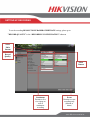
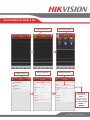
5. SETTING UP THE NETWORK SETTING UP NETWORK ACCESS Networking a NVR requires 3 steps: 1. Assign an IP address, Default Gateway, Subnet Mask, and a DNS server (Please note: DNS, not DDNS) to the NVR 2. Forward the appropriate ports on the router (Port Forwarding). 3. Register DDNS (DDNS registration is required only if the public IP address is Dynamic). To assigning an IP ADDRESS, go to “MENU”>”SYSTEM CONFIGURATION”>”NETWORK” Enable DHCP General With DHCP enabled, the router will assign an IP address to the NVR Select NIC Type REFRESH Please Note: After enabling DHCP, The IP configuration becomes “Greyed out” IP CONFIGURATION Please note that the NVR’s default IP Address is set to 192.0.0.64 www.hikvision.com/en/us