1
SCOTTY SCS HD User's Manual
7.3 Creation of a User defined Hard Disk Image
As SCOTTY offers the possibility to create a user defined image of the system
partition, am arbitrary system state can be saved and restored at any time. This
user defined image, a so-called “admin image”, is saved onto the hidden
recovery partition together with the factory image containing the delivery state.
Thus, the restoration of the delivery state remains possible, even after creation
of an admin image.
An admin image can be created after a possible change of the systems state or
after installation of additional software. The saved system state can then be
restored at any time without additional tools. Without an admin image, only the
systems delivery state not containing any custom changes can be restored.
Creation of a user defined hard disk image:
• Reboot the computer.
• The boot manager screen is displayed for several seconds during the startup
(see figure: Boot manager).
• Choose Recover V3 using the Arrow-down Key and press Return.
• After recovery software has started use password “restore“ to proceed.
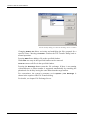
• The main menu of the recovery software is displayed (see figure Recovery
software: Main menu).
• Choose Create admin image.
• Enter password for creating an admin image and press the button Create.
• After creation of the admin image the system returns to the main menu.
To restore a user defined hard disk image please follow the instructions in
chapter Restoring the system.
When creating a new recovery media, a present admin image is automatically copied to the
recovery media. When restoring the full hard disk from this recovery media, the admin image
is copied back to the hard disk and is available from the recovery software’s main menu.
90
All rights reserved.