1
MN05013002Z-EN
Putting the SmartWire-Darwin
network into operation
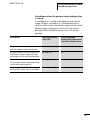
Switching on when the gateway target configuration
is stored
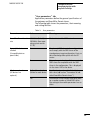
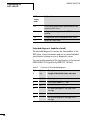
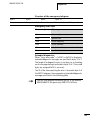
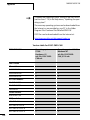
If a configuration is stored in the gateway, each time the
supply voltage is switched on it is checked whether the
slaves actually found on the network comply with the stored
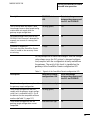
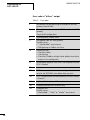
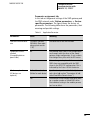
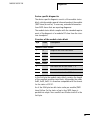
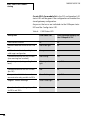
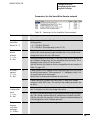
gateway target configuration. The result of the check is
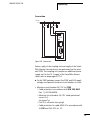
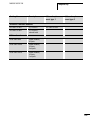
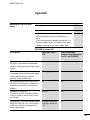
displayed via the SmartWire-Darwin status LED on the
gateway:
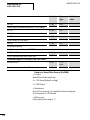
Description
SmartWire-Darwin
status LED
Data interchange
between the gateway and
SmartWire-Darwin slaves
The current actual configuration complies
with the gateway target configuration.
Green continuous light
Yes
A necessary SWD slave is missing or the
coupling unit target configuration does
not comply with the actual configuration.
Flashing (red)
no
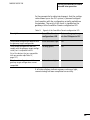
Slave addressing is active (after power on
or the download of a planned configuration with empty modules).
Flashing (green)
no
Short-circuit on the 15 V power supply or
no SmartWire-Darwin slave is connected.
Red continuous light
no
Creating field bus communication
If a data interchange is possible between the SmartWireDarwin slaves and the gateway, in principle communication
between the gateway and the controller can also be
performed via CANopen.
X Connect the
X Load
CANopen gateway to the field bus.
the program into the PLC.
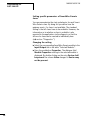
The configuration of the CANopen network is transferred to
the CANopen master when the program is uploaded onto
the controller. The CANopen master then transfers the
configuration of the SmartWire-Darwin network to the
gateway and tests it. (This only applies if you have checked
87