1
First Time Setup (cont.)
Device
Settings
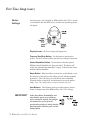
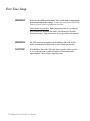
Once the power cord is plugged in, REMstar Plus with C-Flex’s system
version number, the total hours of use, and then the total therapy hours
will appear.
Display Screen: All device settings will appear here.
Pressure Start/Stop Button: Use this button to start/stop the
airflow. DO NOT start the airflow until the circuit tubing is connected.
Heated Humidifier Button: Use this button when the optional
REMstar Heated Humidifier has been prescribed. This button will
control the optional heated humidifier’s output. Follow the instructions
included with the humidifier.
Ramp Button: When the airflow is turned on, use this button to start
the ramp cycle (which lowers the airflow pressure and then gradually
increases it). This will allow you to fall asleep more comfortably.
When the airflow is turned off, use this button to access the patient
menu. Note: The ramp feature is not prescribed for all users.
User Buttons: These buttons can be used when entering various
menus to change some of the REMstar Plus with C-Flex settings.
IMPORTANT!
In the Setup Menu, the humidifier and
ramp buttons operate as up and down
keys to change the settings, the left/right
user buttons are used to go to the
previous/next question or setting, and the
start/stop button will allow you to exit the
Settings Menu.
10 ❍ REMstar Plus with C-Flex User Manual
Previous Next
Exit
Settings