1
First Time Setup (cont.)
Setting the
C-Flex Level
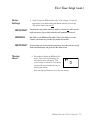
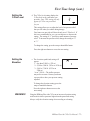
d. The C-Flex level setting displays the
C-Flex level set by your home care
provider. Note: This setting will only
appear if C-Flex was prescribed
for you.
This setting allows you to adjust the level of air pressure relief
that you feel when you exhale during therapy.
Your home care provider will have already set a C-Flex level. If
this is not comfortable for you, you can increase or decrease the
setting. The setting of “1” provides a small amount of pressure
relief. To increase the pressure relief, change the setting to “2”
or “3.”
To change the setting, press the ramp or humidifier button.
Press the right user button to access the next setting.
Setting the
Elevation
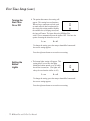
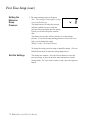
e. The elevation symbol and setting will
appear.
1 = less than 2,500 ft. (<762 m)
2 = 2,500 to 5,000 ft. (762 m to 1524 m)
3 = 5,001 to 7,500 ft. (1525 m to
2286 m)
*over 7,500 ft. = The airflow pressure
may not be accurate. Contact your home
care provider to have your pressure setting
adjusted.
3
To change the elevation setting, press the
ramp or humidifier buttons.
Press the right user button to access the
next setting.
WARNING!
Using the REMstar Plus with C-Flex at an incorrect elevation setting
could result in airflow pressures higher than the prescribed setting.
Always verify the elevation setting when traveling or relocating.
REMstar Plus with C-Flex User Manual
❍ 13