1
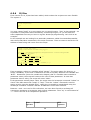
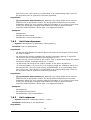
Examples:
•
cc ..
•
cc /
•
cc /ut:TestUnittype/pr:TestProfile
•
cc "/ut:Test Unit Type/"
•
cc /gr:MyGroup
7.1.2
Generic.unit
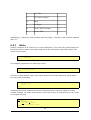
Syntax: unit [<search-value>]
Comment: Switch context to a particular unit. If more than 1 unit is found, all the
units are listed. If within a unit type context, all parameters with the D(isplayeble) flag
are shown.
Arguments:
•
[<search-value>]: Optional. Searches among all unit parameters values and
unit-ids. Possible to use control characters to specify search more closely:
* (asterix) - 0 or more wildchars
_ (underscore) - 1 wildchar
^ (circumflex) - start of string
$ (dollar) - end of string
! (exclamation) - negation of search
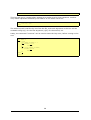
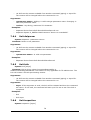
Examples:
•
unit
•
unit AABBCC0123
•
unit "John Doe"
7.1.3
Generic.syslog
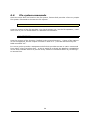
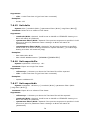
Syntax: syslog [<search-args>] [<list-args>]
Comment: Search syslog and list the results in various ways
Arguments:
•
-c: Will list the current context to the output. This is useful when using this output
as input to another command using the -u option.
•
-u: Will use the context available from another command (piping) or input-file.
The context will be changed before the command is run.
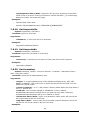
•
-o: Will order the listing of the output. Syntax of the option argument is
-o(<columnnumber><a|n><a|d>)+ An example might be -o3aa4nd, which is to
be read like this: Sort the (3)rd column (a)lphabetically in an (a)scending order,
next sort on the (4)th column (n)umericallay in an (d)escending order. Parts of
the argument may be ignored if incorrectly specified.
Arguments:
•
[<search-args>]: Optional. Default search is for everything the last 24h, but
only return the 100 most recent entries. If search argument contains whitespace,
enclose with double quotes. The search argument syntax is:
s(<option>)(,<option>)* Each option is described below:
37