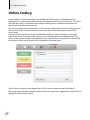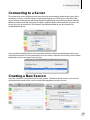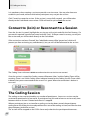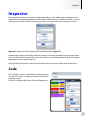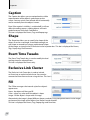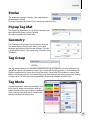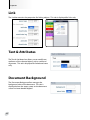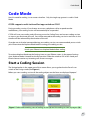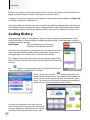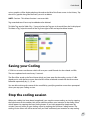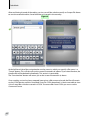
1
MANUAL Easy Analysis Live Coding Detailed Information Statistics Generator Contents Welcome to CODA© � � � � � � � � � � � � � � � � � � � � � � � � � � � � � � � � � � � � � � � � � � � � � � � � � � � � � � � � � � � � � � � � � � 7 CODA Overview� � � � � � � � � � � � � � � � � � � � � � � � � � � � � � � � � � � � � � � � � � � � � � � � � � � � � � � � � � � � � � � � � � � � � � 7 System Requirements� � � � � � � � � � � � � � � � � � � � � � � � � � � � � � � � � � � � � � � � � � � � � � � � � � � � � � � � � � � � � � � � � 8 Current CODA Version� � � � � � � � � � � � � � � � � � � � � � � � � � � � � � � � � � � � � � � � � � � � � � � � � � � � � � � � � � � � � � � � � 8 CODA Support & Feedback � � � � � � � � � � � � � � � � � � � � � � � � � � � � � � � � � � � � � � � � � � � � � � � � � � � � � � � � � � � � 9 Using this Manual � � � � � � � � � � � � � � � � � � � � � � � � � � � � � � � � � � � � � � � � � � � � � � � � � � � � � � � � � � � � � � � � � � � 10 The Main Menu Bar � � � � � � � � � � � � � � � � � � � � � � � � � � � � � � � � � � � � � � � � � � � � � � � � � � � � � � � � � � � � � � � � � � 11 1. The CODA Toolbar � � � � � � � � � � � � � � � � � � � � � � � � � � � � � � � � � � � � � � � � � � � � � � � � � � � � � � � � � � � � � � � � � 11 a. Events� � � � � � � � � � � � � � � � � � � � � � � � � � � � � � � � � � � � � � � � � � � � � � � � � � � � � � � � � � � � � � � � � � � � � � � 14 b. PopUp Tag� � � � � � � � � � � � � � � � � � � � � � � � � � � � � � � � � � � � � � � � � � � � � � � � � � � � � � � � � � � � � � � � � � � 14 c. Tag � � � � � � � � � � � � � � � � � � � � � � � � � � � � � � � � � � � � � � � � � � � � � � � � � � � � � � � � � � � � � � � � � � � � � � � � � 15 d. Dummy � � � � � � � � � � � � � � � � � � � � � � � � � � � � � � � � � � � � � � � � � � � � � � � � � � � � � � � � � � � � � � � � � � � � � 16 e. TextBox � � � � � � � � � � � � � � � � � � � � � � � � � � � � � � � � � � � � � � � � � � � � � � � � � � � � � � � � � � � � � � � � � � � � � 16 f. Link � � � � � � � � � � � � � � � � � � � � � � � � � � � � � � � � � � � � � � � � � � � � � � � � � � � � � � � � � � � � � � � � � � � � � � � � � 16 g. Command Centre � � � � � � � � � � � � � � � � � � � � � � � � � � � � � � � � � � � � � � � � � � � � � � � � � � � � � � � � � � � � 17 h. Inspector� � � � � � � � � � � � � � � � � � � � � � � � � � � � � � � � � � � � � � � � � � � � � � � � � � � � � � � � � � � � � � � � � � � � 17 Properties Window � � � � � � � � � � � � � � � � � � � � � � � � � � � � � � � � � � � � � � � � � � � � � � � � � � � � � � � � � � � � � 18 h (i) Name an Event, Popup Tag or Tag Button � � � � � � � � � � � � � � � � � � � � � � � � � � � � � � � � � 18 h (ii) Event Time Tweaks � � � � � � � � � � � � � � � � � � � � � � � � � � � � � � � � � � � � � � � � � � � � � � � � � � � � 19 h (iii) Exclusive Link Cluster � � � � � � � � � � � � � � � � � � � � � � � � � � � � � � � � � � � � � � � � � � � � � � � � � 20 h (iv) Hot Keys� � � � � � � � � � � � � � � � � � � � � � � � � � � � � � � � � � � � � � � � � � � � � � � � � � � � � � � � � � � � � 21 Appearance Window� � � � � � � � � � � � � � � � � � � � � � � � � � � � � � � � � � � � � � � � � � � � � � � � � � � � � � � 22 h (vi) The Fill Panel – Button & Form Presentation� � � � � � � � � � � � � � � � � � � � � � � � � � � � � � 23 h (vii) The Stroke Panel – Button Presentation � � � � � � � � � � � � � � � � � � � � � � � � � � � � � � � � � 24 h (viii) Popup Tag Mat� � � � � � � � � � � � � � � � � � � � � � � � � � � � � � � � � � � � � � � � � � � � � � � � � � � � � � 25 h (ix) Geometry � � � � � � � � � � � � � � � � � � � � � � � � � � � � � � � � � � � � � � � � � � � � � � � � � � � � � � � � � � � 26 h (xi) Global Tag � � � � � � � � � � � � � � � � � � � � � � � � � � � � � � � � � � � � � � � � � � � � � � � � � � � � � � � � � � � 27 h (xiii) Live Output Files � � � � � � � � � � � � � � � � � � � � � � � � � � � � � � � � � � � � � � � � � � � � � � � � � � � � 28 k. The Coding Toolbar � � � � � � � � � � � � � � � � � � � � � � � � � � � � � � � � � � � � � � � � � � � � � � � � � � � � � � � � � � � 31 l. Saving and Retrieving your Work. � � � � � � � � � � � � � � � � � � � � � � � � � � � � � � � � � � � � � � � � � � � � � � � 34 3. Getting Started� � � � � � � � � � � � � � � � � � � � � � � � � � � � � � � � � � � � � � � � � � � � � � � � � � � � � � � � � � � � � � � � � � � � 35 Building a CODA Form � � � � � � � � � � � � � � � � � � � � � � � � � � � � � � � � � � � � � � � � � � � � � � � � � � � � � � � � � � 35 4. Creating and Specifying an Event� � � � � � � � � � � � � � � � � � � � � � � � � � � � � � � � � � � � � � � � � � � � � � � � � � � � 36 4a. Reconfiguring an Event to a Tag � � � � � � � � � � � � � � � � � � � � � � � � � � � � � � � � � � � � � � � � � � � � � � � 36 5. Creating and Specifying a Popup Tag � � � � � � � � � � � � � � � � � � � � � � � � � � � � � � � � � � � � � � � � � � � � � � � 37 6. Creating and Specifying a Tag� � � � � � � � � � � � � � � � � � � � � � � � � � � � � � � � � � � � � � � � � � � � � � � � � � � � � � � 37 6a. Reconfiguring a Tag to an Event � � � � � � � � � � � � � � � � � � � � � � � � � � � � � � � � � � � � � � � � � � � � � � � 38 7.Duplicating CODA Form Combinations � � � � � � � � � � � � � � � � � � � � � � � � � � � � � � � � � � � � � � � � � � � � � � � 39 Advanced Functions � � � � � � � � � � � � � � � � � � � � � � � � � � � � � � � � � � � � � � � � � � � � � � � � � � � � � � � � � � � � � � � � � 39 8. Links� � � � � � � � � � � � � � � � � � � � � � � � � � � � � � � � � � � � � � � � � � � � � � � � � � � � � � � � � � � � � � � � � � � � � � � � � � � � � 40 8a. Link Protocols� � � � � � � � � � � � � � � � � � � � � � � � � � � � � � � � � � � � � � � � � � � � � � � � � � � � � � � � � � � � � � � 40 Pass Tags � � � � � � � � � � � � � � � � � � � � � � � � � � � � � � � � � � � � � � � � � � � � � � � � � � � � � � � � � � � � � � � � � � � � � � 41 Global Tags � � � � � � � � � � � � � � � � � � � � � � � � � � � � � � � � � � � � � � � � � � � � � � � � � � � � � � � � � � � � � � � � � � � � 41 Exclusive Link Cluster � � � � � � � � � � � � � � � � � � � � � � � � � � � � � � � � � � � � � � � � � � � � � � � � � � � � � � � � � � � 42 8b. Event Button Reactivation� � � � � � � � � � � � � � � � � � � � � � � � � � � � � � � � � � � � � � � � � � � � � � � � � � � � 43 9. CODA Form Management � � � � � � � � � � � � � � � � � � � � � � � � � � � � � � � � � � � � � � � � � � � � � � � � � � � � � � � � � � 44 9a. Arranging the Form in Layers � � � � � � � � � � � � � � � � � � � � � � � � � � � � � � � � � � � � � � � � � � � � � � � � � 44 9b.Transparent Buttons� � � � � � � � � � � � � � � � � � � � � � � � � � � � � � � � � � � � � � � � � � � � � � � � � � � � � � � � � � 45 10. Importing an Image to the CODA Form � � � � � � � � � � � � � � � � � � � � � � � � � � � � � � � � � � � � � � � � � � � � 45 11. Email a Form� � � � � � � � � � � � � � � � � � � � � � � � � � � � � � � � � � � � � � � � � � � � � � � � � � � � � � � � � � � � � � � � � � � � � 45 12. Coding an Activity� � � � � � � � � � � � � � � � � � � � � � � � � � � � � � � � � � � � � � � � � � � � � � � � � � � � � � � � � � � � � � � � 46 Online Coding � � � � � � � � � � � � � � � � � � � � � � � � � � � � � � � � � � � � � � � � � � � � � � � � � � � � � � � � � � � � � � � � � 48 Connecting to a Server� � � � � � � � � � � � � � � � � � � � � � � � � � � � � � � � � � � � � � � � � � � � � � � � � � � � � � � � � � 49 Creating a New Session� � � � � � � � � � � � � � � � � � � � � � � � � � � � � � � � � � � � � � � � � � � � � � � � � � � � � � � � � � 49 Connect to (Join) or Reconnect to a Session� � � � � � � � � � � � � � � � � � � � � � � � � � � � � � � � � � � � � � � � 50 The Coding Session� � � � � � � � � � � � � � � � � � � � � � � � � � � � � � � � � � � � � � � � � � � � � � � � � � � � � � � � � � � � � 50 The Session Owner � � � � � � � � � � � � � � � � � � � � � � � � � � � � � � � � � � � � � � � � � � � � � � � � � � � � � � � � � � � � � 51 Start Coding � � � � � � � � � � � � � � � � � � � � � � � � � � � � � � � � � � � � � � � � � � � � � � � � � � � � � � � � � � � � � � � � � � � 51 Session Timer and Synchronization � � � � � � � � � � � � � � � � � � � � � � � � � � � � � � � � � � � � � � � � � � � � � � � 51 Disconnect from / Stop a Session� � � � � � � � � � � � � � � � � � � � � � � � � � � � � � � � � � � � � � � � � � � � � � � � � 51 Data Transfer and Storage � � � � � � � � � � � � � � � � � � � � � � � � � � � � � � � � � � � � � � � � � � � � � � � � � � � � � � � 52 13. Exporting your Coded Data� � � � � � � � � � � � � � � � � � � � � � � � � � � � � � � � � � � � � � � � � � � � � � � � � � � � � � � � 52 Interpreting CODA Event Log Data� � � � � � � � � � � � � � � � � � � � � � � � � � � � � � � � � � � � � � � � � � � � � � � � 52 14. CODA Command Centre� � � � � � � � � � � � � � � � � � � � � � � � � � � � � � � � � � � � � � � � � � � � � � � � � � � � � � � � � � � 53 Establishing a CODA Server� � � � � � � � � � � � � � � � � � � � � � � � � � � � � � � � � � � � � � � � � � � � � � � � � � � � � � 56 Appendices � � � � � � � � � � � � � � � � � � � � � � � � � � � � � � � � � � � � � � � � � � � � � � � � � � � � � � � � � 57 Keyboard Quick Key Functions � � � � � � � � � � � � � � � � � � � � � � � � � � � � � � � � � � � � � � � � � � � � � � � � � � � � � � � � 57 Glossary of Terms� � � � � � � � � � � � � � � � � � � � � � � � � � � � � � � � � � � � � � � � � � � � � � � � � � � � � � � � � � � � � � � � � � � � 59 CODA Screen Options Index Table � � � � � � � � � � � � � � � � � � � � � � � � � � � � � � � � � � � � � � � � � � � � � � � � � � � � � 63 iCODA USER MANUAL� � � � � � � � � � � � � � � � � � � � � � � � � � � � � � � � � � � � � � � � � � � 66 iCODA Preface� � � � � � � � � � � � � � � � � � � � � � � � � � � � � � � � � � � � � � � � � � � � � � � � � � � � � � � � � � � � � � � � � � � � � � � 67 Current iCODA Version � � � � � � � � � � � � � � � � � � � � � � � � � � � � � � � � � � � � � � � � � � � � � � � � � � � � � � � � � � 67 Navigation between iCODA screens� � � � � � � � � � � � � � � � � � � � � � � � � � � � � � � � � � � � � � � � � � � � � � � � � � � � 68 Gestures� � � � � � � � � � � � � � � � � � � � � � � � � � � � � � � � � � � � � � � � � � � � � � � � � � � � � � � � � � � � � � � � � � � � � � � � � � � � 69 Single tap � � � � � � � � � � � � � � � � � � � � � � � � � � � � � � � � � � � � � � � � � � � � � � � � � � � � � � � � � � � � � � � � � � � � � 69 Slide� � � � � � � � � � � � � � � � � � � � � � � � � � � � � � � � � � � � � � � � � � � � � � � � � � � � � � � � � � � � � � � � � � � � � � � � � � 69 Double tap � � � � � � � � � � � � � � � � � � � � � � � � � � � � � � � � � � � � � � � � � � � � � � � � � � � � � � � � � � � � � � � � � � � � 69 Resize� � � � � � � � � � � � � � � � � � � � � � � � � � � � � � � � � � � � � � � � � � � � � � � � � � � � � � � � � � � � � � � � � � � � � � � � � 69 Objects� � � � � � � � � � � � � � � � � � � � � � � � � � � � � � � � � � � � � � � � � � � � � � � � � � � � � � � � � � � � � � � � � � � � � � � � � � � � � 70 Event Button� � � � � � � � � � � � � � � � � � � � � � � � � � � � � � � � � � � � � � � � � � � � � � � � � � � � � � � � � � � � � � � � � � � 70 Popup Tag Button � � � � � � � � � � � � � � � � � � � � � � � � � � � � � � � � � � � � � � � � � � � � � � � � � � � � � � � � � � � � � � 70 Tag Button� � � � � � � � � � � � � � � � � � � � � � � � � � � � � � � � � � � � � � � � � � � � � � � � � � � � � � � � � � � � � � � � � � � � � 70 Dummy Button� � � � � � � � � � � � � � � � � � � � � � � � � � � � � � � � � � � � � � � � � � � � � � � � � � � � � � � � � � � � � � � � � 70 Text Box� � � � � � � � � � � � � � � � � � � � � � � � � � � � � � � � � � � � � � � � � � � � � � � � � � � � � � � � � � � � � � � � � � � � � � � 70 Link� � � � � � � � � � � � � � � � � � � � � � � � � � � � � � � � � � � � � � � � � � � � � � � � � � � � � � � � � � � � � � � � � � � � � � � � � � � 70 List Mode� � � � � � � � � � � � � � � � � � � � � � � � � � � � � � � � � � � � � � � � � � � � � � � � � � � � � � � � � � � � � � � � � � � � � � � � � � � 71 Open a Form� � � � � � � � � � � � � � � � � � � � � � � � � � � � � � � � � � � � � � � � � � � � � � � � � � � � � � � � � � � � � � � � � � � 71 Create a new Form� � � � � � � � � � � � � � � � � � � � � � � � � � � � � � � � � � � � � � � � � � � � � � � � � � � � � � � � � � � � � � 71 Remove a Form or a Timeline� � � � � � � � � � � � � � � � � � � � � � � � � � � � � � � � � � � � � � � � � � � � � � � � � � � � � 72 Edit a Form or Timeline Name � � � � � � � � � � � � � � � � � � � � � � � � � � � � � � � � � � � � � � � � � � � � � � � � � � � � 72 Design Mode� � � � � � � � � � � � � � � � � � � � � � � � � � � � � � � � � � � � � � � � � � � � � � � � � � � � � � � � � � � � � � � � � � � � � � � � 74 Insert a new object � � � � � � � � � � � � � � � � � � � � � � � � � � � � � � � � � � � � � � � � � � � � � � � � � � � � � � � � � � � � � 75 Move an object� � � � � � � � � � � � � � � � � � � � � � � � � � � � � � � � � � � � � � � � � � � � � � � � � � � � � � � � � � � � � � � � � 75 Resize an object� � � � � � � � � � � � � � � � � � � � � � � � � � � � � � � � � � � � � � � � � � � � � � � � � � � � � � � � � � � � � � � � 75 Create a link to an object � � � � � � � � � � � � � � � � � � � � � � � � � � � � � � � � � � � � � � � � � � � � � � � � � � � � � � � � 75 Delete a link to an object � � � � � � � � � � � � � � � � � � � � � � � � � � � � � � � � � � � � � � � � � � � � � � � � � � � � � � � � 76 Modify an object’s properties � � � � � � � � � � � � � � � � � � � � � � � � � � � � � � � � � � � � � � � � � � � � � � � � � � � � 76 Arrange objects � � � � � � � � � � � � � � � � � � � � � � � � � � � � � � � � � � � � � � � � � � � � � � � � � � � � � � � � � � � � � � � � 76 Remove an object � � � � � � � � � � � � � � � � � � � � � � � � � � � � � � � � � � � � � � � � � � � � � � � � � � � � � � � � � � � � � � 76 Inspector� � � � � � � � � � � � � � � � � � � � � � � � � � � � � � � � � � � � � � � � � � � � � � � � � � � � � � � � � � � � � � � � � � � � � � � � � � � 77 Code� � � � � � � � � � � � � � � � � � � � � � � � � � � � � � � � � � � � � � � � � � � � � � � � � � � � � � � � � � � � � � � � � � � � � � � � � � 77 Caption � � � � � � � � � � � � � � � � � � � � � � � � � � � � � � � � � � � � � � � � � � � � � � � � � � � � � � � � � � � � � � � � � � � � � � � 78 Shape� � � � � � � � � � � � � � � � � � � � � � � � � � � � � � � � � � � � � � � � � � � � � � � � � � � � � � � � � � � � � � � � � � � � � � � � � 78 Event Time Tweaks� � � � � � � � � � � � � � � � � � � � � � � � � � � � � � � � � � � � � � � � � � � � � � � � � � � � � � � � � � � � � � 78 Exclusive Link Cluster � � � � � � � � � � � � � � � � � � � � � � � � � � � � � � � � � � � � � � � � � � � � � � � � � � � � � � � � � � � 78 Fill� � � � � � � � � � � � � � � � � � � � � � � � � � � � � � � � � � � � � � � � � � � � � � � � � � � � � � � � � � � � � � � � � � � � � � � � � � � � 78 Stroke� � � � � � � � � � � � � � � � � � � � � � � � � � � � � � � � � � � � � � � � � � � � � � � � � � � � � � � � � � � � � � � � � � � � � � � � � 79 Popup Tag Mat� � � � � � � � � � � � � � � � � � � � � � � � � � � � � � � � � � � � � � � � � � � � � � � � � � � � � � � � � � � � � � � � � 79 Geometry � � � � � � � � � � � � � � � � � � � � � � � � � � � � � � � � � � � � � � � � � � � � � � � � � � � � � � � � � � � � � � � � � � � � � 79 Tag Group � � � � � � � � � � � � � � � � � � � � � � � � � � � � � � � � � � � � � � � � � � � � � � � � � � � � � � � � � � � � � � � � � � � � � 79 Tag Mode� � � � � � � � � � � � � � � � � � � � � � � � � � � � � � � � � � � � � � � � � � � � � � � � � � � � � � � � � � � � � � � � � � � � � � 79 Link� � � � � � � � � � � � � � � � � � � � � � � � � � � � � � � � � � � � � � � � � � � � � � � � � � � � � � � � � � � � � � � � � � � � � � � � � � � 80 Text & Attributes � � � � � � � � � � � � � � � � � � � � � � � � � � � � � � � � � � � � � � � � � � � � � � � � � � � � � � � � � � � � � � � 80 Document Background� � � � � � � � � � � � � � � � � � � � � � � � � � � � � � � � � � � � � � � � � � � � � � � � � � � � � � � � � � 80 Code Mode � � � � � � � � � � � � � � � � � � � � � � � � � � � � � � � � � � � � � � � � � � � � � � � � � � � � � � � � � � � � � � � � � � � � � � � � � 81 Start a Coding Session � � � � � � � � � � � � � � � � � � � � � � � � � � � � � � � � � � � � � � � � � � � � � � � � � � � � � � � � � � 81 Coding History� � � � � � � � � � � � � � � � � � � � � � � � � � � � � � � � � � � � � � � � � � � � � � � � � � � � � � � � � � � � � � � � � 82 Saving your Coding� � � � � � � � � � � � � � � � � � � � � � � � � � � � � � � � � � � � � � � � � � � � � � � � � � � � � � � � � � � � � 83 Stop the coding session � � � � � � � � � � � � � � � � � � � � � � � � � � � � � � � � � � � � � � � � � � � � � � � � � � � � � � � � � 83 Online Coding� � � � � � � � � � � � � � � � � � � � � � � � � � � � � � � � � � � � � � � � � � � � � � � � � � � � � � � � � � � � � � � � � � � � � � � 85 The Coding Session� � � � � � � � � � � � � � � � � � � � � � � � � � � � � � � � � � � � � � � � � � � � � � � � � � � � � � � � � � � � � 86 5 Creating a New Session� � � � � � � � � � � � � � � � � � � � � � � � � � � � � � � � � � � � � � � � � � � � � � � � � � � � � � � � � � 87 Connect to (Join) or Reconnect to a Session� � � � � � � � � � � � � � � � � � � � � � � � � � � � � � � � � � � � � � � � 87 Start a Session � � � � � � � � � � � � � � � � � � � � � � � � � � � � � � � � � � � � � � � � � � � � � � � � � � � � � � � � � � � � � � � � � 88 Start Coding � � � � � � � � � � � � � � � � � � � � � � � � � � � � � � � � � � � � � � � � � � � � � � � � � � � � � � � � � � � � � � � � � � � 89 Session Timer and Synchronization � � � � � � � � � � � � � � � � � � � � � � � � � � � � � � � � � � � � � � � � � � � � � � � 89 Disconnect from / Stop a Session� � � � � � � � � � � � � � � � � � � � � � � � � � � � � � � � � � � � � � � � � � � � � � � � � 89 Data Transfer and Storage � � � � � � � � � � � � � � � � � � � � � � � � � � � � � � � � � � � � � � � � � � � � � � � � � � � � � � � 90 Timeline Share � � � � � � � � � � � � � � � � � � � � � � � � � � � � � � � � � � � � � � � � � � � � � � � � � � � � � � � � � � � � � � � � � � � � � � 91 Email a Timeline� � � � � � � � � � � � � � � � � � � � � � � � � � � � � � � � � � � � � � � � � � � � � � � � � � � � � � � � � � � � � � � � 91 6 Welcome to CODA© Welcome to CODA© Quick, Live Event Coding CODA © by Sportstec is the latest addition to the Sportstec family of products. CODA © is designed to work in conjunction with any SportsCode™ / Studiocode™ video analysis system, giving you activity and/or participant event coding capabilities previously only dreamed of. The beauty of CODA © is the flexibility it gives coaching staff by being able to code a performance either live at the venue, live from a remote location or at a later time from pre-recorded footage. CODA Overview CODA is a tool that the User customizes to create a Log of Events, (the Event Log,) that can be linked to a video. CODA is also a very flexible tool in that the Event Log can be exported into Excel which makes the data available to be manipulated to produce a variety of reports to compliment video replay analysis. We recommend that you read sections 1 & 2 thoroughly to gain an understanding of the basis of the CODA Structure – then work through Sections 3 – 10 which are written in a “Tutorial” format. Here’s a quick guide to how the CODA process works. CODA works in only 2 modes, Design Mode and Coding Mode. In “Design Mode” you will design the CODA Form that will determine what events you will code to the Event Log and what descriptions you will make available to add to each of these events. In “Coding Mode” you will use your designed CODA Form to build the event information on the Event Log. In a new CODA Form you build, edit and categorize events or actions for future analysis. To do this you create and name coded buttons for all actions. In sport for example you may wish to code a particular player, a particular move, or each time a point(s) is scored. Once you have built your CODA Form and customized it to provide you with the information you need to enhance your existing instructional tools, when you click on or activate each Event Button during coding it will mark the Event Log accordingly. Gathering the data during the activity either live, (or later from video,) is easy. Now all that is needed is for you to link the Event Log with a video timeline in one of the SportsCode™ / Studiocode™ video analysis systems. You can now analyze performance according to the information on the timeline. The captured Event Log data may also be exported into an Excel spreadsheet for separate analysis. Note : If CODA Event Log data is exported into a GameBreaker video analysis system, only the Event Button data will be shown, there will be no tagged information about each event written to a GameBreaker timeline. 7 System Requirements System Requirements The minimum recommended system requirements for CODA are : Macintosh Computer with 1.5GHz or faster PowerPC G4 , PowerPC G5 , Intel Core Duo or Intel Xeon processor 1 GB of RAM 50MB of HDD space A display with 1024 x 768 resolution or higher Mac OS X v10.4.11 or higher (Optional) Tablet and pen Current CODA Version The current version of CODA which this Manual applies to is Version 1.2.1 Application Installation & Licensing 1. Insert the CODA CD into the CD-ROM drive on your computer or download the full installer from the Sportstec website at www.sportstec.com. 2. Run the installer package by double clicking on the installer found in the image. Once the installer is complete, CODA can be found in the /Applications folder. 3. Launch CODA by double clicking on the CODA icon in the /Applications folder. The following window will appear. 4. To register your CODA application online, click the “Register” button. 8 CODA Support & Feedback Enter your Registration Code and click the “Register” button. If you have a Firewall that won’t allow you to register online, you may register manually. To effect this process, click on the “Register Manually” button. CODA will provide you with a Licence code. Email this code to [email protected] to receive an Activation Key. Enter both the Licence code and the Activation Key into the relevant panels, then activate your software. Software Updates Sportstec Limited is constantly seeking enhancements to how this software can be used and Sportstec welcomes User feedback for this purpose. You are able to download any enhancements and update the software by clicking on the “CODA ” icon at the far left of the Main Menu. From the Sub-Menu selection click “About CODA ” to check which software version you are using, and then from the same Sub-Menu select “Check For Updates”. If there are any software upgrades available these may be downloaded. CODA Support & Feedback In order to keep Sportstec product software at the cutting edge, we invest heavily in research and development. Sportstec is constantly providing it’s customers with innovations developed from features and enhancements which have been driven by customer demand. Sportstec also provides innovation that takes full advantage of advances in technology. Sportstec has a rigorous testing process to ensure that all software is robust and fit for purpose. Occasionally a bug will exist in spite of our best efforts to discover and eliminate it. If you discover any fault or bug in CODA , please email [email protected] as soon as possible. We aim to respond to you within 24 hours of your notification. We would also welcome other feedback and comments regarding your ideas for a function or feature which might be improved on or added. If you require individual training in the CODA application, please contact your CODA distributor. 9 Using this Manual Using this Manual Sections 1 & 2 describe the functions which each of the Icons on the Toolbar performs. Sections 3 – 6 describe how to create building blocks on your CODA Form. Sections 7 – 11 describe how to assemble your building blocks into a working CODA model. Section 12 describes how to interpret the Data. Section 13 describes how to link CODA desktop to iCODA ( iPhone or iPod Touch) In this Manual references to Icons and Menu Headings are color coded to ease your identification for Menu selection(s) as follows : RED In bold type upper case refers to Main Menu Headings and Toolbar Icons. Blue In bold type refers to Submenu Icons or Headings. Green In bold type refers to Page Function Buttons. Italics In bold type and underlined refers to critical key strokes on the keyboard. The electronic versions (Software DVD and website accessed,) of this manual contains links to a series of short video “tutorials”. These links are marked by the following icon Wherever this icon appears in the manual, click on the icon to view a short video tutorial which will demonstrate a feature or function of CODA which is described in the text alongside. This Manual has been written with the assumption that the User is using an Apple Computer with a standard mouse or trackpad and keyboard. References to “clicking” and cursor placement are directly related to mouse or trackpad use. 10 The Main Menu Bar Apple System Features which will speed up many of the CODA processes are inherent in the CODA application. We recommend that you familiarize yourself with all the Apple system features. We have explained some of these features in appendix (i) to this Manual but for a full explanation you should consult your Apple Manual. The Main Menu Bar CODA has been written so that almost all the functions required of the application may be accessed / instigated from the CODA Toolbar. For the purpose of this manual, the functions of each of the Main Menu Headings in the Main Menu Bar are summarized below. CODA : With this Heading, the functions are limited to : a). Registration & deregistration of your CODA licence b). CODA version updates c). In the “Preferences” sub-heading, you can choose to display a “Start up” window on opening CODA . The remaining functions are system functions. FILE: The functions are all system functions. EDIT: The functions are all system functions with the exception of “Convert into Tag”, (refer to para 1(c) for details on this function,) and/or “Convert into Event”, (refer to para. 1(a).) INSERT: The functions listed here may all be performed by clicking on the relevant icon in the CODA Toolbar. ARRANGE: The functions listed here are described in Paragraph 9a. VIEW: The first 3 functions may all be performed by clicking on the relevant icon in the CODA Toolbar. The remaining 5 functions may only be performed from this Menu and are described in detail in Paragraphs 1b , 1.h(iv) , 8a & 11 and in the “Getting Started” section on page 34. WINDOW: The functions are all system functions. HELP: 1. The CODA Toolbar To open your CODA application select the CODA Icon from your desktop or from the Dock. 11 1. The CODA Toolbar This will open the “Document Startup Dialogue Window” . You may choose to bypass this window by checking the box “Do not show this dialogue again”. You may reinstate the Document Startup Dialogue by going to CODA in the Main Menu, select Preferences and then check the box “Show Document Startup Dialogue” When you place (hover) your cursor over each of the toolbar icons, a message will appear which describes the function of the icon when you click on it. If you Control Click on any of these Icons the following drop down menu will appear. This menu allows you to alter the appearance of or to customize the toolbar to your specific needs. Selection of any of the options in this Menu, (with the exception of “Keep Item Visible” and “Remove Item”,) will affect all the Icons on the Toolbar no matter which Icon is selected. The “Icon & Text” option is the system default setting. With this option selected all the Icons are displayed on the Toolbar with the Text description. Selection of “Icon Only” will deselect the current selection setting and only Icons will be displayed on the Toolbar. Selection of “Text Only” will deselect the current selection setting and only Text will be displayed on the Toolbar. The “Use Small Size” option will reduce the size of the Icons on the Toolbar. It is possible to vary the size of the CODA Window within the screen by clicking and dragging on the box at the bottom right hand of the window. When the window size is reduced in this way, the Icons on the Toolbar will be progressively removed from the right. These Icons are accessible by clicking on the double arrow Icon. You may ensure an Icon will always be visible on the Toolbar by Control Clicking on the Icon and selecting “Keep Item Visible” from the drop down menu. The “Remove Item” option will remove a selected Icon from the Toolbar. An Icon may be restored to the Toolbar and/or the layout of the Toolbar may be customized by selecting the “Customize Toolbar” option. 12 1. The CODA Toolbar The window above includes 2 icons ;”Space” and “Flexible Space”. These are a special Mac feature to help you organize your toolbar by providing spacing between your application icons. These are not CODA icon features. You may open a new CODA Window by selecting “FILE” from the Main Menu then selecting “New”. A CODA window becoms a CODA Form whenyou start placing coding objects in it. You may open an existing Form by selecting “Open Form” or “Open Recent” and selecting your target Form from where it is saved. Clicking of an “EVENT” , “POPUP TAG”, “TAG” or “DUMMY” Icon will place a code button in the CODA Form. A button in the Form must be “highlighted” before you can work with it when you are designing your CODA Form. Click on a button to “highlight” it. It is highlighted when it has become surrounded by eight (8) square re-sizing knobs; one in each corner and one in the middle of each side. A button can be moved around the CODA Form by clicking on the centre of the button and dragging it to the desired location. A button may be customized for easy recognition to differentiate it from other buttons in the CODA Form and to set specific system parameters around how this marker will be used when the Event Log is linked to and synchronized with a video timeline. Refer to paragraphs 2, 4 and 10 below for further details about button functionality. 13 1. The CODA Toolbar A button may be named, functional properties attributed to it and the appearance of a button may be manipulated by using the “INSPECTOR” function. (See paras. 1.h(i) – (xii) below) The Function and Purpose of each of the Toolbar Icons is as follows: a. Events When you place your cursor arrow over the Event icon the “Add an Event to the Form” message appears. When, (and each time,) you click on this icon an Event button will be placed in a descending vertical sequence on the left hand side of the CODA Form. This will have a default caption “Event” in the centre of the button. This Event button will be used to mark an event when the Event Log is synchronized to the timeline in a SportsCode™ / Studiocode™ video analysis system. An Event button may also be created by converting an existing Tag Button. This can be achieved by Control Clicking on the target Tag button, and selecting the “Convert into Event” option. You may also achieve this result by selecting the “Convert into Event option from the Edit Menu in the Main Menu Bar. Be aware that when you convert a Tag button into an Event button, the existing aesthetic properties of the button, (name and appearance,) will be unchanged. When an activity is being coded, clicking on an Event button will “activate” or “deactivate” the button and at the same time mark the Log. The button may deactivate itself automatically or may be required to be manually deactivated depending upon whether or not the Lag Time function is active. (Refer to para. 1.h (ii) below). A button may also be automatically “activated” pursuant to Linking instructions. (Refer to Para. 8 and 1.h (iii) below.) b. PopUp Tag When you place your cursor arrow over the Popup Tag icon the “Add a Popup Tag to the Selected Event” message will appear. This icon will not be available unless an Event button in the CODA Form is selected. The purpose of a Popup Tag button is to enable you to code event descriptions for the Event button and, (if you choose,) to describe consequent event results and so on.. They may also be tabulated for more focused analysis as part of the analysis reporting that CODA can provide. Refer to paragraphs 2 and 5 below for further details about Popup Tag button functionality. When you click on this icon, (with an Event button selected,) a Popup Tag button will be placed within a background panel referred to as a “Popup Tag Mat” which will encompass / include / surround the selected Event button, (and 14 1. The CODA Toolbar any prior created Popup Tag buttons which have been attributed to that Event button.) in the CODA Form. An alternative method is to select the Event button, Control Click and select “Add Popup Tag”. A Popup Tag button can be moved to any location in the CODA Form by clicking on the Popup Tag button and dragging it to the desired location. The Popup Tag Mat which surrounds the Event button and the Popup Tag button(s) will distort to remain linked to its Event button. Popup Tag buttons are always only attached to one Event button. The Popup Tag buttons on a Popup Tag Mat in the CODA Form can be hidden and redisplayed by Control Clicking on the Event button and selecting “Hide/ Show Popup Tags” or by clicking on VIEW from the Main Menu and selecting “Hide/Show Popup Tags”. – c. Tag When you place your cursor arrow over the Tag icon the “Add a Tag to the Form” message will appear. When, (and each time,) you click on this icon a Tag button will be placed in a descending vertical sequence on the left hand side of the CODA Form. A Tag can be moved to any location in the CODA Form by clicking on the Tag and dragging it to the desired location. A Tag button may also be created by converting an existing Event Button. This can be achieved by Control Clicking on the target Event button, and selecting the “Convert into Tag” option. You may also achieve this result by selecting the “Convert into Tag option from the Edit Menu in the Main Menu Bar. Be aware that when you convert an Event button into a Tag button, the existing aesthetic properties of the button, (name and appearance,) will be unchanged. Note: You will not be able to perform this function if the Event button has Popup Tags associated with it. A Tag is initially identified as a yellow oblong button. A Tag is a descriptor which may be attached to any Event marker ie. A Tag is Global in the sense that it is not attached to any specific Event in the way a Popup Tag must be attached to a specific Event. Refer to paragraphs 2, 6 and 10 below for further details about this button functionality. Clicking on this button during Coding will place a descriptor tag on the SportsCode™ / Studiocode™ video timeline for all Events which are currently active or if no Events are active, it will attribute its description to the last Event which was active. A Tag may be set up to pass its descriptor to an Event which is not yet active only if the Tag is set up as a source button in an Activation Link and one of the 15 1. The CODA Toolbar Link properties is to pass the Tag information forward. Refer to para. 8 below for more detailed information on this property. d. Dummy When you place your cursor arrow over the Dummy icon the “Create a new dummy” message will appear. When, (and each time,) you click on this icon a Dummy button will be placed in a descending vertical sequence in the CODA Form. The purpose of a dummy is to help organize your buttons visually, which can make the coding process easier – especially live !. You may color it , change its shape etc to use as a background mat. A Dummy button has no coding function(s). e. TextBox When you place the cursor arrow over the Text Box icon the “Create a new Text Box” message will appear. When, (and each time,) you click on this icon the word “Text” surrounded by 8 resizing knobs will be placed in a descending vertical sequence in the CODA Form. This box has no coding properties and its function is purely to place text at your selected place in the CODA Form. The Text Box can be, resized and the text can be selected to be aligned left, right or centered within the text area. f. Link When you place the cursor arrow over the Link icon the “Create a New Link” message will appear. When you click on the icon a “link” symbol will be displayed with the cursor arrow. When you place this modified cursor over a button in the CODA Form the button will be “backlit” with a mauve halo. Place the modified cursor over the button you wish to link-from, (the Source button,) and click and drag the cursor to the button you wish to link-to, (the Target button). A green link line will be drawn with an arrow head to indicate the direction of the link. A Link is used to automatically activate or deactivate buttons in a CODA Form as a consequence of how the activity is unfolding. A link may also pass Tag information from a source Tag to a target Event when the link activates the target. The benefit of using Links is to reduce the number of manual button activations and/or deactivations, (clicks) that an operator would need to perform. Refer to para. 8 below for more detailed information on this function. 16 1. The CODA Toolbar g. Command Centre When you place your cursor arrow over the Command Centre icon the “Open Coda Command Centre” message will appear. When, you click on this icon the Command Centre window will open. The Command Centre allows you to connect to a iCoda application installed on your iPhone or iPod Touch, activate or deactivate the iCODA application and transfer CODA documents and output files. NB : This feature is an Apple platform application only ie. It does NOT work for other PDA devices h. Inspector When you place the cursor arrow over the Inspector icon the “Show or Hide the Inspector Window” message will appear. Click on the icon with a button or a Link in the CODA Window highlighted. symbol, (which will be backlit with a sky blue hue,) to expose Click on the the “Properties Window”, which will allow you to specify the button properties. symbol, (which will be backlit with a sky blue hue,) to expose Click on the the “Appearance Window” , which will allow you to determine how your button and/or button combinations(s) will appear. 17 1. The CODA Toolbar Properties Window h (i) Name an Event, Popup Tag or Tag Button This function is the same for Event buttons, Popup Tag buttons and Tag buttons. With the button highlighted, in the “Code Name” panel of the Inspector Properties function, type the caption that will describe the Event and for Popup Tag and Tag buttons, the caption that will describe related actions. In this case I have chosen “Banana” as the description of an Event button for a hypothetical activity of selecting fruit from an assorted fruit basket. You may also name a button by clicking on the button caption and then typing a new caption. 18 1. The CODA Toolbar The default setting places this description, (or Caption,) centrally within the target button. You may move the Caption either within the borders of the button either horizontally or vertically by clicking on and dragging the “Caption” sliders. If you prefer you may also move the Caption outside the borders of the button. Where-ever you move a Caption to, it will remain relative to the button borders even though you may subsequently choose to move or re-size the button. To show or hide the Caption in the button, tick on the Check box to show it and turn the display of the Caption off by clicking on the Caption box to deselect it. You may change the color and typeface of the Caption by selecting the button then clicking on the “FONTS” icon from the Toolbar. A drop down window will appear which will present you with a variety of standard Font options. To change the Caption Font color, select the font color box displayed in the upper centre right of the window; a color drop down window will appear. Select the color palette you prefer from the Color Toolbar and then select and drag your color choice to the Color Bar at the top of the Colors drop down window. h (ii) Event Time Tweaks This function is the same for Event buttons, Popup Tag buttons and Tag buttons. You have complete control over the duration of each event you code. Using the Lead and Lag Times means you can program CODA to automatically add a specific time to the beginning or end of an event marked for the purpose of editing a video when CODA is linked to a timeline in the SportsCode™ / Studiocode™ application. In the illustration below, 5 seconds Lead Time and 10 seconds Lag Time have been selected. 19 1. The CODA Toolbar 1. The purpose of the Lead Time selection box is to set a predetermined period that the replay video clip will start before the timepoint that the event is activated. In the illustration above, the linked video is set to commence 5 seconds before the time the event was marked by clicking on the Event button. 2. The Lag Time selection box has 2 purposes : (i) When the Lag Time box is not ticked, it will require the coding operator, (when the activity is being coded,) to mark when the video clip will stop by clicking on the Event button to manually deactivate it. When the Lag Time box is ticked, then the Event button will be deactivated automatically, (and the video clip will stop,) after the period (in seconds,) specified. Because the Lag Time will determine how long you have from when the Event button is first activated until the Event button will be automatically deactivated, this has a coding significance. When an Event button is activated any Popup Tag buttons associated with the Event will also become active, but they will only remain active for as long as the Event button is active. ie. The Lag Time specified will be the time limit available to code any Popup Tag description(s) related to the event. h (iii) Exclusive Link Cluster This is a function exclusive to Event Buttons. The purpose of the “Exclusive Link Cluster” window within the “INSPECTOR” function is to group Event buttons in the CODA Form which will be mutually exclusive in their activation. Only Event buttons are eligible to be linked in a “Exclusive Link Cluster”. Para. 8 below describes the function of Linking buttons in the CODA Form. This will simplify the CODA Form by relieving you of having a large number of link lines cluttering the CODA Form. It will also simplify the coding workload by deactivating any active button in the cluster when another button in the cluster is activated. To set up an Exclusive Link Cluster you must first identify which Event buttons in the CODA Form will qualify as having mutually exclusive properties. Next click on one of the buttons and then click on the “INSPECTOR” Icon. Hold down the “Command “ Key and click on each of the other Event buttons selected as part of the Exclusive Link Cluster. Name the cluster in the text box provided in the Inspector window. 20 1. The CODA Toolbar To identify which buttons in the CODA Form are members of an “Exclusive Link Cluster”, click and hold on an Event button. If that button is a member of an “Exclusive Link Cluster” it will be backlit by a rose colored hue and every other Event button which is a member of that cluster grouping will also be backlit. A button can only be assigned to one (1) Exclusive Link Cluster. A further function restricted to members of an Exclusive Link Cluster is the ability to pass the last member Event marked onto the next member Event marked as if it were a Tag ie. it will mark the following Event with a record of the Event immediate preceding it without any activation. To enable this function, select the “Pass Last Code as Tag” box for the Exclusive Link Cluster. h (iv) Hot Keys This function is the same for Event buttons, Popup Tag buttons and Tag buttons. You may choose to attribute a keyboard Hot Key or a combination of keys to any button. This will allow you to use your mouse and/or your keyboard to activate a button while you are coding in a live environment. To provide for this option, click on the Text box from the “Hot Key” panel at the bottom of the Inspector window and then type in your keyboard option preference. If a Hot Key has been nominated, it will be displayed in the top left corner of the button. You may also display or hide all the Hot Key combinations in the button titles in the CODA Form by clicking on the CODA Form and from the “VIEW” menu select “Show/Hide All Hot Keys”. 21 1. The CODA Toolbar Appearance Window h (v) Button Shapes and Images This function is the same for Event buttons, Popup Tag buttons, Tag buttons and Dummy buttons. If you wish to graphically represent different button events you may change the shape of a button or import an image to use as the button. A button may also be made transparent for use with more advanced coding. The following 4 shape options are available within the drop down menu. These shapes may be manipulated by using the re-sizing knobs. 22 1. The CODA Toolbar If an image has been imported, “Filled Image’s” will be the default display. The shape of the Filled Image may be manipulated by selecting one of the other 3 options and using the resizing knobs. A button in the CODA Form may be re-sized pursuant to the instructions detailed in para. 2 below h (vi) The Fill Panel – Button & Form Presentation Button Presentation This function is the same for Event buttons, Popup Tag buttons, Tag buttons and Dummy buttons. The “Fill” panel allows you to color the button by clicking on the default color in the color box. The Colors palette choice will drop down. Select the button color you want from your preferred palette and drag and drop it either directly to the Event button in the CODA Form; to the Color Bar at the top of the Colors drop down window; or to the color button within the “Fill” panel in the Inspector window. You may also choose to make your button transparent by selecting no color as your choice. Refer to para. 9b below – Transparent Buttons. You may also choose to use an image as a button. With the button highlighted open the “INSPECTOR” function and from the “Shape” panel drop down menu select the “Filled Images” option. Then from the “Fill” panel select “Image”. A File List window will open. Select the image you wish to use, (also refer to the section “Helpful Apple System Functions” in this Manual,) this could be a photograph, illustration or symbol. Once you have selected and captured your image, click on your target button and key “Command V”. The image will replace the target button. If you wish to change an image, highlight the button and from the “Fill” panel select “Choose Image”. Again the File List window will open. 23 1. The CODA Toolbar The “Fill” panel in the Inspector window will change when you select this button to show the image and to provide further options for Image button re-sizing. You may now need to manipulate the image. First use the resizing knobs to get the image to a size and shape that is suitable. If the image does not fit the required shape, or if during the shape and size manipulation the image has become distorted, you can restore image integrity by selecting one of the options in the Image drop down menu which best suits your needs. If you had previously placed a name in the Event button this name will remain in the button overlaid on the image. To remove the name if the image portrays the event, with the Event button selected, select the “INSPECTOR” icon and deselect the “Caption” box by removing the tick from the box. Form Presentation In the same way as the “Inspector – Fill” function may be used to fill a button , it may also be used to color the background of the Form. By default the Form background is white. To change the background to a color of your choice, place the cursor within the Form, but clear of any button or Tag Mat, and click to ensure that nothing in the Form is highlighted. Select the “INSPECTOR” icon. and then the “Background” box. The Colors From the Inspector panel select palette choice will drop down. Select the color you want from your preferred palette, the background color will change with your selection. h (vii) The Stroke Panel – Button Presentation This function is the same for Event buttons, Popup Tag buttons, Tag buttons and Dummy buttons. The “Stroke” panel scribes a border outline around the button. By default the Stroke is the same color as the background. If you click on the colored panel underneath the “Stroke” box, a color chart will appear. Move a slider to the color you want the button outline to be, and then click on 24 1. The CODA Toolbar the numbered size box on the right of the panel to set the width of the outline which will be drawn from the existing outside of the box in. Here is an example of a result of settings used above. h (viii) Popup Tag Mat This function is limited to an Event button. When a Popup Tag button is created, a Popup Tag Mat will be drawn which surrounds the Event button and the Popup Tag button. Any subsequent Popup Tag buttons which are created associated with the Event button will also be surrounded by the Tag Mat. The Popup Tag Mat has a very important function when you are coding. 25 1. The CODA Toolbar If your cursor goes off the Popup Tag Mat when you are coding the whole Popup Tag selection will be deactivated and you must return your cursor to the Event button without clicking on the button to reactivate it to continue entering Popup Tag information. You can choose to vary the size of the border of a Popup Tag Mat by highlighting the Event button and from the Inspector window selecting the size in the numbering box in the “Popup Label Mat” panel. The higher the number, the larger the border will become. You may also choose a color for the Popup Tag Mat by clicking on the color well on the left of the “Popup Tag Mat” panel. A color palette window will open. Select the color you prefer and click and drag the color either into the color bar at the top of the Palette window or directly to the color well in the “Popup Label Mat” panel. h (ix) Geometry This function is the same for Event buttons, Popup Tag buttons, Tag buttons and Dummy buttons. This function allows you to vary the position of a button and the size of a button in the CODA Form very precisely. If you highlight the target button, the buttons position in the Form will be precisely described with reference to the left hand side and the top of the Form. These reference values are shown in the “Origin” boxes. The “X” and “Y” are references to the axis of the Form. 26 1. The CODA Toolbar The size of the button may be varied by changing the values in the “Size” boxes. These values will vary the “Width” and the “Height” The position of the button may be locked by checking the “Locked” box. This will prevent the button from being moved within the Form no matter what other positioning or repositioning of buttons or combinations of buttons may occur. To turn this function off, re-check the box. Inspector – Tag (Tag Highlighted) There are 2 selections in this window which have different properties to the selections described above for the “Inspector – Event” window. h (x) Tag Group To ease your post-activity analysis, you may group nominated Tags together. To establish a Tag Group, follow the same procedure as for the establishment of an “Exclusive Link Cluster” as described in para. 1.h (iii) above h (xi) Global Tag A Tag by default will be a Global Tag. ie. It will attach its properties to all Events which are active when the Tag is activated or will attach its properties to the last Event which was active if no Event is active at the time the Tag is activated. By deselecting “Global Tag” in the Inspector menu, you restrict that Tags function to only working in conjunction with a Link or several Links attached to that Tag to activate 1 or more Events. 27 1. The CODA Toolbar h (xii) Inspector - Link (Link Highlighted) The properties which the Link will exhibit as a result of the selections above are detailed in para. 8 below. h (xiii) Live Output Files When the Inspector icon is selected but no button is highlighted, or if the Inspector window is open and all buttons in the CODA Form become deselected, the following panel will open. This drop down panel will allow you to specify where you want to output your CODA File(s) to and in what output format you wish to save them in. Clicking on “Add” will produce the following screen : 28 1. The CODA Toolbar Using the relevant text box you name the file and also select the file address. We recommend that you initially save it to your Desktop. You then need to select the Output Format you prefer. You may select them both by selecting one and saving it then adding the other. To delete an Output Format, highlight the target file and click “Delete” The SportsCode™ / Studiocode™ Analysis applications prefer the XML format. If you are to use one of the SportsCode™ / Studiocode™ applications this selection is recommended. If you wish to export the data into Excel and then use this software application to sort the data to provide other performance analysis reports you should also select CSV. 29 1. The CODA Toolbar i. Colors When you place the cursor arrow over the Colors icon the “Show Color Panel” message will appear. When you click on the button a Color Palette will open which presents a Toolbar range of 5 palette options for selecting colors. In the example below the centre option of the 5 options available has been illustrated. There are 3 function features common to all the 5 palette choices which will assist you in enhancing the coding of your CODA Form. The “magnifying glass” symbol at top left beside the color bar can be used to capture a specific color hue from anywhere, by clicking on the symbol, it will become your cursor. Next place this modified cursor over the color you want to use and click on it. The color chosen will be displayed in the color bar and if you have the target button highlighted it will also change to the color choice. At the bottom of the Color window is a row of boxes referred to as the Color Bar. These boxes may be used to store any special or favorite color mixes you have chosen so that they may be recalled at any time. Once a color has been chosen and that color is displayed in the color bar click on the color bar and drag the color to one of the favorites boxes at the bottom of the color window. To recall a color simply click on the color in the favorites box and drag it to the color bar. Immediately above the line of Color favorites boxes is an Opacity slider. This may be used to vary the opacity of a color selected and displayed in the color bar. The Opacity Slider can also be used to make a button transparent for use in some more advanced coding applications. You may color buttons in the CODA Form by highlighting the button then click on the “COLORS” Icon and selecting your preferred color palette, then clicking on the color choice. 30 1. The CODA Toolbar You may color a button’s text by highlighting the button, then double clicking on the button text, then following the instructions in the previous sentence. You may also wish to refer to para. 1.h (vi) above for options within the “Fill” submenu of the “Inspector” function to effect color change. j. Fonts When you place the cursor arrow over the icon the “Show Font Panel” message will appear. When you click on the Icon a drop down window will appear, which will provide a full range of font options for your selection. To change the font of any text in the CODA Form, highlight the button and then click on the “FONTS” Icon. Select the font style, typeface and size from the selections in the drop down menu. To change the text color in this menu routine click on the color box and choose the color from the palette choice. For more detailed color options refer to para. 1.i above. k. The Coding Toolbar This Icon and its related Icon are “toggle buttons”. They are used to select which mode CODA will be operating in and to switch from one to the other. They are not an indicator of the mode you are in. So ..if the “Coding” Icon 31 1. The CODA Toolbar is displayed the system will be operating in design mode and if the “Design” Icon is displayed the system will be operating in coding mode. When you place the cursor arrow over the “Coding” Icon the “Switch to Coding Mode” message will appear. When you click on this Icon, the Toolbar will change in preparation for your coding session. The CODA Form will be displayed in a “greyed out” mode with the primary Event buttons and also any Tag buttons. Note that no Popup Tag buttons will be displayed until the Event button they are associated with is activated. Popup Tag buttons will also disappear when their Event button is deactivated. The “Coding Time” display identifies the timeline that the coded events will be recorded against and it is also the reference point that will identify the coded events on the Event Log to the video footage of the activity in the SportsCode™ / Studiocode™ video analysis system. The elapsed time on the Event Log will be displayed in the ”Coding Time” display on the Toolbar. In “greyed out” mode the buttons in the CODA Form are not active. They will become active once the coding session is started by clicking on the “START” button. The “START” and “STOP” buttons will start and stop the Event Log. When you are coding an activity, a “Coding History” window will be displayed which will keep a sequential record of the Events coded, the start and end time of when an Event is “active” and a record of all tags activated which are associated with the recorded Events. 32 1. The CODA Toolbar This coding history is able to be edited. For instructions on this function refer to para. 10 below When the “START” button is clicked, the CODA Form will become available to mark events on the Event Log, which will be counting in 1 second intervals. When the “STOP” button is clicked a drop down window will seek information to save the recorded information by specifying a file name, a file address and the Output format. When the file is “Saved” the Event Log clock will stop and it will be reset to 0:00:00 Refer to para. 11 below for more detailed instruction regarding coding. 33 1. The CODA Toolbar In “Coding Mode” , when you place the cursor arrow over the “Design” Icon the “Switch to Design Mode” message will appear. l. Saving and Retrieving your Work. If you have edited or added to your CODA Form the red button in the top left hand corner of the Toolbar will indicate this by displaying a dot in its centre. Click on this red button and if you have not previously given Save instructions a drop down window will seek details from you about saving your work, naming the file and where you wish to save the file to. We recommend that you initially save it to your Desktop. For Output File options refer to para. 1.h (xii) above It is possible to retrieve the most recently saved CODA Form, but any changes you have made to that CODA Form will be lost. To exercise this option, with the CODA Form open, select “FILE” then select “Revert” 2. Button Re-sizing To re-size a Button click on the Button to display the re-sizing knobs. By clicking on a corner knob, you will anchor the button on the diagonally opposite corner and then you are able to drag your selected knob in any direction to change the shape and size of the button. If you want to change the size of a button, but keep the button dimensions in proportion to the original button, (this is often needed when an image is used as a button,) click on a corner re-sizing knob and then while holding down the “Shift” Key, drag the knob until you have the size you want. 34 3. Getting Started 3. Getting Started It is assumed that you have read and understood the information contained in the preceding Chapters of this Manual before progressing to applying the functions of the software tools to Coding. Building a CODA Form When you open CODA from the Dock or from the Application Icon on the Desktop the CODA Window will open. This window will be blank if you have not selected to “Show Document Startup Dialog” from the “Preferences” sub-menu in “CODA ” on the Main Menu bar. If this box has been “checked” then you will see the following Startup Window on your screen. OR : To open a new CODA Window at any time, go to “FILE” then select “New Form”. The new CODA window will display (in the top left corner,) an template which is the size of the screen real estate available on an iPhone or iPod Touch for constucting a Form in iCODA. This template can be hidden by going “VIEW” in the Main Menu and then selecting “Hide iCODA Bounds” A Window becomes a Form when you start placing coding objects in it. To open a CODA Form that has been saved, go to “FILE” then select “Open Form” and select the CODA Form file address and the file name from the system menu. Alternatively, if the CODA Form is one which has recently been open, select “FILE” then “Open Recent”. A drop down menu will display a list of recently worked on CODA Forms, select the CODA Form you are seeking. 35 4. Creating and Specifying an Event You may wish to clear the “Open Recent ” selection if you have deleted draft CODA Forms. To do this, select the “Clear Menu” option. 4. Creating and Specifying an Event Select “EVENT” from the Toolbar to open/create an Event in the CODA Form. Click on the Event in the CODA Form to identify it. It will become surrounded by re-sizing knobs to indicate that it is selected and then go to the “INSPECTOR” icon on the Toolbar. You should now name the event. This will place a mark on the CODA Event Log, (refer to para. 1.e above,) and also specify all the CODA Form parameters which the Inspector function describes. Be sure to include the Code Time Modification details (refer to para. 1.h(ii) above), to instruct the SportsCode™ / Studiocode™ system what to play when the event is selected for viewing. The Event Button data will be depicted as a Code Row in a SportsCode or Studiocode timeline which will create a movie instance. In the illustration below the activity is “Grading Fruit on a Conveyor Belt to remove over ripe fruit” The Events created have been named to describe the 3 selection possibilities in this activity. 4a. Reconfiguring an Event to a Tag You may have created an Event and then subsequently decided that it would more appropriately function as a Tag. To change an Event to a Tag , Control Click on the Event and from the drop down menu select “Convert into Tag”. Consider the implications of this carefully because reconfiguring the button to a Tag will cause the button to act merely as a label ie. it will not create a movie instance. 36 5. Creating and Specifying a Popup Tag 5. Creating and Specifying a Popup Tag A Popup Tag cannot be created unless an Event is selected which the Popup Tag will be attached to. Select the Event you wish to attribute a Popup Tag to by clicking on it and then click on the “POPUP TAG” icon on the Toolbar. A Popup Tag will open in the CODA Form within a Popup Tag Mat which surrounds the Popup Tag(s) and the Event it is attached to. An alternative method is to select the Event , Control Click and select “Add Popup Tag” or select the Event and right click and select “Add Popup Tag” You should now name the Popup Tag to further describe an aspect of the Event by selecting the “INSPECTOR” icon from the Toolbar. An abbreviated Inspector window will drop down. Name the Popup Tag with the description you wish to attribute to the Event and all other CODA Form properties such as button color, shape and border you want displayed and any Hot Key option you may wish to specify. A Popup Tag will be depicted as a label in the movie instance created by the Event button it is attached to when the data is exported into either SportsCode or Studiocode. The illustration below shows 3 Popup Tags created to describe the Event. The Event signifies a Banana being selected from the grading conveyor belt and the Popup Tags as further possible descriptions of the Event selection. 6. Creating and Specifying a Tag You create a Tag by selecting the “TAG” icon from the Toolbar. The Tag is specified by using the “Inspector” window in the same way as for Events and Popup Tags. When CODA data is exported into either SportsCode or Studiocode, a Tag will be depicted as a label in any or all movie instances created by any or all Event Buttons active at the time the Tag Button is selected. In the illustration below, the Tags have been given an elliptical shape as well as a distinctive color . They are outside the Tag Button Mat and so they are independent of the Event but may still be “attached” to it as a further description. 37 6. Creating and Specifying a Tag 6a. Reconfiguring a Tag to an Event You may have created a Tag and then subsequently decided that it would more appropriately function as an Event. To change a Tag to an Event , highlight the Tag and from the “EDIT” menu select “Convert into Event”. You should note that the Shape, Color and Name given to the Tag will not change with its change of function. These must be amended separately if necessary. You may also achieve this by highlighting the button and Control Click on it. Consider the implications of this carefully because reconfiguring a Tag Button to an Event Button will change the function of the button from describing an action in a movie instance, to initiating a movie instance when the CODA data is exported into either SportsCode or Studiocode. Summary Now you have a CODA Form for the hypothetical activity in which you have created 3 Events, each with 3 Popup Tags and 2 Tags. You have grouped the Popup Tags by color, you have named them all to describe their various event descriptors and possible outcomes; and the Tags, (which may be selected at random as non-associated event descriptors,) are differentiated by a distinctive elliptical shape. What has been described in paragraphs 4 – 6 above are the basic building blocks of the CODA application. As a starting point for your own activity it would be helpful to you if you were to compile a list of all the primary events , (each of these will become an Event Button,) that may occur during the activity. 38 7.Duplicating CODA Form Combinations Next, for each of these, list the variable descriptions which may arise. Those descriptors which are specific to an event will become Popup Tags, those which are global to the whole activity will become Tags. In the example above, the primary events possible are the selections from the grading belt of either a banana, a peach or a pineapple. A further possible description specific to each piece of fruit, (event,) is that the piece of fruit selected may be unripe, it may be ripe or it may be over ripe. A further consequence description which could be added but would not necessarily be dependant in the event is that the piece of fruit could be replaced on the grading belt or discarded. 7.Duplicating CODA Form Combinations If there are Events and their Popup Tag combinations which are substantially similar, it is possible to duplicate a button combination in the same CODA Form. There are 3 ways this may be achieved : 1. Control Click on the Event button for the combination you wish to duplicate and from the drop down menu select “Duplicate”. To move the duplicated button click on the centre of the button and drag it to the desired location. It is not possible to duplicate a Button or Button combination from one CODA Form to another CODA Form using this method. 2. Hold down the Command key and click on all the buttons in the combination. Then hold down the Option key, click on the middle of the Event button and drag the combination to the desired location. 3. Use the Apple Keyboard Quick Key function by selecting the Event button for the button combination you wish to duplicate then COMMAND+C and then COMMAND+V. This method can also be used to copy a button combination between CODA Forms. Advanced Functions You will appreciate that within your chosen activity, there will be that activity’s unique events and possibly also a variety of unique resultant event permutations depending on how the activity develops. If you were to code every Event or Tag and the total number of resultant Event or Tag permutations for each into a CODA Form, the size of the Form would have the potential to be large; and the ability to rapidly find and activate and deactivate each Tag or Event with its resultant Popup Tags and record them, (in real time,) could become impractical. One solution to this is to have individual coding personnel coding a very focused facet of the activity with a greatly simplified template. Another solution is to incorporate a mechanism where code buttons can be automatically activated and/or deactivated in the CODA Form by establishing links between selected buttons. 39 8. Links 8. Links The use of links in the Form will make the coding of your activity more efficient. Links are useful to activate or deactivate an Event button as a known consequence of a prior action recorded in the activity. This will save the coding operator from having to manually deactivate one button and then manually activate the next. 8a. Link Protocols A Link may be used to “activate” , “deactivate” or to “reactivate” a button. A Link will not be activated unless the Source button is active. A link may be established : – from an Event button to another Event button or to a Tag button – from a Tag button to an Event button or to another Tag button – from a Popup Tag button to an Event button or to a Tag button A Link cannot be established : – from an Event button to a Popup Tag button – from a Tag button to a Popup Tag button – from a Popup Tag button to a Popup Tag button To establish a link between two buttons : on the Toolbar. Notice that the cursor now has 1. Click on the “LINK” icon a link symbol, (like a telephone handset,) to indicate that the Link function is active. 2. Place the cursor over the button which you wish to make the Link from (the Source button). It will be backlit with a pink hue. 3. Click and drag from the Source button to the second desired button (Target button) and let go of the mouse button. 4. A green line will be drawn between the two buttons indicating that they are linked. If you intend to establish more than one Link at a time, an alternative Quick Key method which is specific to CODA is to place the cursor over the Source button, hold down the Control key on the keyboard and then click on the Source button and drag and drop to the multiple Target buttons. 40 8. Links Each time a link is created the default Link will be to activate the Target button. The green Link line will indicate it is an “activation link” with an “open arrowhead” symbol. To make the link one which will deactivate a Target button in the Event Log, click on the link line . The link line will be backlit with a purple hue. Next select the “INSPECTOR” Icon and the following window will open : In this window deselect “Activate Target” and select “Deactivate Target”. The green Link line will indicate it is a “deactivation link” with a “solid arrowhead” symbol. In the same way, you can have the link set up so that the Target button is activated or deactivated when the Source button is deactivated. To make the Link one which will act when the Source Button is deactivated, click on the link line, select the Inspector window and then select the box of how you want the Target Button to act from the “On Deactivate” selection. Pass Tags A default property of a Tag button is that it will mark all Events which are active at the time the Tag is activated, or if no Events are active, then it will mark the last Event which was active. When a Link is established from a Tag to an Event the default setting for Links will also mark the Event which is activated by the Link. This default setting for the Link may be deselected, (by “unchecking the box,) if the Link is to activate or deactivate the target Event but not mark the Tags properties to the target Event. Global Tags Refer to 1.h(xi) above for a definition of this function and how a Tag button will only work with a Link if the “Global Tag” box in the Inspector Tag properties window is deselected. Ie. If the “Global Tag” box is deselected, then that tag will not mark any Event buttons which are open or the last Event button which was open. It will only mark Event buttons subject to a link from that Tag button. 41 8. Links Exclusive Link Cluster A Link which is “Exclusive” between a grouping of buttons will occur when you know that two separate events cannot occur at the same time. This is a useful tool where multiple Event buttons which perform essentially the same marking function on the Event Log, (but which will be mutually exclusive,) can be grouped together to ensure that when one of those grouped buttons is active, no other button in that group can be active. An example of this would be if a Basketball Court were to be divided up into 8 Zones and the Basketball game was being coded so that play in each Zone was being tracked, then at any instance in the game, play can only occur in one Zone. If Zones 1 – 8 were grouped in an Exclusive Link, then when one Zone button is activated on the Event Log all other Zone buttons could be de-activated. This would halve the number of button clicks which would be necessary to code the activity. Members of an Exclusive Link Cluster may also have their code passed on to the next member of the cluster as if the Event was acting as a Tag. For instructions on how to group buttons into a cluster to form an “Exclusive” Link and to set them up to “pass the last code as a Tag” refer to para. 1.h (iii) above. In the example we have been using to illustrate creating components of our CODA Form, the rules of the activity are that only 1 piece of fruit may be selected at a time; if the piece of fruit is either unripe or ripe it must be replaced on the conveyor belt and another piece of fruit selected; if it is over ripe it must be discarded and another piece of fruit selected. In our example now illustrated below we have created 12 links to substantially automate the rules process described above. 42 8. Links The 3 Event buttons should be placed in an Exclusive Link Cluster because only one of them can be active at any point in time. has been created from each of the “Unripe” An “Activation Link” (with an open arrow head,) Popup Tag buttons to the “Replaced” Tag button. An “Activation Link” has been created from the “Over Ripe” Popup Tag buttons to the “Discarded” Tag button. 6 Links in total has been created from the “Replaced “Tag A “Deactivation Link” (with a solid arrow head,) button to each of the Event buttons. A “Deactivation Link” has been created from the “Discarded” Tag button to each of the Event buttons. 6 Links in total When the activity in this example is being coded, the coding operator observing the activity would click on the Event that represents what has happened, (say … a Banana has been selected) and then observed that the banana was over ripe, ( then clicked on the “Over Ripe” Popup Tag within the Popup Tag Mat.) The Exclusive Link Cluster which links the 3 Event buttons will prevent any of the buttons associated with Peach and Pineapple from being activated until Banana becomes deactivated. The Activation link which exists between the “Over Ripe” Popup Tag and the “Discarded” Tag will activate the “Discarded” Tag Button and then the Deactivation links between the “Discarded” Tag and the Event buttons will ensure that the “Banana” Event Button is deactivated. This will eliminate the need for the operator to click on the “Discarded” button to activate it as well as on the “Banana” button to deactivate the Event. ie. in this instance it halves the required operator coding activity. To display what the functional status of a Link is, click on the Link line; it will be backlit with a mauve color, then open the “INSPECTOR” Icon. The drop down window will show the link functional status. You may choose to have the Links in the CODA Form non-visible while you are building other parts of the CODA Form. If this is your preference, then with the CODA Form open, go to “VIEW” and select “Hide all Links” from the drop down Menu. You may reinstate the visibility of the Links by selecting “Show All Links” from the same menu. 8b. Event Button Reactivation Para. 1.h (ii) above details the functions set up by Code Time Modification and in particular the effect that setting a Lag Time has on the period of time after the point at which the Event button is activated until the Event button will be automatically deactivated. If the “Reactivate Lag Time” option is selected in a link command, then, (when an activity is being coded,) … by clicking on the relevant active Event button before the lag time has expired, (it will indicate it is active by the “concentric circle” countdown overlaid on the button,) you will extend the activation period and the period of time available to record descriptors associated with the event by a further set Lag Time period without creating another event marker on the Event Log. 43 9. CODA Form Management 9. CODA Form Management 9a. Arranging the Form in Layers If the CODA Form you have built becomes large, it is possible that it will not fit within the boundaries of your screen. This could cause a problem later when you are coding the activity. If this is the case, it is possible to begin stacking buttons in the CODA Form in layers one behind or one in front of the other. You may stack as many buttons as you wish. The “ARRANGE” Menu allows you arrange a stack in what ever order you prefer. The arranging of the order in an existing stack may also be done by Control Clicking on a button in the stack and then selecting the option you want from the drop down Menu. As you build and arrange your buttons in the CODA Form, you may lock a button in position in the CODA Form by Control Clicking on the button and selecting “Lock Position” from the drop down menu. It may be Unlocked in the same manner. This feature is especially useful when you have arranged linked buttons in a stack and it is desirable to maintain their position in the stack relative to one another. The Popup Tags on a Popup Tag Mat in the CODA Form can be hidden and redisplayed by Control Clicking on the Event and selecting “Hide/Show Popup Tags” 44 10. Importing an Image to the CODA Form 9b.Transparent Buttons In some instances, where a button will only be activated and deactivated by linking, or when a button is being placed over a graphic in a stack, you may wish to make the button or series of buttons transparent so that they do not clutter the coding Form. Refer to para. 1.h (vii) above for instructions on how to make a button transparent. 10. Importing an Image to the CODA Form Images you wish to import into the CODA Form must be in either pdf, gif or jpeg format. Any image placed in a CODA Form will initially function as an Event button. If an image has been selected from an external document, place your cursor at a corner of the selected image and key “Command, Control, Shift & 4” and then click on the corner of the image and drag the cursor to the diagonally opposite corner and release the mouse button to capture the image. Next place the cursor into a blank portion of the CODA Form, and key “Command V” or click on a blank portion of the CODA Form and then go to “EDIT” and select “Paste”. You can also use the Apple Quick Key function by clicking on an image to select it then COMMAND+C to capture it and then click on the CODA Form and COMMAND+V to paste it . If your favored image has been stored in a file in your computer, it may be retrieved to the CODA Form simply by clicking on the file and dragging it to the Form. The image may then be positioned anywhere in the CODA Form by clicking on it and dragging it to the desired location. The image may also be re-sized or reshaped in accordance with details in para.1.h(vi) above or by clicking on a corner and dragging the image to the desired size. An image filled Event button, created in this way may also be re-configured to a Tag button pursuant to the instructions detailed in para. 5 above. 11. Email a Form A form created in CODA may be emailed to an iCODA device. To add the form as an attachment to an email, click on the icon at the top of the form and drag it to the body of the email and drop it. The recipient of the email will require iCODA or CODA to open it. 45 12. Coding an Activity 12. Coding an Activity Once the SportsCode™ / Studiocode™ CODA Template / CODA Form has been completed you are ready to begin coding an activity. Click on the “CODING” Icon on the CODA Toolbar. You will be offered a window to save your design work. We strongly recommend that you save your design work before you begin any coding activity. The Coding Mode Toolbar illustrated below will appear and your CODA Form will be displayed in “opaque” format. This means that the Form contents will not be available to mark events on the Event Log until CODA is “Started”. A separate “Coding History” window will also open. This window will sequentially record the Events which have been activated as they are activated, (either from the User pressing the Event button or as a result of a Link,) and display if an Event is still active. It will also record the start and end time on the timeline for each Event marked. You may choose whether or not to display the Coding History window by clicking on VIEW in the Main Menu and selecting “Show/Hide Coding History”. 46 12. Coding an Activity The window will also record the information from each Tag and Popup Tag activated while the Event is active. You are able to Edit your coded information at any time before you stop your coding session by using the Coding History window. If you highlight a selected Event, any Tag and Popup Tag information attached to that Event will be displayed in the “Tags” window. You may delete (-) the Event which will also delete any supplementary information attached to the Event ; and you may insert (+) an Event. When you click the “+” button a list of Event buttons will be offered for your selection. You may also attach Tag and Popup Tag information to your added event by clicking on the “+” button in the “Tags” window and make a selection from the Tags offered. You may also edit Tag history information in the same manner as Event history. When the activity begins click on the “START” button on the Coding Toolbar. The activity timer will begin recording the elapsed time. Code the events by clicking on the relevant Event buttons to activate them. These will mark the Event Log with the Event. Also record any Event descriptors set up as Popup Tags. Tags may also be activated which will add further description to all Events which are currently active. An Event must be active for any of the Popup Tag information to be captured. Any Links which have been included in your CODA Form architecture will also influence what is being marked on the Event Log. It will take a little practice to become proficient at coding an activity. A coding operator may wish to alter some of the settings such as mat size and Time Lag as he/she becomes more familiar with using CODA . Then your coding session is over, select the “STOP” button on the Coding Toolbar. 47 12. Coding an Activity Online Coding Online Coding is a feature that allows any number of CODA and/or iCODA applications to participate in a synchronized coding session simultaneously and live via the internet. The CODA XML data file which is created from the multiple coding inputs is available to be pulled into SportsCode or Studiocode in real time. You will be required to be connected to a CODA Server to participate in an Online Cding Session. ( Refer to the CODA Command Centre section of this Manual for a description of the CODA Server setup. Click the “Online Coding” icon in the Code Window toolbar. A sheet will display. In the upper panel of the sheet, the names of the servers in your LAN only which are available to you. The names of the servers which are not available in your LAN which you have previously connected to using the “Other Server” button will be displayed in the lower panel. If this is the first time you have logged into a CODA server the above sheet will be blank. The image above illustrates that the window will have a “greyed out” appearance until the Online Coding session has been started. 48 12. Coding an Activity Connecting to a Server To connect to a server which you have not previously connected to, (either within your LAN or externally), or if this is the first tiime you are connecting to any CODA Server, click the “Other Server” button at the bottom left of the sheet illustrated above. You will be presented with the following sheet to provide the Name, IP Address and Port details of the external Server or new Server you wish to connect to. These details should be provided to you by whoever has established the Server. Once you have established a Server connection either by selecting and clicking on the Server name from the Server list or by connecting to a new Server, select the Session (by Session Name displayed,) or you may create a new Session Creating a New Session From the ‘Session List” click the “New Session” option. The device which creates a new session will become the owner of the session and will be required to start the session. 49 12. Coding an Activity It is mandatory when creating a session to provide a session name. You may also choose to establish a password, without which other participants may not join the session. Click “Create” to create the session. If the session is successfully created, you will be taken directly to the Code Mode screen where CODA will wait for you to Start the session. Connect to (Join) or Reconnect to a Session From the Session List panel, highlight the session you wish to join and click the “Join” button. If a password is required, input the password and click “Join”. If the password is correct, you will join the session and you will be taken directly to the Code Mode. If the session has not been “Started”, the Code Mode screen will be “greyed out” which will prevent you from activating any code button(s), but you will still be connected to the session. The Coding Timer will show 0:00:00 to confirm that the session has not started. Once the session is started, the Coding screen will become “clear” and the Coding Timer will be counting. There is an Online Coding status indicator located on the Coding Session Timer which indicates that you are connected to the server if it is green. When the connection is broken it turns red. The Coding Session The coding session may be joined by any number of participants. Access to a session may be restricted to participants by password. A participant may join and/or leave a session at any time between when a session is created and when it is stopped. When a participant joins a session after a coding session has been started, the participants coding timer will display the time elapsed from the start of the coding session (not from the time the participant joined the session.) The session will be stopped on the CODA Server only when the last participant disconnects. 50 12. Coding an Activity The Session Owner The person / device which creates a session is the “Owner” of the session. The key function which the owner must perform is to “Start” a coding session. No other participant is able to start a session. Start Coding Once the session owner has started the session, the Code Mode screen will become clear and you may begin coding. If the session is in progress when you join, the Code Mode screen will be clear and immediately available for coding. Session Timer and Synchronization Once a session has been started, all the session participants, (including the Session Owner,) become equal participants as far as the CODA server is concerned. In the toolbar of a participants coding screen a Coding Timer displays the server time elapsed since the session was started. All participants will display the time elapsed since the start of the session irrespective of when they joined the session. This ensures that the coding from all participants is synchronized with a common timeline. Note: It is conceivable that an event could be coded live from devices located in varying time zones. In such an instance, CODA uses UTC as a reference time. (UTC is Coordinated Universal Time which replaced Grenwich Mean Time {GMT} as the world standard time. For CODA purposes, UTC and GMT may be considered as being the same.) For synchronization purposes, the CODA server is concerned only with time synchronization between itself and all the session participants. If there is to be any third party application pulling the timeline data from the CODA server they must ensure that these computers are also synchronized with their network time. Disconnect from / Stop a Session You may deliberately disconnect from the session at any time by clicking the “Stop” icon button in the Code Mode toolbar. If the Online Coding status indicator which is located on the Coding Session Timer changes from green to red during an online coding session, this indicates that the connection to the server has been broken. CODA will automatically attempt to re-establish the connection. A disconnection which is not deliberate will not affect your coding records because CODA saves your coding data at your device and sends it to the server at intervals. Coda records what data has been transmitted to and saved by the server and as soon as the reconnection is established, CODA will “catch up” on the data coded during the period of disconnection. 51 13. Exporting your Coded Data Data Transfer and Storage CODA stores the data coded by each device on that device and it also transmits the stored data at intervals to the CODA Server. If the connection between the device and the server is broken during the session and it is unable to be restored, CODA will show the following message alert. It is recommended that you retain the complete timeline file after you have been disconnected from the server. 13. Exporting your Coded Data Interpreting CODA Event Log Data CODA is designed to be used in conjunction with the SportsCode™ / Studiocode™ Analysis products. For details of how to import the CODA Event Log into these products and for information on how to manipulate the resultant data please refer to the relevant SportsCode™ / Studiocode™ User Manual. The data captured by CODA may be saved in either of the following formats: - XML document - CSV Comma Separated Values Refer to Para. 1.h (xii) above for details. Manipulating CODA Event Log data saved in XML format The SportsCode™ / Studiocode™ applications will only accept import data in .xml format. Refer to the relevant User Manual(s) for instructions. Data captured in CODA and exported in .xml format is termed an “XML Edit List.” When this Edit List is imported into either SportsCode or Studiocode it will be linked and synchronised to video of the performance coded and the coded information will be in a timeline. The information coded by Event Buttons will be depicted as a Code Row in the timeline, (which will create movie instances,) and all Popup Tag and Tag information will be depicted as labels for each instance. The information may be displayed as a Code Matrix and will be available for analysis in the same way as information coded directly by the SportsCode or Studiocode software. 52 14. CODA Command Centre Note : Data imported from CODA can not be displayed in color in a SportsCode or Studiocode Code Matrix. Manipulating CODA Event Log data saved in CSV format Double click on the .csv file on the Desktop or open it from where it has been saved to. The .csv will open in Excel format. It will be tabulated in columns in event order. The data will now be available to be sorted by column and in whatever order you choose to provide you with specific activity information that will assist you in reviewing performance. 14. CODA Command Centre Linking CODA Desktop to iCODA (iPhone or iPod Touch), the Command Centre allows you to connect to an iCODA application installed on an iPhone or iPod Touch ; activate or deactivate the iCODA application and transfer CODA Forms and Output Files. Note: The Command Centre will only link to iCODA and visa versa. iCODA is exclusive to iPhone and iPod Touch. iCODA must be activated by a Command Centre license before it can be used. Files from an activated iCODA may be shared with any licensed Command Centre. To open the Command Centre window choose Command Centre from the CODA heading of the Main menu. Alternatively you can click on the toolbar icon if you have it displayed on your toolbar. By default, the Command Centre window will open in “Mobile Devices “ mode The left side of the Mobile Devices window consists of two main sections called LICENSES and DEVICES. 53 14. CODA Command Centre The LICENSES section contains all iCODA activation licenses you have purchased. If there are new licenses which are not displayed in the section, press the “Update Licenses” button to synchronize the list with the server. You must be connected to the internet for this operation. The licenses which are active at the moment are displayed in orange. A green display indicates available licenses that can be activated for new iCODA devices. The DEVICES section will display all the devices that run iCODA and which are connected to your local Wi-Fi network. Select the device in the list with which you want to establish a connection. When you connect to the selected iCODA device for the first time, the iCODA application will ask you for a permission. You must give iCODA permission to accept the connection to be able to use it in Command Centre. After you have connected to a new device it’s activation status will be displayed in the left panel, shown in the illustration below. Press Activate button to make the iCODA application active using one of your available licenses. You must be connected to the internet for this operation. After the activation has been successfully done, the Activation tab view will contain information about the license used for the device. File management view will be shown for active devices, see Figure 3. The file list on the right may be empty if you just activated your new iCODA. It will contain all output files created after coding sessions finished on the device. The output files can be downloaded and deleted from the device. 54 14. CODA Command Centre The file list in the Documents Panel contains CODA documents stored in the device. You can download and delete files from the device and upload new documents onto the device. To download files from the device Select one or more files in the list. (Use the Shift or Command button for multiple selection.) Click the Download button from the panel at the base of the window and specify the destination folder. Alternatively you can drag-and-drop the files onto the desktop or to any folder in Finder. To remove files from the device Select files. Click the Delete button from the panel at the base of the window. To upload documents onto the device. Click the Upload button on the panel at the base of the window. Select the files from your file source and press Open . Alternatively you can drag-and-drop files from your Documents file list to the Command Centre panel The CODA Server The Coda Server is a feature that allows any number of CODA and/or iCODA applications to participate in a synchronized coding session simultaneously and live via the internet. The basic premise of this feature is that there must be a common receptacle for the coded information. The Coda Server must be established through the CODA Command Centre to perform this task. NOTE: By implication, online coding with CODA linked to SportsCode or Studiocode is a remote application. IT consultation will be a must if you intend to use any IP address or Port which differs from those which will appear as default settings. This may require a high level of network experience and may be a very involved setup. Please contact your IT consultant or Sportstec for more information or assistance.. A CODA Server has the capacity to execute multiple coding sessions at the same time from any number of CODA and/or iCODA applications. In the Command Centre which has “hosted” the active Coda Server, the number of active sessions are displayed as well as the participants to each session who are currently connected or who have been connected and are now disconnected. The number of events coded for each participant is also recorded. 55 14. CODA Command Centre Establishing a CODA Server Click on the CODA Server icon in the Command Centre Toolbar. In the panel at the top of the screen, specify a name for the Server. The IP address for the server computer specified is a default. If you need to allow access to another device from outside the LAN to send data to or to pull data from, it will be particularly important that you specify a Public IP address. We strongly recommend you consult with your IT Manager. By default, Port 8080 is specified. If that port is in use, you will get an error message “ The port for this IP address is already in use” You will be required to either stop the service which is using that port, or select another port. The “Sessions Root Folder” is the file path for the root folder of where the system will store the coding session timelines. CODA will specify a default file path culminating in the file named “Coda Sessions” . By default, this folder location is shared. Ensure that the “File Sharing” box in your System Preferences is checked (turned on). If you change the folder location to another path, folder sharing should be turned on for the Folder location chosen, so other computers in your network can access the coding session timelines. 1. In Finder, navigate to the chosen sessions root folder 2. Right Click on the folder 3. Select “Get Info” 4. Check the “Shared Folder” box 5. Select either “Read & write” or “Read Only” Click on “Start Server” Once the CODA Server is running, (the Status field will display “Running”) the above fields cannot be edited. If there are no sessions active, the server may be stopped by clicking the “Stop Server” button. If there is a session active and you attempt to stop the Server, you will receive the following message: “Close all sessions and STOP CODA Server” The “Stop Server Now” button will force all sessions to close and the server will become inactive All connected devices will show that the session has been disconnected. That device will not be able to reconnect because there will no longer be a server to connect to. All data captured by the server to that point will be preserved. The session may also be closed by the server at any time by pressing the “Close Session Now” button. 56 Keyboard Quick Key Functions Appendices Keyboard Quick Key Functions Apple System Functions MENU ITEM – FUNCTION KEYSTROKE COMMAND ⌘ CONTROL OPTION SHIFT LEFT RIGHT ARROWS CLICK ⌃ ⌥ ⇧ ↑↓ � FILE New Open Close window Save Save as Page Setup Quit ⌘N ⌘O ⌘W ⌘S ⇧⌘S ⇧⌘P ⌘Q EDIT Undo Redo Cut Copy Paste Paste and Match Style Select All ⌘Z ⇧⌘Z ⌘X ⌘C ⌘V ⌥⇧⌘V ⌘A 57 Keyboard Quick Key Functions CODA Specific Functions WINDOW Minimize ⌘M ARRANGE Bring Forward Send Backward Bring to Front Send to Back Lock Position Unlock Position ⌘↓ ⌘↑ ⌥⌘↓ ⌥⌘↑ ⌥⌘L ⌥⌘U VIEW Show Fonts Show Colors Show Inspector Hide All Links Show All Hot Keys Hide Exclusive Labels ⌘T ⇧⌘C ⌥⌘I ⌘L ⌘K ⇧⌘E GENERAL Preferences Hide CODA Hide Others ⌘, ⌘H ⌥⌘H MAC OS X Selection snap shot to memory 58 ⇧⌃⌘4 ⌘V to paste to another window Glossary of Terms Glossary of Terms Main Coding objects Code button - A visual object represented by a particular shape or image. Properties: Code Name Functions: can be pushed down, can affect the coding process, can be the initiator for a link Event - a code button Properties: Lead Time Lag Time Functions: can become turned on creating a new instance can become turned off ending the instance can be the master of popup tags can be the target of a link Tag - a code button Properties: Global Tag Functions: label an instance be the target of a link Popup tag - a code button labels its master’s Event instances Link - an object that connects two code buttons Properties: Activate Target On Activation Deactivate Target On Activation Reactivate Lag Time On Activation Activate Target On Deactivation Deactivate Target On Deactivation Pass Tags Functions: can turn a target on can turn a target off can reactivate a target’s lag time can pass tag data 59 Glossary of Terms Exclusive link cluster - A logical group that includes member events Properties: Pass Last Event’s Code Functions: turns members off can pass the last Event’s code on to the next activated member Other objects and terms Instance - A passage in time, created by a particular event Properties: Start Time End Time Code Name Labels Active instance An instance that has been created, but has not been closed yet. It has an empty End Time property. Current instance An instance that is the last created with the event. When the coding session begins no Event has current instance. The last created active instance is the current instance for it’s Event. When the active instance is closed it remains the current instance until a new one is created. Master event An Event against its popup tags. Coding session A time interval that contains instances. A coding session has it’s own timer which starts with 0. Code stack An array of codes passed down a Link chain. To label Means to add a code name into the labels property of an instance. Last Active Event The last activated Event in the coding history. Even if it has been turned off (by run out lag time or user action) it remains the Last Active Event. It is able to receive doLabel messages from tags and links. Receiving doLabel messages makes it send doLabel messages to its current instance. Messages During a coding session the user sends messages to code buttons. Thereafter, the code buttons send messages to the links connected to them. 60 Glossary of Terms Code buttons can receive messages: pushDown - the message is initiated when the user presses a code button. doActivate - the message is initiated by a link. doDeactivate - the message is initiated by a link or exclusive link cluster. doReactivateLagTime - the message is initiated by a link. doLabel - the message is initiated by a link or tag. This message contains a code stack. Links can receive messages from initiator code buttons initiatorDidTurnOn - the message is initiated by a code button initiatorDidTurnOff - the message is initiated by a code button doLabel - the message is initiated by a tag (initiator). This message contains a code stack. Coding sequence When coding objects receive messages they do the following actions in the following order: Turned off Event receives pushDown or doActivate message: Sends a initiatorDidTurnOn message to all outbound links. Sends a initiatorDidTurnOn message to the exclusive link cluster. Creates the active instance. Turned on Event receives doActivate message No actions Turned on Event receives pushDown or doDeactivate message: Sends a initiatorDidTurnOff message to all outbound links. Closes the active instance. Event receives doLabel message: If the event is turned on or the event is turned off and is the Last Active Event it will label its current instance. This means the event adds a code stack into the instance’s labels array keeping the order of appearance. Global Tag is pushed down by the User: Sends a initiatorDidTurnOn message to all outgoing links. Sends a doLabel message to all turned on events. The Code stack contains the tag’s code. Tag is pushed down by the User: Sends a initiatorDidTurnOn message to all outgoing links. Creates a code stack and adds its code to it. Sends a doLabel message with a copy of the code stack to all outgoing links. Tag receives a doLabel message: Adds its code to the received code stack if the code stack does not contain the tag’s code yet. Sends a copy of the code stack to all outgoing links. 61 Glossary of Terms Popup tag receives a pushDown message: Creates a code stack and adds its code to it. Sends a doLabel message to its master event. Sends a initiatorDidTurnOn message to all outgoing links. Link receives a initiatorDidTurnOn message If the Activate Target On Activate property is set on the link sends a doActivate message to its target. If the Deactivate Target On Activate property is set on the link sends a doDeactivate event to its target If the Reactivate Lag Time On Activate property is set on the link sends a doReactivateLagTime message to the target event. Link receives a initiatorDidTurnOff message If the Activate Target On Deactivate property is set on the link sends a doActivate message to its target. If the Deactivate Target On Deactivate property is set on the link sends a doDeactivate event to its target Link receives a doLabel message If the Pass Tags property is set on the link passes a doLabel message to its target. Exclusive link cluster receives a initiatorDidTurnOn message Sends a doDeactivate message to all members except the initiator. If the property Pass Last Code as Tag is set on the cluster sends a doLabel to the initiator. A Code stack contains code of the previous event. Coding routines Creation of an instance An instance can only be created by an event. An Event creates an instance when it goes from a turned off into a turned on state. An Event sets a Code Name of the newly created instance to be equal to the Event’s Code Name. A Start Time is assigned at the moment of creation. A Start Time is calculated using this formula: Start Time = Current Coding Session Time - Lead Time If the Start Time is negative it sets to be 0. Closing of an instance An instance can only be closed by the same event it has been created by. An Event closes an instance when it goes from a turned off into a turned on state. An End Time is assigned at the moment of closing. An End Time is calculated using this formula: End Time = Current Coding Session Time + Lag Time 62 CODA Screen Options Index Table CODA Screen Options Index Table Command SubMenu About CODA Menu / Toolbar Icon Paragraph Reference Open CODA Link H’light Inspector Yes 8a Add Inspector Yes 1.h(xii) Add an Event to the Form Event Icon Yes 1a Add a Tag to the Form Tag Icon Yes 1c Add Popup Tag Popup Icon Yes 1b, 5, 9a Popup Icon Yes 1b, 5 Inspector Yes 1.h(vi) Yes 9a Arrange Yes 9a Button Yes 9a Arrange Yes 9a Button Yes 9a Inspector Yes 1.h(i), 1.h(vi), Activate Target Add a Popup Tag to the Selected Event Control Click Background Bring All to Front Bring Forward Control Click Bring Forward Bring to Front Control Click Bring to Front Caption Check for Updates SYSTEM FUNCTION 13 CODA Fill Inspector Clear Menu Open Recent File 2 to 3 CODA 13 Command Centre Yes 1.h(vi) Choose Image Convert into Event Control Click Button Yes 1a, 6a Convert into Tag Control Click Button Yes 1c, 4a Create a new Dummy Dummy Icon Yes 1d Create a new Link Link Icon Yes 1f Create a new Textbox Textbox Icon Yes 1e Customize Toolbar Control Click Toolbar Yes 1 Deactivate Target Link H’light Inspector Yes 8a 1.h(xii) Delete De-register Licence SYSTEM FUNCTION CODA Do not show this dialogue again 1 Duplicate Control Click Button Ellipse Shape Inspector Yes 1.h(v) Inspector Yes 1.h(iii) ,7 Inspector Yes 1.h(v),1.h(vi) Geometry Inspector Yes 1.h(ix) Global Tag Inspector 1.h(xi) , 8a Hide/Show All Hotkeys View 1.h(iv) Hide/Show All Links View 8a Exclusive Link Cluster Filled Image’s Hide/Show Popup Tags Shape Control Click Button 7 Yes 1b ,9a 63 CODA Screen Options Index Table Command SubMenu Menu / Toolbar Icon Icon & Text Control Click Toolbar Yes 1 Icon Only Control Click Toolbar Yes 1 Image Fill Inspector Yes 1.h(vi) Jump to Selection Find Edit Keep Item Visible Control Click Toolbar Yes 1 Lag Time Inspector Yes 1.h(ii) Lead Time Inspector Yes 1.h(ii) Link Line 8 Lock Position Arrange Control Click Lock Position Button 9a Yes 9a New File Open File No 1, (2-3) Open Recent File No 1, (2-3) Inspector Yes 1.h(vi) Page Setup File No Pass last code as Tag Inspector Yes Paste Edit Popup Tag Mat Inspector Fill Original Size Preferences SYSTEM FUNCTION 1, (2-3) 1.h(iii) 10 Yes 1.h(viii) CODA Print File Reactivate Lag Time Link H’light Inspector Yes 8b Rectangle Shape Inspector Yes 1.h(v) Edit Yes Redo Register Licence Remove Item SYSTEM FUNCTION CODA Control Click Revert Rounded Rectangle Shape Toolbar Yes 1 File Yes 1i Inspector Yes 1.h(v) Save File Save As File Save Last Coding Session As File Yes Scale to Fill Fill Inspector Yes 1.h(vi) Scale to Fit Fill Inspector Yes 1.h(vi) Select All Edit Send Backward Arrange Send Backward Control Click Show Color Panel Show Document Startup Dialog 64 Paragraph Reference Open Preferences 9a Button Yes 9a View Yes 1i CODA 3 Show Fonts View 1j Show Font Panel Inspector Yes 1j CODA Screen Options Index Table Command SubMenu Menu / Toolbar Icon Paragraph Reference Open Show Inspector View Show/Hide All Hot Keys View 1.h(iv) Show/Hide All Links View 8a Show/Hide Coding History View 11 Show/Hide the Inspector Window Button Start/Stop Toolbar Stretch Fill Yes 1h 1k, 11 Inspector Yes 1.h(vi) Stroke Inspector Yes 1.h(vii) Switch to Coding Mode Inspector Yes 1k Switch to Design Mode Inspector Yes 1k Text Only Control Click Toolbar Yes 1 Tile Fill Inspector Command Centre Yes 1.h(vi) Update Licenses 13 Unlock Position Control Click Button Yes 9a Use Small Size Control Click Toolbar Yes 1 XML document Inspector 1.h(xii) 65 CODA Screen Options Index Table iCODA USER MANUAL 66 iCODA Preface iCODA Preface iCODA is an application exclusive to the Apple iPhone, iPad and iPod Touch. iCODA will link to the CODA Command Centre and vica versa, and iCODA will also link directly with SportsCode for Timeline exports. This manual describes the principles and techniques you need when using iCODA. For a more detailed description of CODA functions, consult the CODA User Manual. ICODA supports the operating Sysytem for iPhone 3GS, iPhone4, iPod Touch and iPad. iCoda supports the following screen sizes : 320 x 480 (iPhone 3GS, iPhone 3G) 640 x 960 (iPhone 4) 768 x 1024 (iPad) iCODA supports portrait and landscape screen orientation & auto orientation rotation. Your iCODA application is downloadable from the iTunes App Store. The application must be activated by a CODA Command Centre license before it can be used as an iCODA device. Once an iCODA device has been activated by its host CODA application, it is able to be linked to any licensed CODA Command Centre and to share Forms and Timeline files. For a detailed description of the coding process please refer to the CODA manual. Current iCODA Version The current version of iCODA which this Manual applies to is Version 1.3.1 67 Navigation between iCODA screens Navigation between iCODA screens In the iCODA application there are 4 Mode windows. These are the List Mode (Lists Forms or Timelines) ; Design Mode (which includes the Inspector window) ; Code Mode and Timeline Share. (see Figure 1) You can navigate between them at any time by using relevant the navigation bar at the top of the screen. or by using the tab bar at the bottom of the screen Figure 1 (L to R) List Mode ; Design Mode ; Code Mode ; Timeline Share In List Mode, you may “toggle” between Forms and Timelines. • From the Timelines screen you may only navigate to the Send Email function. There is no facility to email any other screen. • From the Forms screen you may navigate to Design Mode and to the Code Mode. In Design Mode you may navigate to the Inspector functions and to Code Mode. In Code Mode you may navigate to the Forms screen in List Mode , to Design Mode and to Online Coding. In Design and Code Mode, for a Coding Form which has been uploaded from a Coda Command Centre (refer to page 53 of the CODA Manual) and the dimensions of which are larger than the screen size, the form display will be scrollable in the X and Y axis. There is also a bar display at the bottom and right of the screen to display what proportion and which part of the form is displayed on the screen. When you Stop & Save a coding session you will be returned to List Mode. 68 Gestures Gestures iCODA employs the following gestures: single tap, slide, double tap, resize. Each of these gestures performs a particular action on the target object. Single tap The single tap gesture is what you use to select buttons. It is performed by tapping an object once without moving your finger before you release it. In Design mode a single tap is used to select an object allowing you to “arrange” links etc. in Code mode use a single tap to activate/deactivate coding objects. Slide The slide gesture begins by placing your finger on the target object, the finger slides into another location and then is released. Use the slide gesture to move an object on the screen in Design mode or to delete a Form or Timeline in List mode. Double tap The double tap is a gesture that consists of two single taps, one after the other. Use double tap to open the Inspector view for an object in Design mode. Resize The resize gesture is performed with two fingers touching the screen when at least one of them slides. Use this gesture to change the bounds of the selected object. The bounds of the selected object will follow the fingers. An object must not be locked to be moved with slide or resized with the resize gesture. 69 Objects Objects The following objects can be created in iCODA. See CODA Principles in the CODA manual for a detailed description of the objects and the coding process. Event Button An Event Button is a coding object that opens and marks the log of Events in the Edit List when it is activated and closes the log after it has been deactivated. An Event Button can be both the initiator and target of a Link. Popup Tag Button A Popup Tag Button is a tag (see below) that is exclusively linked to its target Event. It appears in the screen on the Popup tag mat only when its target Event is active. A Popup Tag Button can be the initiator of a Link only to an object outside of its Popup tag mat. Tag Button A Tag Button is a coding object that is able to describe coding instances in the timeline. A Tag can mark instances in two ways: by activating outbound Links and passing its tag information down the Link chain or by marking all open instances if the Tag is global. A Tag Button can be both the initiator and the target of a Link. Dummy Button A Dummy is a decorative graphical object that helps you to create your visual scene on the coding form. It can be turned into any picture you need, like any code button. However, a Dummy is not a coding object, i.e. it cannot affect the coding process. Text Box A Text box is a decorative object that allows you to create an artistic text on the Form. A Text Box is not a coding object, i.e. it cannot affect the coding process. Link A Link is a coding object that links an initiator with a target. This means that a Link has direction. Depending on the defined properties, a Link can activate and/or deactivate its target code button, reactivate lag time of the target event and/or pass tag information from the initiator to the target. These actions are activated when the initiator becomes activated if the link is an Activation Link or deactivated if the initiator becomes activated when the link is a Deactivation Link. 70 List Mode List Mode In List Mode you may toggle between Forms and Timeline Lists by tapping the relevant tab in the tab bar at the bottom of the screen. The Forms List contains all the coding Forms previously created in iCODA or uploaded from CODA using the Command Centre function. (Refer to page 53 of the CODA User Manual) Importing Forms into iCODA cannot be initiated by iCODA. The Form Name is preceded by the Form icon The Timeline List contains all the Timelines previously created in iCODA when you stop and save a Coding session. The Timeline Name is preceded by the Timeline icon. In List mode you can open an existing Form or create a new one You may also remove or change the name of a Form or Timeline. Open a Form To begin working with a Form just select it in the list by a single tap. The screen will slide to the right going directly to the Code mode. Create a new Form To create a new Form tap the Add button, (the + sign,) in the upper-right corner. Type the new Form name in the opened dialog box (see Figure 2) and tap the Save button. The screen will then slide to the right going directly to the Design mode. Figure 2 Type the new Form name 71 List Mode Remove a Form or a Timeline If you want to delete a Form or Timeline, tap the Edit button in the upper-left corner (see Figure 3). The list will switch to Edit mode Tap the delete mark on the left side of the List and press the Delete button which will appear. Figure 3 The Lists in Edit mode Alternatively, to delete a Form or Timeine right from the List without entering into Edit mode, you can tap the Form or Timeline name and slide it sideways, (either left or right,) to make the Delete button appear. Warning! You cannot undo deletion of a Form or Timeline. Edit a Form or Timeline Name Tap the Edit button in the upper-left corner to switch the List to Edit mode (see Figure 3). Tap the Form or Timeline name to make the Rename dialog screen appear (see Figure 4). Rename the Form or Timeline and tap Save. To clear the name use the grey round button, (with an x sign,) on the right side of the text field. Tap the Save button or return button to accept the changes. When you save the new or amended form, you will be taken to the Design Mode Screen Figure 4 The Rename Form screen 72 List Mode Receive a Form by Email Forms attached to emails can be opened and stored in iCODA. Select the attachment (tap the attachment or swipe the arrow to the right), if iCODA is installed a popup menu will appear with the option to “Open in iCoda” or to Cancel. Upon opening, the form attachment will automatically be copied into the iCODA Form List. However, if a form with the same name already exists, you will be offered the options to overwrite the existing form, rename the received form or cancel the Open instruction. Note: If you are engaged in an active coding session and you choose to open an email which contains a form attachment, in order to avoid losing coding data, iCODA will not open the form but will save it to the Form List. If the form attachment has a name which already exists in the Form List, then the new form will be renamed with a sequentially numeric suffix. 73 Design Mode Design Mode Design mode allows you to modify your Form both when a coding session has not been started and during the active coding session. Within Design Mode you will find the Inspector window which will allow you to modify properties of the Code window objects. Warning “ If you decide to modify a Form during a coding session, you should be careful. Changing or removing any coding objects that have already been used in the timeline may lead to data inconsistency. This may happen because your timeline may contain instances from the objects that may no longer exist in the Form if the objects were removed or renamed. The Toolbar at the bottom of the screen contains two popup menus - Insert and Arrange. The far right button with the trash icon will help you to delete objects. The Navigation bar in the upper part of the screen contains the button, (Code) that switches the application into Code Mode. In the upper right corner there is an Undo button which helps you undo operations made on objects. Figure 5 Design Mode In Design mode you can insert/remove objects and modify their properties. Use the Undo button to reverse changes made to objects on the screen. 74 Design Mode Insert a new object To add new objects to the Form tap the Insert button on the toolbar. In the popup menu, refer to the list of objects on page 7 & 8, tap the type of desired object. A new object will be created on a vacant space in the screen or in the middle of the screen if there is no free space. Once you have finished tap the Insert button again to close the popup menu. Move an object Objects can be moved to a new space using a slide gesture (see Gestures chapter). Resize an object Objects can be resized by using a resize gesture (see Gestures chapter) or by modifying the Geometry properties in Inspector. The Geometry property “Locked”, on the Geometry Inspector bar, must be switched off to be able to resize or move an object. Create a link to an object Links are useful to add a link to an object you must select the object from the form and then tap the Insert button on the toolbar. In the popup menu, tap link and the button will flash blue. Tap the insert button again to close the popup up menu, place your finger on the selected object and slide it to the wanted target and release your finger at this point the link will appear between each object. 75 Design Mode Delete a link to an object To delete the link created, tap the link a purple hue will show, then tap the trash icon. Modify an object’s properties All an object’s properties can be modified by using the Inspector functions. To call the Inspector , double tap the object. See the Inspector chapter for more details. To open the Inspector for the Form’s properties, double tap an empty space on the Form. You can Undo all changes made to properties in the Inspector screen. Arrange objects Every object on the screen has its own Z-position, i.e. an order of objects along the Z-axis, which is perpendicular to the screen. Consider each object as a single sheet in a stack. When the Form is being constructed, by default, the objects are arranged in order from the top of the Form with each new object being added beneath the last one on the Form, but ahead or in front of the former object in the Z-axis. It may be useful, (in the interests of saving screen real estate,) to arrange objects in a stack. Use the Arrange popup menu, which opens when the Arrange button is tapped.. Bring to Front. takes any object from the stack and puts it at the fore-front position. Bring Forward swaps the object with the closest object forward of it, if any. Send to Back puts the object to the furthest position rearward. Send Backward swaps the object with the closest object rearward of it, if any. Please note that Z-ordering for Popup tags behaves opposite to that of Event Buttons Popup tags always follow their target Event when the Event’s Z-order is changed. Remove an object Select an object and tap the trash icon in the lower-right corner of the screen. 76 Inspector Inspector The Inspector displays an Inspector window depending on the object type and allows you to modify the corresponding properties of the object. The Inspector Screen for the iPad is a single display which contains all the Inspector functions. Scroll up or down by swiping the screen. Figure 6 Inspector screen for the Player Event illustrated in Figure 7b. Double tap an object on the form and the Inspector screen for that object type will rotate into view. For the iPad, the edge of the screen will contain an arrowhead pointer which will indicate the object that the screen relates to. For the iPad, the Inspector screen will “auto-hide” when you tap any blank area on the form. Code The Code bar contains a text field to name the object. The text in this bar is written into the timeline during a coding session. This bar is displayed for Events, Tags and Popup tags. 77 Inspector Caption The Caption bar allows you to manipulate the visible representation of the object’s code name on the screen. You can switch it on/off and shift it horizontally and/or vertically from the object’s center. Even if the caption’s visibility is switched off, it will not affect the coding process, coding objects will mark coded instances with their Code Name. This bar is displayed for Events, Tags and Popup tags. Shape The Shape bar allows you to specify the shape of the object. It can be a rectangle, a rounded rectangle, an oval shape or turned into a more sophisticated shape of the image, assigned in the Fill function in the Inspector bar. This bar is displayed for Events, Tags, Popup tags and Dummies. Event Time Tweaks The Event Time Tweaks bar is used to modify the lead and lag time of a selected Event. This bar is displayed for Events only. Exclusive Link Cluster The Exclusive Link Cluster bar is used to include an Event into an exclusive link cluster. You can also remove the Event from a cluster using this bar. This bar is displayed for Events only. Fill The Fill bar manages the internal style of an object’s appearance. None - the object will have no fill. Color - select any color to fill the object’s shape. Image - fill the object’s shape with an image. Alternatively the image’s shape (different shapes made by using transparent zones in the image) can become the shape of the object. See Shape’s bar description. This bar is displayed for Events, Tags, Popup tags and Dummies. 78 Inspector Stroke The Stroke bar manages visibility, color and thickness of the object’s outline. This bar is displayed for Events, Tags, Popup tags and Dummies. Popup Tag Mat The Popup Tag Mat allows you to specify the color and the width of the Event’s Popup Tag Mat. This tab is displayed for Events only. Geometry The Geometry bar manages the coordinates and the size of the object’s frame. It also allows you to lock theframe, preventing it from further changes. This tab is displayed for Events, Tags, Popup tags, Dummies and Text boxes. Tag Group The tag group property sets the parent group for the tag. A tag button can only belong to one group, but a group can contain as many tags as required. Using tag groups is recommended as it helps organize and sort tags when using the Matrix, Sorter and Find windows in SportsCode. When using the tag groups, try to avoid using tags that belong to the same group when coding a single event. This can create sorting problems in the Sorter window of SportsCode. Tag Mode A global tag button, when pressed down, will insert into all active event buttons. With this option turned off, the tag can be passed down a link, making it possible to exclusively insert the tag into only one linked event. 79 Inspector Link The Link bar contains the properties for linking objects. This tab is displayed for links only. Text & Attributes The Text & Attributes bar allows you to modify text attributes of the selected object, such as color and alignment. This tab is displayed for linked text boxes only. Document Background The Document Background bar manages the background color of the document. This tab is displayed when the empty space on the document screen has been double tapped. 80 Code Mode Code Mode Use this mode for coding, i.e. to create a timeline. Only the single tap gesture is used in Code Mode. iCODA supports multi-task and fast app-switch on iOS4.1 During a coding session, if you choose to answer a telephone call or respond to other notifications, your coding session will automatically be suspended. iCODA will save your coding and will return you to the Coding Form and current coding session as soon as you terminate your call. You will be returned to the coding session in real time. ie. the timeline will be advanced by the duration of the call. If you do not wish to be interupted during your coding session, we recommended you to switch your iPhone into the Airplane Mode before starting your coding session. Switch your iPhone into Airplane Mode before coding. To activate Airplane Mode tap the Settings icon on your iPhone screen. In the popup Settings view, Airplane Mode is located on the first position. Slide the switch to ON. In this mode your iPhone cannot receive any incoming calls or text messages. Start a Coding Session The Navigation bar in the upper part of the screen allows you to go back to the Form list or switch to the Design mode (see Figure 1). Before you start a coding session all the coding objects on the form are displayed “opaque”. A B Figure 7 Code mode awaiting start of coding session (a) and the coding session in progress (b). 81 Code Mode To start a new coding session with the opened Form tap the Start button on the baseline and a timeline will be activated. To code, simply tap the relevant button(s). A coding session timer will appear at the right hand side on the baseline toolbar (see Figure 7b) and begin recording the elapsed time. During the coding session you may return to the Design Mode by tapping the Design button in the navigation bar at the top of the screen. Important: Refer to the Design Mode section of this manual before adding, amending or deleting objects from your Form during a coding session. Coding History When you begin coding in Code Mode, a “History” button will appear in the footer bar at the base of the screen. As you are coding, the following coding history will be recorded, saved and available for display and edit. EDIT Buttons - Start and End time of each instance - Tag Buttons attached to each Event To display the Coding History, just tap the History button and a History screen will rotate with the coding history information relative to the coding file open. This coding history is available to be edited. The Coding History will be displayed in the chronological order of the Event start times with the most recent Event displayed at the top of the window. If a graphic is displayed alongside and to the left of the Event name, this indicates that the Event is still open. There is a blue arrow graphic displayed alongside and to the right of the Event name. Tapping this arrow graphic will rotate a screen which displays the Start and End times of the Event. This display has a “pin-wheel” which can be scrolled to edit the Event start and end times in the Timeline. An Event may be deleted from the History by either swiping the Event name from right to left and then tapping the Delete button or Tap the Edit button at the top left of the screen. Red 82 Code Mode minus graphics will be displayed alongside and to the left of the Event names in the History. Tap the minus graphic alongside the Event you wish to delete. NOTE : Caution - This delete function is not reversible Tags attached to an Event may be added and/or deleted. To Add a Tag, tap the “Add a Tag ...” bar and select the Tag you wish to add from the list displayed. To delete a Tag, swipe the name of the Tag from right to left and tap the delete button. Saving your Coding iCODA has an auto-save feature which will save your .coda file and also the related .xml file. These are updated and saved every 5 seconds. The file will be saved as the Form Name which you have open for the coding session. If a file already exists with the form name, then the file will be saved and named with the form name followed sequentially by (1) , (2) etc You are able to change the name of the saved file by specifying another name when prompted when you stop your coding session. Stop the coding session When your coding has been done (completed), you stop the current coding session by tapping the Stop button on the toolbar. You will be asked to confirm your intention in the dialog sheet which appears by tapping the Stop Coding button. If you have tapped the Stop button by mistake, you may return to your coding screen by tapping the Continue Coding button. The coding session timer will still be active until you have confirmed your intention to stop coding. 83 Code Mode After confirming the end of the coding session you will be asked to specify an Output File Name to save the created timeline. Saved timelines are stored in the memory. Figure 8 A B At the left hand side of the navigation bar on the screen in which you specify a file name, is a ”Cancel” button. This will take you to the screen illustrated in b) above. If you select Remove, the timeline file will be deleted immediately. This action is irretrievable. The “Save timeline” button will return you to the screen illustrated in a) above Once a coding session has been stopped, been given a file name and saved; the file will remain on the iCODA device until the Command Centre in CODA downloads it. You are not able to view a list of saved files which are stored in iCODA. To remove files from iCODA you must use the Command Centre. 84 Online Coding Online Coding Online Coding is a feature that allows any number of CODA and/or iCODA applications to participate in a synchronized coding session simultaneously and live via the internet. The CODA XML data file which is created from the multiple coding inputs is available to be pulled into SportsCode or Studiocode in real time. For the iPhone, iPod and iPad, there must be either a WiFi connection to a local area network or a 3G internet connection for remote connection to the server. At the bottom right of the iCODA screen is a button titled “Online Coding”. When you tap this button, by default, you will be taken directly to the first server available to you in your LAN. If this is the first time you have logged into a CODA server or if the server you connected to last time is unavailable you will be taken to the Servers List screen The upper panel will display the server(s) active in your LAN only. The lower panel will display the server(s) you have recently connected to which are not in your LAN. To connect to another network or computer, slide the “Other” name in the panel to the right. The “Other Server” screen will be presented.. You must enter the public IP address and port number of the computer/server you wish to connect to, you may also choose to enter the server URL or DNS name. Once you have connected to a server, CODA will retain the server name & address and it will be displayed in the “Recent Servers” panel of the Servers List next time you enter this routine. Tap the Join button to connect to the nominated server. 85 Online Coding If , (by default,) you have been taken to the first available server in your Server List, (which will automatically list all the sessions available at that time on that server,) but this is not the server you wish to connect to, tap the “Servers” button at the top left of the screen and you will be returned to the Servers List Tap the server you wish to connect to. This will take you to the Session List screen which will list the sessions (if any) which are created and are available to participate in. If there are no sessions active / available you may choose to create a new session. Note: When you select “Online Coding”, iCODA will automatically search its memory for servers which it has previously connected to. Each of these servers which are available will be displayed for you to choose from. If only one server is available, iCODA will bypass the Server List screen and take you immediately to the Session List screen to display the sessions (if any) which are created and available for connection to. The Coding Session The coding session may be joined by any number of participants. Access to a session may be restricted to participants by password. A participant may join and/or leave a session at any time between when a session is created and when it is stopped. When a participant joins a session after a coding session has been started, the participants coding timer will display the time elapsed from the start of the coding session (not from the time the participant joined the session.) The session will be stopped on the CODA Server only when the last participant disconnects. The Session Owner The person / device which creates a session is the “Owner” of the session. The key function which the owner must perform is to “Start” a coding session. No other participant is able to start a session. 86 Online Coding Creating a New Session From the ‘Session List” tap the “New Session” option. The device which creates a new session will become the owner of the session and will be required to start the session. It is mandatory when creating a session to provide a session name. You may also choose to establish a password, without which other participants may not join the session. Tap “Done” to create the session. If the session is successfully created, you will be taken directly to the Code Mode screen where CODA will wait for you to Start the session. Connect to (Join) or Reconnect to a Session From the Session List Screen, tap the session you wish to join. If a password is required, input the password and tap “ Join”. If the password is correct, you will join the session and you will be taken directly to the Code Mode. 87 Online Coding If the session has not been “Started”, the Code Mode screen will be “greyed out” which will prevent you from activating any code button(s), but you will still be connected to the session. A spinning wheel symbol will indicate that you are connected and that you are waiting for the session to start. There is an Online Coding status indicator located on the Coding Session Timer which indicates that you are connected to the server if it is green. When the connection is broken it turns red. Start a Session If you are the device which has created a session, you will be required to “Start” the session. No coding of the session can take place by any device connected to the session until the session is started. The creator of a session will have the “Start” button at the bottom left of the “Session Name” screen. When this button is tapped, the Code screen will become clear and you may begin coding. The Code screens on all other devices connected to the session on the server will change from “greyed out” to clear to indicate that the session has been started, and the session timer will be activated. 88 Online Coding Start Coding Once the session owner has started the session, the Code Mode screen will become clear and you may begin coding. If the session is in progress when you join, the Code Mode screen will be clear and immediately available for coding. Session Timer and Synchronization Once a session has been started, all the session participants, (including the Session Owner,) become equal participants as far as the CODA server is concerned. At the bottom right of a participants coding screen a timer displays the server time elapsed since the session was started. All participants will display the time elapsed since the start of the session irrespective of when they joined the session. This ensures that the coding from all participants is synchronized with a common timeline. Note: It is conceivable that an event could be coded live from devices located in varying time zones. In such an instance, CODA uses UTC as a reference time. (UTC is Coordinated Universal Time which replaced Grenwich Mean Time {GMT} as the world standard time. For CODA purposes, UTC and GMT may be considered as being the same.) For synchronization purposes, the CODA server is concerned only with time synchronization between itself and all the session participants. If there is to be any third party application pulling the timeline data from the CODA server they must ensure that these computers are also synchronized with their network time. Disconnect from / Stop a Session You may deliberately disconnect from the session at any time by tapping the “Disconnect” button at the bottom right of the Code Mode screen. If the Online Coding status indicator which is located on the Coding Session Timer changes from green to red during an online coding session, this indicates that the connection to the server has been broken. CODA will automatically attempt to re-establish the connection. A disconnection which is not deliberate will not affect your coding records because CODA saves your coding data at your device and sends it to the server at intervals. Coda records what data has been transmitted to and saved by the server and as soon as the reconnection is established, CODA will “catch up” on the data coded during the period of disconnection. 89 Online Coding Data Transfer and Storage CODA stores the data coded by each device on that device and it also transmits the stored data at intervals to the CODA Server. If the connection between the device and the server is broken, the device will continue to save the coding data. It is recommended that you retain the complete timeline file after you have deliberately disconnected from the server until you have confirmed that your entire timeline file has been received by the server. 90 Timeline Share Timeline Share Email a Timeline You must have an active email account setup as a pre-requisite of this function. If you have more than 1 email account, the default email account will be used. To email a Timeline, tap the Timeline Name to select it, then tap the Email button. In the email screen, tap the address line ( To: ) to activate the addressee edit screen. Enter the addressee details either by tapping the symbol to activate your Address Book, or by typing the details from the keyboard , ..........then tap the Send button. You will be returned to the Timelines list. The Timeline which has been emailed will display an envelope within the Timeline icon adjacent to the Timeline Name. 91 Timeline Share Notes ���������������������������������������������������� ���������������������������������������������������� ���������������������������������������������������� ���������������������������������������������������� ���������������������������������������������������� ���������������������������������������������������� ���������������������������������������������������� ���������������������������������������������������� ���������������������������������������������������� ���������������������������������������������������� ���������������������������������������������������� ���������������������������������������������������� ���������������������������������������������������� ���������������������������������������������������� ���������������������������������������������������� ���������������������������������������������������� ���������������������������������������������������� ���������������������������������������������������� ���������������������������������������������������� ���������������������������������������������������� ���������������������������������������������������� ���������������������������������������������������� ���������������������������������������������������� ���������������������������������������������������� ���������������������������������������������������� ���������������������������������������������������� ���������������������������������������������������� ���������������������������������������������������� ���������������������������������������������������� ���������������������������������������������������� 92