1
■ Power On Status
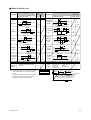
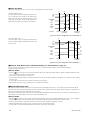
The state of output relay at power -on can be set by a setup parameter restart mode "R.MD".
(A)
(1) When "R.MD" is set to 0.
The output relay is always de-energized (opened) at poweron, even if PV does not exceed SP (A). The output (OUT)
display lamp is lit. After the confirming operation, state of
output relay is energized (closed) and the output (OUT)
display lamp turns off if the PV does not exceed SP (B).
(B)
SP
HYS
PV
EXCEEDED
Lamp
lit
off
OUT
Lamp
lit
off
Output
relay
on
off
Operation
Power-on confirmation
(accepted)
confirmation
(accepted)
Fig.1 Power-on status of high limit control when R.MD = 0
(2) When "R.MD" is set to 1.
The state of output relay is energized (closed) and the output (OUT) display lamp turns off if the PV does not excced
SP at power-on.
(A)
SP
HYS
PV
EXCEEDED
Lamp
lit
off
OUT
Lamp
lit
off
Output
relay
on
off
Operation
Power-on
confirmation
(accepted)
Fig.2 Power-on status of high limit control when R.MD = 1
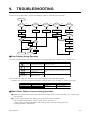
■ Duration Time (Refer to the confirmation display ➀ in the flowchart on page 11)
The time while PV exceeds SP is counted and stored in the memory. It is displayed in the “TIME” in the confirmation display ➀.
Display time range: 00.00 to 99.59
● How to RESET
• Push the “
” key for about one second to reset the duration time in the confirmation display ➀ where “TIME” is displayed. When the count is
reset, “0.00” is displayed until PV exceeds SP again.
• The time count is reset when power is turned on.
• If PV exceeds SP while the old time count data is retained in the memory, the old data should be automatically reset, and the new time counting
starts from “0.0”.
• It is impossible to reset the time count while PV exceeds SP by any operation.
• Duration time cannot be reset by an external contact or communication (RS-485).
■ Maximum/Minimum Value
The maximum value or minimum value of PV is stored in the memory and displayed in the “HI” or “LO” display in the confirmation display ➁.
When the control type is specified as high limit control, the maximum value is displayed in the “HI” display, and the control type is specified as low
limit control, the minimum value is displayed in the “LO” display.
When the PV exceeds SP and then return to the normal status, Maximum/Minimum value is retained as it is, but when PV exceeds SP again, it is
automatically reset and start taking new value for its maximum/minimum value.
● How to RESET
• Push the “
” key for about one second to reset the maximum/minimum value in the confirmation display ➁ where “HI” or “LO” is displayed.
The value is reset, and the value immediately after the confirmation should be recognized as a maximum or minimum value.
• When the power is turned-on, the memory should be reset and the first PV should be recognized as maximum.
• Maximum/minimum value cannot be reset by an external contact or communication (RS-485).
• It is impossible to reset the maximum/minimum value while PV exceeds SP by any operation.
16
IM 05C01E22-41E