1
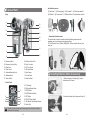
3. Rotate Accessory Locking Ring (2) clockwise to
lock it up. Do not over-tighten.
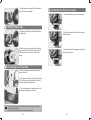
Connecting the Flash to a Camera
1. Loosen the locking ring on the mounting foot.
Attaching Flash Tube
1. Remove the reflector or other accessories from
the flash head.
2. Slip the mounting foot of the flash unit into the
camera hotshoe.
2. Match the red dot on the base of the flash tube
with the red dot in the Tube Socket (4). Push the
flash tube in until it is securely seated into the
socket.
3. Secure the flash unit by rotating the locking ring
the direction of the row.
Connecting to a Power Pack
1. Before connecting, make sure that the power
pack is turned off.
2. Plug one end of Power Cable into Power Socket
(7) of the flash unit, and insert the other end into
the output socket of the power pack.
3. Turn on the power pack. Normally the flash unit
will be fully charged and ready to work.
The flash unit is not powered by itself, but draws power from Cheetah Lithium Battery
Pack L4500 (sold separately).
For the instructions of the power pack, see the related user manual.
- 05 -
- 06 -