1
SUPPLY
For best possible float maintenance charging or voltage supply function
for your vehicle the voltage and max current limit are adjustable from the
front panel. See below how to set the voltage supply program and it's
parameters.
MXTS 70
12V/70A
24V/50A
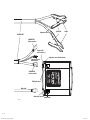
2. Connect the charger to the battery
(see "Cable connection")
3. Connect the charger to the mains supply
The power lamp will indicate that the mains cable is connected to the
mains supply. The error lamp will indicate if the battery clamps are
incorrectly connected. The reverse polarity protection will ensure that
the battery or charger will not be damaged.
4. Turn on the mains switch
EN
1. Connect the charger cables to the charger
(see "Cable connection")
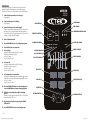
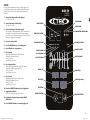
POWER lamp
MODE-button
ERROR lamp
START/STOP-button
NORMAL PROGRAM
5. Press the MODE-button to select Supply mode
6. Press SET-button to set parameters
7. Select voltage
•Display (h) will indicate that voltage (U) is selected
•Display (V) will indicate set voltage
•Press +/- to change
•Press SET-button to confirm
8. Select Supply voltage
•Display (h) will indicate that Supply voltage (Su) is selected
•Display (V) will indicate Supply voltage level
•Press +/- to change
•Press SET-button to confirm
9. Select current
•Display (h) will indicate that current (A) is selected
•Display (A) will indicate set current
•Press +/- to change
•Press SET-button to confirm
10. Press the START/STOP-button to start Supply mode
11. Supply mode indication
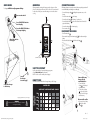
STEP 7 is lit to indicate that Supply mode is running.
12. Stop Supply at any time by pressing the START/
STOP-button
TEMPERATUR SENSOR lamp
STOP
START
STOP
MODE
SUPPLY PROGRAM
NORMAL AGM Ca/Ca BOOST
SUPPLY
READY TO START
AGM PROGRAM
Ca/Ca PROGRAM
fully charged
BOOST PROGRAM
1
2
3
4
5
6
7
DISPLAY (V)
DISPLAY (h)
SET-BUTTON
8
DISPLAY (A)
V
A
h
Ah & info
DECREASE BUTTON
DISPLAY (Ah & info)
INCREASE BUTTON
SET
13. Press START/STOP-button to resume Supply mode
EN • 7
20019214A Manual MXTS70, All languages, Print file_003.indd 7
2013-08-19 13:22:23