1
INDICATION LAMPS, DISPLAYS
AND ERRORCODES
12/24
10-70
E01
E01-E99
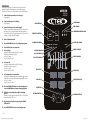
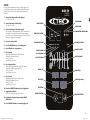
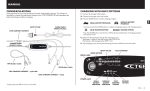
INDICATION LAMPS:
TART/STOP LAMP
S
Indicates that charging has not started or has been interrupted.
Press START/PAUSE-button to start/resume.
OWER LAMP
P
Indicates that mains supply is connected.
RROR LAMP
E
Indicates that a fault has occurred.
Se ERROR CODES for description.
Press START/PAUSE-button to clear error and interrupt charging.
EMPERATURE SENSOR LAMP
T
Indicates that the temperature sensor is activated.
Voltage is automatically adjusted to optimize charge at
ambient temperature.
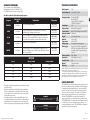
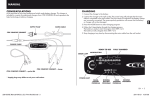
SETTINGS BEFORE START:
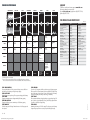
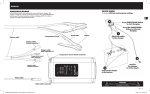
ERROR CODES:
E01
REVERSE POLARITY
DISPLAY (V)
Indicates voltage set
Options: 12/24 Volts
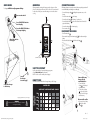
Connect the charger according to “quickguide”
DISPLAY (A)
Indicates current set
Options: 70/50/40/30/20/10A in 12V setting
Options: 50/40/30/20/10A in 24V setting
70A could only be selected for SUPPLY program.
E03
DISPLAY (h)
Indicates which parameter to set
Options: U/SU/A/ /
U = Nominal Voltage
SU = Supply Voltage
A = Current limit
= Temperature compensation
= Recond time in BOOST program
DISPLAY (Ah & info)
Displays error codes
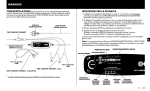
REAL TIME INDICATION DURING CHARGING:
DISPLAY (V)
Displays output voltage
DISPLAY (A)
Displays output current
DISPLAY (h)
Alt. 1. Displays total elapsed charging time (minutes/hours)
Alt. 2. Displays time elapsed until error occured
DISPLAY (Ah & info)
Alt.1. Displays total charge delivered since start (minutes/hours)
Alt.2. Displays error codes together with ERROR lamp
OVER VOLTAGE
Battery voltage to high for the chosen charging program, check
battery voltage.
E02
TIME OUT STEP 1: DESULPHATION
Restart the charger. If charging is still being interrupted the battery is seriously sulphated and may need to be replaced.
TIME OUT STEP 2: SOFT START
Restart the charger. If charging is still being interrupted the battery
can not accept charge and may need to be replaced.
E04
TIME OUT STEP 5: ANALYSE
Restart the charger. If charging is still being interrupted the battery can not keep charge and may need to be replaced.
E05
BATTERY OVERHEATED
The battery is too hot to charge. The battery is damaged and
may need to be replaced.
E06
LOW BATTERY VOLTAGE IN SUPPLY PROGRAM
Battery voltage too low or too large consumers connected. Check
if 12V battery connected in 24V battery setting or disconnect
large consumers.
E07
HIGH CURRENT IN SUPPLY PROGRAM
Check if clamps are short circuited or connected reversed polarity.
E08
OVER VOLTAGE PROTECTION
If battery voltage is below 17V the ERROR lamp is lit when 24V
setting has been selected.
E99
Alt 1. Press START/STOP button to charge with 12V setting.
To set the parameters for customized charging proceed with
“CHARGING” step 6 to 9
Alt 2. Press INCREASE button to change to 24V setting. Press
START/STOP button to resume. To set the parameters for customized charging proceed with “CHARGING” step 6 to 9.
8 • EN
20019214A Manual MXTS70, All languages, Print file_003.indd 8
2013-08-19 13:22:24