1
Basics
S Pen Keeper
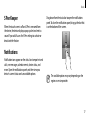
When the touch screen is off and S Pen is removed from
the device, the device displays a pop-up alert and emits a
sound if you walk. Access the S Pen settings to activate or
deactivate the feature.
Drag down from the status bar to open the notifications
panel. To close the notifications panel, drag up the bar that
is on the bottom of the screen.
Notifications
Notification icons appear on the status bar to report missed
calls, new messages, calendar events, device status, and
more. Open the notifications panel, and then view your
device’s current status and use available options.
The available options may vary depending on the
region or service provider.
17