1
1.9 How to Install "One Man" Installation Slides
Chapter 1
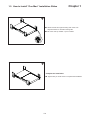
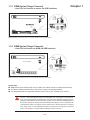
Install into rack
1
Rear side
Right bracket
■
Left bracket
■
■
Front side
Attach the left and right mounting bracket to rack 19”
mounting rails.
Adjust the rear mouting bracket to fit your rack.
M6 screw and cup washer x 6 pcs included.
Caution : Leave the screws slightly loose until
you complete the installation in step 4
Right front
Left front
2
Mounting bracket
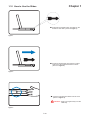
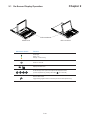
■ Pick up the LCD keyboard drawer.
■ Insert the LCD keyboard drawer into the mounting bracket.
■ Pull and hold the left & right black arrow buttons on the rails.
■ Return the LCD keyboard drawer to park position.
Black arrow button
P.8