1
VXI Technology, Inc.
SWITCH REPLACEMENT
Should a switch become non-functional or damaged, it is possible to replace the switches by using
the following protocol.
NOTE
Although switch replacement is possible, it is not possible to insert a switch other than the switch
originally found in that slot (i.e. a SM7270N cannot be replaced with an SM7274N). The cables
installed in the SM7000N are specific to the switch option originally installed.
Procedure
1.
Remove the AC power cord from the chassis.
To avoid the possibility of shock, wait a minimum of ten seconds for electricity to dissipate
from the mainframe after removing power.
2.
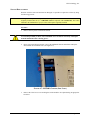
Observing proper ESD precautions, remove the SM7000N from the mainframe and lay the
chassis down on an antistatic mat. (See Figure 4-7).
FIGURE 4-7: SM7000N CHASSIS (SIDE VIEW)
3.
44
Remove the 5/64” hex screws retaining the switch module to be replaced using an appropriate
hex driver.
SM7000N Switch Configuration