1
Product Name : ADSL Router
(For Conexant Chipset)
Table of Contents:
FCC Part 68
FCC Part 15
Chapter 1. Introduction
Chapter 1.1 Overview
Chapter 1.2 Features
Chapter 1.3 System Requirements
Chapter 2. Installation
Chapter 2.1 Checklist
Chapter 2.2 The Front LEDs
Chapter 2.3 The Rear Ports
Chapter 2.4 Hardware Installation
Chapter 3 Configuration
Chapter 3.1 Determine your connection setting
Chapter 3.2 Connecting the ADSL Router to your network
Chapter 3.3 Configuring with Web Browser
Chapter 3.3.1 Status - Home page
Chapter 3.3.2 Status - ADSL Status
Chapter 3.3.3 Status - LAN
Chapter 3.3.4 Status - PPP
Chapter 3.3.5 Configuration - WAN Configuration
Chapter 3.3.6 Configuration - LAN Configuration
Chapter 3.3.7 Configuration - PPP Configuration
Chapter 3.3.8 Configuration - NAT Configuration
Chapter 3.3.9 Configuration - Virtual Server Configuration
Chapter 3.3.10 Configuration - DNS Configuration
Chapter 3.3.11 Configuration - Bridge Filtering Configuration
Chapter 3.3.12 Configuration - Save Settings
Chapter 3.3.13 Configuration - Reboot Without Saving
Chapter 3.3.14 Admin Privilege - WAN Status
Chapter 3.3.15 Admin Privilege - ATM Status
Chapter 3.3.16 Admin Privilege - TCP Status
Chapter 3.3.17 Admin Privilege - Route Table
Chapter 3.3.18 Admin Privilege - Learned (Bridge) MAC Table
Chapter 3.3.19 Admin Privilege - ADSL Configuration
Chapter 3.3.20 Admin Privilege - RIP Configuration
Chapter 3.3.21 Admin Privilege - Password Configuration
Chapter 3.3.22 Miscellaneous Configuration
Chapter 3.3.23 Reset to Factory Default
Chapter 3.3.24 Diagnostic Test
Chapter 3.3.25 Code Image Update
Chapter 3.3.26 System Log
Appendix A Glossary
Appendix B Cabling / Connection
Declaration of Conformity
¡@
FCC Part 68
This equipment complies with Part 68 of the FCC Rules. On the bottom of this equipment is a
label that contains the FCC Registration Number and Ringer Equivalence Number (REN) for
this equipment. You must provide this information to the telephone company upon request.
The REN is useful to determine the quantity of devices you may connect to the telephone line
and still have all of those devices ring when your number is called. In most, but not all areas,
the sum of the REN of all devices connected to one line should not exceed five (5.0). To be
certain of the number of devices you may connect to your line, as determined by the REN, you
should contact your local telephone company to determine the maximum REN for your calling
area.
If the modem causes harm to the telephone network, the telephone company may discontinue
your service temporarily. If possible, they will notify you in advance. But if advance notice isn't
practical, you will be notified as soon as possible. You will be advised of your right to file a
complaint with the FCC.
The telephone company may make changes in its facilities, equipment, operations, or
procedures that could affect the proper operation of your equipment. If they do, you will be
notified in advance to give you an opportunity to maintain uninterrupted telephone service.
If you experience trouble with this modem, please contact your dealer for repair/warranty
information. The telephone company may ask you to disconnect this equipment from the
network until the problem has been corrected or you are sure that the equipment is not
malfunctioning.
This equipment may not be used on coin service provided by the telephone company.
Connection to party lines is subject to state tariffs.
Installation
This device is equipped with a USOC RJ11C connector.
¡@
FCC Part 15
The modem generates and uses radio frequency energy. If it is not installed and used properly
in strict accordance with the user's manual, it may cause interference with radio and television
reception. The modem has been tested and found to comply with the limits for Class B
computing devices in accordance with the specifications in Subpart B, Part 15 of the FCC
regulations. These specifications are designed to provide reasonable protection against such
interference in a residential installation. However, there is no guarantee that interference will
not occur in a particular installation. FCC regulations require that shielded interface cables be
used with your modem.
If interference does occur, we suggest the following measures be taken to rectify the problem:
1) Move the receiving antenna.
2) Move the modem away from the radio or TV.
3) Plug the modem into a different electrical outlet.
4) Discuss the problem with a qualified radio / TV technician.
CAUTION :
Changes or modifications not expressly approved by the party responsible for compliance to
the FCC Rules could void the user's authority to operate this equipment.
Cable connections:
All equipment connected to this modem must use shielded cable as the interconnection
means.
Notes:
Operation is subject to the following two conditions:
1) This device may not cause harmful interference, and
2) This device must accept any interference received including interference that may cause
undesired operation.
Chapter1 Introduction
The ADSL Router provides home connectivity to an ADSL service provider network over an
ADSL/Asynchronous Transfer Mode (ATM) physical layer. The router can run upstream
maximum transmission rates of 640Kbps and downstream maximum transmission rates of
8Mbps. The actual rate depends on the copper category of your telephone wire, distance from
the central office and the type of ADSL service subscribed. A 10BaseT interface is provided
for connection to an Ethernet LAN or Ethernet-equipped PC, and this router is easy to install
and to configure.
1.1 Overview
The Conexant AccessRunner CX82310 Single-Chip ADSL Router is optimised to address the
growing demand for high-speed Internet access, and it does so as a single, highly-integrated
and cost-effective solution.
Featuring a USB 1.1-compliant interface and an IEEE 802.3-compliant Ethernet MAC
interface to provide connectivity options, the CX82310 does not rely on host PC drivers, and
thus is not limited by them. The result is extreme ease-of-use with active auto selection of the
interface and simultaneous operation of both USB and Ethernet. All setup and provisioning is
accomplished via a simple intuitive Web interface which further enhances the user
experience.
The CX82310 is built upon a scalable architecture and is fully compliant with full-rate ADSL
(T1.413 Issue 2 and G.dmt standards) and the splitterless G.Lite (G.992.2) standards,
including Annex A (ADSL over POTS) and Annex B (ADSL over ISDN). This broad level of
compliance ensures that products based on the AccessRunner can address the existing
installed base and continued deployment of ADSL lines. Telephone companies, for example,
can deploy full-rate, splitterless full-rate as well as G.lite to the consumer.
A single-chip router, the CX82310 allows an always-on high-speed broadband connection to
the Internet. It uses existing twisted-pair telephone lines to deliver data rates at more than 100
times the speed of conventional dial-up modems, and without the interruptions that can plague
telephone service. Data transfer rates of up to 8 Mbps downstream and 1 Mbps upstream
make it the ideal solution for high-bandwidth applications for corporate networks, Internet and
video delivery.
Networking support includes both bridge and router modes. The router mode includes
advanced features such as Network Address Translation (NAT), Dynamic Host Protocol
(DCHP) and Routing Information Protocol (RIPv2) processor, ADSL DMT Engine, Analogue
Front End (AFE) and Line Driver.
Through the use of a flash file system, firmware upgrades are easily managed. This allows for
simple, reliable product updates or feature enhancements.
A high-performance, 16-bit parallel expansion bus is available for additional functionality. This
expansion bus provides a glueless interface to PCMCIA 802.11b wireless system.
Additionally, the expansion bus can be used to interface to a V.92/V.90 backup system.
1.2 Features
•
•
ADSL Compliance
- Compliant with ADSL standards
Full-rate ANSI.413 Issue 2 and ITU G.dmt (G.992.1) standards
Splitter less ITU G.lite (G.992.2) specification
Annex A (ADSL over POTS) and Annex B (ADSL over ISDN)
- DMT modulation and demodulation
- Full-rate adaptive modem
Maximum downstream rate of 8 Mbps
Maximum upstream rate of 1 Mbps
- Tone detection for low power mode
- Supports splitter less ADSL implementation
- Supports Dying Gasp
- Interoperable with all major DSLAM equipment
ATM Protocols
- WAN mode support: PPP over ATM (RFC 2364) and PPP over Ethernet
(RFC 2516)
- LAN mode support: bridged/routed Ethernet over ATM (RFC 1483) and
classical IP over ATM (RFC 1577)
- ATM Forum UNI 3.1/4.0 PVC
- Up to 8 VCs (virtual circuits)
•
•
•
•
•
- ATM SAR (segmentation and reassembly)
- ATM AALC (adaption layer type 5)
- OAM F4/F5
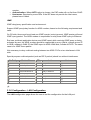
Bridge Mode
- Ethernet to ADSL self learning Transparent Bridging (IEEE 802.1D)
- Supports up to 128 MAC learning addresses
Router Mode
- IP routing-RIPv2
- Static routing
- DNS Proxy
- Port Forwarding
- DHCP (dynamic host configuration protocol) server and client
- NAT (network address translation)
- MAPT (network address and port translation)
- ICMP (Internet control message protocol)
- Simultaneous USB and Ethernet operation
Security
- User authentication for PPP
- PAP (password authentication protocol)
- CHAP (challenge authentication protocol)
- Password protected system management
Ethernet Interface
- Compliant with IEEE 802.3 and 802.3u 10/100 Mbps
HTTP Web-Based Management
- Firmware upgrade via FTP
- Customizable Web pages
- WAN and LAN side connection statistics
- Configuration of static routes and routing table
- Password protected access
- Selection of bridge or router mode
- PPP user ID and password
- Configuration of VCs (virtual circuits)
¡@
1.3 System Requirements
1) Personal computer (PC)
2) Pentium II 233 MHz processor minimum
3) 32 MB RAM minimum
4) 20 MB of free disk space minimum
5) Ethernet Network Interface Controller (NIC) RJ45 Port
6) Internet Browser
Chapter 2 Installation
This chapter offers information about installing your router. If you are not familiar with the
hardware or software parameters presented here, please consult your service provider for the
values needed.
2.1 Checklist
Check the shipping box carefully to ensure that the contents include the items you ordered. If
any of the items are missing or damaged, contact your local distributor. The contents of your
carton may vary depending on your service provider.
Contents description
1) ADSL Router for home/office use.
2) ADSL Router Installation and Operation Guide (this publication)
3) Power supply with 9Vdc / 1.5 Ampere power adapter
4) ADSL cable RJ-11 telephone cable (6 ft)
5) Ethernet cable Ethernet category 5 twisted pair cable (6 ft)
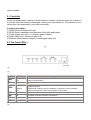
2.2 The Front LEDs¡@
¡@
¡@
¡@
LED
State
Description
PWR:
ON
OFF
Modem is powered ON
Modem is powered OFF
RDY:
Flashing
When the router is working properly
ON
Flashing
OFF
"Showtime"-successful connection between ADSL modem and telephone
company's network
"Handshaking"-modem is trying to establish a connection to telco's network
Modem is powered OFF ADSL Carrier Detect if LED is flash
ACT:
Flashing
Data transmitting between LAN AND PC
LNK:
ON
Successful connection between LAN AND PC
TXD:
Flashing
Data transmitting between modem and telco's network
RXD:
Flashing
Data receiving between modem and telco's network
ADSL:
¡@
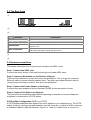
2.3 The Rear Ports
¡@
¡@
¡@
Connector
Description
POWER:
Power connector with 9Vdc/ 1.5 Ampere
Ethernet Port (RJ-45):
Connect to the Ethernet port
Reset Switch
The reset button, when pressed, resets the modem without the need to unplug
the power cord
ADSL Connector:
The RJ-11 connector allows data communication between the modem and the
ADSL network through a twisted-pair phone wire
¡@
¡@
2.4 Hardware installation
This section describes how to connect and configure the ADSL router.
Step 1. Connect the ADSL Line
Connect the router directly to the wall jack using the included ADSL cable.
Step 2. Connect a Workstation to the Router's LAN port
There are two methods to connect the router and workstation. The one use the crossover
Ethernet cable to connect directly between them. The other use straight Ethernet cable to
connect router with hub (or switch), then go to the workstation.
Step 3. Connect the Power Adapter to the Router
Connect the power adapter to the port labeled POWER on the rear panel of router.
Step 4. Connect All Cables to the Network
The procedure for connecting cables differs depending on whether or not your telephone
equipment is connected to a POTS splitter.
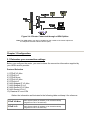
POTS Splitter Configuration (ADSL over POTS)
A POTS splitter separates data signals from voice signals on your telephone line. The POTS
splitter works by running a separate data line from the voice line, so that the ADSL router has
a dedicated cable for data transmission. Figure 2-3.1 and 2-3.2 shows how to connect all
cables to the Router.
Figure 2-4.1 Router Connected through a POTS Splitter
Note:The POTS splitter may also be installed on the outside of the house adjacent
to the telephone network interface device (NID).
Figure 2-4.2 Router Connected through several micro-filters
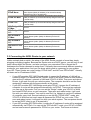
ISDN Splitter Configuration (ADSL over ISDN)
A ISDN splitter separates ADSL signals from ISDN signals on your ISDN telephone line. The ISDN splitter works
by running a separate ADSL line from the ISDN line, so that the ADSL router has a dedicated cable for data
transmission. Figure 2-3.3 shows how to connect all cables to the Router.
Figure 2-4.3 Router Connected through a ISDN Splitter
Note:The ISDN splitter may also be installed on the outside of the house adjacent to
the telephone network interface device (NID).
Chapter 3 Configuration
3.1 Determine your connection settings
Before you configure the router, you need to know the connection information supplied by
your ADSL service provider.
Protocol Selection
1) PPPoE VC-Mux
2) PPPoE LLC
3) PPPoE None
4) PPPoA VC-Mux
5) PPPoA LLC
6) 1483 Bridged IP VC-Mux
7) 1483 Bridged IP LLC
8) 1483 Routed IP VC-Mux
9) 1483 Routed IP LLC
10) Classical IP over ATM
Gather the information as illustrated in the following table and keep it for reference.
PPPoE VC-Mux:
PPPoE LLC:
VPI/VCI, Service Name, Username, Password, and Domain
Name System (DNS) IP address (it can be automatically
assigned from ISP or be set fixed)
VPI/VCI, Service Name, Username, Password, and Domain
Name System (DNS) IP address (it can be automatically
assigned from ISP or be set fixed)
PPPoE None:
PPPoA VC-Mux:
PPPoA LLC:
1483 Bridged IP
VC-Mux:
1483 Bridged IP
LLC:
VPI/VCI, Service Name, Username, Password, and Domain
Name System (DNS) IP address (it can be automatically
assigned from ISP or be set fixed)
VPI/VCI, Username, Password, and Domain Name System
(DNS) IP address (it can be automatically assigned from ISP
or be set fixed).
VPI/VCI, Username, Password, and Domain Name System
(DNS) IP address (it can be automatically assigned from ISP
or be set fixed).
VPI/VCI
VPI/VCI
VPI/VCI, IP address, Subnet mask, Gateway address, and
Domain Name System (DNS) IP address (it is fixed IP
address).
VPI/VCI, IP address, Subnet mask, Gateway address, and
1483 Routed IP
Domain Name System (DNS) IP address (it is fixed IP
LLC:
address).
Classical IP over VPI/VCI, IP address, Subnet mask, Gateway address, and
Domain Name System (DNS) IP address (it is fixed IP
ATM:
address).
1483 Routed IP
VC-Mux:
3.2 Connecting the ADSL Router to your network
Unlike a simple hub or switch, the setup of the ADSL Router consists of more than simply
plugging everything together. Because the Router acts as a DHCP server, you will have to set
some values within the Router, and also configure your networked PCs to accept the IP
Addresses the Router chooses to assign them. Generally there are several different operating
modes for your applications. And you can know which mode is necessary for your system
from ISP. These modes are router, bridge, PPPoE+NAT and NAT and PPPoA+NAT. Actually
all these are for IP address of WAN.
•
•
•
If your ISP provides RFC1483 Routed mode, it means the IP address of LAN will be
routed via WAN. You should set the "Router" mode in the ADSL router for this situation,
also set the IP address / netmask of LAN and VPI/VCI of WAN. Then save and reboot
Router, it will work fine with your whole system. The computer should be set the fixed
assigned IP address with the same domain at this mode.
If your ISP provides RFC1483 Bridge mode plus PPPoE, it means the IP address of
computer or router will be assigned automatically via PPPoE. There are two methods
you can use at this mode. First you can set the "bridge" mode, give VPI/VCI of WAN
and install PPPoE driver on your computer. Then save and reboot router, it will work
fine with your whole system. You need to use Dial_Up_Network to get the IP address
of computer every time. Second method you can set the "PPPoE+NAT" mode, give
VPI/VCI of WAN and set user's name & password for PPPoE on your router. Then
save and reboot router, it will work fine with your whole system. The computers should
be set as DHCP client to get IP dynamically.
If your ISP provides RFC2364 mode, it means the IP address of router will be assigned
automatically via PPPoA. You can set the "PPPoA+NAT" mode, give VPI/VCI of WAN
and set user's name & password for PPPoA on your router. Then save and reboot
•
router, it will work fine with your whole system. The computers should be set as DHCP
client to get IP dynamically.
If your ISP provides RFC1483 Routed and the serial static IP address for you, there are
two methods you can use at this mode. First you can set the "router" mode and give
VPI/VCI of WAN. Then save and reboot router, it will work fine with your whole system.
The computers should be set the fixed assigned IP address at this method. Second
method you can set the "NAT" mode, give VPI/VCI/ IP address /netmask of WAN. Then
save and reboot router, it will work fine with your whole system. The computers should
be set as DHCP client to get IP dynamically.
3.3 Configuring with Web Browser
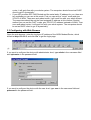
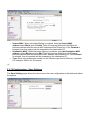
Open the web browser, enter the local port IP address of the ADSL Modem/Router, which
default at http://10.0.0.2, and click 'Go' to get the login page.
¡@
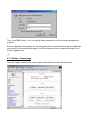
If you want to configure the device with administrator level, type admin in the username field
and epicrouter in the password field.
If you want to configure the device with the user level, type user in the username field and
password in the password field.
Then, click 'OK' to log in. You can modify these passwords for security and management
purpose.
At the configuration homepage, the left navigation pane where bookmarks are provided links
you directly to the desired setup page. Click on the desired item to expand the page in the
main navigation pane.
¡@
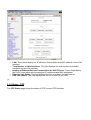
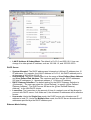
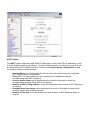
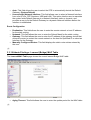
3.3.1 Status - Home page
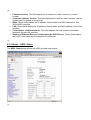
The Home page shows the firmware versions and WAN and LAN interface status.
¡@
•
•
•
•
•
•
Firmware Version: This field display the Conexant firm ware (vxworks.z) version
number.
Customer Software Version: This field displays the customer' sown firmware version
number and it is based on revision.txt.
WAN: These fields display the IP address, Subnet Mask and MAC address for the
WAN ADSL) interface.
LAN: These fields display the IP address, Subnet Mask and MAC address for the LAN
interface.
Total Number of LAN Interfaces: This field displays the total number of available
interfaces for the LAN interface.
Number of Ethernet Devices Connected to the DHCP Server: These fields display
the DHCP client table with the assigned IP addresses.
¡@
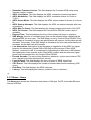
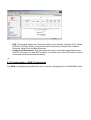
3.3.2 Status - ADSL Status
The ADSL Status page shows the ADSL physical layer status.
¡@
•
•
•
•
•
•
•
•
•
•
•
•
•
•
•
•
Showtime Firmware Version: This field displays the Conexant ADSL data pump
firmware version number.
ADSL Line Status: This field displays the ADSL connection process and status.
ADSL Modulation: This field displays the ADSL modulation status for G.dmt or
T1.413.
ADSL Annex Mode: This field displays the ADSL annex modes for Annex A or Annex
B.
ADSL Startup Attempts: This field displays the ADSL connection attempts after loss
of showtime.
ADSL Max Tx Power: This field displays the transmit output power level of the CPE.
ADSL CO Vendor: This field displays the Central Office DSLAM vendor name, if
available.
Elapsed Time: This field displays the time of the modem has been in operation.
SNR Margin: Amount of increased noise that can be tolerated while maintaining the
designed BER (bit error rate). The SNR Margin is set by Central Office DSLAM. If the
SNR Margin is increased, bit error rate performance will improve, but the data rate will
decrease. Conversely, if the SNR Margin is decreased, bit error rate performance will
decrease, but the data rate will increase.
Line Attenuation: Attenuation is the decrease in magnitude of the ADSL line signal
between the transmitter (Central Office DSLAM) and the receiver (Client ADSL
Modem), measured in dB. It is measured by calculating the difference in dB between
the signal power level received at the Client ADSL modem and the reference signal
power level transmitted from the Central Office DSLAM.
Errored Seconds: The error during Showtime, whenever, a given sec contains CRC
error, that second will be declared error second.
Loss of Signal: This field displays the count of event of ADSL signal loss.
Loss of Frame: This field displays the count of event of ADSL frame loss.
CRC Errors: This field displays the number of transmit data frames containing CRC
errors.
Data Rate: This field displays the ADSL data rate.
Latency: This field displays the latency modes for fast or interleave.
¡@
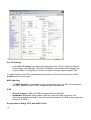
3.3.3 Status - Home
The Home page shows the information and status of LAN port, DHCP client table,Ethernet
link and USB link.
•
•
•
•
•
LAN: These fields display the IP address, Subnet Mask and MAC address for the LAN
interface.
Total Number of LAN Interfaces: This field displays the total number of available
interfaces for the LAN interface.
Number of Ethernet Devices Connected to the DHCP Server: These fields display
the DHCP client table with the assigned IP addresses and MAC addresses.
Ethernet Link Status: This field displays the link up or down for the Ethernet.
USB Link Status: This field displays the link up or down for the USB.
¡@
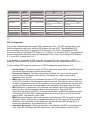
3.3.4 Status - PPP
The PPP Status page shows the status of PPP for each PPP interface.
•
•
PPP: These fields display the Connection Name (user defined), Interface (PVC), Mode
(PPPoE or PPPoA), Status (Connected or Not Connected), Packets Sent, Packets
Received, Bytes Sent and Byte Received.
Connect and Disconnect: This field allows the user to manually connect/disconnect
the PPP connection for each PPP interface. In another word, each PPP session can be
connected and disconnected individually.
¡@
3.3.5 Configuration - WAN Configuration
The WAN configuration page allows the user to set the configuration for the WAN/ADSL ports.
¡@
Per VC Settings
•
Under Per VC Setting, it provides the configurations for VPI/VCI, Static IP Address
Subnet Mask, and Gateway. The Static IP Address, Subnet Mask and Gateway are
used for Static IP configuration. Current Conexant firmware supports eight PVCs.
To switch between the PVCs, please choose the options of virtual circuit and click on the
Submit button to switch over.
MAC Spoofing
•
The MAC Spoofing is developed to solve the scenario when the ISP only recognizes
one MAC address. Copy the ISP-recognized MAC address here.
ATM
•
•
Service Category: UBR and CBR are supported from the ATM.
Bandwidth: Bandwidth setting takes effect only when the CBR is selected. The
maximum available bandwidth is from the upstream data rate of ADSL status page (see
Section 3.2, ADSL ).
Encapsulation, Bridge, PPP, and DHCP Client
¡@
WAN
Configuration
Bridge
Mode
Router Mode
(PPPoA/PPPoE)
Router Mode (Dynamic
IP)
Router Mode (Static IP)
IP address
N/A
Automatically assigned by
ISP
Automatically assigned by ISP
Provided by ISP
Subnet Mask
N/A
Automatically assigned by
ISP
Automatically assigned by ISP
Provided by ISP
Encapsulation
1483 Bridged IP
LLC, 1483
Bridged IP VCMux
1483 Bridged/Routed IP
PPPoA LLC/VCLLC,
1483
Mux,
PPPoE LLC/VCBridged/Routed VC-Mux, Classical
Mux,
IP over ATM
1483 Bridged/Routed IP
LLC,
1483
Bridged/Routed VC-Mux, Classical
IP over ATM
Bridge
Enabled
Disabled
Disabled
Disabled
PPP Service
N/A
Provided by ISP
N/A
N/A
PPP User name
N/A
Provided by ISP
N/A
N/A
PPP Password
N/A
Provided by ISP
N/A
N/A
DHCP Client enable
Unchecked
Unchecked
Checked
Unchecked
¡@
PPP Configuration
The current release supports multiple PPP sessions per PVC. The PPP configuration in the
WAN configuration page is for the first PPP session for each PVC. The predefined PPP
Account Name (Account ID) is ¡§Simple PPP Account 0¡¨ for PVC0 and predefined PPP
Connection Name is ¡§Simple PPP Session 0¡¨ for PVC0. For the other PVC X, the predefined
account name and connection name will be Simple PPP Account X and Simple PPP Session
X. X is the PVC number from 1 to 7.
It can support up to total of 16 PPP sessions, and each PVC can support up to 8 PPP
sessions. The multiple PPP sessions may be configured with any combination over 8 PVCs.
For the multiple PPP sessions, please go to PPP Configuration page (Section 6.3).
•
•
•
•
•
•
Service Name: The service name of PPP is required by some ISPs. If the ISP does not
provide the Service Name, please leave it blank.
Disconnect Timeout: The Disconnect Timeout allows the user to set the specific
period of time to disconnect from the ISP. The default is 0, which means never
disconnect from the ISP.
MRU: Maximum Receive Unit indicates the peer of PPP connection the maximum size
of the PPP information field this device can be received. The default value is 1492 and
is used in the beginning of the PPP negotiation. In the normal negotiation, the peer will
accept this MRU and will not send packet with information field larger than this value.
MTU: Maximum Transmission Unit indicates the network stack of any packet is larger
than this value will be fragmented before the transmission. During the PPP
negotiation,the peer of the PPP connection will indicates its MRU and will be accepted.
The actual MTU of the PPP connection will be set to the smaller one of MTU and the
peer¡¦s MRU. The default is value 1492.
MSS: Maximum Segment Size is the largest size of data that TCP will send in a single
IP packet. When a connection is established between a LAN client and a host in the
WAN side, the LAN client and the WAN host will indicate their MSS during the TCP
connection handshake. The default value is 1432.
Automatic Reconnect: When it is checked, it will maintain the PPP connection all the
time. If the ISP shut down the PPP connection, it will automatically reconnect PPP
•
•
session.
Authentication: When AUTO option is chosen, the PAP mode will run first then CHAP.
Host name: Required by some ISPs. If the ISP does not provide the Host name,
please leave it blank.
IGMP
IGMP relay/proxy specification and environment:
Support IGMP proxy/relay function for ADSL modem, based on the following requirement and
case:
On CO side, there must be at least one IGMP querier (router) present. IGMP querier will send
IGMP query packet. The ADSL modem is responsible to relay these IGMP query to Ethernet.
End-user multicast application device send IGMP report while receiving IGMP query or being
activated by user, the ADSL modem should be responsible to proxy (that is, change source IP
to ADSL modem¡¦s WAN IP) the IGMP report to ADSL WAN side, include all PVCs. The same
case is for IGMP leave packet.
Not necessary to relay multicast routing between two ADSL PVCs or two interfaces in LAN
side.
Special purpose multicast packet (such as RIP 2 packet) should run without interference.
Rx Entity
Packet Class
TTL
Action
Notes
ADSL
IGMP query
1
Relay to Ethernet
¡@
¡@
IGMP report
1
Ignore
¡@
¡@
IGMP leave
1
Ignore
¡@
¡@
General Multicast IP
-
Relay to Ethernet
¡@
Ethernet
IGMP query
1
Ignore
¡@
¡@
IGMP report
1
Relay to all ADSL PVC
¡@
¡@
IGMP leave
1
Relay to all ADSL PVC
¡@
¡@
General Multicast IP
-
Ignore
¡@
¡@
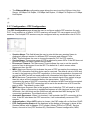
3.3.6 Configuration - LAN Configuration
The LAN configuration page allows the user to set the configuration for the LAN port.
¡@
•
LAN IP Address & Subnet Mask: The default is 10.0.0.2 and 255.0.0.0. User can
change it to other private IP address, such as 192.168.1.2, and 255.255.255.0.
DHCP Server
•
•
•
•
•
System Allocated: The DHCP address pool is based on LAN port IP address plus 12
IP addresses. For example, the LAN IP address is 10.0.0.2; the DHCP address pool is
at the range of 10.0.0.3 to 10.0.0.14.
User Defined: The DHCP address pool is at the range of User Defined Start Address
and User Defined End Address. The maximum pool size can be 253 IP addresses:
255 total IP addresses ¡V 1 broadcast address ¡V 1 LAN port IP address.
DHCP Gateway Selection: The default setting for the DHCP Gateway Selection is
¡§Automatic¡¨. The user can select the ¡§User Defined¡¨ to specify ¡§User Defined
Gateway Address¡¨. The DHCP server will issue the ¡§User Defined Gateway
Address¡¨ to the LAN DHCP clients.
Lease time: The Lease time is the amount of time of a network user will be allowed to
connect with DHCP server. If all fields are 0, the allocated IP addresses will be effective
forever.
User mode: Under the Single User mode, the DHCP server only allocates one IP
address to local PC. Under the Multiple User mode, the DHCP server allocates the IP
addresses specified bye the DHCP address pool.
Ethernet Mode Setting
•
The Ethernet Mode configuration page allows the user to set the LAN port into Auto
Sense, 100 Mbps Full Duplex, 100 Mbps Half Duplex, 10 Mbps Full Duplex or 10 Mbps
Half Duplex.
¡@
¡@
3.3.7 Configuration - PPP Configuration
The PPP Configuration page allows the user to configure multiple PPP sessions for each
PVC. It can support up to total of 16 PPP sessions, and each PVC can support up to 8 PPP
sessions. The multiple PPP sessions may be configured with any combination over 8 PVCs.
•
•
•
•
•
•
•
•
•
•
Session Name: This field allows the user to enter his/her own session Name to
distinguish different session for different PPP accounts and different PVCs.
PVC: This field allows the user to choose the specific PVC for PPP session.
Service Name: The service name of PPP is required by some ISPs. If the ISP does not
provide the Service Name, please leave it blank.
Disconnect Timeout: The Disconnect Timeout allows the user to set the specific
period of time to disconnect from the ISP. The default is 0, which means never
disconnect from the ISP.
MRU: Maximum Receive Unit indicates the peer of PPP connection the maximum size
of the PPP information field this device can be received. The default value is 1492 and
is used in the beginning of the PPP negotiation. In the normal negotiation, the peer will
accept this MRU and will not send packet with information field larger than this value.
MTU: Maximum Transmission Unit indicates the network stack of any packet is larger
than this value will be fragmented before the transmission. During the PPP
negotiation,the peer of the PPP connection will indicates its MRU and will be accepted.
The actual MTU of the PPP connection will be set to the smaller one of MTU and the
peer¡¦s MRU. The default is value 1492.
MSS: Maximum Segment Size is the largest size of data that TCP will send in a single
IP packet. When a connection is established between a LAN client and a host in the
WAN side, the LAN client and the WAN host will indicate their MSS during the TCP
connection handshake. The default value is 1432.
Automatic Reconnect: When it is checked, it will maintain the PPP connection all the
time. If the ISP shut down the PPP connection, it will automatically reconnect PPP
session.
Authentication: When AUTO option is chosen, the PAP mode will run first then CHAP.
PPP Configuration Status will be displayed at the bottom of this page to show all the
Session Names with its Adapter (PVC number), Mode (PPPoA or PPPoE), Service
Name, Account to Use (PPP Account ID), Disconnect Timeout configuration, MRU,
MTU, MSS, Authentication Mode (Auto, CHAP or PAP), and Auto Reconnect
configuration.
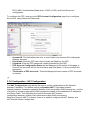
To configure the PPP, must go to the PPP Account Configuration page first to configure
Account ID, Users Name and Password.
•
•
•
•
•
Account ID: This field allows the user to enter his/her own account ID to distinguish
different accounts.
User Name: Enter the PPP user name (usually provided buy the ISP).
Password: Enter the PPP password (usually provided buy the ISP).
PPP Account Configuration Status will be displayed at the bottom of this page to
show all the accounts with its Account Name and User Name. (It does not show the
password.)
The Number of PPP Accounts: This field displays the total number of PPP Accounts
is entered.
¡@
3.3.8 Configuration - NAT Configuration
The NAT Configuration page allows the user to set the configuration for the Network
Address Translation. The default setting is Dynamic NAPT. It provides dynamic
Network Address Translation capability between LAN and multiple WAN connections, and the
LAN traffic is routed to appropriate WAN connections based on the destination IP addresses
and Route Table. This eliminates the need for the static NAT session
configuration between multiple LAN clients and multiple WAN connections.
When the Dynamic NAPT is chosen, there is no need to configure the NAT Session and
NAT Session Name Configuration.
NAPT (Static)
The NAPT option maps the single WAN IP addresses to many local PCs IP addresses.(1xN).
It is the multiple-mapping mechanism. For each WAN Interface, more than one local PCs can
be associated with one WAN Interface. Click the link Session Name Configuration to add
the session name for WAN interface.
•
•
•
•
•
•
Session Name: This field allows the user to select the session from the configured
NAT Session Name Configuration.
User¡¦s IP: This filed allows the user to assign the IP address to map the
corresponding NAT/NAPT sessions.
Session Name Status will be displayed at the middle of this page to show the
corresponding Session Name with its IP address.
Number of NAT Configurations: This filed displays the total number of NAT Sessions
is entered.
Available Sessions Status will be displayed at the end of this page to show all the
Session Names with its WAN Interface.
Number of Session: This filed displays the total number of NAT Sessions Name is
entered.
NAT (Static)
The NAT option only maps single WAN IP address to the local PC IP address. It is peertopeer mapping. (1x1) For each WAN interface, only one local PC IP address can be associated
with each WAN interface. Click the link Session Name Configuration to add the session
name for WAN interface.
•
•
•
•
Session Name: This field allows the user to enter his/her own session Name to
distinguish different NAT session for different interfaces among different PPP sessions
and different PVCs.
Interface: This field allows the user to choose specific WAN Interface (PVC or PPP
Session) for NAT Session.
NAT Session Name Status: This table displays at the bottom of this page to show all
the NAT Session Names with its WAN Interface.
Number of NAT Configurations: This filed displays the total number of NAT Sessions
Name is entered.
Click the link Go back to NAT Configuration to the NAT configuration page. Select the NAT
option. Select the Session Name and assign the PC IP address, and choose the Add action.
Click the Submit button and go to the Save Settings to save this configuration.
NAT allows only one entry (User IP) per session.
NAPT allows many entries (User IPs) per session.
¡@
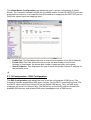
3.3.9 Configuration - Virtual Server Configuration
The Virtual Server Configuration page allows the user to set the configuration of Virtual
Server. The Conexant firmware includes the Free BSD version firewall. All UDP/TCP ports are
protected from intrusion. If any specific local PCs need to be mapped to the UDP/TCP port on
WAN side, please input the mappings here.
•
•
•
Public Port: This field allows the user to enter the port number of the Public Network.
Private Port: This field allows the user to enter the port number of the Private
Network.In most cases, the private port number is same as public port number.
Host IP Address: This field allows the user to enter the private network IP address for
the particular sever.
¡@
3.3.10 Configuration - DNS Configuration
The DNS Configuration page allows the user to set the configuration of DNS proxy.The
Conexant firmware supports the DNS proxy function. For the DHCP requests from local PCs,
the DHCP server will set the LAN port IP as the default DNS server. Thus, all DNS query
messages will come into LAN port first. The DNS proxy on the ADSL modem recorded the
available DNS servers, and forward DNS query messages to one of DNS server.
•
•
•
•
Disable DNS Proxy: The LAN port does not process the DNS query message. For the
DHCP requests from local PCs, the DHCP server will set the user-configured preferred
DNS sever or alternate DNS server whichever is available as the DNS server. Then all
DNS query messages will be directly sent to the DNS servers.
Use Auto Discovered DNS Servers Only: The DNS proxy will store the DNS server
IP addresses obtained from DHCP client or PPP into the table. And all DNS query
messages will be sent to one of the dynamically obtained DNS servers.
Use User Configured DNS Servers Only: The DNS proxy will use the user-configured
preferred DNS server and alternate DNS server. And all DNS query message will be
sent to one of DNS servers. Enter the DNS IP in the Preferred DNS Server and
Alternate DNS Server fields.
Auto Discovery + User Configured: The DNS proxy¡¦s table has all the IP addresses
of dynamically obtained and user configured DNS servers.
¡@
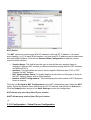
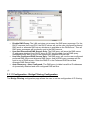
3.3.11 Configuration - Bridge Filtering Configuration
The Bridge Filtering configuration page allows the user to set the configuration of IP filtering.
•
•
•
Source MAC: When the bridge filtering is enabled, enter the Source MAC
address,select Block and click Add. Then all incoming WAN and LAN Ethernet
packets matched with this source MAC address will be filtered out. If the Forward is
selected, then the packets will be forwarded to the destination PC.
Destination MAC: When the bridge filtering is enabled, enter the Destination MAC
address, select Block and click Add. Then all incoming WAN and LAN Ethernet
packets matched with this destination MAC address will be filtered out. If the Forward
is selected, then the packets will be forwarded to the destination PC.
Type: Enter the hexadecimal number for the Ethernet type field in Ethernet_II packets.
For example, 0800 is for IP protocol.
¡@
3.3.12 Configuration - Save Settings
The Save Settings page allows the user to save the new configuration to the flash and reboot
the system.
When the configurations are changes via the Web pages, the new settings need to be saved
into the flash, so it is necessary to go to this Save Settings page to save and reboot the
system for the changes to be taken effect.
During the Save and Reboot, the following Web page will be displayed ¡§Your setting are
being saved and the modem is being rebooted. Please wait¡K.¡¨
After the Save and Reboot, the following Web page will be displayed ¡§Your setting have
been saved and the modem has rebooted.¡¨
¡@
3.3.13 Configuration - Reboot Only
The Reboot Only allows the user to reboot the system without save the new configuration to
the flash.
During the Reboot, the following Web page will be displayed ¡§The modem is being rebooted.
Please wait¡K.¡¨. After the Reboot, the following Web page will be displayed ¡§The modem
has rebooted.¡¨
¡@
3.3.14 Admin Privilege - WAN Status
The WAN Status page shows the information and status of WAN PVCs.
•
•
WAN: These fields display the IP address, Subnet Mask and MAC address for the
WAN (ADSL) interface.
DHCP Release and Renew: This field allows the user to release and renew the WAN
IP address in the WAN DHCP Client Enabled (dynamic) mode.
¡@
3.3.15 Admin Privilege - ATM Status
The ATM Status page shows all the statistics information of ATM cells.
•
Reset Counters: This button allows user to reset the ATM Status counter.
¡@
3.3.16 Admin Privilege - TCP Status
The TCP Status page shows the statistics for all TCP connections.
•
Reset Counters: This button allows user to reset the TCP Status counter.
¡@
3.3.17 Admin Privilege - Route Table
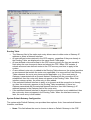
The Route Table page displays routing table and allows the user to manually enter the
routing entry. The routing table will display the routing status of Destination, Netmask,
Gateway, and Interface. The interface br0 means the USB interface; lo0 means the loopback
interface; and ppp1 means the PPP interface. The Gateway is the learned Gateway
Routing Table
•
•
•
•
•
•
The Gateway field of the static route entry allows users to either enter a Gateway IP
address or select a Network Interface.
All user-defined routes retained in the CPE memory, regardless if they are already in
the Routing Table, are displayed on the same Route Table page.
All user defined route entries kept in the CPE memory during run time are saved to
flash when the user chooses to save and reboot the CPE. When CPE restarts, it
reloads all saved user-defined routes to the CPE memory and tries to apply to the
system.
A user-defined route entry is added to the Routing Table whenever the system provides
an environment that makes the route entry applicable. It is removed from the Routing
Table whenever the route entry becomes not applicable. e.g. If the route entry¡¦s
Gateway is associated with a dynamic Network Interface but the connection is not
established, then the route entry does not appear in the Routing Table. When that
interface comes up later, the route entry is then added.
If the selected Network Interface is static or is dynamic and the connection is already
up, then the route entry appears in the Routing Table immediately. If there is a
Gateway associated with the selected Network Interface, then that Gateway¡¦s IP
address appears in the Gateway field of the route entry
If the selected Network Interface is dynamic but the connection is not established, then
the route entry does not appear in the Routing Table. When the interface comes up
later, the route entry is then added.
System Default Gateway Configuration
The system-wide Default Gateway now provides three options: Auto, User-selected Network
Interface, and None.
•
None: This field allows the user to choose to have no Default Gateway in the CPE
•
•
Auto: This field allows the user to select the CPE to automatically decide the Default
Gateway. (System Default)
User-selected Network Interface: This field allows user to select a Network Interface
from a list (PVCs, PPP Sessions, USB and LAN). This option lets the user to associate
the system-wide Default Gateway to a Network Interface, static or dynamic, and
provides a way to fix the Default Gateway to a dynamic Network Interface before the
interface is established.
Route Configuration
•
•
•
•
Destination: This field allows the user to enter the remote network or host IP address
for the static routing.
Netmask: This field allows the user to enter the Subnet Mask for the static routing.
Gateway: This field allows the user to enter the IP address of the gateway device that
allows the router to contact the remote network or the host for Specified IP or select an
Interface for the Gateway.
Manually Configured Routes: This field displays the static route entries entered by
the user.
¡@
3.3.18 Admin Privilege - Learned (Bridge) MAC Table
The Learned MAC Table page shows the current learned Bridge MAC table.
•
¡@
Aging Timeout: This field allows the user to enter the update period for the MAC table.
3.3.19 Admin Privilege - ADSL Configuration
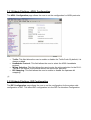
The ADSL Configuration page allows the user to set the configuration for ADSL protocols.
•
•
•
•
Trellis: This field allows the user to enable or disable the Trellis Code. By default, it is
always enabled.
Handshake Protocol: This field allows the user to select the ADSL handshake
protocol.
Wiring Selection: This field allows the user to enter the wiring selection for the RJ-11.
Tip/Rip is the default for the board without the inner/outer pair relay
Bit Swapping: This field allows the user to enable or disable the upstream bit
swapping.
¡@
3.3.20 Admin Privilege - RIP Configuration
The RIP Configuration page allows the user to set the configuration for the system wide
configuration of RIP. The actual RIP configuration is in the RIP Per Interface Configuration.
•
•
•
•
RIP: This field allows the user to Enable or Disable the RIP session. The resulting RIP
session will monitor all network interfaces that are currently available for messages
from other RIP routers.
Supplier Interval: This field allows the user to enter the Supplier Interval timer in
second. This timer specifies how often RIP sends announcements as a RIP
Supplier.(Default = 30 seconds)
Expire Timeout: This field allows the user to enter the Expire timer in second. This
timer specifies the expiration time of a route. When a route has not been updated for
more than ¡§expire¡¨ period of time, it is removed from the Route Table. This route is
invalidated and remains in the internal RIP Route Table. It will be included in the RIP
announcements to let other routers know the changes. (Default = 180 seconds)
Garbage Timeout: This field allows the user to enter the Garbage timer in second.
This timer specifies how long the expired and invalidated routes are kept in the Internal
RIP Route Table before it is removed from it. (Default = 120 seconds)
3.3.21 Admin Privilege - Password Configuration
1.Admin
The Admin Password Configuration page allows the user to set the password for
administrator.
The Admin password is same pas the FTP password, so it must has at least 8-characters for
the FTP to work.
2.User
The User Password Configuration page allows the user to set the password for the user.
¡@
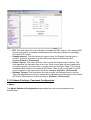
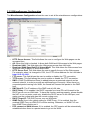
3.3.22 Miscellaneous Configuration
The Miscellaneous Configuration allows the user to set all the miscellaneous configurations.
•
•
•
•
•
•
•
•
•
•
•
•
•
HTTP Server Access: This field allows the user to configure the Web pages can be
accessed from.
All: When this field is checked, it allows both WAN and LAN access to the Web pages.
Restricted LAN: This field allows the Web pages access from LAN side.
Restricted WAN Specified IP & Subnet Mask: This field allows the Web access from
WAN side with a specify IP and subnet mask.
HTTP Server Port: This field allows the user to specify the port of the Web access. .
For example, when it is changed to 1001, the HTTP server address for the LAN side is
http://10.0.0.2:1001.
FTP server: This field allows the user to enable or disable the FTP connection.
TFTP server: This field allows the user to enable or disable the TFTP connection.
DMZ: A DMZ (De-Militarized Zone) is added between a protected network and an
external network, in order to provide an additional layer of security. When there is a
suspected packet coming from WAN, the firewall will forward this packet to the DMZ
host.
DMZ Host IP: The IP address of the DMZ host at LAN side.
DHCP Relay: If it is enabled, the DHCP requests from local PCs will forward to the
DHCP server runs on WAN side. To have this function working properly, please disable
the NAT to run on router mode only, disable the DHCP server on the LAN port, and
make sure the routing table has the correct routing entry.
DHCP Target IP: The DHCP server runs on WAN side.
IGMP Proxy: Here is the global setting for IGMP Proxy. If it is enabled, then the
enabled IGMP Proxy on WAN PVCs will be working. Otherwise, no WAN PVC can
have IGMP Proxy working on it.
PPP connect on WAN access: If it is enabled, the PPP session will be automatically
established when there is a packet wants to go out the WAN.
•
PPP Half Bridge: When the PPP Half Bridge is enabled, only one PC is able to
access the Internet, and the DHCP server will duplicate the WAN IP address from the
ISP to the local client PC. Only the PC with the WAN IP address can access the
Internet.
¡@
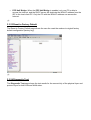
3.3.23 Reset to Factory Default
The Reset to Factory Default page allows the user the reset the modem to original factory
default configuration (factory.reg).
¡@
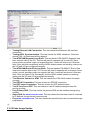
3.3.24 Diagnostic Test
The Diagnostic Test page shows the test results for the connectivity of the physical layer and
protocol layer for both LAN and WAN sides.
•
•
•
•
•
•
•
•
•
•
•
Testing Ethernet LAN Connection: This test checks the Ethernet LAN interface
connection.
Testing ADSL Synchronization: This test checks the ADSL showtime. If this test
returns FAIL, all other tests will be skipped.
Test ATM OAM Segment Loop Back: This test sends ATM OAM F5 Segment loop
back request cells to the CO. This test will pass if response cell is received. Since
some service providers might not support this test, it could still work even if this test
fails. If this test fails consistently and the ADSL modem seems not working, make sure
the VPI and VCI are configured correctly.
Test ATM OAM End-to-End Loop Back: This test sends ATM OAM F5 End to End
loop back request cells to the CO. This test will pass if response cell is received. Since
some r service providers might not support this test, it could still work even if this test
fails. If this test return FAIL consistently and the ADSL modem seems not working,
make sure the VPI and VCI are configured correctly.
Test Ethernet Connect to ATM: This test checks the ATM AAL5 module is loaded
correctly.
Test PPPoE Connection: This test checks the PPPOE connection.
Test PPP Layer Connection: This test checks the PPP authentication.
Test IP Connect to PPP: This test checks a valid IP address assigned from the
service provider.
Ping Primary DNS: This test checks the primary DNS can be reached through ping
request.
Query DNS for www.conexant.com: This test checks the host name can be resolved
to IP address though domain name servers
Ping www.conexant.com: This test checks the specified host can be reached through
ping request.
¡@
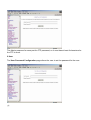
3.3.25 Code Image Update
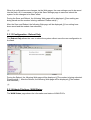
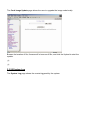
The Code Image Update page allows the user to upgrade the image code locally.
Browse the location of file, firmware.dlf or boorom.dlf file, and click the Upload to start the
update.
¡@
¡@
3.3.26 System Log
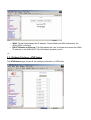
The System Log page shows the events triggered by the system.
¡@
•
•
Clear Log: This field allows the user to clear the current contents of the System Log.
Save Log: This field allows the user to save the current contents of the System Log by
right click HERE and select ¡§Save Target As¡¨ to save it into a text file.
Appendix A Glossary
Address mask
A bit mask used to select bits from an Internet address for subnet addressing. The mask is 32
bits long and selects the network portion of the Internet address and one or more bits of the
local portion. Sometimes called subnet mask.
AAL5
ATM Adaptation Layer - This layer maps higher layer user data into ATM cells, making the
data suitable for transport through the ATM network.
ADSL
Asymmetric digital subscriber line
ATM
Asynchronous Transfer Mode - A cell-based data transfer technique in which channel demand
determines packet allocation. ATM offers fast packet technology, real time, demand led
switching for efficient use of network resources.
AWG
American Wire Gauge - The measurement of thickness of a wire
A device connects two or more physical networks and forwards packets between them.
Bridges can usually be made to filter packets, that is, to forward only certain traffic. Related
devices are: repeaters which simply forward electrical signals from one cable to the other, and
full-fledged routers which make routing decisions based on several criteria.
Broadband
Characteristic of any network multiplexes independent network carriers onto a single cable.
Broadband technology allows several networks to coexist on one single cable; traffic from one
network does not interfere with traffic from another. Broadcast A packet delivery system where
a copy of a given packet is given to all hosts attached to the network. Example: Ethernet.
CO
Central Office. Refers to equipment located at a Telco or service provider's office.
CPE
Customer Premises Equipment located in a user's premises
DHCP (Dynamic Host Configuration Protocol)
DHCP is software that automatically assigns IP addresses to client stations logging onto a
TCP/IP network. DHCP eliminates having to manually assign permanent IP addresses to
every device on your network. DHCP software typically runs in servers and is also found in
network devices such as Routers.
DMT
Discrete Multi-Tone frequency signal modulation
Downstream rate
The line rate for return messages or data transfers from the network machine to the user's
premises machine.
DSLAM
Digital Subscriber Line Access Multiplex
Dynamic IP Addresses
A dynamic IP address is an IP address that is automatically assigned to a client station
(computer, printer, etc.) in a TCP/IP network. Dynamic IP addresses are typically assigned by
a DHCP server, which can be a computer on the network or another piece of hardware, such
as the Router. A dynamic IP address may change every time your computer connects to the
network.
Encapsulation
The technique used by layered protocols in which a layer adds header information to the
protocol data unit (PDU) from the layer above. As an example, in Internet terminology, a
packet would contain a header from the physical layer, followed by a header from the network
layer (IP), followed by a header from the transport layer (TCP), followed by the application
protocol data.
Ethernet
One of the most common local area network (LAN) wiring schemes, Ethernet has a
transmission rate of 10 Mbps.
FTP
File Transfer Protocol. The Internet protocol (and program) used to transfer files between
hosts.
Hop count
A measure of distance between two points on the Internet. It is equivalent to the number of
gateways that separate the source and destination.
HTML
Hypertext Markup Language - The page-coding language for the World Wide Web.
HTML browser
A browser used to traverse the Internet, such as Netscape or Microsoft Internet Explorer.
http
Hypertext Transfer Protocol - The protocol used to carry world-wide-web (www) traffic
between a www browser computer and the www server being accessed.
ICMP
Internet Control Message Protocol - The protocol used to handle errors and control messages
at the IP layer. ICMP is actually part of the IP protocol.
Internet address
An IP address is assigned in blocks of numbers to user organizations accessing the Internet.
These addresses are established by the United States Department of Defense's Network
Information Center. Duplicate addresses can cause major problems on the network, but the
NIC trusts organizations to use individual addresses responsibly. Each address is a 32-bit
address in the form of x.x.x.x where x is an eight- bit number from 0 to 255. There are three
classes: A, B and C, depending on how many computers on the site are likely to be
connected.
Internet Protocol (IP)
The network layer protocol for the Internet protocol suite
IP address
The 32-bit address assigned to hosts that want to participate in a TCP/IP Internet.
ISP
Internet service provider - A company allows home and corporate users to connect to the
Internet.
MAC
Media Access Control Layer - A sub-layer of the Data Link Layer (Layer 2) of the ISO OSI
Model responsible for media control.
MIB
Management Information Base - A collection of objects can be accessed via a network
management protocol, such as SNMP and CMIP (Common Management Information
Protocol).
NAT
Network Address Translation - A proposal for IP address reuse, where the local IP address is
mapped to a globally unique address.
NVT
Network Virtual Terminal
PAP
Password Authentication Protocol
PORT
The abstraction used by Internet transport protocols to distinguish among multiple
simultaneous connections to a single destination host.
POTS
Plain Old Telephone Service - This is the term used to describe basic telephone service.
PPP
Point-to-Point-Protocol - The successor to SLIP, PPP provides router-to-router and host-tonetwork connections over both synchronous and asynchronous circuits.
PPPoE
PPP over Ethernet is a protocol for connecting remote hosts to the Internet over an always-on
connection by simulating a dial-up connection.
Remote server
A network computer allows a user to log on to the network from a distant location.
RFC
Request for Comments - Refers to documents published by the Internet Engineering Task
Force (IETF) proposing standard protocols and procedures for the Internet. RFCs can be
found at www.ietf.org..
Route
The path that network traffic takes from its source to its destination. The route a datagram
may follow can include many gateways and many physical networks. In the Internet, each
datagram is routed separately.
Router
A system responsible for making decisions about which of several paths network (or Internet)
traffic will follow. To do this, it uses a routing protocol to gain information about the network
and algorithms to choose the best route based on several criteria known as "routing metrics".
routing table
Information stored within a router that contains network path and status information. It is used
to select the most appropriate route to forward information along.
Routing Information Protocol
Routers periodically exchange information with one another so that they can determine
minimum distance paths between sources and destinations.
SNMP
Simple Network Management Protocol - The network management protocol of choice for
TCP/IP-based Internet.
SOCKET
(1) The Berkeley UNIX mechanism for creating a virtual connection between processes.
(2) IBM term for software interfaces that allow two UNIX application programs to talk via
TCP/IP protocols.
Spanning-Tree Bridge Protocol (STP)
Spanning-Tree Bridge Protocol (STP) - Part of an IEEE standard. A mechanism for detecting
and preventing loops from occurring in a multi-bridged environment. When three or more
LAN's segments are connected via bridges, a loop can occur. Because a bridge forwards all
packets that are not recognized as being local, some packets can circulate for long periods of
time, eventually degrading system performance. This algorithm ensures only one path
connects any pair of stations, selecting one bridge as the 'root' bridge, with the highest priority
one as identifier, from which all paths should radiate.
Spoofing
A method of fooling network end stations into believing that keep alive signals have come
from and returned to the host. Polls are received and returned locally at either end
Static IP Addresses
A static IP address is an IP address permanently assigned to computer in a TCP/IP network.
Static IP addresses are usually assigned to networked devices that are consistently accessed
by multiple users, such as Server PCs, or printers. If you are using your Router to share your
cable or DSL Internet connection, contact your ISP to see if they have assigned your home a
static IP address. You will need that address during your Router's configuration.
Subnet
For routing purposes, IP networks can be divided into logical subnets by using a subnet mask.
Values below those of the mask are valid addresses on the subnet.
TCP
Transmission Control Protocol - The major transport protocol in the Internet suite of protocols
provides reliable, connection-oriented full-duplex streams.
TFTP
Trivial File Transfer Protocol - A simple file transfer protocol (a simplified version of FTP) that
is often used to boot diskless workstations and other network devices such as routers over a
network (typically a LAN).
Telnet
The virtual terminal protocol in the Internet suite of protocols - Allows users of one host to log
into a remote host and act as normal terminal users of that host.
Transparent bridging
So named because the intelligence necessary to make relaying decisions exists in the bridge
itself and is thus transparent to the communicating workstations. It involves frame forwarding,
learning workstation addresses and ensuring no topology loops exist (in conjunction with the
Spanning-Tree algorithm).
UDP
User Datagram Protocol - A connectionless transport protocol that runs on top of TCP/IP's IP.
UDP, like TCP, uses IP for delivery; however, unlike TCP, UDP provides for exchange of
datagrams without acknowledgments or guaranteed delivery. Best suited for small,
independent requests, such as requesting a MIB value from an SNMP agent, in which first
setting up a connection would take more time than sending the data.
UNI signaling
User Network Interface signaling for ATM communications.
Virtual Connection (VC)
A link that seems and behaves like a dedicated point-to-point line or a system that delivers
packets in sequence, as happens on an actual point-to-point network. In reality, the data is
delivered across a network via the most appropriate route. The sending and receiving devices
do not have to be aware of the options and the route is chosen only when a message is sent.
There is no pre-arrangement, so each virtual connection exists only for the duration of that
one transmission.
WAN
Wide area network - A data communications network that spans any distance and is usually
provided by a public carrier (such as a telephone company or service provider).¡@
¡@
Appendix B Cabling / Connection
Network cables connect PCs in an Ethernet network Category 5, called "Cat5" for short is
commonly used type of network cable today.
Cat 5 cables are tipped with RJ-45 connectors, which fit into RJ-45 port.
¡@
Straight-through vs. Crossover Cables:
Straight-through
Wire
Becomes
Crossover
Wire
Becomes
1
1
1
3
2
2
2
6
3
3
3
1
6
6
6
2
¡@
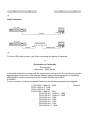
LAN Connection:
¡@
To check LEDs light up when you finish connecting two pieces of hardware.
¡@
Declaration of Conformity
The following
Equipment : ADSL Router
in herewith confirmed to comply with the requirements set out in the Council Directive on the
Approximation of the Laws of the Member States relating to Electromagnetic Compatibility
(89/336/EEC) and the amendments in the Council Directive 92/31/EEC,
93/68/EEC.
For the evaluation of above mentioned Directives, the following standards were applied :
1) EN 55022 : 1998+A1 : 2000
2) EN 61000-3-2 : 2000
3) EN 61000-3-3 : 1995
4) EN 55024 : 1998+A1 : 2001
EN 61000-4-2 : 1995+A1 : 1998
EN 61000-4-3 : 1996+A1 : 1998
EN 61000-4-4 : 1995
EN 61000-4-5 : 1995
EN 61000-4-6 : 1996
EN 61000-4-8 : 1993
EN 61000-4-11 : 1994
Class B
Testing Laboratory :
PEP TECHNOLOGIES LTD.
12FL-3, NO.27-1, LANE 169, KANG NING ST.,
HSI CHIH CITY, TAIPEI HSIEN, TAIWAN, R.O.C.
Declaration of Conformity
The following
Equipment : ADSL Router
in herewith confirmed to comply with the requirements set out in the Council Directive on
the harmonization of the Laws of the Member States relating to electrical equipment
designed for use within certain voltage limits (73/23/EEC).
For the evaluation of above mentioned Directives, the following standards were applied :
EN 60950 : 2000
Testing Laboratory :
PEP TECHNOLOGIES LTD.
12FL-3, NO.27-1, LANE 169, KANG NING ST.,
HSI CHIH CITY, TAIPEI HSIEN, TAIWAN, R.O.C.