1
360˚
Advantages:
Features:
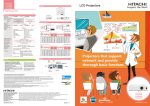
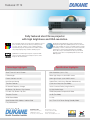
8112 CP-X2514WN
3,000 ANSI Lumens White/Color Output
LIGHT OUTPUT
3000
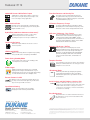
Transition Detector and Security Bar
A security sensor located inside the projector
recognizes when the projector has been moved.
Moving the projector without using the correct PIN
code will disable the projector.
3,000 lumens of white light output in conjunction
with equal color light output project bright, clear,
true to life images in any application.
LIGHT OUTPUT
2000:1 Contrast Ratio
Contrast can be automatically controlled through
an active iris to add depth perspective during both
bright and dark scenes.
Hybrid Filter (4,000 hours between maintenance)**
Dukane’s hybrid filter consists of a two-stage,
layered design and an electrostatic filter,
providing dust protection for up to 4,000 hours.
IR Remote Frequency Change
To avoid conflict with fluorescent lights or IrDA
(IR signal) from notebook PC, the frequency of the
IR remote control can be changed from the menu.
MyButton / MySource - Doc Camera
Two customizable buttons on the remote control
allow users to create a shortcut for any projector
command such as: Direct input (RGB1, S-video,
etc.), picture mode or filter reset. For connection to a
document camera, MySource allows users to add a
third document camera source button.
10 Watt Audio Output
10W audio output eliminates the need to connect
external speakers.
PIN Lock / MyScreen / MyText
PIN lock protection can limit projector users.
MyScreen PIN lock keeps captured images on the
startup screen. Users can set any name logo to
MyScreen, clearly identifying ownership. MyText
provides the ability to write text on the startup
screen such as model name, serial number or
location.
HDMI Input (HDCP)
Digital connectivity allows for highest image quality
from your HD device. Compliancy with HDCP.
Power Saving Standby Mode
Power saving mode reduces the standby power
consumption to less than 1W.
Template Function
Line templates in the projector menu can help when
writing on a whiteboard. There are four types of line
templates to choose from.
PJMessenger
PJMessenger function allows you to send and
display text messages and audio alerts on your
networked projectors. It is an easy and efficient way
to send announcements out to multiple units.
Whiteboard Mode
Limits the peak white by changing the gamma
curve limiting its brightness when used with a
whiteboard to protect the eye health of teachers
and students.
Present Content via LAN
Dukane’s suite of networking software allows you
to easily send content directly from your PC to the
projector via your LAN connection.
Input Source Naming
Users can name input sources in simple
language instead of factory default name.
Serial Number and MAC Address Label on Side
Serial #
A label is affixed to side of projector to more
easily access and read the model name and serial
number while mounted in ceiling use. This is a
convenience for installers, end user and auditors
for instant accessibility.
Easy Maintenance
Easy maintenance is another attractive function, as
the lamp door is on top of the model and the filter
slides to the front.
DUKANE CORPwww.dukane.com/av
Audio Visual Products Toll-free: 888-245-1966
2900 Dukane Drive
Fax: 630-584-5156
St. Charles, Illinois 60174 E-mail: [email protected]
* Actual lamp life will vary by individual lamp and based on environmental conditions, selected operating mode,
user settings and usage. Hours of average lamp life specified are not guaranteed and do not constitute part of
the product or lamp warranty. Lamp brightness decreases over time.
** Actual filter life will vary by individual filter and based on environmental conditions, selected operating mode,
user settings and usage. Hours of average filter life specified are not guaranteed and do not constitute part of
the product warranty.