1
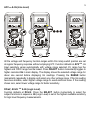
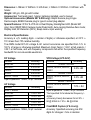
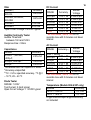
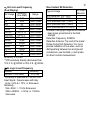
9 Electric Field EF-Detection Model 905 defaults at E.F. function. Models 906 & 907 default at oC. Press SELECT button momentarily 2 times to select E.F. function. The meter displays “E.F.” when it is ready. Signal strength is indicated as a series of bar-graph segments on the display plus variable beep tones. ●Non-Contact EF-Detection: An antenna is located along the top end of the meter, which detects electric field surrounding current-carrying conductors. It is ideal for tracing live wiring connections, locating wiring breakage and to distinguish between live or earth connections. ●Probe-Contact EF-Detection: For more precise indication of live wires, such as distinguishing between live and ground connections, use the Red (+) test probe for direct contact measurements. A, mA, and A Current functions Function defaults DC. Press SELECT button momentarily to select AC +Hz. Hz Input sensitivity varies automatically with current range selected. 600A range has the highest and 10A range has the lowest. Press SELECT button momentarily further select higher resolution Hz in main display. The display shows the selected current range for about one second before displaying Hz readings. Pressing the RANGE button momentarily repeatedly to display and select any other current range. If the Hz