1
GB
How to use your DEFA AutoSecurity alarm
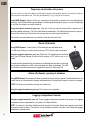
Using DEFA remote: Your DEFA AutoSecurity Alarm Module is activated using the
two buttons (A and B) on the remote control. The two buttons are easy to tell apart, as
button A is noticeably higher.
A B
Using the original remote for your car: The Alarm Module is operated with the lock/unlock button on the original remote control. When you have locked the car with the original
remote, the Alarm Module will be set to ON.
«Press» means that you press the button for a maximum of 1 second. «Hold» means that
you press the button for at least 2 seconds. Unlocking your car by using the key rather
than the remote, will not set the Alarm Module to off.
Alarm ON (arm)
Using DEFA Remote: Press button A. The flashlights are activated once to confirm that the alarm is
armed. The LED illuminates for 20 seconds and then starts to flash confirming that the alarm and the
Glassbreakage/Microwave sensor is activated.
Using the original remote for your car: Short press on the lock button. The flashlights are activated
once confirming that the alarm is armed. The LED illuminates for 20 seconds and then starts to flash, to
confirm that the alarm and the Glassbreakage/Microwave sensor is activated.
Alarm ON (arm), closing of power windows/ sun roof
Using DEFA Remote: Press button A. Keep it pressed until everything is closed. The Alarm Module is
armed, the car is locked and the power windows/sunroof is closing as long as the button is pressed.
NOTE. The function is available on some car models only, please contact your nearest DEFA dealer to
get more information.
Using the original remote for your car: The function is not possible.
29