1
BUTTON CONFIGURATION
There are 3 Functions that are triggered by 3 different button combinations on the Sound Bar.
Function
LED Behavior
Description
Factory
Reset
All 12 LEDs will
flash 3 times:
Reset the Sound Bar to the factory default settings. To perform a Factory Reset, Press and Hold
the Bluetooth( ) and Volume Down (—) buttons for 5 seconds.
Note: This will erase all settings and preferences that you have set.
VIZIO TV
Remote
Control
Enable VIZIO TV Remote:
Disable VIZIO TV Remote:
Enable Energy Star:
Energy Star
Disable Energy Star:
Enable/disable the use of a VIZIO TV remote control to power on and adjust the volume
of the sound bar. To enable/disable this function, Press and Hold the Power (
) and
Volume Up ( + )buttons for 5 seconds.
When the Energy Star setting is enabled, the sound bar will automatically power down after
a period of inactivity. When disabled, the sound bar will remain powered on until you turn
it off. To enable/disable this function, Press and Hold the Power (
) and Volume Down (—)
buttons for 5 seconds.
Note: Energy Star setting is enabled by default.
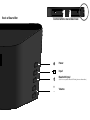
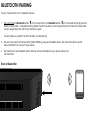
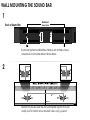
Back of Sound Bar
Power
Input
Bluetooth Input
+
-
Volume