1
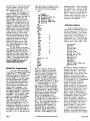
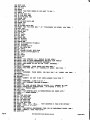
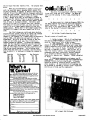
TI~~
U8288,82B1
8 1
8288 08 A9
8218 28 99
8228 3F 81
8238 08 C9
8248 59 F8
82S8 42 F8
8268 99 82
8278 10 B8
8288 A9 iF
8298 28 99
82Ae 38 87
82B8 FE 68
Mini-graphics
forttie 440
.Alpha display
Memory Requirements:
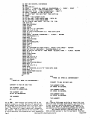
177 (dec) bytes; located from 0200 (hex) to
·02B1 (hex) zero page locations FO. FE. and FF. OSI
65V Monitor located at FE00 (hex); OSI 440 Video Board
at OXXX.
Program Control Functions:
When the program is initialized. the screen is
cleared and a ? is set at the lower left hand corner
of the screen. Typing any ASCII character will replace the? with that character. The ASCII symbol
is the mini-graphic "pen" and may be moved in any
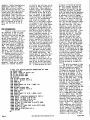
direction on the screen by pressing any of the following keys: T.Y.U.G.J.8.N.M. Considering H as the
Home Key. the control vectors are best described by
this diagram:
In addition to the vector control keys. the
program will also recognize the following command keys;
Carriage return: asks fo·r a new pen (?) at the
pen's current location. Any ASCII may be used.
# (number sign): re-1n1t1a11zes the screen
when the program is in the vector control mode.
,,(up arrow): replaces the pen at its current
location with an ASCII space. i.e •• blanks the pen.
Program Modification:
The location of the? on the screen at program
initialization may be changed by changing memory location 021C (hex) from 65 (hex) to another hex value.
If. for example. your screen is under-scanned. 83 (hex)
or even A3 (hex) may be more desirable. However. it
is not possible to move the initialization location
out of the lower part of. the screen with this modification.
If this program is to be called as a subroutine from another program. make the following
changes:
. location (hex)
0295
0296
0297
0298
data
current
A9
20
10
80
new
EA
EA
EA
60
(up arrow will now cause a return from subroutine.
The pen lift function may be replaced with CARRIAGE
RTN followed by SPACE. The four locations from 0295
(hex) to 0298 (hex) may. of course. be used for any
other function that you wish to control with A. subroutine calls. etc.
Page 20
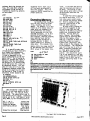
2
88
82
FE
3E
21
20
18
A9
28
82
98
08
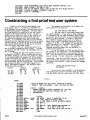
3 4
AA 83
A9 04
28 EO
F868
C9 55
C9 4E
C6 A9
FF 28
99 02
18 95
82 E6
83 23
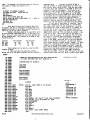
3
FE
CS
FE
C9
F8
F8
E8
99
18
A9
FF
4C
6
A9
FF
83
80
24
38
28
02
A3
28
4C
79
7
08
08
FO
F8
C9
C9
99
18
A9
18
AD
11
8
83
FS
81
E6
47
40
82
B1
28
80
82
B1
9
FF
C6
FE
29
F8
F8
18
A9
28
18
B8
24
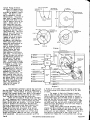
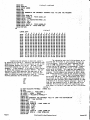
ABC
A9 28 83
FF A9 65
28 EO FE
7F C9 54
27 C9 4A
33 08 CO
BF A9 E1
81 28 99
99 82 18
48 63 FE
82 C6 FF
AA A8 68
0
FO
83
C9
F8
F8
A9
20
82
9C
83
A5
83
E
A9
FE
23
1E
2A
OF
99
10
A9
FE
FO
24
F
81
A9
F8
C9
C9
28
02
AA
21
68
81
~e
Program Relocation:
.
As stated in the memory requirements section.
the ASCII Mini-Graphics resides at 0200 (hex to 02B1
(hex). However. by changing nine subroutine calls
and one Jump Absolute. the program may reside at any
location. All affected Subroutine calls are "20 99
02". Their locations are (hex) 0210, 025F. 0266, 0260,
0274. 0278. 0282. 028,9. and 0290. The Jump Absolute.
"4C AD 0~' is located at 02A6 (hex). For example t . if
this program were relocated starting at 0700 (hex).
the Subrouti ne calls wou1 d become "20 99 07" and the
Jump Absol ute waul d become "4C AD 07". Note that
regardless of program location. zero page FO. FE. FF
will still be used.
PA[][]UCTnews
i
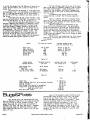
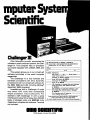
The Ohio Scientific Challenger III contains a
revolutionary new triple processor CPU board that can
run virtually all published software available today
for microprocessors at a very small cost increase over
comparable single processor computers. Equipped with
three microprocessors, Challenger III runs 6800. 6502,
8080 and Z-80 programs.
Challenger III comes· standard with the OS-650
Disk Operating System and is ideal for educational
applications. Students can study the three microprocessors for programming and engineering analysis.
Small business application is an ideal use
for the Challenger III. Businessmen can utilize software packages written for and of the three ,microprocessors while conducting everyday business functions
on the computer.
Industrial development is another area where
Challenger III can be utilized for the investigation
and comparison of the three processors. A 74 megabyte
disk option makes mass data storage a reality for the
experienced user.
Still another app1 ication of the Chall enger
III is for personal computing. The Personal Computing
enthusiast can experiment with the three processors
to no limit with software programs of all three types.
Personal finances. strategic games, home and business
applications are just a few of the Challenger III
appl ications.
Ohio Scientific's Small Systems Journal
August 1977