1
TM
For in vitro Diagnostic Use
Respiratory Samples
MycAssay Pneumocystis
®
Cepheid SmartCycler
2.2.2
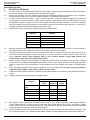
Insert the MycAssay Pneumocystis Myconostica Protocol CD-ROM and click on the Define Assays tab, and
Import the MycAssay Pneumocystis v3_1.sca file from the CD-ROM, as shown below:
2.2.3
Click on the Create Run tab. Enter an appropriate Run Name (it is recommended that this includes the date and
operators initials as a minimum), or leave blank if you wish the name to be created automatically by the software.
Select MycAssay Pneumocystis v3.1 as the assay.
Enter the Lot Number and Expiration Date of the kit as printed on the kit box and each pouch. The lot number
will be in the form of M-XXXXXXXX.
Enter the Patient (Sample) ID and the Number of specimens (replicates) in the appropriate boxes and click
Apply. Do this for all patient samples being tested. The software will automatically include a Negative and
Positive control in the Real-Time PCR run.
Carefully place the reaction tubes into the designated sites in the SmartCycler® block and click Start Run. N.B.
Take care when placing the reaction tubes into the designated sites as they may not be in the same order as your
set-up. Make a note of the run name and click OK. The run will now start and red lights will appear above each
site in use on the block.
2.2.4
2.2.5
2.2.6
2.2.7
To determine how long the run will take to complete, click on the Check Status tab. The run name and
subsequent run time will be listed.
3.
Data Analysis and Interpretation
3.1
3.2
3.3
The results can be viewed in Dx software, by selecting the View Results tab.
Click on the View Another Run button at the bottom of the page, select the run you wish to view then click OK.
The Patient Results should already be selected in the Views list. The patient (sample) ID and the subsequent
assay result will be clearly listed. The results can be interpreted using the table below:
Outcom
e
1
Patient
Result
Colour
Negative
Green
Interpretation
Further Action
Negative for
Report result
Pneumocystis
2
Positive
Red
Positive for
Report result
Pneumocystis
3
Invalid
Light Grey*
IAC failure in sample
Repeat sample
4
Invalid
Light Grey*
Failure in Positive or
Repeat entire run
Negative Control
*If the result is reported as ND, in light grey, this corresponds to error code 3079, the result of high fluorescence in one or
more channels. If a Ct value of ≤39.0 is recorded in the Pneumocystis channel, report as positive.
3.4
3.5
3.6
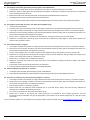
To view individual sample results (Ct values) for either Pneumocystis or IAC separately, select Sample Results
from the Views list and click on the individual tabs for each target (i.e. <Pne> or <IAC>). The results will be
displayed in the same format as the Patient Results but for each individual target.
If a Patient sample reports an Invalid result, this is due to a failed IAC result (indicated by Unresolved in the
Sample Results tab); repeat the reaction (plus Positive and Negative controls). If the reaction continues to fail, an
inhibiting substance may be present in the template and a Negative result cannot be relied upon.
The lower the Ct value the higher the probability of disease. Ct values close to the cut-off of 39.0 are more likely
to represent colonisation than infection, but some patients may have disease with very little P. jirovecii present,
representing a poor specimen, prior treatment or the nature of fungal load in that particular patient.
English–7
030-090 Version 3. 2 09NOV10