1
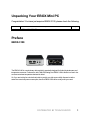
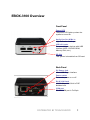
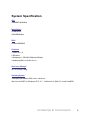
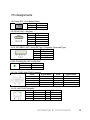
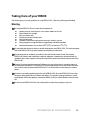
EBOX-3100 User’s Guide DISTRIBUTED BY TEXIM EUROPE Copyright The information in this manual is subject to change without notice for continuous improvement in the product. All rights are reserved. The manufacturer assumes no responsibility for any inaccuracies that may contain in this document, and makes no commitment to update or to keep current information contain in this manual. No part of this manual may be reproduced, copied, translated or transmitted, in whole or in part, in any form or by any means without the prior written permission of the DMP Electronics Inc. Copyright 2014 DMP Electronics Inc. Special Notice to Users DMP Electronics Inc. provides no warranty with regard to this manual, the software, or other information contained herein and hereby expressly disclaims any implied warranties of merchantability or fitness for any particular purpose with regard to this manual, the software, or such other information. In no event shall DMP Electronics be liable for any incidental, consequential, or special damages, whether based on tort, contract, or otherwise, arising out of or in connection with this manual, the software, or other information contained herein or the use thereof. DMP Electronics reserves the right to make any modification to this manual or the information contained herein at any time without notice. The software described herein is governed by the terms of a separated user license agreement or label sticker. This product contains software owned by DM&P and licensed by third parties. Use of such software is subject to the terms and conditions of license agreements enclosed with this product. Software specifications are subject to change without notice and may not necessarily be identical to current retail versions. Updates and additions to the software may require an additional charge. Subscription to online service providers may require a fee and credit card information. Financial services may require prior arrangements with participating financial institution. DISTRIBUTED BY TEXIM EUROPE Trademarks Acknowledgment The EBOX-3100 is the registered trademarks of DMP Electronics Inc. Other brand names, product names or trade names appearing in this document are the properties and registered trademarks of their respective owners. All names mentioned herewith are served for identification purpose only. DISTRIBUTED BY TEXIM EUROPE Safety Information WARNING Do not expose EBOX to rain or moisture, in order to prevent shock and fire hazard. Never install EBOX in wet locations. Do not open the cabinet to avoid electrical shock. Refer to your nearest dealer for qualified personnel servicing. Never touch un-insulated terminals or wire unless your power adapter and display monitor are disconnected. Locate EBOX as close as possible to the socket outline for easy access and to avoid force caused by entangling of your arms with surrounding cables from the EBOX. When using EBOX, avoid using or installing the modem to the serial port during a storm or a lightning. Do not use the modem or a telephone to report a gas leak in the vicinity of the leak. USB connectors are supplied with Limited Power Sources. DO NOT ATTEMPT TO OPEN OR TO DISASSEMBLE THE CHASSIS (ENCASING) OF THIS PRODUCT. PLEASE CONTACT YOUR NEAREST DEALER FOR SERVICING FROM QUALIFIED TECHNICIAN. DISTRIBUTED BY TEXIM EUROPE Regulatory FCC Class A Note This equipment has been tested and found to comply with the limits for a Class A digital device, pursuant to Part 15 of the FCC Rules. These limits are designed to provide reasonable protection against harmful interference when the equipment is operated in a commercial environment. This equipment generates, uses and can radiate radio frequency energy and, if not installed and used in accordance with the instruction manual, may cause harmful interference in which case the user will be required to correct the interference at his own expense. Testing was done with shielded cables. Therefore, in order to comply with the FCC regulations, you must use shielded cables with your installation. WARNING This product complies with EN55022 class A. In a domestic environment this product may cause radio interference in which case the user may be required to take adequate measures. Changes or modifications to this unit not expressly approved by the party responsible for compliance could void the user’s authority to operate the equipment. This device complies with Part 15 of the FCC rules. Operation is subject to the following two conditions: (1) this device may not cause harmful interference, and (2) this device must accept any interference received, including interference that may cause undesired operation. This digital apparatus does not exceed the Class A limits for radio noise emissions from digital apparatus as set out in the interference - causing equipment standard entitled “Digital Apparatus”, ICES-003 of the Department of Communications. Manufacturer’s Declaration of Conformity This equipment has been tested and found to comply with the requirements of European Community Council Directives 89/336/EEC and 73/23/EEC relating to electromagnetic compatibility and product safety respectively. Attention This product has been designed and certified to comply with certain regulatory requirements pertaining to Information Technology Equipment. This product has not been designed for use as a medical device. Without limitation of the foregoing, this product is not intended and has not been certified for use in a hospital or clinical environment to diagnose, treat, or monitor patients under medical supervision, and is not intended and has not been certified to make physical or electrical contact with patients, nor to transfer energy to or from patients and/or to detect such energy transfer to or from patients. DISTRIBUTED BY TEXIM EUROPE Purchase Agreement Purpose: In accordance to the general commercial conduct of Trust and Fair Trade, herewith below is the agreement for the protection for both parties, DMP and Users in pursuant of trading. Product Description: With this product, herewith also known as EBOX-3100, which is a simplified & an economical design of an embedded device for Special Purpose Computing. The basic specification of this product is comprised of the x86 technology design, and with onboard 512MB DDR3 System memory, USB, and LAN Interfaces. Distribution Convention: 1. This Product includes a gift box, an inner case, a PC. Upon receiving this product, kindly please refer to the User’ Manual to check for the contents and appearance of this product; contact immediately your nearest dealer or DMP office for any defective or missing parts. The supplier will not be responsible for any reported discrepancy there after the expiration period of 3-days from the date of purchase. 2. In consideration of transportation and the cost of storage, the supplier provides to the distributors a warranty of 12-months. This warranty covers the failure caused by hardware breakdown (excluding hard drives), but does not cover the act of misuse and mishandling. 3. The supplier will not accept unknown post, therefore if you wish to repair or to return your goods – kindly please contact your nearest dealer to make your declaration, and at the same time, apply for an RMA number (RMA stands for Return Merchandise Authorization – please ask for RMA form and fill-up for authorization). 4. The freight for return goods for repair will follow the International customary practice and convention: Both parties is to pay for freight of one shipment each. The shipper is required to prepay the freight from the place of origin (This means that the returnee (user) covers the freight for return goods, while the Supplier covers the freight for goods after the repair). 5. Obsolete warranty is referred to as: (1) Expiration of warranty or (2) Damage due to misuse within warranty. The Supplier will be taken into consideration of the circumstances, to provide repair service with charges expense for obsolete warranty. This expense includes the cost of material and the cost of labor. Note: If there is another particular issue not listed in the above conditions, both parties agreed to follow the General Law of Commerce with fair and reasonable discussion in handling and resolving the argument. DISTRIBUTED BY TEXIM EUROPE Contents Chapter 1 02 Unpacking your EBOX Mini PC Chapter 2 05 EBOX-3100 Overview 06 System Specifications 07 Peripherals Connecting Chapter 3 09 BIOS Reconfiguring Chapter 4 11 Technical Specifications Chapter 5 13 Onboard Connectors Summary 14 Pin Assignments Chapter 6 16 Taking Care Your EBOX 17 Cleaning Your EBOX 18 Troubleshooting Chapter 7 20 20 20 20 20 Terms and Condition Warranty Service and Support Return Merchandise Authorization (RMA) Policy Shipping Policy DISTRIBUTED BY TEXIM EUROPE Chapter 1 DISTRIBUTED BY TEXIM EUROPE 1 Unpacking Your EBOX Mini PC Congratulation! You have just acquired EBOX-3100, please check the following: Item No. 1 Description EBOX-3100 VESA PC Q’ty x1 Preface EBOX-3100 The EBOX-3100 is a revolutionary device which is especially designed for limited physical space and temperature concerns. Furthermore, with FANLESS design, the EBOX-3100 is ideal to be used in the environment where temperature demand is critical. So, if you are looking for a device that is able to provide you with more mobility & space but at the same time uses less power consumption, then the EBOX-3100 will be surely meet your need. DISTRIBUTED BY TEXIM EUROPE 2 Chapter 2 DISTRIBUTED BY TEXIM EUROPE 4 EBOX-3100 Overview Front Panel Power LED The power LED lights up when the system is turned on. Audio Line Out & Mic In High Defination Audio port. USB v2.0 ports For connection to devices with USB interface (HDD, CD/DVD-ROM, Memory Stick, etc.) SD Slot This system is bootable from SD card. Back Panel DC Power Jack Micro-USB B type interface Power switch To turn the power on or off. RJ-45 LAN Jack 10/100 Mbps LAN, Built-in PXE diskless boot. COM port RS-232 COM port in Full 9pin DISTRIBUTED BY TEXIM EUROPE 5 System Specification CPU Vortex86EX (400 MHz) Main Memory 512MB DDR3 (32-bit DRAM bus) BIOS Coreboot SEABIOS Peripheral 1. USB V2.0 x 2 2. SD slot x 1 3. Serial port x 1 (RS-232 COM port in full 9pin) 4. Audio port (Mic in x1 & Line out x 1) Dimension & Weight 78 x 78 x 28 mm / 208g Operating System Text-based user interface: DOS, Linux... and so on. We have the BSP for Windows CE 5, 6,7 , VxWorks 6.8, QNX 6.3.2 and FreeBSD. DISTRIBUTED BY TEXIM EUROPE 6 Peripherals Connecting the Power Adaptor DC Power Jack To use EBOX-3100 immediately, please attach the power connection. See the left diagram for visual connection. Connect the Micro-USB B type USB power connection to the DC Input of EBOX-3100. Turning ON EBOX-3100 Switch on power as indicated on your left-side figure, the system will start . Note: With the Auto Power On supported function, when power & switch on, the system will be turned on automatically. DISTRIBUTED BY TEXIM EUROPE 7 Chapter 3 DISTRIBUTED BY TEXIM EUROPE 8 BIOS Reconfiguring 1. Under Windows OS ( such as Win 7, Win XP XPe..) , you may use PuTTY via COM to COM cable as console redirection. (Note: PuTTY is a free and open-source terminal emulator, serial console and network file transfer application. Please download here). 2. Select connection type as serial and set the speed of the COM port that you connected with. (EBOX standard COM port speed is 1152000). 3. SEA BIOS is used in the EBOX-3100. To reconfigure the EBOX-3100, press or hit the <F12> key to enter your BIOS setup main menu as below: DISTRIBUTED BY TEXIM EUROPE 9 Chapter 4 DISTRIBUTED BY TEXIM EUROPE 10 Technical Specification Model Type Processor BIOS Memory Ethernet USB (2.0) Audio SD Slot I/O RS-232 Auto Power On Power Dimensions Unit Net Weight Operation Temp. Certifications Note EBOX-3100 Vortex86EX (400MHz) AMI BIOS Onboard 512MB DDR3 10/100 Mbps LAN x 1 (RJ-45 connector, Built-in PXE diskless boot) External: 2 ports (Front x 2) Mic in and Line out 1x 1x Yes DC +5V @ 0.45A 78 x 78 x 28 mm 208g 5 ~ 50 ℃ CE, FCC, VCCI RS-232 COM port in Full 9pin Ordering Information: EBOX-3100: Standard Version DISTRIBUTED BY TEXIM EUROPE 11 Chapter 5 DISTRIBUTED BY TEXIM EUROPE 12 Onboard Connectors Summary Summary Table for CPU Board Nbr Description Type of Connections Pin nbrs. J1 SODIMM--200P-EX SODIMM socket 200 Pin 200-pin J2 Power Switch Power Switch 4-pin J3 DC 5V Input Micro USB B Type 1-pin J4 USB2 (Front) USB Connector 8-pin J5 SD card slot Standard: 32.0×24.0×2.1 mm 9-pin J6 USB1 (Front) USB Connector 8-pin J7 Ethernet LAN RJ-45 8-pin J8 COM port (Back) Box Header 5x2 2.0mm 10-pin J9 Line-Out Audio Jack 2-pin J10 Mic-In Audio Jack 2-pin Front Connectors Outline SD Slot USB Min In/ Line Out Power & HDD LED *EBOX 3100 Model is with Auto Power On feature, do NOT have front Reset Button Rear Connectors Outline RJ-45 LAN DC power Serial Ports Power Switch DISTRIBUTED BY TEXIM EUROPE 13 Pin Assignments J16: Power SW – Push Button Switch Switch Right Left Status ON OFF J15: DC-IN (15V) – 2pin Jack Pin # 1 2 3 4 5 Signal Name +5 V Input Data − Data + ID GND o J5, J6, J8: USB2.0 (180 ) : 4pin USB Type 1 Connector (Horizontal Type) Pin # 1 2 3 4 Signal Name VCC Data − Data + GND LEDS: POWER ON / OFF & HDD R/W LED Color Green Green Flashes State Power On HDD R/W J13, J14 : COM - 9pin D-Sub Connector Pin # 1 3 5 7 9 Signal Name DCD1 TXD1 GND RTS1 RI1 Pin # 2 4 6 8 -- Signal Name RXD1 DTR1 DSR1 CTS1 -- J9, J10: LAN: RJ-45 Connector Pin # 1 3 5 7 Signal Name Pin # Signal Name FTXD+ 2 FTXDFRXIN+ 4 NC NC 6 FRXINNC 8 NC DISTRIBUTED BY TEXIM EUROPE 14 Chapter 6 DISTRIBUTED BY TEXIM EUROPE 15 Taking Care of your EBOX This section gives you some guidelines on using EBOX-3100 – Safe using, Storing and Handling. Storing Do not place EBOX-3100 in a location that is subjected to: Heating sources, such as stove, oven, heater, radiator or air duct Direct contact from sunlight Rain or moisture area Excessive dust accumulation area High humidity place Constant or occasional mechanical movement, vibration or shock Strong magnets or magnetic fields or magnetically unshielded speakers Ambient temperature of more than 122oF (50oC) or less than 41oF (5oC) Do not place other electronic device or electrical equipment near EBOX-3100. The electromagnetic field of the EBOX-3100 may cause interference subjecting to malfunction. Provide adequate air ventilation (circulation) to prevent internal buildup of heat. Do not place EBOX-3100 near the wall, behind the curtains or draperies, in between two books that block its ventilation slots. Leave a space of at least 8 inches (20cm) behind the sides and back panel of the EBOX-3100. Change of environmental temperature: Problems may occur when there is a sudden change of environmental temperature, or if the EBOX-3100 is brought directly from a cold location to a warm one, moisture may condense inside EBOX-3100. Turn off the device, and contact your nearest dealer. Check the surrounding appliance(s) before using EBOX-3100. Since the EBOX-3100 uses highfrequency radio signal and may interface with radio or TV reception causing interference or poor signal display. When this happens, relocate the EBOX-3100 by a suitable distance away from the set.. Do not drop the EBOX-3100 from the working table nor place heavy objects on top of it.. DISTRIBUTED BY TEXIM EUROPE 16 Using Cables for Connection To avoid the problem, use only the specified interface cables in your accessory bag. The supplier will not be responsible for the connection arising from the other unspecified peripheral equipment. Do not use cut or damaged cables for connection. Cleaning Your VESA PC Clean the VESA PC with a soft, dry cloth or a soft cloth lightly moistened with a mild detergent solution. Do not use any type of abrasive pad, scouring powder, or solvent such as alcohol or benzene, as these may damage the finish of EBOX. When a solid object falls or a liquid spills onto the EBOX, turn off the EBOX immediately and unplug the LAN and power cables. Contact a qualified person or your dealer to check the EBOX before you use it again. Always disconnect the power cord from the power source before cleaning the EBOX. DISTRIBUTED BY TEXIM EUROPE 17 Troubleshooting This section describes the techniques of resolving some basic problems that you encounter when using EBOX-3100. For more troubleshooting guidelines, please contact your nearest dealer for technical support. Troubleshooting Your VESA PC A. VESA PC does not start Make sure the EBOX-3100 is properly secured and plugged into power connection before it is turned on. Make sure the power indicator shows the power is on. See section 2 for more information about “EBOX-3100 Overview”. When the EBOX-3100 is plugged into a power strip or the UPS (Uninterruptible Power Supply), make sure the power strip or UPS is turned on and working normally. Check if your power control button does not function, by removing the power connection. Wait for one minute, and then reattach the power connection before turning on the power. Condensation may cause the EBOX-3100 to malfunction for a while. If this happens, do not use the EBOX-3100 for at least one hour. When you have checked all the above guidelines and the EBOX-3100 does not work. Remove the power connection from the EBOX-3100, unplug and plug it in again. Then turn on the power. B. “Operating System Not Found” – A message indicating that “Operating system not found” appear when the VESA PC starts Enter the BIOS setup main menu by pressing <F12> key, be sure that the correct boot drive is enabled. If Windows still does not start, follow these steps to initialize the BIOS: 1. Turn off the EBOX-3100. 2. Remove any peripheral devices connected to the EBOX-3100. 3. Restart the EBOX-3100. 4. Press <F12> to enter BIOS Setup main menu window. 5. Select the boot up storage (SD card or the USB drive) If you have just connected EBOX-3100 to a CD/DVD or USB Drivers, remove these peripherals. And restart to confirm that the operating system starts properly. If EBOX-3100 continues to display the message ”Operating system not found,” and OS does not start, please contact your nearest dealer for servicing. DISTRIBUTED BY TEXIM EUROPE 18 Chapter 7 DISTRIBUTED BY TEXIM EUROPE 19 Terms and Conditions Warranty The warranty terms for EBOX-3100 are twelve (12) months from the shipped month. During the warranty period, DMP Electronics Will repair replace the product covered under this limited warranty. Service and Support DMP Electronics Inc. provides the technical support for hardware problems with your system throughout the warranty period. The technical support service is limited to configuration and operation of EBOX-3100 sold by DMP Electronics Inc. The technical support service does not offer software tutoring or training. Return Merchandise Authorization(RMA)policy If the DMP staff or dealer determines that a part is defective. Purchaser must call our technical support service to obtain an RMA number before attempting to return any part. To obtain an RMA number, Purchaser must follow procedures as below: 1. Complete the DMP Electronics Inc. standard RMA Form and fax back to the RMA Department. 2. The RMA Number must be used within 7 DAYS 3. The RMA Number must be shown clearly on your shipping label. 4. DMP Electronics Inc. must receive all Returns before a replacement will be sent. 5. The repair cost depends on the parts, the damage reasons, and whether under warranty period… etc. The Seller will charge the Purchaser in a reasonable price. 6. A copy of the invoice for the RMA product(s) will also be shipped to Purchaser. 7. The freight of return to DMP Electronics Inc. is charged to the Purchaser's account and accompanied by an RMA number. Any Returns with freight collect will be refused and returned to you. After Repairing, the cost of freight will be paid by Seller. 8. DMP Electronics Inc. must receive all returned goods within the warranty period. Shipping Policy The Purchaser must pre-pay shipping for any defective system or parts returned under the warranty. DMP Electronics Inc. shall not be liable for risk of loss or damage during shipment of your returned system or parts if you fail to insure the shipment. All products must be shipped back to DMP Electronics Inc. in original or equivalent packaging. DMP Electronics Inc. will ship the repaired or replacement product(s) to the Purchaser by freight prepaid. The purchaser assumes the risk of loss. DMP Electronics Inc. shall not be responsible for failure of the delivery service to make on-time delivery. DISTRIBUTED BY TEXIM EUROPE 20 Partner in Electronic Components & Supply Chain Solutions The Netherlands Denmark Elektrostraat 17 NL-7483 PG Haaksbergen Tel: +31 (0)53 573 33 33 Fax: +31 (0)53 573 33 30 [email protected] Nørregade 15 DK-9240 Nibe Tel: +45 88 20 26 30 Fax: +45 88 20 26 39 [email protected] Belgium United Kingdom Gentsesteenweg 1154-C22 Chaussée de Gand 1154-C22 B-1082 Brussel / Bruxelles Tel: +32 (0)2 462 01 00 Fax: +32 (0)2 462 01 25 [email protected] St. Mary’s House, Church Lane Carlton Le Moorland Lincoln LN5 9HS Tel: +44 (0)1522 789 555 Fax: +44 (0)845 299 22 26 [email protected] Germany Germany Justus-von-Liebig-Ring 7-9 D-25451 Quickborn Tel: +49 (0)4106 627 07-0 Fax: +49 (0)4106 627 07-20 [email protected] Martin-Kollar-Strasse 9 D-81829 München Tel: +49 (0)89 436 086-0 Fax: +49 (0)89 436 086-19 [email protected] Austria Warwitzstrasse 9 A-5020 Salzburg Tel: +43 (0)662 216026 Fax: +43 (0)662 216026-66 [email protected] Texim Europe B.V. Elektrostraat 17 NL-7483 PG Haaksbergen Tel: +31 (0)53 573 33 33 [email protected] www.texim-europe.com