1
·
During the installation process all occurring security warnings can be
confirmed with 'OK'.
·
During the installation process your Audionet device has to be connected with your PC via an USB cable.
·
After successful installation you can choose your DNC as the sound
device / playback device of your PC. For configuration open the system preferences of your PC.
·
Pay attention to the length of the USB cable. If the cable is too long
you might diminish sound quality and / or experience dropouts during
playback.
5.3.3
FM Antenna Connection
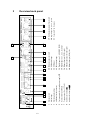
Your device has an F-series connector 13 for antenna connection. An
adaptor to coaxial socket is delivered separately. This port is specified for
75 Ohm FM antenna or analog cable TV connection.
5.3.4
Audionet Link
For your convenience, the DNC can be switched on/off by other Audionet units (e.g. power amplifiers) connected via Audionet Link by a simple
touch on the remote control or the power key on the front panel.
You only need a simple optical TosLink cable. Connect the Audionet
Link input Link IN 8 of your DNC to the Audionet Link output of the
controlling unit.
The DNC is equipped with an Audionet Link input Link IN 8 and an
Audionet Link output Link OUT 9 . The DNC is a slave device. Connect
the Audionet master device to Link IN 8 , other Audionet slave devices
can be connected to Link OUT 9 . Thus the switching signal will be
passed along.
Tip
·
Audionet source units and power amplifiers are usually equipped not
only with an Audionet Link input, but additionally with an Audionet
Link output to connect further Audionet devices to be controlled via
Audionet Link in a daisy chain. Connect this Audionet Link output to
the Audionet Link input of the next Audionet unit using a simple optical TosLink cable allowing you to switch on/off your complete
Audionet system by your Audionet master unit.
Important
·
For the DNC to be controlled via Audionet Link, menu item Poweroff mode within the Global Setup menu has to be set to Quick
Start (see section 8.2.3 - Power-off mode on page 39).
15