1
OmniSTAR 8400HP User Manual
Additional Features and Information
This section contains information on the additional features of the 8400HP
receiver and an explanation of the Led functions.
Sleep Mode
In sleep mode, the power board and Bluetooth module will continue to draw
power from the batteries, causing the batteries to drain over time. Follow these
steps to put the 8400HP into sleep mode:
1.
2.
3.
Turn on your receiver.
Press and hold the receiver’s power key for more than four seconds
and less than eight seconds. The STAT LED will be orange. The
receiver enters Sleep Mode.
Any activity on the RS232 port will turn the receiver on.
If you press and hold the power key for more than 14 seconds, it will
be ignored. This protects receiver operation against stuck keys.
Put the receiver in Zero Power Mode to prevent the draining of the battery.
Zero Power Mode
When your receiver is off, even in Sleep Mode, the power board will continue
to draw power from the batteries. This means that if you fully charge your
receiver, turn it off and store it, the receiver will drain its battery power in less
than two months. To stop the power board from draining the batteries, you can
put your receiver in Zero Power Mode:
1. Turn on your receiver.
2. Press and hold the power key for more than 8 seconds, but less
than 14 seconds.
3. Release the power key when the STAT and REC LED''s all become
red. When the LED's turn off, your receiver will be in Zero Power
Mode.
4. Press the Reset key for about one second to return to Normal mode.
When the internal batteries have completely discharged and no
external power is connected, the receiver will go into Zero Power
Mode automatically to prevent the batteries from over discharging.
Status Indicators
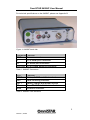
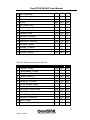
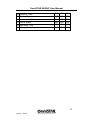
The 8400HP has LED indicators that provide the status of the 8400HP. See
Table 2: 8400HP LED indicators on page 3.
7
Issue 2.1, 07/05