1
 TracTronix TF 100 Timing Systems
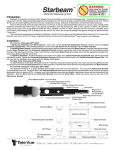
General Setup Instructions: Important: It is highly recommended that fresh, high quality batteries be used for best performance and reliability with this timing system. Discharged or weak batteries will result in reduced wireless and/or infrared transmission distances, erratic results, or complete system inoperability. Always have a fresh spare set of batteries available. 1. Install batteries in each unit. 2. Attach IR receiver and IR emitter to tripods using the standard tripod mount hole located on the bottom of each unit. (Tripods are optional. However, they do help for faster setup and beam alignment ‐ particularly with lens equipped units. Units can optionally be placed on top of any flat, level surface that provides proper alignment of the beam(s). ) program that you want to use by pressing the Mode button. The Start/Stop program is selected for you automatically on power up. Set the IR receiver in place directly across from where the IR emitter is located and make sure the unit is level with the ground and the antenna is pointing upright. Problem: When I press the power 3. Turn on IR emitter. Choose high 4. Turn on IR receiver. Choose the 5. If you have a dual or multi‐beam system repeat steps 3 and 4 for each beam, making sure that each IR receiver has the proper program selected for its location (only necessary on multi‐beam systems where split times will be recorded in which case you will want to select the SPLIT TIME program). (When installing batteries in either the IR receiver or IR emitter please observe correct battery orientation as indicated in the bottom of the battery compart‐ ment of each unit.) power or low power by pressing the Mode button. High power is for longer IR distances while low power if shorter distances and save battery life. Set the IR emitter in place on the track and make sure it is level with the ground and pointing in the direction of where the IR receiver will be placed. Solution: This may be a problem on really sunny days when the sun is low in the sky. The reason is because the sun produces intense infrared light which the IR receiver is seeing instead of the modulated infrared light the IR emitter is sending out. Try rearranging the IR receiver so it is pointing away from the sun and the IR emitter is pointing towards the sun. This will minimize the interference from the sun. The green Beam Alignment LED indicator should turn off. If it remains on it indicates that the infrared beam is
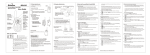
NOT established. In that case you must adjust the position of the IR receiver either side to side or up and down until the beam alignment LED goes off indicating that the IR receiver “sees” the IR emitter and an infrared gate has been established. 6. Turn on the RF receiver and wait until the LCD screen displays “Timer Is Ready” with lap count at zero and timer displaying all zeros. Test the RF receiver to make sure it is getting signals from the IR receiver by walking through the beam that was established in step 4. The timer should start running as soon as you pass through the beam. If this happens then congratulations your timing system is now set up and ready to be used. Troubleshooting: Most issues involving infrared or radio frequency transmission distances can be resolved by replacing the batteries with new high quality alkaline (Duracel© or Energizer©) batteries. Freshly charged rechargeable Ni‐Cd or Ni‐Mh batteries will also work satisfactorily. Problem: You have new batteries installed but the beam will not stay established when the units are more than a few yards apart. button the unit goes off but then comes right back on. Solution: This is generally a sign that your batteries need to be replaced. Try replacing them with new batteries and then powering the unit on and off again. This can also be a problem if you press the power button for more than a few seconds. Problem: Sometimes the LCD screen on the RF receiver gets locked up or displays incorrect data when started or stopped. Solution: Though rare this does occur sometimes due to disruptions in the radio frequency signal from the IR receiver(s). This is usually caused by RF interference in or around the area where the timing event is performed. Try to eliminate any possible sources of stray RF signals in the area. Problem: I pushed the MODE button too many times and now the program is stuck in the Auxiliary program. Solution: Please see the other side of this sheet for instructions on using each feature of the individual TF100 units. If none of these solutions solve your problem(s) please contact technical support by phone at (816)668‐1559 or email at [email protected] TracTronix TF100 Features and Specs IR Emitter: The IR emitter has only two modes ‐ low power and high power. When the unit is first powered on it enters the default low power mode. This is indicated visually by the LOW POWER LED coming on and staying lit continuously. By pressing the mode button the unit will switch to high power and with the corresponding HI POWER LED becoming lit and the LOW POWER LED turning off. You can switch back to the low power state again by simply pushing the mode button one more time. Low power mode consumes almost half as much power as the hi power mode which results in much longer battery life. IR Receiver: The IR receiver has three different programs to choose from. Use the MODE button to cycle through them. Start/Stop ‐ This program will either start or stop the timer each time the infrared beam is broken. In a dual beam system you would use this program for both the starting line and the finishing line. In a single beam system this program works as both the starting line and finishing line. Split Time ‐ This program will cause the RF receiver to capture a split time if the timer has already been started. Though it does not serve a purpose in a single beam system it can be used in a dual beam system by using one beam as the starting and finishing line and the other beam as the split time beam. This will only work on a closed loop course. A closed loop course would not be required if used in a multi‐beam system. Auxiliary ‐ This is where any custom programs would be located in the event that one has been requested by the customer and programmed at the factory. By default it leaves the factory with a program that allows the user to use the unit as a remote control for the RF receiver. When in Auxiliary mode the user can press the mode button and the Beam Alignment LED with light up. Upon releasing the mode button the timer will start or stop. This feature works well for “touchpad” applications in track & field or any other application where a contestant breaks the beam to start the timer but a coach or referee observing the contestant needs to stop the timer remotely. To exit this mode and return to the start/stop program the user needs to press and hold the Mode button and then the Power button. Release them both at the same time and the unit is back in the Start/Stop program. RF Receiver: The RF receiver tracks and stores all contestant times. It will store up to 10 lap times and 4 split times. The split times are only stored until the next lap is started at which time the previous split times will be lost. Start/Stop ‐ Use this button to manually start or stop the timer. Split ‐ Us this button to manually capture a split time while the timer is running. This will allow the user to capture a split time even if they do not have enough beams to make a full multi‐beam system. Clear ‐ Press once momentarily to zero out the timer (lap times will remain stored). Press and hold for 3 seconds to completely clear the timer and all stored lap times. Recall ‐ Repeatedly pressing this button will allow the user to scroll through stored lap times. If the current lap had multiple split times it will scroll through those first and then proceed to scroll through previous lap times. Specifications: Infrared Range: Low Power without lens ~ 60 ft. High Power without lens ~ 90 ft. Low Power with lens ~ 145 ft. High Power with lens ~ 250 ft. Wireless RF Range: Line of site with limited RF interference ~ 600 ft. Wireless Frequency: Center frequency 433.9 Mhz Bandwidth 1.3 Mhz Wireless Transmission Time: Elapsed RF transmission time per triggered event ‐ 250 milliseconds Time Accuracy: ‐/+ 0.001 second @ 85° F* *Temperatures excessively hot or cold can cause accuracy to differ by larger ratios due to fluctuations in operation of internal high accuracy crystal oscillator. Batteries: RF receiver ‐ 1 9V IR Receiver ‐ 2 AA IR Emitter ‐ 2 AA It is recommended that you remove batteries from units when not in use for long periods.