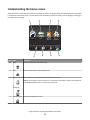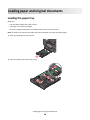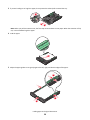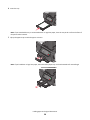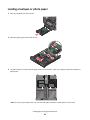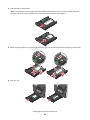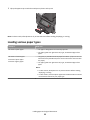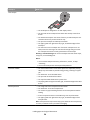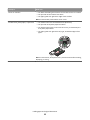
1
Pro800 User's Guide November 2010 Machine type(s): 4444 Model(s): 201, 20E www.lexmark.com Contents Safety information.......................................................................................6 About your printer.......................................................................................7 Thank you for choosing this printer!.........................................................................................................7 Minimizing your printer's environmental impact......................................................................................7 Finding information about the printer......................................................................................................8 Understanding the parts of the printer...................................................................................................10 Ordering and replacing supplies.................................................................13 Ordering ink cartridges............................................................................................................................13 Using genuine Lexmark ink cartridges.....................................................................................................13 Replacing ink cartridges..........................................................................................................................14 Ordering paper and other supplies.........................................................................................................15 Recycling Lexmark products....................................................................................................................15 Using the printer control panel buttons and menus....................................16 Using the printer control panel...............................................................................................................16 Understanding the home screen.............................................................................................................17 Navigating menus using the touch screen..............................................................................................18 Changing the Power Saver timeout.........................................................................................................19 Saving paper and energy with Eco-Mode................................................................................................20 Resetting to factory settings...................................................................................................................20 Using the printer software.........................................................................21 Minimum system requirements..............................................................................................................21 Using the Windows printer software......................................................................................................21 Using the Macintosh printer software....................................................................................................23 Finding and installing optional software.................................................................................................25 Updating the printer software................................................................................................................25 Reinstalling the printer software.............................................................................................................26 Loading paper and original documents.......................................................28 Loading the paper tray............................................................................................................................28 Loading envelopes or photo paper.........................................................................................................31 Loading various paper types...................................................................................................................33 Contents 2 Saving paper default settings..................................................................................................................36 Loading original documents on the scanner glass...................................................................................37 Loading original documents into the ADF...............................................................................................37 Printing......................................................................................................38 Tips for printing.......................................................................................................................................38 Printing basic documents........................................................................................................................38 Printing specialty documents..................................................................................................................42 Working with photos...............................................................................................................................44 Printing from a Bluetooth-enabled device..............................................................................................49 Printing on both sides of the paper (duplexing)......................................................................................53 Managing print jobs................................................................................................................................56 Copying......................................................................................................60 Tips for copying.......................................................................................................................................60 Making copies.........................................................................................................................................60 Copying photos........................................................................................................................................61 Copying an ID card...................................................................................................................................61 Copying a two-sided document...............................................................................................................61 Enlarging or reducing images..................................................................................................................62 Adjusting copy quality.............................................................................................................................62 Making a copy lighter or darker..............................................................................................................62 Collating copies using the printer control panel.....................................................................................63 Repeating an image on one page............................................................................................................63 Copying multiple pages on one sheet ....................................................................................................63 Making a duplex copy..............................................................................................................................64 Canceling copy jobs.................................................................................................................................65 Scanning....................................................................................................66 Tips for scanning......................................................................................................................................66 Scanning to a local or network computer...............................................................................................66 Scanning to a flash drive or memory card...............................................................................................67 Scanning photos into an editing application...........................................................................................67 Scanning documents into an editing application....................................................................................69 Scanning directly to e-mail using the printer software...........................................................................70 Scanning to a PDF....................................................................................................................................70 Scanning FAQ...........................................................................................................................................71 Contents 3 Canceling scan jobs.................................................................................................................................72 E-mailing....................................................................................................73 Setting up the printer to e-mail...............................................................................................................73 Creating an e-mail contact list.................................................................................................................74 Sending e-mail.........................................................................................................................................76 Canceling an e-mail.................................................................................................................................78 Networking................................................................................................79 Installing the printer on a wireless network............................................................................................79 Advanced wireless setup.........................................................................................................................84 Installing the printer on an Ethernet network........................................................................................93 Networking FAQ......................................................................................................................................94 Using SmartSolutions...............................................................................106 What is SmartSolutions?.......................................................................................................................106 Creating and customizing printer solutions..........................................................................................107 Maintaining the printer............................................................................109 Maintaining ink cartridges.....................................................................................................................109 Cleaning the exterior of the printer......................................................................................................111 Cleaning the scanner glass....................................................................................................................112 Cleaning the touch screen.....................................................................................................................112 Troubleshooting.......................................................................................113 Before you troubleshoot.......................................................................................................................113 Using the Service Center to solve printer problems..............................................................................113 If Troubleshooting does not solve your problem..................................................................................113 Setup troubleshooting...........................................................................................................................113 Jams and misfeeds troubleshooting......................................................................................................119 Print troubleshooting............................................................................................................................122 Copy and scan troubleshooting.............................................................................................................124 E-mail troubleshooting..........................................................................................................................126 Memory card troubleshooting..............................................................................................................127 Network troubleshooting......................................................................................................................129 Notices.....................................................................................................147 Product information..............................................................................................................................147 Contents 4 Edition notice........................................................................................................................................147 Power consumption..............................................................................................................................150 Index........................................................................................................162 Contents 5 Safety information Connect the power cord to a properly grounded electrical outlet that is near the product and easily accessible. Do not place or use this product near water or wet locations. Use only the power supply and power cord provided with this product or the manufacturer's authorized replacements. CAUTION—SHOCK HAZARD: Make sure that all external connections (such as Ethernet and telephone system connections) are properly installed in their marked plug-in ports. This product is designed, tested, and approved to meet strict global safety standards with the use of specific manufacturer's components. The safety features of some parts may not always be obvious. The manufacturer is not responsible for the use of other replacement parts. CAUTION—POTENTIAL INJURY: Do not cut, twist, bind, crush, or place heavy objects on the power cord. Do not subject the power cord to abrasion or stress. Do not pinch the power cord between objects such as furniture and walls. If any of these things happen, a risk of fire or electrical shock results. Inspect the power cord regularly for signs of such problems. Remove the power cord from the electrical outlet before inspecting it. Refer service or repairs, other than those described in the user documentation, to a professional service person. CAUTION—SHOCK HAZARD: To avoid the risk of electric shock when cleaning the exterior of the printer, unplug the power cord from the wall outlet and disconnect all cables from the printer before proceeding. CAUTION—POTENTIAL INJURY: The area behind the duplex cover has protruding ribs as part of the paper path. To avoid injury, use caution when accessing this area for clearing a paper jam. SAVE THESE INSTRUCTIONS. Safety information 6 About your printer Thank you for choosing this printer! We've worked hard to make sure it will meet your needs. To start using your new printer right away, use the setup materials that came with the printer, and then skim the User’s Guide to learn how to perform basic tasks. To get the most out of your printer, read the User’s Guide carefully, and make sure you check the latest updates on our Web site. We're committed to delivering performance and value with our printers, and we want to make sure you're satisfied. If you do encounter any problems along the way, one of our knowledgeable support representatives will be delighted to help you get back on track fast. And if you find something we could do better, please let us know. After all, you are the reason we do what we do, and your suggestions help us do it better. Minimizing your printer's environmental impact We are committed to protecting the environment and are continually improving our printers to reduce their environmental impact. By selecting certain printer settings or tasks, you may be able to reduce your printer's environmental impact even further. Conserving energy • Activate Eco-Mode. This feature sets the screen brightness to low and sets the printer to change to Power Saver mode after the printer is left idle for 10 minutes. • Select the lowest Power Saver timeout. The Power Saver feature puts the printer in a minimum-power standby mode after the printer has been idle for a set amount of time (the Power Saver timeout). • Share your printer. Wireless/network printers allow you to share a single printer among multiple computers, thus conserving energy and other resources. Conserving paper • Activate Eco-Mode. On selected printer models, this feature sets the printer to automatically print on both sides of the paper (duplex) for copy and fax jobs, and for printing in Windows and Mac OS X 10.6 or later. • Print more than one page image on one side of the paper. The “Pages per sheet” feature allows you to print multiple pages on one sheet. You can print up to 8 page images on one side of a sheet of paper. • Print on both sides of the paper. Duplexing lets you print on both sides of the paper manually or automatically (depending on your printer model). • Preview print jobs before printing. Use the preview features found in Toolbars, the Print or Print Preview dialog, or the printer display (depending on your printer model). • Scan and save. To avoid printing multiple copies, you can scan documents or photographs and save them to a computer program, application, or flash drive for presentation. • Use recycled paper. About your printer 7 Conserving ink • Use Quick Print or Draft Mode. These modes can be used to print documents using less ink than normal and are ideal for printing documents that are mostly text. • Use High Yield cartridges. Inks in High-Yield cartridges allow you to print more pages with fewer cartridges. • Clean the printhead. Before replacing and recycling your ink cartridges, try using the “Clean Printhead” and “Deep Clean Printhead” features. These features clean the printhead nozzles to improve the quality of your prints. Recycling • Return ink cartridges for reuse or recycling through the Lexmark Cartridge Collection Program. To return an ink cartridge, go to www.lexmark.com/recycle. Follow the instructions to request a postage-paid bag. • • • • Recycle the product packaging. Recycle your old printer instead of throwing it away. Recycle paper from discarded print jobs. Use recycled paper. To read the Lexmark Environmental Sustainability Report, see www.lexmark.com/environment. Finding information about the printer Publications What are you looking for? Find it here Initial setup instructions: Setup documentation • Connecting the printer • Installing the printer software The setup documentation came with the printer and is also available on the Lexmark Web site at http://support.lexmark.com. About your printer 8 What are you looking for? Find it here Additional setup and instructions for using the printer: User's Guide • Selecting and storing paper and specialty media • Loading paper • Performing printing, copying, scanning, and faxing tasks, The User's Guide is available on the installation software CD. depending on your printer model • • • • Configuring printer settings Viewing and printing documents and photos Setting up and using printer software Setting up and configuring the printer on a network, depending on your printer model For updates, check our Web site at http://support.lexmark.com. • Caring for and maintaining the printer • Troubleshooting and solving problems Creating and customizing printer solutions, depending on your printer model SmartSolutions User's Guide and Help Go to http://smartsolutions.lexmark.com. Click the User's Guide link to view basic SmartSolutions information, or click ? to view context-sensitive information. Help using the printer software Windows or Mac Help Open a printer software program or application, and then click Help. Click ? to view context-sensitive information. Notes: • The Help installs automatically with the printer software. • The printer software is located in the printer Program folder or on the desktop, depending on your operating system. The latest supplemental information, updates, and online technical support: • • • • • • Lexmark Support Web site— http://support.lexmark.com Troubleshooting hints and tips Note: Select your region, and then select your product to view the appropriate support site. Record the following information (located on the store receipt and the back of the printer), and have it ready when you contact support so that they may serve you faster: Frequently asked questions Documentation Driver downloads Live chat support E-mail support • • • • Machine Type number Serial number Date purchased Store where purchased About your printer 9 What are you looking for? Find it here Telephone support In the US, call us at: 1-800-332-4120 Monday–Friday (8:00 AM–11:00 PM ET), Saturday and Sunday (11:00 AM–8:00 PM ET) Support telephone numbers and hours of operation for your region or country can be found on the Support Web site (http://support.lexmark.com) or on the printed warranty that came with your printer. Warranty information Warranty information varies by country or region: • In the US—See the Statement of Limited Warranty included with this printer, or at http://support.lexmark.com. • Rest of the world—See the printed warranty that came with your printer. Understanding the parts of the printer 1 2 3 4 5 6 7 12 8 11 10 9 Use the To 1 Scanner lid Access the scanner glass. 2 Scanner glass Scan and copy photos and documents. 3 Automatic Document Feeder (ADF) Scan, copy, or fax multiple-page letter-, legal-, and A4-size documents. 4 ADF tray Load original documents in the ADF. Recommended for scanning, copying, or faxing multiple-page documents. Note: Do not load postcards, photos, small items, or thin media (such as magazine clippings) into the ADF. Place these items on the scanner glass. About your printer 10 5 Use the To ADF paper guide Keep paper straight when feeding it into the ADF. Note: Adjust the paper guide on the ADF tray to the width of the original document. 6 ADF output tray Hold documents as they exit from the ADF. 7 Wi-Fi indicator Check wireless status. 8 Memory card slot Insert a memory card. 9 PictBridge and USB port Connect a PictBridge-enabled digital camera, a USB Bluetooth adapter, or a flash drive to the printer. 10 Printer control panel Operate the printer. 11 Paper tray Load paper. 12 Paper exit tray Hold paper as it exits. 3 4 1 2 5 6 7 Use the To 1 Scanner unit 2 Ink cartridge access Install, replace, or remove ink cartridges. 3 Ethernet port Connect your printer to a computer, a local network, an external DSL, or a cable modem. 4 USB port Connect the printer to a computer using a USB cable. • Access the ink cartridges and printhead. • Remove paper jams. Warning—Potential Damage: Do not touch the USB port except when plugging in or removing a USB cable or installation cable. 5 Power supply with port Connect the printer to a power source. 6 Duplex unit • Print on both sides of a sheet of paper. • Remove paper jams. About your printer 11 7 Use the To Printhead access Install the printhead. Note: The carrier moves to the printhead access area when no printhead is installed in the printer. About your printer 12 Ordering and replacing supplies Ordering ink cartridges Page yields available at www.lexmark.com/pageyields. For best results, use only Lexmark ink cartridges. Lexmark Pro800 Series models Item Return Program Cartridge1 Regular cartridge2 Black cartridge 100 100A High yield black cartridge 100XL, 105XL 100XLA Yellow color cartridge 100 100A High yield yellow color cartridge 100XL 100XLA Cyan color cartridge 100 100A High yield cyan color cartridge 100XL 100XLA Magenta color cartridge 100 100A High yield magenta color cartridge 100XL 100XLA 1 Licensed for a single use only. After use, return this cartridge to Lexmark for remanufacturing, refilling, or recycling. 2 Available only on the Lexmark Web site at www.lexmark.com. Using genuine Lexmark ink cartridges Lexmark printers, ink cartridges, and photo paper are designed to perform together for superior print quality, and our inks are formulated to work with your printer and help extend the life of your product. We recommend that you use only genuine Lexmark ink cartridges. Lexmark's warranty does not cover damage caused by non-Lexmark ink or ink cartridges. Ordering and replacing supplies 13 Replacing ink cartridges Make sure you have a new ink cartridge or cartridges before you begin. You must install new cartridges immediately after removing the old ones or the ink remaining in the printhead nozzles may dry out. 1 Turn on your printer. 2 Open the printer. 2 Note: The printhead moves to the cartridge installation position. 3 Press the release tab, and then remove the used ink cartridge or cartridges. 1 2 4 Install each ink cartridge. Use two hands to install the black cartridge. Note: Install the new ink cartridges immediately after removing the protective cap to avoid exposing the ink to air. 5 Close the printer. Ordering and replacing supplies 14 Ordering paper and other supplies To order supplies or to locate a dealer near you, visit our Web site at www.lexmark.com. Item Part Number USB cable 1021294 For more information, go to www.lexmark.com. Paper Paper size Lexmark Photo Paper Lexmark PerfectFinish Photo Paper • • • • Letter • • • • Letter A4 4 x 6 in. L A4 4 x 6 in. L Notes: • Availability may vary by country or region. • For best results when printing photos or other high-quality images, use Lexmark Photo Paper or Lexmark PerfectFinishTM Photo Paper. • For more information, go to www.lexmark.com Recycling Lexmark products To return Lexmark products for recycling: 1 Visit our Web site at www.lexmark.com/recycle. 2 Find the product type you want to recycle, and then select your country or region from the list. 3 Follow the instructions on the computer screen. Note: Printer supplies and hardware not listed in a Lexmark collection program may be recycled through your local recycling center. Contact your local recycling center to determine the items they accept. Ordering and replacing supplies 15 Using the printer control panel buttons and menus Using the printer control panel The following diagrams explain the sections of the printer control panel: Note: The icons are displayed when they are selectable on the current screen. If an icon is not displayed, then the function is not available. 3 2 1 7 6 5 Use 1 4 To Power • Turn the printer on and off. • Switch to Power Saver mode. Note: When the printer is on, press to switch to Power Saver mode. Press and hold for three seconds to turn off the printer. 2 Back • Return to the previous screen. • Exit from one menu level to a higher one. 3 Touch screen display • Navigate the printer menus. • Change settings. • View printer messages and animation. Note: The display is turned off in Power Saver mode. 4 Start Start a job, depending on which mode is selected. 5 Cancel Cancel the current job or task. 6 Help Display Help text and animation. 7 Home Return to the home screen. Using the printer control panel buttons and menus 16 Understanding the home screen After the printer is turned on and a short warm-up period occurs, the display shows the following basic screen which is referred to as the home screen. Use the home screen selections to initiate an action, such as copying or scanning, or to change printer settings. 1 2 3 4 A Copy Scan Memory Device Smart Solutions 12 8 Display item 1 7 6 5 Description Copy Access the copy menu and make copies. A A 2 Scan Access the scan menu and scan documents. 3 Memory Device View, select, print, or attach photos and documents to e-mail. Note: This icon appears only when you return to the home screen while a memory card, flash drive, or PictBridge-enabled camera is connected to the printer. or PictBridge 4 SmartSolutions Open the SmartSolutions menu. Using the printer control panel buttons and menus 17 Display item Description 5 Ink levels 6 Setup Access the setup menu and change printer settings. 7 2-Sided Print on both sides of a sheet of paper. 1 8 • Display the current ink levels of the installed tanks. • Access cartridge maintenance and information functions. 2 Eco-Mode Activate Eco-Mode to select the following options: • Print on both sides of the paper (duplex). • Change to Power Saver mode after the printer is left idle for 10 minutes. • Set screen brightness to low. Navigating menus using the touch screen 1 PREVIEWING PHOTOS 2 3 Accept PAPER TYPE Accept Auto Detect Plain Matte Photo Transparency 6 Use To 1 Left arrow Scroll left. 2 Right arrow Scroll right. 3 Accept 5 Save your setting. Using the printer control panel buttons and menus 18 4 Use To 4 Down arrow Scroll down. 5 Scrollbar Scroll up and down the menu list. 6 Up arrow Scroll up. To navigate using the touch screen: • Drag the scrollbar or touch the arrows until the menu or setting that you want appears on the display. • To confirm a setting or select a menu or item, touch it. • If necessary, touch Accept, OK, or after making a selection or changing a setting. This saves the setting. For example, to navigate to Paper Type and change the paper type setting: 1 Touch . Note: All the instructions in this guide start from the home screen. 2 Touch Copy. 3 Touch More Options. 4 Scroll down (using the scrollbar or arrows) until Paper Type appears on the list. 5 Touch Paper Type. 6 Scroll up or down (using the scrollbar or arrows) to view the list of paper types. 7 Select a paper type setting by touching it, and then touch Accept to save the setting. Changing the Power Saver timeout The Power Saver timeout is the time it takes for the printer to switch to Power Saver mode when the printer is left idle. The Power Saver feature optimizes energy efficiency by reducing the printer power consumption (as much as 28 percent on some printer models) compared to the default printer settings. To save the most energy, select the lowest Power Saver timeout. 1 From the home screen, navigate to Power Saver: > Device Setup > Power Saver 2 Select a Power Saver timeout, and then touch Accept. Using the printer control panel buttons and menus 19 Saving paper and energy with Eco-Mode The Eco-Mode feature significantly cuts paper usage, reduces paper waste, optimizes energy efficiency, and saves money. 1 From the home screen, touch . 2 Touch the Eco-Mode setting or settings you want to activate, and then touch Accept. • Power Saver after 10 Minutes • Screen Dim • 2-Sided Printing Note: If you select 2-Sided Printing, then the printer prints on both sides of the paper (duplex) for copy and fax jobs, and for printing in Windows. Resetting to factory settings Resetting to factory default settings will delete all the printer settings you have previously selected. 1 From the home screen, touch , and then touch Use Factory Defaults. 2 Touch Yes. 3 When prompted to set the initial settings of your printer, make your selections using the touch screen. Using the printer control panel buttons and menus 20 Using the printer software Minimum system requirements The printer software requires up to 500MB of free disk space. Supported operating systems • • • • • • • • • * Microsoft Windows 7 (Web only)* Microsoft Windows Vista (SP1) Microsoft Windows XP (SP3) Microsoft Windows 2000 (SP4 or later) Macintosh PowerPC OS X version 10.3.9 to 10.6 Macintosh Intel OS X version 10.4.4 to 10.6 Linux Ubuntu 8.10 and 8.04 LTS (Web only)* Linux openSUSE 11.1 and 11.0 (Web only)* Linux Fedora 10 (Web only)* The printer driver for this operating system is available only at http://support.lexmark.com. Using the Windows printer software Software installed during printer installation When you set up the printer using the installation software CD, all the necessary software was installed. You may have chosen to install some additional programs. The following table provides an overview of various software programs and what they can help you do. If you did not install these additional programs during initial installation, then reinsert the installation software CD, run the installation software, and then select Install Additional Software from the Software Already Installed screen. Using the printer software 21 Printer software Use the LexmarkTM Printer Home (referred to as Printer Home) Lexmark Fast Pics To • • • • • • • • • • • Launch applications or programs. Access the Fax Solutions software. Scan or e-mail a photo or document. Edit scanned documents. Scan documents to PDF. Adjust settings for the printer. Order supplies. Maintain ink cartridges. Print a test page. Register the printer. Contact technical support. Manage, edit, transfer, and print photos and documents. (referred to as Fast Pics) Lexmark Toolbar (referred to as Toolbar) Lexmark Tools for Office • • • • Print black or text-only Web pages to save ink. Schedule automatic printing of Web pages. Access Picnik and edit photos online. Print, scan, or convert local files from Windows. Access your favorite settings in Microsoft Office 2007. (referred to as Tools for Office) Lexmark Fax Solutions (referred to as Fax Solutions) Abbyy Sprint OCR Lexmark Wireless Setup Utility (referred to as Wireless Setup Utility) • • • • Send a fax. Receive a fax in three-in-one printers. Add, edit, or delete contacts in the built-in phone book. Access the Lexmark Fax Setup Utility in four-in-one printers. Use the Fax Setup Utility to set the Speed Dial and Group Dial numbers, set Ringing and Answering, and print fax history and status reports. Scan a document and produce text that you can edit with a word-processing program. • Set up the wireless printer on a wireless network. • Change the wireless settings of the printer. Note: This program is installed automatically with the printer software if the printer has wireless capability. Lexmark Service Center (referred to as Service Center) • Troubleshoot the printer. • Access the printer maintenance functions. • Contact technical support. Notes: • This program is installed automatically with the printer software. • You may be prompted to install this program from the Web, depending on your printer model. Using the printer software 22 Use the To Printing Preferences When you select File Print with a document open and then click Properties, a Printing Preferences dialog appears. The dialog lets you select options for the print job, such as the following: • • • • • • Select the number of copies to print. Print two-sided copies. Select the paper type. Add a watermark. Enhance images. Save settings. Note: Printing Preferences is installed automatically with the printer software. Note: Your printer may not come with some of these programs or some of the functions of these programs, depending on the features of the printer that you purchased. Using the Macintosh printer software Software installed during printer installation Applications are installed along with the printer software during installation. 1 From the Applications folder in the Finder, or from the Finder desktop, double-click the printer folder. 2 Double-click the application that you want to use. Use the To Print dialog Adjust the print settings and schedule print jobs. Note: With a document or photo open, choose File > Print to access the Print dialog. Printer Services dialog (not available in Mac OS X version 10.5 or later) Scan Center (in Mac OS X version 10.6) • • • • • Access the printer utility. Troubleshoot. Order ink or supplies. Contact Lexmark. Check the printer software version installed on the computer. • Scan photos and documents. • Customize settings for scan jobs. or Lexmark All-In-One Center (in Mac OS X version 10.5 or earlier) (referred to as All-In-One Center) Printer Settings (in Mac OS X version 10.6) • Customize settings for fax jobs. • Create and edit the Contacts list. or Lexmark AIO Setup Utility (in Mac OS X version 10.5 or earlier) (referred to as AIO Setup Utility) Using the printer software 23 Use the To Network Card Reader (in Mac OS X version 10.6) • View the contents of a memory device inserted into a network printer. or Lexmark Network Card Reader (in Mac OS X version 10.5 or earlier) • Transfer photos and PDF documents from a memory device to the computer over a network. (referred to as Network Card Reader) Lexmark Printer Utility (not available in Mac OS X version 10.6) (referred to as Printer Utility) Wireless Setup Assistant (in Mac OS X version 10.6) • • • • • • • Get help with cartridge installation. Print a test page. Print an alignment page. Clean the printhead nozzles. Order ink or supplies. Register the printer. Contact technical support. Set up the printer on a wireless network. or Note: This application is automatically installed with the printer Lexmark Wireless Setup Assistant (in Mac OS X version 10.5 software if the printer has wireless capability. or earlier) (referred to as Wireless Setup Assistant) Uninstaller Remove the printer software from your computer. Note: Your printer may not come with these applications, depending on the features of the printer that you purchased. Web Links Web Links are links to predefined Web pages. In Mac OS X version 10.6 1 From the Finder, navigate to: Applications > select your printer folder > Web Links 2 Double-click the Web Link that you want to visit. In Mac OS X version 10.5 or earlier 1 From the Finder desktop, double-click the printer folder. 2 Double-click the Printer Utility icon. 3 From the Web Links tab, select the link you want to visit. Use To Customer Support Contact technical support. Lexmark Software Updates Download and install the latest printer software. Lexmark Online Visit the Lexmark Web site. Order Supplies Online Order ink or supplies. Printer Registration Register your printer. Using the printer software 24 Use To Visit Lexmark SmartSolutions • Visit the SmartSolutions Web site. • Choose your custom solutions. Note: Your printer may not come with these Web Links, depending on the features of the printer that you purchased. Finding and installing optional software For Windows users 1 Click or Start. 2 Click All Programs or Programs, and then select the printer program folder from the list. 3 Navigate to: Printer Home > select your printer > Support tab > On-line support 4 From the Web site, select your printer and then download the driver. 5 Install additional or optional software. For Macintosh users In Mac OS X version 10.6 1 From the Finder, navigate to: Applications > select your printer folder > Web Links > Lexmark Software Updates 2 From the Web site, select your printer and then download the driver. 3 Install additional or optional software. In Mac OS X version 10.5 or earlier 1 From the Finder desktop, double-click the printer folder. 2 Double-click the Printer Utility icon. 3 From the Web Links tab, click Customer Support. 4 From the Web site, select your printer and download the driver. 5 Install additional or optional software. Updating the printer software Checking for software updates For Windows users 1 Click or Start. 2 Click All Programs or Programs, and then select the printer program folder from the list. Using the printer software 25 3 Navigate to: Printer Home > select your printer > Support tab > Check for Software Updates 4 Follow the instructions on the computer screen. For Macintosh users In Mac OS X version 10.6 1 From the Finder, navigate to: Applications > select your printer folder > Web Links > Lexmark Software Updates 2 From the Web site, select your printer and then download the driver. In Mac OS X version 10.5 or earlier 1 From the Finder desktop, double-click the printer folder. 2 Double-click the Printer Utility icon. 3 From the Web Links tab, click Customer Support. 4 From the Web site, select your printer and then download the driver. Enabling automatic software updates (Windows only) 1 With a document open, click File > Print. 2 Click Properties, Preferences, Options, or Setup. 3 Navigate to: Advanced tab > More Options > Allow automatic updates from the web for my software > OK Reinstalling the printer software When you set up the printer using the installation software CD, all the necessary software was installed. If you encountered problems while installing, or if your printer does not appear in the Printers folder or as a printer option when you send a print job, then try removing and reinstalling the printer. Uninstalling the printer software For Windows users 1 Click or Start. 2 Click All Programs or Programs, and then select the printer program folder from the list. 3 Select the uninstall option. 4 Follow the instructions on the computer screen to remove the software. 5 Once the uninstall process in complete, restart your computer. Using the printer software 26 For Macintosh users 1 From the Applications folder in the Finder, or from the Finder desktop, double-click the printer folder. 2 Double-click the Uninstaller icon. 3 Follow the instructions on the computer screen to remove the software. Installing the printer software Note: If you installed the printer software on this computer before but need to reinstall the software, then uninstall the current software first. For Windows users 1 Close all open software programs. 2 Insert the installation software CD. If the Welcome screen does not appear after a minute, then launch the CD manually: a Click , or click Start and then click Run. b In the Start Search or Run box, type D:\setup.exe, where D is the letter of your CD or DVD drive. 3 Follow the instructions on the Welcome screen. For Macintosh users 1 Close all open software applications. 2 Insert the installation software CD. If the installation dialog does not appear after a minute, then click the CD icon on the desktop. 3 Double-click Install. 4 Follow the instructions on the installation dialog. Using the Internet 1 Go to the Lexmark Web site at www.lexmark.com. 2 Navigate to: Downloads > Driver Finder > select your printer > select your operating system 3 Download the driver and install the printer software. Note: Updated printer software may be available at http://support.lexmark.com. Using the printer software 27 Loading paper and original documents Loading the paper tray Make sure: • You use paper designed for inkjet printers. • The paper is not used or damaged. • If you are using specialty paper, you follow the instructions that came with it. Note: To avoid jams, make sure the paper does not buckle when you adjust the paper guides. 1 Pull tray completely out of the printer. 2 Move the paper guides to the sides of tray. 1 2 3 Loading paper and original documents 28 3 If you are loading A4- or legal-size paper, then squeeze the tab and pull to extend the tray. 1 2 Note: When you pull the extension out, the first stop accommodates A4-size paper. When the extension is fully out, it accommodates legal-size paper. 4 Load the paper. 5 Adjust the paper guides to rest gently against the left, right, and bottom edges of the paper. 1 2 3 Loading paper and original documents 29 6 Insert the tray. Note: If you extended the tray to accommodate A4- or legal-size paper, then the tray sticks out from the front of the printer when inserted. 7 Flip up the paper stop to catch the paper as it exits. Note: If you loaded A4- or legal-size paper, then extend the paper stop. Use both extenders for A4 and legal. Loading paper and original documents 30 Loading envelopes or photo paper 1 Pull tray completely out of the printer. 2 Move the paper guides to the sides of tray. 1 2 3 3 Use the envelope icon and the photo paper outline on the bottom of the tray to help you position envelopes or photo paper. Note: Do not mix paper types in the tray. You can load either envelopes or photo paper, but not both. Loading paper and original documents 31 4 Load envelopes or photo paper. Note: Load envelopes or photo paper with the printable side facedown. (If you are not sure which side is the printable side, then see the instructions that came with the envelopes or photo paper.) 5 Adjust the paper guides to rest gently against the left, right, and bottom edges of the envelopes or photo paper. 1 1 3 2 3 6 Insert the tray. Loading paper and original documents 32 2 7 Flip up the paper stop to catch the envelopes or photos as they exit. Note: For best results, allow photos to dry at least 24 hours before stacking, displaying, or storing. Loading various paper types Load up to 150 sheets of plain paper Make sure • The paper is designed for use with inkjet printers. • The paper guides rest against the left, right, and bottom edges of the paper. 100 sheets of coated paper 25 sheets of photo paper 25 sheets of glossy paper • The glossy or printable side of the paper faces down. (If you are not sure which side is the printable side, then see the instructions that came with the paper.) • The paper guides rest against the left, right, and bottom edges of the paper. Notes: • For best results, allow photos to dry at least 24 hours before stacking, displaying, or storing. • For best results, load more photo paper than needed but do not exceed the maximum amount for your paper type. Loading paper and original documents 33 Load up to Make sure 10 envelopes • The envelopes are designed for use with inkjet printers. • The print side of the envelopes faces down with the flap to the left as shown. • You load the envelopes in the center of the tray as indicated by the icon. Load them all the way to the back of the tray. • You print the envelopes in landscape orientation. • The paper guides rest against the left, right, and bottom edges of the envelopes. • You select the correct envelope size. If the exact envelope size is not listed, select the next larger size. Set the left and right margins so that the envelope text will be correctly positioned on the envelope. Warning—Potential Damage: Do not use envelopes that have metal clasps, string ties, or metal folding bars. Notes: • Do not load envelopes with holes, perforations, cutouts, or deep embossing. • Do not use envelopes that have exposed flap adhesive. 25 sheets of labels • You use full label sheets. Partial sheets (with areas exposed by missing labels) may cause labels to peel off during printing, resulting in a paper jam. • • • • 50 transparencies You load letter- or A4-size label sheets. The print side of the labels faces down. The top of the labels feeds into the printer first. The paper guides rest against the left, right, and bottom edges of the label sheets. • The rough side of the transparencies faces down. • You load letter- or A4-size transparencies. • You remove any paper backing sheets from the transparencies before loading. • If the transparencies have a removable strip, each strip faces down. • The paper guides rest against the left, right, and bottom edges of the transparencies. Note: Transparencies require more drying time. Remove each transparency as it exits, and allow it to dry to avoid ink smudging. Loading paper and original documents 34 Load up to Make sure 10 iron-on transfers • You follow the loading instructions that came with the iron-on transfers. • The print side of the transfers faces down. • The paper guides rest against the edges of the transfers. Note: For best results, load transfers one at a time. 25 index cards, photo papers, or postcards • The thickness does not exceed 0.025 inches (0.635 mm). • The print side of the photo paper faces down. • You load the photo paper in the center of the tray, as indicated by the 4 x 6 photo paper outline. • The paper guides rest against the left, right, and bottom edges of the paper. Note: For best results, allow photos to dry at least 24 hours before stacking, displaying, or storing Loading paper and original documents 35 Load up to 20 sheets of banner paper Make sure • The print side of the banner faces down. • The leading edge of the banner paper feeds into the printer first. • If your printer has more than one paper tray, then load banner paper in Tray 1. To load banner paper: 1 2 3 4 5 6 7 Pull the tray completely out of the printer. Remove all paper from the tray. Move the paper guides as though you were loading legal-size paper. Squeeze the lever and pull to extend the tray to legal size. Tear off only the number of pages needed to print the banner. Set the stack of pages in front of the printer. Slide the first sheet from the stack of pages over the tray handle and all the way into the back of tray. Saving paper default settings You can set the default paper settings for the documents and photos that you print. 1 From the home screen, navigate to Paper Setup: > Paper Setup 2 Choose the default settings: • If you want to set the default paper size: a Touch Paper Size. b Select the default paper size for the printer, and then touch Accept. • If you want to set the default paper type: a Touch Paper Type. b Select the default paper type for the printer, and then touch Accept. Loading paper and original documents 36 Loading original documents on the scanner glass 1 Open the scanner lid and place the document facedown on the scanner glass. 2 Close the scanner lid. Loading original documents into the ADF You can load up to 50 sheets of an original document into the ADF for scanning, copying, and faxing. You can load A4-, letter-, or legal-size paper into the ADF. 1 Adjust the paper guide on the ADF tray to the width of the original document. 2 Load the original document faceup and top edge first into the ADF until you hear a beep. Loading paper and original documents 37 Printing Tips for printing • • • • • Use the appropriate paper for your print job. Select a higher print quality for better prints. Make sure there is enough ink in the ink cartridges. Remove each sheet as it is printed when printing photos or when working with specialty media. Select the borderless setting when printing photos. Printing basic documents Printing a document For Windows users 1 With a document open, click File > Print. 2 Click Properties, Preferences, Options, or Setup. 3 Select the print quality, the number of copies to print, the type of paper to use, and how the pages should print. 4 Click OK to close any printer software dialogs. 5 Click OK or Print. For Macintosh users 1 With a document open, choose File > Page Setup. 2 From the Page Setup dialog, set the printer, paper size, and orientation. 3 Click OK. 4 From the menu bar, choose File > Print. 5 From the Printer pop-up menu, choose your printer. 6 From the print options menu, choose the print quality, the number of copies to print, the type of paper to use, and how the pages should print. 7 Click Print. Printing 38 Collating printed copies When printing multiple copies of a document, you can choose to print each copy as a set (collated) or to print the copies as groups of pages (not collated). Collated Not collated Notes: • The collate option is available only when you are printing multiple copies. • To prevent smudging when printing photos, remove each photo as it exits the printer, and then let it dry before stacking. For Windows users 1 With a document open, click File > Print. 2 Click Properties, Preferences, Options, or Setup. 3 Navigate to: Print Setup tab > Copies area 4 Enter the number of copies that you want to print, and then select Collate Copies. 5 Click OK to close any printer software dialogs. 6 Click OK or Print. For Macintosh users 1 With a document open, choose File > Page Setup. 2 From the Page Setup dialog, set the printer, paper size, and orientation. 3 Click OK. 4 From the menu bar, choose File > Print. 5 From the Printer pop-up menu, choose your printer. 6 From the Copies area, enter the number of copies that you want to print, and then choose Collated. 7 Click Print. Printing pages in reverse order For Windows users 1 With a document open, click File > Print. 2 Click Properties, Preferences, Options, or Setup. Printing 39 3 From the Copies area of the Print Setup tab, select a page order: • To print the last page first, select Print Last Page First. • To print the first page first, clear the Print Last Page First check box. Note: If two-sided printing is enabled, then you cannot print the last page first. To change the print order, you must first disable two-sided printing. 4 Click OK to close any printer software dialogs. 5 Click OK or Print. For Macintosh users 1 With a document open, choose File > Page Setup. 2 From the Page Setup dialog, set the printer, paper size, and orientation. 3 Click OK. 4 From the menu bar, choose File > Print. 5 From the Printer pop-up menu, choose your printer. 6 From the print options pop-up menu, choose Paper Handling. 7 From the Page Order menu, choose a page order: • To print the last page first, choose Reverse or Reverse page order. • To print the first page first, choose Normal or clear the Reverse page order option. 8 Click Print. Printing multiple pages on one sheet For Windows users 1 With a document open, click File > Print. 2 Click Properties, Preferences, Options, or Setup. 3 Navigate to: Advanced tab > Layout list > select Pages per sheet 4 Select the number of page images to print on each page. 5 Adjust other settings as needed. 6 Click OK to close any printer software dialogs. 7 Click OK or Print. For Macintosh users 1 With a document open, choose File > Page Setup. 2 From the Page Setup dialog, set the printer, paper size, and orientation. 3 Click OK. Printing 40 4 From the menu bar, choose File > Print. 5 From the Printer pop-up menu, choose your printer. 6 From the print options pop-up menu, choose Layout. 7 From the Pages per Sheet pop-up menu, choose the number of page images to print on each page. 8 Adjust other settings as needed. 9 Click Print. Printing documents from a memory card or flash drive (Windows only) To enable the File Print function: • The printer must be connected to a computer through a USB cable or through a network. • The printer and the computer must be on. • The memory card or flash drive must contain document files that are supported by the printer. For more information, see “Supported memory cards and file types” on page 45. • The computer must contain applications that support the file types in the memory device. 1 Insert a memory card or flash drive. The Memory Device screen appears on the display. 2 Touch Print Documents. 3 Select and print the document: If the printer is using a USB connection a Select the file name of the document that you want to print. b Press to start printing the document. If the printer is using a Wireless connection (selected models only) a Select the file name of the document that you want to print. b Press , and then wait for the printer to connect to the network computer or to finish searching the network for available computers. c When prompted, select the name of the network computer, and then touch Accept to start printing the document. Notes: • You may be prompted to enter a PIN if the computer requires it. Enter the PIN using the keypad. • To assign a computer name and a PIN to the computer, see the Help for the printer software associated with your operating system. Printing 41 Printing specialty documents Printing envelopes For Windows users 1 With a document open, click File > Print. 2 Click Properties, Preferences, Options, or Setup. 3 Navigate to: Print Setup tab > Paper Type list > select Plain Paper 4 Navigate to: Paper Size list > select your envelope size If no size matches the envelope size, then set a custom size. 5 Select an orientation. 6 Click OK to close any printer software dialogs. 7 Click OK or Print. For Macintosh users 1 With a document open, choose File > Page Setup. 2 From the “Format for” pop-up menu, choose your printer. 3 From the Paper Size pop-up menu, choose your envelope size. If no size matches the envelope size, then set a custom size. 4 Select an orientation, and then click OK. 5 From the menu bar, choose File > Print. 6 From the Printer pop-up menu, choose your printer. 7 Click Print. Notes: • Most envelopes use landscape orientation. • Make sure the same orientation is also selected in the application. Printing labels For Windows users 1 With a document open, click File > Print. 2 Click Properties, Preferences, Options, or Setup. 3 Navigate to: Print Setup tab > Paper Type list > select your paper type Printing 42 4 Navigate to: Paper Size list > select your paper size If no paper size matches the label sheet size, then set a custom size. 5 Click OK to close any printer software dialogs. 6 Click OK or Print. For Macintosh users 1 With a document open, choose File > Page Setup. 2 From the “Format for” pop-up menu, choose your printer. 3 From the Paper Size pop-up menu, choose your paper size. If no paper size matches the label sheet size, then set a custom size. 4 Select an orientation, and then click OK. 5 From the menu bar, choose File > Print. 6 From the Printer pop-up menu, choose your printer. 7 From the print options pop-up menu, choose Print Settings or Quality & Media. 8 From the Paper Type pop-up menu, choose Card Stock. 9 From the Print Quality menu, choose a print quality other than Quick Print or Draft. 10 Click Print. Tips on loading label sheets • • • • Make sure the top of the label sheet feeds into the printer first. Make sure the adhesive on the labels does not extend to within 1 mm of the edge of the label sheet. Make sure the paper guide or paper guides rest against the edges of the label sheet. Use full label sheets. Partial sheets (with areas exposed by missing labels) may cause labels to peel off during printing, resulting in a paper jam. Printing on custom-size paper For Windows users 1 With a document open, click File > Print. 2 Click Properties, Preferences, Options, or Setup. 3 Navigate to: Print Setup tab > Paper Size list > select Custom Size 4 Adjust the settings as needed to create a custom size, and then click OK. 5 Click OK to close any printer software dialogs. 6 Click OK or Print. Printing 43 For Macintosh users 1 With a document open, choose File > Page Setup. 2 From the “Format for” pop-up menu, choose your printer. 3 From the Paper Size pop-up menu, choose Manage Custom Sizes. 4 Adjust the settings as needed to create a custom size, and then click OK. 5 From the Paper Size pop-up menu, choose the custom size you created, and then click OK. 6 From the menu bar, choose File > Print. 7 From the printer pop-up menu, choose your printer. 8 Click Print. Working with photos Using a memory card or flash drive with the printer Memory cards and flash drives are storage devices frequently used with cameras and computers. You can remove the memory card from the camera or the flash drive from the computer and insert it directly into the printer. 1 Insert a memory card into the card slot or a flash drive into the USB port. Inserting a memory card Inserting a flash drive MEMORY STICK H AS FL Notes: E IV DR Notes: • Insert the card with the brand name label facing right. • Make sure any arrows on the card point toward the • The flash drive uses the same port that is used for a PictBridge camera cable. • An adapter may be necessary if your flash drive does printer. • If necessary, connect the memory card to the adapter that came with it. • Make sure that the memory card inserted is supported by the printer. For more information, see “Supported memory cards and file types” on page 45. Printing 44 not fit directly into the port. Warning—Potential Damage: Do not touch any cables, any network adapter, any connector, the memory device, or the printer in the areas shown while actively printing, reading, or writing from the memory device. A loss of data can occur. 2 The Memory Device screen appears on the display. Notes: • If the printer does not recognize the memory device, then remove and reinsert it. • If a flash drive or a digital camera set to mass storage mode is inserted into the USB port while a memory card is in the card slot, then a message appears on the display prompting you to choose which memory device to use. Supported memory cards and file types Memory Card • • • • • • • • • • • • • • File Type Documents: Secure Digital (SD) • • • • • • • • • Secure Digital High Capacity (SDHC) Micro Secure Digital (with adapter) (Micro SD) Mini Secure Digital (with adapter) (Mini SD) MultiMedia Card (MMC) Reduced Size MultiMedia Card (with adapter) (RS-MMC) MultiMedia Card mobile (with adapter) (MMCmobile) Memory Stick Memory Stick PRO Memory Stick Duo (with adapter) .doc (Microsoft Word) .xls (Microsoft Excel) .ppt (Microsoft PowerPoint) .pdf (Adobe Portable Document Format) .rtf (Rich Text Format) .docx (Microsoft Word Open Document Format) .xlsx (Microsoft Excel Open Document Format) .pptx (Microsoft PowerPoint Open Document Format) .wpd (WordPerfect) Images: Memory Stick PRO Duo (with adapter) • JPEG • TIFF xD-Picture Card xD-Picture Card (Type H) xD-Picture Card (Type M) Printing photos using the printer control panel 1 Load photo paper. 2 Insert a memory card, flash drive, or digital camera set to mass storage mode. The Memory Device screen appears on the display. 3 Touch View Photos. The Select Photos screen appears. Printing 45 4 Touch the photo or photos you want to print. Tips: • If you want to clear a selected photo, then touch the photo again. • If you want to view more photos, then touch the left or right arrow, and then touch the photo to select it. 5 When you are finished selecting the photos you want to print, touch Layout. 6 If you want to change the print settings, then touch Change Settings. If necessary, touch Accept each time you make a selection. 7 Press . Note: For best results, allow the prints to dry at least 24 hours before stacking, displaying, or storing. Editing photos using the printer control panel 1 Load photo paper. 2 Insert a memory card or flash drive. The Memory Device screen appears on the display. 3 Touch View Photos. The Select Photos screen appears. 4 Touch the photo you want to edit. 5 Touch to view the selected photo. Tips: • If you want to clear the selected photo, then touch . • If you want to view the previous or next photo, then touch the left or right arrow, and then touch to select the photo. 6 Touch . Touch Accept each time you make a selection. From here You can Crop Crop a photo. Brightness Adjust the brightness of a photo. Red Eye Reduce the red-eye effect caused by light reflection. Auto Fix Enhance a photo automatically. Color Effects Select whether to print a photo in black and white, sepia, antique brown, or antique gray. 7 When you are finished editing the photo, touch Done. 8 If you want to edit another photo, then touch to return to the Select Photos screen. 9 Repeat steps 4 through 8 until all the photos are edited, and then touch Layout. Printing 46 10 If you want to change the print settings, then touch Change Settings. If necessary, touch Accept each time you make a selection. 11 Press . Note: For best results, allow the prints to dry at least 24 hours before stacking, displaying, or storing. Printing photos from a memory device using the printer software 1 Load photo paper. 2 Insert a memory card or flash drive. 3 Transfer or print the photos: If the printer is using a USB connection • For Windows users Fast Pics launches automatically when you insert the memory device. Follow the instructions on the computer screen to transfer the photos to the computer or to print. • For Macintosh users If you have set an application to launch when a memory device is connected to the computer, then the application automatically launches. Follow the instructions on the computer screen to transfer the photos to the computer or to print. If the printer is using a Wireless connection (selected models only) a From the Memory Device screen, touch More Options. b Touch Connect to Computer, and then select a network computer where you want to save the photos. c Transfer or print the photos: • For Windows users Fast Pics launches automatically when a connection is established. Follow the instructions on the computer screen to transfer the photos to the computer or to print. • For Macintosh users Select Yes to view images from the memory device. The Network Card Reader launches on the computer. Follow the instructions on the computer screen to transfer the photos to the computer or to print. Printing 47 Printing photos from a PictBridge-enabled digital camera PictBridge is a technology available in most digital cameras that lets you print directly from your digital camera without using a computer. 1 Insert one end of the USB cable into the camera. Note: Use only the USB cable that came with the camera. 2 Insert the other end of the cable into the PictBridge port on the front of the printer. Notes: • Make sure that the PictBridge-enabled digital camera is set to the correct USB mode. If the camera USB selection is incorrect, then the camera is detected as a flash drive, or an error message is displayed on the printer control panel. For more information, see the camera documentation. • The printer reads only one memory device at a time. Warning—Potential Damage: Do not touch any cables, any network adapter, any connector, the memory device, or the printer in the areas shown while actively printing, reading, or writing from the memory card. A loss of data can occur. 3 If the PictBridge connection is successful, then the following message appears on the display: Camera Connected. Use Camera to choose and print photos. 4 If you want to change the default print settings: a Touch More Options to access the PictBridge menu. b Select the paper source, paper size, paper type, photo size, quality, and layout of the photos that you want to print. Touch Accept each time you make a selection. Note: The printer will use the default print settings unless you change the print settings from the camera. 5 See the documentation for your camera to begin printing. Note: If you insert the camera while the printer is performing another job, then wait for the job to finish before printing from the camera. Printing 48 Printing photos from a memory device using the proof sheet 1 Load letter- or A4-size plain paper. 2 Insert a memory card or flash drive. The Memory Device screen appears on the display. 3 Navigate to Print Proof Sheet: More Options > Proof Sheet > Print Proof Sheet 4 Select which photos you want to print. You can print a proof sheet: • For the 20 most recent photos, if there are 20 or more photos on the memory device. • For all photos on the memory device. • By date, if the photos on the card were taken on different dates. If you choose this option, select the date, and then touch Accept. The proof sheet prints. 5 Follow the instructions on the proof sheet to select which photos to print, the number of copies per photo, red-eye reduction, color effects, page layout, print options, and paper size. Note: When making selections, make sure to fill in the circles completely. 6 Load photo paper. Note: Make sure that the paper matches the size that you selected on the proof sheet. 7 Load the proof sheet facedown on the scanner glass. 8 Touch Scan Proof Sheet, and then touch Continue. The printer scans the proof sheet and then starts printing the photos. Note: For best results, allow the prints to dry at least 24 hours before stacking, displaying, or storing. Printing from a Bluetooth-enabled device • This printer is compliant with Bluetooth Specification 2.0. It supports the following profiles: Object Push Profile (OPP) and Serial Port Profile (SPP). Check with your Bluetooth-enabled device manufacturers (cellular phone or PDA) to determine their hardware compatibility and interoperability. It is recommended that you use the latest firmware on your Bluetooth-enabled device. • To print Microsoft documents from your Windows® Mobile/Pocket PC PDA, additional third-party software and drivers are required. For more information about the required software, see the documentation for your PDA. Setting up a connection between your printer and a Bluetooth-enabled device Note: The printer does not support printing files from your computer using a Bluetooth connection. You need to set up a connection between a Bluetooth-enabled device and your printer if you are sending a print job from the Bluetooth device for the first time. You will need to repeat the setup if: • You reset the printer to its factory default settings. • You change the Bluetooth security level or the Bluetooth pass key. Printing 49 • The Bluetooth-enabled device you are using requires users to set up a Bluetooth connection on every print job. For more information, see the documentation for your Bluetooth device. • The name of the Bluetooth device you are using is automatically deleted from the Bluetooth device list. When the Bluetooth security level is set to High, the printer saves a list of up to eight Bluetooth devices that have previously set up a connection with the printer. When the printer detects more than eight devices, the least recently used device is removed from the list. You need to repeat the setup of the deleted device to be able to send a print job to the printer. Note: You need to set up a connection for each Bluetooth device that you use to send a print job to the printer. To set up a connection between the printer and a Bluetooth-enabled device: 1 Insert a USB Bluetooth adapter into the USB port located on the front of the printer. Bluetooth Dongle Connected appears on the display. Note: A Bluetooth adapter is not included with the printer. 2 From the home screen, navigate to Discovery: > Bluetooth Setup > Discovery 3 Make sure Discovery is set to ON. If necessary, touch ON, and then touch Accept. The printer is now ready to accept a connection from a Bluetooth-enabled device. 4 Configure the Bluetooth-enabled device to set up a connection to the printer. For more information, see the documentation for your Bluetooth device. Note: If the Bluetooth Security Level on the printer is set to High, then you must enter a pass key. Printing 50 Setting the Bluetooth security level 1 Insert a Bluetooth USB adapter into the USB port. Bluetooth Dongle Connected appears on the display. Note: A Bluetooth adapter is not included with the printer. 2 From the home screen, navigate to Security Level: > Bluetooth Setup > Security Level 3 Select the security level, and then touch Accept. • Low—Allow Bluetooth devices to connect and send print jobs to your printer without requiring users to enter a pass key. • High—Require users to enter a four-digit numeric pass key on the Bluetooth device before connecting and sending print jobs to the printer. 4 The Bluetooth Pass Key menu opens on the display if you set the security level to High. Use the keypad to enter your four-digit pass key, and then touch Accept. Printing from a Bluetooth-enabled device Note: The printer does not support printing files from your computer using a Bluetooth connection. Printing 51 1 Insert a USB Bluetooth adapter into the USB port. Bluetooth Dongle Connected appears on the display. Warning—Potential Damage: Do not touch any cables, any network adapter, any connector, the USB Bluetooth adapter, or the printer in the areas shown while actively printing, reading, or writing from a Bluetooth-enabled device. A loss of data can occur. Notes: • A Bluetooth adapter is not included with the printer. • Your printer automatically switches to Bluetooth mode when you insert a USB Bluetooth adapter. 2 Make sure the printer is set up to receive Bluetooth connections. For more information, see “Setting up a connection between your printer and a Bluetooth-enabled device” on page 49. 3 Set up the Bluetooth device to print to the printer. For more information, see the documentation for your Bluetooth device. 4 See the documentation for your Bluetooth device to begin printing. Note: If the Bluetooth Security Level on the printer is set to High, you must enter a pass key. Printing 52 Printing on both sides of the paper (duplexing) Printing on both sides of the paper (duplexing) automatically The automatic duplex unit, available only on select printer models, supports A4- and letter-size paper. If you purchased a model without automatic duplex, or if you need to print duplex using other paper sizes, then see the instructions for printing on both sides of the paper (duplexing) manually. For Windows users 1 With a document open, click File > Print. 2 Click Properties, Preferences, Options, or Setup. 3 Navigate to: Advanced tab > 2-Sided Printing area > select On Note: To use the settings defined in the printer, select Use Printer Settings. 4 Select either the Side Flip or Top Flip option. Side Flip is the setting most often used. 5 Click OK to close any printer software dialogs. 6 Click OK or Print. To return to single-sided printing, navigate to: Advanced tab > 2-Sided Printing area > select Off For Macintosh users 1 With a document open, choose File > Page Setup. 2 From the Page Setup dialog, set the printer, paper size, and orientation. 3 Click OK. 4 From the menu bar, choose File > Print. 5 From the Printer pop-up menu, choose your printer. 6 From the print options pop-up menu, choose Print Settings or Quality & Media. 7 From the Paper Type pop-up menu, choose Plain Paper. 8 From the print options pop-up menu, choose Layout. Printing 53 9 From the Two-Sided pop-up menu, choose Long-Edge binding or Short-Edge binding. • For Long-Edge binding, pages are bound along the long edge of the page (left edge for portrait, top edge for landscape). Portrait Landscape 2 1 2 1 • For Short-Edge binding, pages are bound along the short edge of the page (top edge for portrait, left edge for landscape). Portrait Landscape 10 Click Print. Setting the duplex printing dry time (Macintosh only) In Mac OS X version 10.6 1 From the Apple menu, navigate to: System Preferences > Print & Fax > select your printer > Open Print Queue > Printer Setup > Driver 2 From the Two-Sided Printing Dry Time pop-up menu, choose a dry time setting. Note: Under conditions of high humidity, or if the normal drying time does not allow the ink to dry completely, choose Extended. 3 Click OK or Apply Changes. In Mac OS X version 10.5 or earlier 1 With a document open, choose File > Print. 2 From the Printer pop-up menu, choose your printer. 3 From the print options pop-up menu, choose Print Settings or Advanced Options, depending on your operating system. 4 If necessary, click the disclosure triangle. 5 Choose the dry time setting. In regions with high humidity, choose Extended. Printing 54 Printing on both sides of the paper (duplexing) manually For Windows users 1 With a document open, click File Print. 2 Click Properties, Preferences, Options, or Setup. 3 Click the Advanced tab. 4 From the 2-Sided Printing section, select Manual. Note: The Print Instruction Page to Assist in Reloading item is selected automatically. 5 Click OK. The printer prints the odd-numbered pages and the instruction sheet. 6 Flip and reload the paper, following the directions on the instruction sheet to complete the print job. 1 2 3 Note: To return to single-sided printing, return to the Advanced tab. From the 2-Sided Printing section, select Off from the drop-down menu. For Macintosh users 1 With a document open, choose File > Print. 2 From the print options pop-up menu, choose Paper Handling. 3 From the Print or “Pages to print” pop-up menu, select to print the odd-numbered pages. 4 If you are printing multiple pages, then from the Page Order menu, select Reverse. 5 After printing the first set of pages, flip and reload the paper. 1 2 3 6 Repeat steps 1 and 2. Printing 55 7 From the Print or “Pages to print” pop-up menu, select to print the even-numbered pages. 8 Click Print. Managing print jobs Setting your printer as the default printer Your printer should be selected automatically from the Print dialog when you send a print job. If you have to manually select your printer, then it is not the default printer. To set the default printer: For Windows users 1 Click , or click Start and then click Run. 2 In the Start Search or Run box, type control printers. 3 Press Enter, or click OK. The printers folder opens. 4 Right-click the printer, and then select Set as Default Printer. For Macintosh users 1 From the Apple menu, navigate to: System Preferences > Print & Fax 2 Select the printer from the Default Printer pop-up menu, or select the printer and click Make Default. Changing the printing mode To conserve ink, you can change the default printing mode for all print jobs to Draft or Quick Print. It uses less ink and is ideal for printing text-only documents. If you need to print photos or other high-quality documents, then you can select a different mode from the Print dialog before sending the print job. To change the default print mode: For Windows users 1 Click , or click Start and then click Run. 2 In the Start Search or Run box, type control printers. 3 Press Enter, or click OK. The printer folder opens. 4 Right-click the printer, and then select Printing Preferences. 5 Select Quick Print as the printing mode. Printing 56 For Macintosh users 1 With a document open, choose File > Print. 2 From the printer pop-up menu, choose the printer. 3 From the print options pop-up menu, choose Print Settings or Quality & Media, depending on your operating system. 4 From the Print Quality pop-up menu, choose Draft or Quick Print as the printing mode. 5 From the Presets pop-up menu, choose Save as, and then type a name for your setting configuration. You must choose this configuration name from the Presets pop-up menu for each print job. Changing the printing mode for a single print job For Windows users 1 With a document open, click File > Print. 2 Click Properties, Preferences, Options, or Setup. 3 Select Automatic, Quick Print, Normal, or Best. Note: Printing in Draft or Quick Print mode uses less ink and is ideal for printing text documents. For Macintosh users 1 With a document open, choose File > Print. 2 From the printer pop-up menu, choose the printer. 3 From the print options pop-up menu, choose Print Settings or Quality & Media, depending on your operating system. 4 From the Print Quality pop-up menu, choose Automatic, Draft or Quick Print, Normal, Photo or Best. Note: Printing using Quick Print uses less ink and is ideal for printing text documents. Pausing print jobs For Windows users 1 Click , or click Start and then click Run. 2 In the Start Search or Run box, type control printers. 3 Press Enter, or click OK. The printer folder opens. 4 Right-click the printer, and then select Open or See what's printing. 5 Pause the print job: • If you want to pause a particular print job, then right-click the document name, and then select Pause. • If you want to pause all print jobs in the queue, then click Printer, and then select Pause Printing. Printing 57 For Macintosh users 1 Click the printer icon on the Dock. The print queue dialog appears. 2 Pause the print job: • If you want to pause a particular print job, then choose the document name, and then click Hold. • If you want to pause all print jobs in the queue, then click Pause Printer or Stop Jobs, depending on your operating system. Resuming print jobs For Windows users 1 Click , or click Start and then click Run. 2 In the Start Search or Run box, type control printers. 3 Press Enter, or click OK. The printers folder opens. 4 Right-click the printer, and then select Open or See what's printing. 5 Resume the print job: • If you want to resume a particular print job, then right-click the document name, and then select Resume or Restart. • If you want to resume all print jobs in the queue, then click Printer, and then clear the selection for Pause Printing. For Macintosh users 1 From the Apple menu, navigate to: System Preferences > Print & Fax > select your printer 2 Click Open Print Queue or Set Up Printers. The print queue dialog appears. 3 Resume the print job: • If you want to resume a particular print job, then choose the document name, and then click Resume. • If you want to resume all print jobs in the queue, then click Resume Printer or Start Jobs. Canceling print jobs To cancel a print job from the printer control panel, press . To cancel a print job from the computer, do the following: For Windows users 1 Click , or click Start and then click Run. 2 In the Start Search or Run box, type control printers. Printing 58 3 Press Enter, or click OK. The printer folder opens. 4 Right-click the printer, and then select Open or See what's printing. 5 Cancel the print job: • If you want to cancel a particular print job, then right-click the document name, and then select Cancel. • If you want to cancel all print jobs in the queue, then click Printer > Cancel All Documents. For Macintosh users 1 Click the printer icon on the Dock. 2 From the print queue dialog, choose the job you want to cancel, and then click Delete. Printing 59 Copying ADF Scanner glass Use the scanner glass for single pages, small items (such as postcards or photos), transparencies, photo paper, or thin media (such as magazine clippings). Use the ADF for multiple-page documents. Note: The ADF is available only on select models. If you purchased a printer without an ADF, then load original documents or photos on the scanner glass. Tips for copying • When using the ADF, adjust the paper guide on the ADF to the width of the original document. • When using the scanner glass, close the scanner lid to avoid dark edges on the scanned image. • Do not load postcards, photos, small items, transparencies, photo paper, or thin media (such as magazine clippings) into the ADF. Place these items on the scanner glass. Making copies 1 Load paper. 2 Load an original document faceup into the ADF or facedown on the scanner glass. Note: From the home screen, you can press to print one copy of the original document using the default settings. 3 From the home screen, navigate to Number of Copies: Copy > Number of Copies 4 Enter the number of copies you want to print, and then touch Accept. 5 Touch Color or Black/White to set a color or black-and-white copy. 6 Press . Copying 60 Copying photos 1 Load photo paper. 2 Place a photo facedown on the scanner glass. 3 From the home screen, navigate to Photo Reprint: SmartSolutions > Photo Reprint 4 Touch Continue. 5 Select the photo print size, and then touch Accept. 6 Touch Continue to start printing. Note: For best results, allow the prints to dry at least 24 hours before stacking, displaying, or storing. Copying an ID card 1 Load paper. 2 From the home screen, navigate to ID Card Copy: SmartSolutions > ID Card Copy 3 Load the front side of the ID card facedown on the top left corner of the scanner glass. 4 Touch Continue. 5 When prompted to copy the back side of the ID card, touch Yes. 6 Load the back side of the ID card facedown on the top left corner of the scanner glass. 7 Touch Continue to start printing. Copying a two-sided document 1 Load paper. 2 Load an original document faceup into the ADF or facedown on the scanner glass. 3 From the home screen, navigate to 2-Sided Copies: Copy > More Options > 2-Sided Copies 4 Touch 2-Sided to 1-Sided or 2-Sided to 2-Sided, and then touch Accept. • Select 2-Sided to 1-Sided to make single-sided copies of the two-sided document. • Select 2-Sided to 2-Sided to make two-sided copies (like the original document). 5 Press . 6 Follow the instructions on the display. Copying 61 Enlarging or reducing images 1 Load paper. 2 Load an original document faceup into the ADF or facedown on the scanner glass. 3 From the home screen, navigate to Resize: Copy > More Options > Resize 4 Select a resize setting, and then touch Accept. Notes: • If you select Custom %, then select the desired custom percent value. Touch Accept to save the setting. • If you select Borderless, then the printer will reduce or enlarge the document or photo as necessary to print a borderless copy on the paper size that you selected. For best results with this resize setting, use photo paper and set the paper type to Photo, or let the printer automatically detect the paper type. • If you select Poster, then select the size of the poster you want to print, and then touch Accept. This selection allows you to print a single image across multiple printed pages. 5 Press . Adjusting copy quality 1 Load paper. 2 Load an original document faceup into the ADF or facedown on the scanner glass. 3 From the home screen, navigate to Quality: Copy > More Options > Quality 4 Set the copy quality to Automatic, Draft, Normal, or Photo, and then touch Accept. 5 Press . Making a copy lighter or darker 1 Load paper. 2 Load an original document faceup into the ADF or facedown on the scanner glass. 3 From the home screen, navigate to Lighter/Darker: Copy > More Options > Lighter/Darker 4 Use the slider to change the darkness level, and then touch Accept. Dragging the slider to the left makes the copy lighter, and dragging the slider to the right makes the copy darker. 5 Press . Copying 62 Collating copies using the printer control panel If you print multiple copies of a document, then you can choose to print each copy as a set (collated) or to print the copies as groups of pages (not collated). Collated Not collated 1 Load paper. 2 Load an original document faceup into the ADF or facedown on the scanner glass. 3 From the home screen, navigate to Number of Copies: Copy > Number of Copies 4 Enter the number of copies you want to print, and then touch Accept. 5 Touch More Options. 6 Scroll to Collate, and then touch 7 Press 1 2 2 1 . . Repeating an image on one page You can print the same page image multiple times on one sheet of paper. This option is helpful when creating items such as labels, decals, flyers, and handouts. 1 Load paper. 2 Load an original document facedown on the scanner glass. 3 From the home screen, navigate to Copies per Sheet: Copy > More Options > Copies per Sheet 4 Select the number of times to repeat the image on a page: once, four times, nine times, or 16 times, and then touch Accept. 5 Press . Copying multiple pages on one sheet The Pages per Sheet setting lets you copy multiple pages on one sheet by printing smaller images of each page. For example, you can condense a 20-page document into five pages if you use this setting to print four page images per sheet. 1 Load paper. 2 Load an original document faceup into the ADF or facedown on the scanner glass. 3 From the home screen, navigate to Pages per Sheet: Copy > More Options > Pages per Sheet Copying 63 4 Select the number of pages that you want to copy on a sheet of paper, and then touch Accept. You may choose to copy one, two, or four page images on a sheet. Note: If you are copying four pages in landscape format, scan pages 3 and 4 first, and then scan pages 1 and 2. 5 Press . Making a duplex copy Making a duplex copy automatically The automatic duplex unit, available only on selected printer models, supports letter- and A4-size paper. If you purchased a model without automatic duplex, or if you need to make duplex copies using other paper sizes, then see the instructions for making a duplex copy manually. Note: You cannot make duplex copies on envelopes, card stock, or photo paper. 1 Load paper. 2 Load an original document faceup into the ADF or facedown on the scanner glass. 3 From the home screen, navigate to 2-Sided Copies: Copy > More Options > 2-Sided Copies 4 Choose the duplex option that matches your original document, and then touch Accept: • If you are copying a one-sided document, then touch 1-Sided to 2-Sided. • If you are copying a two-sided document, then touch 2-Sided to 2-Sided. 5 Press to save the first page of the document to the printer memory. 6 Follow the instructions on the display. Making a duplex copy manually 1 Load paper. 2 Load an original document faceup into the ADF or facedown on the scanner glass. 3 From the home screen, touch Copy. 4 Press to print on one side of the paper. 5 Load the next page of the document: • If you are copying a one-sided document, then load the next page faceup into the ADF or facedown on the scanner glass. • If you are copying a two-sided document, then flip the original document, and then reload it faceup into the ADF or facedown on the scanner glass. Copying 64 6 Remove the paper from the paper exit tray, and then reload the paper to print the other side of the document. 1 2 3 7 Press . Canceling copy jobs To cancel a copy job, press . Scanning stops and the printer returns to the previous menu. Copying 65 Scanning ADF Scanner glass Use the scanner glass for single pages, small items (such as postcards or photos), transparencies, photo paper, or thin media (such as magazine clippings). Use the ADF for multiple-page documents. Note: The ADF is available only on select models. If you purchased a printer without an ADF, then load original documents or photos on the scanner glass. Tips for scanning • When using the ADF, adjust the ADF paper guide to the width of the original document. • When using the scanner glass, close the scanner lid to avoid dark edges on the scanned image. • Do not load postcards, photos, small items, transparencies, photo paper, or thin media (such as magazine clippings) into the ADF. Place these items on the scanner glass. • Select the PDF file type if you want to scan multiple pages and save them as one file. • To initiate network scanning from the printer, make sure that “Enable network scan to computer” is selected in the General tab of the Scan Center. This is available only in Mac OS X version 10.6. Scanning to a local or network computer 1 Load an original document faceup into the ADF or facedown on the scanner glass. 2 From the home screen, navigate to Scan to Computer: Scan > Scan to Computer 3 Touch USB-Connected Computer or the name of a network computer. The local or network computer is the destination that will receive the scan. Wait until the printer has finished downloading a list of the scan applications available on the selected computer. Scanning 66 Notes: • If the printer is connected only to a local computer, then the printer will automatically download a list of the scan applications. • You may be prompted to enter a PIN if the computer requires it. Enter the PIN using the keypad. • To assign a computer name and a PIN to the computer, see the Help for the printer software associated with your operating system. 4 Select an application, and then touch Accept. 5 Select the color, resolution quality and the original image size. If necessary, touch Accept each time you make a selection. 6 Press to start scanning. The scan is complete when the application you selected in step 4 opens on the destination computer, and the scan appears within the application as a new file. Scanning to a flash drive or memory card Before you begin, make sure your flash drive or memory card is not write protected. 1 Load an original document faceup into the ADF or facedown on the scanner glass. 2 From the home screen, navigate to Scan to Memory Device: Scan > Scan to Memory Device 3 Insert the flash drive or memory card. Notes: • The printer reads only one memory device at a time. • If a flash drive is inserted into the USB port while a memory card is in the card slot, then a message appears on the display prompting you to select which memory device to use. 4 Select the output file type you want to create. Note: Select the PDF file type if you want to scan multiple pages and save them as one file. 5 Select the color, resolution quality, and original image size. If necessary, touch Accept each time you make a selection. 6 Press to start scanning. The scan is complete when a message appears on the printer control panel indicating that the file you scanned has been saved. Scanning photos into an editing application Using the printer control panel 1 Load a photo or photos faceup into the ADF or facedown on the scanner glass. 2 From the home screen, navigate to: Scan > Scan to Computer Scanning 67 3 Touch USB-Connected Computer or the name of a network computer. The local or network computer is the destination that will receive the scan. Wait until the printer has finished downloading the list of scan applications available on the selected computer. Notes: • You may be prompted to enter a PIN if the computer requires it. Enter the PIN using the keypad. • To assign a computer name and a PIN to the computer, see the Help for the printer software associated with your operating system. 4 Select an application, and then touch Accept. 5 Select the resolution quality and the original image size. Touch Accept each time you make a selection. 6 Press to start scanning. The scan is complete when the application you selected in step 4 opens on the destination computer, and the scan appears within the application as a new file. Using the printer software For Windows users 1 Load a photo or photos facedown on the scanner glass. 2 Click or Start. 3 Click All Programs or Programs, and then select the printer program folder from the list. 4 Navigate to: Printer Home > select your printer > Photo • If you want to scan a single photo, or multiple photos as a single image, then select Single photo. • If you want to scan multiple photos at once and save them as separate images, then select Split into individual photos. Note: Allow at least 1/4 inch of space between photos if you want to scan multiple photos at once and save them as separate images. Scanning starts and the scan progress dialog appears. 5 Save the photo or photos and open in a photo editing application to edit. For Macintosh users 1 Load a photo or photos facedown on the scanner glass. 2 From the Applications folder in the Finder, or from the Finder desktop, double-click the printer folder. 3 Double-click Scan Center or All-In-One Center. 4 From the “What is being scanned?” area on the main screen, select Photo. 5 From the “How will the scanned image be used?” pop-up menu, choose To be printed or To be viewed on monitor/Web page. 6 From the “Send scanned image to” menu, choose a destination folder or application for the scanned image. 7 If you have several images to scan, then select Prompt for multiple pages. Scanning 68 8 Click Preview/Edit. The Scan dialog appears. 9 Adjust the image and scan settings as needed. 10 Click Scan. Scanning documents into an editing application An Optical Character Recognition (OCR) application allows you to edit an original text document that has been scanned. In order for this to work, you must have an OCR application stored on a local or network computer and you must be able to choose it from the list of applications when you set up the scan. When selecting settings for the scan: • Select to scan to the local computer or network computer where the OCR application is installed. • Select to scan to the highest resolution. For Windows users 1 Load an original document faceup into the ADF or facedown on the scanner glass. 2 Click or Start. 3 Click All Programs or Programs, and then select the printer program folder from the list. 4 Navigate to: Printer Home > select your printer > Document Scanning starts and the scan progress dialog appears. 5 When the scan is finished, save the document in a word-processing application. 6 Open the document in the selected application to edit it. For Macintosh users 1 Load an original document faceup into the ADF or facedown on the scanner glass. 2 From the Applications folder in the Finder, or from the Finder desktop, double-click the printer folder. 3 Double-click Scan Center or All-In-One Center. 4 From the “What is being scanned?” area on the main screen, select a document type other than Photo. 5 From the “How will the scanned image be used?” pop-up menu, choose To be edited (OCR). 6 From the “Send scanned image to” menu, choose a word-processing application to use for editing. 7 Click Scan. 8 Open the scanned document from a word-processing application to edit it. Scanning 69 Scanning directly to e-mail using the printer software For Windows users 1 Load an original document faceup into the ADF or facedown on the scanner glass. 2 Click or Start. 3 Click All Programs or Programs, and then select the printer program folder from the list. 4 Navigate to: Printer Home > select your printer > Email 5 Select Photo, Document, or PDF. Note: You can select Document only if an OCR application is stored on your computer. Scanning starts and the scan progress dialog appears. When the scan is finished, a new e-mail message is created with the scanned document automatically attached. 6 Compose your e-mail message. Note: If your e-mail program does not open automatically, then you can scan the document to the computer and then send it through e-mail as an attachment. For Macintosh users 1 Load an original document faceup into the ADF or facedown on the scanner glass. 2 From the Applications folder in the Finder, or from the Finder desktop, double-click the printer folder. 3 Double-click Scan Center or All-In-One Center. 4 From the “What is being scanned?” area on the main screen, select a document type. 5 From the “How will the scanned image be used?” menu, choose To be viewed on monitor/web page. 6 From the “Send scanned image to” menu, choose an e-mail application. 7 Click Scan. When the scan is finished, a new e-mail message is created with the scanned document automatically attached. 8 Compose your e-mail message. Scanning to a PDF For Windows users 1 Load an original document faceup into the ADF or facedown on the scanner glass. 2 Click or Start. 3 Click All Programs or Programs, and then select the printer program folder from the list. Scanning 70 4 Navigate to: Printer Home > select your printer > PDF Scanning starts and the scan progress dialog appears. 5 Save the document as a PDF. For Macintosh users 1 Load an original document faceup into the ADF or facedown on the scanner glass. 2 From the Applications folder in the Finder, or from the Finder desktop, double-click the printer folder. 3 Double-click Scan Center or All-In-One Center. 4 From the “What is being scanned?” area on the main screen, select a document type. 5 Customize the settings as needed. 6 Click Scan. 7 Save the document as a PDF. Scanning FAQ How can I improve the quality of a scan? • Make sure your original documents are in good condition. • Make sure the application that receives the scanned document is appropriate. For example, if you are scanning a photo to edit it, then make sure you choose a photo editing application to receive the scan. If you are scanning a document to edit the text, then make sure you choose an OCR application. • Use a high resolution. How do I scan in black and white? Color is the default for all scans. To scan in black and white, do the following: 1 From the home screen of the printer control panel, touch Scan. 2 Choose a scan destination. 3 Select the settings for the scan. 4 From the Scan Options screen, touch . Why am I being asked for a PIN? PINs are a security measure used to restrict the scanned information from going into certain locations, or to keep what is being scanned from being seen or used by others. You may be prompted to enter a PIN if the network computer you are scanning to requires one. To learn how PINs get assigned to network computers, see the Help for the printer software associated with your operating system. Scanning 71 What is an application list, and how do I update it? When you scan a file, you can choose which application to use to open it on your computer. The printer downloads this application list from your computer when scanning for the first time. If you do not see the application you want on the list, or if you install new applications on your computer, then update the application list in the printer. Updating the application list 1 From the home screen of the printer control panel, navigate to Scan to Computer: Scan > Scan to Computer 2 Select a local or network computer to receive the scan. 3 From the list of scan applications available on the selected computer, touch REFRESH, and then touch Accept. This updates the application list in the printer. Canceling scan jobs Press on the printer control panel, or click Cancel on the computer screen. Scanning 72 E-mailing Your can use your printer to send e-mail to one or more recipients without using a computer. To do this, you can either scan a document or photo and then send it as an e-mail, or you can attach a saved document or photo from a memory device to an e-mail. Before you can send e-mail using the printer control panel, you must first configure the e-mail settings of your printer. Setting up the printer to e-mail Setting up the e-mail function 1 From the home screen, navigate to E-mail Setup: > E-mail Setup 2 Touch Yes to set up e-mail. 3 Enter your e-mail address, and then touch OK. The printer compares your e-mail address to the list of known e-mail providers. 4 Follow the prompts on the display: • If your e-mail address matches one of the domains on the list, then the printer automatically assigns the SMTP server settings. Note: You may be required to enter your e-mail account user name and password depending on the e-mail address you entered. • If the e-mail domain is not known, then the Advanced E-mail Setup Wizard appears on the display. Enter the necessary information. Touch OK or Accept to save each item. Changing the e-mail settings after setup If you want to change the SMTP server settings 1 From the home screen, navigate to E-mail Setup: > E-mail Setup > SMTP Setup 2 Touch each item to enter the necessary information. Touch OK or Accept to save each item. • Server—Enter the name or address of the SMTP server. • Port—Enter the SMTP port. • Authentication Type—Select the authentication type for your e-mail account. If you select None, then you will not be required to enter the User Name and Password. For more information, contact your e-mail provider or your system support person. Note: The Authentication Type screen may not appear on the display, depending on the e-mail address you entered during e-mail setup. • Sender's Name—Enter your name. • User Name—Enter your e-mail address. E-mailing 73 • Password—Enter your e-mail account password. • Domain—Enter your e-mail account domain. Note: This setting appears only when the Authentication Type is set to NTLM. For more information, contact your e-mail provider or your system support person. 3 To check if the SMTP server settings are correct, touch Test SMTP Settings. If you want to change the e-mail settings 1 From the home screen, navigate to E-mail Setup: > E-mail Setup 2 Touch each item, and then enter the necessary information. If necessary, touch OK or Accept to save each item. • Return E-mail Address—Enter your e-mail address. • Send Me a Copy—Touch Yes to send yourself a copy of every e-mail sent from your printer. • Subject Line—Enter your default e-mail subject. • Message—Enter your default e-mail message. Creating an e-mail contact list Creating an e-mail contact list using the printer control panel 1 From the home screen, navigate to Address Book: > Address Book 2 Add a contact or an e-mail group: • To add a contact: a Touch Add a Contact. b Touch Add Contact Name. c Enter the contact name, and then touch OK. d Touch Add E-mail Address. e Enter the e-mail address of the contact, and then touch OK. f Touch Accept. g If you want to add another entry, then repeat steps a through f. You can enter up to 89 contacts. • To add an e-mail group: a Touch Add a Group. b Touch Add Group Name. c Enter a group name, and then touch OK. d Touch Add Group Member, and then select whether you want to add a contact manually or import a contact: – Address Book—Import a contact from the Address Book. – History—Import a contact from the e-mail history. – New Entry—Add a new contact. e Touch Accept to save the entry every time you import a contact or add a contact. E-mailing 74 Creating an e-mail contact list using the printer software For Windows users 1 Click or Start. 2 Click All Programs or Programs, and then select the printer program folder from the list. 3 Click Printer Home. 4 Click the Fax tab, and then click Edit contact list. The Contacts tab of the Printer Setup Utility opens. 5 Click Select from phonebook. 6 From the Phonebook field, choose a phone book. You can choose any mail client phone book where you store e-mail addresses. 7 Select the contact that you want to add, and then click Add to or change list to import the contact. 8 Click OK. For Macintosh users 1 From the Finder desktop, double-click the printer folder. 2 Double-click the AIO Setup Utility for your printer. 3 Click the Contacts tab. 4 Click the Individuals tab to add contacts. 5 Click to open the Address Book. Note: To add contacts, you need to import contacts from the Address Book on your Macintosh computer. If the contact is not in the Mac Address Book, then first add the contact to the address book and then import it. 6 From the Address Book, click and drag the contacts that you want to add to the Contacts list. For more information, click Help or ? to view the help information for the fax software. E-mailing 75 Sending e-mail ADF Scanner glass Use the scanner glass for single pages, small items (such as postcards or photos), transparencies, photo paper, or thin media (such as magazine clippings). Use the ADF for multiple-page documents. Note: The ADF is available only on select models. If you purchased a printer without an ADF, then load original documents or photos on the scanner glass. Tips for e-mailing • When using the ADF, adjust the paper guide on the ADF to the width of the original document. • When using the scanner glass, close the scanner lid to avoid dark edges on the scanned image. • Do not load postcards, photos, small items, transparencies, photo paper, or thin media (such as magazine clippings) into the ADF. Place these items on the scanner glass. • Make sure to enter your e-mail account information and set up the SMTP server before sending an e-mail. • Make sure the printer is connected to an Ethernet or wireless network before sending an e-mail. If necessary, make sure the network is connected to the Internet for the printer to communicate with the SMTP server. If the printer cannot connect to the Internet, then contact your system support person. The printer supports only one active network connection (Ethernet or wireless) at a time. • Add contacts to your address book. When sending an e-mail, you can just select contacts from your address book instead of typing their e-mail addresses repeatedly. Scanning a document or photo to e-mail 1 Load an original document faceup into the ADF or facedown on the scanner glass. Note: You can attach only one document or photo to each e-mail. 2 From the home screen, navigate to Scan to E-mail: Scan > Scan to E-mail 3 Select the output file type you want to create. Note: Select the PDF file type if you want to scan multiple pages and save them as one file. E-mailing 76 4 Touch an option to enter or select the recipients: • Enter E-mail Address—Enter the e-mail address manually. • Address Book—Touch Sort by Name or Sort by Group, and then select the contact. • History—Select the name or e-mail address from the history list. If necessary, touch OK or Accept each time you make a selection. 5 To enter additional recipients, touch Add Recipient, and then enter the e-mail address, name, or group you want to add. Touch Accept every time you add a recipient. Note: You can send an e-mail to up to 30 recipients. 6 Select the file type, color, quality, and original size of the document or photo you want to send. If necessary, touch Accept to save each setting. 7 If you want to change the default e-mail subject: a Touch Subject. b Enter your subject, and then touch OK. 8 If you want to change the default e-mail message: a Touch Message. b Enter your message, and then touch OK. 9 Press . Attaching a document or photo to e-mail 1 Insert the flash drive or memory card. The Memory Device screen appears on the display. Notes: • The printer reads only one memory device at a time. • If a flash drive is inserted into the USB port while a memory card is in the card slot, then a message appears on the display prompting you to select which memory device to use. 2 Touch Attach File to E-mail. 3 If you want to change the default e-mail subject: a Touch Subject. b Enter your subject, and then touch OK. 4 If you want to change the default e-mail message: a Touch Message. b Enter your message, and then touch OK. 5 Select the file to attach: Note: You can attach only one document or photo to each e-mail. • If you want to attach a document: a Touch Attach document to E-mail. b Touch the file name of the document that you want to attach. E-mailing 77 c Touch Continue. • If you want to attach a photo: a Touch Attach Photo to E-mail. b Touch the photo you want to attach. c Touch Continue. 6 Touch an option to enter or select the recipients: • Enter E-mail Address—Enter the e-mail address manually. • Address Book—Touch Sort by Name or Sort by Group, and then select the contact. • History—Select the name or e-mail address from the history list. If necessary, touch OK or Accept each time you make a selection. 7 To enter additional recipients, touch Add Recipient, and then enter the e-mail address, name, or group you want to add. Touch Accept every time you add a recipient. Note: You can send an e-mail to up to 30 recipients. 8 Touch Send. Canceling an e-mail To cancel an e-mail, press . E-mailing 78 Networking Installing the printer on a wireless network Wireless network compatibility Your printer contains an IEEE 802.11n wireless print server. Your printer is compatible with IEEE 802.11 b/g/n routers that are Wi-Fi certified. Supported network security options The printer supports three wireless security options: no security, WEP, and WPA/WPA2. No Security It is not recommended to use no security at all on a home wireless network. Using no security means that anyone within range of your wireless network can use your network resources—including Internet access, if your wireless network is connected to the Internet. The range of your wireless network may extend far beyond the walls of your home, allowing access to your network from the street or from your neighbors’ homes. WEP WEP (Wired Equivalent Privacy) is the most basic and the weakest type of wireless security. WEP security relies on a series of characters called the WEP key. Every device on the wireless network must use the same WEP key. WEP security can be used on both ad hoc and infrastructure networks. A valid WEP key has: • Exactly 10 or 26 hexadecimal characters. Hexadecimal characters are A–F, a–f, and 0–9 or • Exactly 5 or 13 ASCII characters. ASCII characters are letters, numbers, punctuation, and symbols found on a keyboard. WPA/WPA2 WPA (Wi-Fi Protected Access) and WPA2 (Wi-Fi Protected Access 2) offer stronger wireless network security than WEP. WPA and WPA2 are similar types of security. WPA2 uses a more complex encryption method and is more secure than WPA. Both WPA and WPA2 use a series of characters, called the WPA pre-shared key or passphrase, to protect wireless networks from unauthorized access. A valid WPA passphrase has: • From 8 to 63 ASCII characters. ASCII characters in a WPA passphrase are case-sensitive. or • Exactly 64 hexadecimal characters. Hexadecimal characters are A–F, a–f, and 0–9. Networking 79 Every device on the wireless network must use the same WPA passphrase. WPA security is an option only on infrastructure networks with wireless access points and network cards that support WPA. Most newer wireless network equipment also offers WPA2 security as an option. Note: If your network uses WPA or WPA2 security, then select WPA Personal when you are prompted to select the type of security your network uses. Printing a network setup page A network setup page lists the configuration settings of the printer, including the IP address and MAC address of the printer. 1 Load plain paper. 2 From the home screen, navigate to Print Setup Page: > Network Setup > Print Setup Page The network setup page prints. Information you will need to set up the printer on a wireless network To set up the printer for wireless printing, you need to know: • The name of your wireless network. This is also known as the Service Set Identifier (SSID). • If encryption was used to secure your network. • The security key (either a WEP key or WPA passphrase) that allows other devices to communicate on the network if encryption was used to secure your network. You can locate your network WEP key or WPA passphrase by accessing your wireless access point or router and checking the security information. If your wireless access point (wireless router) is using Wired Equivalent Privacy (WEP) security, the WEP key should be: • Exactly 10 or 26 hexadecimal characters. Hexadecimal characters are A–F, a–f, and 0–9. or • Exactly 5 or 13 ASCII characters. ASCII characters are letters, numbers, punctuation, and symbols found on a keyboard. If your wireless access point is using Wi-Fi Protected Access (WPA) security, the WPA passphrase should be: • From 8 to 63 ASCII characters. ASCII characters in a WPA passphrase are case-sensitive. or • Exactly 64 hexadecimal characters. Hexadecimal characters are A-F, a-f, and 0-9. If your wireless network is not using security, then you will not have a security key. Note: If you do not know the SSID of the network that your computer is connected to, launch the wireless utility of the computer network adapter and look for the network name. If you cannot find the SSID or the security information for your network, see the documentation that came with the wireless access point, or contact your system support person. Networking 80 Installing the printer on a wireless network Before you install the printer on a wireless network, make sure that: • Your wireless network is set up and working properly. • The computer you are using is connected to the same wireless network where you want to set up the printer. For Windows users 1 Close all open software programs. 2 Insert the installation software CD. If the Welcome screen does not appear after a minute, then launch the CD manually: a Click , or click Start and then click Run. b In the Start Search or Run box, type D:\setup.exe, where D is the letter of your CD or DVD drive. 3 Follow the instructions on the Welcome screen to set up the printer. For Macintosh users 1 Close all open software applications. 2 Insert the installation software CD. If the installation dialog does not appear after a minute, then click the CD icon on the desktop. 3 Double-click Install. 4 Follow the instructions on the installation dialog to set up the printer. Installing the printer on other computers Once the printer is set up on the wireless network, it can be accessed wirelessly by any other computer on the network. However, you will need to install the printer driver on every computer that will access it. You do not need to configure the printer again, although you will need to run the setup software on each computer to install the driver. For Windows users 1 Close all open software programs. 2 Insert the installation software CD. If the Welcome screen does not appear after a minute, then launch the CD manually: a Click , or click Start and then click Run. b In the Start Search or Run box, type D:\setup.exe, where D is the letter of your CD or DVD drive. 3 Follow the instructions on the computer screen for installing a configured printer on a new computer. For Macintosh users 1 Close all open software applications. 2 Insert the installation software CD. If the installation dialog does not appear after a minute, then click the CD icon on the desktop. 3 Double-click Install. Networking 81 4 Select My printer is already set up. I am installing it on a new computer. 5 Click Continue, and then follow the instructions on the computer screen for installing a configured printer on a new computer. Interpreting the colors of the Wi-Fi indicator light The colors of the Wi-Fi indicator light show the network status of the printer. • Off means one of the following: – The printer is turned off or is powering up. – The printer is not connected to a wireless network and is in Power Saver mode. In Power Saver mode, the power light pulses on and off. – The printer is connected to an Ethernet network. Refer to the Quick Reference Guide to find out if your printer has Ethernet capability. • Solid orange means one of the following: – The printer has not yet been configured for a wireless network. – The printer is configured for an ad hoc connection, but it is not currently communicating with another ad hoc device. • Blinking orange means one of the following: – The printer is out of the range of the wireless access point (wireless router). – The printer is trying to communicate with the wireless access point, but the wireless access point is turned off or not working properly. – Either the configured printer or the wireless access point has been turned off and back on, and the printer is trying to establish communications with the network. – The wireless settings of the printer may no longer be valid. • Green means that the printer is connected to a wireless network and is ready for use. Special wireless installation instructions The following instructions apply to customers outside of North America who are using a wireless broadband box. Some examples of these boxes include LiveBox, AliceBox, N9UF Box, FreeBox, and Club Internet. Before you begin • Make sure your box is wireless-enabled and activated to work on a wireless network. For more information about configuring the box to work wirelessly, see the documentation that came with your box. • Make sure your box is turned on and that your computer is on and connected to your wireless network. Adding the printer to your wireless network 1 Set up your printer for wireless networking using the setup instructions provided. Stop when you are prompted to select a network. 2 If there is an association/registration button on the back of your box, press it before selecting a network. Note: After pressing the association/registration button, you have five minutes to complete the printer installation. 3 Return to the computer screen. From the wireless networks list that appears, select your network, and then click Continue. Networking 82 If your wireless network does not appear in the list: a Connect to another wireless network. For Windows users Click Unlisted Network. For Macintosh users Select Other Wireless Network, and then click Continue. b Enter the details about your wireless network. Note: Your WEP, WPA, or WPA2 key may be obtained from the bottom of the box, the user’s guide that came with the box, or from the box Web page. If you have already changed the key for your wireless network, use the key you created. 4 Follow the instructions on your screen to complete installation. Assigning a static IP address The printer will be assigned an IP address automatically through DHCP on most wireless networks. 1 Complete the wireless setup, allowing the printer to receive a DHCP address from a DHCP server on the network. 2 Print a network setup page to see what IP address is currently assigned to the printer. 3 Open a Web browser and then type the printer IP address in the address field. Press Enter. The printer Web page loads. Note: If you are using a proxy server, then temporarily disable it to load the printer Web page correctly. 4 Click the Configuration link. 5 Click the TCP/IP link. 6 Click the Set static IP address link. 7 Type the IP address you want to assign to the printer in the IP Address field. 8 Click the Submit button. The Submitting selection message appears. To confirm that the address was successfully assigned, type the static IP address in the Web browser address field and then press Enter. The printer Web page loads if the address was successfully assigned. For more information, contact your system support person. Changing wireless settings after installation To change wireless settings on the printer, such as the configured network and the security key, do the following: For Windows users 1 Click or Start. 2 Click All Programs or Programs, and then select the printer program folder from the list. Networking 83 3 Navigate to: Printer Home > select your printer > Settings tab > Wireless setup utility 4 Follow the instructions on the computer screen. For Macintosh users 1 From the Applications folder in the Finder, or from the Finder desktop, double-click the printer folder. 2 Double-click Wireless Setup Assistant. 3 Follow the instructions on the computer screen. Advanced wireless setup Creating an ad hoc wireless network You can set up an ad hoc network if you: • Do not have an access point or wireless router • Do not have a wireless network (but do have a wireless network adapter for your computer) • Want to set up a standalone network between the printer and a computer with a wireless network adapter Notes: • Before you begin, make sure your wireless network adapter is properly attached to your computer and is working. • The recommended way to set up your wireless network is to use an access point (wireless router). This network setup is called infrastructure network. • If your computer has MyWi-Fi or Wi-Fi Direct, then you can create direct connections to your wireless printer. For more information, see the documentation that came with your computer. • The printer can communicate on only one wireless network at a time. Configuring the printer for an ad hoc wireless network will keep it from working on any other wireless network, either ad hoc or infrastructure. In Windows Vista or later 1 Click > Control Panel > Network and Internet > Network and Sharing Center. 2 Click Set up a connection or network > Set up a wireless ad-hoc (computer-to-computer) network > Next. 3 Follow the instructions for setting up a wireless ad hoc network. As part of the setup: a Create a network name or SSID for the network between the computer and your printer. b Write down the name of your network. Make sure you copy it exactly, including any capital letters. c Go to the Security Type list, select WPA2-Personal or WEP, and then create a WPA passphrase or WEP key. WPA passphrases must be: • From 8 to 63 ASCII characters. ASCII characters are letters, numbers, and symbols found on a keyboard. ASCII characters in a WPA passphrase are case-sensitive. or • Exactly 64 hexadecimal characters. Hexadecimal characters are A–F, a–f, and 0–9. Networking 84 WEP keys must be: • Exactly 5 or 13 ASCII characters. ASCII characters are letters, numbers, and symbols found on a keyboard. or • Exactly 10 or 26 hexadecimal characters. Hexadecimal characters are A–F, a–f, and 0–9. d Write down the password for your network. Make sure you copy it exactly, including any capital letters. Windows Vista will enable the ad hoc network for you. It will appear in the “Connect to a network” dialog under “Available networks,” indicating that the computer is configured for the ad hoc network. 4 Close the Windows Control Panel and any remaining windows. 5 Insert the installation software CD, and follow the directions for wireless installation. Note: Do not connect the installation or network cables until instructed to do so by the setup software. 6 When the available networks are displayed, provide the network name and the security information you created. The installer will configure the printer for use with your computer. 7 Store a copy of your network name and security information in a safe place for future reference. Note: You may need to reconnect Windows Vista computers to the ad hoc network after restarting. In Windows XP 1 Click Start > Control Panel > Network and Internet Connections > Network Connections. 2 Right-click the icon for your wireless network connection. 3 Click Enable, if it appears in the pop-up menu. Note: If Disable appears, then your wireless connection is already enabled. 4 Right-click the Wireless Network Connection icon. 5 Click Properties > Wireless Networks tab. Note: If the Wireless Networks tab does not appear, then your computer has third-party software that controls your wireless settings. You must use that software to set up the ad hoc wireless network. For more information, see the documentation for the third-party software. 6 Select the Use Windows to configure my wireless network settings check box. 7 Under Preferred Networks, delete any existing networks. Select a network, and then click Remove to delete the network from the list. 8 Click Add to create an ad hoc network. 9 In the Network Name (SSID) box, type the name you want to give your wireless network. 10 Write down the network name you chose so you can refer to it when running the wireless setup. Make sure you copy it exactly, including any capital letters. 11 If Network Authentication appears in the list, then select Open. 12 In the “Data encryption” list, select WEP. 13 If necessary, clear the “The key is provided for me automatically” check box. 14 In the Network Key box, type in a WEP key. Networking 85 15 Write down the WEP key you chose so you can refer to it when running the wireless setup. Make sure you copy it exactly, including any capital letters. 16 In the “Confirm network key” box, type the same WEP key. 17 Select This is a computer-to-computer (ad hoc) network; wireless access points are not used. 18 Click OK twice to close the two open windows. 19 It may take a few minutes for your computer to recognize the new settings. To check the status of your network: a Right-click the Wireless Network Connections icon. b Select View Available Wireless Networks. • If the network is listed but the computer is not connected, select the ad hoc network, and then click Connect. • If the network does not appear, wait a moment, and then click Refresh network list. 20 Insert the installation software CD, and then follow the directions for wireless installation. Note: Do not connect the installation or network cables until instructed to do so by the setup software. 21 When the available networks are displayed, provide the network name and the security information you created. The installer will configure the printer for use with your computer. 22 Store a copy of your network name and security information in a safe place for future reference. In Windows 2000 • Refer to the documentation that came with your wireless network adapter for information on configuring an ad hoc network with Windows 2000. For Macintosh users 1 Access the Airport settings: In Mac OS X version 10.5 or later From the Apple menu, navigate to: System Preferences > Network > AirPort In Mac OS X version 10.4 or earlier From the Finder, navigate to: Applications > Internet Connect > AirPort 2 From the Network Name or Network menu, click Create Network. 3 Create a name for the ad hoc network, and then click OK. Note: Store the network name and password in a safe place for future reference. Networking 86 Adding a printer to an existing ad hoc wireless network Note: The printer can communicate on only one wireless network at a time. Configuring the printer for an ad hoc wireless network will remove it from any other wireless network, either ad hoc or infrastructure, for which it is configured. For Windows users 1 Click or Start. 2 Click All Programs or Programs, and then select the printer program folder from the list. 3 Navigate to: Printer Home > select your printer > Settings tab > Wireless setup utility 4 Follow the instructions on the computer screen. Note: Windows Vista computers may need to be reconnected to the ad hoc network after restarting. For Macintosh users 1 From the Applications folder in the Finder, or from the Finder desktop, double-click the printer folder. 2 Double-click Wireless Setup Assistant. 3 Follow the instructions on the computer screen. Configuring the printer wirelessly using WPS (Wi-Fi Protected Setup) Wi-Fi Protected Setup (WPS) is a method of configuring computers and printers on a secure wireless network. WPS is faster than manual configuration, and it reduces typing errors when new devices are added to a wireless network. The SSID and WPA passphrase are automatically detected and configured for you. The printer supports WPS and can be configured for wireless access using WPS. In order to use WPS to configure the printer, the wireless router must also support WPS. If you want to use WPS to set up your printer, then insert the CD and follow the instructions on the computer screen. Notes: • To use WPS to configure the printer wirelessly, all of the devices on your wireless network must support WPS. If any device on your network does not support WPS, then you must type the SSID and security information when prompted. • If you are using the PIN method to add your printer using WPS, make sure you type all eight digits when you are asked to enter your PIN. Switching between USB, Ethernet, and wireless connections (Windows only) You can change the way you access your printer, depending on your needs. The following procedures assume that you have configured your printer for one type of connection and that the printer drivers are installed on the computer. See related topics on troubleshooting specific connection types if you encounter difficulties during configuration. Note: The printer supports one active local connection (USB) and one active network connection (Ethernet or wireless) at a time. It is not possible to use both Ethernet and wireless at the same time. Networking 87 Using the printer wirelessly Select the connection type that describes how you currently access your printer: If the printer is currently set up locally (using USB connection) 1 Click or Start. 2 Click All Programs or Programs, and then select the printer program folder from the list. 3 Select Printer Home. 4 Click the Settings tab. 5 Click the Wireless setup utility link. 6 Follow the instructions on the computer screen to set up the printer wirelessly. Note: There is no need to remove the USB cable connecting the printer to the computer during wireless configuration. If the printer is currently set up for Ethernet 1 Unplug the Ethernet cable from the printer. 2 Place the printer close to the computer you want to use to configure the printer for wireless access. Note: You will need to connect the printer to the computer with a USB cable. Make sure the printer is close enough to the computer for your USB cable to reach both. 3 Click or Start. 4 Click All Programs or Programs, and then select the printer program folder from the list. 5 Select Printer Home. 6 Click the Settings tab. 7 Click the Wireless setup utility link. 8 Follow the instructions on the computer screen to set up the printer wirelessly. Using the printer locally (USB) Select the connection type that describes how you currently access your printer: If the printer is currently set up for Ethernet 1 Attach a USB cable to the computer and to the printer. 2 Wait for a moment for Windows to locate the driver and finish setting up the printer. 3 Select the USB printer (see “Selecting the printer” on page 89). If the printer is currently set up for wireless 1 Attach a USB cable to the computer and to the printer. 2 Wait a moment for Windows to locate the driver and finish setting up the printer. 3 Select the USB printer (see “Selecting the printer” on page 89). Note: You can continue to use the printer through Ethernet or wireless connection. Networking 88 Using the printer over an Ethernet network Select the connection type that describes how you currently access your printer: If the printer is currently set up for wireless 1 Plug an Ethernet cable into the printer and into an available port on a switch or wall jack. 2 Wait for a minute for the Ethernet network interface to become active and acquire an IP address from the network. 3 Select the Network printer (see “Selecting the printer” on page 89). Note: The wireless interface of the printer is disabled while it is connected to an Ethernet network. If the printer is currently set up locally (using USB connection) 1 Plug an Ethernet cable into the printer and into an available port on a switch or wall jack. 2 Insert the software and installation CD into the computer you want to use to configure the printer. 3 Follow the instructions on the computer screen for configuring a printer on an Ethernet network. 4 Select the Network printer (see “Selecting the printer” on page 89). Note: You will need a USB cable to complete the configuration. Selecting the printer 1 Click or Start. 2 In the Start Search or Run box, type control printers. 3 Press Enter, or click OK. The printer folder opens. 4 Right-click the printer you want to use, either Network or USB. 5 Select Set as Default Printer from the menu. 6 Close the Printers or Printers and Faxes window. Switching between USB, Ethernet, and wireless connections (Macintosh only) You can change the way you access your printer depending on your needs. The following procedures assume that you have configured your printer for one type of connection and that the drivers are installed on the computer. See related topics on troubleshooting specific connection types if you encounter difficulties during configuration. Note: The printer supports one active local connection (USB) and one active network connection (Ethernet or wireless) at a time. It is not possible to use both Ethernet and wireless at the same time. Using the printer wirelessly Select the connection type that describes how you currently access your printer: Networking 89 If the printer is currently set up locally (using USB connection) 1 Close all open applications. 2 Insert the installation software CD. If the installation dialog does not appear after one minute, then click the CD icon on the desktop. 3 Double-click Lexmark Extras > Lexmark Setup Assistant. 4 Follow the instructions on the computer screen. Note: There is no need to remove the USB cable connecting the printer to the computer during wireless configuration. If the printer is currently set up for Ethernet 1 Unplug the Ethernet cable from the printer. 2 Place the printer close to the computer you want to use to configure the printer for wireless access. Note: You will need to connect the printer to the computer with a USB cable. Make sure the printer is close enough to the computer for your USB cable to reach both. 3 Close all open applications. 4 Insert the installation software CD. If the installation dialog does not appear after one minute, then click the CD icon on the desktop. 5 Double-click Lexmark Extras > Lexmark Setup Assistant. 6 Follow the instructions on the computer screen. 7 A second print queue will be created. Remove the Ethernet queue if you do not want to switch back to accessing the printer over an Ethernet connection. Using the printer locally (USB) Select the connection type that describes how you currently access your printer: If the printer is currently set up for Ethernet 1 Attach one end of a USB cable to the USB port on the back of the printer. Attach the other end to a USB port on the computer. 2 Add the printer (see “Add the printer” on page 91). 3 A second print queue will be created. Remove the Ethernet queue if you do not want to switch back to accessing the printer over an Ethernet connection. If the printer is currently set up for wireless 1 Attach one end of a USB cable to the USB port on the back of the printer. Attach the other end to a USB port on the computer. 2 Add the printer (see “Add the printer” on page 91). 3 A second print queue will be created. Remove the wireless queue if you do not want to switch back to accessing the printer over a wireless connection. Networking 90 Using the printer over an Ethernet network Select the connection type that describes how you currently access your printer: If the printer is currently set up for wireless 1 Plug an Ethernet cable into the printer and to an available port on a switch or wall jack. 2 Wait one minute for the Ethernet network interface to become active and acquire an IP address from the network. 3 Add the printer (see “Add the printer” on page 91). 4 A second print queue will be created. Remove the wireless queue if you do not want to switch back to accessing the printer over a wireless network. If the printer is currently set up locally (using USB connection) 1 Plug an Ethernet cable into the printer and to an available port on a switch or wall jack. 2 Insert the installation software CD into the computer you want to use to configure the printer. 3 Follow the instructions on the computer screen. Note: You will need a USB cable to complete the configuration. Add the printer In Mac OS X version 10.5 to 10.6 1 From the Apple menu, navigate to: System Preferences > Print & Fax > + > Default tab > select your printer Note: Choose the printer that corresponds with your selected connection type (Bonjour or USB). 2 Click Add. In Mac OS X version 10.4 or earlier 1 From the Finder, choose Utilities. 2 Double-click Printer Setup Utility or Print Center. 3 From the Printer List dialog, choose the printer you want to use, and then click Add. 4 From the Printer Browser, select your printer, and then click Add. Sharing a printer in a Windows environment 1 Prepare the computers to share the printer: a Make all computers printing to the printer accessible through Network Neighborhood by enabling File and Print Sharing. See the Windows documentation for instructions on enabling File and Print Sharing. b Install the printer software on all computers that will print to the printer. 2 Identify the printer: a On the computer that is attached to the printer, do one of the following: 1 Click , or click Start and then click Run. 2 In the Start Search or Run box, type control printers. Networking 91 3 Press Enter, or click OK. The printer folder opens. b c d e Right-click the name of your printer. Click Sharing or Printer Properties. From the Sharing tab, select Share this printer or Shared as, and then assign a distinctive name. Click OK. 3 Locate the printer from the remote computer: Note: The remote computer is the one that is not attached to the printer. a Do one of the following: 1 Click , or click Start and then click Run. 2 In the Start Search or Run box, type control printers. 3 Press Enter, or click OK. The printer folder opens. b c d e f Right-click the name of your printer. Click Properties or Printer properties. Click the Ports tab, and then click Add Port. Select Local Port, and then click New Port. Type the Universal Naming Convention (UNC) Port name, which consists of the server name and the distinctive printer name that was specified in step 2 on page 91. The name should be in the form \\server \printer. g Click OK. h Click Close on the Printer Ports dialog. i Make sure the new port is selected on the Ports tab, and then click Apply. The new port is listed with the printer name. j Click OK. Sharing a printer in a Macintosh environment 1 From the Apple menu, choose System Preferences. 2 From the menu bar, click Help System Preferences Help. 3 In the Search field, type sharing the printer on a network, and then press return. 4 To let other Macintosh computers on the network that use Mac OS X version 10.3 or later use any printer connected to your Macintosh computer, double-click Sharing your printer with Mac OS X users. or To let Windows computers on the network use any printer connected to your Macintosh computer, double-click Sharing your printers with Windows users. 5 Follow the instructions on the computer screen. Note: Windows users should see the Windows documentation for information on adding a network printer connected to a Macintosh computer. Networking 92 Installing the printer on an Ethernet network Information you will need to set up the printer on an Ethernet network To configure your printer for an Ethernet network, organize the following information before you begin: Note: If your network automatically assigns IP addresses to computers and printers, continue on to installing the printer. • • • • A valid, unique IP address for the printer to use on the network The network gateway The network mask A nickname for the printer (optional) Note: A printer nickname can make it easier for you to identify your printer on the network. You can choose to use the default printer nickname, or assign a name that is easier for you to remember. You will need an Ethernet cable to connect the printer to the network and an available port where the printer can physically connect to the network. Use a new network cable when possible to avoid potential problems caused by a damaged cable. Installing the printer on an Ethernet network Before you install the printer on an Ethernet network, make sure that: • You have completed the initial setup of the printer. • Your network is set up and working properly. • Your computer is connected to your network. For Windows users 1 Close all open software programs. 2 Insert the installation software CD. If the Welcome screen does not appear after a minute, do one of the following: a Click , or click Start and then click Run. b In the Start Search or Run box, type D:\setup.exe, where D is the letter of your CD or DVD drive. 3 Follow the instructions on the computer screen to set up the printer, selecting Ethernet connection when you are prompted to select a connection type. For Macintosh users 1 Close all open software applications. 2 Insert the installation software CD. If the installation dialog does not appear after a minute, then click the CD icon on the desktop. 3 Double-click Install. 4 Follow the instructions on the computer screen to set up the printer, selecting Ethernet connection when you are prompted to select a connection type. Networking 93 Networking FAQ What is Wi-Fi Protected Setup? Wi-Fi Protected Setup (WPS) is a simple and secure configuration that allows you to establish a wireless home network and enable network security without requiring prior knowledge of Wi-Fi technology. It is no longer necessary to configure the network name (SSID) and WEP key or WPA passphrase for network devices. Note: WPS only supports networks that communicate through wireless access points (wireless routers). The printer supports the following methods in connecting to a wireless network: • Personal Identification Number (PIN)—A PIN on the printer is entered into the wireless settings of the wireless access point. • Push Button Configuration (PBC)—Buttons on both the printer and the wireless access point are pushed within a given period of time. Look for any of these identifier marks to check if your wireless access point is WPS certified: You can find these WPS logos on the side, back, or top of your wireless access point. For more information on accessing the wireless settings and determining the WPS capability of your wireless access point, see the documentation that came with the wireless access point or contact your system support person. Where do I find my WEP key or WPA passphrase? To find the WEP key or WPA passphrase for the wireless network, view the security settings on the access point or wireless router. Most access points have a Web page that can be accessed using a Web browser. You can also check the manual that came with your access point or router. If your access point or router is using the default settings, you can find the information in the manual. If someone else set up your network for you, that person or company may have included the information in the manual. If you do not know how to access the Web page, or if you do not have administrator access to the wireless access point on your network, and are unable to locate the information in the manual, contact your system support person. What is an SSID? A Service Set Identifier (SSID) is the name that identifies a wireless network. All devices on the network must know the SSID of the wireless network or they will not be able to communicate with each other. Usually, the wireless network broadcasts the SSID to allow wireless devices in the area to connect to it. Sometimes, the SSID is not broadcast for security reasons. If the SSID of your wireless network is not broadcast, it cannot be detected automatically and will not show up in the list of available wireless networks. You must enter the network information manually in this situation. An SSID can contain up to 32 alphanumeric characters. Networking 94 Where do I find my SSID? You can find the SSID for the wireless network by viewing the settings on the access point or wireless router. Most access points have a built-in Web server that can be accessed using a Web browser. Many network adapters provide a software application that allows you to view the wireless settings of your computer, including your SSID. Check your computer to see if a program was installed with your network adapter. If you are unable to locate your SSID using either of these methods, contact your system support person. What is a network? A network is a collection of devices such as computers, printers, Ethernet hubs, wireless access points, and routers connected together for communication through cables or through a wireless connection. A network can be wired, wireless, or designed to have both wired and wireless devices. Devices on a wired network use cables to communicate with each other. Devices on a wireless network use radio waves instead of cables to communicate with each other. For a device to be able to communicate wirelessly, it must have a wireless network adapter attached or installed that lets it receive and transmit radio waves. How do I find out what type of security my network is using? You must know the WEP key or WPA passphrase and the type of security (WEP, WPA, or WPA2) used on the wireless network. To obtain this information, see the documentation that came with your wireless access point (wireless router), see the Web page associated with the wireless access point, or consult your system support person. Note: The WEP key or WPA passphrase is not the same as the password for the wireless access point. The password allows you to access the wireless access point settings. The WEP key or WPA passphrase allows printers and computers to join your wireless network. How are home networks configured? For desktop computers, laptops, and printers to communicate with each other over a network, they must be connected by cables and/or have wireless network adapters built in or installed in them. There are many different ways a network can be set up. Five common examples appear below. Note: The printers in the following diagrams represent printers with internal print servers built in to them so that they can communicate over a network. Networking 95 Wired network example • A desktop computer, a laptop, and a printer are connected by Ethernet cables to a hub, router, or switch. • The network is connected to the Internet through a DSL or cable modem. Internet Wireless network examples Scenario 1: Mixed wired and wireless connections on a network with Internet access • All computers and printers connect to the network through a router with Ethernet and wireless capabilities. • Some computers and printers connect wirelessly to the router; others connect over a wired connection. • The network is connected to the Internet through a DSL or cable modem. Internet Networking 96 Scenario 2: Wireless network with Internet access • All computers and printers connect to the network using a wireless access point or wireless router. • The wireless access point connects the network to the Internet through a DSL or cable modem. Internet Scenario 3: Wireless network with no Internet access • Computers and printers connect to the network using a wireless access point. • The network has no connection to the Internet. Scenario 4: Computer connected wirelessly to a printer without Internet access • A computer is directly connected to a printer without going through a wireless router. • This configuration is referred to as an ad hoc network. • The network has no connection to the Internet. Note: Most computers can connect to only one wireless network at a time. If you access the Internet over a wireless connection, you will lose Internet access if you are connect to an ad hoc network. Why do I need an installation cable? When setting up the printer on your wireless network, the printer will need to temporarily connect to a computer using the installation cable. This temporary connection is used to set up the wireless settings of the printer. Networking 97 The installation cable connects to a rectangular USB port on the installing computer and the square USB port on the printer. How do I attach the installation cable? The installation cable attaches to a USB port on the computer and to the square connector on the back of the printer. This connection allows you to configure the printer for a networked or locally attached installation. 1 Attach the large, rectangular connector to any USB port on your computer. USB ports may be on the front or the back of the computer, and may be horizontal or vertical. 2 Attach the small, square connector to the printer. 3 Continue following the on-screen instructions. How are infrastructure and ad hoc networks different? Wireless networks can operate in one of two modes: infrastructure or ad hoc. In infrastructure mode, all devices on a wireless network communicate with each other through a wireless router (wireless access point). Devices on the wireless network must have valid IP addresses for the current network and share the same SSID and channel as the wireless access point. In ad hoc mode, a computer with a wireless network adapter communicates directly with a printer equipped with a wireless print server. The computer must have a valid IP address for the current network and be set to ad hoc mode. The wireless print server must be configured to use the same SSID and channel that the computer is using. Networking 98 The following table compares the characteristics and requirements of the two types of wireless networks. Infrastructure Ad hoc Communication Through wireless access point Directly between devices Security More security options WEP or no security Range Determined by range and number of Restricted to range of individual wireless access points devices on network Speed Usually faster Usually slower Unique IP address for each device Yes Yes Mode set to Infrastructure mode Ad hoc mode Same SSID Yes, including the wireless access point Yes Same channel Yes, including the wireless access point Yes Characteristics Requirements for all devices We recommend setting up a network in infrastructure mode using the installation CD that came with the printer. Infrastructure mode is the recommended setup method because it provides: • • • • Increased network security Increased reliability Faster performance Easier setup Finding the signal strength Wireless devices have built-in antennas that transmit and receive radio signals. The signal strength listed on the printer network setup page indicates how strongly a transmitted signal is being received. Many factors can affect the signal strength. One factor is interference from other wireless devices or other devices such as microwave ovens. Another factor is distance. The farther two wireless devices are from each other, the more likely it is that the communication signal will be weaker. The strength of the signal received by your computer can also affect the connectivity of the printer with the network during configuration. When you installed the wireless adapter in your computer, the adapter software probably placed an icon in your system tray. Try double-clicking this icon, and it will tell you how strongly the computer is receiving the wireless signal from the network. To improve signal quality, remove sources of interference and/or move wireless devices closer to the wireless access point (wireless router). Networking 99 How can I improve wireless signal strength? A common reason wireless printers fail to communicate over a network is poor wireless signal quality. If the signal is too weak, too distorted, or blocked by an object, it cannot carry information between the access point and the printer. To determine if the printer is receiving a strong signal from the access point, print a network setup page. The Quality field indicates the relative strength of the wireless signal the printer is receiving. Drops in signal strength can be intermittent, however, and although the signal quality appears high, it may drop during certain conditions. If you think signal strength is a problem between your access point and the printer, try one or more of the following: Notes: • The solutions below are for infrastructure networks. If you are using an ad hoc network, adjust the computer when the solution suggests adjusting the access point. • Ad hoc networks have a much shorter range than infrastructure networks. Try moving the printer closer to the computer if they seem to have trouble communicating. MOVE THE PRINTER CLOSER TO THE WIRELESS ACCESS POINT/WIRELESS ROUTER If the printer is too far away from the access point, it will not be able to communicate with other devices on the network. For most indoor wireless networks, the maximum distance between the access point and the printer is approximately 100 feet (30 meters). This distance could be longer or shorter, depending upon the layout of the network and the limitations of the access point. REMOVE OBSTACLES BETWEEN THE ACCESS POINT AND THE PRINTER The wireless signal from your access point will pass through most objects. Most walls, floors, furniture and other objects will not block the wireless signal. However, there are materials that are too dense for the signal to pass through. Objects containing metal and concrete can block the signal. Arrange your printer and access point so that the signal is not blocked by such objects. REMOVE SOURCES OF INTERFERENCE Other types of radio frequencies can cause problems with the wireless signal on your network. These sources of interference can cause printing issues that seem to come and go. Turn off potential sources of interference where possible. Avoid using microwaves and cordless phones when printing over your wireless network. If another wireless network is operating in the vicinity, change the wireless channel on the access point. Do not place your access point on a printer or other electronic device. Such devices can also interfere with the wireless signal. ARRANGE THE NETWORK TO REDUCE SIGNAL ABSORPTION Even when the wireless signal is able to pass through an object, it is slightly weakened. If it passes through too many objects, it can be significantly weakened. All objects absorb part of the wireless signal when it passes through them, and certain types of objects absorb enough to cause communications problems. Place your access point as high in the room as possible to avoid signal absorption. Networking 100 How can I make sure my computer and printer are connected to the same wireless network? If the printer is not on the same wireless network as the computer, then you will not be able to print wirelessly. The SSID of the printer must match the SSID of the computer, if the computer is already connected to the wireless network. For Windows users 1 Obtain the SSID of the network that the computer is connected to: a Type the IP address of your access point (wireless router) in the address field of your Web browser. If you do not know the IP address of the access point: 1 Click , or click Start and then click Run. 2 In the Start Search or Run box, type cmd. 3 Press Enter, or click OK. 4 Type ipconfig, and then press Enter. Check the Wireless Network Connection section: • The “Default Gateway” entry is typically the access point. • The IP address appears as four sets of numbers separated by periods, such as 192.168.2.134. b c d e Type the user name and password of the router when prompted. Click OK. In the Wireless settings section, look for the SSID. Write down the SSID. Note: Make sure you copy it exactly, including any capital letters. 2 Obtain the SSID of the network that the printer is connected to: a From the printer, print a network setup page. b In the Wireless section, look for SSID. 3 Compare the SSID of the computer and SSID of the printer. If the SSIDs are the same, then the computer and the printer are connected to the same wireless network. If the SSIDs are not the same, then run the utility again to set up the printer on the wireless network used by the computer. For Macintosh users with an AirPort base station In Mac OS X version 10.5 or later 1 From the Apple menu, navigate to: System Preferences > Network > AirPort The SSID of the network that the computer is connected to is displayed in the Network Name menu. 2 Write down the SSID. Networking 101 In Mac OS X version 10.4 or earlier 1 From the Finder, navigate to: Applications > Internet Connect > AirPort The SSID of the network that the computer is connected to is displayed in the Network menu. 2 Write down the SSID. For Macintosh users with an access point 1 Type the IP address of the access point in the address field of your Web browser and continue to step 2. If you do not know the IP address of the access point, then do the following: a From the Apple menu, navigate to: System Preferences > Network > AirPort b Click Advanced or Configure. c Click TCP/IP. The Router entry is typically the access point. 2 Type your user name and password when prompted, and then click OK. 3 In the Wireless settings section, look for the SSID. 4 Write down the SSID, security type, and the WEP key/WPA passphrase (if shown). Notes: • Make sure you copy the network information down exactly, including any capital letters. • Store the SSID and the WEP key or WPA passphrase in a safe place for future reference. Can I use my printer on a USB and a network connection at the same time? Yes; the printer supports a simultaneous USB and network connection. The printer can be configured in the following ways: • • • • • Locally attached (connected to a computer using a USB cable) Wireless network Ethernet network Wireless network and locally attached simultaneously Ethernet network and locally attached simultaneously What is a MAC address? A Media Access Control (MAC) address is a 48-bit identifier associated with the hardware of network equipment. The MAC address may also be called the physical address because it is connected to the hardware of a device instead of its software. The MAC address is displayed as a hexadecimal number in this format: 01-23-45-67-89-AB. Every device capable of communicating on a network has a MAC address. Network printers, computers, and routers, whether Ethernet or wireless, all have MAC addresses. While it is possible to change the MAC address of a network device, it is not common practice to do so. For this reason, MAC addresses are considered permanent. IP addresses are easily changed, so MAC addresses are a more reliable method of identifying a specific device on a network. Networking 102 Routers with security capabilities may allow filtering of MAC addresses on networks. This allows a managed list of devices to access the network, identified by their MAC addresses. MAC address filtering can help prevent access on the network from unwanted devices, such as from intruders on a wireless network. MAC address filtering can also prevent legitimate access if you forget to add a new device to the router's list of allowed addresses. If your network uses MAC address filtering, be sure to add the MAC address of the printer to the list of allowed devices. How do I find the MAC address? Most network equipment has a unique hardware identification number to distinguish it from other devices on the network. This is called the Media Access Control (MAC) address. When installing the printer on a network, make sure you select the printer with the correct MAC address. The MAC address label is located inside the printer. MAC: XX XX XX XX XX XX The MAC address of the internal print server is a series of letters and numbers. Other devices sometimes use a type of MAC address called Universally Administered Address (UAA). UAA: MAC: XX XX XX XX XX XX XX XX XX XX XX XX Note: A list of MAC addresses can be set on an access point (router) so that only devices with matching MAC addresses are allowed to operate on the network. This is called MAC filtering. If MAC filtering is enabled in your access point and you want to add a printer to your network, then the MAC address of the printer must be included in the MAC filter list. What is an IP address? An IP address is a unique number used by devices (such as a wireless printer, computer, or wireless access point) on an IP network to locate and communicate with each other. Devices on an IP network can communicate with each other only if they have unique and valid IP addresses. A unique IP address means no two devices on the same network have the same IP address. An IP address is a group of four numbers separated by periods. An example of an IP address is 192.168.100.110. Networking 103 What is TCP/IP? Networks are able to function because computers, printers, and other devices are able to send data to each other, either through cables or by using wireless signals. This transfer of data is made possible by sets of data transmission rules called protocols. A protocol can be thought of as a language, and like a language, it has rules allowing participants to communicate with each other. Different types of networks use different protocols, but Transmission Control Protocol/Internet Protocol (TCP/IP) is the most popular. TCP/IP is used to send data over the Internet as well as over most corporate and home networks. Because computers do not understand words and instead rely upon numbers for communication, TCP/IP requires that every device on a network using TCP/IP to communicate must have an IP address. IP addresses are essentially unique computer names in a numeric format, used to transfer data around a network. IP addresses allow TCP/IP to confirm requests for and receipt of data by various devices on the network. How do I locate IP addresses? For Windows users 1 Click , or click Start and then click Run. 2 In the Start Search or Run box, type cmd. 3 Press Enter, or click OK. The Command Prompt window opens. 4 Type ipconfig, and then press Enter. The IP address appears as four sets of numbers separated by periods, such as 192.168.0.100. For Macintosh users 1 From the Apple menu, choose About This Mac. 2 Click More Info. 3 From the Contents pane, choose Network. 4 If you are connected over a wireless network, choose AirPort from the Active Services list. How to locate a printer IP address • You can locate the printer IP address by viewing the printer network setup page. How are IP addresses assigned? An IP address may be assigned automatically by the network using DHCP. Once the printer is set up on a computer, the computer sends all print jobs across the network to the printer using this address. If the IP address is not automatically assigned, you will be asked during wireless setup to manually enter an address and other network information after selecting your printer from the available list. Networking 104 What is a key index? A wireless access point (wireless router) can be configured with as many as four WEP keys. Only one key is used on the network at a time, however. The keys are numbered, and the number of a key is referred to as its key index. All devices on the wireless network must be configured to use the same key index when multiple WEP keys are configured on the wireless access point. Select the same key index on your printer as you are using on your wireless access point. Networking 105 Using SmartSolutions What is SmartSolutions? SmartSolutions is a set of solutions that you can create, customize, and download from the SmartSolutions Web site (http://smartsolutions.lexmark.com) to your printer. It lets you create one-touch custom solutions to streamline repetitive copying, scanning, and printing tasks. SmartSolutions also lets you view RSS feeds, Google Calendar, and online photo albums from the printer control panel. To access a solution you created or customized, touch SmartSolutions on the printer control panel, and then select the icon or name of the solution. The following are some of the solutions that may be available; be sure to check the SmartSolutions Web site for an updated list. Pre-loaded solutions Use To ID Card Copy Copy both sides of an ID card onto a single page. Photo Reprint Create photo reprints. Tell Me More Learn more about SmartSolutions and how you can create and download your custom solutions. Custom solutions Solution Description Cartridge Finder View information on local stores where you can purchase cartridges, with options to print or e-mail cartridge and retailer information as well as print a map of the retailer location. Copy Copy documents or photos using pre-defined copy settings. Eco-Copy Copy documents or photos using settings that have positive environmental impact. Google Calendar* View your Google Calendar with an option to print the daily agenda or event details. Photo Viewer* View photos from Web sites, such as Photobucket and Picasa, with options to print or send an e-mail with a link to the selected photo. Photobucket Viewer* Picasa Photo Viewer* Print a File (Windows only) Use the printer to print document files on your computer or external storage device that were previously selected in the Solution Center. RSS Headlines* View news headlines and article summaries, as well as other RSS feeds (for example, on weather, word of the day, trivia, and poetry), with options to e-mail the complete articles or launch them for viewing on a computer. Scan to Email E-mail scanned documents directly from the printer using pre-defined names or contacts from the address book. * You can select one or more of these solutions as your printer screen saver. Using SmartSolutions 106 Solution Description Scan to Fax Fax documents directly from the printer using pre-defined names or contacts from the address book. Scan to File Scan and save files to a previously selected directory on a computer using pre-defined settings. * You can select one or more of these solutions as your printer screen saver. Examples: • If you are a business owner or supervisor who frequently prints a work schedule, then you could create a Print a File solution. Specify the location of your schedule file, and then name the solution Print Schedule. The next time you need to print a copy of the current schedule, simply select Print Schedule from the SmartSolutions menu on the printer control panel. The printer automatically finds the file and prints it. • If you frequently scan and fax a document to your lawyer using the same settings, then you could create a Scan to Fax solution and name it Fax to Lawyer. The next time you want to fax a document, you simply have to load the document and select Fax to Lawyer from the SmartSolutions menu on the printer control panel. The printer automatically applies your chosen settings, selects your lawyer as the fax recipient, and then sends the fax. Note: You need to add your printer to the Solution Center before you can start creating or customizing solutions. Creating and customizing printer solutions Before you begin, make sure: • Your printer and computer are each connected to the Internet through an Ethernet or wireless connection. • Your printer is powered on. 1 Launch the SmartSolutions Web site: Using the printer software a Open the printer program folder: For Windows users 1 Click or Start. 2 Click All Programs or Programs, and then select the printer program folder from the list. For Macintosh users From the Finder desktop, double-click the printer program folder. b Click Visit Lexmark SmartSolutions. Using a Web browser a Open a Web browser. b Type smartsolutions.lexmark.com in the address bar, and then press Enter. 2 From the SmartSolutions Web site, log in or create an account. 3 Add your printer. 4 Use the Web site to create, customize, and download solutions to your printer. Using SmartSolutions 107 For more information, see the SmartSolutions User's Guide on the Web site. Using SmartSolutions 108 Maintaining the printer Maintaining ink cartridges In addition to the following tasks that you can perform, your printer performs an automatic maintenance cycle every week if it is plugged into an electrical outlet. It will briefly come out of Power Saver mode or will temporarily turn on if it is turned off. Checking ink levels Using the printer control panel From the home screen, touch . The graphic of the ink levels appears on the display. Using the printer software For Windows users 1 Click or Start. 2 Click All Programs or Programs, and then select the printer program folder from the list. 3 Navigate to: Printer Home > select your printer > Maintenance tab > Check ink levels For Macintosh users In Mac OS X version 10.6: 1 From the Apple menu, navigate to: System Preferences > Print & Fax > select your printer 2 Click Options & Supplies or Print Queue. 3 Click Supply Levels. In Mac OS X version 10.5 or earlier: 1 From the Finder desktop, double-click the printer program folder. 2 Select Printer Utility from the list. 3 Check the ink levels from the Maintenance tab. Maintaining the printer 109 Aligning the printhead If the characters or lines on your printed image appear jagged or wavy, then you may need to align the printhead. Using the printer control panel 1 Load plain paper. 2 From the home screen, navigate to: > More Options > Align Printer An alignment page prints. Note: Do not remove the alignment page until printing is finished. Using the printer software For Windows users 1 Load plain paper. 2 Click or Start. 3 Click All Programs or Programs, and then select the printer program folder from the list. 4 Navigate to: Printer Home > select your printer > Maintenance tab > Align cartridges 5 Follow the instructions on the computer screen. For Macintosh users Note: This feature is available only in Mac OS X version 10.5 or earlier. 1 Load plain paper. 2 From the Finder desktop, double-click the printer program folder. 3 Select Printer Utility from the list. 4 From the Maintenance tab of the Printer Utility dialog, click Print Alignment Page. 5 Follow the instructions on the computer screen. If you aligned the cartridges to improve print quality, then print your document again. If print quality has not improved, then clean the printhead nozzles. Cleaning the printhead nozzles Poor print quality is sometimes due to clogged printhead nozzles. Clean the printhead nozzles to improve the quality of your prints. Notes: • Cleaning the printhead nozzles uses ink, so clean them only when necessary. • Deep cleaning uses more ink, so try the Clean Printhead option first to save ink. • If the ink levels are too low, then you must replace the ink cartridges before you can clean the printhead nozzles. Maintaining the printer 110 Using the printer control panel From the home screen, navigate to: > More Options > Clean Printhead or Deep Clean Printhead A cleaning page prints. Using the printer software For Windows users 1 Click or Start. 2 Click All Programs or Programs, and then select the printer program folder from the list. 3 Navigate to: Printer Home > select your printer > Maintenance tab > Clean cartridges 4 Follow the instructions on the computer screen. For Macintosh users Note: This feature is available only in Mac OS X version 10.5 or earlier. 1 Load plain paper. 2 From the Finder desktop, double-click the printer program folder. 3 Select Printer Utility from the list. 4 From the Maintenance tab, select Clean Print Nozzles. A cleaning page prints. Cleaning the exterior of the printer 1 Make sure that the printer is turned off and unplugged from the wall outlet. CAUTION—SHOCK HAZARD: To avoid the risk of electric shock when cleaning the exterior of the printer, unplug the power cord from the wall outlet and disconnect all cables to the printer before proceeding. 2 Remove all paper from the printer. 3 Dampen a clean, lint-free cloth with water. Warning—Potential Damage: Do not use household cleaners or detergents, as they may damage the finish of the printer. 4 Wipe only the outside of the printer, making sure to remove any ink residue that has accumulated on the paper exit tray. Warning—Potential Damage: Using a damp cloth to clean the interior may cause damage to your printer. 5 Make sure the printer is dry before beginning a new print job. Maintaining the printer 111 Cleaning the scanner glass 1 Dampen a clean, lint-free cloth with water. 2 Gently wipe the scanner glass clean. Note: Make sure all ink or corrective fluid on a document is dry before placing the document on the scanner glass. Cleaning the touch screen The touch screen of your printer control panel may need to be cleaned from time to time to remove fingerprints and smudges. 1 Make sure the printer is turned off and unplugged from the wall outlet. CAUTION—SHOCK HAZARD: To avoid the risk of electric shock when cleaning the exterior of the printer, unplug the power cord from the wall outlet and disconnect all cables from the printer before proceeding. 2 Wipe the touch screen with the cloth that came with your printer or with another clean, dry, lint-free cloth. Warning—Potential Damage: Do not use liquids, household cleaners, or detergents, as they may damage the touch screen. Maintaining the printer 112 Troubleshooting Before you troubleshoot Use this checklist to solve most printer problems: • • • • • • • • • Make sure the power cord is plugged into the printer and into a properly grounded electrical outlet. Make sure the printer is not plugged into any surge protectors, uninterrupted power supplies, or extension cords. Make sure the printer is turned on. Make sure the printer is securely connected to the host computer, print server, or other network access point. Check the printer for error messages, and resolve any errors. Check for paper jam messages, and clear any jams. Check the ink cartridges, and install new cartridges if necessary. Use the Service Center to locate and solve the problem (Windows only). Turn the printer off, wait about 10 seconds, and then turn the printer back on. Using the Service Center to solve printer problems The Service Center provides step-by-step troubleshooting help and contains links to printer maintenance tasks and customer support. To open the Service Center, use one of these methods: Method 1 Method 2 If it appears on an error message dialog, click the For additional assistance, use the Service Center link. 1 Click or Start. 2 Click All Programs or Programs, and then select the printer program folder from the list. 3 Select Printer Home. 4 From the Support tab, select Service Center. If Troubleshooting does not solve your problem Visit our Web site at http://support.lexmark.com to find the following: • Knowledgebase articles with the latest information and troubleshooting for your printer • Live online technical support • Contact numbers for telephone technical support Setup troubleshooting • “Incorrect language appears on the display” on page 114 • “Printhead errors” on page 114 • “Software did not install” on page 115 Troubleshooting 113 • • • • • “Print job does not print or is missing pages” on page 116 “Printer is printing blank pages” on page 117 “Printer is busy or does not respond” on page 118 “Cannot delete documents from the print queue” on page 118 “Cannot print through USB” on page 118 Incorrect language appears on the display If the "Before you troubleshoot" checklist does not solve the problem, then try the following: CHANGE THE LANGUAGE USING THE PRINTER MENUS 1 From the home screen, navigate to Use Factory Defaults: > Use Factory Defaults 2 Touch Yes. The printer resets and starts the initial printer setup. 3 Complete the initial printer setup. Printhead errors If the "Before you troubleshoot" checklist does not solve the problem, then try the following: REMOVE AND REINSERT THE PRINTHEAD 1 Open the printer and lift the latch. 2 Troubleshooting 114 2 Remove the printhead. Warning—Potential Damage: Do not touch the printhead nozzles. 3 Wipe the printhead contacts using a clean, lint-free cloth. 4 Reinsert the printhead, and then close the latch until it clicks. 5 Close the printer. Note: If removing and reinserting the printhead does not resolve the error, then contact technical support. Software did not install If you encountered problems while installing, or if your printer does not appear in the list in the Printers folder or as a printer option when sending a print job, then try removing and reinstalling the software. Before you reinstall the software, do the following: MAKE SURE THAT YOUR COMPUTER MEETS THE MINIMUM SYSTEM REQUIREMENTS LISTED ON THE PRINTER BOX TEMPORARILY DISABLE SECURITY PROGRAMS IN WINDOWS BEFORE INSTALLING THE SOFTWARE Troubleshooting 115 CHECK THE USB CONNECTION 1 Check the USB cable for any obvious damage. If the cable is damaged, then use a new one. 2 Firmly plug the square end of the USB cable into the back of the printer. 3 Firmly plug the rectangular end of the USB cable into the USB port of the computer. The USB port is marked with a USB symbol. Note: If you continue to have problems, then try another USB port on the computer. You may have connected to a defective port. RECONNECT THE PRINTER POWER SUPPLY 1 Turn off the printer, and then unplug the power cord from the wall outlet. 2 Gently remove the power supply from the printer, and then reinsert it. 3 Plug the power cord into the wall outlet, and then turn on the printer. Print job does not print or is missing pages If the "Before you troubleshoot" checklist does not solve the problem, then try one or more of the following: MAKE SURE THE INK CARTRIDGES ARE INSERTED CORRECTLY 1 Turn on the printer, and then open the printer. 2 Make sure the cartridges are inserted correctly. The cartridges should click firmly into the matching color slot of the printhead. 3 Close the printer. SELECT YOUR PRINTER FROM THE PRINT DIALOG BEFORE SENDING THE PRINT JOB (MAC ONLY) 1 With a document open, choose File > Print. 2 From the printer pop-up menu, choose your printer, and then click Print. If your printer does not appear on the Printer list, then choose Add Printer. From the list of printers in the Default tab, select your printer, and then click Add. If your printer does not appear on the list, then try either of the following: • For a USB-connected printer, remove and then reconnect the USB cable. • For a printer that is wirelessly connected, see the Wireless troubleshooting section. MAKE SURE THE PRINT JOB IS NOT PAUSED MAKE SURE YOUR PRINTER IS SET AS THE DEFAULT PRINTER Troubleshooting 116 RECONNECT THE PRINTER POWER SUPPLY 1 Turn off the printer. Note: Make sure the printer is not in Power Saver mode. Press and hold for three seconds to turn off the printer. 2 Pull out the power cord from the power supply. 3 After one minute, reconnect the power cord into the power supply. 4 Turn on the printer. REMOVE AND RECONNECT THE USB CABLE CONNECTED TO YOUR PRINTER CHECK THE USB CONNECTION 1 Check the USB cable for any obvious damage. If the cable is damaged, then use a new one. 2 Firmly plug the square end of the USB cable into the back of the printer. 3 Firmly plug the rectangular end of the USB cable into the USB port of the computer. The USB port is marked with . Note: If you continue to have problems, then try another USB port on the computer. You may have connected to a defective port. REMOVE AND REINSTALL THE PRINTER SOFTWARE Printer is printing blank pages Blank pages may be caused by improperly installed ink cartridges. REINSTALL THE INK CARTRIDGES AND DEEP CLEAN AND ALIGN THE PRINTHEAD 1 Reinstall the ink cartridges, see “Replacing ink cartridges” on page 14 for more information. If the cartridges do not seem to fit, make sure the printhead is properly seated, and then try installing the cartridges again. 2 Load plain paper. 3 From the home screen of the printer control panel, navigate to Deep Clean Printhead: > More Options > Deep Clean Printhead A cleaning page prints. 4 Navigate to Align Printer: > More Options > Align Printer. An alignment page prints. Note: Do not remove the alignment page until printing is finished. Troubleshooting 117 Printer is busy or does not respond If the "Before you troubleshoot" checklist does not solve the problem, then try one or more of the following: MAKE SURE THE PRINTER IS NOT IN POWER SAVER MODE If the power light is blinking on and off slowly, then the printer is in Power Saver mode. Press printer. to wake up the If the printer will not come out of Power Saver mode, then reset the power: 1 Unplug the power cord from the wall outlet, and then wait 10 seconds. 2 Insert the power cord into the wall outlet, and then turn on the printer. If this problem persists, then check our Web site for updates for your printer software or firmware. RECONNECT THE PRINTER POWER SUPPLY 1 Turn off the printer, and then unplug the power cord from the wall outlet. 2 Gently remove the power supply from the printer, and then reinsert it. 3 Plug the power cord into the wall outlet, and then turn on the printer. Cannot delete documents from the print queue If you have jobs stuck in the print queue and cannot delete them to get other jobs to print, then the computer and printer may not be communicating. RESTART THE COMPUTER AND TRY AGAIN Cannot print through USB If the "Before you troubleshoot" checklist does not solve the problem, then try one or more of the following: CHECK THE USB CONNECTION 1 Check the USB cable for any obvious damage. If the cable is damaged, then use a new one. 2 Firmly plug the square end of the USB cable into the back of the printer. 3 Firmly plug the rectangular end of the USB cable into the USB port of the computer. The USB port is marked with a USB symbol. Note: If you continue to have problems, then try another USB port on the computer. You may have connected to a defective port. MAKE SURE THE USB PORT IS ENABLED IN WINDOWS 1 Click , or click Start and then click Run. 2 In the Start Search or Run box, type devmgmt.msc. Troubleshooting 118 3 Press Enter, or click OK. The Device Manager opens. 4 Click the plus sign (+) beside Universal Serial Bus controllers. If USB Host Controller and USB Root Hub are listed, then the USB port is enabled. For more information, see the computer documentation. REMOVE AND REINSTALL THE PRINTER SOFTWARE Jams and misfeeds troubleshooting • • • • “Paper jam in the printer” on page 119 “Paper jam in the duplex unit” on page 119 “Paper jam in the ADF (selected models only)” on page 121 “Paper or specialty media misfeeds” on page 121 Paper jam in the printer Note: The parts inside the printer are sensitive. Avoid unnecessarily touching these parts while clearing jams. 1 Press to turn off the printer. 2 Check the paper tray or lift the scanner unit to check for jammed paper. 2 3 Firmly grasp the paper, and then gently pull it out. Note: Be careful not to tear the paper while removing it. 4 Press to turn the printer back on. Paper jam in the duplex unit Note: The parts inside the printer are sensitive. Avoid unnecessarily touching these parts while clearing jams. Troubleshooting 119 1 Push down the duplex latches and pull out the duplex unit. CAUTION—POTENTIAL INJURY: The area behind the duplex cover has protruding ribs as part of the paper path. To avoid injury, use caution when accessing this area for clearing a paper jam. 2 Firmly grasp the paper, and then gently pull it out. Note: Be careful not to tear the paper while removing it. 3 Reinsert the duplex unit. 4 Touch DONE or press , depending on your printer model. 5 From your computer, resume the print job. Troubleshooting 120 Paper jam in the ADF (selected models only) Note: The parts inside the printer are sensitive. Avoid unnecessarily touching these parts while clearing jams. 1 Open the ADF door, and then gently pull out the jammed paper. Note: Be careful not to tear the paper while removing it. 2 Close the ADF door. 3 Touch DONE or press , depending on your printer model. 4 From your computer, resume the print job. Paper or specialty media misfeeds These are possible solutions if paper or specialty media misfeeds or skews, or if multiple sheets feed or stick together. Try one or more of the following: CHECK PAPER CONDITION Use only new, unwrinkled paper. CHECK PAPER LOADING • Load a smaller amount of paper into the printer. • Load paper with the print side facedown. (If you are not sure which side is the printable side, see the instructions that came with the paper.) • Check the loading instructions for your paper or specialty media. REMOVE EACH PAGE AS IT IS PRINTED ADJUST THE PAPER GUIDES TO FIT THE LOADED PAPER Troubleshooting 121 Print troubleshooting • • • • “Poor quality at the edges of the page” on page 122 “Streaks or lines on printed image” on page 123 “Print speed is slow” on page 123 “Computer slows down when printing” on page 124 Poor quality at the edges of the page If the "Before you troubleshoot" checklist does not solve the problem, then try one or more of the following: CHECK MINIMUM PRINT SETTINGS Unless you are using the borderless feature, use these minimum print margin settings: • Left and right margins: – 6.35 mm (0.25 in.) for letter-size paper – 3.37 mm (0.133 in.) for all paper sizes except letter • Top margin: 1.7 mm (0.067 in.) • Bottom margin: 12.7 mm (0.5 in.) SELECT THE BORDERLESS PRINT FEATURE For Windows users 1 With a document or photo open, click File > Print. 2 Click Properties, Preferences, Options, or Setup. 3 From the Paper Options area of the Print Setup tab, select Borderless. For Macintosh users 1 With a photo open, choose File > Page Setup. If there is no Page Setup item on the File menu, then go to step 2. Otherwise, specify your print settings: a From the Settings pop-up menu, choose Page Attributes. b From the “Format for” pop-up menu, choose your printer. c From the Paper Size pop-up menu, choose a paper size that has “(Borderless)” in its name. For example, if you loaded a 4 x 6 photo card, then choose US 4 x 6 in (Borderless). d Select an orientation, and then click OK. 2 From the menu bar, choose File > Print. If you have already specified the printer, paper size, and orientation in step 1, then you may have to choose your printer again from the Printer pop-up menu before going to step 3. Otherwise, set them: a From the Printer pop-up menu, choose your printer. b From the Paper Size pop-up menu, choose a paper size that has “(Borderless)” in its name. For example, if you loaded a 4 x 6 photo card, then choose US 4 x 6 in (Borderless). c Select an orientation. Troubleshooting 122 3 If necessary, click Advanced. 4 From the print options pop-up menu, choose Print Settings or Quality & Media. • From the Paper Type pop-up menu, choose a paper type. • From the Print Quality pop-up menu, choose Photo or Best. 5 Click Print. Streaks or lines on printed image If the "Before you troubleshoot" checklist does not solve the problem, then try one or more of the following: CHECK THE INK LEVELS Replace low or empty ink cartridges. SELECT A HIGHER PRINT QUALITY FROM THE PRINTER SOFTWARE MAKE SURE THE INK CARTRIDGES ARE PROPERLY INSTALLED ALIGN THE PRINTHEAD CLEAN OR DEEP CLEAN THE PRINTHEAD NOZZLES Note: If these solutions do not remove the streaks or lines on the printed image, then contact technical support. Print speed is slow If the "Before you troubleshoot" checklist does not solve the problem, then try one or more of the following: MAXIMIZE COMPUTER PROCESSING SPEED • Close all applications not in use. • Minimize the number and size of graphics and images in the document. • Remove as many unused fonts as possible from your system. ADD MEMORY Consider purchasing more RAM. SELECT A LOWER PRINT QUALITY FROM THE PRINTER SOFTWARE MANUALLY SELECT A PAPER TYPE THAT MATCHES THE TYPE OF PAPER YOU ARE USING REMOVE AND REINSTALL THE PRINTER SOFTWARE Troubleshooting 123 Computer slows down when printing These are possible solutions. Try one of the following: IF YOU ARE USING A USB CONNECTION, THEN TRY A DIFFERENT USB CABLE IF YOU ARE ON A NETWORK, THEN RESET THE POWER OF THE ACCESS POINT (ROUTER) 1 Unplug the power cord from the access point. 2 Wait ten seconds, and then insert the power cord. Copy and scan troubleshooting • • • • • • • “Copier or scanner does not respond” on page 124 “Scanner unit does not close” on page 124 “Poor copy or scanned image quality” on page 124 “Partial copies or scans of documents or photos” on page 125 “Scan was not successful” on page 125 “Scanning takes too long or freezes the computer” on page 126 “Cannot scan to a computer over a network” on page 126 Copier or scanner does not respond If the "Before you troubleshoot" checklist does not solve the problem, then try one or more of the following: SET YOUR PRINTER AS THE DEFAULT PRINTER REMOVE AND REINSTALL THE PRINTER SOFTWARE Scanner unit does not close 1 Lift the scanner unit. 2 Remove any obstruction keeping the scanner unit open. 3 Lower the scanner unit. Poor copy or scanned image quality If the "Before you troubleshoot" checklist does not solve the problem, then try one or more of the following: CLEAN THE SCANNER GLASS ADJUST THE SCAN QUALITY FROM THE PRINTER SOFTWARE Troubleshooting 124 REVIEW THE TIPS FOR COPYING, SCANNING, AND IMPROVING PRINT QUALITY USE A CLEARER VERSION OF THE ORIGINAL DOCUMENT OR IMAGE MAKE SURE THE DOCUMENT OR PHOTO IS LOADED FACEDOWN ON THE SCANNER GLASS AND IN THE CORRECT CORNER Partial copies or scans of documents or photos If the "Before you troubleshoot" checklist does not solve the problem, then try one or more of the following: MAKE SURE THE DOCUMENT OR PHOTO IS LOADED FACEDOWN ON THE SCANNER GLASS AND IN THE CORRECT CORNER SELECT A PAPER SIZE FROM THE PRINTER SOFTWARE THAT MATCHES THE LOADED PAPER MAKE SURE THE ORIGINAL SIZE SETTING MATCHES THE SIZE OF THE DOCUMENT YOU ARE SCANNING Scan was not successful If the "Before you troubleshoot" checklist does not solve the problem, then try one or more of the following: CHECK THE USB CONNECTION 1 Check the USB cable for any obvious damage. If the cable is damaged, then use a new one. 2 Firmly plug the square end of the USB cable into the back of the printer. 3 Firmly plug the rectangular end of the USB cable into the USB port of the computer. The USB port is marked with . Note: If you continue to have problems, then try another USB port on the computer. You may have connected to a defective port. RESTART THE COMPUTER ADD NETWORK PRINTERS THROUGH THE EDIT DEVICE LIST DIALOG If you are scanning from a network printer, then add that printer using the Edit Device List dialog. For more information, see the Edit Device List Help: 1 With the Scan Center application open, choose Browse Devices from the Device pop-up menu. 2 Click ? from the Edit Device List dialog that appears. Troubleshooting 125 MAKE SURE “ENABLE NETWORK SCAN TO COMPUTER” IS SELECTED IN THE GENERAL TAB OF THE SCAN CENTER (MACINTOSH ONLY) Notes: • This is available only in Mac OS X version 10.6. • If you have several applications open, then make sure that the Scan Center is the active application. Otherwise, the correct menu bar does not appear. From the menu bar, navigate to: Scan Center > Preferences > General tab Scanning takes too long or freezes the computer If the "Before you troubleshoot" checklist does not solve the problem, then try one or more of the following: CLOSE OTHER SOFTWARE PROGRAMS THAT ARE NOT BEING USED USE A LOWER SCANNING RESOLUTION Cannot scan to a computer over a network If the "Before you troubleshoot" checklist does not solve the problem, then try one or more of the following: MAKE SURE THE PRINTER AND THE DESTINATION COMPUTER ARE CONNECTED TO THE SAME NETWORK MAKE SURE THE PRINTER SOFTWARE IS INSTALLED ON THE DESTINATION COMPUTER MAKE SURE “ENABLE NETWORK SCAN TO COMPUTER” IS SELECTED IN THE GENERAL TAB OF THE SCAN CENTER (MACINTOSH ONLY) Notes: • This is available only in Mac OS X version 10.6. • If you have several applications open, then make sure that the Scan Center is the active application. Otherwise, the correct menu bar does not appear. From the menu bar, navigate to: Scan Center > Preferences > General tab E-mail troubleshooting • “Cannot send e-mail” on page 127 • “Cannot attach files” on page 127 Troubleshooting 126 Cannot send e-mail CHECK YOUR E-MAIL CONFIGURATION SETTINGS Make sure you have correctly completed the e-mail setup and successfully configured an SMTP server. CHECK YOUR NETWORK CONNECTION Make sure the printer is connected to an Ethernet or wireless network. Your network must be connected to the Internet for the printer to communicate with the SMTP server. CHECK YOUR PROXY CONFIGURATION Your proxy server configuration should allow SMTP server connections. For help with your proxy server or SMTP settings, contact your system support person. MAKE SURE TO ENTER A VALID RECIPIENT E-MAIL ADDRESS MAKE SURE THE RECIPIENT MAILBOX IS NOT FULL This causes e-mail to bounce back to your inbox. Cannot attach files SELECT A SUPPORTED FILE TYPE (JPEG OR PDF) MAKE SURE THE FILE SIZE IS NOT TOO LARGE Memory card troubleshooting • • • • “Memory card troubleshooting checklist” on page 127 “Nothing happens when a memory card is inserted” on page 128 “Cannot print documents from a memory card or flash drive” on page 128 “Photos do not transfer from a memory card across a wireless network” on page 128 Memory card troubleshooting checklist Before you troubleshoot, use the following checklist to solve most memory card problems: • Make sure that the memory card you are using can be used in the printer. • Make sure the memory card is not damaged. • Make sure memory card contains supported file types. Troubleshooting 127 Nothing happens when a memory card is inserted If the "Memory card troubleshooting checklist" does not solve the problem, then try one or more of the following: REINSERT THE MEMORY CARD The memory card may have been inserted too slowly. Remove and then reinsert the memory card quickly. CHECK THE USB CONNECTION 1 Check the USB cable for any obvious damage. If the cable is damaged, then use a new one. 2 Firmly plug the square end of the USB cable into the back of the printer. 3 Firmly plug the rectangular end of the USB cable into the USB port of the computer. The USB port is marked with a USB symbol. Note: If you continue to have problems, then try another USB port on the computer. You may have connected to a defective port. CHECK THE NETWORK CONNECTION If the printer and computer are connected over a network, then make sure that the correct host and device are communicating. Select the printer from the computer or the computer from the printer. Cannot print documents from a memory card or flash drive If the "Memory card troubleshooting checklist" does not solve the problem, then try the following: CHECK THE USB CONNECTION 1 Check the USB cable for any obvious damage. If the cable is damaged, then use a new one. 2 Firmly plug the square end of the USB cable into the back of the printer. 3 Firmly plug the rectangular end of the USB cable into the USB port of the computer. The USB port is marked with a USB symbol. Note: If you continue to have problems, then try another USB port on the computer. You may have connected to a defective port. CHECK THE NETWORK CONNECTION If the printer and computer are connected over a network, then make sure that the correct host and device are communicating. Select the printer from the computer or the computer from the printer. Photos do not transfer from a memory card across a wireless network If the "Memory card troubleshooting checklist" does not solve the problem, then try one or more of the following: MAKE SURE THAT BOTH THE PRINTER AND THE DESTINATION COMPUTER ARE TURNED ON AND READY Troubleshooting 128 MAKE SURE “ENABLE READING FROM A MEMORY DEVICE OVER THE NETWORK FROM YOUR PRINTER” IS SELECTED IN THE PREFERENCES DIALOG OF THE NETWORK CARD READER (MACINTOSH ONLY) Notes: • This is available only in Mac OS X version 10.6. • If you have several applications open, then make sure that the Network Card Reader is the active application. Otherwise, the correct menu bar does not appear. From the menu bar, navigate to: Network Card Reader > Preferences SELECT THE CORRECT COMPUTER NAME FROM THE LIST ON THE PRINTER MAKE SURE YOUR WIRELESS NETWORK IS CONNECTED AND ACTIVE If your wireless connection is down, then use a USB cable to connect your printer to your computer. Network troubleshooting • • • • “Network troubleshooting checklist” on page 129 “The Continue button is unavailable” on page 130 “Cannot print and there is a firewall on the computer” on page 132 “Communication with printer lost when connected to Virtual Private Network (VPN)” on page 132 Network troubleshooting checklist Before beginning to troubleshoot the wireless printer, verify the following: General Networking Make sure: • The printer, the computer, and the wireless access point are all plugged in and turned on. • The wireless network is working properly. Try accessing other computers on your wireless network. If your network has Internet access, try connecting to the Internet over a wireless connection. • The printer driver is installed on the computer from which you are performing a task. • The correct printer port is selected. • The IP address, gateway, and network mask are correct for your network. Print a network setup page from the printer to check the network settings. • All switches, hubs, and other connecting devices are turned on. Troubleshooting 129 Ethernet Networking Make sure: • The Ethernet cable and connectors are not damaged. Check the connectors at both ends for any obvious damage. If possible, use a new cable. Damage to the cable may not be obvious. • The Ethernet cable is firmly plugged in to the printer and to the network hub or wall connection. Wireless Networking Make sure: • The SSID is correct. Print a network setup page from the printer to check the network settings. • Your WEP key or WPA passphrase is correct (if your network is secure). Log in to the wireless access point (wireless router) and check the security settings. If you are not sure if your security information is correct, run the wireless setup again. • The printer and the computer are within the range of the wireless network. For most networks, the printer and the computer should be within 100 feet (30 meters) of the wireless access point (wireless router). • The Wi-Fi indicator light is lit and is solid green. • The computer and printer are both connected to the same wireless network. • The printer is located away from obstacles or electronic devices that could interfere with the wireless signal. Make sure the printer and wireless access point are not separated by poles, walls, or support columns containing metal or concrete. Many devices can interfere with the wireless signal, including baby monitors, motors, cordless phones, security system cameras, other wireless networks, and some Bluetooth devices. • The computer is not connected to a VPN. • Any non-Microsoft firewalls on the computer are updated to the most recent version and allow the printer software to communicate over the network. The Continue button is unavailable Try the following solutions in the order they appear until the Continue button becomes active and can be clicked: CHECK IF THE USB CABLE IS SECURELY PLUGGED INTO THE USB PORTS ON BOTH THE COMPUTER AND THE PRINTER USB ports are marked with the symbol. MAKE SURE THAT THE PRINTER IS PLUGGED IN AND TURNED ON Check to see if the button is lit. If you have just turned on the printer, then you might need to disconnect the USB cable and reconnect it. Troubleshooting 130 MAKE SURE THAT THE USB PORT ON THE COMPUTER IS WORKING Test the USB port by connecting other devices to it. If you can successfully use other devices from the port, then the port is working. If the USB port on the computer is not working, then try using the other USB ports on the computer. MAKE SURE THAT THE USB CABLE IS WORKING Try using a different USB cable. If you are using a cable longer than 10 feet, then try using a shorter cable. MAKE SURE THAT YOU ARE USING THE CORRECT CD FOR YOUR PRINTER MODEL Compare the printer model on the CD to the printer model on the printer. The numbers should either match exactly or be within the same series. If you have any doubts, look for an updated version of the printer software on our Web site. For more information, see “Installing the printer software” in the User's Guide. You can access the User's Guide from the link at the bottom of the installation screen. RECONNECT THE POWER SUPPLY 1 Turn off the printer. 2 Unplug the power cord from the power outlet. 3 Remove the power supply from the back of the printer and then plug it back in. 4 Plug the power cord back into the power outlet. 5 Turn on the printer, and then resume the installation on your computer. TRY RUNNING THE INSTALLER AGAIN 1 Close the installer. 2 Remove the CD, and then restart the computer. 3 Insert the CD and then run the installer again. Notes: • When you get to the Software Already Installed screen, make sure you select Install a printer. • If you have already set up your printer, select Additional Computer when you get to the Setting up a new printer? screen to skip the hardware setup wizard. CHECK THAT YOUR COMPUTER IS ABLE TO ACKNOWLEDGE USB ACTIVITY ON THE USB PORT Open the Device Manager to check if it has activity whenever a USB device is connected to a USB port: 1 Click , or click Start and then click Run. 2 In the Start Search or Run box, type devmgmt.msc. 3 Press Enter, or click OK. The Device Manager opens. Troubleshooting 131 4 Watch the Device Manager window while connecting a USB cable or another device to the USB port. The window refreshes when Device Manager recognizes the USB connection. • If there is activity on Device Manager but none of the previous solutions worked, call Customer Support. • If there is no activity on Device Manager, there may be a problem with your computer and its USB support. The computer must recognize the USB connection in order for installation to work. Cannot print and there is a firewall on the computer Third-party (non-Microsoft) firewalls can interfere with wireless printing. If the printer and computer are configured correctly, and the wireless network is working, but the printer will not print wirelessly, then a firewall could be the problem. If there is a firewall (other than the Windows firewall) on the computer, try one or more of the following: • Update the firewall using the most recent update available from the manufacturer. Refer to the documentation that came with your firewall for instructions on how to do this. • If programs request firewall access when you install the printer or try to print, make sure you allow those programs to run. • Temporarily disable the firewall and install the wireless printer on the computer. Re-enable the firewall when you have completed the wireless installation. Communication with printer lost when connected to Virtual Private Network (VPN) You will lose your connection to a wireless printer on your local network when connected to most Virtual Private Networks (VPNs). Most VPNs allow users to communicate with only the VPN and no other network at the same time. If you would like to have the ability to connect to your local network and to a VPN at the same time, the system support person for the VPN must enable split tunneling. Be aware that some organizations will not allow split tunneling due to security or technical concerns. Wireless troubleshooting • • • • • • • • • • “Resetting the wireless settings to factory defaults” on page 132 “Cannot print over wireless network” on page 133 “Wi-Fi indicator light is not lit” on page 136 “Wi-Fi indicator light is green but the printer does not print (Windows only)” on page 136 “Wi-Fi indicator light is still orange” on page 137 “Wi-Fi indicator light is blinking orange during installation” on page 138 “Wireless print server not installed” on page 142 “'Communication not available' message displays when printing wirelessly” on page 142 “Communication with printer lost when connected to Virtual Private Network (VPN)” on page 132 “Resolving intermittent wireless communications issues” on page 144 Resetting the wireless settings to factory defaults 1 From the home screen, navigate to Reset Network Settings: > Network Setup > Reset Network Settings 2 Touch Yes. The printer wireless settings are reset to factory default settings. To verify, print a network setup page. Troubleshooting 132 Cannot print over wireless network If you encountered problems while installing, or if your printer does not appear in the printers folder or as a printer option when sending a print job, then you can try uninstalling and reinstalling the software. Before you reinstall the software, check the troubleshooting checklist, and then do the following: TURN THE ACCESS POINT (WIRELESS ROUTER) OFF AND THEN BACK ON Wait one minute for the printer and computer to reestablish the connection. This can sometimes refresh network connections and resolve connectivity issues. DISCONNECT FROM VPN SESSION When you are connected to another network through a VPN connection, you will not be able to access the printer over your wireless network. End your VPN session and try printing again. MAKE SURE DEMO MODE IS TURNED OFF Select printer features are not available when Demo Mode is turned on. From the home screen, navigate to: > Demo Mode > Off > save the setting CHECK YOUR WEP KEY OR WPA PASSPHRASE If your access point is using WEP security, then the WEP key should be: • Exactly 10 or 26 hexadecimal characters. Hexadecimal characters are A–F, a–f, and 0–9. or • Exactly 5 or 13 ASCII characters. ASCII characters are letters, numbers, and symbols found on a keyboard. ASCII characters in a WEP key are case-sensitive. If your access point is using WPA or WPA2 security, then the WPA passphrase should be: • Exactly 64 hexadecimal characters. Hexadecimal characters are A–F, a–f, and 0–9. or • From 8 to 63 ASCII characters. ASCII characters are letters, numbers, and symbols found on a keyboard. ASCII characters in a WPA passphrase are case-sensitive. Note: If you do not know this information, then see the documentation that came with the wireless network, or contact the person who set up your wireless network. CHECK IF YOUR ACCESS POINT HAS AN ASSOCIATION/REGISTRATION BUTTON Wireless broadband boxes in Europe, the Middle East, and Africa such as LiveBox, AliceBox, N9UF Box, FreeBox, or Club Internet may require you to press an association/registration button when adding the printer to your wireless network. If you are using one of these boxes and need more information, then see the documentation that came with your box, or contact your Internet Service Provider (ISP). Troubleshooting 133 MOVE YOUR ACCESS POINT AWAY FROM OTHER ELECTRONIC DEVICES There may be temporary interference from electronic devices such as microwave ovens or other appliances, cordless phones, baby monitors, and security system cameras. Make sure your access point is not positioned too closely to these devices. MOVE THE COMPUTER AND/OR PRINTER CLOSER TO THE ACCESS POINT The range of your wireless network depends on many factors, including the abilities of your access point and network adapters. If you are having trouble printing, then try placing the computer and printer no more than 100 feet apart. CHECK THE WIRELESS SIGNAL QUALITY Print a network setup page and check the signal quality. If the signal quality is listed as good or excellent, then another factor is causing the problem. CHECK YOUR ADVANCED SECURITY SETTINGS • If you are using MAC (Media Access Control) address filtering to limit access to your wireless network, then you must add the printer MAC address to the list of addresses allowed to connect to the access point. • If you set the access point to issue a limited number of IP addresses, then you must change this so that the printer can be added. Note: If you do not know how to make these changes, then see the documentation that came with the access point, or contact the person who set up your wireless network. MAKE SURE YOUR COMPUTER IS CONNECTED TO YOUR ACCESS POINT • See if you have access to the Internet by opening your Web browser and accessing any site. • If there are other computers or resources on your wireless network, then check to see if you can access them from your computer. MAKE SURE THAT YOUR COMPUTER AND PRINTER ARE CONNECTED TO THE SAME WIRELESS NETWORK If the printer is not on the same wireless network as the computer, then you will not be able to print wirelessly. The SSID of the printer must match the SSID of the computer, if the computer is already connected to the wireless network. For Windows users 1 Obtain the SSID of the network that the computer is connected to. a Type the IP address of your access point into the address field of your Web browser. If you do not know the IP address of the access point: 1 Click , or click Start and then click Run. 2 In the Start Search or Run box, type cmd. 3 Press Enter or click OK. 4 Type ipconfig, and then press Enter. Check the Wireless Network Connection section: • The “Default Gateway” entry is typically the access point . • The IP address appears as four sets of numbers separated by periods, such as 192.168.2.134. b Type the user name and password of the access point when prompted. c Click OK. Troubleshooting 134 d In the Wireless settings section, look for the SSID. e Write down the SSID. Note: Make sure you copy it exactly, including any capital letters. 2 Obtain the SSID of the network that the printer is connected to: a From the printer, print a network setup page. b In the Wireless section, look for SSID. 3 Compare the SSID of the computer and SSID of the printer. If the SSIDs are the same, then the computer and the printer are connected to the same wireless network. If the SSIDs are not the same, then run the utility again to set up the printer on the wireless network used by the computer. For Macintosh users with an AirPort base station In Mac OS X version 10.5 or later 1 From the Apple menu, navigate to: System Preferences > Network > AirPort The SSID of the network that the computer is connected to is displayed in the Network Name menu. 2 Write down the SSID. In Mac OS X version 10.4 or earlier 1 From the Finder, navigate to: Applications > Internet Connect > AirPort The SSID of the network that the computer is connected to is displayed in the Network menu. 2 Write down the SSID. For Macintosh users with an access point 1 Type the IP address of the access point in the address field of your Web browser, and then continue to step 2. If you do not know the IP address of the access point, then do the following: a From the Apple menu, navigate to: System Preferences > Network > AirPort b Click Advanced or Configure. c Click TCP/IP. The Router entry is typically the access point. 2 Type your user name and password when prompted, and then click OK. 3 In the Wireless settings section, look for the SSID. 4 Write down the SSID, security type, and the WEP key/WPA passphrase (if shown). Notes: • Make sure you copy the network information down exactly, including any capital letters. • Store the SSID and the WEP key or WPA passphrase in a safe place for future reference. Troubleshooting 135 MAKE SURE YOUR OS IS COMPATIBLE WITH WIRELESS PRINTING THROUGH AIRPORT The printer supports wireless printing only through AirPort base stations for Mac OS X version 10.5 or later. Wi-Fi indicator light is not lit CHECK POWER If the Wi-Fi indictor light is off, make sure the light is on. If the light is not on, check the following: • Make sure the printer is plugged in and turned on. • Make sure the printer is plugged into a working outlet. • If the printer is plugged into a power strip, make sure it is turned on and working. Wi-Fi indicator light is green but the printer does not print (Windows only) If you have completed the configuration for wireless printing and all of the settings appear to be correct, but the printer does not print, then try one or more of the following: ALLOW THE WIRELESS INSTALLATION TO COMPLETE Do not attempt to print, remove the installation CD, or detach the installation cable until you see the Wireless Setup Successful screen. ENABLE THE PRINTER Confirm that the printer is enabled: 1 Click , or click Start and then click Run. 2 In the Start Search or Run box, type control printers. 3 Press Enter, or click OK. The printer folder opens. 4 Right-click the new printer; from the menu, select Use Printer Online. 5 Close the Printers or Printers and Faxes window and try printing again. SELECT THE WIRELESS PRINTER You may need to select the wireless printer from your computer to use the printer wirelessly. 1 Click , or click Start and then click Run. 2 In the Start Search or Run box, type control printers. 3 Press Enter, or click OK. The printer folder opens. 4 Right-click the printer in the folder with the matching name and model number followed by ”(Network).” 5 Select Use Printer Online from the menu. 6 Close the Printers or Printers and Faxes window and try printing again. Troubleshooting 136 SELECT THE WIRELESS PORT If you have previously set up your printer as a locally attached printer, then you may need to select the wireless printer to use the printer wirelessly. 1 Click , or click Start and then click Run. 2 In the Start Search or Run box, type control printers. 3 Press Enter, or click OK. The printer folder opens. 4 Right-click the printer, and then select Properties or Printer properties from the menu. 5 Click the Ports tab. 6 Locate the selected port. The selected port has a check beside it in the Port column. 7 If the Description column of the selected port indicates that it is a USB port, scroll through the list and select the port with Printer Port in the Description column. Check the printer model in the Printer column to make sure you select the right printer port. 8 Click OK, and then try to print again. Wi-Fi indicator light is still orange When the Wi-Fi indicator light is orange, it may indicate that the printer is: • Not configured in infrastructure mode • Waiting to make an ad hoc connection to another wireless device • Not connected to a wireless network The printer may be unable to join the network because of interference, its distance from the wireless access point (wireless router), or until its settings are changed. These are possible solutions. Try one or more of the following: CHECK NETWORK NAME Make sure your network does not have the same name as another network near you. For example, if you and your neighbor both use a manufacturer's default network name, your printer could be connecting to your neighbor's network. If you are not using a unique network name, consult the documentation for your wireless access point (wireless router) to learn how to set a network name. If you set a new network name, you must reset the printer and computer SSID to the same network name. CHECK SECURITY KEYS If you are using WEP security A valid WEP key is: • Exactly 10 or 26 hexadecimal characters. Hexadecimal characters are A–F, a–f, and 0–9. or • Exactly 5 or 13 ASCII characters. ASCII characters are letters, numbers, and symbols found on a keyboard. Troubleshooting 137 If you are using WPA security A valid WPA passphrase is: • From 8 to 63 ASCII characters. ASCII characters in a WPA passphrase are case-sensitive. or • Exactly 64 hexadecimal characters. Hexadecimal characters are A-F, a-f, and 0-9. If your wireless network is not using security, then you will not have a security key. Using a wireless network with no security is not recommended because it can allow intruders to use your network resources without your consent. MOVE THE COMPUTER AND/OR PRINTER CLOSER TO THE WIRELESS ACCESS POINT (WIRELESS ROUTER) The possible distance between devices in 802.11b or 802.11g networks is 300 feet, while the wireless network range potentially doubles in 802.11n networks. The range of your wireless network depends on many factors, including the abilities of your router and network adapters. If you are having trouble printing, try placing the computer and printer no more than 100 feet apart. You can find the strength of the network signal on the printer network setup page. CHECK MAC ADDRESS If your network uses MAC address filtering, make sure that you include the MAC address of the printer in the MAC address filter list. This will allow the printer to operate on the network. Wi-Fi indicator light is blinking orange during installation When the Wi-Fi indicator light is blinking orange, it indicates that the printer has been set up for wireless networking but cannot connect to the network for which it has been configured. The printer may be unable to join the network because of interference, its distance from the access point (wireless router), or until its settings are changed. These are possible solutions. Try one or more of the following: MAKE SURE THE ACCESS POINT IS ON Check the access point and, if necessary, turn it on. MOVE YOUR ACCESS POINT TO MINIMIZE INTERFERENCE There may be temporary interference from other devices such as microwave ovens or other appliances, cordless phones, baby monitors, and security system cameras. Make sure your access point is not positioned too closely to these devices. MOVE THE COMPUTER AND/OR PRINTER CLOSER TO THE ACCESS POINT The possible distance between devices in 802.11b or 802.11g networks is 300 feet, while the wireless network range potentially doubles in 802.11n networks. The range of your wireless network depends on many factors, including the abilities of your access point and wireless network adapters. If you are having trouble printing, then try placing the computer and printer no more than 100 feet apart. You can find the signal strength of the network on the network setup page. Troubleshooting 138 CHECK YOUR WEP KEY OR WPA PASSPHRASE If your access point is using WEP security, then the WEP key should be: • Exactly 10 or 26 hexadecimal characters. Hexadecimal characters are A–F, a–f, and 0–9. or • Exactly 5 or 13 ASCII characters. ASCII characters are letters, numbers, and symbols found on a keyboard. If your access point is using WPA or WPA2 security, then the WPA passphrase should be: • Exactly 64 hexadecimal characters. Hexadecimal characters are A–F, a–f, and 0–9. or • From 8 to 63 ASCII characters. ASCII characters are letters, numbers, and symbols found on a keyboard. ASCII characters in a WPA passphrase are case-sensitive. Note: If you do not know this information, then see the documentation that came with the wireless network, or contact the person who set up your wireless network. CHECK THE MAC ADDRESS If your network uses MAC address filtering, then make sure that you include the MAC address of the printer in the MAC address filter list. This will allow the printer to operate on the network. For more information, see “How do I find the MAC address?” on page 103. PING THE ACCESS POINT TO MAKE SURE THE NETWORK IS WORKING For Windows users 1 Obtain the IP address of the access point. a Click , or click Start and then click Run. b In the Start Search or Run box, type cmd. c Press Enter, or click OK. d Type ipconfig, and then press Enter. • The “Default Gateway” entry is typically the access point. • The IP address appears as four sets of numbers separated by periods, such as 192.168.2.134. 2 Ping the access point: a Click , or click Start and then click Run. b In the Start Search or Run box, type cmd. c Press Enter, or click OK. d Type ping followed by a space and the IP address of the access point. For example: ping 192.168.1.100 e Press Enter. 3 Check to see whether the access point responds: • If the access point responds, then you will see several lines appear that start with “Reply from.” It is possible that the printer did not connect to the wireless network. Turn off and then restart the printer to try to connect again. • If the access point does not respond, then “Request timed out.” appears. Troubleshooting 139 Try the following: a Click , or click Start and then click Run. b In the Start Search or Run box, type ncpa.cpl, and then press Enter. c Press Enter or click OK. d Select the appropriate connection from the ones shown. e Right-click the connection, and then click Repair or Diagnose. For Macintosh users 1 Make sure AirPort is turned on: From the Apple menu, navigate to: System Preferences > Network The AirPort status indicator should be green. Notes: • Yellow means the port is active but not connected. • Red means the port has not been configured. 2 Obtain the IP address of the access point: a From the Apple menu, navigate to: About This Mac > More Info b From the Contents pane, choose Network. c From the Active Services list, choose AirPort. The bottom pane lists the details of the AirPort connection. d Write down the Router entry. The Router entry is typically the access point. 3 Ping the access point: a From the Finder, navigate to: Utilities > Network Utility > Ping tab b In the network address field, type the IP address of the access point. For example: 10.168.1.101 c Click Ping. 4 If the access point responds, then you will see several lines that display the number of bytes received from the access point. This means that your computer is connected to the access point. If the access point does not respond, then nothing is displayed. You can use Network Diagnostics to help resolve the problem. MAKE SURE YOUR COMPUTER CAN COMMUNICATE WITH THE PRINTER For Windows users 1 Obtain the printer IP address. a From the printer, print a network setup page. For more information, see the User's Guide. b In the TCP/IP section, look for Address. Troubleshooting 140 2 Click , or click Start and then click Run. 3 In the Start Search or Run box, type cmd. 4 Press Enter, or click OK. 5 Type ping followed by a space and the IP address of the printer. For example: ping 192.168.1.100 6 Press Enter. 7 If the printer responds, then you will see several lines that display the number of bytes received from the printer. This ensures that your computer is communicating with your printer. If the printer does not respond, then “Request timed out.” appears. • Your computer might not be connected to the network. • You may need to change the settings of your printer. Run the Wireless Setup Utility again. For Macintosh users 1 Obtain the printer IP address. a From the printer, print a network setup page. For more information, see the User's Guide. b In the TCP/IP section, look for Address. 2 From the Finder, navigate to: Utilities > Network Utility > Ping tab 3 Type the IP address of the printer in the network address field. For example: 10.168.1.101 4 Click Ping. 5 If the printer responds, then you will see several lines that display the number of bytes received from the printer. This means that your computer is communicating with your printer. If the printer does not respond, then nothing is displayed. • Your computer might not be connected to the network. You can use Network Diagnostics to help resolve the problem. • You may need to change the settings of your printer. Run the Wireless Setup Assistant again. CONFIGURE THE PRINTER FOR WIRELESS ACCESS AGAIN If your wireless settings have changed, then you must run the printer wireless setup again. The WEP or WPA key, channel, or other network settings may have been manually changed; or the access point may have been reset to factory defaults. Running the wireless setup again can also resolve issues due to wireless configuration errors. Notes: • If you change network settings, then change them on all the network devices before changing them for the access point. • If you have already changed the wireless network settings on your access point, then you must change the settings on all the other network devices before you can see them on the network. Troubleshooting 141 For Windows users 1 Click or Start. 2 Click All Programs or Programs, and then select the printer program folder from the list. 3 Navigate to: Printer Home > select your printer > Settings tab > Wireless setup utility Note: You may be prompted to connect the printer to the computer again using the installation cable as part of the setup process. 4 Follow the instructions on the computer screen. For Macintosh users 1 From the Applications folder in the Finder, or from the Finder desktop, double-click the printer folder. 2 Double-click Wireless Setup Assistant. 3 Follow the instructions on the computer screen. Wireless print server not installed You may see a message during installation indicating that the printer does not have a wireless print server installed. If you are sure the printer is capable of wireless printing, try the following: CHECK POWER Make sure the light is on. “Communication not available” message displays when printing wirelessly These are possible solutions. Try one or more of the following: MAKE SURE YOUR COMPUTER AND PRINTER HAVE VALID IP ADDRESSES FOR THE NETWORK If you are using a laptop and have power saving settings enabled, you may see the ”Communication not available” message on your computer screen when you attempt to print wirelessly. This can occur if the laptop hard drive has powered down. If you see this message, wait a few seconds and then try to print again. The laptop and printer require a few seconds to power up again and reattach to the wireless network. If you see this message again after you have waited long enough for the printer and the laptop to attach to the network, there may be a problem with your wireless network. Make sure that the laptop and printer have both received IP addresses: For Windows users 1 Click , or click Start and then click Run. 2 In the Start Search or Run box, type cmd. Troubleshooting 142 3 Press Enter, or click OK. The Command Prompt window opens. 4 Type ipconfig, and then press Enter. The IP address appears as four sets of numbers separated by periods, such as 192.168.0.100. For Macintosh users 1 From the Apple menu, choose About This Mac. 2 Click More Info. 3 From the Contents pane, choose Network. 4 If you are connected over a wireless network, choose AirPort from the Active Services list. How to locate a printer IP address • You can locate the printer IP address by viewing the printer network setup page. If the printer and/or the laptop does not have an IP address, or if either has an address of 169.254.x.y (where x and y are any two numbers between 0 and 255): 1 Turn off the device that does not have a valid IP address (the laptop, the printer, or both). 2 Turn on the device(s). 3 Check the IP addresses again. If the laptop and/or printer still does not receive a valid IP address, there is a problem with your wireless network. Try the following: • Make sure your wireless access point (wireless router) is turned on and is working. • Remove any objects that could be blocking the signal. • Temporarily turn off any unnecessary wireless devices on your network and pause any network-intensive activities, like large file transfers or network games. If the network is too busy, it is possible that the printer is not receiving the IP address within the allowed time. • Make sure your DHCP server, which may also be your wireless router, is working and is configured to assign IP addresses. If you are not sure how to do this, refer to the manual that came with your wireless router for more information. If the printer and computer have valid IP addresses and the network is operating correctly, continue troubleshooting. MAKE SURE THE WIRELESS PORT IS SELECTED Note: This solution applies to Windows users only 1 Click , or click Start and then click Run. 2 In the Start Search or Run box, type control printers. 3 Press Enter, or click OK. The printer folder opens. 4 Right-click the printer, and then select Properties or Printer properties from the menu. 5 Click the Ports tab. 6 Locate the selected port. The selected port has a check beside it in the Port column. Troubleshooting 143 7 If the Description column of the selected port indicates that it is a USB port, scroll through the list and select the port with Printer Port in the Description column. Check the printer model in the Printer column to make sure you select the right printer port. 8 Click OK, and then try to print again. MAKE SURE BIDIRECTIONAL COMMUNICATION IS ENABLED Note: This solution applies to Windows users only 1 Click , or click Start and then click Run. 2 In the Start Search or Run box, type control printers. 3 Press Enter, or click OK. The printer folder opens. 4 Right-click the printer, and then select Properties or Printer properties from the menu. 5 Click the Ports tab. 6 Click the box next to Enable bidirectional support if it is not already checked. 7 Click Apply. 8 Click OK, and then try to print again. Resolving intermittent wireless communications issues You may notice that your printer works for a short time and then stops working, although apparently nothing has changed on your wireless network. Many different issues can interrupt network communications, and sometimes more than one problem exists at the same time. These are possible solutions. Try one or more of the following: DISCONNECT FROM ALL VPNS WHEN ATTEMPTING TO USE THE WIRELESS NETWORK Most Virtual Private Networks (VPNs) allow computers to communicate with only the VPN and no other network at the same time. Disconnect from the VPN before installing the driver on the computer or before running the wireless setup on the computer. To check if the computer is currently connected to a VPN, open your VPN Client software and check your VPN connections. If you do not have a VPN Client software installed, check the connections manually using the Windows VPN Client. If you would like to have the ability to connect to your local network and to a VPN at the same time, the system support person for the VPN must enable split tunneling. Be aware that some organizations will not allow split tunneling due to security or technical concerns. TURN OFF THE WIRELESS ACCESS POINT (WIRELESS ROUTER) AND TURN IT BACK ON AGAIN ELIMINATE NETWORK CONGESTION If a wireless network is too busy, the computer and printer may have difficulty communicating with each other. Some causes of wireless network congestion can include: • Transferring large files across the network • Networked games Troubleshooting 144 • Peer-to-peer file swapping applications • Streaming video • Too many computers on the wireless network at once ELIMINATE SOURCES OF INTERFERENCE Common household items can potentially disrupt wireless network communications. Cordless phones (but not cellular phones), microwave ovens, baby monitors, almost any kitchen appliance, wireless surveillance equipment, nearby wireless networks, and any appliance containing a motor can disrupt wireless network communications. Try turning on any potential sources of interference and see if it causes the problem. If it does, separate your wireless network from the device. CHANGE THE CHANNEL THE WIRELESS ROUTER USES You can sometimes eliminate interference from unknown sources by changing the channel your wireless router uses to broadcast. There are three distinct channels on a router. Check the documentation that came with your router to determine which three apply. Other channels are offered as options, but these overlap. If the router is configured to use the default settings, change the channel setting to use a different distinct channel. Refer to the manual that came with your wireless router if you are not sure how to change the channel. CONFIGURE THE WIRELESS ROUTER WITH A UNIQUE SSID Many wireless networks use the SSID that the router was originally configured by the manufacturer to use. Using the default SSID can cause problems when more than one network is operating in the same area with the same SSID. The printer or computer may attempt to attach to the wrong network, although it will appear to be trying to connect to the correct network. To avoid this type of interference, change the SSID on your wireless router from the default. Refer to the manual that came with your router if you are not sure how to change the SSID. Note: You must change the SSID on all of the other devices that access your wireless network if you change the SSID on the router. ASSIGN STATIC IP ADDRESSES TO ALL DEVICES IN THE NETWORK Most wireless networks use a DHCP server (dynamic host configuration protocol) built in to the wireless router to assign IP addresses to clients on the wireless network. DHCP addresses are assigned when they are needed, as when a new device is added to the wireless network or when it is powered on. Wireless devices must send a request to the router, and receive an IP address in response so they can function on the network. Because the router performs many other tasks besides assigning addresses, it sometimes does not respond quickly enough with an address. The requesting device sometimes gives up before it receives an address. Try assigning static IP addresses to the devices in your network to resolve this issue. Static IP addresses cut down on the work your wireless router has to do. Refer to the manual that came with your router and your operating system documentation if you are not sure how to assign static IP addresses. To assign a static IP address to the printer, do the following: 1 Complete the wireless setup, allowing the printer to receive a DHCP address from a DHCP server on the network. 2 Print a network setup page to see what IP address is currently assigned to the printer. 3 Open a Web browser and then type the printer IP address in the address field. Press Enter. The printer Web page loads. Troubleshooting 145 4 Click the Configuration link. 5 Click the TCP/IP link. 6 Click the Set Static IP Address link. 7 Type the IP address you want to assign to the printer in the IP Address field. 8 Click the Submit button. The Submitting Selection message appears. Confirm that the IP address is updated by typing the static IP address in the browser address field and checking to see if the printer Web page reloads. CHECK FOR KNOWN ISSUES WITH THE WIRELESS ROUTER Some wireless routers have documented defects that were identified and resolved by the manufacturers. Visit the company Web site of the router manufacturer. Check for firmware updates and other advice from the manufacturer. Check the manual that came with your wireless router if you are not sure how to reach the manufacturer Web site. CHECK FOR WIRELESS ADAPTER UPDATES If you are having trouble printing from one particular computer, check the Web site of the manufacturer of the network adapter card in that computer. It is possible that there is an updated driver available that could resolve the issue. CHANGE ALL NETWORK DEVICES TO THE SAME TYPE While it is possible to successfully mix 802.11b, 802.11g, and 802.11n devices on the same wireless network, the faster devices will sometimes prevent the slower devices from communicating. Wireless devices are designed to wait for a gap in wireless network communications before attempting to send information. If newer, faster devices are constantly using the wireless network, then older, slower devices will not have a chance to send data. Try only turning on the network devices of the same type and see if network communications improve. If this solves the problem, you may want to upgrade your older devices with newer network adapters. PURCHASE A NEW ROUTER If your router is several years old, it may not be fully compatible with the newer wireless devices on your network. Consider purchasing a newer router that is fully compliant with the 802.11 IEEE specifications. Troubleshooting 146 Notices Product information Product name: Lexmark Pro800 Series Machine type: 4444 Model(s): 201, 20E Edition notice November 2010 The following paragraph does not apply to any country where such provisions are inconsistent with local law: LEXMARK INTERNATIONAL, INC., PROVIDES THIS PUBLICATION “AS IS” WITHOUT WARRANTY OF ANY KIND, EITHER EXPRESS OR IMPLIED, INCLUDING, BUT NOT LIMITED TO, THE IMPLIED WARRANTIES OF MERCHANTABILITY OR FITNESS FOR A PARTICULAR PURPOSE. Some states do not allow disclaimer of express or implied warranties in certain transactions; therefore, this statement may not apply to you. This publication could include technical inaccuracies or typographical errors. Changes are periodically made to the information herein; these changes will be incorporated in later editions. Improvements or changes in the products or the programs described may be made at any time. References in this publication to products, programs, or services do not imply that the manufacturer intends to make these available in all countries in which it operates. Any reference to a product, program, or service is not intended to state or imply that only that product, program, or service may be used. Any functionally equivalent product, program, or service that does not infringe any existing intellectual property right may be used instead. Evaluation and verification of operation in conjunction with other products, programs, or services, except those expressly designated by the manufacturer, are the user’s responsibility. For Lexmark technical support, visit http://support.lexmark.com. For information on supplies and downloads, visit www.lexmark.com. If you don't have access to the Internet, you can contact Lexmark by mail: Lexmark International, Inc. Bldg 004-2/CSC 740 New Circle Road NW Lexington, KY 40550 USA © 2010 Lexmark International, Inc. All rights reserved. Notices 147 UNITED STATES GOVERNMENT RIGHTS This software and any accompanying documentation provided under this agreement are commercial computer software and documentation developed exclusively at private expense. Trademarks Lexmark and Lexmark with diamond design are trademarks of Lexmark International, Inc., registered in the United States and/or other countries. PerfectFinish is a trademark of Lexmark International, Inc. Mac and the Mac logo are trademarks of Apple Inc., registered in the U.S. and other countries. All other trademarks are the property of their respective owners. Licensing notices All licensing notices associated with this product can be viewed from the CD:\LEGAL directory of the installation software CD. Federal Communications Commission (FCC) compliance information statement This product has been tested and found to comply with the limits for a Class B digital device, pursuant to Part 15 of the FCC Rules. Operation is subject to the following two conditions: (1) this device may not cause harmful interference, and (2) this device must accept any interference received, including interference that may cause undesired operation. The FCC Class B limits are designed to provide reasonable protection against harmful interference when the equipment is operated in a residential installation. This equipment generates, uses, and can radiate radio frequency energy and, if not installed and used in accordance with the instructions, may cause harmful interference to radio communications. However, there is no guarantee that interference will not occur in a particular installation. If this equipment does cause harmful interference to radio or television reception, which can be determined by turning the equipment off and on, the user is encouraged to try to correct the interference by one or more of the following measures: • • • • Reorient or relocate the receiving antenna. Increase the separation between the equipment and receiver. Connect the equipment into an outlet on a circuit different from that to which the receiver is connected. Consult your point of purchase or service representative for additional suggestions. The manufacturer is not responsible for radio or television interference caused by using other than recommended cables or by unauthorized changes or modifications to this equipment. Unauthorized changes or modifications could void the user's authority to operate this equipment. Note: To assure compliance with FCC regulations on electromagnetic interference for a Class B computing device, use a properly shielded and grounded cable such as Lexmark part number 1021294 for USB attach. Use of a substitute cable not properly shielded and grounded may result in a violation of FCC regulations. Notices 148 Any questions regarding this compliance information statement should be directed to: Director of Lexmark Technology & Services Lexmark International, Inc. 740 West New Circle Road Lexington, KY 40550 (859) 232–3000 Noise emission levels The following measurements were made in accordance with ISO 7779 and reported in conformance with ISO 9296. Note: Some modes may not apply to your product. 1-meter average sound pressure, dBA Printing 52 dBA Scanning 47 dBA Copying 52 dBA Ready inaudible Values are subject to change. See www.lexmark.com for current values. Temperature information Ambient temperature 15–32° C (60–90° F) Shipping temperature -40–60° C (-40–140° F) Storage temperature 1–60° C (34–140° F) Waste from Electrical and Electronic Equipment (WEEE) directive The WEEE logo signifies specific recycling programs and procedures for electronic products in countries of the European Union. We encourage the recycling of our products. If you have further questions about recycling options, visit the Lexmark Web site at www.lexmark.com for your local sales office phone number. Product disposal Do not dispose of the printer or supplies in the same manner as normal household waste. Consult your local authorities for disposal and recycling options. Notices 149 Battery notice This product contains Perchlorate material. Special handling may apply. For more information, go to http://www.dtsc.ca.gov/hazardouswaste/perchlorate/. ENERGY STAR Any Lexmark product bearing the ENERGY STAR emblem on the product or on a start-up screen is certified to comply with Environmental Protection Agency (EPA) ENERGY STAR requirements as configured when shipped by Lexmark. Power consumption Product power consumption The following table documents the power consumption characteristics of the product. Note: Some modes may not apply to your product. Mode Description Power consumption (Watts) Printing The product is generating hard-copy output from electronic inputs. 21 Copying The product is generating hard-copy output from hard-copy original documents. 13 Scanning The product is scanning hard-copy documents. 11 Ready The product is waiting for a print job. 10 Power Saver The product is in energy-saving mode. 3.9 Off 0.43 The product is plugged into a wall outlet, but the power switch is turned off. The power consumption levels listed in the previous table represent time-averaged measurements. Instantaneous power draws may be substantially higher than the average. Values are subject to change. See www.lexmark.com for current values. Power Saver This product is designed with an energy-saving mode called Power Saver. The Power Saver Mode is equivalent to the Sleep Mode. The Power Saver Mode saves energy by lowering power consumption during extended periods of inactivity. The Power Saver Mode is automatically engaged after this product is not used for a specified period of time, called the Power Saver Timeout. Factory default Power Saver Timeout for this product (in minutes): Notices 150 60 By using the configuration menus, the Power Saver Timeout can be modified between 1 minute and 240 minutes. Setting the Power Saver Timeout to a low value reduces energy consumption, but may increase the response time of the product. Setting the Power Saver Timeout to a high value maintains a fast response, but uses more energy. Off mode If this product has an off mode which still consumes a small amount of power, then to completely stop product power consumption, disconnect the power supply cord from the wall outlet. Total energy usage It is sometimes helpful to calculate the total product energy usage. Since power consumption claims are provided in power units of Watts, the power consumption should be multiplied by the time the product spends in each mode in order to calculate energy usage. The total product energy usage is the sum of each mode's energy usage. LEXMARK LICENSE AGREEMENTS PLEASE READ CAREFULLY: BY USING THIS PRODUCT, YOU AGREE TO BE BOUND BY ALL THE TERMS AND CONDITIONS OF THESE LICENSE AGREEMENTS. IF YOU DO NOT AGREE WITH THE TERMS OF THESE LICENSE AGREEMENTS, PROMPTLY RETURN THE PRODUCT UNUSED AND REQUEST A REFUND OF THE AMOUNT YOU PAID. IF YOU ARE INSTALLING THIS PRODUCT FOR USE BY OTHER PARTIES, YOU AGREE TO INFORM THE USERS THAT USE OF THE PRODUCT INDICATES ACCEPTANCE OF THESE TERMS. CARTRIDGE LICENSE AGREEMENT I agree that the patented print cartridge(s) shipped with this printing device are sold subject to the following license/agreement: The patented print cartridge(s) contained inside is/are licensed for a single use only and is/are designed to stop working after delivering a fixed amount of ink. A variable amount of ink will remain in the cartridge when replacement is required. After this single use, the license to use the print cartridge terminates, and the used cartridge must be returned only to Lexmark for remanufacturing, refilling or recycling. If I buy another cartridge in the future that is sold subject to the above terms, I accept such terms as to that cartridge. If you do not accept the terms of this single use license/agreement; return this product in its original packaging to your point of purchase. A replacement cartridge sold without these terms is available at www.lexmark.com. LEXMARK SOFTWARE LICENSE AGREEMENT This Software License Agreement (“License Agreement”) is a legal agreement between you (either an individual or a single entity) and Lexmark International, Inc. (“Lexmark”) that, to the extent your Lexmark product or Software Program is not otherwise subject to a written software license agreement between you and Lexmark or its suppliers, governs your use of any Software Program installed on or provided by Lexmark for use in connection with your Lexmark product. The term “Software Program” includes machine-readable instructions, audio/visual content (such as images and recordings), and associated media, printed materials and electronic documentation, whether incorporated into, distributed with or for use with your Lexmark product. 1 STATEMENT OF LIMITED WARRANTY. Lexmark warrants that the media (e.g., diskette or compact disk) on which the Software Program (if any) is furnished is free from defects in materials and workmanship under normal use during the warranty period. The warranty period is ninety (90) days and commences on the date the Software Program is delivered to the original end-user. This limited warranty applies only to Software Program media purchased new from Lexmark or an Authorized Lexmark Reseller or Distributor. Lexmark will replace the Software Program should it be determined that the media does not conform to this limited warranty. Notices 151 2 DISCLAIMER AND LIMITATION OF WARRANTIES. EXCEPT AS PROVIDED IN THIS LICENSE AGREEMENT AND TO THE 3 4 5 6 7 MAXIMUM EXTENT PERMITTED BY APPLICABLE LAW, LEXMARK AND ITS SUPPLIERS PROVIDE THE SOFTWARE PROGRAM "AS IS" AND HEREBY DISCLAIM ALL OTHER WARRANTIES AND CONDITIONS, EITHER EXPRESS OR IMPLIED, INCLUDING, BUT NOT LIMITED TO, TITLE, NON-INFRINGEMENT, MERCHANTABILITY AND FITNESS FOR A PARTICULAR PURPOSE, AND ABSENCE OF VIRUSES, ALL WITH REGARD TO THE SOFTWARE PROGRAM. This Agreement is to be read in conjunction with certain statutory provisions, as that may be in force from time to time, that imply warranties or conditions or impose obligations on Lexmark that cannot be excluded or modified. If any such provisions apply, then to the extent Lexmark is able, Lexmark hereby limits its liability for breach of those provisions to one of the following: replacement of the Software Program or reimbursement of the price paid for the Software Program. LICENSE GRANT. Lexmark grants you the following rights provided you comply with all terms and conditions of this License Agreement: a Use. You may Use one (1) copy of the Software Program. The term “Use” means storing, loading, installing, executing, or displaying the Software Program. If Lexmark has licensed the Software Program to you for concurrent use, you must limit the number of authorized users to the number specified in your agreement with Lexmark. You may not separate the components of the Software Program for use on more than one computer. You agree that you will not Use the Software Program, in whole or in part, in any manner that has the effect of overriding, modifying, eliminating, obscuring, altering or de-emphasizing the visual appearance of any trademark, trade name, trade dress or intellectual property notice that appears on any computer display screens normally generated by, or as a result of, the Software Program. b Copying. You may make one (1) copy of the Software Program solely for purposes of backup, archiving, or installation, provided the copy contains all of the original Software Program’s proprietary notices. You may not copy the Software Program to any public or distributed network. c Reservation of Rights. The Software Program, including all fonts, is copyrighted and owned by Lexmark International, Inc. and/or its suppliers. Lexmark reserves all rights not expressly granted to you in this License Agreement. d Freeware. Notwithstanding the terms and conditions of this License Agreement, all or any portion of the Software Program that constitutes software provided under public license by third parties (“Freeware”) is licensed to you subject to the terms and conditions of the software license agreement accompanying such Freeware, whether in the form of a discrete agreement, shrink-wrap license, or electronic license terms at the time of download. Use of the Freeware by you shall be governed entirely by the terms and conditions of such license. TRANSFER. You may transfer the Software Program to another end-user. Any transfer must include all software components, media, printed materials, and this License Agreement and you may not retain copies of the Software Program or components thereof. The transfer may not be an indirect transfer, such as a consignment. Prior to the transfer, the end-user receiving the transferred Software Program must agree to all these License Agreement terms. Upon transfer of the Software Program, your license is automatically terminated. You may not rent, sublicense, or assign the Software Program except to the extent provided in this License Agreement, and any attempt to do so shall be void. UPGRADES. To Use a Software Program identified as an upgrade, you must first be licensed to the original Software Program identified by Lexmark as eligible for the upgrade. After upgrading, you may no longer use the original Software Program that formed the basis for your upgrade eligibility. LIMITATION ON REVERSE ENGINEERING. You may not alter, decrypt, reverse engineer, reverse assemble, reverse compile or otherwise translate the Software Program, except as and to the extent expressly permitted to do so by applicable law for the purposes of inter-operability, error correction, and security testing. If you have such statutory rights, you will notify Lexmark in writing of any intended reverse engineering, reverse assembly, or reverse compilation. You may not decrypt the Software Program unless necessary for the legitimate Use of the Software Program. ADDITIONAL SOFTWARE. This License Agreement applies to updates or supplements to the original Software Program provided by Lexmark unless Lexmark provides other terms along with the update or supplement. Notices 152 8 LIMITATION OF REMEDIES. To the maximum extent permitted by applicable law, the entire liability of Lexmark, its suppliers, affiliates, and resellers, and your exclusive remedy shall be as follows: Lexmark will provide the express limited warranty described above. If Lexmark does not remedy defective media as warranted, you may terminate your license and your money will be refunded upon the return of all of your copies of the Software Program. 9 LIMITATION OF LIABILITY. To the maximum extent permitted by applicable law, for any claim arising out of Lexmark's limited warranty, or for any other claim whatsoever related to the subject matter of this Agreement, Lexmark's and its suppliers’ liability for all types of damages, regardless of the form of action or basis (including contract, breach, estoppel, negligence, misrepresentation, or tort), shall be limited to the greater of $5,000 or the money paid to Lexmark or its Authorized remarketers for the license hereunder for the Software Program that caused the damages or that is the subject matter of, or is directly related to, the cause of action. 10 11 12 13 14 15 16 17 IN NO EVENT WILL LEXMARK, ITS SUPPLIERS, SUBSIDIARIES, OR RESELLERS BE LIABLE FOR ANY SPECIAL, INCIDENTAL, INDIRECT, EXEMPLARY, PUNITIVE, OR CONSEQUENTIAL DAMAGES (INCLUDING BUT NOT LIMITED TO LOST PROFITS OR REVENUES, LOST SAVINGS, INTERRUPTION OF USE OR ANY LOSS OF, INACCURACY IN, OR DAMAGE TO, DATA OR RECORDS, FOR CLAIMS OF THIRD PARTIES, OR DAMAGE TO REAL OR TANGIBLE PROPERTY, FOR LOSS OF PRIVACY ARISING OUT OR IN ANY WAY RELATED TO THE USE OF OR INABILITY TO USE THE SOFTWARE PROGRAM, OR OTHERWISE IN CONNECTION WITH ANY PROVISION OF THIS LICENSE AGREEMENT), REGARDLESS OF THE NATURE OF THE CLAIM, INCLUDING BUT NOT LIMITED TO BREACH OF WARRANTY OR CONTRACT, TORT (INCLUDING NEGLIGENCE OR STRICT LIABILITY), AND EVEN IF LEXMARK, OR ITS SUPPLIERS, AFFILIATES, OR REMARKETERS HAVE BEEN ADVISED OF THE POSSIBILITY OF SUCH DAMAGES, OR FOR ANY CLAIM BY YOU BASED ON A THIRD-PARTY CLAIM, EXCEPT TO THE EXTENT THIS EXCLUSION OF DAMAGES IS DETERMINED LEGALLY INVALID. THE FOREGOING LIMITATIONS APPLY EVEN IF THE ABOVE-STATED REMEDIES FAIL OF THEIR ESSENTIAL PURPOSE. TERM. This License Agreement is effective unless terminated or rejected. You may reject or terminate this license at any time by destroying all copies of the Software Program, together with all modifications, documentation, and merged portions in any form, or as otherwise described herein. Lexmark may terminate your license upon notice if you fail to comply with any of the terms of this License Agreement. Upon such termination, you agree to destroy all copies of the Software Program together with all modifications, documentation, and merged portions in any form. TAXES. You agree that you are responsible for payment of any taxes including, without limitation, any goods and services and personal property taxes, resulting from this Agreement or your Use of the Software Program. LIMITATION ON ACTIONS. No action, regardless of form, arising out of this Agreement may be brought by either party more than two years after the cause of action has arisen, except as provided under applicable law. APPLICABLE LAW. This Agreement is governed by the laws of the Commonwealth of Kentucky, United States of America. No choice of law rules in any jurisdiction shall apply. The UN Convention on Contracts for the International Sale of Goods shall not apply. UNITED STATES GOVERNMENT RESTRICTED RIGHTS. The Software Program has been developed entirely at private expense. Rights of the United States Government to use the Software Program is as set forth in this Agreement and as restricted in DFARS 252.227-7014 and in similar FAR provisions (or any equivalent agency regulation or contract clause). CONSENT TO USE OF DATA. You agree that Lexmark, its affiliates, and agents may collect and use information you provide in relation to support services performed with respect to the Software Program and requested by you. Lexmark agrees not to use this information in a form that personally identifies you except to the extent necessary to provide such services. EXPORT RESTRICTIONS. You may not (a) acquire, ship, transfer, or reexport, directly or indirectly, the Software Program or any direct product therefrom, in violation of any applicable export laws or (b) permit the Software Program to be used for any purpose prohibited by such export laws, including, without limitation, nuclear, chemical, or biological weapons proliferation. AGREEMENT TO CONTRACT ELECTRONICALLY. You and Lexmark agree to form this License Agreement electronically. This means that when you click the “Agree” or “Yes” button on this page or use this product, you Notices 153 acknowledge your agreement to these License Agreement terms and conditions and that you are doing so with the intent to “sign” a contract with Lexmark. 18 CAPACITY AND AUTHORITY TO CONTRACT. You represent that you are of the legal age of majority in the place you sign this License Agreement and, if applicable, you are duly authorized by your employer or principal to enter into this contract. 19 ENTIRE AGREEMENT. This License Agreement (including any addendum or amendment to this License Agreement that is included with the Software Program) is the entire agreement between you and Lexmark relating to the Software Program. Except as otherwise provided for herein, these terms and conditions supersede all prior or contemporaneous oral or written communications, proposals, and representations with respect to the Software Program or any other subject matter covered by this License Agreement (except to the extent such extraneous terms do not conflict with the terms of this License Agreement, any other written agreement signed by you and Lexmark relating to your Use of the Software Program). To the extent any Lexmark policies or programs for support services conflict with the terms of this License Agreement, the terms of this License Agreement shall control. MICROSOFT CORPORATION NOTICES 1 This product may incorporate intellectual property owned by Microsoft Corporation. The terms and conditions upon which Microsoft is licensing such intellectual property may be found at http://go.microsoft.com/fwlink/?LinkId=52369. 2 This product is based on Microsoft Print Schema technology. You may find the terms and conditions upon which Microsoft is licensing such intellectual property at http://go.microsoft.com/fwlink/?LinkId=83288. ADOBE SYSTEMS INCORPORATED NOTICE Contains Flash®, Flash® Lite™ and/or Reader® technology by Adobe Systems Incorporated This Product contains Adobe® Flash® player software under license from Adobe Systems Incorporated, Copyright © 1995-2007 Adobe Macromedia Software LLC. All rights reserved. Adobe, Reader and Flash are trademarks of Adobe Systems Incorporated. European Community (EC) directives conformity This product is in conformity with the protection requirements of EC Council directives 2004/108/EC and 2006/95/EC on the approximation and harmonization of the laws of the Member States relating to electromagnetic compatibility and safety of electrical equipment designed for use within certain voltage limits. The manufacturer of this product is: Lexmark International, Inc., 740 West New Circle Road, Lexington, KY, 40550 USA. The authorized representative is: Lexmark International Technology Hungária Kft., 8 Lechner Ödön fasor, Millennium Tower III, 1095 Budapest HUNGARY, A declaration of conformity to the requirements of the Directives is available upon request from the Authorized Representative. This product satisfies the Class B limits of EN 55022 and safety requirements of EN 60950. Industry Canada compliance statement This Class B digital apparatus meets all requirements of the Canadian Interference-Causing Equipment Standard ICES-003. Notices 154 Avis de conformité aux normes de l’industrie du Canada Cet appareil numérique de classe B est conforme aux exigences de la norme canadienne relative aux équipements pouvant causer des interférences NMB-003. Regulatory notices for telecommunication terminal equipment This section contains regulatory information pertaining to products that contain telecommunication terminal equipment such as facsimile. Notice to users of the US telephone network: FCC requirements This equipment complies with Part 68 of the FCC rules and the requirements adopted by the Administrative Council for Terminal Attachments (ACTA). On the back of this equipment is a label that contains, among other information, a product identifier in the format US:AAAEQ##TXXXX. If requested, this number must be provided to your telephone company. This equipment uses the RJ-11C Universal Service Order Code (USOC) jack. A plug and jack used to connect this equipment to the premises’ wiring and telephone network must comply with the applicable FCC Part 68 rules and requirements adopted by the ACTA. A compliant telephone cord and modular plug is provided with this product. It is designed to be connected to a compatible modular jack that is also compliant. See your setup documentation for more information. The Ringer Equivalence Number (REN) is used to determine the number of devices that may be connected to a telephone line. Excessive RENs on a telephone line may result in the devices not ringing in response to an incoming call. In most but not all areas, the sum of RENs should not exceed five (5.0). To be certain of the number of devices that may be connected to a line, as determined by the total RENs, contact your local telephone company. For products approved after July 23, 2001, the REN for this product is part of the product identifier that has the format US:AAAEQ##TXXXX. The digits represented by ## are the REN without a decimal point (for example, 03 is a REN of 0.3). For earlier products, the REN is shown separately on the label. If this equipment causes harm to the telephone network, the telephone company will notify you in advance that temporary discontinuance of service may be required. If advance notice is not practical, the telephone company will notify the customer as soon as possible. You will also be advised of your right to file a complaint with the FCC. The telephone company may make changes in its facilities, equipment, operations or procedures that could affect the operation of this equipment. If this happens, the telephone company will provide advance notice in order for you to make necessary modifications to maintain uninterrupted service. If you experience trouble with this equipment, for repair or warranty information, contact Lexmark International, Inc. at www.lexmark.com or your Lexmark representative. If the equipment is causing harm to the telephone network, the telephone company may request that you disconnect the equipment until the problem is resolved. This equipment contains no user serviceable parts. For repair and warranty information, contact Lexmark International, Inc. See the previous paragraph for contact information. Connection to party line service is subject to state tariffs. Contact the state public utility commission, public service commission, or corporation commission for information. If your home has specially wired alarm equipment connected to the telephone line, ensure the installation of this equipment does not disable your alarm equipment. If you have questions about what will disable alarm equipment, consult your telephone company or a qualified installer. Notices 155 Telephone companies report that electrical surges, typically lightning transients, are very destructive to customer terminal equipment connected to AC power sources. This has been identified as a major nationwide problem. It is recommended that the customer install an appropriate AC surge arrestor in the AC outlet to which this device is connected. An appropriate AC surge arrestor is defined as one that is suitably rated, and certified by UL (Underwriter's Laboratories), another NRTL (Nationally Recognized Testing Laboratory), or a recognized safety certification body in the country/region of use. This is to avoid damage to the equipment caused by local lightning strikes and other electrical surges. The Telephone Consumer Protection Act of 1991 makes it unlawful for any person to use a computer or other electronic device, including fax machines, to send any message unless said message clearly contains in a margin at the top or bottom of each transmitted page or on the first page of the transmission, the date and time it is sent and an identification of the business or other entity, or other individual sending the message, and the telephone number of the sending machine or such business, other entity, or individual. (The telephone number provided may not be a 900 number or any other number for which charges exceed local or long-distance transmission charges.) See your user documentation in order to program this information into your fax machine. South Africa telecommunications notice This modem must be used in conjunction with an approved surge protection device when connected to the PSTN. Notice to users of the Canadian telephone network This product meets the applicable Industry Canada technical specifications. The Ringer Equivalence Number (REN) is an indication of the maximum number of terminals allowed to be connected to a telephone interface. The terminus of an interface may consist of any combination of devices, subject only to the requirement that the sum of the RENs of all the devices does not exceed five. The modem REN is located on the rear of the equipment on the product labeling. Telephone companies report that electrical surges, typically lightning transients, are very destructive to customer terminal equipment connected to AC power sources. This has been identified as a major nationwide problem. It is recommended that the customer install an appropriate AC surge arrestor in the AC outlet to which this device is connected. An appropriate AC surge arrestor is defined as one that is suitably rated, and certified by UL (Underwriter’s Laboratories), another NRTL (Nationally Recognized Testing Laboratory), or a recognized safety certification body in the country/region of use. This is to avoid damage to the equipment caused by local lightning strikes and other electrical surges. This equipment uses CA11A telephone jacks. Avis réservé aux utilisateurs du réseau téléphonique du Canada Ce produit est conforme aux spécifications techniques d’Industrie Canada. Le numéro REN (ringer equivalence number : numéro d’équivalence de sonnerie) fournit une indication du nombre maximum de terminaux pouvant être connectés à l’interface téléphonique. En bout de ligne, le nombre d’appareils qui peuvent être connectés n’est pas directement limité, mais la somme des REN de ces appareils ne doit pas dépasser cinq. Le numéro REN du modem est indiqué sur l’étiquette produit située à l’arrière de l’équipement. Les compagnies de téléphone constatent que les surtensions électriques, en particulier celles dues à la foudre, entraînent d'importants dégâts sur les terminaux privés connectés à des sources d’alimentation CA. Il s’agit-là d’un problème majeur d’échelle nationale. En conséquence, il vous est recommandé de brancher un parasurtenseur dans la prise de courant à laquelle l’équipement est connecté. Utilisez un parasurtenseur répondant à des caractéristiques nominales satisfaisantes et certifié par le laboratoire d’assureurs UL (Underwriter’s Laboratories), un autre laboratoire agréé de type NRTL (Nationally Recognized Testing Laboratory) ou un organisme de certification agréé dans votre région ou pays. Ceci prévient tout endommagement de l’équipement causé par les orages et autres surtensions électriques. Notices 156 Cet équipement utilise des prises de téléphone CA11A. Notice to users of the New Zealand telephone network The following are special conditions for the Facsimile User Instructions. The grant of a telepermit for any item of terminal equipment indicates only that Telecom has accepted that the item complies with minimum conditions for connection to its network. It indicates no endorsement of the product by Telecom, nor does it provide any sort of warranty. Above all, it provides no assurance that any item will work correctly in all respects with another item of telepermitted equipment of a different make or model, nor does it imply that any product is compatible with all of Telecom's network services. This equipment shall not be set up to make automatic calls to the Telecom's 111 Emergency Service. This equipment may not provide for the effective hand-over of a call to another device connected to the same line. This equipment should not be used under any circumstances that may constitute a nuisance to other Telecom customers. Some parameters required for compliance with Telecom's telepermit requirements are dependent on the equipment associated with this device. The associated equipment shall be set to operate within the following limits for compliance to Telecom's specifications: • There shall be no more than 10 call attempts to the same number within any 30 minute period for any single manual call initiation, and • The equipment shall go on-hook for a period of not less than 30 seconds between the end of one attempt and the beginning of the next call attempt. • The equipment shall be set to ensure that automatic calls to different numbers are spaced such that there is not less than 5 seconds between the end of one call attempt and the beginning of another. Using this product in Switzerland This product requires a Swiss billing tone filter (Lexmark part number 14B5109 or 80D1877) to be installed on any line which receives metering pulses in Switzerland. The Lexmark filter must be used, as metering pulses are present on all analog telephone lines in Switzerland. Utilisation de ce produit en Suisse Cet appareil nécessite l’utilisation d’un filtre de tonalité de facturation suisse (nº de référence Lexmark : 14B5109 ou 80D1877) devant être installé sur toute ligne recevant des impulsions de comptage en Suisse. Ce filtre doit être utilisé pour toute installation car ces impulsions existent sur toutes les lignes téléphoniques suisses. Verwendung dieses Produkts in der Schweiz Für dieses Produkt muss ein schweizerischer Billing Tone Filter zur Zählzeichenübertragung (Lexmark Teilenummer 14B5109 oder 80D1877) für jede Leitung installiert werden, über die in der Schweiz Zeitsteuertakte übertragen werden. Die Verwendung des Lexmark Filters ist obligatorisch, da in allen analogen Telefonleitungen in der Schweiz Zeitsteuertakte vorhanden sind. Notices 157 Uso del prodotto in Svizzera Questo prodotto richiede un filtro toni Billing svizzero, (codice Lexmark 14B5109 o 80D1877) da installare su tutte le linee che ricevono impulsi remoti in Svizzera. È necessario utilizzare il filtro Lexmark poiché gli impulsi remoti sono presenti su tutte le linee analogiche in Svizzera. Notice to Users in the European Union Products bearing the CE mark are in conformity with the protection requirements of EC Council directives 2004/108/EC, 2006/95/EC, and 1999/5/EC on the approximation and harmonization of the laws of the Member States relating to electromagnetic compatibility, safety of electrical equipment designed for use within certain voltage limits and on radio equipment and telecommunications terminal equipment. Compliance is indicated by the CE marking. The manufacturer of this product is: Lexmark International, Inc., 740 West New Circle Road, Lexington, KY, 40550 USA. The authorized representative is: Lexmark International Technology Hungária Kft., 8 Lechner Ödön fasor, Millennium Tower III, 1095 Budapest HUNGARY, A declaration of conformity to the requirements of the Directives is available upon request from the Authorized Representative. Refer to the table at the end of the Notices section for further compliance information. Regulatory notices for wireless products This section contains the following regulatory information pertaining to wireless products that contain transmitters, for example, but not limited to, wireless network cards or proximity card readers. Exposure to radio frequency radiation The radiated output power of this device is far below the radio frequency exposure limits of the FCC and other regulatory agencies. A minimum separation of 20 cm (8 inches) must be maintained between the antenna and any persons for this device to satisfy the RF exposure requirements of the FCC and other regulatory agencies. Notice to users in Brazil Este equipamento opera em carater secundario, isto e, nao tem direito a protecao contra interferencia prejudicial, mesmo de estacoes do mesmo tipo, e nao pode causar interferencia a sistemas operando em carater primario. (Res.ANATEL 282/2001). Industry Canada (Canada) This device complies with Industry Canada specification RSS-210. Operation is subject to the following two conditions: (1) this device may not cause interference, and (2) this device must accept any interference, including interference that may cause undesired operation of the device. Notices 158 This device has been designed to operate only with the antenna provided. Use of any other antenna is strictly prohibited per regulations of Industry Canada. To prevent radio interference to the licensed service, this device is intended to be operated indoors and away from windows to provide maximum shielding. Equipment (or its transmit antenna) that is installed outdoors is subject to licensing. The installer of this radio equipment must ensure that the antenna is located or pointed such that it does not emit RF fields in excess of Health Canada limits for the general population; consult Safety Code 6, obtainable from Health Canada's Web site www.hc-sc.gc.ca/rpb. The term "IC:" before the certification/registration number only signifies that the Industry Canada technical specifications were met. Industry Canada (Canada) Cet appareil est conforme à la norme RSS-210 d'Industry Canada. Son fonctionnement est soumis aux deux conditions suivantes : (1) cet appareil ne doit pas provoquer d'interférences et (2) il doit accepter toute interférence reçue, y compris celles risquant d'altérer son fonctionnement. Cet appareil a été conçu pour fonctionner uniquement avec l'antenne fournie. L'utilisation de toute autre antenne est strictement interdite par la réglementation d'Industry Canada. En application des réglementations d'Industry Canada, l'utilisation d'une antenne de gain supérieur est strictement interdite. Pour empêcher toute interférence radio au service faisant l'objet d'une licence, cet appareil doit être utilisé à l'intérieur et loin des fenêtres afin de garantir une protection optimale. Si le matériel (ou son antenne d'émission) est installé à l'extérieur, il doit faire l'objet d'une licence. L'installateur de cet équipement radio doit veiller à ce que l'antenne soit implantée et dirigée de manière à n'émettre aucun champ HF dépassant les limites fixées pour l'ensemble de la population par Santé Canada. Reportez-vous au Code de sécurité 6 que vous pouvez consulter sur le site Web de Santé Canada www.hc-sc.gc.ca/rpb. Le terme « IC » précédant le numéro de d'accréditation/inscription signifie simplement que le produit est conforme aux spécifications techniques d'Industry Canada. Taiwan NCC RF notice statement Notice to users in the European Union Products bearing the CE mark are in conformity with the protection requirements of EC Council directives 2004/108/EC, 2006/95/EC, and 1999/5/EC on the approximation and harmonization of the laws of the Member States relating to Notices 159 electromagnetic compatibility, safety of electrical equipment designed for use within certain voltage limits and on radio equipment and telecommunications terminal equipment. Compliance is indicated by the CE marking. The manufacturer of this product is: Lexmark International, Inc., 740 West New Circle Road, Lexington, KY, 40550 USA. The authorized representative is: Lexmark International Technology Hungária Kft., 8 Lechner Ödön fasor, Millennium Tower III, 1095 Budapest HUNGARY, A declaration of conformity to the requirements of the Directives is available upon request from the Authorized Representative. Products equipped with 2.4GHz Wireless LAN option are in conformity with the protection requirements of EC Council directives 2004/108/EC, 2006/95/EC, and 1999/5/EC on the approximation and harmonization of the laws of the Member States relating to electromagnetic compatibility, safety of electrical equipment designed for use within certain voltage limits and on radio equipment and telecommunications terminal equipment. Compliance is indicated by the CE marking. Operation is allowed in all EU and EFTA countries, but is restricted to indoor use only. The manufacturer of this product is: Lexmark International, Inc., 740 West New Circle Road, Lexington, KY, 40550 USA. The authorized representative is: Lexmark International Technology Hungária Kft., 8 Lechner Ödön fasor, Millennium Tower III, 1095 Budapest HUNGARY, A declaration of conformity to the requirements of the Directives is available upon request from the Authorized Representative. This product may be used in the countries indicated in the table below. AT BE BG CH CY CZ DE DK EE EL ES FI FR HR HU IE IS IT LI LT LU LV MT NL NO PL PT RO SE SI SK TR UK Česky Společnost Lexmark International, Inc. tímto prohlašuje, že výrobek tento výrobek je ve shodě se základními požadavky a dalšími příslušnými ustanoveními směrnice 1999/5/ES. Dansk Lexmark International, Inc. erklærer herved, at dette produkt overholder de væsentlige krav og øvrige relevante krav i direktiv 1999/5/EF. Deutsch Hiermit erklärt Lexmark International, Inc., dass sich das Gerät dieses Gerät in Übereinstimmung mit den grundlegenden Anforderungen und den übrigen einschlägigen Bestimmungen der Richtlinie 1999/5/EG befindet. Ελληνική ΜΕ ΤΗΝ ΠΑΡΟΥΣΑ Η LEXMARK INTERNATIONAL, INC. ΔΗΛΩΝΕΙ ΟΤΙ ΑΥΤΟ ΤΟ ΠΡΟΪΟΝ ΣΥΜΜΟΡΦΩΝΕΤΑΙ ΠΡΟΣ ΤΙΣ ΟΥΣΙΩΔΕΙΣ ΑΠΑΙΤΗΣΕΙΣ ΚΑΙ ΤΙΣ ΛΟΙΠΕΣ ΣΧΕΤΙΚΕΣ ΔΙΑΤΑΞΕΙΣ ΤΗΣ ΟΔΗΓΙΑΣ 1999/5/ΕΚ. English Hereby, Lexmark International, Inc., declares that this type of equipment is in compliance with the essential requirements and other relevant provisions of Directive 1999/5/EC. Notices 160 Español Por medio de la presente, Lexmark International, Inc. declara que este producto cumple con los requisitos esenciales y cualesquiera otras disposiciones aplicables o exigibles de la Directiva 1999/5/CE. Eesti Käesolevaga kinnitab Lexmark International, Inc., et seade see toode vastab direktiivi 1999/5/EÜ põhinõuetele ja nimetatud direktiivist tulenevatele muudele asjakohastele sätetele. Suomi Lexmark International, Inc. vakuuttaa täten, että tämä tuote on direktiivin 1999/5/EY oleellisten vaatimusten ja muiden sitä koskevien direktiivin ehtojen mukainen. Français Par la présente, Lexmark International, Inc. déclare que l'appareil ce produit est conforme aux exigences fondamentales et autres dispositions pertinentes de la directive 1999/5/CE. Magyar Alulírott, Lexmark International, Inc. nyilatkozom, hogy a termék megfelel a vonatkozó alapvetõ követelményeknek és az 1999/5/EC irányelv egyéb elõírásainak. Íslenska Hér með lýsir Lexmark International, Inc. yfir því að þessi vara er í samræmi við grunnkröfur og aðrar kröfur, sem gerðar eru í tilskipun 1999/5/EC. Italiano Con la presente Lexmark International, Inc. dichiara che questo questo prodotto è conforme ai requisiti essenziali ed alle altre disposizioni pertinenti stabilite dalla direttiva 1999/5/CE. Latviski Ar šo Lexmark International, Inc. deklarē, ka šis izstrādājums atbilst Direktīvas 1999/5/EK būtiskajām prasībām un citiem ar to saistītajiem noteikumiem. Lietuvių Šiuo Lexmark International, Inc. deklaruoja, kad šis produktas atitinka esminius reikalavimus ir kitas 1999/5/EB direktyvos nuostatas. Malti Bil-preżenti, Lexmark International, Inc., jiddikjara li dan il-prodott huwa konformi mal-ħtiġijiet essenzjali u ma dispożizzjonijiet oħrajn relevanti li jinsabu fid-Direttiva 1999/5/KE. Nederlands Hierbij verklaart Lexmark International, Inc. dat het toestel dit product in overeenstemming is met de essentiële eisen en de andere relevante bepalingen van richtlijn 1999/5/EG. Norsk Lexmark International, Inc. erklærer herved at dette produktet er i samsvar med de grunnleggende krav og øvrige relevante krav i direktiv 1999/5/EF. Polski Niniejszym Lexmark International, Inc. oświadcza, że niniejszy produkt jest zgodny z zasadniczymi wymogami oraz pozostałymi stosownymi postanowieniami Dyrektywy 1999/5/EC. Português A Lexmark International Inc. declara que este este produto está conforme com os requisitos essenciais e outras disposições da Diretiva 1999/5/CE. Slovensky Lexmark International, Inc. týmto vyhlasuje, že tento produkt spĺňa základné požiadavky a všetky príslušné ustanovenia smernice 1999/5/ES. Slovensko Lexmark International, Inc. izjavlja, da je ta izdelek v skladu z bistvenimi zahtevami in ostalimi relevantnimi določili direktive 1999/5/ES. Svenska Härmed intygar Lexmark International, Inc. att denna produkt står i överensstämmelse med de väsentliga egenskapskrav och övriga relevanta bestämmelser som framgår av direktiv 1999/5/EG. Notices 161 Index A C ad hoc SSID 84 WEP 84 ad hoc network 98 ad hoc wireless network adding a printer 87 creating using Macintosh 84 creating using Windows 84 additional computers installing wireless printer 81 Address Book, e-mail setting up 74 ADF output tray location 11 ADF paper guide location 11 ADF tray location 10 AliceBox 82 aligning the printhead 110 appliances wireless network 100 application list updating 72 assigning IP address 104 Automatic Document Feeder (ADF) clearing a paper jam in 121 loading documents 37 location 10 paper capacity 37 cable installation 97, 98 USB 98 camera connecting 48 canceling copy job 65 e-mail 78 print job 58 scan job 72 cannot attach files 127 cannot delete documents from print queue 118 cannot print from a flash drive 128 cannot print over wireless network 133 cannot print through USB 118 cannot scan to computer over a network 126 cannot send e-mail 127 cartridges, ink ordering 13 using genuine Lexmark 13 changing Power Saver timeout 19 changing printing mode 56 changing wireless settings after installation (Mac) 83 changing wireless settings after installation (Windows) 83 checking an unresponsive printer 113 checking ink levels 109 checklist before you troubleshoot 113 memory card troubleshooting 127 cleaning exterior of the printer 111 cleaning printhead nozzles 110 cleaning the printer control panel 112 Club Internet 82 coated paper loading 33 collating copies 63 Communication not available message 142 computer slows down when printing 124 B banner paper loading 36 bidirectional communication enabling 142 black and white scanning 71 Bluetooth printing 51 setting the security level 51 setting up a connection 49 buttons printer control panel 16 Index 162 configuring e-mail settings 73 IP address 83 connection configurations 102 conserving energy using Eco-Mode 20 conserving energy, ink, and paper 7 conserving paper using Eco-Mode 20 contact list, e-mail creating 75 setting up 74, 75 continue button greyed out 130 continue button not working 130 continue button unavailable 130 copier or scanner does not respond 124 copies making 60 copy and scan troubleshooting cannot scan to computer over a network 126 copier or scanner does not respond 124 partial document or photo scans 125 poor scanned image quality 124 scan not successful 125 scanning takes too long or freezes the computer 126 copy job canceling 65 copy quality, adjusting 62 copy troubleshooting scanner unit does not close 124 copying 60 adjusting quality 62 collating copies 63 enlarging an image 62 ID cards 61 making a copy lighter or darker 62 multiple page images on one sheet 63 on both sides of the paper 64 Pages per Sheet 63 photos 61 reducing an image 62 repeating an image 63 tips 60 two-sided document 61 customizing printer solutions 107 custom-size paper printing on 43 D default printer, setting 56 defaults resetting factory defaults 20 documents attaching to e-mail 77 loading into the Automatic Document Feeder (ADF) 37 loading on scanner glass 37 printing 38 scanning for editing 69 scanning to e-mail 76 scanning using the touch screen 66 duplex copying, automatic 64 copying, manual 64 extending drying time 53 printing, automatic 53 printing, manual 55 duplex printing dry time choosing a given setting 54 duplex unit location 11 E Eco-Mode using 20 editing photos using touch screen 46 emission notices 148, 149, 154, 158, 159 energy conserving 7 enlarging an image 62 envelopes loading 31, 34, 42 printing 42 error using memory card 127 Ethernet 102 Ethernet network information needed for setting up Ethernet printing 93 Ethernet networking for Macintosh 93 for Windows 93 Ethernet port location 11 Ethernet setup information needed for 93 extending the duplex printing dry time 54 exterior of the printer cleaning 111 e-mail setting up 73 e-mail settings configuring 73 e-mail troubleshooting cannot attach files 127 cannot send e-mail 127 e-mailing Address Book 74, 75 attaching a photo or document 77 canceling 78 scanned documents 70 scanning a document or photo 76 tips 76 F factory default settings resetting internal wireless print server 132 resetting to 20 FCC notices 148, 155, 158 file types supported 45 finding information 8 MAC address 103 publications 8 Web site 8 finding IP address of computer (Mac) 104 firewall on computer 132 flash drive inserting 44 printing documents from 41 printing photos using the proof sheet 49 scanning to 67 France special wireless setup instructions 82 FreeBox 82 Index 163 G glossy paper loading 33 greeting cards loading 33 H home screen icons 17 I icons home screen 17 printer control panel 16 ID Card Copy 106 ID cards copying 61 improving scan quality 71 incorrect language appears on display 114 index cards loading 33 information finding 8 information needed for setting up printer on Ethernet network 93 information needed for setting up printer on wireless network 80 informational solutions 106 infrastructure network 98 ink conserving 7 ink cartridge access location 10 ink cartridges ordering 13 replacing 14 using genuine Lexmark 13 ink levels checking 109 inserting a memory card or flash drive 44 installation cable 97, 98 installing network printer 104 installing optional software 25 installing printer on wired network (Macintosh) 93 on wired network (Windows) 93 on wireless network (Macintosh) 81 on wireless network (Windows) 81 installing printer on wired network (Macintosh) 93 installing printer on wired network (Windows) 93 installing printer software 27 installing wireless printer additional computers 81 interactive solutions 106 interference wireless network 100 internal wireless print server resetting to factory default settings 132 IP address 103, 104 configuring 83 IP address, assigning 104 iron-on transfers loading 35 J jams and misfeeds troubleshooting paper jam in the ADF 121 paper jam in the duplex unit 119 paper jam in the printer 119 paper or specialty media 121 K key index 105 L labels loading 34 printing 42 language changing 114 LiveBox 82 loading documents into the Automatic Document Feeder (ADF) 37 documents on scanner glass 37 envelopes 42 envelopes or photo paper 31 paper tray 28 various paper types 33 locating SSID 95 WEP key 94 WPA passphrase 94 M MAC address 102 finding 103 MAC address filtering 102 Macintosh installing printer on wired network (Ethernet) 93 installing printer on wireless network 81 USB 89 wireless 89 Macintosh printer software using 23 memory card inserting 44 printing documents from 41 printing photos using the proof sheet 49 scanning to 67 supported types 45 memory card cannot be inserted 127 memory card slot location 11 memory card troubleshooting cannot print from a flash drive 128 checklist 127 nothing happens when memory card is inserted 128 minimum system requirements 21 multiple WEP keys 105 N N9UF Box 82 navigating menus using touch screen 18 network connection with USB 102 network overview 95 network printer installing 104 network security 95 network setup page printing 80 networking finding IP address of computer 104 Index 164 finding IP address of computer (Mac) 104 finding IP address of printer 104 IP addresses 104 sharing the printer with a Macintosh computer 92 sharing the printer with a Windows computer 92 no wireless network 84 noise emission levels 149 nothing happens when memory card is inserted 128 notices 148, 149, 150, 151, 154, 155, 156, 157, 158, 159 O ordering paper and other supplies 15 P page does not print 116 Pages per Sheet copies 63 paper conserving 7 loading 28, 33 paper and other supplies ordering 15 paper default settings saving 36 paper exit tray location 11 paper jam in the ADF 121 paper jam in the duplex unit 119 paper jam in the printer 119 paper or specialty media misfeeds 121 paper tray loading envelopes or photo cards 31 location 11 partial document or photo scans 125 parts diagram 10 password 95 pausing print job 57 PDF creating from scan 70 phone book, e-mail setting up 74 photo cards loading 35 photo paper loading 31, 33 Photo Reprint 106 photos adjusting brightness 46 applying color effects 46 attaching to e-mail 77 copying photos 61 cropping 46 editing using touch screen 46 enhancing automatically 46 making borderless copies 62 printing using printer control panel 45 printing using the proof sheet 49 reducing red-eye effect 46 rotating 46 scanning for editing 67 scanning to e-mail 76 photos do not print from memory card across wireless network 128 photos from memory device printing using printer software 47 PictBridge port location 11 PictBridge-enabled camera connecting 48 poor quality at the edges of page 122 poor scanned image quality 124 postcards loading 33 Power Saver timeout changing 19 power supply port location 11 print job canceling 58 pausing 57 resuming 58 print speed is slow 123 print troubleshooting cannot delete documents from print queue 118 computer slows down when printing 124 poor quality at the edges of page 122 slow print speed 123 streaks or lines on printed image 123 printer adding to SmartSolutions 107 sharing 91 sharing in Windows 91 printer control panel buttons and icons 16 cleaning 112 location 11 printer does not print wireless 132 printer does not print wirelessly 136 printer does not respond 118 printer printing blank pages 117 printer problems, basic solutions 113 printer software installing 27 uninstalling 26 printer solutions 106 printer, setting as default 56 printhead aligning 110 printhead access location 10 printhead error 114 printhead nozzles cleaning 110 printing collate 39 custom-size paper 43 documents 38 documents from memory card or flash drive 41 envelopes 42 from a Bluetooth-enabled device 51 from a PictBridge-enabled camera 48 labels 42 last page first 39 multiple pages on one sheet 40 network setup page 80 on both sides of the paper 53, 55 photos from memory device using printer software 47 photos using printer control panel 45 photos using the proof sheet 49 reverse page order 39 Index 165 tips 38 two-sided 53, 55 printing in draft mode 56 printing mode changing 56 proof sheet using 49 protocol 104 publications finding 8 R recycling 7 Lexmark products 15 WEEE statement 149 reducing an image 62 repeating an image 63 replacing ink cartridges 14 resetting internal wireless print server to factory default settings 132 resetting to factory defaults 20 resuming print job 58 reverse page order 39 S safety information 6 saving paper default settings 36 scan improving quality 71 PIN 71 scan job canceling 72 scan was not successful 125 scanner glass cleaning 112 location 10 scanner lid location 10 scanner unit location 11 scanner unit does not close 124 scanning creating a PDF from scan 70 documents for editing 69 documents for e-mailing 70 in black and white 71 photos for editing 67 tips 66 to a computer 66 to a flash drive 67 to a memory card 67 to a network 66 using the touch screen 66 scanning takes too long or freezes the computer 126 security wireless network 79 security information wireless network 95 security key 95 selecting the wireless port 142 sending an e-mail attaching a photo or document 77 scanning a document or photo 76 Service Center 113 setting the duplex printing dry time 54 setting up e-mail 73 setting up printer e-mailing 73 on wired network (Macintosh) 93 on wired network (Windows) 93 on wireless network (Macintosh) 81 on wireless network (Windows) 81 setup troubleshooting cannot print through USB 118 incorrect language appears on display 114 page does not print 116 printer does not respond 118 printer printing blank pages 117 printhead error 114 software did not install 115 shared printing 92 sharing printer in Windows 91 SmartSolutions 106 adding printer 107 customizing 107 SMTP server configuring 73 software Service Center 113 software did not install 115 software updates checking 25 enabling 25 software, optional finding, installing 25 solutions 106 customizing 107 SSID ad hoc 84 finding 101 locating 95 wireless network 94 streaks or lines on printed image 123 supported memory cards and file types 45 supported operating systems 21 switching from USB to wireless 87 to wireless, using Mac OS X 89 switching from wireless to USB 87 to USB, using Mac OS X 89 T TCP/IP 104 technical support 113 telecommunication notices 155, 156, 157, 158 Tell Me More 106 tips for copying 60 e-mailing 76 printing 38 scanning 66 touch screen cleaning 112 navigating 18 transparencies loading 34 tray loading paper 28 troubleshooting checking an unresponsive printer 113 contacting technical support 113 Service Center 113 solving basic printer problems 113 wireless network 129 troubleshooting, copy scanner unit does not close 124 troubleshooting, copy and scan cannot scan to computer over a network 126 copier or scanner does not respond 124 Index 166 partial document or photo scans 125 poor scanned image quality 124 scan not successful 125 scanning takes too long or freezes the computer 126 troubleshooting, e-mail cannot attach files 127 cannot send e-mail 127 troubleshooting, jams and misfeeds paper jam in the ADF 121 paper jam in the duplex unit 119 paper jam in the printer 119 paper or specialty media 121 troubleshooting, memory card cannot print from a flash drive 128 checklist 127 nothing happens when memory card is inserted 128 troubleshooting, print cannot delete documents from print queue 118 computer slows down when printing 124 poor quality at the edges of page 122 slow print speed 123 streaks or lines on printed image 123 troubleshooting, setup cannot print through USB 118 incorrect language appears on display 114 page does not print 116 printer does not respond 118 printer printing blank pages 117 printhead error 114 software did not install 115 troubleshooting, wireless cannot print over wireless network 133 changing wireless settings after installation (Mac) 83 changing wireless settings after installation (Windows) 83 photos do not print from memory card across wireless network 128 resolving communication problems 144 Wi-Fi indicator light is blinking orange 138 Wi-Fi indicator light is not lit 136 Wi-Fi indicator light is still orange 137 Two-Sided Printing Dry Time choosing a given setting 54 U UK special wireless setup instructions 82 uninstalling printer software 26 updating printer software 25 updating the application list 72 USB 87, 102 cable 98 Macintosh 89 USB connection with network connection 102 USB port location 11 using Macintosh printer software 23 Web Links 23 V Virtual Private Network 132 VPN lose connection to printer 132 W Web Links using 23 Web site finding 8 WEP 79 ad hoc 84 WEP key key index 105 locating 94 Windows installing printer on wired network (Ethernet) 93 installing printer on wireless network 81 Windows software Abbyy Sprint OCR 21 Fast Pics 21 Fax Setup Utility 21 Fax Solutions software 21 Printer Home 21 Printing Preferences 21 Service Center 21 Toolbar 21 Tools for Office 21 Wireless Setup Utility 21 wired (Ethernet) networking for Macintosh 93 wired (Ethernet) networking for Windows 93 wireless 87, 102 Macintosh 89 printer does not print 132 troubleshooting 132, 136 wireless network adding a printer to existing ad hoc network 87 common home configurations 95 creating an ad hoc network using Macintosh 84 creating an ad hoc network using Windows 84 information needed for setting up wireless printing 80 installing printer on (Macintosh) 81 installing printer on (Windows) 81 interference 100 resolving communication problems 144 security 79 security information 95 signal strength 99 SSID 94 troubleshooting 129 types of wireless networks 98 wireless network compatibility 79 wireless print server not installed 142 wireless settings changing after installation (Mac) 83 changing after installation (Windows) 83 wireless setup information needed for 80 wireless signal strength 99 wireless signal absorption 100 wireless troubleshooting cannot print over wireless network 133 Index 167 changing wireless settings after installation (Mac) 83 changing wireless settings after installation (Windows) 83 photos do not print from memory card across wireless network 128 printer and computer on different networks 101 printer works intermittently on wireless network 144 Wi-Fi indicator light is blinking orange 138 Wi-Fi indicator light is not lit 136 Wi-Fi indicator light is still orange 137 Wi-Fi indicator description of colors 82 light is not lit 136 location 11 Wi-Fi indicator light is blinking orange 138 Wi-Fi indicator light is green printer does not print 136 Wi-Fi indicator light is still orange 137 Wi-Fi Protected Setup 87 using 94 Wi-Fi Protected Setup logo identifying 94 WPA 79 WPA passphrase locating 94 WPA2 79 WPS 87