1
appendix b
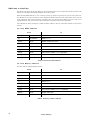
ERROR MESSAGES
Display readout
24
Appears if...
What to do
AUTO (Automatic protocol detection error)
... automatic protocol detection is
enabled and there is no control input.
• Verify that controller is connected
properly and sending data.
LERR (Lamp error)
... the lamp doesn’t ignite within 10
minutes of receiving the ‘Lamp ON’
command.
• Check the lamp
• Check voltage and frequency settings
MERR (Memory error)
... the EEPROM memory cannot be
read.
• Contact service technician.
CSER (Check-sum error)
...a software upload is unsuccessful.
• Reload software, see page 19.
****
... there is no communication between
the control panel and motherboard.
This appears briefly when switching on
the fixture.
• Check fuses.
• Check cable between control panel
and motherboard.
• Reinstall software.
• Contact service technician.
ShER (Short error)
... the fixture detects the lamp is ON
but no ‘Lamp ON’ command has been
received. This can occur if the lamp
relay is stuck.
• The fixture may be operated but
remote lamp on/off may be effected.
• Contact service technician.
Hot (Hot lamp)
... you attempt to strike the lamp within
8 minutes after having switched it off.
The fixture will store the ‘Lamp ON’
instruction and strike the lamp once the
8 minutes period has elapsed.
• Wait until the lamp strikes.
FbEP (Feedback error pan)
FbET (Feedback error tilt)
FbER (Feedback error pan/tilt)
...pan (FbEp), tilt (FbET) or both
(FbER) feedback circuits are malfunctioning.
• The fixture will still operate, though
with reduced maximum speed to prevent the fixture from losing track of its
position.
• Contact service technician.
PAER (Pan time-out)
TIER (Tilt time-out)
...the pan or tilt indexing circuit is malfunctioning.
• After the time-out the fixture will work
normally.
• Contact service technician.
COER (Color wheel time-out)
CYER (Cyan wheel time-out)
MAER (Magenta wheel time-out)
YEER (Yellow wheel time-out)
...the magnetic-indexing circuit malfunctions or the effect wheel is misaligned.
• After the time-out, the effect in question stops in a random position.
• Contact service technician.
Error Messages