1
CX-1X2000
Mini Heading-Hold
Gyro System
INSTRUCTION MANUAL
www.copterx.com
Copyright © 2014 KY MODEL Company Limited.
CX-1X2000
Mini Heading-hold Gyro
MENU
1.
2.
3.
4.
5.
6.
7.
8.
9.
10.
Table of content
Introduction
Features
Specifications
Functions and Connections
LED Indication
Gyro Mounting
Installation of Servo Horn and Linkage
Transmitter Configuration
Parameter Configuration
Notices in each flight
01
1
2
2
2
3
4
4
5
6
6
8
CX-1X2000
Mini Heading-hold Gyro
1. Introduction
Thank you for purchasing the CopterX CX-1X2000 Mini Heading-hold Gyro. CX-1X2000 is an AVCS
(Angular Vector Control System) gyro with small volume, light weight and advanced performance.
Its high-speed processor can process the signal with high frequency and control the tail accurately.
NEW direction switch (DIR), allows pilot to set the direction of the tail rotor servo. NEW digital servo
switch (DS), allows pilot to set it for either a digital servo or a non-digital servo. NEW travel trim
(LIMIT), allows pilot to set the amount of travel for the tail rotor servo. CX-1X2000 can be easily
programmed by a transmitter or a program box (sold separately), it can work well with both electric
and nitro R/C helicopters.
2. Features
• New direction switch (DIR), allows pilot to set the direction of the tail rotor servo
• New digital servo switch (DS), allows pilot to set it for either a digital servo or a non-digital servo
• NEW travel trim (LIMIT), allows pilot to set the amount of travel for the tail rotor servo
• Micro AVCS heading hold gyro
• Compact design to work most helicopter from 100-600 size
• Aluminum casing for accurate vibration free operation
• User selectable between AVCS or Normal mode
• Easily programmable without the aids of complex setup box
• Fully compatible from analog to narrow band digital servo
(1.52ms analog, 1.52ms digital, 760us, 960us)
• Compatible with most popular PPM, PCM, 2.4G radio system
• Wide operation voltage from 3.5V to 10V DC
3. Specification
Dimensions: 22.2*22.2*9.3mm
Weight: 10g (metal case, cables and plugs included)
Operating Voltage: DC3.5V - 10V
Operating Current Drain: 60ma
Operating Temperature: -10°C - 50°C
Maximal Angular Velocity: 800˚/sec
Servo Compatibility: 1.52ms analog servo, 1.52ms digital servo, 760us digital servo, 960us digital servo
Radio Compatibility: PPM, PCM, 2.4G
02
CX-1X2000
Mini Heading-hold Gyro
4. Functions and Connections
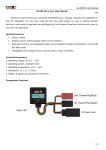
Gyro Operation
Direction Switch
DS Mode Switch
Sensitivity Switching Connector
Rudder Input Connector
Rudder Servo Connector
LED
Limit Trimmer
Sensitivity Switching Connector: Gyro sensitivity switching signal input connector. Connect to
the receiver sensitivity switching channel (normally CH5). This connector is also simultaneously
used to switch between the AVCS and normal operation modes. Since this connector is a single
wire signal line, do not pull it forcefully.
Rudder Input Connector: Connects to the receiver rudder channel (CH4) output connector.
Rudder Servo Connector: Connects the rudder servo.
DS Mode Switch (DS): Digital servo (DS) mode switch. The ON position is the high-speed output
mode for digital servo only. When using a normal servo, always set this switch to the OFF position.
If it is set to the ON position, the servo will be destroyed.
Gyro Operation Direction Switch (DIR): Switches the gyro control direction. It must be switched
according to the direction of rotation of the main rotor and the direction of the rudder linkage.
If the rudder servo moves in the cancellation direction when the nose of the helicopter moves, the
operation direction are good. If you try to fly a model with a clockwise rotation rotor when the gyro
operation direction is reversed, the nose will turn to the left and result in a dangerous situation.
LED: Indicates the operating status of the CX-1X2000. The display contents are shown in section 5.
Limit Trimmer (LIMIT): Sets the maximum travel of the rudder servo. Move the rudder stick to the
left and right and adjust the limit trimmer so that the servo operating angle do not strike the
linkage. During flight, the servo will not operate beyond this angle and the linkage is protected.
When the trimmer is turned clockwise, the servo operating angle increases.
03
CX-1X2000
Mini Heading-hold Gyro
5. LED Indication
Steady Red
Gyro is in AVCS mode
Steady Blue
Gyro is in normal mode
Steady Red and Blue
Gyro is waiting for receiver's signal
Blue and Red LED are flashing synchronously
Gyro is initializing, keep the gyro steady, rudder
stick centered
Red LED is flashing
Gyro is in firmware update mode
6. Gyro Mounting
The gyro should mount to a steady platform which is perpendicular to the main shaft and far away
from the engine and other electric devices.
Mount the gyro to the platform by using a soft foam pad, relax the cable of gyro to reduce
transmission of vibrations through the cable. Do not allow the gyro case to touch other parts of the
helicopter.
Mounting on a small electric helicopter: just use a 2-3mm foam pad.
。
90
2-3mm Foam Pad
Gyro Mounting Platform
Mounting on a large or a High vibration helicopters: use a foam pad on each side of the damping
shield plate.
。
90
2-3mm Foam Pad
2-3mm Foam Pad
Damping and
Shield Plate
Gyro Mounting Platform
04
CX-1X2000
Mini Heading-hold Gyro
7. Installation of Servo Horn and Linkage
First of all make sure the mechanical parts of tail rotor install correctly, all parts can move smoothly,
and the tail servo install firmly.
250 size: 4.5mm
450 / 500 size: 7.5 - 10mm
600 or larger size: 13.5 - 15mm
90°
Mount control ball to servo horn. We recommend the distance from the ball to center is: 4.5mm
(250 size), 7.5 - 10mm (450, 500 size), 13.5 - 15mm (600 or larger size).
Install the horn to tail servo temporarily, adjust the horn position to make it perpendicular to the
linkage, then set the tail pitch to be approximately 8˚ in the direction that compensates the main
rotor torque by adjusting the linkage length.
Notice: Don't connect the servo to the gyro until finishing the gyro type configuration.
05
CX-1X2000
Mini Heading-hold Gyro
8. Transmitter Configuration
Power on the transmitter and create a new helicopter model, set the trims and subtrims of all the
channels to be zero, and make sure all the mixing functions related to tail turn off. Set up a gain
switch in transmitter, which is used to control gyro's working mode (AVCS mode and normal
mode).
The relationship of the gyro actual gain and the displayed value in some popular transmitters are in
the table as follows. We recommend that you can set the gyro actual gain to be about 40%, and
then adjust the gain during practical flight. The gain should be raised until the tail begins to
oscillate quickly (also called Tail Wag). Once this point has been achieved, reduce the gain a little
and do a test0fly again. Check and set the gain for each flight mode.
Gyro is in AVCS mode
100
100
Futaba gyro menu
85%
0%
85%
Futaba Endpoint
100%
0%
100%
0%
JR / Spektrum gyro menu
0
96
Gyro actual gain
JR / Spektrum Endpoint
93
Gyro is in AVCS mode
51%
100%
1%
104%
108%
9. Parameter Configuration
9.1 Set parameters by using gain switch and rudder stick of transmitter
9.1.1 Entering Programming Mode
Power on transmitter and dial the switch to AVCS mode, connect the gyro to receiver (before
selecting the servo type, disconnect the gyro to servo), move the rudder stick to any maximum
extent position and remain it, power on the gyro and the receiver, after the gyro initialization, red
and blue LED indicator are off and then they flash alternately again, it shows that gyro has entered
Programming mode, now center the rudder stick.
9.1.2 Change parameter
Change the parameters by moving rudder stick right or left in every item of menu.
9.1.3 Switch to the next menu and save the cahnge
Dial gain switch for one time between AVCS and normal mode can save the parameters set in
previous menu, and enter into next menu at the same time.
06
CX-1X2000
Mini Heading-hold Gyro
9.1.4 LED indicator in Programming Mode
Red and Blue flash slowly together: switch to a new menu items, the number of flashes is the
sequence number.
In menu item 1, 2, 7, the number of flashes indicates the parameter of current item.
In item 3, 4, 5, 6, fast Red flashes indicate parameter value increasing, fast Blue flash indicates value
decreasing.
Number of red
and blue flash
synchronously
Menu item
Description of parameter and condition
1 flash
Servo type
Red, 1 flash: 1520us 71Hz (analog servo)*
Red, 2 flashes: 1520us 250Hz (digital servo)
Red, 3 flashes: 1520us 333Hz (digital servo)
Red, 4 flashes: 760us 400Hz (digital servo)
Red, 5 Flashes: 960us 333Hz (digital servo)
2 flashes
Gyro Compensation
Direction
Long Red, 1 flash: positive direction*
Long Blue, 1 flash: reverse direction
3 flashes
Servo trim
Servo centered
4 flashes
Limit A of servo
Servo goes to the limit position of direction A
5 flashes
Limit B of servo
Servo goes to the limit position of direction B
6 flashes
Compensation of
pitch to tail
Servo centered, move the pitch stick up and down to
check the value and direction of compensation
7 flashes
Parameter group
selection
Red, 1 flash: parameter group 1 is selected (F3C mode)*
Red, 2 flashes: parameter group 2 is selected (3D mode)
Data reset
Move rudder stick right and left quickly for several
times, until the Blue LED flashes fast, then all the
parameter is reset to the factory default settings
8 flashes
NOTICE
・*Factory default setting
・Before finishing the servo type selection, don't connect the servo to the gyro
・Before finishing the item 3 of the menu, don't fix the horn to the servo
・In Programming mode, the gyro couldn't control the helicopter, don't try to fly in Programming mode
・The menu is circular, it goes back to the item 1 automatically after item 8
・When you want to save the parameters you just setting, you must dial the gain switch between AVCS and normal modes for one time, at the
same time it goes to next item of menu
・The item 6 is an optional function, when it is set, the tail control can be enhanced during the acute pitch changing in 3D flight. For beginners,
we recommend setting it to default, if it is set incorrectly, please enter item 8 to reset the parameter to default. If you want to use this function,
you need to setup a mixing from pitch channel to a vacant channel in transmitter, and plug the gyro pitch signal wire to this vacant channel of
receiver.
・In the item 7, for beginner we recommend selecting parameter group 1 (F3C mode)
・After finishing the setup and saving the parameters, you must turn off the power and restart the gyro to fly.
9.2 Set parameters by using program box, please check the program box user manual for
more details.
07
CX-1X2000
Mini Heading-hold Gyro
10. Notices in each flight
When turn on the power, the gyro needs several seconds to initialize. During initialization, Red and
Blue LED flash synchronously. When initialization is complete, the tail servo will move right and
then left to indicate.
If the airframe is not immobile or the rudder stick is moved during initialization, the gyro may drift.
Remain the airframe immobile and the rudder stick centered, then quickly dial the gain switch
between Normal Mode and AVCS Mode for several times, the gyro will initialize again to eliminate
drift.
Before every flight, verify that the mechanical frame and parts of helicopter is in good condition.
08
www.copterx.com
Copyright © 2014 KY MODEL Company Limited.