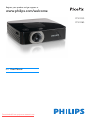
1
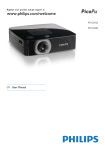
Register your product and get support at
www.philips.com/welcome
PPX2450
PPX2480
EN User Manual
Downloaded From projector-manual.com
Table of Contents
Overview ................................................... 3
Dear Customer ................................................................... 3
About this User Manual ..................................................... 3
1 General Safety Information ................ 4
Setting Up the Device ........................................................ 4
Repairs ................................................................................... 4
Power Supply ....................................................................... 4
2 Overview............................................... 6
Top of the Device ...............................................................
Side view ...............................................................................
Bottom of the Device ........................................................
Remote Control ..................................................................
Overview of the Menu Functions ....................................
6
6
6
7
8
3 Initial Operation .................................. 9
Setting up the Device ......................................................... 9
Connecting power supply / Charging battery .............. 9
Initial Installation .................................................................. 9
Installing or Changing the Batteries of the Remote Control ....................................................................................... 10
Using the Remote Control ............................................ 11
4 Connect to the playback device ....... 12
Connecting to Devices with HDMI output ............... 12
Connecting to a Computer (VGA) .............................. 12
Connecting using Audio/Video (CVBS) Adaptor Cable
................................................................................................13
Connecting using Component-Video (YPbPr/YUV)
Cable ................................................................................... 13
Connecting the headphones .......................................... 14
5 Memory card / USB storage medium
............................................................. 15
Inserting a Memory Card ............................................... 15
Connecting USB Storage Medium ................................ 15
6 Media Playback................................... 16
Video Playback ..................................................................
Photo Playback .................................................................
Music Playback ..................................................................
Managing files ....................................................................
16
17
18
18
7 Settings ............................................... 21
8 Service................................................. 23
Care Instructions for the Battery ................................ 23
Cleaning .............................................................................. 23
Troubleshooting ............................................................... 24
9 Appendix............................................. 25
Technical Data .................................................................. 25
Accessories ........................................................................ 25
Downloaded From projector-manual.com
2
Philips · PPX2450 · 2480
Overview
Dear Customer
Thank you for purchasing our Pocket Projector.
We hope you enjoy your device and its many functions!
About this User Manual
With the installation guide on the following pages, you
can start using your device quickly and easily. Detailed
descriptions can be found in the following sections of
this user manual.
Read the entire user manual carefully. Follow all safety
instructions in order to ensure proper operation of
your device. The manufacturer accepts no liability if
these instructions are not followed.
Symbols Used
Note
Troubleshooting
This symbol designates tips that will help you
to use your device more effectively and easily.
CAUTION!
Damage to the Device or Loss of Data!
This symbol gives warning of damage to the
device and possible loss of data. These damages can result from improper handling.
DANGER!
Danger to Persons!
This symbol gives warning of danger to persons. Physical injury or damage can result
from improper handling.
Downloaded From projector-manual.com
3
1 General Safety Information
Do not make any changes or settings that are not
described in this user manual. Physical injury or damage
to the device or loss of data can result from improper
handling. Take note of all warning and safety notes indicated.
Setting Up the Device
The device is exclusively for indoor use. The device
should be placed securely on a stable, flat surface. Position all cables in such a way that no one will stumble on
them, thus avoiding possible injuries to persons or damage to the device itself.
Do not plug in the device in moist rooms. Never touch
the mains cable or the mains connection with wet
hands.
The device must have sufficient ventilation and may not
be covered. Do not put your device in closed cabinets
or boxes.
Do not place the machine on soft surfaces such as tablecloths or carpets and do not cover the ventilation slits.
Otherwise the device could overheat or catch fire.
Protect the device against direct sunlight, heat, large
temperature fluctuations and moisture. Do not place
the device in the vicinity of heaters or air conditioners.
Observe the information on temperature and humidity
in the technical data.
When the device is running for a long period of time,
the surface becomes hot and a warning symbol appears
on the projection. The device switches automatically to
stand-by mode when it gets too hot. After the device
has cooled down, you can continue playback by pressing
any key.
Do not allow liquids to enter into the device. Switch off
the device and disconnect it from the mains supply if liquids or foreign substances end up inside the device.
Have the unit inspected by a technical service department.
Always handle the unit with care. Avoid touching the
lens. Never place heavy or sharp objects on the projector or the power cable.
If the projector gets too hot or emits smoke, shut it
down immediately and unplug the power cable. Have
your device examined by trained professionals at a technical service location. To prevent the spread of fire,
open flames should be kept away from the device.
Downloaded From projector-manual.com
4
Under the following conditions, a layer of moisture can
appear inside the device which can lead to malfunctions:
· if the device is moved from a cold to a warm area;
· after a cold room is heated;
· when this device is placed in a damp room.
Proceed as follows to avoid any moisture build-up:
1 Seal this device in a plastic bag before moving it to
another room, in order for it to adapt to room conditions.
2 Wait one to two hours before you take the device
out of the plastic bag.
The device should not be used in a very dusty environment. Dust particles and other foreign objects may
damage the unit.
Do not expose the device to extreme vibrations. It may
damage the internal components.
Do not allow children to handle the device without
supervision. The packing materials should be kept out of
the hands of children.
Repairs
Do not make any repairs to the device yourself.
Improper maintenance can result in injuries or damage
to the device. Only have your device repaired by an
authorised service centre.
Do not remove the type label from your device; this
would void the warranty.
Power Supply
Use only the enclosed power adapter (see chapter Appendix / Technical Data). Check whether the mains voltage of
the power supply matches the mains voltage available at
the setup location. This equipment complies with the voltage type specified on the unit.
The capacity of the battery diminishes with time. If the
device functions only with the power supply, the battery
is defective. Contact an authorised service centre to
replace the battery.
Do not try to replace the battery yourself. Incorrect
handling of the battery or using the wrong type of battery can cause damage to the device or cause injury.
Philips · PPX2450 · 2480
DANGER!
Risk of explosion with incorrect type of
batteries
Only replace the batteries with the same or
comparable batteries.
There is a risk of explosion if the incorrect battery type is used.
Switch the device on or off using the power switch
before removing the power supply from the socket.
Turn off the device and remove it from the power supply before cleaning the surface. Use a soft, lint-free
cloth. Never use liquid, gaseous or easily flammable
cleansers (sprays, abrasives, polishes, alcohol). Do not
allow any moisture to reach the interior of the device.
DANGER!
High Power LED
This device is equipped with an high power
LED (Light Emitting Diode), which emits very
bright light. Do not look directly into the projector lens. This could cause eye irritation or
damage.
DANGER!
Danger of Hearing Damage
Do not use the device over a longer time at
high volume—especially when using headphones. This could lead to the risks of hearing
damage.
Downloaded From projector-manual.com
General Safety Information
5
2 Overview
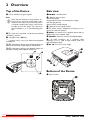
Top of the Device
Side view
1—Focus wheel for image sharpness.
1ON/OFF—On/Off switch
2—Battery status monitor
red: battery empty
Charge indicator with connected power supply:
red: Charging battery
Green: battery is fully charged
3—Remote-control signal receiver
4 Ï—Audio output – headphone connection or connection for external speakers
5 HDMI—Connection for a playback device with an
HDMI output via an adapter cable
6 SD/MMC—Memory card slot (SD/SDHC/MMC)
ˆ ý—USB connection for a computer (data
exchange) or for a USB storage medium (with the
enclosed adapter cable)
‰ DC IN—Port for power supply
Note
Note that the distance to the projection surface must be a minimum of 0.5 meters and a
maximum of 5 meters. If the Pocket Projector
is located outside of this range, it will not be
possible to focus the image. Turn the focus
wheel carefully so as to avoid damaging the
lens.
2 ¿—One menu step back, one directory level back
/ cancelling a function
3—Navigation key / OK key
à—Confirm entry / start, stop video/music playback
or slideshow.
¡/¢—Navigating / during music playback select previous, next title when image display is switched off
À/Á—Navigating / during music playback: adjust volume level / during video playback review, cue
a
b
a
b
h
g
f
e
c
d
Bottom of the Device
c
‚ Tripod socket
a
Downloaded From projector-manual.com
6
Philips · PPX2450 · 2480
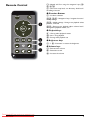
Remote Control
ZOOM
¾—Magnify still. Pan using the navigation keys (¡/
¢, À/Á)
¿—One menu step back, one directory level back /
cancelling a function
‚ Direction Buttons
à—Confirms selection
¡/¢, À/Á—Navigation keys / navigate the menu /
modify settings
¡/¢—Modify settings / during music playback select
previous, next title
À/Á—During music playback adjust volume level /
during video playback review, cue
ƒ Playback keys
: —During video playback review
T—Start / stop playback
;—During video playback cue
„ Brightness keys
N ß O—Decrease / increase the brightness
… Volume keys
N—Decrease the volume
«—Deactivate sound
O—Increase the volume
Downloaded From projector-manual.com
Overview
7
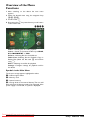
Overview of the Menu
Functions
1 After switching on the device the main menu
appears.
2 Select the desired menu using the navigation keys
¡/¢, À/Á.
3 Confirm with à.
4 By pressing the ¿ key several times you will return
to the main menu.
Videos—Selecting files for video playback
Source—Switch to the external video input HDMI,
AV, COMPONENT or VGA
Pictures—Selecting files for the slideshow
Folder View—Selecting files for Playback. Copy or
Delete Files (Mark the files with Á and confirm
using à).
Music—Selecting music files for playback
Settings—Configure settings for playback and for
the device
Symbols in the Main Menu
The chosen storage appears highlighted in white.
‚—USB storage medium
ƒ—Memory card
„—Internal memory
…—Charge level of the internal battery The icon will
flash red, when the battery needs to be recharged. If the
power supply is connected, no symbol is displayed.
Downloaded From projector-manual.com
8
Philips · PPX2450 · 2480
3 Initial Operation
Setting up the Device
Initial Installation
You can position the device so that it lies flat on a table
in front of the projection surface; it is not necessary to
tilt it towards the projection surface. The device compensates for the distortion from the slanted projection
(pincushion distortion).
A tripod accessory is available if you want to elevate the
device.
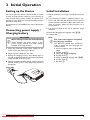
1 Switch the device on using the on/off switch on the
side.
2 Turn the device towards a suitable projection surface or wall. Note that the distance to the projection
surface must be a minimum of 0.5 meters and a maximum of 5 meters. Make sure the projector is in a
secure position.
3 Use the focus wheel on the top to adjust the image
sharpness.
4 Select the desired menu language using ¡/¢.
5 Confirm with à.
Connecting power supply /
Charging battery
CAUTION!
Mains Voltage at the Site of Installation!
Check whether the mains voltage of the
power supply matches the mains voltage
available at the setup location.
1 Insert the small plug of the power supply into the
socket on the rear side of your device.
2 Plug the power supply into the mains.
3 During the charging process, the indicator light on
the side of the device will be red. When the battery
is fully charged, it will turn green.
4 Charge the built-in battery before using for the first
time for at least 3 hours. This will prolong the life of
the battery.
Downloaded From projector-manual.com
Initial Operation
Note
The main menu appears instead of
the language selection
The device has already been installed. In
order to change the menu language, proceed as follows:
1 Use the navigation keys to select Settings.
2 Confirm with à.
3 Select with ¡/¢ Language.
4 Confirm with à.
5 Select the desired language with ¡/¢.
6 Confirm with à.
7 Exit with ¿.
9
Installing or Changing the
Batteries of the Remote
Control
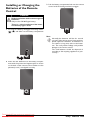
3 Push the battery compartment back into the remote
control until the locking mechanism engages.
DANGER!
Risk of explosion with incorrect type of
batteries
Only use the CR 2025 type battery.
There is a risk of explosion if the incorrect battery type is used.
1 To access the battery, disengage the locking mechanism (‚) and slide out the battery compartment
(ƒ).
Note
Normally the batteries will last for around
one year. If the remote control stops working,
please replace the batteries. If the device is
not used for a long time, take out the batteries. This will prevent leakage and possible
damage to the remote control.
The used batteries should be disposed of
according to the recycling regulations of your
country.
2 Insert the new batteries into the battery compartment with the positive and negative poles as shown
on the back of the remote control. Make sure the
polarities(+ and -) are aligned correctly.
Downloaded From projector-manual.com
10
Philips · PPX2450 · 2480
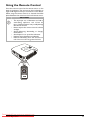
Using the Remote Control
Point the remote control at the remote sensor on the
back of the device. The remote can be used within an
angle of 60 degrees and up to 3 meters from the device.
When using the remote control, no obstacle should be
placed between the remote control and remote sensor.
CAUTION!
• The improper use of batteries can lead to
overheating, explosion, risk of fire and
injury. Leaking batteries can possibly damage
the remote control.
• Never expose the remote control to direct
sunlight.
• Avoid deforming, dismantling or charging
the batteries.
• Avoid exposure to open fire and water.
• Replace empty batteries immediately.
• Remove the battery from the remote control if not in use for long period of time.
Downloaded From projector-manual.com
Initial Operation
11
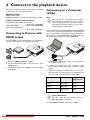
4 Connect to the playback device
Supplied Cables
Connecting to a Computer
(VGA)
Video-(CVBS) cable
USB Adaptercable to connect an USB storage medium
Note
Only use the supplied cable or cables that are available
as accessories to connect the projector.
Many laptops do not activate the external
video output automatically when you connect
a second display such as a projector. Check
your laptop's manual to find out how to activate the external video output.
Cables available as Accessories
Component Video Cable YUV /YPbPr
.................................................(PPA 1210 / 253447083)
VGA-Audio Cable ....................(PPA 1250 / 253447070)
iPod / iPhone /iPad Cable
.................................................(PPA 1280 / 253447091)
Connecting to Devices with
HDMI output
Use the VGA-Audio cable (PPX2480 included, PPX2450
accessory) to connect the projector to a computer, laptop, or some PDAs. The projector supports the following resolutions: VGA/SVGA/XGA. For best results, set
the computer's resolution to SVGA (800x600).
Use the HDMI to mini HDMI cable (not included) to
connect the projector to a computer or laptop.
1 Switch to HDMI in Menu > Source
2 Connect the HDMI cable to the projector's miniHDMI socket.
3 Connect the cable to the HDMI socket of the playback device.
1 Connect the VGA-Audio cable to the projector's
mini-HDMI socket.
2 Connect the VGA plug to the computer's VGA
socket and the audio plug to the computer's audio
output.
3 Adjust the computer's resolution to the correct setting and switch the VGA signal to an external monitor. The following resolutions are supported:
Resolution
Image
refresh rate
VGA
640 x 480
60 Hz
SVGA
800 x 600
60 Hz
XGA
1024 x 768
60 Hz
Note
Screen Resolution
You can obtain the best results with the
800¦×¦600 (60Hz) resolution.
4 Select Menu > Source and switch to VGA.
Downloaded From projector-manual.com
12
Philips · PPX2450 · 2480
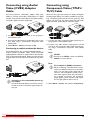
Connecting using Audio/
Video (CVBS) Adaptor
Cable
Connecting using
Component-Video (YPbPr/
YUV) Cable
Use the projector's audio/video adaptor cable (A/V
cable) to connect camcorders, DVD players or digital
cameras. The jacks for these devices are yellow (video),
red (audio right) and white (audio left).
Please use this type of connection to obtain the highest
possible image quality. This cable is available as an accessory. The device jacks have the colours green (Y), blue
(U/Pb), red (V/Pr) for the video signal and red (audio
right) and white (audio left) for the audio signal.
1 Connect the supplied A/V cable to the projector's
mini-HDMI socket.
2 Connect the video device's audio/video jacks to the
A/V cable using a conventional composite video
(RCA) cable.
3 Select Menu > Source and switch to AV.
Connecting to mobile multimedia devices
Some video devices (e.g.: pocket multimedia players, ...)
require specific connection cables. There are either
supplied with the device or acquired from the manufacturer of the multimedia device. Please note that only the
original cables from the device manufacturer may function.
1 Connect the video component cable (accessory) to
the projector's mini-HDMI socket.
2 Connect the video device's appropriate colored
sockets to the component video cable of the projector using a conventional component video (RCA)
cable.
Note
YCbCr
Note that the YPbPr outlets are labelled
YCbCr on some devices.
Note
Note
Switching to the multimedia device signal output
See the multimedia device instruction manual
to find out how to switch the signal output to
this jack.
Downloaded From projector-manual.com
Connect to the playback device
Two red phono (RCA) connectors
When connecting, note that there are two
red phono (RCA) connectors on the cable.
One is for the right audio signal and the
other for the V/Pr element of the component video signal. If these two connectors
are inserted incorrectly, the projected
image appears green and the audio signal
for the right speaker will not work.
3 Select Menu > Source and switch to Component.
13
Connecting to mobile multimedia devices
Connecting the headphones
Some video devices (e.g.: pocket multimedia players, ...)
require specific connection cables. There are either
supplied with the device or acquired from the manufacturer of the multimedia device. Please note that only the
original cables from the device manufacturer may function.
1 Before connecting the headphones, turn down the
volume on the device.
2 Connect the headphones to the projector's headphone slot. The device speakers deactivate automatically when the headphones are connected.
Note
Switching to the multimedia device signal output
See the multimedia device instruction manual
to find out how to switch the signal output to
this jack.
Downloaded From projector-manual.com
14
3 After connecting the headphones, increase the volume to a comfortable level.
DANGER!
Danger of Hearing Damage
Do not use the device over a longer time at
high volume—especially when using headphones. This could lead to the risks of hearing
damage. Before connecting the headphones,
turn down the volume on the device. After
connecting the headphones, increase the
volume to a comfortable level.
Philips · PPX2450 · 2480
5 Memory card / USB storage medium
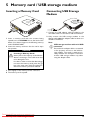
Inserting a Memory Card
1 Insert a memory card with the contacts facing
upwards into the SD/MMC slot at the back of the
device. Your device supports the following memory
cards: SD/SDHC/MMC.
2 Insert the memory card into the slot until it snaps
into position.
DANGER!
Inserting a Memory Card!
Never pull out the memory card while the
device is accessing it. This could cause data
to be damaged or lost.
In order to make sure that the device does
not access the memory card, press the ¿
key in the main menu until the symbol for
the internal memory has been selected.
Connecting USB Storage
Medium
1 Connect the USB adapter cable provided to the
mini-USB socket on the reverse side of the device.
2 Only connect the USB storage medium to the
adapter cable after the adapter cable has been connected to the device.
Note
USB storage medium with mini-USB
connector
Ensure that the adapter cable is connected
to the projector and not to the USB storage medium. The signal is switched correctly between the computer connection
and the USB storage medium only when
using the adapter cable.
3 Press lightly on the memory card to remove it.
4 The memory card is ejected.
Downloaded From projector-manual.com
Memory card / USB storage medium
15
6 Media Playback
Note
Navigation keys
All the keys shown are buttons on the
remote control.
9 Press ¿ to end playback and return to the overview.
10 When you press ¿ again, you will return to the
main menu.
Note
Navigation during playback
Review / cue: Press :/; on the remote
control or À/Á on the device.
Press T to stop or continue playback.
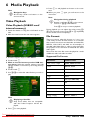
Video Playback
Video Playback (USB/SD card/
internal memory)
1 Switch the device on using the on/off switch on the
side.
2 After the initial screen the main menu appears.
During playback you can adjust the volume using N/
O on the remote control. Press « or N repeatedly
to shut off the volume completely.
File Format
There are various video file formats as *.mov, *.avi,
*.m4v. Many of these formats function as a container
that contains the various encoded audio and video files.
MPEG-4, H.264, MP3, and AAC are all examples of
encoded audio/video files. In order to play these files,
the projector must read them and decode the audio/
video signals.
Please note that some files cannot be played as a result
of different video and audio encoders.
3 Use the navigation keys to select Videos.
4 Confirm with à.
5 With an inserted memory card or USB storage device: Select the internal memory, the USB
storage medium or the memory card using the keys
¡/¢.
6 Confirm with à.
7 Use ¡/¢ to select the video file that you wish to
play.
Supported File Formats
Container
Video Format
*.avi, *.mov, *.mp4
MJPEG, MPEG-4, H.264
*.mkv
MPEG-4, H.264
*.ts
MPEG-2, H.264
*.m2ts
H.264
*.3gp
H.263
*.flv
FLV (up to 800¦x¦600)
*.asf
ASF
*.rm, *.rmvb
Real video
*.dat
MPEG-1
*.vob
MPEG-2
*.mpg, *.mpeg
MPEG-1, MPEG-2
Note
Displaying video files
Only those videos that are compatible
with the Pocket Projector will be displayed.
8 Press à to start playback.
Downloaded From projector-manual.com
16
Philips · PPX2450 · 2480
Video Playback (Mini-HDMI
socket)
1 Connect the audio/video output of the external
device to the Pocket Projector's mini-HDMI socket.
Use the corresponding cable and cable adapter for
this purpose (see also chapter Connect to the playback device, page 12).
2 To find out how to deactivate the video output for
the external device, please see the relevant instruction manual. Most often, this option is labeled "TV
out" or "TV Output" in the corresponding menu.
3 Start the video playback on the external device.
4 Modify the volume with N/O.
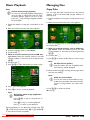
3 Use the navigation keys to select Pictures.
4 Confirm with à.
5 With an inserted memory card or USB storage device: Select the internal memory, the USB
storage medium or the memory card using the keys
¡/¢.
6 Confirm with à.
7 Miniature photos are displayed on the screen as an
overview.
Modify settings during playback
1 Press the ¡ or ¢ key.
2 Use the ¡/¢ keys to choose from the following
settings:
Brightness: Adjust brightness
Contrast: Adjust contrast
Saturation: Adjust colour saturation
Smart Settings: Select predefined settings for
brightness / contrast / colour saturation
Volume: Adjust volume level
3 Modify the setting using À/Á.
The device saves the modified settings automatically.
Modify other settings
1 Press the à button.
2 Use the ¡/¢ keys to choose from the following
settings:
Image Settings: Adjust brightness, contrast, colour
saturation
Sound Settings: Adjust treble, bass and volume
Power Save: This function reduces the light output
in order to increase the operating time for the builtin battery.
3 Confirm with à.
4 Modify the setting using à and ¡/¢.
5 Confirm with à.
Photo Playback
1 Switch the device on using the on/off switch on the
side.
2 After the initial screen the main menu appears.
Downloaded From projector-manual.com
Media Playback
Note
Miniature view or list
In the settings, you are able to select whether the overview will be displayed as miniatures or in a list.
Note
Many photos on the memory card or
the USB medium
If there are a lot of photos on the memory
card or the USB storage medium it can
take a moment before the overview
appears.
8 Use À/Á or ¡/¢ to select the image that you
want to start the slide show with.
9 Press à to start the slide show.
Note
Zoom in / Zoom out
You can enlarge the displayed image during
the slide show using the ¾ key. Use the
À/Á/¡/¢ keys to move around the
magnified image.
10 Press T to pause the slide show.
11 Press ¿ to end the slide show and return to the
overview.
12 When you press ¿ again, you will return to the
main menu.
17
Music Playback
Managing files
Note
Copy Files
Switch off the image playback
You can turn off image playback while playing
music in order to save power (see also chapter Music Settings, page 21). As soon as you
press the ¿ key, the image reappears and the
fan starts again.
You can copy files back and forth from the internal
memory to the connected USB storage medium or
memory card.
1 Switch the device on using the on/off switch on the
side.
2 After the initial screen the main menu appears.
1 Switch the device on using the on/off switch on the
side.
2 After the initial screen the main menu appears.
3 Use the navigation keys to select Music.
4 Confirm with à.
5 With an inserted memory card or USB storage device: Select the internal memory, the USB
storage medium or the memory card using the keys
¡/¢.
6 Confirm with à.
7 Use ¡/¢ to select the file that you wish to play.
3 Use the navigation keys to select Folder View.
4 Confirm with à.
5 With an inserted memory card or USB storage device: Select the internal memory, the USB
storage medium or the memory card using the keys
¡/¢.
6 Confirm with à.
7 Use ¡/¢ to select the file that you want to copy.
Note
No Files Found (0 files)
Only those files that are compatible with
the Projector will be displayed.
8 Mark the file using Á. Pressing the key again deselects the chose file(s).
Note
Mark the entire folder
You can also mark an entire folder to copy
all files from the folder. Note that the copy
process of large folders can takes some
time.
8 Press à to start playback.
9 Press T to stop or continue playback.
Note
9 Use ¡/¢ to select other files.
10 Press à.
Navigating when image playback is
switched off
Press ¡/¢ to skip to the previous or
next song.
Press T to stop or continue playback.
Press ¿ to return to the selection.
During playback you can adjust the volume using N/
O on the remote control. Press « or N repeatedly
to shut off the volume completely.
Downloaded From projector-manual.com
18
Philips · PPX2450 · 2480
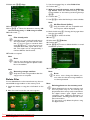
11 Select with ¡/¢ Copy.
3 Use the navigation keys to select Folder View.
4 Confirm with à.
5 With an inserted memory card or USB storage device: Select the internal memory, the USB
storage medium or the memory card using the keys
¡/¢.
6 Confirm with à.
7 Use ¡/¢ to select the file that you want to delete.
Note
12 Confirm with à.
13 Use ¡/¢ to select the destination memory: SD
card, internal memory or USB storage medium.
14 Confirm with à.
Note
Files already exist
If the files you are copying already exist in
the target folder, you must choose whether or not you want to overwrite them
using ¡/¢ and à. If you choose not to
overwrite these files, copies will be created. The copies can be recognised by a
number added to the file names.
No Files Found (0 files)
Only those files that are compatible with
the Projector will be displayed.
8 Mark the file using Á. Pressing the key again deselects the chose file(s).
9 Use ¡/¢ to select other files.
10 Press à.
11 Select with ¡/¢ Delete.
12 Confirm with à.
13 Use ¡/¢ if you want to delete the files or cancel
the deletion process.
15 The files are copied.
Note
Error
If errors occur during the copying process,
make sure that enough free space is available on the medium.
14 Confirm with à.
Note
Removing storage medium
Only remove the storage medium after the
copy process is complete.
Note
Error
If errors occur during the deletion process, make sure that the storage medium is
not write-protected.
Delete Files
You can delete files from the internal memory, the connected USB storage medium or the memory card.
1 Switch the device on using the on/off switch on the
side.
2 After the initial screen the main menu appears.
Downloaded From projector-manual.com
Media Playback
Note
Deleting photos on the memory card
When deleting photos via the computer, note
that the photos may not be correctly displayed when the memory card is inserted into
the digital camera again. Digital cameras
sometimes store additional information in
specific folders, including previews and orientation information.
For this reason, only delete the photos using
the digital camera.
19
Connect to a Computer (USB)
You can use the USB cable to connect the Pocket
Project to a computer. In this way, you are able to copy
files back and forth between the internal memory, an
inserted memory card and the computer. You can also
delete the files. You can playback the files saved on the
Pocket Projector on your computer.
1 Connect the mini-USB socket to the Pocket Projector and the USB socket to the computer.
2 Switch the device on using the on/off switch on the
side.
3 A confirmation appears when the devices are connected successfully.
Note
Successful connection
You cannot use the Pocket Projector when
it is connected to a computer via USB.
4 If a memory card has been inserted, it will be displayed as another disk drive.
5 You can move, copy or delete data from the computer, the memory card (if inserted) and the internal
memory.
Downloaded From projector-manual.com
20
Philips · PPX2450 · 2480
7 Settings
1 Switch the device on using the on/off switch on the
side.
2 After the initial screen the main menu appears.
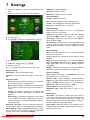
Brightness—Adjust brightness
Contrast—Adjust contrast
Saturation—Adjust colour saturation
Sound Settings:
Volume—Adjust the volume
Bass—Set the playback of the low frequencies
Treble—Set the playback of the high frequencies
Key tones—Turn key tones on and off
3 Use the navigation keys to select Settings.
4 Confirm with à.
5 Use ¡/¢ to select from the following settings.
6 Confirm with à.
7 Modify the settings using à, ¡/¢,
8 Confirm with à.
The ¿ key takes you one step back in the menu.
Image settings
Wall paper—Select background images
Fit Screen—Convert videos and images to 16:9 resolution
Projection mode
Front—Normal projection; the device is located in
front of the projection surface/screen.
Rear—Rear projection; the device is located behind
the projection surface; the image is horizontal mirrored.
Ceiling—The device is hanging from the ceiling in an
upside-down position; the image is rotated by 180
degrees.
Rear ceiling—The device is hanging from the ceiling
in an upside-down position behind the projection
surface; the image is rotated by 180 degrees and horizontal mirrored.
Wall color correction—Colour correction of the projected image to adjust to coloured projection surfaces
Smart Settings—Select predefined settings for brightness / contrast / colour saturation. If you modify these
settings, the setting is switched to Manual.
Downloaded From projector-manual.com
Settings
Video Settings
View—Display all videos in a list or a corresponding
folder structure on the drive.
Repeat—Set the repeat type for video files: Repeat
deactivated (Off), repeat all videos in a directory
(Directory), repeat only the current video (Movie),
repeat all videos (All).
Resume play—If this function is activated, playback will
continue at the position it was last stopped. If deactivated, playback will always start at the beginning of the
video.
Music Settings
View—Show all songs in a list or a corresponding folder
structure on the drive.
Screen—Activate or deactivate the projection during
playback.
Repeat—Set the repeat type for music files: Repeat
deactivated (Off), repeat all songs in a directory (Directory), repeat only the current song (Song), repeat all
songs (All).
Shuffle—Activate this function for random playback.
Otherwise, playback will take place in sequence.
Picture Settings
View—Display the images as a thumbnail or as a list
during selection in the main menu.
Time per slide—Image viewing time during slide show
Repeat—Set the type of repeat for slide show photos:
Repeat off (Off), repeat all photos in the directory
(Directory), repeat all stored photos (All).
Slide transition—Set image transitions
Slideshow order—Play slide show in order or randomly
Power Save
Eco mode—This function reduces the light output in
order to increase the operating time for the built-in battery. When operating from the power supply, the
energy saving mode is always deactivated in order to
ensure the best-possible image display.
Sleep mode—With this function, the projector automatically shuts down after a specified period of time or
at the end of a movie.
21
Language
Select the desired language for the menu.
Maintenance
Reset settings—Reset settings to factory defaults.
Firmware Update—Update Firmware
Note
Connect for the duration of the firmware
update the power adapter.
Information—Display free space in the internal memory and information on the device (Capacity: / Free
space: / Firmware Version / Device name: / Model / Mcu
Version)
Downloaded From projector-manual.com
22
Philips · PPX2450 · 2480
8 Service
Care Instructions for the
Battery
The capacity of the battery diminishes with time. You
can prolong the life of the battery if you observe the following points:
• Without a power supply, the device operates from
the built-in battery. When the battery does not
have sufficient capacity, the device switches to
stand-by mode. Connect the device to the power
supply.
• When the battery does not have sufficient capacity, the battery symbol in the display blinks and the
battery status light on the side of the device turns
red.
• When the device is running for a long period of
time, the surface becomes hot and a warning symbol appears on the projection. The device
switches automatically to stand-by mode when it
gets too hot. After the device has cooled down,
you can continue playback by pressing any key.
• Use the device at least once a week.
• Charge the battery regularly. Don’t store the
device with a completely discharged battery.
• If the device is not used for several weeks, discharge the battery a little by using the device
before storing it.
• If the device only works using the USB connection
or with the power supply, the battery is defective.
• Keep the device and the battery away from
sources of heat.
DANGER!
Cleaning
DANGER!
Switching off the device!
Switch the device on or off using the power
switch before removing the power supply
from the socket.
DANGER!
Instructions for Cleaning!
Use a soft, lint-free cloth. Never use liquid or
easily flammable cleansers (sprays, abrasives,
polishes, alcohol, etc.). Do not allow any
moisture to reach the interior of the device.
Do not spray the device with any cleaning fluids.
Wipe over the surfaces gently. Be careful that
you do not scratch the surfaces.
Cleaning the Lens
Use a brush or lens cleaning paper for cleaning the lens
of the projector.
DANGER!
Do not use any liquid cleaning agents
Do not use any liquid cleaning agents for
cleaning the lens, to avoid damaging the coating film on the lens.
Do not replace the battery yourself
Do not try to replace the battery yourself.
Incorrect handling of the battery or using the
wrong type of battery can cause damage to
the device or cause injury.
Downloaded From projector-manual.com
Service
23
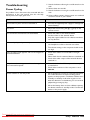
Troubleshooting
1 Switch the device off using the on/off switch on the
side.
2 Wait at least ten seconds.
3 Switch the device on using the on/off switch on the
side.
4 If the problem repeats, please contact our technical
customer service or your retailer.
Power Cycling
If a problem occurs that cannot be corrected with the
instructions in this user manual (see also the help
below), follow the steps given here.
Problems
Solutions
The Pocket Projector cannot be switched on
•
Connect the supplied power supply to recharge the
internal battery.
No sound
•
Adjust the volume using the O / N key on the
remote control.
No sound from the external connected device
•
•
•
Check the cables to the external device
Set the volume on the external device
Only the original cables from the device manufacturer may function
Bad sound quality with your computer connection
•
Check if the audio cable is connected to the computers headphone socket or the line-out socket.
The volume setting on the computer should not be
too high.
•
Only the initial screen appears and not the image from
the external device
•
•
•
Only the initial screen appears and not the image from
the connected computer
•
•
Device switches to stand-by mode
•
•
Downloaded From projector-manual.com
24
Check if the cables are connected to the right
sockets.
Please check that the external device is switched on
Check if the video output of the external device is
switched on.
Please check that the VGA-output of the computer
is switched on.
Check if the resolution of the computer is set to
800x600.
When the device is running for a long period of time,
the surface becomes hot and a warning symbol
appears on the projection. The device switches automatically to stand-by mode when it gets too hot.
After the device has cooled down, you can continue
playback by pressing any key.
When the battery does not have sufficient capacity,
the device switches to stand-by mode. Connect the
device to the power supply.
Philips · PPX2450 · 2480
9 Appendix
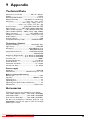
Technical Data
Dimensions (L¦×¦H¦×¦W).......................105¦×¦31¦×¦105¦mm
Weight ..........................................................................0,27¦kg
Recommended Ambient........................................5¦–¦35¦ºC
Relative Humidity ..................20¦–¦80¦% (non-condensing)
File format................................ *.mp4, *.avi, *.mov, *.mkv,
..................................... *.dat, *.mpg, *.mpeg, *.vob, *.ts
.......................... *.m2ts, *.rm, *.rmvb, *.asf, *.flv, *.3gp
Photo formats .......................JPEG, BMP, PNG, GIF, TIFF
Music formats.................MP3, WAV, WMA, OGG,AAC
Video Standard (CVBS).......... PAL, SECAM, NTSC, HD
Video Standard (YPbPr)....480i/p, 576i/p, 720p, 1080i/p
Video connection ................................. Mini-HDMI socket
Headphone connection........... Mono - jack plug: 3,5¦mm
Audio Output...................................................................1¦W
Internal memory.............................................................2¦GB
Compatible Memory Cards ...................SD/SDHC/MMC
Technology / Optical
Display technology ..................................WVGA 0,3" DLP
Light source ........................................................... RGB LED
Resolution .......................................... 854¦x¦480¦Pixel¦(16:9)
...........................................................800¦x¦600¦Pixel¦(4:3)
Supported Resolutions..................... VGA/SVGA/WVGA
..................................................................... XGA/WXGA
Brightness (Bright Mode).....up to 80 lumen (PPX2480)
.............................................up to 55 lumen (PPX2450)
Contrast ratio .............................................................1000:1
Projected image size ........................................12¦–120¦inch
Screen distance ...........................................0,5¦m up to 5¦m
Horizontal Scan Rate.........................................31¦–¦69¦kHz
Vertical Scan Rate ................................................56¦–¦85¦Hz
Power supply
Model No................................................................ MPA-630
Manufacturer ............................. Wanlida Group Co., Ltd.
Built-in rechargeable battery
Battery type .................................................................... LiPol
Capacity .........................................................1800mAh 7.4V
Charging time..................................................................... 3¦h
Operating time................................................................... 1¦h
Operating time (ECO mode switched on).................. 2¦h
Manufacturer ................................................... Great Power
Accessories
Following accessories are available for your device:
YUV /YPbPr Adapter Cable.......PPA 1210 / 253447083
VGA-Audio Cable ........................PPA 1250 / 253447070
iPod / iPhone /iPad cable ............PPA 1280 / 253447091
All data are provided for reference purposes only.
Sagemcom reserves the right to make any changes
without prior notice.
Downloaded From projector-manual.com
Appendix
25
The CE marking certifies that the product meets the
main requirements of the European Parliament and
Council directives 2006/95/CE, 2004/108/CE and 2009/
125/CE on telecommunications terminal equipment,
regarding safety and health of users and regarding electromagnetic interference.
The declaration of compliance can be consulted on the
site www.sagem-ca.at/doc.
Preservation of the environment as part of a sustainable
development plan is an essential concern of Sagemcom.
The desire of Sagemcom is to operate systems observing the environment. The desire of Sagemcom is to
operate systems observing the environment and consequently it has decided to integrate environmental performances in the life cycle of this products, from manufacturing to commissioning use and elimination.
Packaging: The presence of the logo (green dot)
means that a contribution is paid to an approved
national organisation to improve package recovery and
recycling infrastructures. Please respect the sorting
rules set up locally for this kind of waste.
Batteries: If your product contains batteries, they
must be disposed of at an appropriate collection point.
Trademarks: The mentioned references in this manual are trademarks of the respective companies. The
lack of the trademarks É and Ë does not justify the
assumption that these dedicated terminologies are free
trademarks. Other product names used herein are for
identification purposes only and may be trademarks of
their respective owners. Sagemcom disclaims any and all
rights in those marks.
Neither Sagemcom nor its affiliates shall be liable to the
purchaser of this product or third parties for damages,
losses, costs, or expenses incurred by the purchaser or
third parties as a result of accident, misuse, or abuse of
this product or unauthorized modifications, repairs, or
alterations to this product, or failure to strictly comply
with Sagemcom operating and maintenance instructions.
Sagemcom shall not be liable for any damages or problems arising from the use of any options or any consumable materials other than those designated as original
Sagemcom / PHILIPS products or Sagemcom / PHILIPS
approved products.
Sagemcom shall not be held liable for any damage resulting from electromagnetic interference that occurs from
the use of any interface cables other than those designated as Sagemcom /PHILIPS products.
All rights reserved. No part of this publication may be
reproduced, stored in a retrieval system or transmitted
in any form or by any means, electronic, mechanical,
photocopying, recording, or otherwise, without the
prior written permission of Sagemcom. The information
contained herein is designed only for use with this product. Sagemcom is not responsible for any use of this
information as applied to other devices.
This user manual is a document that does not represent
a contract.
Errors, printing errors and changes are reserved.
Copyright È 2011 Sagemcom Austria GmbH
Product: The crossed-out waste bin stuck on the
product means that the product belongs to the family of
electrical and electronic equipment. In this respect, the
European regulations ask you to dispose of it selectively;
• At sales points in the event of the purchase of similar
equipment.
• At the collection points made available to you
locally(drop-off centre, selective collection, etc.).
In this way you can participate in the re-use and upgrading of Electrical and Electronic Equipment Waste, which
can have an effect on the environment and human
health.
The paper and cardboard packaging used can be disposed of as recyclable paper. Have the plastic wrapping
and Styrofoam packaging recycled or dispose of it in the
non-recyclable waste, depending on the requirements
in your country.
Downloaded From projector-manual.com
26
Philips · PPX2450 · 2480
Downloaded From projector-manual.com
Appendix
27
PHILIPS and the PHILIPS’ Shield Emblem are registered trademarks of Koninklijke Philips Electronics N.V.
and are used by Sagemcom Austria GmbH under license from Koninklijke Philips Electronics N.V.
È 2011 Sagemcom Austria GmbH
All rights reserved
Sagemcom Documents SAS
Documents Business Unit
Headquarters : 250, route de l’Empereur
92500 Rueil-Malmaison Cedex · FRANCE
Tel: +33 (0)1 57 61 10 00 · Fax: +33 (0)1 57 61 10 01
www.sagemcom.com
Simplified Joint Stock Company · Capital 8.479.978 € · 509 448 841 RCS Nanterre
Downloaded From projector-manual.com
PPX2450 · 2480
EN
253447695-A