1
1.1
Overview of Store Testing Procedure at SERC
Store testing at SERC comprises the following stages, only some of which are covered by this
manual. Other components would be treated in a similar manner.
1.1.1 Initial Study of Store
First you have to get the documentation from the manufacturer and study it. Next you make a
calculation of the geometric heights (equivalent relative heights for store model) for all
connections and calculate theoretical volume. This is done in an Excel sheet.
1.1.2 Calibration Checks of Test Stand
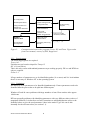
All the flow and temperature sensors are checked against one another. See Combitest Program
Manual.
1.1.3 Connection to Test Stand
Connect the store to the test stand. Normally the conditioning and full charge circuit will be
connected as high/low as possible so that the whole store can be charged/discharged. Special
air release mechanisms might be required. All extra pipes other than the ones normally used
should be drawn down inside the insulation for connection at the bottom of the store.
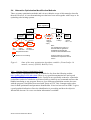
1.1.4 Definition of Tests to be Performed and Quantities to Measure
Based on the manufacturers documentation and a simple analysis of the function of the store, a
list of all the ports, heat exchangers that need to be identified is made up. Based on this list,
the list of tests required is made up based on experience from previous tests. Once this list is
made, the programming of the individual test sequences is made – see Combitest Program
Manual. A decision as to what parameters should be identified will be required here as this
affects which test sequences need to be applied.
1.1.5 Application of Tests to Store
Run the measurement program with the command files for each test sequence, including the
verification sequence if used. After each test sequence it is important to make an energy
balance check to make sure that the test stand is operating correctly.
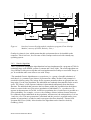
1.1.6 Creation of Trnsys Model for Parameter Identification
Make a model of the store together with: the data reader for the measurement files; equations
to calculate the measured heat transfer rates and instantaneous difference between measured
and simulate rates; online output of the rates; and simulation summaries for the transferred
energies and difference in heat transfer rates. See sections 3.2.1 and 3.2.3 for more details.
1.1.7 Modification of Datafiles to use for Parameter Identification
Convert the raw measurement file to ones that can be used with the model created above. See
Appendix A for more details.
1.1.8 Parameter Identification
Use DF and Fittrn to identify the parameters. See sections 3.2.3 and 3.2.4 for more details.
SERC’s Parameter Identification Manual
4