1
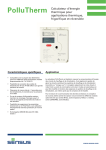
MiniCom 3
User manual
© 2006 Sensus Metering System
www.armatec.com
Contents
I
Table of Contents
Part I Introduction
1 Installation
2
................................................................................................................................... 3
2 Registration ................................................................................................................................... 3
3 Supported Communication
...................................................................................................................................
Channels
3
Part II Meter Types
8
1 PolluTherm ................................................................................................................................... 11
2 PolluStat E ................................................................................................................................... 12
3 PolluCom E ................................................................................................................................... 13
4 HRI
................................................................................................................................... 14
5 PolluMUK E ................................................................................................................................... 15
6 DYNAMIC Hyb/Ele
................................................................................................................................... 16
7 DYNAMIC Encoder
................................................................................................................................... 17
8 Accupuls
................................................................................................................................... 19
9 FM-2D/K
................................................................................................................................... 20
10 Calmex
................................................................................................................................... 21
11 Unknown Meter
................................................................................................................................... 21
Part III Commands
24
1 Start Readout
................................................................................................................................... 24
2 Set Primary MBus
...................................................................................................................................
Address
26
3 Set Meter ID ................................................................................................................................... 27
4 Set Customer
...................................................................................................................................
Location
28
5 Set System Date
...................................................................................................................................
and Time
29
6 Set Averaging
...................................................................................................................................
Duration
30
7 Reset Min/Max
...................................................................................................................................
Values
31
8 Set LCD Option
................................................................................................................................... 31
9 Set Tariff Parameters
................................................................................................................................... 31
10 Set Storage Date
................................................................................................................................... 33
11 Read Logger...................................................................................................................................
Values
34
12 Set Bus Credit
................................................................................................................................... 35
13 Device Configuration
................................................................................................................................... 36
HRI - Configuration
.......................................................................................................................................................... 36
Accupuls - Configuration
.......................................................................................................................................................... 36
Calmex - Configuration
.......................................................................................................................................................... 39
Part IV User Interface
42
1 Program Opening
................................................................................................................................... 42
© 2006 Sensus Metering System
I
II
MiniCom 3
2 Main Window................................................................................................................................... 42
Meters
Commands
Results
Output
3 Menu
.......................................................................................................................................................... 43
.......................................................................................................................................................... 44
.......................................................................................................................................................... 45
.......................................................................................................................................................... 45
................................................................................................................................... 46
File
.......................................................................................................................................................... 46
View
.......................................................................................................................................................... 46
Tools
.......................................................................................................................................................... 47
Meter Parameters
......................................................................................................................................................... 47
COM Number
......................................................................................................................................................... 49
Options ......................................................................................................................................................... 49
Language......................................................................................................................................................... 52
Export Results
......................................................................................................................................................... 53
Help
.......................................................................................................................................................... 54
4 Tool Bars
................................................................................................................................... 54
Part V How to Do
58
1 Solving Problems
................................................................................................................................... 58
2 How To Scan...................................................................................................................................
Meters
59
Index
61
© 2006 Sensus Metering System
Part
I
2
1
MiniCom 3
Introduction
Description of the MiniCom 3 program
Document date : 21.2.2006
MiniCom 3 is a software tool for setting the parameters of utility meters made by SENSUS METERING
SYSTEMS. The program is not designed for other manufacturers' meters.
MiniCom 3 enables the user to set his specific parameters, such as meter address, meter ID,
customer location, system date and time, tariff parameters. This is done through the communication
interface (MBus terminal, inductive interface and optical interface).
In order to use all of MiniCom 3's commands, it is necessary to be registered. If your version is not
registered, some commands will not be available and therefore you won't be able to run them.
List of supported meters:
· PolluTherm - energy meter - totaliser
· PolluTherm (FW2) - energy meter - totaliser, firmware 2
· PolluStat E - ultrasonic energy meter
· PolluStat E (FW2) - ultrasonic energy meter, firmware 2
· PolluCom E - compact heat meter
· PolluCom E (FW2) - compact heat meter, firmware 2
· HRI - a comprehensive pulse and data system for remote reading of a conventional meter
· PolluMUK E - multijet universal coaxial appartment water meter
· DYNAMIC Hybrid * - register for cold water meters "Hybrid"
· DYNAMIC Electronic * - register for cold water meters "Electronic"
· DYNAMIC Encoder MBus ** - register for cold water meters "Encoder" MBus
· DYNAMIC Encoder MiniBus ** - register for cold water meters "Encoder" MiniBus
· Accupuls - complementary AMR systems for pulse output meters
· FM-2D/K - frequency converter
· Calmex - energy meter - totaliser
*) MiniCom 3 has put together DYNAMIC Hybrid and DYNAMIC Electronic under one name,
DYNAMIC Hyb/Ele
**) MiniCom 3 has put together DYNAMIC Encoder MBus and DYNAMIC Encoder MiniBus under one
name, DYNAMIC Encoder
More information under Meter Types.
MBus
MiniCom 3 uses MBus protocol to communicate with meters. This protocol is defined by the
international standard IEC-870.
It is supposed that the program user understands the basic principles of MBus communication and can
assess the risks of the programming within the complex MBus installation. An error can affect all
connected meter.
Detailed information about MBus can be found at www.m-bus.com.
MBus uses two types of addresses: primary and secondary. MiniCom 3 supports both. Some meters
support both, while others only support the primary address. Details can be found under Meter Types.
MBus communication uses the most common baudrates of 300 and 2400 bps. MiniCom 3 is able to
communicate using both rates. Some meters support both, while others support only one. Details can
be found under Meter Types.
© 2006 Sensus Metering System
Introduction
1.1
3
Installation
The Installation of the program MiniCom 3
The installation program of the current version of MiniCom 3 can be found on the SENSUS
METERING SYSTEMS, http://www.imsemea.com website.
Minimum requirements
To install MiniCom 3 it is necessary to have at least the following:
· Microsoft Windows NT 4.0 (Intel) operating system with SP3 installed or Windows 2000 or Windows
XP or Windows 98 SE or Windows ME
· Administrative Privileges on the system for Windows NT 4.0 and Windows 2000 and Windows XP
during installation
· Microsoft Internet Explorer 5 or higher if running on NT 4, Windows 98
· 64 megabytes of RAM (128 MB recommended)
· Super VGA monitor (600x800)
· Disk Space required: 2 MB of free space in the target directory.
· One COM port on your computer or its full-functioning equivalent, such as USB/COM
converter
First installation
To install MiniCom 3, do the following:
1. Run the file mc3XXX.exe (XXX is the version of the software), which you can get from SENSUS
METERING SYSTEMS.
2. Continue according to the Wizard on the screen.
Reinstallation or upgrade
For reinstallation or upgrade simply run the file mc3XXX.exe again and continue according to the
Wizard on the screen.
Removing the software from the computer
Use Windows "Control Panel" | "Add or Remove Programs".
1.2
Registration
Registration of the MiniCom 3 program
After registration you will be able to use all the commands on MiniCom 3. To register you have go to
menu:
"Help" | "About". Click on "Register" and enter your name and password, which you have received from
SENSUS METERING SYSTEMS.
Contact
Sensus Metering Systems GmbH
Meineckestrasse 10
30880 Laatzen
Germany
Tel: +49 5102 74 0
Fax: +49 5102 74 339
http://www.sensus.com
e-mail: [email protected]
1.3
Supported Communication Channels
List of supported communication channels
MiniCom 3 only supports communication through the serial port of your computer. So you need a
© 2006 Sensus Metering System
4
MiniCom 3
computer equipped with at least one COM port or its full-functioning equivalent, such as USB/COM
converter.
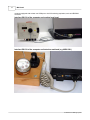
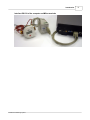
Interface RS-232 of the computer and a optical read head
Interface RS-232 of the computer and inductive read head (e.g. MDK 6921)
© 2006 Sensus Metering System
Introduction
Interface RS-232 of the computer and MBus terminals
© 2006 Sensus Metering System
5
Part
II
8
2
MiniCom 3
Meter Types
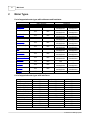
List of supported meter types with addresses and baudrates:
MBus address
primary
secondary
PolluTherm
PolluTherm (FW2)
PolluStat E
PolluStat E (FW2)
PolluCom E
PolluCom E (FW2)
HRI
PolluMUK E
DYNAMIC Hyb/Ele
DYNAMIC
Encoder
Accupuls
FM-2D/K
Calmex
YES
YES
YES
YES
YES
YES
YES
YES
YES
YES
YES
YES
YES
YES
YES
YES
YES
YES
YES
YES
YES
YES
YES
YES
YES
-
Baudrates
300
2400
YES,
YES,
autodetection
autodetection
YES,
YES,
autodetection
autodetection
YES,
YES,
autodetection
autodetection
YES,
YES,
autodetection
autodetection
YES,
YES,
autodetection
autodetection
YES,
YES,
autodetection
autodetection
YES,
YES,
autodetection
autodetection
YES,
YES,
autodetection
autodetection
YES,
YES,
autodetection
autodetection
YES
-
YES,
autodetection
YES,
autodetection
YES
YES,
autodetection
YES,
autodetection
-
List of supported meter types with interfaces:
Inductive interface
Optical interface
MBus terminals
PolluTherm
YES*
YES
YES
PolluTherm (FW2)
YES*
YES
YES
PolluStat E
YES*
YES
YES
PolluStat E (FW2)
YES*
YES
YES
PolluCom E
YES*
YES
YES
PolluCom E (FW2)
YES*
YES
YES
HRI
YES*
YES
PolluMUK E
YES
YES
DYNAMIC Hyb/Ele
YES*
- / YES
YES
DYNAMIC Encoder
YES (MiniBus Version)
YES (MBus Version)
Accupuls
YES*
YES
FM-2D/K
YES*
YES
Calmex
YES
YES
* Inductive interface can be connected through inductive head to MBus terminals.
© 2006 Sensus Metering System
Meter Types
9
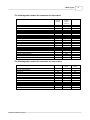
The following table contains the commands for heat meters:
PTherm
PStat E
PCom E
Start Readout
Set primary MBus address
Set meter ID
Set customer location
Set system date and time
Set averaging duration
Reset min/max values
Clear errors
Set LCD option
Set tariff parameters
Set storage date
Read logger values
Set bus credit
Select readout telegrams
Set password
Set cooling meter parameters
Set pulse input parameters
Set pulse output parameters
Device configuration
* Can only be used with the command "Device configuration"
YES
YES
YES
YES
YES
YES
YES
YES
YES
YES
YES
-
FW2 :
PTherm
PStat E
PCom E
YES
YES
YES
YES
YES
YES
YES
YES
YES
YES
YES
YES
YES
YES
YES
YES
YES
-
Calmex
DYNAMIC
Hyb/Ele
YES
YES
YES
YES
YES
-
DYNAMIC
Encoder
YES
YES
YES
-
YES
YES *
YES *
YES *
YES
The following table contains the commands for water meters:
PMuk E
Start Readout
Set primary MBus address
Set meter ID
Set customer location
Set system date and time
Set averaging duration
Reset min/max values
Set LCD option
Set storage date
Set tariff parameters
Read logger values
Set bus credit
© 2006 Sensus Metering System
YES
YES
YES
YES
YES
YES
YES
10
MiniCom 3
The following table contains the commands for other types of meters:
Start Readout
Set primary MBus address
Set meter ID
Set customer location
Set system date and time
Set averaging duration
Reset min/max values
Set LCD option
Set storage date
Set tariff parameters
Read logger values
Set bus credit
Device configuration
* Can only be used with the command "Device
configuration"
HRI
YES
YES
YES
-
Accupuls
YES
YES
YES
YES
YES *
YES
-
FM-2D/K
YES
YES
YES
YES
-
Unknown
YES
-
YES
YES
-
-
© 2006 Sensus Metering System
Meter Types
2.1
11
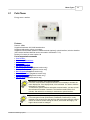
PolluTherm
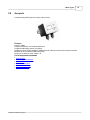
Energy meter - totaliser.
Features
Protocol : MBus
Supported baudrates: 300, 2400 autodetection
Supported addressing: primary, secondary
Supported communication interfaces: MBus terminals (optional), optical interface, inductive interface
(the inductive interface MiniPad can be connected to terminals 51 + 52)
Number of counters in meter readout: 98
List of supported commands
·
·
·
·
·
·
·
·
·
·
·
Start Readout
Set primary MBus address
Set meter ID
Set customer location
Set system date and time
Set averaging duration (Registered version only)
Reset min/max values (Registered version only)
Set LCD option (Registered version only)
Set tariff parameters (Registered version only)
Read logger values (Registered version only)
Set bus credit (Registered version only)
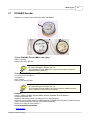
Activation of a meter using optical interface:
For meter communication via optical interface it is necessary to activate the
meter display first. If the display blinks, it isn't activated. You have to hold the
red button for 2 seconds.
To activate the optical interface and enable communication, you have to hold
the red button for another 3 seconds. The interface remains active for 3
minutes, after which it is necessary to reactivate the optical interface.
System date and time:
For some types of meter (PolluTherm, PolluStat E, PolluCom E) it is only
possible to set values for the date and time which are higher than the current
values. Be cautious: before setting the values, check them thoroughly. The
higher values cannot be changed.
© 2006 Sensus Metering System
12
2.2
MiniCom 3
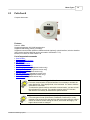
PolluStat E
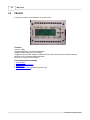
Ultrasonic energy meter.
Features
Protocol : MBus
Supported baudrates: 300, 2400 autodetection
Supported addressing: primary, secondary
Supported communication interfaces: MBus terminals (optional), optical interface, inductive interface
(the inductive interface MiniPad can be connected to terminals 51 + 52)
Number of counters in meter readout: 98
List of supported commands
·
·
·
·
·
·
·
·
·
·
·
Start Readout
Set primary MBus address
Set meter ID
Set customer location
Set system date and time
Set averaging duration (Registered version only)
Reset min/max values (Registered version only)
Set LCD option (Registered version only)
Set tariff parameters (Registered version only)
Read logger values (Registered version only)
Set bus credit (Registered version only)
Activation of a meter using optical interface:
For meter communication via optical interface it is necessary to activate the
meter display first. If the display blinks, it isn't activated. You have to hold the
red button for 2 seconds.
To activate the optical interface and enable communication, you have to hold
the red button for 3 seconds. The interface remains active for 3 minutes,
after which it is necessary to reactivate the optical interface.
System date and time:
For some types of meter (PolluTherm, PolluStat E, PolluCom E) it is only
possible to set values for the date and time which are higher than the current
values. Be cautious: before setting the values, check them thoroughly. The
higher values cannot be changed.
© 2006 Sensus Metering System
Meter Types
2.3
13
PolluCom E
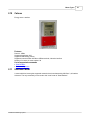
Compact heat meter.
Features
Protocol : MBus
Supported baudrates: 300, 2400 autodetection
Supported addressing: primary, secondary
Supported communication interfaces: MBus terminals (optional), optical interface, inductive interface
(the inductive interface MiniPad can be connected to terminals 51 + 52)
Number of counters in meter readout: 98
List of supported commands
·
·
·
·
·
·
·
·
·
·
·
Start Readout
Set primary MBus address
Set meter ID
Set customer location
Set system date and time
Set averaging duration (Registered version only)
Reset min/max values (Registered version only)
Set LCD option (Registered version only)
Set tariff parameters (Registered version only)
Read logger values (Registered version only)
Set bus credit (Registered version only)
Activation of a meter using optical interface:
For meter communication via optical interface it is necessary to activate the
meter display first. If the display blinks, it isn't activated. You have to hold the
red button for 2 seconds.
To activate the optical interface and enable communication, you have to hold
the red button for 3 seconds. The interface remains active for 3 minutes,
after which it is necessary to reactivate the optical interface.
System date and time:
For some types of meter (PolluTherm, PolluStat E, PolluCom E) it is only
possible to set values for the date and time which are higher than the current
values. Be cautious: before setting the values, check them thoroughly. The
higher values cannot be changed.
© 2006 Sensus Metering System
14
2.4
MiniCom 3
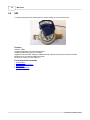
HRI
A comprehensive pulse and data system for remote reading of a conventional meter.
Features
Protocol : MBus
Supported baudrates: 300, 2400 autodetection
Supported addressing: primary, secondary
Supported communication interfaces: MBus terminals, inductive interface (the inductive interface
MiniPad can be connected to MBus terminals)
Number of counters in meter readout: 2
List of supported commands
·
·
·
·
Start Readout
Set primary MBus address
Set meter ID
Device configuration
© 2006 Sensus Metering System
Meter Types
2.5
15
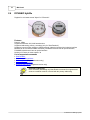
PolluMUK E
Multijet universal coaxial appartment water meter.
Features
Protocol : MBus
Supported baudrates: 300, 2400 autodetection
Supported addressing: primary, secondary (only for "Start Readout")
Supported communication interfaces: MBus terminals, optical interface
Number of counters in meter readout: 11
List of supported commands
·
·
·
·
·
·
Start Readout
Set primary MBus address
Set storage date (Registered version only)
Set meter ID
Set system date and time
Set bus credit (Registered version only)
Secondary addressing:
In the secondary addressing only Start Readout command is supported and
all other commands must be executed with the primary addressing.
© 2006 Sensus Metering System
16
2.6
MiniCom 3
DYNAMIC Hyb/Ele
Register for cold water meters "Hybrid" or "Electronic".
Features
Protocol : MBus
Supported baudrates: 300, 2400 autodetection
Supported addressing: primary, secondary (only for "Start Readout")
Supported communication interfaces: MBus terminals, inductive interface (the inductive interface
MiniPad can be connected to MBus terminals), DYNAMIC Electronic has an optical interface,
DYNAMIC Hybrid doesn't have an optical interface
Number of counters in meter readout: 34
List of supported commands
·
·
·
·
·
Start Readout
Set primary MBus address
Set storage date (Registered version only)
Set system date and time
Reset min/max values (Registered version only)
Secondary addressing:
In the secondary addressing only Start Readout command is supported and
all other commands must be executed with the primary addressing.
© 2006 Sensus Metering System
Meter Types
2.7
17
DYNAMIC Encoder
Register for cold water meters "Encoder" MBus and MiniBus.
Text on DYNAMIC Encoder MBus cable (grey)
M-Bus: no polarity
Protocol: EN 1434 / IEC 870
Attention - DYNAMIC Encoder MBus
Be careful what type of Encoder you use.
The DYNAMIC Encoder MBus will not communicate when connected to
MiniBus (inductive interface).
Text on DYNAMIC Encoder MiniBus cable (black)
Do not connect to an M-Bus !
red: Signal <+>
black: Ground
Protocol: EN 1434, IEC 870
Attention - DYNAMIC Encoder MBus
Be careful what type of Encoder you use.
The DYNAMIC Encoder MiniBus cannot be connected to MBus terminals.
Such a connection would destroy the register.
Features
Protocol : MBus (DYNAMIC Encoder MBus), MiniBus (DYNAMIC Encoder MiniBus)
Supported baudrates: 300
Supported addressing: primary, secondary (only for "Start Readout")
Supported communication interfaces: MBus terminals (DYNAMIC Encoder MBus), inductive interface
(can be connected through inductive head to MBus terminals)
Number of counters in meter readout: 2
List of supported commands
· Start Readout
© 2006 Sensus Metering System
18
MiniCom 3
· Set primary MBus address
· Set meter ID
Secondary addressing:
In the secondary addressing only Start Readout command is supported and
all other commands must be executed with the primary addressing.
© 2006 Sensus Metering System
Meter Types
2.8
Accupuls
Complementary AMR systems for pulse output meters.
Features
Protocol : MBus
Supported baudrates: 300, 2400 autodetection
Supported addressing: primary, secondary
Supported communication interfaces: MBus terminals, inductive interface (the inductive interface
MiniPad can be connected to MBus terminals)
Number of counters in meter readout: 39
List of supported commands
·
·
·
·
·
·
Start Readout
Set primary MBus address
Set meter ID
Set customer location
Reset min/max values
Device configuration
© 2006 Sensus Metering System
19
20
2.9
MiniCom 3
FM-2D/K
Frequency converter. Flow-totalization of 2 water meters.
Features
Protocol : MBus
Supported baudrates: 300, 2400 autodetection
Supported addressing: primary, secondary
Supported communication interfaces: MBus terminals, inductive interface (the inductive interface
MiniPad can be connected to MBus terminals)
Number of counters in meter readout: 7
List of supported commands
·
·
·
·
Start Readout
Set primary MBus address
Set Meter ID
Reset min/max values (Registered version only)
© 2006 Sensus Metering System
Meter Types
2.10
21
Calmex
Energy meter - totaliser.
Features
Protocol : MBus
Supported baudrates: 300
Supported addressing: primary
Supported communication interfaces: MBus terminals, inductive interface
Number of counters in meter readout: 28
List of supported commands
· Start Readout
· Device configuration
2.11
Unknown Meter
A meter which isn't among the supported meters but has been detected by MiniCom 3, is listed as
Unknown. The only command you can send to this "new" meter is "Start Readout".
© 2006 Sensus Metering System
Part
III
24
3
MiniCom 3
Commands
The following is the complete list of commands for setting the parameters of Sensus meters:
· Start Readout
· Set Primary MBus Address
· Set Meter ID
· Set Customer Location
· Set System Date and Time
· Set Averaging Duration (Registered version only)
· Reset Min/Max Values (Registered version only)
· Clear Errors (Registered version only)
· Set LCD Option (Registered version only)
· Set Tariff Parameters (Registered version only)
· Set Storage Date (Registered version only)
· Read Logger Values (Registered version only)
· Set Bus Credit (Registered version only)
· Select Readout Telegrams (Registered version only)
· Set Password (Registered version only)
· Set Cooling Meter Parameters (Registered version only)
· Set Pulse Input Parameters (Registered version only)
· Set Pulse Output Parameters (Registered version only)
· Device Configuration
o HRI - Configuration
o Accupuls - Configuration
o Calmex - Configuration
See also Meter Types.
3.1
Start Readout
This command activates the meter readout and is available for all meter types.
If the readout goes successfully, the new values will appear in the Results window.
If the readout does not go successfully, an "Error" box will appear. Solutions to problems during
communication with meters can be found under the topic "Solving Problems".
Line of communication:
After you select your command, MiniCom 3 will begin to use the serial port
and communicate with the meter. During this time the green LED icon in the
lower right corner in the Status Bar changes colour to red. Then there is only
more function in the program, "Abort communication", that can be selected.
Communication status is indicated in the Status Bart to the left of the
coloured LED icon.
If you are using a registered version of MiniCom 3, you can follow the communication in detail in the
"Output window".
© 2006 Sensus Metering System
Commands
25
Meter parameters:
Before selecting a command you must first check communication
parameters of the meter. The meter you select must have its MBus address
and baudrate set correctly (for the communication with just one meter we
recommend the common primary address 254). The parameters can be
changed by double clicking on the meter in the "Meters" window, or by
clicking the button on the right on your mouse and selecting the command
"Meter Parameters", or by choosing from the main commands menu "Tools" /
"Meter Parameters".
If you don't know the exact meter address, and you are communicating with
just one meter, use the common primary address 254, which every meter
replies to. If you are communicating with more than one meter and you don't
know their addresses, use the command "Meter scan".
Using the common primary addresses (254 und 255):
When you send a command for programming or setting the primary
addresses 254 and 255, all of the connected meters execute this command.
You risk accidentally sending a command to all connected meters that was
only intended for one meter. Don't use the common addresses when
communicating with more than meter at once.
In the case of communication with the meter using the common address 254 where the meter was
successfully read, the program automatically exchanges the common address 254 in the meter
parameters for the real address. The address change automatically appears in the Meters window.
The last read meter address will be saved in the program. Wenn you connect another meter you have
to change the meter address. In the case of one meter to the common address 254.
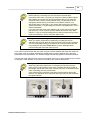
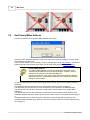
Using the optical interface:
When using the optical read head, it is necessary to first ensure that the
head is in the correct position on the meter. The cable should be parallel to
the straight vertical side of the meter, with the LED icons on the head and the
meter connecting as on the picture below.
Some meters require activation of the optical interface before starting the
readout. The description of each specific meter type tells you how to activate
the optical interface.
© 2006 Sensus Metering System
26
3.2
MiniCom 3
Set Primary MBus Address
Use this command to set the primary MBus address of the meter.
Clicking on "OK" sends the data to the meter (even if you don't make any changes). "Cancel" stops
communication with the meter.
If the command doesn't run successfully, still try to read the meter using "Start Readout". Solutions to
problems during communication with meters can be found under the topic "Solving Problems".
Primary MBus address:
The primary MBus address ((1-250) must be unique among the meters
connected to one MBus line (to one serial COM port). Therefore, such an
address can be used just once within the MBus line.
Having more than one meter in the system with the same primary address
generates a collision, so the address cannot be used, neither for parameter
setting nor meter readout.
For primary addresses you can use values fitting within one byte, from 0 to 255, with the following
limitations:
The address 0 should only be used for new meters which haven't yet been configured.
The addresses 251 and 252 can't be used, because they are reserved for the MBus standard.
The address 253 can't be used, because it is used during communication via secondary MBus
addresses.
The address 254 can't be used, because it is reserved for communication with all meters at once
(broadcast address with reply). When you use 254 all meters receive the communication and reply to
it.
The address 255 can't be used, because it reserved for communication with all meters at once
(broadcast address without reply). When you use 255 all meters receive the communication but they
do not reply to it.
© 2006 Sensus Metering System
Commands
27
Allowed primary addresses:
Meters can be programmed with addresses from 0 to 250, but we
recommend not using 0.
If the MBus address has been set successfully, it will appear in the Meters window in the Address
column (when using the primary address). If the meter has already been read, in the Results window
the address will be changed. These changes enable further communication with the meter with its new
address. To thoroughly check implementation of the change, we recommend running a meter
readout.
3.3
Set Meter ID
Use this command to set the meter ID (Identification) as a part of the secondary MBus Address.
This dialog will appear, if you haven't read the meter before starting this command. If you click on
"Start Readout", after reading the meter a dialog with the current parameter value appears. If you
choose "Ignore", a dialog with a default value appears, which doesn't correspond to the real parameter
value.
Clicking on "OK" sends the data to the meter (even if you don't make any changes). "Cancel" stops
communication with the meter.
If the command doesn't run successfully, still try to read the meter using "Start Readout". Solutions to
problems during communication with meters can be found under the topic "Solving Problems".
If you set the meter ID before reading the meter, in the dialog window there will appear in the space
"Meter ID" the default value "12345678". If you set the meter ID after the reading the meter, the actual
ID number will appear in the window.
© 2006 Sensus Metering System
28
MiniCom 3
Secondary MBus address:
The meter ID is a part of the secondary MBus address. If you change it, you
change the secondary address as well.
The secondary address consists of 4 parts: meter ID, manufacturer code,
version and medium. It should be unique among all meters, so you should
always set a different meter ID.
The delivery setting of the meter ID is the serial number from the
manufacturer.
If the Meter ID has been set successfully, it will appear in the Meters window in the "Meter ID" column
(when using the secondary address). If the meter has already been read, in the Results window the
meter ID will be changed. These changes enable further communication with the meter with its new
address. To thoroughly check implementation of the change, we recommend running a meter readout.
3.4
Set Customer Location
Use this command to set the customer location of the meter.
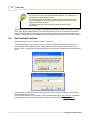
This dialog will appear, if you haven't read the meter before starting this command. If you click on
"Start Readout", after reading the meter a dialog with the current parameter value appears. If you
choose "Ignore", a dialog with a default value appears, which doesn't correspond to the real parameter
value.
Clicking on "OK" sends the data to the meter (even if you don't make any changes). "Cancel" stops
communication with the meter.
If the command doesn't run successfully, still try to read the meter using "Start Readout". Solutions to
problems during communication with meters can be found under the topic "Solving Problems".
© 2006 Sensus Metering System
Commands
29
Customer Location:
The customer location has nothing to do with the meter ID or Fabrication
Number parameters.
It normally uses a value which serves as the identifier of a meter site in the
utility distribution network. This number stays the same even if the meter
itself has been replaced. The customer location number should be the same
for all meters used at one location.
The delivery setting of the customer location is the serial number from the
manufacturer.
If the customer location has been set successfully and the meter has already been read, in the Results
window the customer location will be changed. To thoroughly check implementation of the change, we
recommend running a meter readout.
3.5
Set System Date and Time
Use this command to set the system date and time of the meter.
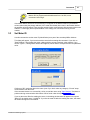
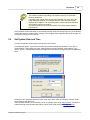
This dialog will appear, if you haven't read the meter before starting this command. If you click on
"Start Readout", after reading the meter a dialog with the current parameter value appears. If you
choose "Ignore", a dialog with a default value appears, which doesn't correspond to the real parameter
value.
Clicking on "OK" sends the data to the meter (even if you don't make any changes). "Cancel" stops
communication with the meter.
If the command doesn't run successfully, still try to read the meter using "Start Readout". Solutions to
problems during communication with meters can be found under the topic "Solving Problems".
© 2006 Sensus Metering System
30
MiniCom 3
System date and time:
For some types of meter (PolluTherm, PolluStat E, PolluCom E) it is only
possible to set values for the date and time which are higher than the current
values. Be cautious: before setting the values, check them thoroughly. The
higher values cannot be changed.
Clicking on "Use PC date and time" sends the system time from the user's PC to the meter.
If the system date and time have been set successfully and the meter has already been read, in the
Results window the date and time will be changed. To thoroughly check implementation of the change,
we recommend running a meter readout.
3.6
Set Averaging Duration
(Registered version only)
Use this command to set the averaging period for the calculation of the tariff setting and for the
maximum values of the meter.
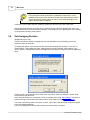
This dialog will appear, if you haven't read the meter before starting this command. If you click on
"Start Readout", after reading the meter a dialog with the current parameter value appears. If you
choose "Ignore", a dialog with a default value appears, which doesn't correspond to the real parameter
value.
Clicking on "OK" sends the data to the meter (even if you don't make any changes). "Cancel" stops
communication with the meter.
If the command doesn't run successfully, still try to read the meter using "Start Readout". Solutions to
problems during communication with meters can be found under the topic "Solving Problems".
The meter calculates the maximum values of power, volume flow, flow and return temperature based
on the set averaging duration.
The set averaging period also provides a basis for the tariff setting calculation.
© 2006 Sensus Metering System
Commands
31
The averaging duration can be set in the range between 3 and 765 minutes, for firmware 2 it is 3 1440 minutes (24 hours). The averaging duration is always a multiple of 3. If you set a number, which
is not commensurable with 3, this value will be round down to the nearest commensurable value.
If the averaging duration has been set successfully and the meter has already been read, in the
Results window this item will be changed. To thoroughly check implementation of the change, we
recommend running a meter readout.
3.7
Reset Min/Max Values
(Registered version only)
Use this command to reset (without further dialog) all minimum and maximum values in the meter
memory. This refers to all peak values from the last use of this command, or, if this command has
never been used, it refers to all peak values from the lifespan of the meter.
If the command doesn't run successfully, still try to read the meter using "Start Readout". Solutions to
problems during communication with meters can be found under the topic "Solving Problems".
If the resetting has been set successfully and the meter has already been read, in the Results window
these items will be set back to zero. To thoroughly check implementation of the change, we
recommend running a meter readout.
3.8
Set LCD Option
(Registered version only)
Use this command to set the LCD display and its data.
Clicking on "OK" sends the data to the meter (even if you don't make any changes). "Cancel" stops
communication with the meter.
If the command doesn't run successfully, still try to read the meter using "Start Readout". Solutions to
problems during communication with meters can be found under the topic "Solving Problems".
This command allows you to select the items shown on the meter display. Some items on the display
can be faded in or out. For details, see the documentation for your individual meter.
To see if the LCD option has been set successfully, check the meter display.
3.9
Set Tariff Parameters
(Registered version only)
Use this command to set the tariff parameters to enable and active the tariff function on the meter
according to a selected condition. The tariff function is based also on the setting of the averaging
duration.
© 2006 Sensus Metering System
32
MiniCom 3
Clicking on "OK" sends the data to the meter (even if you don't make any changes). "Cancel" stops
communication with the meter.
Time delay after selecting this command
First, the meter must be connected. After selecting this command, first the
current meter parameters are read, and then the configuration dialog is
shown. We recommend using this command only after doing a meter
readout. If there is a communication error during the readout, this will be
shown on the screen and you won't be able to continue in the configuration.
If the command doesn't run successfully, still try to read the meter using "Start Readout". Solutions to
problems during communication with meters can be found under the topic "Solving Problems".
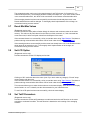
In the default setting the tarif function is switched off. You have to activate this function first (the top
item in the dialog). Then the specific conditions are available and you can select the tariff condition and
its limit value. Please keep in mind the specified physical unit.
If, after selecting the command "Set tariff parameters" and before setting the new condition by clicking
on "OK", the physical meter is changed, then the new tariff setting won't go through.
If the setting has been made successfully, it will be shown on your screen and the meter will calculate
further values using the new tariff.
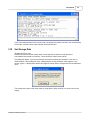
If you check "Save changes to protocol", a protocol file in text format will be created to document these
changes - the corresponding time and the newly set tariff parameters with the setting time (system
time of your PC). This file is named using the fabrication number of the meter (for example, 23660127.
txt) and stored in the MiniCom 3 main directory. This is, when installed as suggested, the directory "C:
\Program Files\MiniCom 3".
© 2006 Sensus Metering System
Commands
33
If you reset tariff parameters for the same meter, all changes will shown in the file in the order that they
were made. In that file all the made changes will be documented.
3.10
Set Storage Date
(Registered version only)
Use this command to set the storage date. The storage date is when the meter stores the
accumulated current data to its memory. These values are called "stored values".
This dialog will appear, if you haven't read the meter before starting this command. If you click on
"Start Readout", after reading the meter a dialog with the current parameter value appears. If you
choose "Ignore", a dialog with a default value appears, which doesn't correspond to the real parameter
value.
The storage date is part of the meter readout, along with the other counters or it can be read on the
display.
© 2006 Sensus Metering System
34
MiniCom 3
Clicking on "OK" sends the data to the meter (even if you don't make any changes). "Cancel" stops
communication with the meter.
If the command doesn't run successfully, still try to read the meter using "Start Readout". Solutions to
problems during communication with meters can be found under the topic "Solving Problems".
If the new date has been set successfully and the meter has already been read, in the Results window
the date will be changed. To thoroughly check implementation of the change, we recommend running
a meter readout.
3.11
Read Logger Values
(Registered version only)
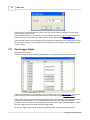
Use this command to receive the daily saved values, for the FW1 it means for the last 512 days.
If the command doesn't run successfully, still try to read the meter using "Start Readout". Solutions to
problems during communication with meters can be found under the topic "Solving Problems"
These values can be several months old, depending on the size of the meter memory and the amount
of time the meter has been in use. The heat meters PolluCom E, PolluTherm und PolluStat E
(Firmware 1) have a memory for the energy values from the last 512 days. The data appears in table
form (tab Logger values) and graph form (tab Logger chart).
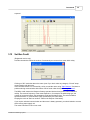
On the tab "Logger chart" you can change the graph properties, the graph can be printed and
© 2006 Sensus Metering System
Commands
35
exported.
3.12
Set Bus Credit
(Registered version only)
Use this command to restrict the number of commands you can send to a meter within a day.
Clicking on "OK" sends the data to the meter (even if you don't make any changes). "Cancel" stops
communication with the meter.
If the command doesn't run successfully, still try to read the meter using "Start Readout". Solutions to
problems during communication with meters can be found under the topic "Solving Problems".
The MBus credit ensures the lifespan of battery-operated devices through their whole calibration
validity. The read out frequency of the meter depends on, for example, the addressing type, the
number of connected meters, the temperature probe and the battery type. The meter handles a
specifiied amount of communication a day (as defined by the meter clock).
Keeping the mode at "Set bus credit off" reduces the lifespan of the battery.
If you require unlimited communication and the meter is battery-operated, you should switch to a meter
which uses a power supply unit.
The meter PolluCom E has no bus credit.
© 2006 Sensus Metering System
36
3.13
MiniCom 3
Device Configuration
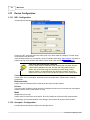
3.13.1 HRI - Configuration
Use this special command to configure the HRI device.
Clicking on "OK" sends the data to the meter (even if you don't make any changes). "Cancel" stops
communication with the meter.
If the command doesn't run successfully, still try to read the meter using "Start Readout". Solutions to
problems during communication with meters can be found under the topic "Solving Problems".
Time delay after selecting this command
First, the meter must be connected. After selecting this command, first the
current meter parameters are read, and then the configuration dialog is
shown. We recommend using this command only after doing a meter
readout. If there is a communication error during the readout, this will be
shown on the screen and you won't be able to continue in the configuration.
Consumption
Current value of the consumption, set based on the connected meter. Please keep in mind the
physical unit.
Backward buffer
Used to clear the backward buffer, which stores the loop-back input impulse.
D-Value
This is the pulse multiplier by which the device multiplies its pulse count to calculate the consumption.
Always enter the value in units shown i.e. l/imp.
Mode
(Registered version only)
Used to set the current mode of the device, B1 to B4. Details can be found in HRI documentation.
To thoroughly check implementation of the changes, we recommend running a meter readout.
3.13.2 Accupuls - Configuration
Use this special command to configure the Accupuls device.
© 2006 Sensus Metering System
Commands
37
Clicking on "OK" sends the data to the meter (even if you don't make any changes). "Cancel" stops
communication with the meter.
If the command doesn't run successfully, still try to read the meter using "Start Readout". Solutions to
problems during communication with meters can be found under the topic "Solving Problems".
Time delay after selecting this command
First, the meter must be connected. After selecting this command, first the
current meter parameters are read, and then the configuration dialog is
shown. We recommend using this command only after doing a meter
readout. If there is a communication error during the readout, this will be
shown on the screen and you won't be able to continue in the configuration.
Global Parameters
Meter ID
Meter identification number (also a part of the secondary meter address).
Fabrication Number
Fabrication Number:
The Fabrication number has nothing to do with the meter ID or Customer
location parameters.
It is assigned to the meter at the time of manufacture by Sensus Metering
System GmbH. It cannot be changed.
Customer Location
© 2006 Sensus Metering System
38
MiniCom 3
Customer Location:
The customer location has nothing to do with the meter ID or Fabrication
Number parameters.
It normally uses a value which serves as the identifier of a meter site in the
utility distribution network. This number stays the same even if the meter
itself has been replaced. The customer location number should be the same
for all meters used at one location.
The delivery setting of customer location is the serial number from the
manufacturer.
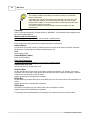
Password
Enter a valid meter password. The default value is "00000000". The password can be changed using
the command Set Password.
Medium and Unit Parameters
To change the following parameters, you must enter a valid password.
Measured Medium
Enter the physical quantity which will be measured based on input pulses.
Index (Volume)
Current value of the pulse counter. It shows the the current value of the meter in the units selected in
the field "Unit". Please keep in mind the specified physical unit
Unit
Select a physical unit.
Pulse Multiplier (Value)
Enter a pulse multiplier.
Date Time Parameters
To change the following parameters, you must enter a valid password.
System Date and Time
Set the date and time on the meter clock.
Next Due Date
On this date the current year value on the meter is stored to the memory. For example, if you set 31
December, then every year on that day the meter will store the value of yearly consumption. This date
needn't to be lower than the current or invalid.
Details can be found in Accupuls documentation.
Billing Day
On this date every month at the time set in the billing hour box, the current value of the consumption is
stored.
Details can be found in Accupuls documentation.
Billing Hour
At this time on the billing day, the current value of the consumption is stored.
Details can be found in Accupuls documentation.
To thoroughly check implementation of the changes, we recommend running a meter readout.
© 2006 Sensus Metering System
Commands
39
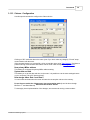
3.13.3 Calmex - Configuration
Use this special command to configure the Calmex device.
Clicking on "OK" sends the data to the meter (even if you don't make any changes). "Cancel" stops
communication with the meter.
If the command doesn't run successfully, still try to read the meter using "Start Readout". Solutions to
problems during communication with meters can be found under the topic "Solving Problems".
New primary MBus address
This allows you to change the primary MBus address setting.
System date and time
This allows you to set the date and time on the meter. It is possible to use the same settings that are
on your computer ("Set to PC date and time").
New storage dates: Date 1 and Date 2
You can select two dates when the meter will store the consumption values to the memory.
Do not forget to switch the Calmex meter into programming mode (it can't be done through
MiniCom 3 - see Meter Manual). Otherwise this function will fail.
To thoroughly check implementation of the changes, we recommend running a meter readout.
© 2006 Sensus Metering System
Part
IV
42
MiniCom 3
4
User Interface
4.1
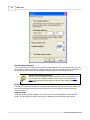
Program Opening
After opening the program, you have to choose the right COM port through which the MiniCom 3 will
communicate with the meters.
If you choose an invalid or unavailable communication port number, an error dialog will appear and you
will have to choose a valid number or the program will be terminated.
See also COM number.
4.2
Main Window
The main window contains the following:
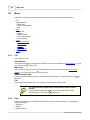
· Menu
· Tool bars with icons for quickly opening chosen commands from the menu
· Window Meters with 2 tab pages:
o Supported - with the list of all supported meters
o Scanned - with all already scanned meters
· Window Commands
· Window Results
· Output window (only in the registered version)
· Status bar with the following features (left to right):
o quick help for chosen item from user interface
o registered or unregistered version
o information about the communication status (with which communication port the program is
communicating and at what baudrate)
o coloured LED icon showing activity on communication port
© 2006 Sensus Metering System
User Interface
4.2.1
43
Meters
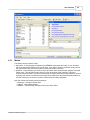
The Meters window contains 2 tabs:
· Supported - on this tab page all supported (by SENSUS) meter types are listed, so you can select
the command without needing to do a meter scan. If you want to select a command, simply choose
the proper meter type and in the window Command the proper command.
· Scanned - on this tab page you will find a list of all meters which were detected using the command
"Meter scan". This tab page is blank after you open the program. After scanning, a list of the
scanned meters is shown. This list is erased by the next scan. When the primary address is used for
scanning, then the list of scanned meters uses primary addresses. When the secondary address is
used for scanning, then the list of scanned meters uses secondary addresses.
Both lists contain the following meter parameters:
o Meter type - the name of meter type
o Address - meter MBus address
o Baudrate - communication baudrate of the meter 300 or 2400
© 2006 Sensus Metering System
44
MiniCom 3
Meter parameters:
Before selecting a command you must first check communication
parameters of the meter. The meter you select must have its MBus address
and baudrate set correctly. The parameters can be changed by double
clicking on the meter in the Meters window, or by clicking the button on the
right on your mouse and selecting the command "Meter Parameters", or by
choosing from the main commands menu "Tools" / "Meter Parameters".
4.2.2
Commands
After opening the program, this window may be blank. The commands will become available after you
select a meter.
There is a list of commands for a single meter type. The Commands window is different for every type
of meter.
To use all the commands which MiniCom 3 provides, you need to be registered. In the unregistered
version some commands are unavailable and cannot be selected.
Details for using commands can be found under the topics Commands and Meter types.
© 2006 Sensus Metering System
User Interface
45
Command description:
Quick help for every command can be viewed with the icon . For some
commands, the current parameter value and the reading time are also shown
when you click on the above list for a description.
4.2.3
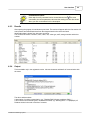
Results
After opening the program, this window may be blank. The results will appear after the first readout. All
read counters and identification data from the telegram head on the meter are listed.
Identification data is shown first, with name and value.
The counters each have a number, name, value, unit, value type, tariff, storage number and device
number.
4.2.4
Output
This is available only in the registered version. It shows the status and details of communication with
the meter.
The above window shows:
A description of running communication, e.g. "Reading RAM (4 bytes at address 0242)..."
A list of all sent and received bytes in hexadecimal format, e.g. "Sending bites: >> 10|5B|06|61|16"
Readout results in the order of the list of counters.
© 2006 Sensus Metering System
46
4.3
MiniCom 3
Menu
All MiniCom 3 commands which are common for all meters can be found in the main menu.
· File
o Start Readout
o Meter scan
o Abort communication
o Exit
· View
o Status bar
o Results
o Output window
o Clear output window
o Restore panels
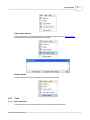
· Tools
o Meter parameters
o COM number
o Options
o Language
o Export results
· Help
o About
4.3.1
File
In this menu you can:
Start Readout
This command activates a meter readout. Details can be found under the topic Start Readout. You can
also use the icon
or the key F5.
Meter scan
This command performs a scan for all meters. Details can be found under the topic How to scan
meters. You can also use the icon
or the key F6.
Abort communication
This command immediately stops the communication with the meter. You can also use the icon
the key F7.
or
Exit
This command closes MiniCom 3. You can use the combination of keys Alt+F4.
You cannot exit the program when communication with the meter is
running:
To stop communication immediately, use the command "File" | "Abort
communication" or use the icon
or the key F7.
4.3.2
View
In this menu the setup of the windows on the screen can be chosen by checking or unchecking the
window view option :
· Status bar
· Results
· Output window
© 2006 Sensus Metering System
User Interface
Clear output window
This command (only in the registered version) is used to erase the data in the Output window.
Erasing the data is only possible through this command.
Restore panels
Use this command to restore the default view of the program window.
4.3.3
Tools
4.3.3.1
Meter Parameters
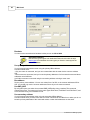
In this dialog you can set the parameters for the communication with the meter.
© 2006 Sensus Metering System
47
48
MiniCom 3
Baudrate
You can set the communication baudrate in bites per sec as 300 or 2400.
Supported baudrates:
Not all meter types support both baudrates! Please check under the topic
Meter types to see whether the meter types you intend to read support the
selected baudrate.
Use primary address
You will communicate with the meter using the primary MBus address.
Use this method when:
- Only one meter is connected, and you can communicate with the meter via the common address
254.
- More meters are connected, and you know the primary addresses of all connected meters and these
addresses are all different.
In all other cases we recommend using the secondary address or doing a meter scan.
Bus address
Set the primary meter address. You can use values from 0 to 250, or the common addresses 254 or
255. You should only use the common addresses if there is just one meter connected.
Use SND_NKE
By using this option you select the command SND_NKE before doing a readout.This command
activates the meter. You must use it for the meter types PolluTherm, PolluStat E and PolluCom E, and
we recommend using it for PolluMuk as well.
Use secondary address
You will communicate with the meter using the secondary MBus address.
Use this method when you have more than one meter connected to one MBus line or when you do not
know the primary addresses of the connected meters or when their addresses are the same.
© 2006 Sensus Metering System
User Interface
49
Support of secondary addressing:
Not all meter types support secondary addressing! The meter Calmex cannot
be read using the secondary address. Please check under the topic Meter
types to see whether the meter type you intend to read supports secondary
addressing.
Meter ID
Meter identification number (ID), it is a part of the secondary MBus address. Eight-position decimal
value.
Manufacturer (H)
The manufacturer can be set in one of two forms: as a hexadecimal value in the range of 0-FFFF or as
a string of 3 types.
Medium (H)
Set a medium. It is a hexadecimal value in the range of 0-FF.
Version (H)
Set the version number. It is a hexadecimal value in the range of 0-FF.
The parameters can also be changed by double clicking on the meter in the Meters window, or by
clicking the button on the right on your mouse and selecting the command "Meter Parameters", or by
the icon in the tool bar.
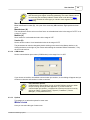
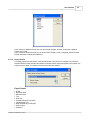
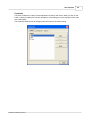
4.3.3.2
COM Number
Set the communication port number (COM Number) in the range from 1 to 255.
If you choose an invalid or unavailable communication port number, an error dialog will appear and you
will have to choose a valid number in order to continue.
Port cannot be opened:
COM cannot be opened when you set an invalid COM port number or when
the port is being used by another application. If you don't know the
communication port number, a complete list of active ports can be found by
clicking on "Start" | "Control Panel" | "System" | "Hardware" | "Device
Manager" | "Ports (COM and LPT)."
4.3.3.3
Options
This allows you to select the options for meter scan.
Meter's scan
Here you can select the type of meter scan:
© 2006 Sensus Metering System
50
MiniCom 3
By secondary addresses
The scan will be done according to the meters' secondary addresses. Use this method when you have
more than one meter connected to one MBus line or when you do not known the primary addresses of
the connected meters or they are the same (the default setting from the manufacturer is 0).
Support of secondary addressing:
Not all meter types support secondary addressing! The meter Calmex cannot
be read using the secondary address. Please check under the topic Meter
types to see whether the meter type you intend to read supports secondary
addressing.
By primary addresses
The scan will be done according to the meters' primary addresses. Use this method if you have just a
few meters connected or when you're sure that there is no primary address collision among the
connected meters.
Address range
Select the range of primary addresses. If you are sure of the primary addresses of the connected
meters, you can restrict the range for the scanning. Otherwise you should keep it set at 0-250.
© 2006 Sensus Metering System
User Interface
51
Primary addressing:
The meter scanning by primary addresses always begins with the common
address 254, no matter what the selected range of addresses is. This
accelerates the meter scan in most cases when just one meter is connected.
When more meters are connected, then scanning with the address 254
evokes a collision and the scanning goes to the selected range.
Repeat request count
Select a number of requests (1-5) for one address for the meter scan. More repetition extends the
scanning time but increases the probability of scanning all the meters.
Scanned baudrates
Select a baudrate for the meter scan.
Should just one baudrate be selected, only the addresses with this baudrate will be scanned.
Should both baudrates be selected, they will be scanned in the order shown, which can be changed
with the arrow. In this case all the addresses with the first baudrate will be scanned first and after that,
all addresses with the second baudrate.
Support of baudrates:
Not all meter types support both baudrates. Please check under the topic
Meter types to see whether the meter type you intend to read supports the
selected baudrate.
Start meter scan on startup
By selecting this checkbox the meters will be scanned automatically after the program is opened.
Timeouts
Here can you select the timeouts for the communication:
© 2006 Sensus Metering System
52
MiniCom 3
Timeout for meter reply
Timeouts are specified in milliseconds, and the default setting is 800 ms. This is the time that the
meter has to process the sent command. It is not the time for the whole reply. You should extend this
parameter for meters with a longer reaction time, e.g. DYNAMIC Hyb/Ele.
Timeout scale
Here you can select the number by which the timeout will be multiplied for sending and receiving of
data. Increase this option when there are problems on the serial line.
4.3.3.4
Language
In this menu you can choose the language for the user interface of MiniCom 3.
© 2006 Sensus Metering System
User Interface
53
In the version for Western Europe you can choose from: English, German, Portuguese, Spanish,
French and Finnish.
In the version for Eastern Europe you can choose from: English, Czech, Hungarian, Polish, Russian,
Slovak and Serbo-Croatian (latin alphabet).
4.3.3.5
Export Results
This dialog exports the data shown in the Results window. This function is available only when the
Results window is visible and the table inside is activated. When viewing the graph in this window, the
export cannot be done. The export can only be done after the readout.
Export Format
·
·
·
·
·
·
·
·
·
·
HTML
Microsoft Word
Microsoft Excel
Text
Rich Text
Comma-Delimited Text (CSV)
Tab-Delimited Text
Data Interchange Format (DIF)
SYLK Format
Clipboard
© 2006 Sensus Metering System
54
MiniCom 3
View on Screen
The exported data will be viewed directly in the target application, e.g. MS Excel, Internet Explorer, etc.
Export to File
The exported data will be saved in the file specified at the start of exporting.
4.3.4
Help
About
Here you can find basic information about the program, its version and registration, who it is registered
to, and a contact for service and support.
4.4
Tool Bars
The tool bars contain the icons for quick launching of selected commands from the main menu:
executes the same function as the command Start Readout in the main menu
executes the same function as the command Meter scan in the main menu
executes the same function as the command Abort communication with the meter in the main
menu
executes the same function as the command Meter parameters in the main menu
executes the same function as the command COM number in the main menu
executes the same function as the command Options in the main menu
executes the same function as the command Language in the main menu
executes the same function as the command Export results in the main menu
this arrow adjusts the Tool bars
View adjustment of Tool Bars
To adjust the tool bars use the arrow, which makes the menu accessible for adding and removing
buttons.
Reset Toolbar
By using the command "Reset Toolbar", the default view of the buttons will be restored. This means
that all buttons will appear in their primary locations.
© 2006 Sensus Metering System
User Interface
55
Customize
The button Customize is used for further adjustment of buttons and menus. When you click on this
button, a dialog for editing the Tool bars will appear. In this dialog you can set the layout of the main
menu and buttons.
The command Reset cancels all changes made and restores the default setting.
© 2006 Sensus Metering System
Part
V
58
MiniCom 3
5
How to Do
5.1
Solving Problems
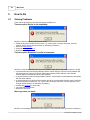
These are the general error warnings that appear in MiniCom 3:
Timeout expired. Device is not responding.
MiniCom 3 didn't receive any reply from the meter.
· Check the physical connection of the meter, e.g. a loose cable. If using a read head, check its
position, and if using an optical interface, its activation (Firmware 1).
· Check the COM number.
· Check the Meter parameters.
· Repeat the command.
Timeout expired. Response is invalid or incomplete.
MiniCom 3 received an invalid reply. The meter started to reply, but its reply was incomplete or invalid.
· It could be because of the primary address collision. When using the common primary address 254,
check that just one meter is connected. When using another primary address, check that the
entered address corresponds with the meter address.
· It could be because of the secondary address collision. Check that the entered address corresponds
with the meter address.
· It could be because of a physical disconnection during the communication with the meter. Check the
physical connection of the meter, e.g. a loose cable. If using a read head, check its position, and if
using an optical interface, its activation (Firmware 1).
· Increase the timeouts for meter reply.
· The meter may be defective.
· Repeat the command.
Meter type does not match.
MiniCom 3 successfully performed the meter readout, but the selected meter type doesn't correspond
© 2006 Sensus Metering System
How to Do
59
with the scanned type.
· Select the correct (scanned) meter type.
5.2
How To Scan Meters
When you have more than one meter connected and you don't know all their addresses or even their
numbers, it is best to use the command Meter scan.
The meter scan can be started with the command from the main menu, "File" | "Meter scan", or with
the icon , or with the key F6.
How to change the parameters for a meter scan
In the dialog Options you can specify the options for a meter scan. The dialog Options can be started
in the main menu by clicking on "Tools" | "Options" or with the icon
.
Fundamentals for a meter scan
Scanning by secondary addresses is quicker and more reliable, because the secondary address
collision is almost impossible. However, not all meter types support the secondary addressing (details
under the topic Meter Types).
When reading meters that don't support the secondary addressing, or when you don't know if all
connected meters support the secondary addressing, you should scan by primary addresses.
When just one meter is connected and you want to do a scan, use the primary addressing.
When you scan the meters using primary addresses and no meters are detected, it can be caused by
the primary address collision. In this case, connect the meters one by one and set unique addresses
for them or use the meter scan by secondary addresses.
After starting the scan, a dialog with information about the running communication appears. It shows
the baudrate being used and the address being searched for.
After the operation end the dialog with the scan result with the number of scanned meters appears.
These meters appear in the window Meters, on the tab Scanned.
© 2006 Sensus Metering System
Index
Index
-DDate 29
Date and time
-A-
29
About 54
Accupuls 19
Accupuls-configuration 36
Activation of meter 11, 12, 13
Activation of PolluComt E 13
Activation of PolluStat E 12
Activation of PolluTherm 11
Address 43
Averaging 30
-E-
-B-
Fixed date 33
FM/2-DK 20
Frequency converter
Battery 35
Baudrate 43
Baudrate for meter scan
Bus credit 35
49
-CCalmex 21
Calmex-configuration 39
Change date and time 29
Clear output window 46
COM number 49
COM port 49
Commands 24, 44
Communication channels 3
Communication port 49
Compact heat meter 13
Configuration 36, 39
Contact 3
Cosmos Electronic 16
Cosmos Encoder 17
Cosmos Hyb/Ele 16
Cosmos Hybrid 16
Current version 3
Customer location 28
© 2006 Sensus Metering System
Energy meter 11, 12, 21
Error 58
Export 34, 53
Export results 53
-F20
-GGraph export
34
-HHeat meter 13
Help 54
HRI 14
HRI-configuration
-IIcons 54
IEC-870 2
Installation 3
Interface 3
-LLanguage 52
Limit values 30
Logger 34
Logger graph 34
36
61
62
MiniCom 3
-M-
-R-
Main Menu 46
Main window 42
MBus 2
Menu 46
Meter 8
Meter baudrates 8
Meter commands 8
Meter display 31
Meter ID 27
Meter interface 8
Meter parameters 47
Meter scan 59
Meter scan parameters
Meter types 8
Meters 43
MiniCom 2
Minimum requirements
Read logger values 34
Readout 24
Readout results 45
Registration 3
Requirements 3
Rest min/max values 31
Results 45
RS-232 3
-S59
3
-NName and password 3
Number of communication port
-OOptical head 3, 24
Optical interface 3, 24
Options 49
Output 45
Output window 45
-PPassword 3
PolluCom E 13
PolluMuk E 15
PolluStat E 12
PolluTherm 11
Primary address 26, 47
Program opening 42
49
Scanned 43
Secondary address 47
Sensus 2
Sensus Metering Systems 2
Set averaging duration 30
Set bus credit 35
Set customer location 28
Set display 31
Set LCD option 31
Set MBus address 26
Set meter ID 27
Set primary MBus address 26
Set storage date 33
Set system date and time 29
Set tariff parameters 31
Start Readout 24
Startup 42
Status bar 42
Storage date 33
Supported 43
Supported addresses 8
Supported bauds 8
Supported channels 8
Supported interface 8
Supported meters 2
System date 29
System time 29
-TTariff condition 31
Tariff parameters 31
Time 29
© 2006 Sensus Metering System
Index
Timeout 49
Timeout scale 49
Totaliser 11, 21
-UUknown 21
Ultrasonic energy meter
12
-VVersion 3
View 46
-WWater meter 14, 15, 16, 17, 19
Window Commands 44
Window Meters 43
Window Results 45
© 2006 Sensus Metering System
63