1
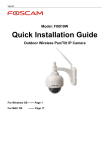
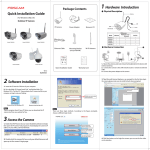
Quick Installation Guide
(For Windows & Mac OS)
)
Outdoor Wireless IP Camera
V1.1
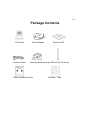
Package Contents
IP Camera
Ethernet Cable
Power Adapter
Resource CD
Mounting Bracket(except FI8919) Wi-Fi Antenna
Quick Installation Guide
Warranty Card
1 Hardware
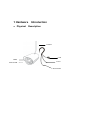
Physical
Introduction
Description
Antenna
LAN
LENS
Infared LED
Power
Reset Button
Hardware Connection
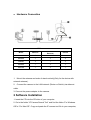
Differences
1.
PoE(Power over
Model
Wireless
FI8904W
FI8905W
√
√
×
×
×
×
FI8905E
×
√
×
FI8906W
√
×
×
FI8919W
√
×
√
Ethernet)
Pan/Tilt
Mount the antenna and make it stand vertically(Only for the device with
external antenna).
2.
Connect the camera to the LAN network (Router or Switch) via ethernet
cable.
3. Connect the power adapter to the camera.
2 Software Installation
1. Insert the CD into the CD drive of your computer.
2. Go to the folder “IP Camera Search Tool” and find the folder “For Windows
OS”or “For Mac OS”. Copy and paste the IP camera tool file to your computer,
or drag it onto your Desktop.
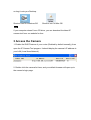
Shortcut icon for Windows OS
Shortcut icon for Mac OS
Note:
If your computer doesn’t have CD drive, you can download the latest IP
camera tool from our website for free.
3 Access the Camera
1. Enable the DHCP feature of your router (Enabled by default normally), then
open the IP Camera Tool program. It should display the camera’s IP address in
your LAN (Local Area Network).
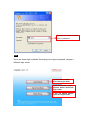
2. Double click the camera list here, and your default browser will open up to
the camera’s login page.
Default user name is admin
with no password.
Note:
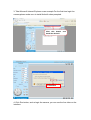
There are three login methods. According to the figure prompted, choose a
different login mode.
If you use IE browser,
select this login mode.
If you use Firefox, Google
Chrome, Safari, select this
login mode.
If you use Mobile phone,
select this login mode.
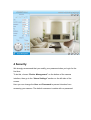
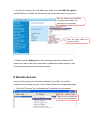
3. Take Microsoft Internet Explorer as an example.For the first time login the
camera,please make sure to install ActiveX when prompted.
Click this button
install the ActiveX
and
Click Run
4. Click Run button, and re-login the camera, you can see the live video on the
interface.
4 Security
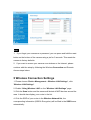
We strongly recommend that you modify your password when you login for the
first time.
To do this, choose “Device Management” on the bottom of the camera
interface, then go to the “Users Settings” section on the left side of the
screen.
Here you can change the User and Password to prevent intruders from
accessing your camera. The default username is admin with no password.
Note:
1.
If you forget your username or password, you can press and hold the reset
button on the bottom of the camera using a pin for 5 seconds. This resets the
camera to factory defaults.
2. If you want to access your camera over wireless or the Internet, please
continue with the setup by following the Wireless Connection and Remote
Access steps below.
5 Wireless Connection Settings
1. Please choose “Device Management > Wireless LAN Settings”, click
“Wireless LAN Settings”.
2. Enable “Using Wireless LAN” on the “Wireless LAN Settings” page.
3. Click the Scan button and the camera will detect all WIFI devices around the
area. It should also display your router in the list.
4. Click the SSID of your router in the Wireless Network list, the
corresponding information (SSID & Encryption) will be filled in the SSID boxes
automatically.
5. You will only need to fill in the Share Key. Make sure that SSID, Encryption
and Share Key you filled in for the camera are exactly the same for your router.
Click the SSID of router and SSID,
Encryption will be filled in the
following box automatically
Enter the same share key
with your router.
6. Please click the Submit button after all settings have been entered, the
camera will reboot. After the camera has completed the reboot process, wait
10 seconds and disconnect the ethernet cable.
6 Remote Access
If you need to access your IP camera outside of your LAN, you need to
configure some settings on your router. Please follow the corresponding steps:
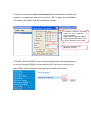
1. Run the IP Camera Tool, and assign an IP address for your camera.
Right click your camera and
click Network Configuration.
2. Enter the name of the User and Password of the Administrator (default user
is admin, no password), and click the button ”OK” to apply the modification.
The camera will reboot once the modification is done.
IP Address: Set this in the same
subnet as your computer , or
keep it as default.
Subnet Mask: Keep it as default.
Gateway and DNS Server: Set it
to the IP address of your router.
Input the Username and
password, click OK.
3. Enable UPnP and DDNS in the camera’s settings page. We recommend you
to use the Foscam DDNS by factory default, but if you want to use the third
party DDNS, please check the user manual for further instructions.
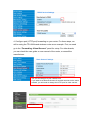
4. Configure port (HTTP port) forwarding on your router. For these steps, we
will be using the TP-LINK brand wireless router as an example. First, we need
go to the “Forwarding -Virtual Servers” panel for setup. For other brands,
you can check the user guide or user manual of the router, or consult the
manufacturer.
You can see the port of your camera here.
If you want to set Remote Access for several cameras on the same
network, you will need to change the HTTP port for each camera.
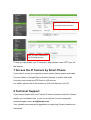
Click Add New
Input the port and IP address of
your camera and click Save.
Here you have finished the
Port Forwarding setup.
5. Now you can access your IP camera by http://domain name:HTTP port via
the Internet.
7 Access the IP Camera by Smart Phone
If you want to access your camera on smart phone, please search and install
Foscam Viewer on Google Play for Android devices, or search and install
Foscam ip cam viewer on APP Store for iOS devices.
For details, please refer to the Android or iOS User Manual in the CD.
8 Technical Support
If you have problems with your Foscam IP camera, please contact the Foscam
reseller you purchased from, or you can e-mail the Foscam headquarter
technical support team: [email protected].
Your valuable comments and suggestions on improving Foscam products are
welcomed!
ShenZhen Foscam Intelligent Technology Co., Ltd
www.foscam.com