1
Gemini 4:4:4 User Manual 021012.001
TABLE OF CONTENTS
OVERVIEW .................................................................................................................................................. 3
PACKAGE CONTENTS......................................................................................................................... 3
FEATURES ............................................................................................................................................... 4
GEMINI 4:4:4 ANATOMY .................................................................................................................... 6
MENU STRUCTURE ............................................................................................................................... 7
GEMINI .................................................................................................................................................. 8
INPUTS .................................................................................................................................................. 9
RECORD................................................................................................................................................ 9
OUTPUT .............................................................................................................................................. 10
MENU QUICK KEYS ............................................................................................................................ 10
PREPARATIONS....................................................................................................................................... 12
TIPS, TECHNIQUES & RECOMMENDATIONS ............................................................................ 12
POWER ................................................................................................................................................... 14
AC Power Supply ............................................................................................................................ 14
Camera ................................................................................................................................................ 14
REGISTRATION .................................................................................................................................... 15
SETTING DATE & TIME...................................................................................................................... 15
SETTING METADATA ........................................................................................................................ 15
DPX HEADER METADATA ........................................................................................................... 16
XML FILE ............................................................................................................................................ 16
HANDLING SSD CARDS. ................................................................................................................... 16
FORMATTING SSD CARDS .............................................................................................................. 16
SSD Status Indicators .................................................................................................................... 17
System Status Indicators ............................................................................................................. 17
RECORDING .............................................................................................................................................. 18
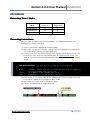
Recording Time / Media ................................................................................................................... 18
www.Gemini444.com
1|Page
Gemini 4:4:4 User Manual 021012.001
Recording Instructions ...................................................................................................................... 18
DPX ........................................................................................................................................................... 19
PLAYBACK ................................................................................................................................................ 20
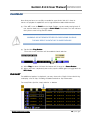
PLAYLIST ............................................................................................................................................... 20
TRANSFER ................................................................................................................................................. 22
Best User Practices............................................................................................................................. 22
Performance .......................................................................................................................................... 22
File Support........................................................................................................................................... 22
Transfer Configurations .................................................................................................................... 24
Accessing & Using the SSD on A Computer ............................................................................. 25
POST WORKFLOW................................................................................................................................. 27
APPENDIX .................................................................................................................................................. 31
Firmware Updates .............................................................................................................................. 31
Specifications ....................................................................................................................................... 35
Gemini Mechanical Drawings .......................................................................................................... 36
Remote Connector Pinout ............................................................................................................... 36
Firmware Version 1.0.592 (see also Release Notes) .............................................................. 37
Features .............................................................................................................................................. 37
Known Issues – 1.0.594 ................................................................................................................. 39
Trouble Shooting & Support ........................................................................................................... 40
Limited Warranty ................................................................................................................................ 41
Obtaining an RMA ............................................................................................................................... 42
www.Gemini444.com
2|Page
Gemini 4:4:4 User Manual 021012.001
OVERVIEW
OVERVIEW
PACKAGE CONTENTS
Make sure you have the following items, supplied with your Gemini 4:4:4 upon
purchase.
Hard Case
Gemini 4:4:4
Transfer Station
HDMI
Type C to Type A
HDHD- SDI (Qty
( Qty 2)
eSATA
Data Cable
Power DD -Tap
4-Pin
(transfer station power)
XLR Power Cable
4-Pin
Universal AC Power
Supply
Stylus &
Microfiber Cloth
Hot Shoe Mount
USB Mini Type A
NOTE: Only Convergent Design SSD’s will work in the Gemini 4:4:4.
These SSD’s, available in 256GB and 512GB
512 GB,
GB, must be purchased separately.
Your Gemini 4:4:4 dealer is an ideal place to purchase these SSD’s.
www.Gemini444.com
3|Page
Gemini 4:4:4 User Manual 021012.001
FEATURES
The Gemini 4:4:4 is a professional, high-definition video recorder that fits in the
palm of your hand and is easily mountable on your camera. It is very light weight
and small in size.
Gemini 4:4:4 functions as a high-quality monitor, with a wide viewing angle, high
brightness with great contrast, and no compromise video playback device.
The footage from the Gemini 4:4:4 can be easily incorporated into virtually any
workflow using your favorite codec or as native uncompressed DPX sequences.
With an extra cost option, Gemini 4:4:4 is also capable of recording, combining,
and playing back 3D video.
The Gemini 4:4:4 records to specially certified and tested 1.8” solid-state hard
drives that can be purchased from Convergent Design through your local dealer.
UNCOMPRESSED 4:4:4 RGB QUALITY
The Gemini 4:4:4 records in the highest quality possible; no other recorder
exceeds the image quality of the Gemini 4:4:4!
The Gemini 4:4:4 records Full Uncompressed 4:4:4 RGB and also accepts 4:2:2
camera signals. This ensures that 100% of the quality of your video signal will be
maintained. There are no signal losses, no artifacts, and no loss of quality
whatsoever.
This is especially important when recording Log video, such as Sony S-Log or
Log-C. The precise values for each bit are recorded. No bit values are changed in
any way, thus preserving the full integrity of your images. Recording full 4:4:4 is
the proper way to record S-Log and Log-C. Recording 4:2:2 from a 4:4:4 capable
camera is a compromise.
4:2:2 to 4:4:4 UPUP - CONVERSION
The Gemini 4:4:4 records in DPX file format, an industry standard for high end
post processing. To conform with widely used software that accepts the DPX file
format, the Gemini 4:4:4 automatically up-converts (up-reses) to 4:4:4.
This is accomplished by using a sophisticated routine that uses the weighted
average of nearby pixels to ensure that the 4:4:4 is of high quality, even when the
source video is 4:2:2.
HD TOUCH SCREEN FOR RECORD AND PLAYBACK
The Gemini 4:4:4 is easily controlled using the touch screen. A Stylus is provided
to prevent the LCD Monitor from being smudged.
www.Gemini444.com
4|Page
Gemini 4:4:4 User Manual 021012.001
NOTE: Your camera MUST be equipped to output 4:4:4 in order
to use the uncompressed 4:4:4 functionality of the Gemini.
A 4:2:2 signal will be upup-resed to 4:4:4.
DUAL SSD
The Gemini 4:4:4 is unique in that is supports two SSD’s for both recording and
playback.
To extend recording time, a recording can automatically span from one SSD to
another. This is fully automatic.
S-LOG and LOGLOG- C SUPPORT
Many features are built into the Gemini 4:4:4 for supporting Log footage:
A menu option easily allows one to apply a built-in LUT (Lookup Table) to native
S-Log footage. The LUT is applied to the LCD and HD-SDI outputs.
LOG RECORDING
The Gemini 4:4:4 is ideally suited for recording Sony S-Log and also supports
Log-C.
DUAL LINK SDI
The Gemini supports dual link 1.5Ghz HD-SDI Input for 4:4:4 recording.
HIGH PERFORMANCE SSD’S
The Gemini 4:4:4 SSD’s are specially picked for their performance and reliability.
These SSD’s are capable of reading at greater than 400Mbps, making transfer of
files very quick. You’ll find these Convergent Design SSD’s available through our
Dealers at affordable rates.
FAST BOOT TIME
You can expect your Gemini 4:4:4 to power up and be ready for recording in
approximately 12 seconds or less after applying power.
www.Gemini444.com
5|Page
Gemini 4:4:4 User Manual 021012.001
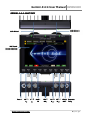
GEMINI 4:4:4 ANATOMY
SSD Drive 2
SSD Drive 1
HD Touch
Screen Monitor
Power
SDI A
IN
SDI B Audio
IN
IN
HDMI
OUT
Audio SDI A
OUT
OUT
SDI B
OUT
Remote
Tally
kfjaslkdjflk sdlkfjaslkdjf lkdjflksdjf lksdjf
www.Gemini444.com
6|Page
Gemini 4:4:4 User Manual 021012.001
WARNING: DO NOT ENCLOSE THE UNIT IN AN AIRTIGHT CONTAINER
Keep the area around the cooling fins (vertical lines on the back of the
Gemini) open for air flow. Gemini 4:4:4 and SSD’s will operate at full
potential under these conditions. Keep the unit vertical for best cooling.
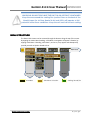
MENU STRUCTURE
The Gemini 4:4:4 menu can be accessed through the buttons along the top of the screen.
By tapping on a Main Menu heading, a Sub-Menu 1 navigation will appear. Likewise, by
tapping a Sub-Menu 1 heading, a Sub-Item 2, and so on, may appear and subsequently
provide you with an Option related to that.
Main Menu
SubSub-Menu 1
Available
www.Gemini444.com
SubSub-Menu 2
SubSub-Menu 3
Sub-Menu Selection
Options
Setting Saved/On
7|Page
Gemini 4:4:4 User Manual 021012.001
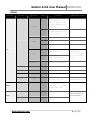
GEMINI
SubSub-Menu 1
SubSub-Menu 2
SubSub-Menu 3
Option
Description
On
The on screen menu will
disappear after 15 seconds of
idling. Touching the screen
anywhere will bring the menu
back.
Off
The on-screen menu will always
be displayed unless the hide
button is touched.
Auto-Hide
Additional Information
2.39:1
LCD
Guides
SET
1.85:1
None
Removes any current Guides
setting.
On
Flip the video and on-screen
display by 180˚.
Off
Flip the video and on-screen
display to normal view.
→
Adjustable in 10% increments.
Click OK to save selection.
Flip
Brightness
ABOUT
Time
→
→
Set the appropriate time.
Date
→
→
Set the appropriate date.
Reset
→
→
Restore all default settings.
Keys
Unit
OK
Indicates your product was
successfully registered.
→
→
→
Displays the firmware version,
serial number of your Gemini
unit, and warranty date.
Format
SSD 1
→
→
Permanently erases everything
on SSD 1.
Format
SSD 2
→
→
Permanently erases everything
on SSD 2.
SSD's
www.Gemini444.com
Great for certain
mounting options.
Note: THIS DOES NOT
FLIP THE RECORDED
IMAGE!
Requires nothing further
after initial registration.
WARNING:
DATA WILL NOT BE
RECOVERABLE!
8|Page
Gemini 4:4:4 User Manual 021012.001
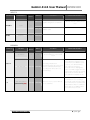
INPUTS
SubSub - Menu 1
SubSub - Menu 2
TIMECODE
SubSub Menu 3
Source
AUDIO
Option
Description
Additional Information
SDI
Timecode is extracted from the SDI
signal coming from your camera.
For non-zero timecode, set your
camera’s timecode output (if it has
one).
LTC
LTC to 6 pin via remote port and
adaptor cable.
→
Channels
→
2
SubSub - Item
SubSubMenu 3
Option
Description
Rec Button
→
→
Recording is started by touching
the record button on the Gemini
screen.
RECORD
Dropdown
TRIGGER
SDI Timecode
CLIP
(Clip Name)(Clip #)
(AAAAAAAA)(000)
(000)
(AAAAAAAA)
www.Gemini444.com
→
→
→
→
Additional Information
Recording will start when
incrementing timecode is detected
from the SDI input and will stop
recording when timecode is not
incrementing.
This mode is particularly useful
when wanting to trigger a record
session from your camera's record.
However, your camera will most
likely output incrementing
timecode while it is playing back
video. This will also trigger a record
in the Gemini. Therefore, this setting
may need to be turned off while
your camera is in playback mode
Allows the user to set the name of
the recorded files.
The last three digits will autoincrement from one recording to
the next. If you are using more than
one Gemini unit, it is recommended
that at least the first two characters
of this name be set different from
one Gemini unit to the next.
9|Page
Gemini 4:4:4 User Manual 021012.001
OUTPUT
SubSub - Menu
SubSub - Menu 2
SubSub Menu 3
Option
Description
Additional Information
On
→
→
When the Gemini is recording, the
SDI and HDMI output will display a
red bar on the bottom of the screen
to indicate an active record.
Off
→
→
Nothing will be overlaid on the SDI or
HDMI output of the Gemini.
4:2:2
→
→
SDI output as 4:2:2; works in both
Rec and Play Mode.
This setting only affects the output
video. 4:2:2 Input will always be
converted to 4:4:4 for recording.
4:4:4
→
→
Incoming video will be output as
4:4:4.
Use this setting if you want to
output 4:4:4 RGB, usually Dual Link
HD-SDI. (Not valid with 4:2:2 input)
REC TALLY
This red bar is not recorded in the
Gemini. If you are using a separate
recorder to record the output of the
Gemini, turn this setting off.
MODE
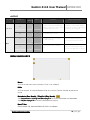
MENU QUICK KEYS
Menu
Click to reveal main menu structure. Click << to collapse.
Hide
Click to remove all content/buttons from the screen. Tap the monitor anywhere to
reveal
Metadata (Rec Mode) / Playlist (Play Mode)
See Preparations: Setting Metadata page 12 for more information on Metatdata.
See Playback page 19 for more information on Playlist.
Next Take
Click to reveal Clip, Scene and Take info. Click << to collapse.
www.Gemini444.com
10 | P a g e
Gemini 4:4:4 User Manual 021012.001
MODE TOGGLE & STATUS
Across the bottom of your Gemini monitor you will find the Control Bar, including Mode
Functions and related Indicators and Buttons.
Scene & Take
Status Line
Quick Key
Voltage /
Internal Temp
Remaining
Record Time
Video Input Format
Video Output Format
Timecode
Record / Play / Stop Button
Mode Switch
Description
Status Line
Record / Play / Stop
Button
Scene & Take
The status line will indicate when you
have successfully changed or applied a
setting.
Click to initiate the appropriate action.
Record
Stop
Play
Pause
Scene name set in Metadata; Take autoincrements from one record to the next.
Timecode
Mode Switch
Tapping will move the arrow (“>”) to
toggle between Rec and Play Mode.
Remaining Record Time
Remaining record time per card, shown
as SSD1 / SSD2.
Quick Key
Click the caret
to display options,
then click to apply.
Apply
LUT
1:1 Pixel
www.Gemini444.com
NOTE: Viewing LUTs are
not applied to recorded
material (4:4:4 input only).
For critical focus.
11 | P a g e
Gemini 4:4:4 User Manual 021012.001
PREPARATIONS
TIPS, TECHNIQUES & RECOMMENDATIONS
The Gemini 4:4:4 is a sophisticated, technologically advanced device. A few simple tips,
techniques and recommendations can help ensure a successful shoot.
1. Register your unit now, as you need access to the Internet to do so.
It must be registered. Otherwise the unit is disabled.
2. Obtain the Gemini 4:4:4 and all the necessary batteries, chargers well in advance of
your shoot. Please be certain to plug the power cable into the power input, which is on
the left side, the remote control connector is on the right side. Forcing the power
connector into the remote control connector will damage the Gemini 4:4:4.
3. Obtain genuine Convergent Design SSD’s. No other SSD’s will work in the Gemini 4:4:4.
This is to ensure that the SSD’s are fast enough and have been fully tested prior to your
shoot.
4. Extra, high quality HD-SDI cables are very desirable and should be available on every
shoot. These must be good quality 75 Ohm cables with true 75 Ohm connectors.
5. Please read the manual, you will gain a lot of practical knowledge.
The latest version is on our website:
http://convergent-design.com/LinkClick.aspx?fileticket=CdmSeL04O18%3d&tabid=139
6. We generally recommend that you use the latest firmware.
http://convergent-design.com/FirmwareUpdates/Gemini444.aspx
7. Test the unit and the SSD’s, with your camera, in advance of the shoot.
Setup your camera, exactly as you will for the shoot, setup the Gemini 4:4:4,
create some test footage, and run this test footage through your Post workflow.
Ensure that your Post department can handle the full uncompressed workflow.
Full uncompressed video is great, it is just different. Many systems support DPX, but
not all.
8. For editing DPX Files using Final Cut Pro, please obtain GlueTools.
http://gluetools.com/products.html Select “Cineon/DPX Pro for Final Cut Studio”.
9. Obtain a way to back up your data in the field. A good backup procedure is to have two
backups, stored on separate devices, and have all of your footage checked visually,
prior to reformatting and reusing the SSD’s.
10. Purchase enough SSD’s, plus some extras. Be certain that you have enough so that you
can shoot while the backups are being made and the footage is being checked.
11. While shooting, during breaks, playback you footage, from within the Gemini 4:4:4 to
check that everything is working fine. But, more importantly, transfer you footage to a
backup, then play the footage from the backup to ensure that all is good!
12. Call for support whenever you wish. We strive to provide world class support 24/7.
If you don’t reach us at one number, try another.
Support Contact Info: See Page 40.
www.Gemini444.com
12 | P a g e
Gemini 4:4:4 User Manual 021012.001
13. Ensure that camera viewfinder data is not being sent to the Gemini 4:4:4.
Record a test, and then play it back. If you see viewfinder data while you are recording,
or on playback, there is a major problem and your camera settings must be changed.
14. Do not use Beta firmware for production work!
15. Do not over-tighten the ¼” x 20 or 3/8” x 16 screws. You can damage the case.
16. Please do not open the Gemini 4:4:4 case, as this voids the warranty.
17. Here is a tip to help your shoot be a success:
The most successful teams plan ahead, and check out all of their gear in advance.
18. Never format an SSD unless you are certain that the footage has been transferred, and
checked.
To be safe, wait until you have the footage in two places.
19. Never attempt to write files to the SSD, nor delete files off the SSD and then reuse the
SSD in the Gemini 4:4:4.
20. It is acceptable to upload files from an SSD, using our Transfer Station, then reinsert the
same SSD into the Gemini 4:4:4 so that you can continue shooting.
But, as noted above, do not delete files off the SSD, then attempt to shoot more.
21. Always format the SSD’s, in the Gemini 4:4:4.
Formatting an SSD in another device is not acceptable.
22. Never put the Gemini 4:4:4 in a confined enclosure, it needs access to fresh air for
cooling.
23. Never leave the Gemini 4:4:4 in hot sun without protection for an extended period of
time. If it has been in a hot car, please allow time for it to cool.
24. Protect it from rain, splashes and other inclement weather.
25. Do not leave the Gemini 4:4:4 flat on a table with the power on.
A vertical position is best as it allows air to flow naturally over the cooling fins.
26. Do not feed the Gemini 4:4:4 reverse-voltage DC, or voltages over 19 Volts.
Do not plug in the Anton Bauer D-Tap or P-Tap connectors in backwards.
Caution: Some non-Anton Bauer P-Tap power outlets allow the P-Tap or
D-Tap connector to be plugged in backwards.
If you do, then the Gemini 4:4:4 will stop working and it will have to be repaired.
27. Respect the Touch Sensitive LCD. Do not use hard objects to operate the touch screen.
A ball point or other pen should not be used. Use our provided stylus or something
similar. Caution: The Touch Screen and LCD are expensive to replace.
www.Gemini444.com
13 | P a g e
Gemini 4:4:4 User Manual 021012.001
POWER
There are multiple ways to power your Gemini 4:4:4;
1. Using the provided AC Power Supply which includes international power plugs
2. Using 4-Pin XLR Power, using the supplied 4-Pin XLR to 4-Pin Hirose Power
Cable.
3. Using an Anton Bauer or IDX Battery with a D-Tap connection. A D-Tap to 4Pin Hirose Power Cable is included.
4. Using any 4-Pin Hirose Power cable as provided by Convergent Design for
Gemini 4:4:4 or nanoFlash.
5. Using any suitable DC power source, 6 to 19 Volts DC, with a 4-Pin Hirose
connector.
Pin 1 & 2 Must be Positive DC Voltage
Pin 3 & 4 Must be Negative or Ground
Power Supply must supply at least 15W.
WARNING! Power input is limited to 66- 19 Volt DC.
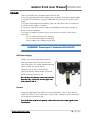
AC Power Supply
Simply connect the 4-pin Hirose to 4-Pin
Male XLR cable to the Female 4-Pin XLR
connector on the AC Power Supply and plug
into a suitable AC power source.
Gently turn to fit and click the Hirose
connector into the Power 6-19V connector
on the left of the Gemini 4:4:4.
Do not force the power connector into the
Remote Tally connector on the right side
of the Gemini 4:4:4.
Camera
Using the supplied HD-SDI cables, or other high quality True 75 Ohm HD-SDI
cables with True 75 Ohm connectors, connect your camera to SDI A, or to both
SDI A and SDI B (for Dual Link).
Use of 50 Ohm and/or low quality cables will cause the video signal to be
intermittent.
www.Gemini444.com
14 | P a g e
Gemini 4:4:4 User Manual 021012.001
REGISTRATION
If you haven’t already, you will need to register your Gemini 4:4:4 at
www.Gemini444.com to activate your unit.
Your information is private and used internally to send you firmware updates via
email. We highly encourage you to enter the optional information that we
request. This extra information is designed to help us provide product
improvements as well as better products for you.
When you power up the Gemini for the
first time, it will automatically provide you
with a serial number that you will need for
your on-line registration, via the website.
(1) Tap the OK button when you are
ready to proceed.
(2) Enter Unit Activation Key using the + and – buttons; Press OK.
(3) Activation is complete if you have received the ‘Unit Activation
Successful’ in the Status Line.
SETTING DATE & TIME
The Gemini | Set | Time and Gemini | Set | Date menu items are used to set the
internal clock of the Gemini 4:4:4, which keeps time even when there is no
external power connected to the unit.
SETTING METADATA
When Gemini 4:4:4 is in Rec Mode, you can edit Metadata.
Tap the ‘Metadata’ Menu Quick Key to reveal the
following editable data: Reel, Scene, Take, Day,
Camera, and Project.
This information is stored until changed or power is
removed.
Some of the metadata is displayed for each clip in Play
Mode, including: Scene, Take, Timecode, Date, Time
and Shooting Day.
www.Gemini444.com
15 | P a g e
Gemini 4:4:4 User Manual 021012.001
To edit, simply tap the field you would like to edit,
then tap the character field to reveal a character
toggle. You may edit multiple fields before choosing
OK to save your changes, or X to revert to previous.
DPX HEADER METADATA
During record, metadata is saved in various locations within the header of every DPX file.
This data is viewable in some software on a computer. Additionally, the metadata is
stored in a separate XML file alongside the DPX files for a given record.
File Field
DPX Slate Info
Input Device Name
Input Device Serial Number
Project
Values for Data Input Included
Reel, Scene, Take, Day
Reel
Camera
Project
XML FILE
All metadata fields and additional clip information are stored for each recording.
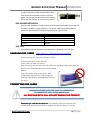
HANDLING SSD CARDS -
READ THE FULL SAFE HANDLING DOCUMENT
Avoid touching the connector end of the SSD’s.
Avoid shocking the connector end
of the SSD’s via static electricity.
When inserting into the Gemini 4:4:4, make sure the label is facing the front of
the unit (see the proper placement in the image
below).
Please be gentle when inserting the card.
Clasping the door over the card and gently
pushing in the drawer will adequately connect
the drive.
FORMATTING SSD CARDS
WARNING: BEFORE USING THE SSD’S IT IS IMPERATIVE
TO FORMAT THE SSD’S IN THE GEMINI 4:4:4
ALL EXISTING DATA WILL BE LOST DURING THE FORMAT!
Formatting is a destructive process.
process Any data on your SSD’s that has not
already been transferred to another medium will be lost forever. Once this
www.Gemini444.com
16 | P a g e
Gemini 4:4:4 User Manual 021012.001
process is started, there is no way to recover the data. “Un-format Utilities” will
not be able to recover the data.
Go to GEMINI > SSD’s > FORMAT SSD1 or GEMINI > SSD’s > FORMAT
SSD2 from the Menu to format the SSD’s.
This process will take approximately 30 seconds for a 256GB
and 60 seconds for 512GB cards.
After the SSD’s have been used to record any video, the video must be
transferred to another device, before reformatting the SSD’s, otherwise the
video will be lost forever.
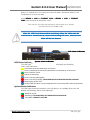
SSD Status Indicators
SSD Status Indicators
System Status Indicators
The LED lights associated with each SSD drive will display the following
status color indicators:
Drive needs to be formatted within the Gemini.
Drive is completely full and can be played back or formatted for a new record.
Drive is ready to record.
SSD card is initializing.
Drive is currently playing back.
Drive is currently recording. NEVER REMOVE SSD DURING RECORD OR PLAYBACK!
Powering Up; System Test
Drive has old clips which can be played back but to record new SSD’s must be formatted.
System Status Indicators
The LED lights located in between each SSD drive, in the middle of the unit, will
display the following status color indicators:
Ready for record.
Recording. IF FLASHING RED, SEE TROUBLESHOOTING BELOW.
Play Mode. CURRENTLY PLAYING.
www.Gemini444.com
17 | P a g e
Gemini 4:4:4 User Manual 021012.001
RECORDING
Recording Time / Media
Media
1080p24 4:4:4
1080p25 4:4:4
256GB SSD (x1)
21
20
256GB SSD (x2)
42
40
512GB SSD (x2)
84
80
Recording Instructions
Are you ready to capture the ultimate quality? The following will walk you
through a successful recording.
(1) Assure you have an appropriate power supply.
(2) Make sure any and all necessary settings have been programmed and saved.
See Preparations: Setting Metadata page xxx
(3) Insert at least one Convergent Design SSD card into either Slot 1 or Slot 2, or
insert one in each slot. For more information on ‘Handling SSD Cards’, visit
page 14. The LED SSD Drive Indicator light should be green. If so, proceed to
step 4.
TROUBLESHOOTING. If the SSD Indicator(s) are NOT green, try the following:
Orange
Yellow
White
SSD drive is initializing. If it does not change after 30 seconds (for 256GB)/ 60
seconds (for 512GB), power cycle the unit.
Go to GEMINI > SSD’S > FORMAT SSD (1 or 2).
Card is full; remove the card and transfer the data.
(4) If the arrow “>” is next to ‘REC’ on the Mode Toggle, you are ready to record.
If not, tap the Mode once to toggle to ‘REC’ mode.
(5) Make sure the System Status Indicator is green.
(6) Tap the Record Button to begin your Clip.
www.Gemini444.com
18 | P a g e
Gemini 4:4:4 User Manual 021012.001
(7) Your clip is now recording. Please note:
a. The System Status Indicator is red.
b. One of the SSD Status Indicators is Red. If you have two cards in, the
other light should be green.
c. The Status Bar will turn red and your time code should be
incrementing.
(8) To stop recording, click the blue Stop Button. The Status Line will indicate
that the “Record is Complete”.
(9) Record again, or, to watch your clip(s), you are ready for Playback Mode.
DPX
Gemini records video into DPX (.dpx) files. DPX is a file format that is specifically
designed for uncompressed video. Each DPX file actually only stores one single
frame of video. Therefore, each record will have a single folder that contains all
of the DPX files. For NLE workflow options, see TRANSFER,
TRANSFER page 18.
TIP: Clip Name and Clip Number (AAAAAAA) (OOO) will increment.
This can be adjusted by the User under the RECORD | CLIP.
www.Gemini444.com
19 | P a g e
Gemini 4:4:4 User Manual 021012.001
PLAYBACK
Now that you have successfully recorded to your Gemini 4:4:4, it’s time to
harness its playback capabilities on its high-definition 800 x 480 monitor.
(1) If the “>
>” is next to ‘PLAY
PLAY’
PLAY on the Mode Toggle, you are ready to play back. If
not, tap the Mode once to toggle to PLAY Mode.
ode The Status Line will indicate
that you are now in Play/Review Mode.
WARNING: DO NOT REMOVE EITHER SSD CARD DURING PLAYBACK.
THIS MAY RESULT IN DATA THAT IS UNRECOVERABLE.
(2) Tap the blue Play Button.
Button
The most recent clip taken will immediately begin playing.
(3) When Play has been initiated, the button will change to a Pause Button.
Button
(4) When you have completed your review, tap the Mode again to toggle back to
REC Mode.
Mode.
PLAYLIST
For additional options in playback, you may choose the ‘Playlist’ Menu Quick Key
to display a list of clips, including metadata and other clip information.
To reveal/hide clip info, simply tab the << button.
www.Gemini444.com
20 | P a g e
Gemini 4:4:4 User Manual 021012.001
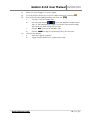
(1)
Make sure your Toggle is in ‘PLAY’ Mode.
(2)
Click the Playlist Quick Key in the left, upper-third of the monitor.
(3)
Select/deselect by tapping the box next to a clip. [
a.
X]
You may choose multiple clips.
b.
(4)
Use the page arrows,
, to reveal additional and previous
clips (5 clips displayed per page). Selections from previous page
will not be lost when using this function.
c.
Choose ‘ALL
ALL’
ALL to select all available clips.
d.
Choose ‘LOOP
LOOP’
LOOP to loop or continuously play selected clips.
Tap the Play Button.
a.
Tap Pause Button to pause.
b.
Toggle to REC Mode when completed to stop.
www.Gemini444.com
21 | P a g e
Gemini 4:4:4 User Manual 021012.001
TRANSFER
Data from your SSD is copied over eSATA; USB is used for ONLY powering the
Transfer Station. Data cannot be copied via USB.
If your computer is not equipped with an eSATA port then you will need to
purchase an Adaptor, or expansion card. Additional options include USB 3.0 to
eSATA Adaptor, or PCI eSATA Adaptor.
Best User Practices
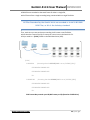
The best way to transfer is to connect
the eSATA adapter, the Transfer Station
and the SSD, then boot the computer.
Use 6 GB eSATA adapters for maximum
performance.
Do not force cables or the SSD into Transfer
Station.
(See image for proper connectivity)
Performance
The Gemini 4:4:4 SSD's can perform up to 400MBps. Keep in mind you will be
limited by the slowest median in the transfer process. For example: eSATA
3Gbps cards have a max performance of ~270MBps, and eSATA 1.5Gbps have a
max performance of ~130MBps.
Typical Hard Drives (Non-Raid) generally perform anywhere in the range of 80130MBps. For maximum performance, make sure you are using eSATA 6 Gbps to
a Raid configuration.
Video Data Rate
Video Format
Mbytes/Sec
1080p24 4:4:4 10-Bit
186.6
1080p25 4:4:4 10-Bit
194.4
1080p30 4:4:4 8-Bit
186.6
1080p30 4:4:4 10-Bit
233.3
**It’s recommended to not exceed 250 clips per card.
File Support
The Gemini 4:4:4 recorder accepts inputs from both HD-SDI 4:2:2 and 4:4:4 cameras.
4:4:4 Cameras currently must have HD-SDI Dual Link. HD-SDI 3G will be supported in a
future firmware release.
www.Gemini444.com
22 | P a g e
Gemini 4:4:4 User Manual 021012.001
All DPX files are recorded so that each frame of video is a single file,
with all frames from a single recording being contained within a single file folder.
All Files Recorded by the Gemini 4:4:4 are recorded as 4:4:4 10 Bit RGB
DPX Files; as this is the industry standard.
T
Thus, each time you start and stop a recording it will create a new file folder,
which takes the name of the Clip, as setup via a menu item in the Gemini 4:4:4:
All clips reside in a }CLIPS{ folder on the Solid State Drive (SSD).
}CLIPS{
CLIP001001
(Assuming that the RECORD|CLIP is set to (CLIP001) (001))
CLIP0001001.0000001.DPX
CLIP0001001.0000002.DPX
Etc.
CLIP0001002
(Assuming that the RECORD|CLIP is set to (CLIP001) (002))
CLIP0001002.0000001.DPX
CLIP0001002.0000002.DPX
Etc.
DPX Frames May contain up to 60,000 Frames per Clip (Based on 512GB Drive)
www.Gemini444.com
23 | P a g e
Gemini 4:4:4 User Manual 021012.001
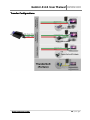
Transfer C onfigurations
www.Gemini444.com
24 | P a g e
Gemini 4:4:4 User Manual 021012.001
Accessing & Using the SSD on A Computer
SSD's used with the Gemini will report as almost entirely full (~250 MB free) on a
computer, as the Gemini reserves almost the entire SSD for video only, and
prevents the computer from writing to this area. Thus the Gemini video area on
the SSD is essentially read-only on a computer).
The SSD's can be used on a computer for playing video directly from the card,
for copying video onto the computer's file system, or to copy firmware update
files from computer to SSD for updating the Gemini (see the User Manual for
more details on updating the Gemini).
Note: Macs require a PCI->Sata Expansion Card to be able to attach
a SSD to the Mac via the Transfer Station.
Mac
Insert the SSD (label up) into the provided Transfer Station, and attach the
Transfer Station to the Mac via PCI->SATA port and the USB port (which only
provides power).
The SSD will appear as a Volume within Finder on the Mac, and can be treated as
part of the File System. Like other Volumes on the Mac, the Volume must be
dismounted within Finder before being physically removed from the Transfer
Station.
PC
For Windows 7 PC's: **Important*: First disable caching of the SSD
within Windows, to allow for consistent and correct display of files
from 1 SSD insertion/removal to the next.
To disable caching to the SSD:
1. Insert the SSD (label up) into the provided Transfer Station,
and attach the Transfer Station to the Pc via the SATA port and
the USB port (which provides power).
2. Within Windows Explorer, find the Drive Letter associated with
the just inserted SSD (256 or 512 GB SSD with ~250 MB
available).
3. Right-click the Drive Letter, in the Drop-down Menu choose
“Properties”.
4. Choose the “Hardware” tab.
5. In the available list, choose the option which begins “C400” be sure to choose the “C400” option and not a different drive.
6. Click the “Properties” button.
7. Choose the “Change Settings” button.
8. Click the “Policies” tab.
9.. Turn “off” (un(un-check) the “Enable writewrite-cache option”,
option” or in
some versions of Windows 7, select (check) “Quick Removal” option.
10. Press “Ok” and you're done.
This procedure may need to be repeated if a future insertion of an SSD creates a
different Drive Letter within Windows Explorer. If the Drive Letter does not
www.Gemini444.com
25 | P a g e
Gemini 4:4:4 User Manual 021012.001
change from one insertion to the next, the procedure does not need to be
repeated.
If you are unable to perform the above, For Windows 7, then you may power
your computer off, then attach the Transfer Station, SSD, and both cables, then
power on your computer. In this case, the computer should recognize your drive.
After copying files to the SSD, you may need to shut down your computer, for
the Windows Cache to be cleared (so that the files are actually written to the
SSD).
Allow 10-20 seconds for Windows to recognize the SSD, after insertion.
Windows XP:
Avoid having the SSD attached at time of booting a Windows XP machine.
Otherwise, if an SSD is attached at time of Windows boot-up, Windows may try
to boot from the SSD.
When removing an SSD from the Transfer Station, allow at least 15 seconds
before inserting another SSD.
Allow 10-20 seconds for Windows to recognize the SSD, after insertion.
www.Gemini444.com
26 | P a g e
Gemini 4:4:4 User Manual 021012.001
POST WORKFLOW
Adobe
Software
After Effects
CS4
CS5
CS5.5
Media Encoder
CS5
CS5.5
Photoshop
CS4
CS5
CS5.5
Premier Pro
CS4
CS5
CS5.5
Imp/Exp
Import
File Type
Native Support
After Effects Project
Premier Pro Sequence
Uncompressed Quicktime Movie
After Effects Project
Premier Pro Sequence
Uncompressed Quicktime Movie
*Codec of Choice DNxHD, XDCAM,
ProRes
Export
•
•
•
•
•
•
•
Import
Native Support
Export
Import
Export
Import
Export
www.Gemini444.com
•
•
DPX
JPG, etc.
Native Support
• After Effects Project
• Premier Pro Sequence
• Uncompressed Quicktime Movie
Final Production
Function and General Notes
•
•
•
•
Check Playback
Apply Color Correction
Apply LUT
Can be sent directly to Adobe Premier /
Media Encoder
• Encode
*This will be dependent of any Codec installed
on your machine
• Viewer (individual frames)
• Used to check a Single Frame
• Be sure to select “Numbered Stills” Option….
• For optimal playback, import as After
Effects Project or import as Premier Pro
Project directly from After Effects.
(Deliverable File)
27 | P a g e
Gemini 4:4:4 User Manual 021012.001
Apple
Color
1.5.3 (FCP7)
Compressor
3.5(FCP 7)
4 (FCP X)
Native Support
Export
Final Cut Pro Project / Sequence
Plug In
Import
Export
Final Cut Pro
6
7
X
• Check Playback
• Apply Color Correction
• Apply LUT
Import
•
•
Glue Tools (Mac)
Cineform Remaster
*Codec of Choice: DNxHD, XDCAM, ProRes
Plug In
Import
•
•
Glue Tools (Mac)
Cineform Remaster
Export
Final Production (deliverable file)
Import
Native Support
Export
• NLE
• Uncompressed Quicktime Movie
• Final Production
Import
Native Support
Export
Final Production
Import
Native Support
Export
*Codec of Choice: DNxHD, XDCAM, ProRes
Export to Final Cut Pro
• Encode
*With Glue Tools you can import DPX files,
then Encode to Codec of choice
• Check Playback
• Edit
*Plug In allows you to import DPX files
directly
AutoDesk
Smoke
Flame
• Check Playback
• Apply Color Correction
• Apply LUT
• Edit
Avid
Avid DS 10.5
Metafuse
• Check Playback
Export to Final Cut Pro
•
Media
Composer
5.5
6
Plug In
Import
Export
•
•
Metafuse
Cineform Remaster
Final Production (deliverable file)
www.Gemini444.com
Ecode
• Check Playback
• Edit
*Plug In allows you to import DPX files
directly
28 | P a g e
Gemini 4:4:4 User Manual 021012.001
CineForm
Neo
4K
3D
Remaster
Import
Native Support
Export
• CineForm 444
• ProRes 444
• (other installed Codecs)
Import
Native Support
Export
Final Production
Import
Native Support
Export
Final Production
Import
Native Support
Export
NLE / Final Production
Import
Native Support
Export
NLE / Final Production
Import
Planned Support of Gemini DPX files
(near future)
Export
Final Production
Import
Native Support
Export
Final Production
• Encode
*Once files are converted to CineForm
444, you can import them
Eyeon
Fusion 6
• Edit
Maxon
Cinema 4D
• Edit
NewTek
LightWave 3D
10.1
• Check Playback
• Apply Color Correction
• Apply LUT
• Edit
The Foundry
Nuke 6.3
Furnace 4.2
FurnaceCore
4.3
• Check Playback
• Apply Color Correction
• Apply LUT
• Edit
Sony
Vegas
• Edit
Grass Valley
Edius
5
6
www.Gemini444.com
• Create a new bin
• Import File
• Select ‘File As Sequence’
29 | P a g e
Gemini 4:4:4 User Manual 021012.001
Black Magic
DaVinci Resolve
Resolve Lite
Media Express
Import
Native Support
Export
NLE / Final Production
Import
Native Support
Export
Uncompressed Quicktime Movie
Import
Native Support
Export
Uncompressed Quicktime Movie
Import
Native Support
Export
Jpeg, DPX, etc.
• Check Playback
• Apply Color Correction
• Apply LUT
• Edit
• Check Playback
• Encode
*If you have DeckLink 3D, or 4:4:4 card, it
will playback and exp
AJA
DPX Translator
• Check Playback
• Encode
DPX Viewers
DJViwer
• Check Playback
XNView
POM DPX
Head Editor
Photoshop
Media Express
DPX Translator
www.Gemini444.com
30 | P a g e
Gemini 4:4:4 User Manual 021012.001
APPENDIX
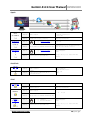
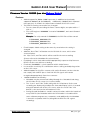
F irmware Updates
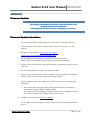
We strongly recommend you always keep your Gemini 4:4:4
updated with the latest firmware.
We frequently add new features and bug fixes at no cost.
Firmware Update Instructions
We recommend that you print out these instructions, if possible (p22-25).
1.
Your computer must have an internet connection so you may access our
website.
2. Navigate to our website: http://www.convergentdesign.com/FirmwareUpdates/Gemini444.aspx
On the Right Side of the page, you will find “Current Firmware”.
Make a note of the firmware version that you will be downloading.
3. Format a SSD in the Gemini 4:4:4 (ensuring that no important clips are on the
SSD first).
4. Insert the formatted SSD card in the transfer station.
5. Connect the transfer station to your computer, connecting both the USB and
eSATA cables to your computer and the transfer station.
If your computer does not recognize the SSD, you may need to reboot your
computer.
a. We recommend creating a folder named something like the following:
Gemini 444 Firmware 2011-11-11-001 (1.0.105)
(Use today’s date and firmware number as listed in our webpage.) But you
may create a folder using a folder name of your choice.
6. Navigate to Gemini 444 | Firmware Updates.
On the Right Side of the page, you will find the Current Firmware and Release
Notes.
www.Gemini444.com
31 | P a g e
Gemini 4:4:4 User Manual 021012.001
7. Click on the firmware version that you wish to download.
Note: You may reinstall an earlier version of the firmware, if desired.
For Windows 7:
(Other Windows Computers will be similar)
See below for Mac instructions
8. Click on Save As.
9. Navigate to the folder you just created.
10. Click on Save. The file you saved will be Gemini 1.0.105.zip
(but with the current firmware version number)
11. Navigate to this folder and file. (You may just click on “Open Folder”)
12. Double Click on this file. It will be something like “Gemini 1.0.105.zip” but with the
current firmware number.
13. Click on Extract All Files.
14. Click on Extract.
15. Double Click on Gemini 1.0.105 (or current firmware version number).
16. Drag and Drop the }GEM_UPDATE{ folder to your SSD Drive
(Listed under Computer) on the left hand side of your screen.
Note: The SSD may be “No Name”, and it can be any Drive Letter”, but it will
have a }CLIPS{ folder on the drive.
Do not copy the firmware update into the }CLIPS{ folder.
Answer Yes to: “Do you want to copy this folder without Encryption?”
And Answer Yes to: “Do you want to copy this file without Encryption?”
Skip over “For Mac” instructions to finish the update.
www.Gemini444.com
32 | P a g e
Gemini 4:4:4 User Manual 021012.001
For Mac
8. Start with Steps 1 through 8 above.
9. Double click on the }GEM_UPDATE{.zip
10. Copy or Drag }GEM_UPDATE{ folder to SSD.
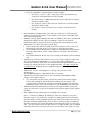
For Both Mac and Windows (PC continued)
1.
If done successfully, you will have:
}CLIPS{
}GEM_UPDATE{
}GEMINI{.UPD
(An Empty Folder)
(The Update Folder)
(The Actual Firmware Update File)
2. Use the “Safely Remove Hardware” option or shutdown/restart your computer
gracefully, to ensure that the firmware has been completely transferred to the
SSD.
3. Otherwise, the firmware update may not be successfully copied to the SSD, and
then the Gemini 4:4:4 will not find the firmware update.
11. Ensure that you have adequate power to power the Gemini 4:4:4, either battery
or AC Power. The firmware update takes less than 5 minutes, but please ensure
that you have at least 30 minutes of battery time remaining to ensure safety.
12. Power up the Gemini 4:4:4.
13. Removing any video input cables.
14. Remove all SSD’s.
15. Insert the SSD with the firmware update.
16. Then power on the unit.
17. You will see a Firmware Update screen if the file is on the SSD properly.
18. Follow the On-Screen Prompts to complete the firmware update.
19. When complete it will say: “DONE – PLEASE REMOVE UPDATE DRIVE”
(Please remove the SSD; The unit will then power off and back on automatically).
20. If you wish to then reuse this SSD (normally the case, unless you have additional
Gemini 4:4;4’s to update):
www.Gemini444.com
33 | P a g e
Gemini 4:4:4 User Manual 021012.001
a. Insert the SSD back into the Gemini 4:4:4
b. Click on Cancel (to avoid performing the Firmware Update again)
c. Reformat the SSD (Click on Menu, then Gemini, then SSD’s, then Format SSD1 or
Format SSD2)
This step is very important:
Then power off the Gemini 4:4:4, then
then Power it back on.
If you fail to perform this step to power cycle the unit, then all
features of the Gemini 4:4:4 may not work properly.
TROUBLE SHOOTING: ! UPDATE FAILED ! or ! EMERGENCY UPDATE !
Check your power source, pull the power, and then run the update again. MAKE SURE THERE IS NO VIDEO
SOURCE plugged into the unit, and that there is only ONE SSD PRESENT.
If this process fails twice, contact Support.
www.Gemini444.com
34 | P a g e
Gemini 4:4:4 User Manual 021012.001
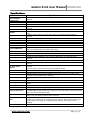
Specifications
Specifications
Feature
Video Standards
Video Formats
Video I/O
Record Features
Metadata
Playback Control
S-Log, Log-C Support
Media
Transfer Station
Built-In LCD Monitor
Software Compatibility
Menu System
Timecode
Digital Audio I/O
Analog Audio I/O
3D - Dual Stream
(Option)
ARRIRAW (Option)
Remote Control (Option)
Power Requirements
Size, Weight
Environmental
Gemini Production Kit
Optional Accessories
Notes
HD-SDI, SMPTE 292M; HD-SDI Dual-Link, (SMPTE 372M; (HD-SDI 3G, SMPTE 424M Planned)
1080p23.98/25; (1080p24/29.97/30/50/59.94/60, 2048x1080p23.98/24 - Planned)
Four BNCs, (2 Input, 2 output), (One HDMI (Type C) Output – Planned)
Uncompressed RGB 10-Bit 4:4:4 Recording into DPX file format (audio recorded into WAV file)
Spans across drives (for longer record times) or (Record simultaneously to both drives –
Planned)
(Video can be recorded with or without baked-in LUTs – Planned)
Reel Number, Scene Number, Take Number, Shooting Day, Camera Number and Project
Name
Selection of One or More files to Play, (Play, Pause, Fast-Forward, Rewind and Step –
Planned)
Support for S-Log, (Log-C and user programmable 1D LUTs - Planned)
Two Slots for 1.8" Solid State Drives (SSD), 256GB / 512GB sizes; Spanning Supported
SSD Performance: 250 MBytes/Sec Write, 415 MBytes/Sec Read, 6 Gbps SATA Interface
Note: Only SSD Media supplied by Convergent Design can be used in the Gemini
1.8" SSD to 6 Gbps eSATA transfer station included
5" high brightness LCD, 800 cd/m², 800 x (RGB) x 480 Pixels, 24-Bit, 900:1 True Contrast,
Wide 170⁰ Viewing Angle, Color Calibrated at Factory
1:1 Pixel Mode (User positioning of desired window via touch-screen control – Planned)
Support for Avid, Final Cut Pro with GlueTools, Premiere, Smoke, Flame, DaVinci, others
Touch Sensitive menu system, Menus can be hidden, LCD can be dimmed
HD-SDI Embedded (SMPTE RP-188) or LTC via optional cable or (Internal Timecode Planned)
HD-SDI Embedded uncompressed, 24-Bit, 48K; 2-channels, stored in WAV format.
(3.5 mm jacks, mic or consumer line level input; headphone or consumer line level output
planned)
(Paid option for Full Stereo (dual stream) record and playback in a single Gemini unit –
Planned);
Cameras must be Gen-locked to operate properly with the Gemini
(Left and Right Video Streams recorded as individual files, in full uncompressed – Planned)
(Vertical Flip, Horizontal Flop, for either/both streams – Planned)
(Individual output of each stream or Combine: Side by Side, Line by Line, Anaglyph, 50/50
Composite and Luma Differencing – Planned)
Support for ARRIRAW recording and playback with Confidence Monitoring planned for March
2012
Wired Remote Control with Tally Light and LTC I/O (Options are extra cost items)
5 to 19 Volts DC, 8 to 16 watts (active) / 4.0 watt (power-save mode planned); 7-second bootup time
138 x 120 x 37 mm (5.4 x 4.7 x 1.45"); 612g (1.35 lb); Milled Aluminum Case
-10 to +40⁰C Ambient Temp (Operating) / -20 +70⁰C (Storage)
Gemini 4:4:4 Recorder, eSATA Transfer Station, HD-SDI cables, HDMI cable, Hot shoe with
1/4"x20 Ball Mount, Universal AC Power Supply, 4-Pin XLR Power Cable, D-Tap Power Cable,
Stylus, Custom Fitted Hard Plastic Case
256GB / 512GB SSD Media, extra Transfer Stations, (DC to DC Converter (Input: 20 to 32V,
Output: 12V), (Sun Shade, Remote Control – Planned)
1080p29.97/30 and 1080p50/59.94/60 data (planned) must be striped across both drives, so
simultaneous recording / 3D is not supported for these formats. (Data from two SSDs can be
readily combined for editing). Also 1080p50/59.94/60 (planned) only supported in 4:2:2
sampling.
Specifications subject to change without notice.
Record Times - See Page 15.
www.Gemini444.com
35 | P a g e
Gemini 4:4:4 User Manual 021012.001
Gemini Mechanical Drawings
Useful for your mounting needs and designs, please find below mechanical
drawings of the Gemini 4:4:4.
Remote Connector Pinout
(1)
(2)
(3)
(4)
POWER PINOUT
Power: +6.5 ~ +19V,
Power: +6.5 ~ +19V
Ground
Ground
www.Gemini444.com
REMOTE PINOUT
(1) 232 - RX
(2) Remote
(3) LTC-I/O
(4) GPI
(5) GND
(6) 232 - TX
36 | P a g e
Gemini 4:4:4 User Manual 021012.001
Firmware Version 1.0.
1 .0.592
.0.592 (see also Release Notes)
Notes)
Features
•
•
Added support for 1080p 24.00 frame rate (in addition to the already
supported 1080p23.98 and 1080p25). Additionally, 1080p23.98 is reported
more precisely as 23.98 in the Input Status window of the LCD screen.
The DPX file naming convention was changed:
For the character preceding the frame counter digits, we replaced the “.”
with a “_”
Files now begin at “0000000” instead of “0000001”, and count forward
as before.
Example: For a clip named CLIP0000001, the DPX files will be named:
CLIP0000001_0000000.DPX
CLIP0000001_0000001.DPX
CLIP0000001_0000002.DPX …etc.
•
•
•
•
•
•
•
Fixed Outputs: Mode setting to be correctly saved when the setting is
changed.
Added a “Next Take” info button on the left side of screen, which when
chosen displays
the Clip, Scene, and Take which will be used for the next recording.
(Please refer to the Metadata discussion below).
Fixed bug in which timecode would inappropriately repeat or skip from one
DPX file to the next within a recording.
Fixed rare (0.000001% ) pixel repetition within video frames.
Lessened the sensitivity of scroll buttons when scrolling and adjusting values
on the LCD screen.
Added Support for CineFlex cameras with earlier firmware versions that do
not comply with SMPTE Specs. Dual-link HD-SDI signals will now be
recognized appropriately from these cameras.
Added Metadata functionality:
Metadata may be entered and edited through the “Metadata” tab along
the left side of LCD screen (in Live/Rec Mode).
The “Scene” and “Take” fields (along with the Clip Name) for the next
recording are displayed just above the timecode display, which is located
along the bottom row of the LCD screen, when the “Next Take” info
button is selected (on the left bottom of LCD).
During Record, Metadata is saved in various locations within the header of
every DPX file (the Metadata within the DPX header is viewable within
some software programs on a computer), and additionally the Metadata
is stored in a separate XML file (alongside the DPX files for a given
recording).
www.Gemini444.com
37 | P a g e
Gemini 4:4:4 User Manual 021012.001
•
•
•
•
•
•
•
•
Also, the Metadata is stored, within the DPX header:
• the “Reel”, “Scene”, “Take”, and “Day” values are placed in the
“Slate Info” defined field in the DPX header
• the “Reel” value is additionally placed in the “Input Device Name”
field of the DPX header
• the “Camera” value is placed in the “Input Device Serial Number”
field of the DPX header
• the “Project” value is placed in the “Project” field of the DPX
header
Most Metadata is displayed for each clip in the Play List (in “Play/Review”
mode on the Gemini Recorder). This includes Scene, Take, Timecode, Date,
Time, and Shooting Day.
Added 2-channel audio support over SDI, recorded as WAV files (and placed
alongside the DPX files for a given recording). WAV file will only be
produced if audio is present over the incoming SDI stream during record.
Added Play List / Play Selection functionality:
◦ Clips may be selected for Playback out of the Gemini via the “Play List”
tab along the left side of the LCD screen (in Play/Review mode).
◦ All selected clips will be played in sequence, and optionally the playback
will loop continuously (if the “Loop” option is selected), until manually
stopped.
◦ The default behavior of the Play List is to play and loop the last recorded
clip.
Added Screen Flip function (Gemini->Set->LCD->Flip) to flip the Video and
On-Screen Display by 180 degrees. This is to allow more flexibility of
mounting the Gemini 4:4:4, as it can now be mounted upside down, while still
viewing the image and menus in the upright position. This does not flip the
recorded image. Flipping of the recorded image will come with the 3D
Option.
Added LCD Screen / LED Brightness setting (Gemini->Set->LCD>Brightness) :
20% to 100% Brightness, adjustable in 10% increments.
Added LTC timecode input source (via remote port and adaptor cable)
(Inputs->Timecode->Source).
◦ LTC Timecode may be used in conjunction with the Record->Trigger>Timecode setting to start and stop recordings on the Gemini (via
incrementing Timecode for starting record, and stopped Timecode for
stopping record), in the same manner as with Embedded SDI Timecode.
Added current time/date display via the System Status button (lower left
corner of LCD touch-screen, press button to bring up a larger System Status
Info box).
Beta support for 3G video inputs is included in this release.
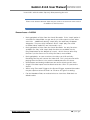
Note** : Due to the addition of audio files, XML files, and Play List in this
firmware release, any SSD to be used for recording with the new firmware
will first require a fresh formatting within the Gemini Recorder (with the new
firmware installed). Additionally, for any SSD's containing clips recorded on
previous firmware, the Gemini Recorder will not provide a Play List for these
clips – the only Play function will be “Play All”. In order to play clips recorded
with earlier firmware, you must select the “All” function in the Play List, and
www.Gemini444.com
38 | P a g e
Gemini 4:4:4 User Manual 021012.001
insert SSD's with the older clips only after powering the unit.
Please note that the Gemini 4:4:4 may be used to record from 4:2:2 sources
in addition to 4:4:4 sources
Known Issues – 1.0.594
•
•
•
•
•
•
•
During playback of clips from the Gemini Recorder: if the “Loop” option is
selected, the video/audio can get out of sync with respect to each other
over time. Additionally during “Loop” play, the audio may disappear
altogether. These are only limitations of the “Loop” play; the actual
recorded video/ audio files are intact and in sync.
During playback of clips from the Gemini Recorder: the only functions
available are “Play” and “Stop” (both functions are available via the
Play/Stop button on the bottom of screen). At this time no other Play
functions (such as Pause or Trick Play functions) are available.
During playback: on rare occasions, the video can shift vertically.
Restarting the Play will correct the video shift. This is only present while
playing from the Gemini; the actual recorded video files are intact.
HDMI Output and Analog Audio Input are not functioning at this time.
Single-Link video inputs must be attached to the “SDI A In” port on the
Gemini.
When using Timecode Trigger as the Record Trigger, repeated timecodes
may be experienced on the final 2 or 3 frames of a given recording.
For the Metadata fields, no method exists to clear these fields back to
default values.
www.Gemini444.com
39 | P a g e
Gemini 4:4:4 User Manual 021012.001
Trouble Shooting & Support
Please read the User Manual before contacting support. We highly recommend
that you follow these steps:
(1) UPDATE YOUR GEMINI:
GEMINI Visit the Gemini 4:4:4 Firmware Updates page on
the website and confirm that you are running the latest version. Please refer
to ‘Firmware Updates’ on page 22 for more about checking the system for
current version and updating.
http://www.convergent-design.com/ProductUpdates/Gemini444.aspx
(2) VISIT OUR FORUM:
FORUM We have a very active forum and you may find the
answer you are looking for, as well as support from the Convergent Design
community.
http://www.dvinfo.net/forum/convergent-design-nanoflash/
(3) REFER TO DOCUMENTATION:
DOCUMENTATION Please read all of this User Manual, as well as
our Gemini 4:4:4 FAQs which document basic usage and help answer
common questions.
(4) CONTACT US: If you still haven’t found a solution to your support needs we
are always happy to help you 24/7!
Support E-Mail: c d su p po r t (at ) co nv er ge nt -d e sig n . co m
Sales E-Mail:
cd s al e s (at ) co nv er ge nt - d e sig n . co m
Main Telephone: ++(720) 221-3861
Sales and After Hours Support Telephone: ++ (719) 930-1376, ++803-2780941
Web Site: http://www.convergent-design.com & www.Gemini444.com
We appreciate your questions, comments,
feedback! We ARE listening! To reach out to us,
look for this link on our website, or visit
http://www.convergenthttp://www.convergentdesign.com/ProductUpdates/WereListening.aspx
www.Gemini444.com
40 | P a g e
Gemini 4:4:4 User Manual 021012.001
Limited Warranty
Convergent Design warrants Gemini 4:4:4, and all included accessories, against
defects in material and workmanship for a period of 2 years (for registered
units), 1 year (for non-registered units), and 3 months (for units used as rentals)
from the original date of purchase.
Convergent Design disclaims all other warranties.
Convergent Design will not be liable for damages of any kind, including, but not
limited to, compensation or reimbursement on account of failure of the unit, or
any of its accessories, or its recording media, external storage systems, or any
other media or storage systems to record or playback content of any type. Also
Convergent Design will not be liable for a failure of the unit to properly record or
play back for any reason. Convergent Design’s total liability, in all cases, is limited
to the actual purchase price.
If you discover a defect, please refer to our Return Merchandise Policy below.
During the warranty period, Convergent Design, at its option, will repair or
replace product or product components, which in its opinion prove defective,
provided the unit is returned, freight charges prepaid, to Convergent Design.
Parts and components used in the repair process may be recycled or repaired, at
Convergent Design’s sole discretion. This warranty service will be performed at
no charge to the registered owner, provided the product is shipped prepaid to
Convergent Design.
Convergent Design reserves the right to determine whether a needed repair is
subject to the warranty as per its provisions stated herein. Transit damage
caused by inadequate packing violates the warranty. The warranty will be void if,
in the opinion of Convergent Design, the product has been damaged through
accident, misuse, misapplication, or as a result of service or modification not
authorized in writing by Convergent Design.
Opening the unit and breaking the warranty seals, voids the warranty, unless
specifically authorized in advance by Convergent Design.
WARNING: THE FOLLOWING ARE NOT COVERED UNDER WARRANTY,
WARRANTY, AND
ARE ITEMS FOR WHICH CONVERGENT DESIGN DOES NOT ACCEPT ANY RESPONSIBILITY:
RESPONSIBILITY :
• Damage due to the use of an AC power supply, other than the one supplied,
or use of any inappropriate power source.
• Damage due to overheating conditions. The unit will attempt to shut down, if
powered on, in the event of overheating, before damage can occur.
www.Gemini444.com
41 | P a g e
Gemini 4:4:4 User Manual 021012.001
• Damage due to exposure to water, or other liquids, or excessive dust or sand.
• Damage caused by dropping or other rough handling.
• Damage caused by any overvoltage conditions or reverse voltage conditions.
• Any physical damage to the LCD and/or Touch Screen including scratches.
• Damage to any connector by using excessive force or rough handling.
• Any loss or corruption of video or audio data recorded on the unit, or any loss
or corruption of data which is in any way associated with the Gemini 4:4:4.
Obtaining an RMA
It is our policy that all material and repair returns, whether in warranty or not, are
only accepted if an RMA (Return Merchandise Authorization) Number has been
issued for the products being returned.
E-mail Convergent Design at cdsupport (at) convergent-design .com to obtain
an RMA number for a faulty unit, or call ++720-221-3861 (7:30 am to 5 pm
Colorado, USA time).
Items must be returned within 15 days of receiving your RMA number.
Returned product must be securely packaged and must have the RMA number
clearly marked on the outside of the package.
RMA numbers and return address may be obtained from Technical Support.
Convergent Design RMA # _______________
4465 Northpark Drive, #400
Colorado Springs, CO 80907
EMAIL: [email protected]
WEBSITE: www.convergent-design.com or www.gemini444.com
Phone ++(720) 221-3861 (Preferred, Denver Time) or
++(866) 654-0080 or
++(803) 278-0941 (For After Hours Support 24/7)
++(719) 930-1376 (For After Hours Support 24/7)
Transit damage caused by inadequate packaging also invalidates the warranty
agreement.
Please ship the unit in its original packaging, if possible.
Within the United States, the unit may be shipped directly to Convergent Design
once an RMA is obtained.
www.Gemini444.com
42 | P a g e
Gemini 4:4:4 User Manual 021012.001
Outside the United States, please coordinate with your dealer, which will then
coordinate with our distributor for your part of the world. Our goal is to ensure
that the units are shipped properly and that the units will clear customs without
incurring extra charges. In some cases your local dealer or distributor may be
able to provide you with a loaner unit.
All products must be shipped prepaid to Convergent Design, or preferably
through the dealer from which the unit was purchased (if outside the US). If you
purchased the unit from a dealer outside of your normal trading zone, then you
may be charged for return shipping to your location.
For insurance reasons, Convergent Design cannot accept any product that is
returned via U.S. Postal Service. Returns will be accepted from Federal Express,
UPS, DHL, or other comparable freight carrier.
Products repaired out-of-warranty are shipped at customer’s expense.
www.Gemini444.com
43 | P a g e