1
Gemini 4:4:4 User Manual v1.4
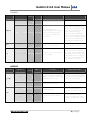
GEMINI
SubSub-Menu 1
SubSub-Menu 2
SubSub-Menu 3
Option
Description
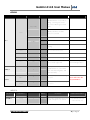
On
The on screen menu will
disappear after 15 seconds of
idling. Touching the screen
anywhere will bring the menu
back.
Off
The on-screen menu always be
displayed unless the hide
button is touched
Auto-Hide
LCD
Additional Information
2.39:1
SET
Guides
1.85:1
None
ABOUT
Removes any current Guides
setting.
Time
→
Set the appropriate time.
Date
→
→
Set the appropriate date.
Reset
→
→
Restore all default settings.
Keys
Unit
Unit OK
Indicates your product was
successfully registered.
→
Displays the firmware version,
serial number of your Gemini
unit, manufacturing date, and
activation date.
→
Permanently erases everything
on SSD 1
→
Permanently erases everything
on SSD 2
Requires nothing further
after initial registration.
→
→
Format
SSD 1
→
Format
SSD 2
→
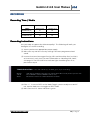
SubSub - Menu 2
SubSub - Menu 3
Option
D escription
Additional Information
Source
→
SDI
Timecode is extracted from the SDI
signal coming from your camera
For non-zero timecode, set
your camera’s timecode
output (if it has one).
SSD's
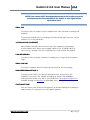
WARNING:
DATA WILL NOT BE
RECOVERABLE!
INPUTS
SubSub - Menu 1
TIMECODE
www.Gemini444.com
8|Page