1
Table of Contents
Installing the TV......................................................3
Changing the Input Source . . . . . . . . . . . . . . . . . . . . . . . . . . . 21
Inspecting the Package Contents . . . . . . . . . . . . . . . . . . . . . . . 3
Changing the Screen Aspect Ratio . . . . . . . . . . . . . . . . . . . . . 21
Installing the TV . . . . . . . . . . . . . . . . . . . . . . . . . . . . . . . . . . . . . 3
Adjusting the Picture Settings. . . . . . . . . . . . . . . . . . . . . . . . . 22
Installing the TV Stand............................................................ 3
Adjusting the More Picture Settings.................................... 23
Installing the TV on a Wall...................................................... 6
Adjusting the Color Temperature........................................ 24
Adjusting the Picture Mode Edit Settings............................ 24
Controls and Connections......................................7
Adjusting the Color Calibration Settings............................. 25
Rear Panel. . . . . . . . . . . . . . . . . . . . . . . . . . . . . . . . . . . . . . . . . . 7
Adjusting the Color Tuner Settings...................................... 25
Side Panel . . . . . . . . . . . . . . . . . . . . . . . . . . . . . . . . . . . . . . . . . . 8
Creating a Custom Picture Mode......................................... 28
Front Panel . . . . . . . . . . . . . . . . . . . . . . . . . . . . . . . . . . . . . . . . . 9
Locking and Unlocking the Custom Picture Modes............ 29
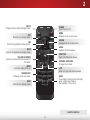
Remote Control. . . . . . . . . . . . . . . . . . . . . . . . . . . . . . . . . . . . . 10
Deleting a Custom Picture Mode......................................... 29
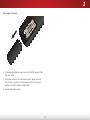
Replacing the Batteries......................................................... 11
Adjusting the Audio Settings. . . . . . . . . . . . . . . . . . . . . . . . . . 30
Connecting Your Devices......................................12
Changing the Equalizer Settings.......................................... 31
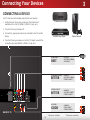
Connecting A Device. . . . . . . . . . . . . . . . . . . . . . . . . . . . . . . . . 12
Delete the Custom Audio Mode........................................... 31
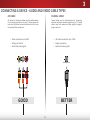
Connecting a Device - Audio and Video Cable Types......... 13
Setting Timers. . . . . . . . . . . . . . . . . . . . . . . . . . . . . . . . . . . . . . 32
AV CABLE........................................................................... 13
Setting the Sleep Timer........................................................ 32
COAXIAL CABLE................................................................. 13
Setting the Auto Power Off Feature..................................... 32
COMPONENT CABLE......................................................... 14
Setting Up Channels. . . . . . . . . . . . . . . . . . . . . . . . . . . . . . . . . 33
HDMI CABLE...................................................................... 14
Selecting a Channel Source.................................................. 33
Connecting a Computer. . . . . . . . . . . . . . . . . . . . . . . . . . . . . . 15
Finding Channels................................................................... 33
Connecting an Audio Device. . . . . . . . . . . . . . . . . . . . . . . . . . 16
Adding New Channels........................................................... 34
Connecting an Audio Device - Audio Cable Types.............. 17
Skipping Channels................................................................. 35
3.5 mm CABLE................................................................... 17
Changing the Audio Language............................................. 36
HDMI CABLE...................................................................... 17
Setting Up Closed Captioning . . . . . . . . . . . . . . . . . . . . . . . . . 37
Connecting an Audio Device - ARC. . . . . . . . . . . . . . . . . . . . . 18
Changing the Appearance of Digital Closed Captions........ 37
Without HDMI ARC................................................................ 18
Renaming Inputs (on the Devices Menu). . . . . . . . . . . . . . . . 39
With HDMI ARC...................................................................... 18
Changing the TV Settings. . . . . . . . . . . . . . . . . . . . . . . . . . . . . 40
Viewing System Information................................................ 40
Using the On-Screen Menu..................................20
Changing the On-Screen Menu Language........................... 41
Navigating the On-Screen Menu. . . . . . . . . . . . . . . . . . . . . . . 20
1