1
Rotary Corrector
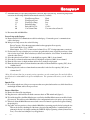
Figure 1:
•
•
•
•
•
•
•
•
•
•
•
•
•
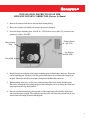
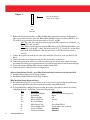
Line up missing pin
with connector plug.
2x5
connector
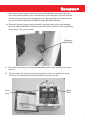
7. Remove the black connector that is on TB1 (the Mini-Max output pulse connector) and plug in the
same type of connector that is part of the Rotary Mini-Max Prover Cable Assembly, #40-2974. If a
TC proof is being performed, move the wire that is on YA to YB , on TB1.
Note: The color of the wires that connect to this black TB1 connector are “black on YA (YB
if using TC)“ and “red on K”.
Note: If there is further question about the TB1 wiring, get a DVM (Digital Volt Meter) and
set it on the “10 volts DC” setting. Put the red probe on YA (YB if using TC) and the black
probe on K. If the DVM reads -0.6 volts instead of 13 volts, then the wires must be
reversed.
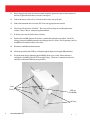
8. Connect the opposite end of the prover cable to the small blue prover box, on the port labeled “I.D.
Pulser”.
9. Connect all of the prover temperature and pressure sensor/cables on the prover.
10. Connect the prover main airflow hose to the test stand and prover master meter. Observe all safety
precautions listed in the prover operation manual, especially keeping hands clear of the meter inlet port.
11. Connect the laptop to the Mini-Max, using the communications cable.
12. Connect the prover’s little blue box to its computer box.
Software Installations Needed: (go to Mini-Max Item Setup if software is already installed)
13. Install the Prover Software on the laptop computer.
14. Install MasterLink32 Software on the laptop computer.
Mini-Max Item Setup (Important Step!):
15. If the Mini-Max items have been previously set up, or have been set up according to special factory
specifications, upload the items and save them in an item file, using MasterLink32.
16. To get the Mini-Max configured for prover testing, these items values must be entered (or verified),
using MasterLink32: (Find Table 3 at the end of this procedure)
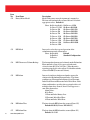
Item
Description
Value or Setting
432
Rotary Meter Model
Select Meter Model being tested
433
Index Mode
Prover
56
Pulser A Scaling
2.0
93
Pulser A Vol Code
UncVol
124
Revs Per Wakeup
1
98
Meter Index Code
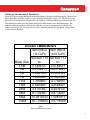
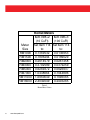
Select From Table 3
92
Uncorr Volume Units
Use the same value as item 98
0
Corrected Volume
00000000
2
Uncorrected Volume
00000000
18
www.honeywell.com
Page 19