1
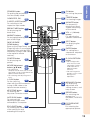
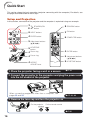
COMPUTER, DVI,
29
S-VIDEO, VIDEO buttons
For switching to the
respective input modes.
BREAK TIMER button 32
For displaying the
break time.
MAGNIFY buttons
33
For enlarging/reducing
part of the image.
PAGE UP/PAGE
34
DOWN buttons
Same as the [Page Down] and
[Page Up] keys on a computer
keyboard, when with the USB
connection (using a USB cable
or the optional remote
receiver).
POINTER button
For displaying the
pointer.
32
MOUSE/Adjustment
buttons (P/R/O/Q)
34
38
• For moving the
computer cursor when with the USB
connection (using a USB cable or the
optional remote receiver).
• For selecting and adjusting menu
items.
L-CLICK button
34
For the Left click
when with the USB connection
(using a USB cable or the
optional remote receiver).
25 ON button
For turning the power
on.
33 FREEZE button
For freezing images.
29 AV MUTE button
For temporarily
displaying a black
screen and turning
off the sound.
29 VOL +/– (Volume)
buttons
For adjusting the
speaker sound level.
32 SPOT button
For displaying the
spotlight.
38 ENTER button
For setting items
selected or adjusted
on the menu.
34 R-CLICK/RETURN
38 •button
For the Right click
when with the USB
connection (using a
USB cable or the
optional remote
receiver).
• For returning to the
previous menu screen
during menu
operations.
38 MENU/HELP button
displaying
48 For
adjustment and
setting screens, and
help screen.
KEYSTONE button
28
For entering the
Keystone Correction mode.
30 RESIZE button
AUTO SYNC button
33
For automatically
adjusting images when
connected to a computer.
33 PICTURE MODE
ECO+QUIET button
32
For lowering the noise
of the cooling fan and
extending the lamp life.
Introduction
STANDBY button
25
For putting the projector
into the standby mode.
For switching the
picture size
(NORMAL, BORDER,
etc.).
button
For selecting the
appropriate picture.
13