1
Step 4
4.1
Focus and Shoot
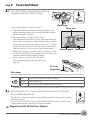
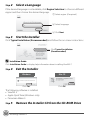
Press the shutter-release button halfway,
stopping when you feel resistance.
If the camera detects a face in step 3:
• The camera focuses on the area indicated by the
yellow double border (focus area), and the double
border changes to green.
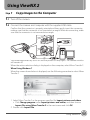
If the camera does not detect any faces:
• The camera has nine focus areas, and automatically
selects the focus areas containing the subject closest
to the camera. When the subject is in focus, g (focus
areas) glow green to indicate the areas of the frame
that the camera is focusing on (up to nine areas).
• When the camera is unable to focus, the focus area
will blink red. Modify the composition and press the
shutter-release button halfway again.
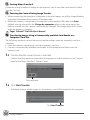
• If the subject is dimly lit, the AF-assist
illuminator may light and the flash may
pop up.
Flash lamp
Focus area
1/250
Shutter speed
F 3.5
Aperture
AF-assist
illuminator
Flash lamp
The flash lamp indicates flash status when the shutter-release button is pressed halfway.
On
Flash will fire when picture is taken.
Blinks
Flash charging.*
Off
Flash will not fire when picture is taken.
* If the battery is low, the monitor display will turn off, and remain off, until the flash is fully charged.
4.2
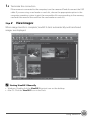
Smoothly press the shutter-release button the rest of the way
down to take the picture.
The shutter is released and the image will be saved to the memory card or
internal memory.
Do not use force when pressing the shutter-release button, as this may
cause camera shake, resulting in blurred images.
Pages 26 and 27 of the User’s Manual
Shooting and Playback
11