1
Little Dipper® Processor — USER MANUAL
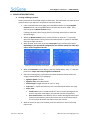
7. Succeeding steps (max. 9), are programmed and saved one by one. From the Step Input screen, select the Step #, enter the desired values then press Save and Exit. Repeat for each remaining step. Step Parameter screen with Drip Time
Step Parameter screen with Stroke Length
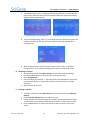
8. To use centrifugal drying, select “C” for the final step in the protocol and enter the number of seconds for the spin. No further steps may be programmed after a centrifuge step.
Step Parameter screen for Centrifuge spin time 9. When all protocol steps are entered, press Save & Exit to return to the Select Protocol screen. Up to 3 steps are displayed at one time on the touch screen. B. Renaming a Protocol 1. To rename a protocol, press Edit Protocol from the touchscreen Home page. 2. Use the up/down buttons to move to select the protocol to edit. 3. Select Change Name. 4. Use the shift key to move the “^” (up arrow) within the alphanumeric 10 key pad until the desired letter is indicated to input the new name. Select up to eight characters. 5. When finished, press Enter. C. Deleting a Protocol 1. To delete a protocol, press Control Panel from the home screen then Advanced Settings. 2. Press the Delete Protocol button to open the screen. 3. Choose a protocol to delete using the up and down arrows and then press Select. A confirmation screen appears saying “Delete Protocol?” Choose YES to confirm. 4. Press the BACK button on each of the previous screens to return to the home screen.
Version 2.1, May 2015 18 (408) 733‐7337, [email protected]