1
TStatSpecTM
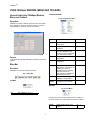
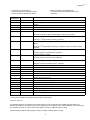
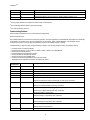
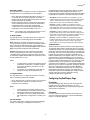
Heat Standby Stpt
67 deg F
40-90 deg F
Standy heating setpoint
or
or
Display resolution: 1 deg F/deg C.
19 deg C
4 -32 deg C
Unoccupied Heat <= Standby Heat <= Standby Cool -2 def (
1 deg C)
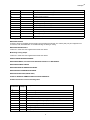
Heat Unoccupied Stpt 55 deg F
40-90 deg F
Unoccupied heating setpoint
or
or
Display resolution: 1 deg F/deg C.
13 deg F
4 -32 deg C
Unoccupied Heat <= Occupied Heat <= Occupied Cool -2
def ( 1 deg C)
Unoccupied Heat <= Standby Heat <= Standby Cool -2 def (
1 deg C)
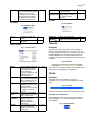
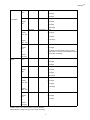
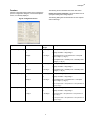
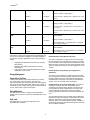
Min Heat Occupied
Stpt
Max Cool Occupied
Stpt
55 deg F
40-90 deg F
or
or
13 deg C
4 -32 deg C
85 degF
45-99 deg F
or
or
29 degC
7-37 deg C
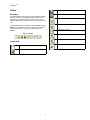
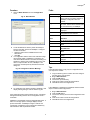
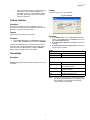
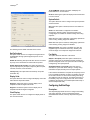
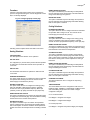
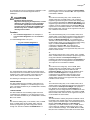
This screen will allow the user to change the setpoints using
spin buttons or typing in the values into the setpoint fields. As
soon as one of the above validations is violated, TStatSpec™
conveys the rule that is applicable for the currently selected
field by:
—
Highlighting the field that is the limit for the currently
selected field
— Displaying the validation test below the currently
selected field
— Changing the value of the selected field to the appropriate value as per the rule.
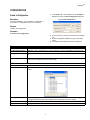
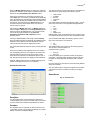
Energy Management:
Power failure Seq Start:
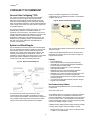
Configure the value for power sequential start by choosing
one of the options 0 to 150 seconds. This allows the
thermostat to delay start of the fan heating and cooling stages
after power is restored to thermostat. After a power outage, it
is desirable to start multiple units sequentially instead of all at
once to avoid a peak in power consumption.
Dehumidification:
This field allows the user to configure a dehumidification
strategy. If the system is in heat mode, dehumidification is not
allowed.
High Limit:
This allows the user to specify the high limit for the
dehumidification is started.
32
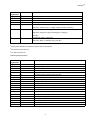
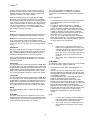
Lowest the programmed occupied heating setpoint
can be allowed.
Display resolution: 1 deg F/deg C.
Min Occupied Heat <= Occupied Heat <= Occupied
Cool -2 deg F (1 deg C)
Highest the programmed occupied cooling setpoint
can be allowed.
Max Occupied Cool >= Occupied Cool >= Occupied
Heat + 2 deg F (1 deg C)
Any combination of the following 3 strategies is allowed:
Dehumidification using Minimum On Time:
This option is available to configure only when the humidity
input is configured in the General page. This is the minimum
time the auxiliary relay configured for dehumidification is ON.
When this option is selected, the user will be provided with an
option to configure the minimum on time ranging from 5 to 15
minutes.
Dehumidification using Reheat. (not supported on
subbase 4):
This option is only available to configure when the humidity
input is configured in the General page. When this is selected,
the thermostat switches on the first heating stage when the
dehumidification is required. This option is not available for
T7350A, 1H1C and T7350B, 2H2C model types.
Dehumidification using Reset Temp Setpt: This option is
available to configure only when the humidity input is
configured in the General page. When this is selected, the
user is allowed to specify a temperature value. When this
option is selected, the thermostat reduces the effective
cooling temperature setpoint by the amount specified by the
user.
The dehumidify setpoint must be smaller than the difference
between the cooling and heating occupied setpoints and the
difference between the cooling and the heating standby
setpoints. When one of these setpoints change, TStatSpec™
automatically adjusts the dehumid reset setpoint such that the
above condition is satisfied.