1
TABLE OF CONTENTS
1.
INTRODUCTION .................................................................................................................................. 1
2.
FEATURES .......................................................................................................................................... 1
2.1.
Software Features ....................................................................................................................... 1
3.
SYSTEM REQUIREMENTS & SPECIFICATIONS.............................................................................. 1
3.1.
System Requirements ................................................................................................................. 1
3.2.
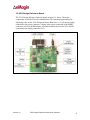
VGA Design Reference Board..................................................................................................... 2
4.
INTERFACE CONNECTIONS & SETUP............................................................................................. 3
4.1.
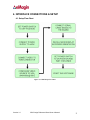
Setup Flow Chart ......................................................................................................................... 3
4.2.
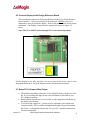
Connect Display to the Design Reference Board ........................................................................ 4
4.3.
Setup PC for Proper Video Output .............................................................................................. 4
4.4.
Power Up ..................................................................................................................................... 5
4.5.
Power Down ................................................................................................................................ 5
4.6.
Brightness .................................................................................................................................... 5
5.
USING THE VGA DESIGN REFERENCE BOARD SOFTWARE....................................................... 5
5.1.
Serial Interface Command Set..................................................................................................... 5
5.2.
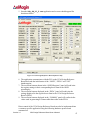
VGA Design Reference Board Software Utility............................................................................ 5
5.2.1.
5.3.
Hardware Protocol..................................................................................................................................7
Downloading New Firmware Versions to the Design Reference Board ...................................... 8
5.3.1.
6.
Using the Firmware Download Utility......................................................................................................8
ADVANCED USER INFORMATION.................................................................................................... 9
6.1.
Microcontroller ............................................................................................................................. 9
6.2.
I2C bus ......................................................................................................................................... 9
6.3.
System Hardware Overview ........................................................................................................ 9
6.4.
Voltages ..................................................................................................................................... 10
6.5.
Bias Control ............................................................................................................................... 10
6.6.
VCOM Mode .............................................................................................................................. 10
6.7.
Gamma ...................................................................................................................................... 11
6.7.1.
6.7.2.
6.7.3.
6.7.4.
6.7.5.
6.7.6.
Gamma Coefficients GC(0-8) ...............................................................................................................11
Preset Gamma Table descriptions .......................................................................................................12
Using “Update LUT” Button for Auto-Gamma Correction .....................................................................12
Loading the LUT from a file ..................................................................................................................12
The “Read LUT” Button .......................................................................................................................12
System Gamma....................................................................................................................................13
7.
FPGA.................................................................................................................................................. 15
7.1.
FPGA Register Map................................................................................................................... 15
8.
REVISION HISTORY ......................................................................................................................... 15
Version 1.0
VGA Design Reference Board User’s Manual
ii