1
AUS
Connecting
Connecting USB devices
Only connect your USB devices after initial set-up of your
new PC. This will prevent unnecessary confusion during
installation. These devices can normally be connected
during operation. Please refer to the operating manual for
your peripheral device.
• The PC’s USB power outputs are protected by a fuse (limited power source
as per EN60950). This ensures that, if there is a technical defect in the
PC, the peripheral devices connected to the affected sockets will not be
damaged.
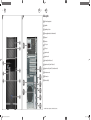
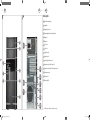
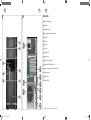
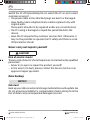
Normally, a choice of several connection sockets 9 / 11 is available.
NOTICE!
Risk of damage!
Ensure that the plug and the socket fit together precisely in order to
avoid any damage to the contacts. Due to the arrangement of the
contacts, the plug will only fit into the socket in one position.
− Connect devices (printer, scanner, camera, etc.) to the corresponding
socket 9 / 11 .
Where possible, always connect your devices to the port that
they were originally installed on. Otherwise you will be
assigned a new ID and the drivers will need to be reinstalled.
Connecting the audio output / headphones / speaker
boxes
Connect active speaker boxes for playback or an audio connection cable for
recording. Read the operating instructions for your stereo to find out which
input you need to use (usually Line In or Aux).
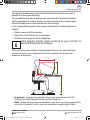
− Connect the cable to the green socket 12 on the back of your PC with the
3.5mm stereo jack.
AFTER SALES SUPPORT
AUS
1300 884 987
8324 EN ALDI AUS Content MSN 2006 0783 RC5.indb 21
21
www.medion.com.au
05.08.2015 11:50:35