1
View of Unit
Rear View
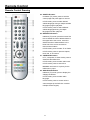
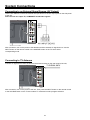
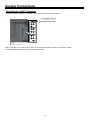
Open the back cover on the right side of the unit’s rear panel and all the connecting jacks will
appear, as shown on the below figure:
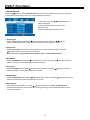
1. Antenna Socket
Connect external TV or DVB-T signal
source
2. Composite AV Output Jacks
Connect to output the audio/video signals
in composite mode
3. VIDEO/S-VIDEO and L/R audio Input
Jacks
Connect an audio and video/S-Video signal
in Composite/S-Video mode.
Video and S-Video share L/R audio jacks
and S-Video is the priority.
4. Y/Pr(Cr)/Pb(Cb) and L/R audio Input Jacks
Connect Y/Pr(Cr)/Pb(Cb) signal source in
YPbPr mode.
5. Power Supply Cord
Connect the power supply.
6. VGA Input Jack
Connect a VGA signal source in VGA mode.
7. HDMI Jack
Connect an HDMI signal source.
6