1
Acronis® Backup & Recovery ™ 10
Server for Linux
User's Guide
Copyright © Acronis, Inc., 2000-2009. All rights reserved.
“Acronis” and “Acronis Secure Zone” are registered trademarks of Acronis, Inc.
"Acronis Compute with Confidence", “Acronis Startup Recovery Manager”, “Acronis Active Restore”
and the Acronis logo are trademarks of Acronis, Inc.
Linux is a registered trademark of Linus Torvalds.
Windows and MS-DOS are registered trademarks of Microsoft Corporation.
All other trademarks and copyrights referred to are the property of their respective owners.
Distribution of substantively modified versions of this document is prohibited without the explicit
permission of the copyright holder.
Distribution of this work or derivative work in any standard (paper) book form for commercial
purposes is prohibited unless prior permission is obtained from the copyright holder.
DOCUMENTATION IS PROVIDED "AS IS" AND ALL EXPRESS OR IMPLIED CONDITIONS,
REPRESENTATIONS AND WARRANTIES, INCLUDING ANY IMPLIED WARRANTY OF MERCHANTABILITY,
FITNESS FOR A PARTICULAR PURPOSE OR NON-INFRINGEMENT, ARE DISCLAIMED, EXCEPT TO THE
EXTENT THAT SUCH DISCLAIMERS ARE HELD TO BE LEGALLY INVALID.
Table of Contents
1.
Introducing Acronis® Backup & Recovery™ 10 ......................................................... 6
1.1.
Acronis Backup & Recovery 10 overview ............................................................................ 6
1.2.
Getting started .................................................................................................................... 6
1.2.1.
1.3.
1.3.1.
1.3.2.
Using the management console ................................................................................................................. 7
Acronis Backup & Recovery 10 components .................................................................... 13
Agent for Linux ........................................................................................................................................... 13
Management Console ............................................................................................................................... 14
1.4.
Supported operating systems ........................................................................................... 14
1.5.
Supported file systems ...................................................................................................... 15
1.6.
Technical support .............................................................................................................. 15
2.
Understanding Acronis Backup & Recovery 10....................................................... 17
2.1.
Basic concepts ................................................................................................................... 17
2.2.
Full, incremental and differential backups ....................................................................... 21
2.3.
User privileges on a managed machine ............................................................................ 23
2.4.
Owners and credentials .................................................................................................... 23
2.5.
GFS backup scheme .......................................................................................................... 24
2.6.
Tower of Hanoi backup scheme ........................................................................................ 29
2.7.
Retention rules .................................................................................................................. 32
2.8.
Backing up LVM volumes (Linux) ...................................................................................... 34
2.9.
Backing up RAID arrays (Linux).......................................................................................... 36
2.10.
Tape support ..................................................................................................................... 38
2.10.1.
2.10.2.
2.11.
2.11.1.
2.11.2.
3.
Tape compatibility table ............................................................................................................................ 38
Using a single tape drive............................................................................................................................ 39
Proprietary Acronis technologies ...................................................................................... 40
Acronis Secure Zone .................................................................................................................................. 40
Acronis Startup Recovery Manager.......................................................................................................... 41
Options ................................................................................................................ 43
3.1.
3.1.1.
3.1.2.
3.1.3.
3.1.4.
3.1.5.
3.2.
3.2.1.
3.3.
3.3.1.
3.3.2.
4.
Console options................................................................................................................. 43
Startup page ............................................................................................................................................... 43
Pop-up messages ....................................................................................................................................... 43
Time-based alerts ...................................................................................................................................... 44
Number of tasks ......................................................................................................................................... 44
Fonts ........................................................................................................................................................... 45
Machine options ............................................................................................................... 45
Event tracing .............................................................................................................................................. 45
Default backup and recovery options ............................................................................... 47
Default backup options ............................................................................................................................. 47
Default recovery options ........................................................................................................................... 67
Vaults .................................................................................................................. 76
4.1.
4.1.1.
4.1.2.
Personal vaults .................................................................................................................. 77
Working with the "Personal vault" view .................................................................................................. 78
Actions on personal vaults ........................................................................................................................ 79
4.2.
4.2.1.
4.2.2.
4.2.3.
4.2.4.
5.
Common operations ......................................................................................................... 80
Operations with archives stored in a vault .............................................................................................. 80
Operations with backups .......................................................................................................................... 81
Deleting archives and backups ................................................................................................................. 82
Filtering and sorting archives .................................................................................................................... 83
Scheduling............................................................................................................ 84
5.1.
Daily schedule ................................................................................................................... 85
5.2.
Weekly schedule ............................................................................................................... 87
5.3.
Monthly schedule.............................................................................................................. 89
5.4.
Conditions ......................................................................................................................... 92
5.4.1.
5.4.2.
5.4.3.
6.
Location is available ................................................................................................................................... 92
Fits time interval ........................................................................................................................................ 93
Time since last backup............................................................................................................................... 94
Direct management .............................................................................................. 95
6.1.
6.1.1.
6.1.2.
6.1.3.
6.2.
6.2.1.
6.2.2.
6.2.3.
6.2.4.
6.2.5.
6.2.6.
6.2.7.
6.2.8.
6.2.9.
6.2.10.
6.3.
6.3.1.
6.3.2.
6.3.3.
6.3.4.
6.3.5.
6.3.6.
6.3.7.
6.3.8.
6.3.9.
6.4.
6.4.1.
6.4.2.
6.4.3.
6.4.4.
6.4.5.
6.4.6.
6.5.
6.5.1.
6.5.2.
6.5.3.
6.5.4.
Administering a managed machine .................................................................................. 95
Dashboard .................................................................................................................................................. 95
Backup plans and tasks.............................................................................................................................. 97
Log .............................................................................................................................................................109
Creating a backup plan .................................................................................................... 112
Why is the program asking for the password? ......................................................................................114
Backup plan's credentials ........................................................................................................................114
Source type...............................................................................................................................................115
Items to back up.......................................................................................................................................115
Access credentials for source..................................................................................................................117
Exclusions .................................................................................................................................................117
Archive ......................................................................................................................................................118
Access credentials for archive location ..................................................................................................120
Backup schemes.......................................................................................................................................120
Archive validation ....................................................................................................................................130
Recovering data............................................................................................................... 130
Task credentials........................................................................................................................................132
Archive selection ......................................................................................................................................133
Data type ..................................................................................................................................................134
Content selection .....................................................................................................................................134
Access credentials for location ...............................................................................................................135
Destination selection ...............................................................................................................................135
Access credentials for destination ..........................................................................................................140
When to recover ......................................................................................................................................141
Bootability troubleshooting ....................................................................................................................141
Validating vaults, archives and backups.......................................................................... 144
Task credentials........................................................................................................................................145
Archive selection ......................................................................................................................................146
Backup selection ......................................................................................................................................147
Location selection ....................................................................................................................................147
Access credentials for source..................................................................................................................147
When to validate......................................................................................................................................148
Mounting an image ......................................................................................................... 148
Archive selection ......................................................................................................................................149
Backup selection ......................................................................................................................................150
Access credentials ....................................................................................................................................150
Volume selection .....................................................................................................................................151
6.6.
Managing mounted images ............................................................................................ 151
6.7.
Acronis Secure Zone ........................................................................................................ 152
6.7.1.
6.7.2.
6.8.
6.8.1.
6.8.2.
6.8.3.
6.8.4.
6.8.5.
Creating Acronis Secure Zone .................................................................................................................152
Managing Acronis Secure Zone ..............................................................................................................155
Bootable media ............................................................................................................... 157
Bootable Media Builder...........................................................................................................................158
Connecting to a machine booted from media ......................................................................................160
Working under bootable media .............................................................................................................160
List of commands and utilities available in Linux-based bootable media ...........................................161
Recovering MD devices and logical volumes .........................................................................................162
Glossary ................................................................................................................................... 166
Index ........................................................................................................................................ 182
1. Introducing Acronis® Backup & Recovery™ 10
1.1. Acronis Backup & Recovery 10 overview
Based on Acronis’ patented disk imaging and bare metal restore technologies, Acronis Backup &
Recovery 10 succeeds Acronis True Image Echo as the next generation disaster recovery solution.
Acronis Backup & Recovery 10 Server for Linux inherits the benefits of the Acronis True Image Echo
product family:
•
Backup of an entire disk or volume, including the operating system, all applications, and data
•
Bare metal recovery to any hardware
•
File and folder backup and recovery.
Acronis Backup & Recovery 10 Server for Linux offers new benefits that help organizations meet
challenging Recovery Time Objectives while reducing both capital expense and software
maintenance costs.
•
Leveraging existing IT infrastructure
Backward compatibility and an easy upgrade from Acronis True Image Echo
•
Highly automated data protection
All-round planning of data protection (backup, retention and validation of backups) within a
backup policy
Built-in Tower of Hanoi and Grandfather-Father-Son backup schemes with customizable
parameters
A variety of events and conditions can be chosen to trigger a backup
•
Redesigned GUI
Dashboard for quick operational decision making
Overview of all configured and running operations with color-coding for successful and failed
operations
•
Additional bootable media facilities
Linux and Acronis command line utilities are available on bootable media to create the logical
volumes structure before starting recovery.
1.2. Getting started
Direct management
1. Install Acronis Backup & Recovery 10 Management Console and Acronis Backup & Recovery 10
Agent.
2. Start the console.
Copyright © Acronis, Inc., 2000-2009
6
Linux
Log in as root or log in as an ordinary user and then switch user as required. Start the console
with the command
/usr/sbin/acronis_console
3. Connect the console to the machine where the agent is installed.
Where to go from here
For what to do next see "Basic concepts (p. 17)".
For understanding of the GUI elements see "Using the management console (p. 7)".
1.2.1.
Using the management console
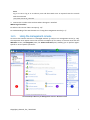
As soon as the console connects to a managed machine (p. 176) or to a management server (p. 176),
the respective items appear across the console's workspace (in the menu, in the main area with the
Welcome screen, the Navigation pane, the Actions and tools pane) enabling you to perform agentspecific or server-specific operations.
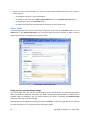
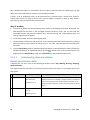
Acronis Backup & Recovery 10 Management Console - Welcome screen
Copyright © Acronis, Inc., 2000-2009
7
Key elements of the console workspace
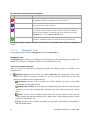
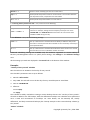
Name
Description
Navigation pane
Contains the Navigation tree and the Shortcuts bar and lets you navigate to
the different views (see the Navigation pane (p. 8) section.)
Actions and tools pane
Contains bars with a set of actions that can be performed and tools (see the
Actions and Tools pane (p. 9) section).
Main area
The main place of working, where you create, edit and manage backup
plans, policies, tasks and perform other operations. Displays the different
views and action pages (p. 11) depending on items selected in the menu,
Navigation tree, or on the Actions and Tools pane.
Menu bar
Appears across the top of the program window and lets you perform all the
operations, available on both panes. Menu items change dynamically.
1024x768 or higher display resolution is required for comfortable work with the management
console.
1.2.1.1.
"Navigation" pane
The navigation pane includes the Navigation tree and the Shortcuts bar.
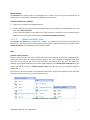
Navigation tree
The Navigation tree enables you to navigate across the program views. Views depend on whether the
console is connected to a managed machine or to the management server.
Views for a managed machine
When the console is connected to a managed machine, the following views are available in the
navigation tree.
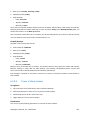
•
[Machine name]. Root of the tree also called a Welcome view. Displays the name of the
machine the console is currently connected to. Use this view for quick access to the main
operations, available on the managed machine.
o
o
o
o
8
Dashboard. Use this view to estimate at a glance whether the data is successfully
protected on the managed machine.
Backup plans and tasks. Use this view to manage backup plans and tasks on the managed
machine: run, edit, stop and delete plans and tasks, view their states and statuses, monitor
plans.
Vaults. Use this view to manage personal vaults and archives stored in there, add new
vaults, rename and delete the existing ones, validate vaults, explore backup content, mount
backups as virtual drives, etc.
Log. Use this view to examine information on operations performed by the program on
the managed machine.
Copyright © Acronis, Inc., 2000-2009
Shortcuts bar
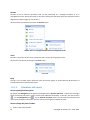
The Shortcuts bar appears under the navigation tree. It offers you an easy and convenient way of
connection to the machines in demand by adding them as shortcuts.
To add a shortcut to a machine
1. Connect the console to a managed machine.
2. In the navigation tree, right-click the machine's name (a root element of the navigation tree), and
then select Create shortcut.
If the console and agent are installed on the same machine, the shortcut to this machine will be
added to the shortcuts bar automatically as Local machine [Machine name].
1.2.1.2.
"Actions and tools" pane
The Actions and tools pane enables you to easily and efficiently work with Acronis Backup &
Recovery 10. The pane's bars provide quick access to program's operations and tools. All items of the
Actions and tools bar are duplicated in the program menu.
Bars
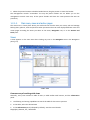
'[Item's name]' actions
Contains a set of actions that can be performed on the items selected in any of the navigation views.
Clicking the action opens the respective action page (p. 12). Items of different navigation views have
their own set of actions. The bar's name changes in accordance with the item you select. For
example, if you select the backup plan named System backup in the Backup plans and tasks view, the
actions bar will be named as 'System backup' actions and will have the set of actions typical to
backup plans.
All actions can also be accessed in the respective menu items. A menu item appears on the menu bar
when you select an item in any of the navigation views.
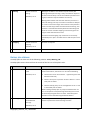
Examples of "'Item name' actions" bars
Copyright © Acronis, Inc., 2000-2009
9
Actions
Contains a list of common operations that can be performed on a managed machine or on a
management server. Always the same for all views. Clicking the operation opens the respective action
page (see the Action pages (p. 12) section.)
All the actions can also be accessed in the Actions menu.
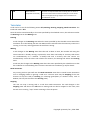
"Actions" bar on a managed machine and on a management server
Tools
Contains a list of the Acronis tools. Always the same across all the program views.
All the tools can also be accessed in the Tools menu.
"Tools" bar
Help
Contains a list of help topics. Different views and action pages of Acronis Backup & Recovery 10
provided with lists of specific help topics.
1.2.1.3.
Operations with panes
How to expand/minimize panes
By default, the Navigation pane appears expanded and the Actions and Tools - minimized. You might
need to minimize the pane in order to free some additional workspace. To do this, click the chevron
( - for the Navigation pane;
- for the Actions and tools pane). The pane will be minimized and
the chevron changes its direction. Click the chevron once again to expand the pane.
How to change the panes' borders
1. Point to the pane's border.
10
Copyright © Acronis, Inc., 2000-2009
2. When the pointer becomes a double-headed arrow, drag the pointer to move the border.
The management console "remembers" the way the panes' borders are set. When you run the
management console next time, all the panes' borders will have the same position that was set
previously.
1.2.1.4.
Main area, views and action pages
The main area is a basic place where you work with the console. Here you create, edit and manage
backup plans, policies, tasks and perform other operations.The main area displays different views and
action pages according the items you select in the menu, Navigation tree, or on the Actions and
Tools pane.
Views
A view appears on the main area when clicking any item in the Navigation tree in the Navigation
pane (p. 8).
"Tasks" view
Common way of working with views
Generally, every view contains a table of items, a table toolbar with buttons, and the Information
panel.
•
Use filtering and sorting capabilities to search the table for the item in question
•
In the table, select the desired item
•
In the Information panel (collapsed by default), view the item's details
Copyright © Acronis, Inc., 2000-2009
11
•
Perform actions on the selected item. There are several ways of performing the same action on
selected items:
o
By clicking the buttons on the table toolbar;
o
By clicking in the items in the [Item's name] Actions bar (on the Actions and Tools pane);
o
By selecting the items in the Actions menu;
o
By right-clicking the item and selecting the operation in the context menu.
Action pages
An action page appears in the main area when clicking any action item in the Actions menu, or in the
Actions bar on the Actions and tools pane. It contains steps you need to perform in order to create
and launch any task, or a backup plan, or backup policy.
Action page - Create backup plan
Using controls and specifying settings
The action pages offer two ways of representation: basic and advanced. The basic representation
hides such fields as credentials, comments, etc. When the advanced representation is enabled, all the
available fields are displayed. You can switch between the views by selecting the Advanced view
check box at the top of the action page.
Most settings are configured by clicking the respective Change… links to the right. Others are selected
from the drop-down list, or typed manually in the page's fields.
12
Copyright © Acronis, Inc., 2000-2009
Action page - Controls
1.3. Acronis Backup & Recovery 10 components
This section contains a list of Acronis Backup & Recovery 10 components with a brief description of
their functionality.
Components for a managed machine (agents)
These are applications that perform data backup, recovery and other operations on the machines
managed with Acronis Backup & Recovery 10. Agents require a license to perform operations on each
managed machine. Agents have multiple features, or add-ons, that enable additional functionality
and so might require additional licenses.
Console and tools
The console provides Graphical User Interface and remote connection to the agents and other
Acronis Backup & Recovery 10 components. With bootable media builders, you can create bootable
media in order to use the agents and other rescue utilities in a rescue environment. Availability of the
agent add-ons in a rescue environment depends on whether an add-on is installed on the machine
where the media builder is working.
1.3.1.
Agent for Linux
This agent enables disk-level and file-level data protection under Linux.
Disk backup
Disk-level data protection is based on backing up either a disk or a volume file system as a whole,
along with all information necessary for the operating system to boot; or all the disk sectors using the
sector-by-sector approach (raw mode.) A backup that contains a copy of a disk or a volume in a
packaged form is called a disk (volume) backup or a disk (volume) image. It is possible to recover disks
or volumes as a whole from such backup, as well as individual folders or files.
File backup
File-level data protection is based on backing up files and directories residing on the machine where
the agent is installed or on a network share accessed using the smb or nfs protocol. Files can be
recovered to their original location or to another place. It is possible to recover all files and
directories that were backed up or select which of them to recover.
Copyright © Acronis, Inc., 2000-2009
13
1.3.1.1.
Bootable components and media builder
Bootable components of the agent enable operations with reboot, such as recovery of the volume
containing the currently active operating system. Once the operations are completed, the machine
boots into the operating system again. The bootable components are based on the Linux kernel. You
can choose not to install the bootable components and perform operations that require reboot using
bootable media.
Acronis Bootable Media Builder is a dedicated tool for creating bootable media (p. 169) containing
the bootable components. The media builder, delivered with Agent for Linux, creates bootable media
that represents volumes and network in the Linux-like style (hda1, sdb2, smb://server/share).
1.3.2.
Management Console
Acronis Backup & Recovery 10 Management Console is an administrative tool for remote or local
access to Acronis Backup & Recovery 10 agents, and in the product editions that include the
centralized management capability, to the Acronis Backup & Recovery 10 Management Server.
The console has two distributions for installation on Windows and installation on Linux. While both
distributions enable connection to any Acronis Backup & Recovery 10 agent and Acronis Backup &
Recovery 10 Management Server, we recommend that you use the console for Windows if you have a
choice between the two. The console that installs on Linux has limited functionality:
•
remote installation of Acronis Backup & Recovery 10 components is not available
•
the Active Directory-related features, such as browsing the AD, are not available.
1.4. Supported operating systems
Acronis Backup & Recovery 10 Management Console, Acronis Backup & Recovery 10
Agent for Linux
•
Linux with kernel 2.4.18 or later (including 2.6.x kernels) and glibc 2.3.2.
•
Various Linux distributions (for the exact list, see the man page for the trueimagecmd utility)
among which support for the following Linux distributions is especially considered: SuSE 9.3, SuSE
10.0, SLES 9.0, RedHat 9.0, Fedora Core 4, Fedora Core 5, Enterprise Server 3.0, Mandrake 10.x,
Slackware 10, Debian (Sarge), ASPLinux 10, Gentoo, Ubuntu 4.10.
•
x64 versions of the above Linux distributions and other Linux distributions are also supported.
The agent for Linux is in fact a 32-bit executable. For authentication, the agent uses system
libraries, 32-bit versions of which are not always installed by default with 64-bit distributions.
When using the agent on a 64-bit RedHat based distribution, such as RHEL, CentOS, Fedora or
Scientific Linux, make sure that the following 32-bit packages are installed in the system:
pam.i386
libselinux.i386
libsepol.i386
These packages should be available in the repository of your Linux distribution.
14
Copyright © Acronis, Inc., 2000-2009
Remote connection to the agent is not possible.
1.5. Supported file systems
Acronis Backup & Recovery 10 can back up and recover the following file systems with the following
limitations:
•
FAT16/32
•
NTFS
•
Ext2/Ext3
•
ReiserFS3 - particular files cannot be recovered from disk backups located on Acronis Backup &
Recovery 10 Storage Node
•
ReiserFS4 - volume recovery without the volume resize capability; particular files cannot be
recovered from disk backups located on Acronis Backup & Recovery 10 Storage Node
•
XFS - volume recovery without the volume resize capability; particular files cannot be recovered
from disk backups located on Acronis Backup & Recovery 10 Storage Node
•
JFS - particular files cannot be recovered from disk backups located on Acronis Backup &
Recovery 10 Storage Node
•
Linux SWAP
Acronis Backup & Recovery 10 can back up and recover corrupted or non-supported file systems
using the sector-by-sector approach.
1.6. Technical support
As part of a purchased annual Support charge you are entitled to Technical Support as follows: to the
extent that electronic services are available, you may electronically access at no additional charge,
Support services for the Software, which Acronis shall endeavor to make available twenty four (24)
hours a day, seven (7) days per week. Such electronic services may include, but are not limited to:
user forums; software-specific information; hints and tips; bug fix retrieval via the internet; software
maintenance and demonstration code retrieval via a WAN-accessible FTP server; and access to a
problem resolution database via Acronis customer support system.
Support shall consist of supplying telephone or other electronic support to you in order to help you
locate and, on its own, correct problems with the Software and supplying patches, updates and other
changes that Acronis, at its sole discretion, makes or adds to the Software and which Acronis makes
generally available, without additional charge, to other licensees of the Software that are enrolled in
Support.
Upon mutual agreement by both parties, Acronis shall:
(i) supply code corrections to you to correct Software malfunctions in order to bring such Software
into substantial conformity with the published operating specifications for the most current version
of the Software unless your unauthorized modifications prohibit or hamper such corrections or cause
the malfunction;
Copyright © Acronis, Inc., 2000-2009
15
or (ii) supply code corrections to correct insubstantial problems at the next general release of the
Software.
More information about contacting Acronis Technical Support is available at the following link:
http://www.Acronis.com/enterprise/support/
16
Copyright © Acronis, Inc., 2000-2009
2. Understanding Acronis Backup & Recovery 10
This section attempts to give its readers a clear understanding of the product so that they can use the
product in various circumstances without step-by-step instructions.
2.1. Basic concepts
Please familiarize yourself with the basic notions used in the Acronis Backup & Recovery 10 graphical
user interface and documentation. Advanced users are welcome to use this section as a step-by-step
quick start guide. The details can be found in the context help.
Backup under operating system
1. To protect data on a machine, install Acronis Backup & Recovery 10 agent (p. 167) on the
machine which becomes a managed machine (p. 176) from this point on.
2. To be able to manage the machine using Graphical User Interface, install Acronis Backup &
Recovery 10 Management Console (p. 171) on the same machine or any machine from which you
prefer to operate. If you have the standalone product edition, skip this step since in your case the
console installs with the agent.
3. Run the console. To be able to recover the machine's operating system if the system fails to start,
create bootable media (p. 169).
4. Connect the console to the managed machine.
5. Create a backup plan (p. 168).
To do so, you have to specify, at the very least, the data to be protected and the location where
the backup archive (p. 167) will be stored. This will create a minimal backup plan consisting of
one task (p. 179) that will create a full backup (p. 167) of your data every time the task is
manually started. A complex backup plan might consist of multiple tasks which run on schedule;
create full, incremental or differential backups (p. 21); perform archive maintenance operations
such as backup validation (p. 180) or deleting outdated backups (archive cleanup (p. 171)). You
can customize backup operations using various backup options, such as pre/post backup
commands, network bandwidth throttling, error handling or notification options.
6. Use the Backup plans and tasks page to view information about your backup plans and tasks and
monitor their execution. Use the Log page to browse the operations log.
7. The location where you store backup archives is called a vault (p. 180). Navigate to the Vaults
page to view information about your vaults. Navigate further to the specific vault to view archives
and backups and perform manual operations with them (mounting, validating, deleting, viewing
contents). You can also select a backup to recover data from it.
Copyright © Acronis, Inc., 2000-2009
17
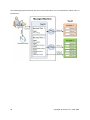
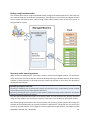
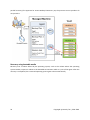
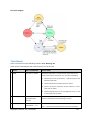
The following diagram illustrates the notions discussed above. For more definitions please refer to
the Glossary.
18
Copyright © Acronis, Inc., 2000-2009
Backup using bootable media
You can boot the machine using the bootable media, configure the backup operation in the same way
as a simple backup plan and execute the operation. This will help you extract files and logical volumes
from a system that failed to boot, take an image of the offline system or back up sector-by-sector an
unsupported file system.
Recovery under operating system
When it comes to data recovery, you create a recovery task on the managed machine. You specify the
vault, then select the archive and then select the backup referring to the date and time of the backup
creation, or more precisely, to the time when the creation has started. In most cases, the data will be
reverted to that moment.
Examples of exceptions to this rule:
Recovering a database from a backup that contains the transaction log (a single backup provides multiple
recovery points and so you can make additional selections).
Recovering multiple files from a file backup taken without snapshot (each file will be reverted to the moment
when it was actually copied to the backup).
You also specify the destination where to recover the data. You can customize the recovery operation
using recovery options, such as pre/post recovery commands, error handling or notification options.
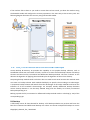
The following diagram illustrates data recovery under the operating system (online). No backup can
proceed on the machine while the recovery operation is taking place. If required, you can connect the
console to another machine and configure a recovery operation on that machine. This ability (remote
Copyright © Acronis, Inc., 2000-2009
19
parallel recovery) first appeared in Acronis Backup & Recovery 10; the previous Acronis products do
not provide it.
Recovery using bootable media
Recovery over a volume locked by the operating system, such as the volume where the operating
system resides, requires a reboot to the bootable environment which is a part of the agent. After the
recovery is completed, the recovered operating system goes online automatically.
20
Copyright © Acronis, Inc., 2000-2009
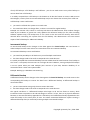
If the machine fails to boot or you need to recover data to bare metal, you boot the machine using
the bootable media and configure the recovery operation in the same way as the recovery task. The
following diagram illustrates the recovery using the bootable media.
2.2. Full, incremental and differential backups
Acronis Backup & Recovery 10 provides the capability to use popular backup schemes, such as
Grandfather-Father-Son and Tower of Hanoi, as well as to create custom backup schemes. All backup
schemes are based on full, incremental and differential backup methods. The term "scheme" in fact
denotes the algorithm of applying these methods plus the algorithm of the archive cleanup.
Comparing backup methods with each other does not make much sense because the methods work
as a team in a backup scheme. Each method should play its specific role according to its advantages.
A competent backup scheme will benefit from the advantages of all backup methods and lessen the
influence of all the methods’ shortcomings. For example, weekly differential backup facilitates
archive cleanup because it can be easily deleted along with the weekly set of daily incremental
backups depending on it.
Backing up with the full, incremental or differential backup method results in a backup (p. 167) of the
corresponding type.
Full backup
A full backup stores all data selected for backup. A full backup underlies any archive and forms the
base for incremental and differential backups. An archive can contain multiple full backups or consist
Copyright © Acronis, Inc., 2000-2009
21
of only full backups. A full backup is self-sufficient - you do not need access to any other backup to
recover data from a full backup.
It is widely accepted that a full backup is the slowest to do but the fastest to restore. With Acronis
technologies, recovery from an incremental backup may be not slower than recovery from a full one.
A full backup is most useful when:
•
you need to roll back the system to its initial state
•
this initial state does not change often, so there is no need for regular backup.
Example: An Internet cafe, school or university lab where the administrator often undoes changes
made by the students or guests but rarely updates the reference backup (in fact, after installing
software updates only). The backup time is not crucial in this case and the recovery time will be
minimal when recovering the systems from the full backup. The administrator can have several
copies of the full backup for additional reliability.
Incremental backup
An incremental backup stores changes to the data against the latest backup. You need access to
other backups from the same archive to recover data from an incremental backup.
An incremental backup is most useful when:
•
you need the possibility to roll back to any one of multiple saved states
•
the data changes tend to be small as compared to the total data size.
It is widely accepted that incremental backups are less reliable than full ones because if one backup in
the "chain" is corrupted, the next ones can no longer be used. However, storing multiple full backups
is not an option when you need multiple prior versions of your data, because reliability of an
oversized archive is even more questionable.
Example: Backing up a database transaction log.
Differential backup
A differential backup stores changes to the data against the latest full backup. You need access to the
corresponding full backup to recover the data from a differential backup. A differential backup is
most useful when:
•
you are interested in saving only the most recent data state
•
the data changes tend to be small as compared to the total data size.
The typical conclusion is: "differential backups take longer to do and are faster to restore, while
incremental ones are quicker to do and take longer to restore." In fact, there is no physical difference
between an incremental backup appended to a full backup and a differential backup appended to the
same full backup at the same point of time. The above mentioned difference implies creating a
differential backup after (or instead of) creating multiple incremental backups.
22
Copyright © Acronis, Inc., 2000-2009
An incremental or differential backup created after disk defragmentation might be considerably larger than
usual because defragmentation changes file locations on the disk and the backup reflects these changes. It is
recommended that you re-create a full backup after disk defragmentation.
The following table summarizes the advantages and shortcomings of each backup type as they
appear based on common knowledge. In real life, these parameters depend on numerous factors
such as the amount, speed and pattern of data changes; the nature of the data, the physical
specifications of the devices, the backup/recovery options you set, to name a few. Practice is the best
guide to selecting the optimal backup scheme.
Parameter
Full backup
Differential backup
Incremental backup
Storage space
Maximal
Medium
Minimal
Creation time
Maximal
Medium
Minimal
Recovery time
Minimal
Medium
Maximal
2.3. User privileges on a managed machine
When managing a machine running Linux, the user has or obtains the root privileges, and so can:
•
Back up and recover any data or the entire machine, having full control over all Acronis Backup &
Recovery 10 agent operations and log files on the machine.
•
Manage local backup plans and tasks owned by any user registered in the operating system.
To avoid routine logging on to the system as root, the root user can log on with the ordinary user
credentials and then switch user as required.
2.4. Owners and credentials
This section explains the concept of owner and the meaning of a backup plan's (or task's) credentials.
Plan (task) owner
A local backup plan owner is the user who created or last modified the plan.
A centralized backup plan owner is the management server administrator who created or last
modified the centralized policy that spawned the plan.
Tasks, belonging to a backup plan, either local or centralized, are owned by the backup plan owner.
Tasks that do not belong to a backup plan, such as the recovery task, are owned by the user who has
created or last modified the task.
Managing a plan (task) owned by another user
Having Administrator privileges on the machine, a user can modify tasks and local backup plans
owned by any user registered in the operating system.
When a user opens a plan or task for editing, which is owned by another user, all passwords set in the
task are cleared. This prevents the "modify settings, leave passwords" trick. The program displays a
Copyright © Acronis, Inc., 2000-2009
23
warning each time you are trying to edit a plan (task) last modified by another user. On seeing the
warning, you have two options:
•
Click Cancel and create your own plan or task. The original task will remain intact.
•
Continue editing. You will have to enter all credentials required for the plan or task execution.
Archive owner
An archive owner is the user who saved the archive to the destination. To be more precise, this is the
user whose account was specified when creating the backup plan in the Where to back up step. By
default, the plan's credentials are used.
Plan's credentials and task credentials
Any task running on a machine runs on behalf of a user. When creating a plan or a task, you have the
option to explicitly specify an account under which the plan or the task will run. Your choice depends
on whether the plan or task is intended for manual start or for executing on schedule.
Manual start
You can skip the Plan's (Task) credentials step. Every time you start the task, the task will run under
the credentials with which you are currently logged on. Any person that has administrative privileges
on the machine can also start the task. The task will run under this person's credentials.
The task will always run under the same credentials, regardless of the user who actually starts the
task, if you specify the task credentials explicitly. To do so, on the plan (task) creation page:
1. Select the Advanced view check box.
2. Select General -> Plan's (Task) credentials -> Change.
3. Enter the credentials under which the plan (task) will run.
Scheduled or postponed start
The plan (task) credentials are mandatory. If you skip the credentials step, you will be asked for
credentials after finishing the plan (task) creation.
Why does the program compel me to specify credentials?
A scheduled or postponed task has to run anyway, regardless if any user is logged on or not (for
example, the system is at the Windows "Welcome" screen) or a user other than the task owner is
logged on. It is sufficient that the machine be on (that is, not in standby or hibernate) at the
scheduled task start time. That's why the Acronis scheduler needs the explicitly specified credentials
to be able to start the task.
2.5. GFS backup scheme
This section covers implementation of the Grandfather-Father-Son (GFS) backup scheme in Acronis
Backup & Recovery 10.
With this backup scheme you are not allowed to back up more often than once a day. The scheme
enables you to mark out the daily, weekly and monthly cycles in your daily backup schedule and set
24
Copyright © Acronis, Inc., 2000-2009
the retention periods for the daily, monthly and weekly backups. The daily backups are referred to as
“sons”; weekly backups are referred to as “fathers”; the longest lived monthly backups are called
“grandfathers”.
GFS as a tape rotation scheme
GFS was initially created and is often referred to as a tape rotation scheme. Tape rotation schemes,
as such, do not provide automation. They just determine:
•
how many tapes you need to enable recovery with the desired resolution (time interval between
recovery points) and roll-back period
•
which tapes you should overwrite with the forthcoming backup.
Tape rotation schemes enable you to get by with the minimal number of cartridges and not to be
buried in used tapes. A lot of Internet sources describe varieties of the GFS tape rotation scheme. You
are free to use any of the varieties when backing up to a locally attached tape device.
GFS by Acronis
With Acronis Backup & Recovery 10, you can easily set up a backup plan that will regularly back up
data and clean up the resulting archive according to the GFS scheme.
Create the backup plan as usual. For the backup destination, choose any storage device where
automatic cleanup can be performed, such as an HDD-based storage device or robotic tape library.
(Since the space freed on the tape after cleanup cannot be reused until all the tape becomes free,
take into account additional considerations when using GFS on a tape library.)
The following is an explanation of the settings that are specific for the GFS backup scheme.
GFS-related settings of the backup plan
Start backup at:
Back up on:
This step creates the total backup schedule, that is, defines all the days you need to back up on.
Assume you select backing up at 8:00 PM on workdays. Here is the total schedule you have
defined.
“B” stands for “backup”.
The total schedule.
Schedule: Workdays at 8:00 PM
Weekly/Monthly
This step forms the daily, weekly and monthly cycles in the schedule.
Copyright © Acronis, Inc., 2000-2009
25
Select a day of the week from the days selected in the previous step. Each 1st, 2nd and 3rd
backup created on this day of the week will be considered as a weekly backup. Each 4th backup
created on this day of the week will be considered as a monthly backup. Backups created on the
other days will be considered as daily backups.
Assume you select Friday for Weekly/Monthly backup. Here is the total schedule marked out
according to the selection.
“D” stands for the backup that is considered Daily. “W” stands for the backup that is considered
Weekly. “M” stands for the backup that is considered Monthly.
The schedule marked out according to the GFS scheme.
Schedule: Workdays at 8:00 PM
Weekly/Monthly: Friday
Acronis uses incremental and differential backups that help save storage space and optimize the
cleanup so that consolidation is not needed. In terms of backup methods, weekly backup is
differential (Dif), monthly backup is full (F) and daily backup is incremental (I). The first backup is
always full.
The Weekly/Monthly parameter splits the total schedule into daily, weekly and monthly
schedules.
Assume you select Friday for Weekly/Monthly backup. Here is the real schedule of the backup
tasks that will be created.
Backup tasks created according to the GFS scheme by Acronis Backup & Recovery 10.
Schedule: Workdays at 8:00 PM
Weekly/Monthly: Friday
Keep backups: Daily
This step defines the retention rule for daily backups. The cleanup task will run after each daily
backup and delete all daily backups that are older than you specify.
26
Copyright © Acronis, Inc., 2000-2009
Keep backups: Weekly
This step defines the retention rule for weekly backups. The cleanup task will run after each
weekly backup and delete all weekly backups that are older than you specify. The weekly
backups' retention period cannot be less than the daily backups' retention period. It is usually set
several times longer.
Keep backups: Monthly
This step defines the retention rule for monthly backups. The cleanup task will run after each
monthly backup and delete all monthly backups that are older than you specify. The monthly
backups’ retention period cannot be less than the weekly backups’ retention period. It is usually
set several times longer. You have the option to keep the monthly backups infinitely.
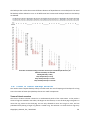
The resulting archive: ideal
Assume you select to keep daily backups for 7 days, weekly backups for 2 weeks and monthly
backups for 6 months. Here is how your archive would appear after the backup plan is launched if all
the backups were full and so could be deleted as soon as the scheme requires.
The left column shows days of the week. For each day of the week, the content of the archive after
the regular backup and the subsequent cleanup is shown.
“D” stands for the backup that is considered Daily. “W” stands for the backup that is considered
Weekly. “M” stands for the backup that is considered Monthly.
Copyright © Acronis, Inc., 2000-2009
27
An ideal archive created according to the GFS scheme.
Schedule: Workdays at 8:00 PM
Weekly/Monthly: Friday
Keep daily backups: 7 days
Keep weekly backups: 2 weeks
Keep monthly backups: 6 months
Starting from the third week, weekly backups will be regularly deleted. After 6 months, monthly
backups will start to be deleted. The diagram for weekly and monthly backups will look similar to the
week-based timescale.
The resulting archive: real
In reality, the archive content will somewhat differ from the ideal scheme.
When using the incremental and differential backup methods, you cannot delete a backup as soon as
the scheme requires if later backups are based on this backup. Regular consolidation is unacceptable
because it takes too much system resources. The program has to wait until the scheme requires the
deletion of all the dependent backups and then deletes the entire chain.
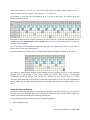
Here is how the first month of your backup plan will appear in real life. “F” stands for full backup.
“Dif” stands for differential backup. “I” stands for incremental backup.
28
Copyright © Acronis, Inc., 2000-2009
The backups that outlive their nominal lifetime because of dependencies are marked pink. The initial
full backup will be deleted as soon as all differential and incremental backups based on this backup
are deleted.
An archive created according to the GFS scheme by Acronis Backup & Recovery 10.
Schedule: Workdays at 8:00 PM
Weekly/Monthly: Friday
Keep daily backups: 7 days
Keep weekly backups: 2 weeks
Keep monthly backups: 6 months
2.6. Tower of Hanoi backup scheme
The need to have frequent backups always conflicts with the cost of keeping such backups for a long
time. The Tower of Hanoi (ToH) backup scheme is a useful compromise.
Tower of Hanoi overview
The Tower of Hanoi scheme is based on a mathematical puzzle of the same name. In the puzzle a
series of rings are stacked in size order, the largest on the bottom, on one of three pegs. The goal is to
move the ring series to the third peg. You are only allowed to move one ring at a time, and are
prohibited from placing a larger ring above a smaller ring. The solution is to shift the first ring every
Copyright © Acronis, Inc., 2000-2009
29
other move (moves 1, 3, 5, 7, 9, 11...), the second ring at intervals of four moves (moves 2, 6, 10...),
the third ring at intervals of eight moves (moves 4, 12...), and so on.
For example, if there are five rings labeled A, B, C, D, and E in the puzzle, the solution gives the
following order of moves:
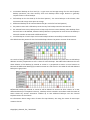
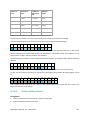
The Tower of Hanoi backup scheme is based on the same patterns. It operates with Sessions instead
of Moves and with Backup levels instead of Rings. Commonly an N-level scheme pattern contains (Nth power of two) sessions.
So, the five-level Tower of Hanoi backup scheme cycles the pattern that consists of 16 sessions
(moves from 1 to 16 in the above figure).
The table shows the pattern for the five-level backup scheme. The pattern consists of 16 sessions.
The Tower of Hanoi backup scheme implies keeping only one backup per level. All the outdated
backups have to be deleted. So the scheme allows for efficient data storage: more backups
accumulate toward the present time. Having four backups, you can recover data as of today,
yesterday, half a week ago, or a week ago. For the five-level scheme you can also recover data backed
up two weeks ago. So every additional backup level doubles the maximal roll-back period for your
data.
Tower of Hanoi by Acronis
The Tower of Hanoi backup scheme is generally too complex to mentally calculate the next media to
be used. But Acronis Backup & Recovery 10 provides you with automation of the scheme usage. You
can set up the backup scheme while creating a backup plan.
Acronis implementation for the scheme has the following features:
•
30
up to 16 backup levels
Copyright © Acronis, Inc., 2000-2009
•
incremental backups on first level (A) - to gain time and storage savings for the most frequent
backup operations; but data recovery from such backups takes longer because it generally
requires access to three backups
•
full backups on the last level (E for five-level pattern) - the rarest backups in the scheme, take
more time and occupy more space in storage
•
differential backups on all intermediate levels (B, C and D for five-level pattern)
•
the pattern starts with a full backup since the very first backup cannot be incremental
•
the scheme forces every backup level to keep only the most recent backup, other backups from
the level have to be deleted; however backup deletion is postponed in cases where the backup is
a base for another incremental or differential one
•
an old backup on a level is kept until a new backup has been successfully created on the level.
The table shows the pattern for the five-level backup scheme. The pattern consists of 16 sessions.
As a result of using incremental and differential backups the situation may arise when an old backup
deletion must be postponed as it still is a base for other backups. The table below indicates the case
when deletion of full backup (E) created at session 1 is postponed at session 17 until session 25
because the differential backup (D) created at session 9 is still actual. In the table all cells with deleted
backups are grayed out:
Differential backup (D) created at session 9 will be deleted at session 25 after creation of a new
differential backup is completed. This way, a backup archive created in accordance with the Tower of
Hanoi scheme by Acronis sometimes includes up to two additional backups over the classical
implementation of the scheme.
For information about using Tower of Hanoi for tape libraries, see Using the Tower of Hanoi tape
rotation scheme.
Copyright © Acronis, Inc., 2000-2009
31
2.7. Retention rules
The backups produced by a backup plan make an archive. The two retention rules described in this
section enable you to limit the archive size and set the lifetime (retention period) of the backups.
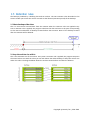
1. Delete backups older than
This is a time interval counted back from the moment when the retention rules are applied. Every
time a retention rule is applied, the program calculates the date and time in the past corresponding
to this interval and deletes all backups created before that moment. None of the backups created
after this moment will be deleted.
2. Keep the archive size within
This is the maximum size of the archive. Every time a retention rule is applied, the program compares
the actual archive size with the value you set and deletes the oldest backups to keep the archive size
within this value. The diagram below shows the archive content before and after the deletion.
32
Copyright © Acronis, Inc., 2000-2009
There is a certain risk that all but one backup will be deleted if the maximum archive size is set
improperly (too small) or a regular backup turns out to be too large. To protect the recent backups
from deletion, select the Never delete backups younger than check box and specify the maximum
age of backups that must be retained. The diagram below illustrates the resulting rule.
Combination of rules 1 and 2
You can limit both the backups’ lifetime and the archive size. The diagram below illustrates the
resulting rule.
Example
Delete backups older than = 3 Months
Keep the archive size within = 200GB
Never delete backups younger than = 10 Days
•
Every time the retention rules are applied, the program will delete all backups created more than
3 months (or more exactly, 90 days) ago.
•
If after the deletion the archive size is more than 200GB, and the oldest backup is older than 10
days, the program will delete that backup.
•
Then, if necessary, the next old backup will be deleted, until the archive size decreases to the
preset limit or the oldest backup age reaches 10 days.
Deleting backups with dependencies
Both retention rules presume deleting some backups while retaining the others. What if the archive
contains incremental and differential backups that depend on each other and on the full backups
they are based on? You cannot, say, delete an outdated full backup and keep its incremental
“children”.
Copyright © Acronis, Inc., 2000-2009
33
When deletion of a backup affects other backups, one of the following rules is applied:
•
Retain the backup until all dependent backups become subject to deletion
The outdated backup will be kept until all backups that depend on it also become outdated. Then
all the chain will be deleted at once during the regular cleanup. This mode helps to avoid the
potentially time-consuming consolidation but requires extra space for storing backups whose
deletion is postponed. The archive size and/or the backup age can exceed the values you specify.
•
Consolidate the backup
The program will consolidate the backup that is subject to deletion with the next dependent
backup. For example, the retention rules require to delete a full backup but retain the next
incremental one. The backups will be combined into a single full backup which will be dated the
incremental backup date. When an incremental or differential backup from the middle of the
chain is deleted, the resulting backup type will be incremental.
This mode ensures that after each cleanup the archive size and the backups’ age are within the
bounds you specify. The consolidation, however, may take a lot of time and system resources.
And you still need some extra space in the vault for temporary files created during consolidation.
What you need to know about consolidation
Please be aware that consolidation is just a method of deletion but not an alternative to deletion.
The resulting backup will not contain data that was present in the deleted backup and was absent
from the retained incremental or differential backup.
Backups resulting from consolidation always have maximum compression. This means that all
backups in an archive may acquire the maximum compression as a result of repeated cleanup
with consolidation.
Best practices
Maintain the balance between the storage device capacity, the restrictive parameters you set and the
cleanup frequency. The retention rules logic assumes that the storage device capacity is much more
than the average backup size and the maximum archive size does not come close to the physical
storage capacity, but leaves a reasonable reserve. Due to this, exceeding the archive size that may
occur between the cleanup task runs will not be critical for the business process. The rarer the
cleanup runs, the more space you need to store backups that outlive their lifetime.
The Vaults (p. 76) page provides you with information about free space available in each vault. Check
this page from time to time. If the free space (which in fact is the storage device free space)
approaches zero, you might need to toughen the restrictions for some or all archives residing in this
vault.
2.8. Backing up LVM volumes (Linux)
This section explains in brief how you would back up and recover volumes managed by Linux Logical
Volume Manager (LVM)—called logical volumes—using Acronis Backup & Recovery 10.
Acronis Backup & Recovery 10 Agent for Linux can access, back up and recover such volumes when
running in Linux with 2.6.x kernel or a Linux-based bootable media.
34
Copyright © Acronis, Inc., 2000-2009
You can back up data of one or more logical volumes and recover it to a previously created logical
volume or a basic (MBR) disk or volume; likewise, it is also possible to recover the data of a basic
volume to a logical volume. In each case, the program stores and recovers volume contents only. The
type or other properties of the target volume will not change.
A system, recovered from a logical volume backup to a basic MBR disk, cannot boot because its kernel tries to
mount the root file system at the logical volume. To boot the system, change the loader configuration and
/etc/fstab so that LVM is not used and reactivate your boot loader as described in the Bootability
troubleshooting (p. 141) section.
When recovering a logical volume over a basic MBR volume, you can resize the resulting volume.
Before recovering logical volumes to a target machine with no correspondent logical volume
structure (for example, to recover to bare metal), you need to manually create the logical volumes
and groups by using the lvm command and then perform the recovery, either in Linux or in bootable
media. You do not need to create the volume structure if it already exists on the machine (such is the
case when some data on the volume was lost, but no hard disks were replaced).
For detailed instructions on how to recover logical volumes, see Recovering MD devices and logical
volumes (p. 162).
How to select logical volumes to back up
Logical volumes appear at the end of the list of volumes available for backup. Basic volumes included
in logical volumes are also shown in the list with None in the Type column. If you select to back up
such partitions, the program will image it sector-by-sector. Normally it is not required. To back up all
available disks, specify all logical volumes plus basic volumes not belonging to them.
A logical volume is a GPT (GUID partition table) partition. Logical volumes are displayed under
Dynamic & GPT Volumes.
Here is an example of a volumes list obtained with the command:
trueimagecmd --list
The GUI displays a similar table.
Num Partition
Flags
Start
Size
Type
_________________________________________________________________
Disk 1:
1-1 hda1 (/boot)
Pri,Act
63
208782
Ext3
1-2 hda2
Pri
208845
8177085
None
Disk 2:
2-1 hdb1
Pri,Act
63
8385867
None
Disk 3:
3-1 hdd1
Pri,Act
63
1219617
Ext3
3-2 Acronis Secure Zone Pri
1219680
2974608
FAT32
Dynamic & GPT Volumes:
DYN1 VolGroup00-LogVol00
DYN2 VolGroup00-LogVol01
Copyright © Acronis, Inc., 2000-2009
15269888
1048576
Ext3
Linux Swap
35
The system has three physical disks (Disk 1, Disk 2, and Disk 3). Two logical volumes, DYN1 and DYN2,
are arranged across basic volumes 1-2 and 2-1. Disk 3 includes Acronis Secure Zone which is not
normally backed up.
To back up the logical volume DYN1, select the volume DYN1.
To back up all three hard disks, select the volumes 1-1, 3-1, DYN1 and DYN2.
If you select Disk 2, volume 1-2 or volume 2-1, the program will create a raw (sector-by-sector)
backup.
To back up the logical DYN1 volume by using the command-line interface, run the following command
(here, the name of the backup is assumed to be /home/backup.tib):
trueimagecmd --partition:dyn1 --filename:/home/backup.tib --create
Helpful link:
•
http://tldp.org/HOWTO/LVM-HOWTO/
2.9. Backing up RAID arrays (Linux)
Acronis Backup & Recovery 10 Agent for Linux can back up and recover Linux Software RAID devices
(known as multiple-disk devices or MD devices) and hardware RAID arrays.
Software RAID arrays
Software RAID arrays, or MD devices, combine several volumes and make solid block devices
(/dev/md0, /dev/md1, ..., /dev/md31), information of which is stored in /etc/raidtab or in dedicated
areas of those volumes.
Backup
You can back up active (mounted) software arrays in the same way as logical volumes. The arrays
appear at the end of the list of volumes available for backup.
Basic volumes included in software arrays are listed as if they had a corrupted file system or do
not have a file system at all. Backing up such volumes does not make sense when a software
array is mounted, as it won’t be possible to recover them.
Example
Here is an example of a volumes list obtained with the --list command. The GUI displays a similar
table.
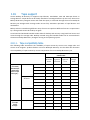
The system has RAID-1 configured on two basic volumes: sdc1, sdd1.
Num
---Disk
1-1
1-2
1-3
Disk
36
Partition
-------------------1:
sda1
sda2
sda3
2:
Table
Flags
Start
Size
Type
----------- ---------- ---------- ----------Pri,Act
Pri
Pri
63
208845
15759765
0
208782
15550920
1012095
Ext3
ReiserFS
Linux Swap
Table
Copyright © Acronis, Inc., 2000-2009
Unallocated
Disk 3:
3-1 sdc1
Unallocated
Disk 4:
4-1 sdd1
Unallocated
Disk 5:
Table
Unallocated
Dynamic & GPT Volumes:
DYN1 md0
1
16771859
Unallocated
Pri
63
16755795
16755732
16065
Ext3
Unallocated
Pri
63
16755795
16755732
16065
None
Unallocated
0
1
16771859
Table
Unallocated
0
0
33511168
63
63
Disk: 5
Disk: 4
Ext3
You can back up the RAID array as follows:
trueimagecmd
progress:on
--create
--partition:DYN1
--filename:/tmp/raid.tib
--
In the Graphical User Interface you can select the DYN1 check box.
Recovery
Parameters of software RAID arrays are not backed up, so they can only be recovered over a basic
volume, to unallocated space, or to a previously configured array. Recovery can be performed in
Linux or a Linux-based bootable media.
When started from bootable media, the bootable agent tries to access parameters of a software
disk array and configure it. However, if the necessary information is lost, the array cannot be
configured automatically. In this case, create a software array manually by using a command such
as mdadm, and then restart the recovery procedure.
For example, the following command creates an MD device /dev/md0 in the RAID-1 configuration
on the basic volumes /dev/sdc1 and /dev/sdd1:
mdadm --create /dev/md0 --level=1 --raid-devices=2 /dev/sd[cd]1
For detailed information about recovering software RAID arrays, see Recovering MD devices and
logical volumes (p. 162).
Hardware RAID arrays
Hardware RAID arrays under Linux combine several physical drives to create a single partitionable
disk. The special file related to a hardware RAID array is usually located in /dev/ataraid. You can back
up hardware RAID arrays in the same way as ordinary hard disks.
Physical drives that are part of hardware RAID arrays may be listed alongside other disks as if they
had a bad partition table or no partition table at all. Backing up such disks does not make sense as it
won’t be possible to recover them.
Copyright © Acronis, Inc., 2000-2009
37
2.10.
Tape support
Acronis Backup & Recovery 10 supports tape libraries, autoloaders, SCSI and USB tape drives as
storage devices. A tape device can be locally attached to a managed machine (in this case, the Acronis
Backup & Recovery 10 Agent writes and reads the tapes) or accessed through the Acronis Backup &
Recovery 10 Storage Node. Storage nodes ensure fully automatic operation of tape libraries and
autoloaders.
Backup archives created using different ways of access to tape have different formats. A tape written
by a storage node cannot be read by an agent.
Linux-based and PE-based bootable media allow for backup and recovery using both local access and
access through the storage node. Backups created using the bootable media can be recovered with
the Acronis Backup & Recovery 10 Agent running in the operating system.
2.10.1. Tape compatibility table
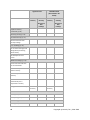
The following table summarizes the readability of tapes written by Acronis True Image Echo and
Acronis True Image 9.1 product families in Acronis Backup & Recovery 10. The table also illustrates
the compatibility of tapes written by various components of Acronis Backup & Recovery 10.
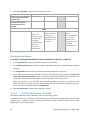
...is readable on a tape device attached to a
machine with...
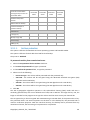
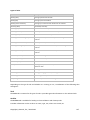
Tape written
on a locally
attached tape
device (tape
drive or tape
library) by...
Bootable Media
Agent for
Windows
Agent for Linux
Tape written
on a tape
device
through...
38
Backup Server
ABR10
Bootable
Media
ABR10
Agent for
Windows
ABR10
Agent for
Linux
ABR10
Storage
Node
ATIE 9.1
+
+
+
+
ATIE 9.5
+
+
+
+
ATIE 9.7
+
+
+
+
ABR10
+
+
+
+
ATIE 9.1
+
+
+
+
ATIE 9.5
-
-
-
+
ATIE 9.7
-
-
-
+
ABR10
+
+
+
+
ATIE 9.1
+
+
+
+
ATIE 9.5
+
+
+
+
ATIE 9.7
+
+
+
+
ABR10
+
+
+
+
ATIE 9.1
+
+
+
+
ATIE 9.5
-
-
-
+
ATIE 9.7
-
-
-
+
Copyright © Acronis, Inc., 2000-2009
Storage Node
ABR10
-
-
-
+
2.10.2. Using a single tape drive
A tape drive that is locally attached to a managed machine can be used by local backup plans as a
storage device. The functionality of a locally attached autoloader or tape library is limited to the
ordinary tape drive. This means that the program can only work with the currently mounted tape and
you have to mount tapes manually.
Backup to a locally attached tape device
When creating a backup plan, you are able to select the locally attached tape device as the backup
destination. An archive name is not needed when backing up to a tape.
An archive can span multiple tapes but can contain only one full backup and an unlimited number of
incremental backups. Every time you create a full backup, you start with a new tape and create a new
archive. As soon as the tape is full, a dialog window with a request to insert a new tape will appear.
The content of a non-empty tape will be overwritten on prompt. You have an option to disable
prompts, see Additional settings (p. 65).
Workaround
In case you want to keep more than one archive on the tape, for example, back up volume C and
volume D separately, choose incremental backup mode instead of a full backup when you create
an initial backup of the second volume. In other situations, incremental backup is used for
appending changes to the previously created archive.
You might experience short pauses that are required to rewind the tape. Low-quality or old tape, as
well as dirt on the magnetic head, might lead to pauses that can last up to several minutes.
Limitations
1. Multiple full backups within one archive are not supported.
2. Individual files cannot be recovered from a disk backup.
3. Backups cannot be deleted from a tape either manually or automatically during cleanup.
Retention rules and backup schemes that use automatic cleanup (GFS, Tower of Hanoi) are
disabled in the GUI when backing up to a locally attached tape.
4. Personal vaults cannot be created on tape devices.
5. Because the presence of an operating system cannot be detected in a backup located on a tape,
Acronis Universal Restore (p. 179) is proposed at every disk or volume recovery, even when
recovering a Linux or non-system Windows volume.
6. Acronis Active Restore (p. 166) is not available when recovering from a tape.
Copyright © Acronis, Inc., 2000-2009
39
Recovery from a locally attached tape device
Before creating a recovery task, insert or mount the tape containing the backup you need to recover.
When creating a recovery task, select the tape device from the list of available locations and then
select the backup. After recovery is started, you will be prompted for other tapes if the tapes are
needed for recovery.
2.11.
Proprietary Acronis technologies
This section describes the proprietary technologies inherited by Acronis Backup & Recovery 10 from
Acronis True Image Echo and Acronis True Image 9.1 product families.
2.11.1. Acronis Secure Zone
Acronis Secure Zone is a secure partition that enables keeping backup archives on a managed
machine disk space and therefore recovery of a disk to the same disk where the backup resides.
Certain Windows applications, such as Acronis disk management tools, can access the zone.
Should the disk experience a physical failure, the zone and the archives located there will be lost.
That's why Acronis Secure Zone should not be the only location where a backup is stored. In
enterprise environments, Acronis Secure Zone can be thought of as an intermediate location used for
backup when an ordinary location is temporarily unavailable or connected through a slow or busy
channel.
Advantages
Acronis Secure Zone:
•
Enables recovery of a disk to the same disk where the disk's backup resides.
•
Offers a cost-effective and handy method for protecting data from software malfunction, virus
attack, operator error.
•
Being an internal archive storage, eliminates the need for a separate media or network
connection to back up or recover the data. This is especially useful for mobile users.
•
Can serve as a primary destination when using dual destination (p. 62) backup.
Limitations
•
The zone cannot be organized on a dynamic disk or a disk using the GPT partitioning style.
Managing the Acronis Secure Zone
Acronis Secure Zone is considered as a personal vault (p. 180). Once created on a managed machine,
the zone is always present in the list of Personal vaults. Centralized backup plans (p. 170) can use
Acronis Secure Zone as well as local plans (p. 176).
If you have used Acronis Secure Zone before, please note a radical change in the zone functionality.
The zone does not perform automatic cleanup, that is, deleting old archives, anymore. Use backup
40
Copyright © Acronis, Inc., 2000-2009
schemes with automatic cleanup to back up to the zone, or delete outdated backups manually using
the archive management functionality.
With the new Acronis Secure Zone behavior, you obtain the ability to:
•
list archives located in the zone and backups contained in each archive
•
examine a backup's content
•
mount a disk backup to copy files from the backup to a physical disk
•
safely delete archives and backups from the archives.
For more information about operations available in Acronis Secure Zone, see the Personal vaults (p.
77) section.
Upgrade from Acronis True Image Echo
When upgrading from Acronis True Image Echo to Acronis Backup & Recovery 10, Acronis Secure
Zone will keep the archives created with Echo. The zone will appear in the list of personal vaults and
the old archives will be available for recovery.
To upgrade the activated Acronis Startup Recovery Manager, deactivate it and activate again. No
action is needed to upgrade the Acronis Startup Recovery Manager if it is not activated.
2.11.2. Acronis Startup Recovery Manager
A modification of the bootable agent (p. 169) can be placed on a system disk and configured to start
at boot time when F11 is pressed. This eliminates the need for rescue media or network connection
to start the bootable rescue utility. This feature has the trade name "Acronis Startup Recovery
Manager".
Acronis Startup Recovery Manager is especially useful for mobile users. If a failure occurs, the user
reboots the machine, hits F11 on prompt "Press F11 for Acronis Startup Recovery Manager…" and
performs data recovery in the same way as with ordinary bootable media. The user can also back up
using Acronis Startup Recovery Manager, while on the move. Acronis Secure Zone (p. 40) is at hand
for backup and recovery operations.
Activation and deactivation of the Acronis Startup Recovery Manager
The operation that enables using Acronis Startup Recovery Manager is called “activation". You are
suggested to activate the Acronis Startup Recovery Manager when creating Acronis Secure Zone (p.
152).
Once the Acronis Secure Zone is created, you can activate or deactivate the Acronis Startup Recovery
Manager at any time using the Manage Acronis Secure Zone action. The deactivation will disable the
boot time prompt "Press F11 for Acronis Startup Recovery Manager…". This means you will need
bootable media in case the system fails to boot.
Limitations
Acronis Startup Recovery Manager:
Copyright © Acronis, Inc., 2000-2009
41
•
Cannot be organized on a dynamic disk or a disk using the GPT partitioning style.
•
Requires manual configuration of boot loaders, such as LILO and GRUB, after activation.
•
Requires re-activation of third-party loaders after activation.
42
Copyright © Acronis, Inc., 2000-2009
3. Options
This section covers Acronis Backup & Recovery 10 options that can be configured using Graphical
User Interface. The content of this section is applicable to both stand-alone and advanced editions of
Acronis Backup & Recovery 10.
3.1. Console options
The console options define the way information is represented in the Graphical User Interface of
Acronis Backup & Recovery 10.
To access the console options, select Options > Console options from the top menu.
3.1.1.
Startup page
This option defines whether to show the Welcome screen or the Dashboard upon connection of the
console to a managed machine or to the management server.
The preset is: the Welcome screen.
To make a selection, select or clear the check box for Show the Dashboard view upon connection of
the console to a machine.
This option can also be set on the Welcome screen. If you select the check box for At startup, show
the Dashboard instead of the current view on the Welcome screen, the setting mentioned above will
be updated accordingly.
3.1.2.
Pop-up messages
About tasks that need interaction
This option is effective when the console is connected to a managed machine or to the management
server.
The option defines whether to display the pop-up window when one or more tasks require user
interaction. This window enables you to specify your decision, such as to confirm reboot or to retry
after freeing-up the disk space, on all the tasks in the same place. Until at least one task requires
interaction, you can open this window at any time from the managed machine's Dashboard.
Alternatively, you can review the task execution states in the Tasks view and specify you decision on
each task in the Information pane.
The preset is: Enabled.
To make a selection, select or clear the Pop up the "Tasks Need Interaction" window check box.
About the task execution results
This option is effective only when the console is connected to a managed machine.
Copyright © Acronis, Inc., 2000-2009
43
The option defines whether to display the pop-up messages about task run results: successful
completion, failure or success with warnings. When displaying of pop-up messages is disabled, you
can review the task execution states and results in the Tasks view.
The preset is: Enabled for all results.
To make a setting for each result (successful completion, failure or success with warnings)
individually, select or clear the respective check box.
3.1.3.
Time-based alerts
Last backup
This option is effective when the console is connected to a managed machine (p. 176) or to the
management server (p. 176).
The option defines whether to alert if no backup was performed on a given machine for a period of
time. You can configure the time period that is considered critical for your business.
The preset is: alert if the last successful backup on a machine was completed more than 5 days ago.
The alert is displayed in the Alerts section of the Dashboard. When the console is connected to the
management server, this setting will also control the color scheme of the Last backup column's value
for each machine.
Last connection
This option is effective when the console is connected to the management server or to a registered
machine (p. 177).
The option defines whether to alert if no connection was established between a registered machine
and the management server for a period of time so indicating that the machine might not be centrally
managed (for instance in the case of network connection failure to that machine). You can configure
the length of time that is considered critical.
The preset is: alert if the machine's last connection to the management server was more than 5 days
ago.
The alert is displayed in the Alerts section of the Dashboard. When the console is connected to the
management server, this setting will also control the color scheme of the Last connect column's value
for each machine.
3.1.4.
Number of tasks
This option is effective only when the console is connected to the management server.
The option defines how many tasks will be displayed at a time in the Tasks view. You can also use
filters available in the Tasks view to limit the number of displayed tasks.
The preset is: 400. The adjustment range is: 20 to 500.
To make a selection, choose the desired value from the Number of tasks drop-down menu.
44
Copyright © Acronis, Inc., 2000-2009
3.1.5.
Fonts
This option is effective when the console is connected to a managed machine or to the management
server.
The option defines the fonts to be used in the Graphical User Interface of Acronis Backup & Recovery
10. The Menu setting affects the drop-down and context menus. The Application setting affects the
other GUI elements.
The preset is: System Default font for both the menus and the application interface items.
To make a selection, choose the font from the respective combo-box and set the font's properties.
You can preview the font's appearance by clicking the button to the right.
3.2. Machine options
The machine options define the general behavior of all Acronis Backup & Recovery 10 agents
operating on the managed machine, and so the options are considered machine-specific.
To access the machine options, connect the console to the managed machine and then select
Options > Machine options from the top menu.
3.2.1.
Event tracing
It is possible to send log events generated by the agent(s), operating on the managed machine, to the
specified SNMP managers. If you do not modify the event tracing options anywhere except for here,
your settings will be effective for each local backup plan and each task created on the machine.
You can override the settings set here, exclusively for the events occurred during backup or during
recovery (see Default backup and recovery options (p. 47).) In this case, the settings set here will be
effective for operations other than backup and recovery, such as archive validation or cleanup.
You can further override the settings set in the default backup and recovery options, when creating a
backup plan or a recovery task. The settings you obtain in this case will be plan-specific or taskspecific.
3.2.1.1.
SNMP notifications
This option is effective for both Windows and Linux operating systems.
This option is not available when operating under the bootable media.
The option defines whether the agent(s) operating on the managed machine have to send the log
events to the specified Simple Network Management Protocol (SNMP) managers. You can choose the
types of events to be sent.
You can override the settings set here, exclusively for the events that occur during backup or during
recovery, in the Default backup and recovery options (p. 47). In this case, the settings set here will be
effective for operations other than backup and recovery, such as archive validation or cleanup.
Copyright © Acronis, Inc., 2000-2009
45
You can further override the settings set in the default backup and recovery options, when creating a
backup plan or a recovery task. The settings you obtain in this case will be plan-specific or taskspecific.
Acronis Backup & Recovery 10 provides the following Simple Network Management Protocol (SNMP)
objects to SNMP management applications:
1.3.6.1.4.1.24769.100.200.1.0 - string identifying the type of event (Information, Warning, Error)
1.3.6.1.4.1.24769.100.200.2.0 - string containing the text description of the event (it looks identical to
messages published by Acronis Backup & Recovery 10 in its log).
The preset is: Disabled.
To set up sending SNMP messages
1. Select the Send messages to SNMP server check box.
2. Specify the appropriate options as follows:
o
o
Types of events to send – choose the types of events: All events, Errors and warnings, or
Errors only.
Server name/IP – type the name or IP address of the host running the SNMP management
application, the messages will be sent to.
Community – type the name of the SNMP community to which both the host running SNMP
management application and the sending machine belong. The typical community is "public".
To disable sending SNMP messages, clear the Send messages to SNMP server check box.
o
The messages are sent over UDP.
The next section contains additional information about Setting up SNMP services on the receiving
machine (p. 46).
3.2.1.2.
Setting up SNMP services on the receiving machine
Windows
To install the SNMP service on a machine running Windows:
1. Start > Control Panel > Add or Remove Programs > Add/Remove Windows Components.
2. Select Management and Monitoring Tools.
3. Click Details.
4. Select the Simple Network Management Protocol check box.
5. Click OK.
You might be asked for lmmib2.dll that can be found on the installation disc of your operating system.
46
Copyright © Acronis, Inc., 2000-2009
Linux
To receive SNMP messages on a machine running Linux, the net-snmp (for RHEL and SUSE) or the
snmpd (for Debian) package has to be installed.
SNMP can be configured using the snmpconf command. The default configuration files are located in
the /etc/snmp directory:
•
/etc/snmp/snmpd.conf - configuration file for the Net-SNMP SNMP agent
•
/etc/snmp/snmptrapd.conf - configuration file for the Net-SNMP trap daemon.
3.3. Default backup and recovery options
3.3.1.
Default backup options
Each Acronis agent has its own default backup options. Once an agent is installed, the default options
have pre-defined values, which are referred to as presets in the documentation. When creating a
backup plan, you can either use a default option, or override the default option with the custom
value that will be specific for this plan only.
You can also customize a default option itself by changing its value against the pre-defined one. The
new value will be used by default in all backup plans you will create later on this machine.
To view and change the default backup options, connect the console to the managed machine and
then select Options > Default backup and recovery options > Default backup options from the top
menu.
Availability of the backup options
The set of available backup options depends on:
•
The environment the agent operates in (Linux, bootable media)
•
The type of the data being backed up (disk, file)
•
The backup destination (networked location or local disk)
•
The backup scheme (Back up now or using the scheduler)
The following table summarizes the availability of the backup options.
Agent for Linux
Bootable media
(Linux-based)
Archive protection (p. 49)
Disk
backup
File
backup
Disk
backup
File
backup
+
+
+
+
+
+
+
+
(password + encryption)
Source files exclusion (p. 50)
Copyright © Acronis, Inc., 2000-2009
47
Pre/Post backup commands
(p. 51)
+
+
-
-
Pre/Post data capture
commands (p. 52)
+
+
-
-
File-level backup snapshot
(p. 55)
-
+
-
-
Compression level (p. 55)
+
+
+
+
+
+
-
-
HDD writing speed (p. 56)
Dest: HDD
Dest: HDD
Dest: HDD
Dest: HDD
Network connection speed
(p. 57)
Dest:
network
share
Dest:
network
share
Dest:
network
share
Dest:
network
share
Fast incremental/differential
backup (p. 60)
+
-
+
-
Backup splitting (p. 60)
+
+
+
+
Dest:
removable
media
Dest:
removable
media
-
-
Do not show messages and
dialogs while processing
(silent mode)
+
+
+
+
Re-attempt if an error occurs
+
+
+
+
Ignore bad sectors
+
+
+
+
Dest: local
Dest: local
-
-
Task start conditions (p. 63)
+
+
-
-
Task failure handling (p. 64)
+
+
-
-
Overwrite data on a tape
without prompting user for
confirmation
Dest: Tape
Dest: Tape
Dest: Tape
Dest: Tape
Dismount media after
backup is finished
Dest:
removable
media
Dest:
removable
media
Dest:
removable
media
Dest:
removable
media
Backup performance:
Backup priority (p. 56)
Media components (p. 61)
Error handling (p. 62):
Dual destination (p. 62)
Additional settings (p. 65):
48
Copyright © Acronis, Inc., 2000-2009
Dest:
removable
media
Dest:
removable
media
Dest:
removable
media
Dest:
removable
media
Validate backup after
creation
-
-
+
+
Reboot after the backup
-
-
+
+
Create full backups as
synthetic backups
+
+
+
+
E-mail (p. 57)
+
+
-
-
Win Pop-up (p. 58)
+
+
-
-
+
+
-
-
Ask for first media while
creating backup archives on
removable media
Notifications:
Event tracing:
SNMP (p. 59)
3.3.1.1.
Archive protection
This option is effective for Windows and Linux operating systems and bootable media.
This option is effective for both disk-level and file-level backup.
The preset is: Disabled.
To protect the archive from unauthorized access
1. Select the Set password for the archive check box.
2. In the Enter the password field, type a password.
3. In the Confirm the password field, re-type the password.
4. Select one of the following:
o
o
Do not encrypt – the archive will be protected with the password only
AES 128 – the archive will be encrypted using the Advanced Standard Encryption (AES)
algorithm with a 128-bit key
o
AES 192 – the archive will be encrypted using the AES algorithm with a 192-bit key
o
AES 256 – the archive will be encrypted using the AES algorithm with a 256-bit key.
5. Click OK.
The AES cryptographic algorithm operates in the Cipher-block chaining (CBC) mode and uses a
randomly generated key with a user-defined size of 128, 192 or 256 bits. The larger the key size, the
longer it will take for the program to encrypt the archive and the more secure your data will be.
The encryption key is then encrypted with AES-256 using a SHA-256 hash of the password as a key.
The password itself is not stored anywhere on the disk or in the backup file; the password hash is
used for verification purposes. With this two-level security, the backup data is protected from any
unauthorized access, but recovering a lost password is not possible.
Copyright © Acronis, Inc., 2000-2009
49
3.3.1.2.
Source files exclusion
This option is effective for Windows and Linux operating systems and bootable media.
This option is effective for disk-level backup of NTFS and FAT file systems only. This option is effective
for file-level backup of all supported file systems.
The option defines which files and folders to skip during the backup process and thus exclude from
the list of backed-up items.
The preset is: Exclude files matching the following criteria: *.tmp, *.~, *.bak.
To specify which files and folders to exclude:
Set up any of the following parameters:
•
Exclude all hidden files and folders
Select this check box to skip files and folders with the Hidden attribute. If a folder is Hidden, all of
its contents — including files that are not Hidden — will be excluded.
•
Exclude all system files and folders
Select this check box to skip files and folders with the System attribute. If a folder is System, all of
its contents — including files that are not System — will be excluded.
You can view file or folder attributes in the file/folder properties or by using the attrib command. For more
information, refer to the Help and Support Center in Windows.
•
Exclude files matching the following criteria
Select this check box to skip files whose names match any of the criteria — called file masks — in
the list; use the Add, Edit, Remove and Remove All buttons to create the list of file masks.
You can use one or more wildcard characters * and ? in a file mask:
The asterisk (*) substitutes for zero or more characters in a file name; for example, the file mask
Doc*.txt yields files such as Doc.txt and Document.txt
The question mark (?) substitutes for exactly one character in a file name; for example, the file
mask Doc?.txt yields files such as Doc1.txt and Docs.txt — but not the files Doc.txt or Doc11.txt
Exclusion examples
Criterion
Example
Description
By name
File1.log
Excludes all files named File1.log.
By path
C:\Finance\test.log
Excludes the file named test.log located in the folder
C:\Finance
Mask (*)
*.log
Excludes all files with the .log extension.
Mask (?)
my???.log
Excludes all .log files with names consisting of five symbols
and starting with “my”.
50
Copyright © Acronis, Inc., 2000-2009
The above settings are not effective for the files or folders that were explicitly selected for backup. For example,
assume that you selected the folder MyFolder and the file MyFile.tmp outside that folder, and selected to skip all
.tmp files. In this case, all .tmp files in the folder MyFolder will be skipped during the backup process, but the file
MyFile.tmp will not be skipped.
3.3.1.3.
Pre/Post commands
This option is effective for Windows and Linux operating systems and PE-based bootable media.
The option enables you to define the commands to be automatically executed before and after the
backup procedure.
The following scheme illustrates when pre/post commands are executed.
Pre-backup
command
Backup
Post-backup
command
Examples of how you can use the pre/post commands:
•
delete some temporary files from the disk before starting backup
•
configure a third-party antivirus product to be started each time before the backup starts
• copy an archive to another location after the backup ends.
The program does not support interactive commands, i.e. commands that require user input (for
example, "pause").
To specify pre/post commands
1. Enable pre/post commands execution by checking the following options:
o
Execute before the backup
o
Execute after the backup
2. Do any of the following:
o
Click Edit to specify a new command or a batch file
o
Select the existing command or the batch file from the drop-down list
3. Click OK.
Pre-backup command
To specify a command/batch file to be executed before the backup process starts
1. In the Command field, type a command or browse to a batch file. The program does not support
interactive commands, i.e. commands that require user input (for example, "pause".)
2. In the Working directory field, specify a path to a directory where the command/batch file will be
executed.
3. In the Arguments field specify the command’s execution arguments, if required.
4. Depending on the result you want to obtain, select the appropriate options as described in the
table below.
Copyright © Acronis, Inc., 2000-2009
51
5. Click Test command to check if the command is correct.
Check box
Selection
Fail the task if the command
execution fails
Selected
Cleared
Selected
Cleared
Do not back up until the
command execution is
complete
Selected
Selected
Cleared
Cleared
Result
Preset
Perform the
backup only after
the command is
successfully
executed. Fail the
task if the
command
execution fails.
Perform the
backup after the
command is
executed despite
execution failure
or success.
N/A
Perform the
backup
concurrently with
the command
execution and
irrespective of the
command
execution result.
Post-backup command
To specify a command/executable file to be executed after the backup is completed
1. In the Command field, type a command or browse to a batch file.
2. In the Working directory field, specify a path to a directory where the command/batch file will be
executed.
3. In the Arguments field, specify the command execution arguments, if required.
4. If successful execution of the command is critical for your backup strategy, select the Fail the task
if the command execution fails check box. In case the command execution fails, the program will
remove the resulting TIB file and temporary files if possible, and the task will fail.
When the check box is not selected, the command execution result does not affect the task
execution failure or success. You can track the command execution result by exploring the log or
the errors and warnings displayed on the Dashboard.
5. Click Test Command to check if the command is correct.
3.3.1.4.
Pre/Post data capture commands
This option is effective for both Windows and Linux operating systems.
The option enables you to define the commands to be automatically executed before and after data
capture (that is, taking the data snapshot) performed by Acronis Backup & Recovery 10 at the
beginning of the backup procedure.
52
Copyright © Acronis, Inc., 2000-2009
The following scheme illustrates when the pre/post data capture commands are executed.
<-----------------------------Pre-backup
command
Pre-data
capture
command
Data
capture
Backup
---------------------------->
Post-data
capture
command
Post-backup
command
If the Volume Shadow Copy Service option is enabled, the commands' execution and the Microsoft
VSS actions will be sequenced as follows:
"Before data capture” commands -> VSS Suspend -> Data capture -> VSS Resume -> "After data
capture" commands.
Using the pre/post data capture commands, you can suspend and resume a database or application
that is not compatible with VSS. As opposed to the Pre/Post commands (p. 51), the pre/post data
capture commands will be executed before and after the data capture process, which takes seconds,
while the entire backup procedure may take much longer, depending on the amount of data to be
backed up. Therefore, the database or application idle time will be minimal.
To specify pre/post data capture commands
1. Enable pre/post data capture commands execution by checking the following options:
o
Execute before the data capture
o
Execute after the data capture
2. Do any of the following:
o
Click Edit to specify a new command or a batch file
o
Select the existing command or the batch file from the drop-down list
3. Click OK.
Pre-data capture command
To specify a command/batch file to be executed before data capture
1. In the Command field, type a command or browse to a batch file. The program does not support
interactive commands, i.e. commands that require user input (for example, "pause".)
2. In the Working directory field, specify a path to a directory where the command/batch file will be
executed.
3. In the Arguments field specify the command’s execution arguments, if required.
4. Depending on the result you want to obtain, select the appropriate options as described in the
table below.
5. Click Test command to check if the command is correct.
Copyright © Acronis, Inc., 2000-2009
53
Check box
Selection
Fail the backup task if the
command execution fails
Selected
Cleared
Selected
Cleared
Do not perform the data
capture until the command
execution is complete
Selected
Selected
Cleared
Cleared
Result
Preset
Perform the data
capture only after
the command is
successfully
executed. Fail the
task if the command
execution fails.
Perform the data
capture after the
command is
executed despite
execution failure
or success.
N/A
Perform the data
capture
concurrently with
the command and
irrespective of the
command execution
result.
Post-data capture command
To specify a command/batch file to be executed after data capture
1. In the Command field, type a command or browse to a batch file. The program does not support
interactive commands, i.e. commands that require user input (for example, "pause".)
2. In the Working directory field, specify a path to a directory where the command/batch file will be
executed.
3. In the Arguments field specify the command’s execution arguments, if required.
4. Depending on the result you want to obtain, select the appropriate options as described in the
table below.
5. Click Test command to check if the command is correct.
Check box
Selection
Fail the task if the command
execution fails
Selected
Cleared
Selected
Cleared
Do not back up until the
command execution is
complete
Selected
Selected
Cleared
Cleared
Result
Preset
Continue the
backup only after
the command is
successfully
54
Continue the
backup after the
command is
executed despite
command
execution failure
N/A
Continue the
backup
concurrently with
the command
execution and
irrespective of the
Copyright © Acronis, Inc., 2000-2009
executed. Delete
the TIB file and
temporary files and
fail the task if the
command execution
fails.
3.3.1.5.
or success.
command
execution result.
File-level backup snapshot
This option is effective only for file-level backup in Windows and Linux operating systems.
This option defines whether to back up files one by one or by taking an instant data snapshot.
Note: Files that are stored on network shares are always backed up one by one.
The preset is: Create snapshot if it is possible.
Select one of the following:
•
Always create a snapshot
The snapshot enables backing up of all files including files opened for exclusive access. The files
will be backed up at the same point in time. Choose this setting only if these factors are critical,
that is, backing up files without a snapshot does not make sense. To use a snapshot, the backup
plan has to run under the account with the Administrator or Backup Operator privileges. If a
snapshot cannot be taken, the backup will fail.
•
Create a snapshot if it is possible
Back up files directly if taking a snapshot is not possible.
•
Do not create a snapshot
Always back up files directly. Administrator or Backup Operator privileges are not required. Trying
to back up files that are opened for exclusive access will result in a read error. Files in the backup
may be not time-consistent.
3.3.1.6.
Compression level
This option is effective for Windows and Linux operating systems and bootable media.
The option defines the level of compression applied to the data being backed up.
The preset is: Normal.
The optimal data compression level depends on the type of data being backed up. For example, even
maximum compression will not significantly reduce the archive size if the archive contains essentially
compressed files, such as .jpg, .pdf or .mp3. However, formats such as .doc or .xls will be compressed
well.
To specify the compression level
Select one of the following:
Copyright © Acronis, Inc., 2000-2009
55
•
None – the data will be copied as is, without any compression. The resulting backup size will be
maximal.
•
Normal – recommended in most cases.
•
High – the resulting backup size will typically be less than for the Normal level.
•
Maximum – the data will be compressed as much as possible. The backup duration will be
maximal. You may want to select maximum compression when backing up to removable media to
reduce the number of blank disks required.
3.3.1.7.
Backup performance
Use this group of options to specify the amount of network and system resources to allocate to the
backup process.
Backup performance options might have a more or less noticeable effect on the speed of the backup
process. This depends on the overall system configuration and the physical characteristics of devices
the backup is being performed from or to.
Backup priority
This option is effective for both Windows and Linux operating systems.
The priority of a process running in a system determines the amount of CPU and system resources
allocated to that process. Decreasing the backup priority will free more resources for other
applications. Increasing the backup priority might speed up the backup process by requesting the
operating system to allocate more resources like the CPU to the backup application. However, the
resulting effect will depend on the overall CPU usage and other factors like disk in/out speed or
network traffic.
The preset is: Low.
To specify the backup process priority
Select one of the following:
•
Low – to minimize resources taken by the backup process, leaving more resources to other
processes running on the machine
•
Normal – to run the backup process with normal speed, allocating resources on a par with other
processes
•
High – to maximize the backup process speed by taking resources from other processes.
HDD writing speed
This option is effective for Windows and Linux operating systems and bootable media.
This option is available when an internal (fixed) hard disk of the machine being backed up is selected
as the backup destination
Backing up to a fixed hard disk (for example, to Acronis Secure Zone) may slow performance of the
operating system and applications because of the large amounts of data that needs to be written to
the disk. You can limit the hard disk usage by the backup process to the desired level.
56
Copyright © Acronis, Inc., 2000-2009
The preset is: Maximum.
To set the desired HDD writing speed for backup
Do any of the following:
•
Click Writing speed stated as a percentage of the maximum speed of the destination hard disk,
and then drag the slider or select a percentage in the box
•
Click Writing speed stated in kilobytes per second, and then enter the writing speed in kilobytes
per second.
Network connection speed
This option is effective for Windows and Linux operating systems and bootable media.
This option is available when a location on the network (network share, managed vault or an
FTP/SFTP server) is selected as the backup destination.
The option defines the amount of network connection bandwidth allocated for transferring the
backup data.
By default the speed is set to maximum, i.e. the software uses all the network bandwidth it can get
when transferring the backup data. Use this option to reserve a part of the network bandwidth to
other network activities.
The preset is: Maximum.
To set the network connection speed for backup
Do any of the following:
•
Click Transferring speed stated as a percentage of the estimated maximum speed of the
network connection, and then drag the slider or type a percentage in the box
•
Click Transferring speed stated in kilobytes per second, and then enter the bandwidth limit for
transferring backup data in kilobytes per second.
3.3.1.8.
Notifications
Acronis Backup & Recovery 10 provides the ability of notifying users about backup completion
through e-mail or the messaging service.
E-mail
This option is effective for Windows and Linux operating systems.
This option is not available when operating under the bootable media.
The option enables you to receive e-mail notifications about the backup task's successful completion,
failure or need for interaction along with the full log of the task.
The preset is: Disabled.
Copyright © Acronis, Inc., 2000-2009
57
To configure e-mail notification
1. Select the Send e-mail notifications check box to activate notifications.
2. In the E-mail addresses field, type the e-mail address to which notifications will be sent. You can
enter several addresses separated by semicolons.
3. Under Send notifications, select the appropriate check boxes as follows:
o
o
When backup completes successfully – to send a notification when the backup task has
completed successfully
When backup fails – to send a notification when the backup task has failed
The When user interaction is required check box is always selected.
4. For the e-mail message to include the log entries related to the backup, select the Add full log to
the notification check box.
5. Click Additional e-mail parameters, to configure additional e-mail parameters as follows, then
click OK:
o
o
o
o
From - type the e-mail address of the user from whom the message will be sent. If you leave
this field empty, messages will be constructed as if they are from the destination address.
Use encryption – you can opt for encrypted connection to the mail server. SSL and TLS
encryption types are available for selection.
Some Internet service providers require authentication on the incoming mail server before
being allowed to send something. If this is your case, select the Log on to incoming mail
server check box to enable a POP server and to set up its settings:
•
Incoming mail server (POP) – enter the name of the POP server.
•
Port – set the port of the POP server. By default, the port is set to 110.
•
User name – enter the user name
•
Password – enter the password.
Select the Use the specified outgoing mail server check box to enable an SMTP server and to
set up its settings:
•
Outgoing mail server (SMTP) – enter the name of the SMTP server.
•
Port – set the port of the SMTP server. By default, the port is set to 25.
•
User name – enter the user name.
•
Password – enter the password.
6. Click Send test e-mail message to check if the settings are correct.
Messenger service (WinPopup)
This option is effective for Windows and Linux operating systems on the sending machine and only
for Windows on the receiving machine.
This option is not available when operating under bootable media.
58
Copyright © Acronis, Inc., 2000-2009
The option enables you to receive WinPopup notifications about the backup task's successful
completion, failure or need for interaction.
The preset is: Disabled.
Before configuring WinPopup notifications, make sure the Messenger service is started on both the
machine executing the task and the machine that will receive messages.
The Messenger service is not started by default in the Microsoft Windows Server 2003 family. Change
the service Startup mode to Automatic and start the service.
To configure WinPopup notifications:
1. Select the Send WinPopup notifications check box.
2. In the Machine name field, enter the name of the machine to which notifications will be sent.
Multiple names are not supported.
Under Send notifications, select the appropriate check boxes as follows:
o
o
When backup completes successfully – to send notification when the backup operation is
completed successfully
When backup fails – to send notification when the backup operation is failed
The When user interaction is required check box – to send notification during the operation
when user interaction is required – is always selected.
Click Send test WinPopup message to check if the settings are correct.
3.3.1.9.
Event tracing
It is possible to send log events of the backup operations, performed on the managed machine, to the
specified SNMP managers.
SNMP notifications
This option is effective for both Windows and Linux operating systems.
This option is not available when operating under the bootable media.
The option defines whether the agent(s) operating on the managed machine have to send the log
events of the backup operations to the specified Simple Network Management Protocol (SNMP)
managers. You can choose the types of events to be sent.
Acronis Backup & Recovery 10 provides the following Simple Network Management Protocol (SNMP)
objects to SNMP management applications:
1.3.6.1.4.1.24769.100.200.1.0 - string identifying the type of event (Information, Warning, Error)
1.3.6.1.4.1.24769.100.200.2.0 - string containing the text description of the event (it looks identical to
messages published by Acronis Backup & Recovery 10 in its log).
The preset is: Use the setting set in the Machine options.
To select whether to send the backup operations events to the SNMP managers:
Choose one of the following:
Copyright © Acronis, Inc., 2000-2009
59
•
Use the setting set in the Machine options – to use the setting specified for the machine. For
more information refer to Machine options (p. 45).
•
Send SNMP notifications individually for backup operation events – to send the events of the
backup operations to the specified SNMP managers.
o
o
o
Types of events to send – choose the types of events to be sent: All events, Errors and
warnings, or Errors only.
Server name/IP – type the name or IP address of the host running the SNMP management
application, the messages will be sent to.
Community – type the name of the SNMP community to which both the host running the
SNMP management application and the sending machine belong. The typical community is
"public".
Click Send test message to check if the settings are correct.
•
Do not send SNMP notifications – to disable sending the log events of the backup operations to
SNMP managers.
3.3.1.10.
Fast incremental/differential backup
The option is effective in Windows and Linux operating systems and bootable media.
This option is effective for incremental and differential disk-level backup.
This option defines whether a file change is detected using the file size and time stamp or by
comparing the file contents to those stored in the archive.
The preset is: Enabled.
Incremental or differential backup captures only data changes. To speed up the backup process, the
program determines whether a file has changed or not by the file size and the date/time when the
file was last modified. Disabling this feature will make the program compare the entire file contents
to those stored in the archive.
3.3.1.11.
Backup splitting
This option is effective for Windows and Linux operating systems and bootable media.
The option defines how a backup can be split.
The preset is: Automatic.
The following settings are available.
Automatic
With this setting, Acronis Backup & Recovery 10 will act as follows.
•
When backing up to a hard disk:
A single backup file will be created if the destination disk's file system allows the estimated file
size.
The backup will automatically be split into several files if the destination disk's file system does
60
Copyright © Acronis, Inc., 2000-2009
not allow the estimated file size. Such might be the case when the backup is placed on FAT16 and
FAT32 file systems that have a 4GB file size limit.
If the destination disk runs out of free space while creating the backup, the task enters the Need
interaction state. You have the ability to free additional space and retry the operation. If you do
so, the resulting backup will be split into the parts created before and after the retry.
•
When backing up to removable media (CD, DVD or a tape device locally attached to the
managed machine):
The task will enter the Need interaction state and ask for a new media when the previous one is
full.
Fixed size
Enter the desired file size or select it from the drop-down list. The backup will then be split into
multiple files of the specified size. This comes in handy when creating a backup that you plan to burn
to multiple CDs or DVDs later on. You might also want to split the backup destined to an FTP server,
since data recovery directly from an FTP server requires the backup to be split into files no more than
2GB in size.
3.3.1.12.
Media components
This option is effective for both Windows and Linux operating systems, when the backup destination
is removable media.
When backing up to removable media, you can make this media work as regular Linux-based
bootable media (p. 169) by writing additional components to it. As a result, you will not need a
separate rescue disc.
The preset is: None selected.
Select the check boxes for the components you want to put on the bootable media:
•
One-Click Restore is the minimal addition to a disk backup stored on removable media, allowing
for easy recovery from this backup. If you boot a machine from the media and click Run Acronis
One-click Restore, the disk will be immediately recovered from the backup contained on the
same media.
Caution: Because the one-click approach does not presume user selections, such as selecting volumes to
recover, Acronis One-Click Restore always recovers the entire disk. If your disk contains several volumes and
you are planning to use Acronis One-Click Restore, include all the volumes in the backup. Any volumes
missing from the backup will be lost.
•
Bootable agent is a bootable rescue utility (based on Linux kernel) that includes most of the
functionality of the Acronis Backup & Recovery 10 agent. Put this component on the media if you
want more functionality during recovery. You will be able to configure the recovery operation in
the same way as under regular bootable media; use Active Restore or Universal Restore.
In Windows, if Acronis Disk Director Lite is installed on the machine, you can select one more
component.
Copyright © Acronis, Inc., 2000-2009
61
•
Acronis Disk Director Lite is a disk management tool that enables such operations as cloning
disks; creating, deleting and converting basic and dynamic volumes; and some additional
operations such as converting a disk partitioning style from MBR to GPT and vice versa or
changing disk label. Adding this component to the media will enable you to prepare the disk
configuration on a machine before recovering the data.
3.3.1.13.
Error handling
These options are effective for Windows and Linux operating systems and bootable media.
These options enable you to specify how to handle errors that might occur during backup.
Do not show messages and dialogs while processing (silent mode)
The preset is: Disabled.
With the silent mode enabled, the program will automatically handle situations requiring user
interaction (except for handling bad sectors, which is defined as a separate option). If an operation
cannot continue without user interaction, it will fail. Details of the operation, including errors, if any,
can be found in the operation log.
Re-attempt, if an error occurs
The preset is: Enabled. Number of attempts: 5. Interval between attempts: 30 seconds.
When a recoverable error occurs, the program re-attempts to perform the unsuccessful operation.
You can set the time interval and the number of attempts. The attempts will be stopped as soon as
the operation succeeds OR the specified number of attempts is performed, depending on which
comes first.
For example, if the backup destination on the network becomes unavailable or not reachable, the
program will attempt to reach the destination every 30 seconds, but no more than 5 times. The
attempts will be stopped as soon as the connection is resumed OR the specified number of attempts
is performed, depending on which comes first.
Ignore bad sectors
The preset is: Disabled.
When the option is disabled, the program will display a pop-up window each time it comes across a
bad sector and ask for a user decision as to whether to continue or stop the backup procedure. In
order to back up the valid information on a rapidly dying disk, enable ignoring bad sectors. The rest of
the data will be backed up and you will be able to mount the resulting disk backup and extract valid
files to another disk.
3.3.1.14.
Dual destination
This option is effective for both Windows and Linux operating systems, when the primary backup
destination is a local folder or Acronis Secure Zone and the secondary destination is another local
62
Copyright © Acronis, Inc., 2000-2009
folder or network share. Managed vaults and FTP servers are not supported as secondary
destinations.
The preset is: Disabled.
When dual destination is enabled, the agent will automatically copy each backup being created
locally to the secondary destination such as a network share. Once the backup to the primary
destination is completed, the agent compares the updated archive contents to the secondary archive
contents, and copies to the secondary destination all backups that are missing there along with the
new backup.
This option enables quick machine backup to the internal drive as an intermediate step before saving
the ready backup on the network. This comes in handy in cases of slow or busy networks and timeconsuming backup procedures. Disconnection during the copy transfer will not affect the backup
operation as opposed to backing up directly to the remote location.
Other advantages:
•
Replication enhances the archive reliability.
•
Roaming users can back up their portable computers to Acronis Secure Zone while on the road.
When the portable computer is connected to the corporate network, all changes made to the
archive will be transferred to its stationary copy after the first backup operation.
If you select the password-protected Acronis Secure Zone as the primary destination, keep in mind that the
archive in the secondary destination will not be protected with a password.
To use Dual destination:
1. Select the check box for Use dual destination.
2. Browse to the secondary destination or enter the full path to the destination manually.
3. Click OK.
You might have to provide the access credentials for the secondary destination. Enter the credentials
on prompt.
3.3.1.15.
Task start conditions
This option is effective in Windows and Linux operating systems.
This option is not available when operating under bootable media.
This option determines the program behavior in case a backup task is about to start (the scheduled
time comes or the event specified in the schedule occurs), but the condition (or any of multiple
conditions) is not met. For more information on conditions please see Scheduling (p. 84) and
Conditions (p. 92).
The preset is: Wait until the conditions are met.
Wait until the conditions are met
With this setting, the scheduler starts monitoring the conditions and launches the task as soon as the
conditions are met. If the conditions are never met, the task will never start.
Copyright © Acronis, Inc., 2000-2009
63
To handle the situation when the conditions are not met for too long and further delaying the backup
is becoming risky, you can set the time interval after which the task will run irrespective of the
condition. Select the Run the task anyway after check box and specify the time interval. The task will
start as soon as the conditions are met OR the maximum time delay lapses, depending on which
comes first.
Time diagram: Wait until conditions are met
Skip the task execution
Delaying a backup might be unacceptable, for example, when you need to back up data strictly at the
specified time. Then it makes sense to skip the backup rather than wait for the conditions, especially
if the events occur relatively often.
3.3.1.16.
Task failure handling
This option is effective for Windows and Linux operating systems.
This option is not available when operating under the bootable media.
This option determines the program behavior when any of the backup plan's tasks fails.
The preset is: Continue executing the backup plan.
Stop executing the backup plan
The plan's schedule will be temporarily disabled so that you have time to find out and eliminate the
cause of the failure. None of the plan's tasks will start on schedule until you resume the plan
execution with the
64
button in the Backup plans and tasks view.
Copyright © Acronis, Inc., 2000-2009
Continue executing the backup plan
The plan's tasks will be executed on schedule as though the failure did not occur.
In addition, the program can try to execute the failed task again. Select the Restart a failed task check
box and specify the number of attempts and the time interval between the attempts. The program
stops trying as soon as an attempt completes successfully OR the specified number of attempts is
performed, depending on which comes first.
If the task fails because of a mistake in the backup plan, you can edit the plan while the task is in the Idle state.
While the task is running, you have to stop it prior to editing the backup plan.
3.3.1.17.
Additional settings
Specify the additional settings for the backup operation by selecting or clearing the following check
boxes.
Overwrite data on a tape without prompting for user confirmation
This option is effective only when backing up to a tape device.
The preset is: Disabled.
When starting backup to a non-empty tape in a locally attached tape device, the program will warn
that you are about to lose data on the tape. To disable this warning, select this check box.
Dismount media after backup has finished
This option is effective in Windows and Linux operating systems.
This option is effective when backing up to a removable media (CD, DVD, tape or floppy disk.)
The preset is: Disabled.
The destination CD/DVD can be ejected or the tape can be dismounted after the backup is
completed.
Copyright © Acronis, Inc., 2000-2009
65
Ask for the first media while backing up to removable media
This option is effective only when backing up to removable media.
The option defines whether to display the Insert First Media prompt when backing up to removable
media.
The preset is: Enabled.
When the option is enabled, backing up to removable media may be not possible if the user is away,
because the program will wait for someone to press OK in the prompt box. Hence, you should disable
the prompt when scheduling a backup to removable media. Then, if the removable media is available
(for example, a DVD is inserted), the task can run unattended.
Reset archive bit
The option is effective only for file-level backup in Windows operating systems and in bootable
media.
The preset is: Disabled.
In Windows operating systems, each file has the File is ready for archiving attribute, available by
selecting File -> Properties -> General -> Advanced -> Archive and Index attributes. This attribute,
also known as the archive bit, is set by the operating system each time the file is changed and can be
reset by backup applications each time they include the file in a backup. The archive bit value is used
by various applications such as databases.
When the Reset archive bit check box is selected, Acronis Backup & Recovery 10 will reset the archive
bits of all files being backed up. Acronis Backup & Recovery 10 itself does not use the archive bit
value. When performing incremental or differential backup, it determines whether a file has changed
by the file size and the date/time when the file was last saved.
Restart the machine automatically after backup is finished
This option is available only when operating under bootable media.
The preset is: Disabled.
When the option is enabled, Acronis Backup & Recovery 10 will restart the machine after the backup
process is completed.
For example, if the machine boots from a hard disk drive by default and you select this check box, the
machine will be restarted and the operating system will start as soon as the bootable agent has
finished creating the backup.
66
Copyright © Acronis, Inc., 2000-2009
Deduplicate the backup only after transferring it to the vault (do not deduplicate at
source)
This option is effective for Windows and Linux operating systems and bootable media, when the
backup destination is a deduplicating vault.
The preset is: Disabled.
Enabling this option turns off deduplicating backups at source, meaning that deduplication will be
performed by Acronis Backup & Recovery 10 Storage Node after the backup is saved to the vault (this
is called deduplication at target).
Turning off deduplication at source may lead to faster backup processes but greater network traffic
and heavier load of the storage node. The eventual size of the backup in the vault is independent of
whether deduplication at source is turned on.
Deduplication at source and deduplication at target are described in Deduplication overview.
3.3.2.
Default recovery options
Each Acronis agent has its own default recovery options. Once an agent is installed, the default
options have pre-defined values, which are referred to as presets in the documentation. When
creating a recovery task, you can either use a default option, or override the default option with the
custom value that will be specific for this task only.
You can also customize a default option itself by changing its value against the pre-defined one. The
new value will be used by default in all recovery tasks you will create later on this machine.
To view and change the default recovery options, connect the console to the managed machine and
then select Options > Default backup and recovery options > Default recovery options from the top
menu.
Availability of the recovery options
The set of available recovery options depends on:
•
The environment the agent operates in (Linux, bootable media)
•
The type of data being recovered (disk, file)
•
The operating system being recovered from the disk backup.
The following table summarizes the availability of the recovery options.
Copyright © Acronis, Inc., 2000-2009
67
Agent for Linux
Bootable media
(Linux-based or PEbased)
Disk
recovery
File
recovery
Disk
recovery
(also from a
disk
backup)
File
recovery
(also from a
disk
backup)
Pre/Post recovery
commands (p. 69)
+
+
PE only
PE only
Recovery priority (p. 70)
+
+
-
-
-
+
-
+
Do not show messages and
dialogs while processing
(silent mode)
+
+
+
+
Re-attempt if an error
occurs
+
+
+
+
Set current date and time
for recovered files
-
+
-
+
Validate backup archive
before recovery
+
+
+
+
Check file system after
recovery
+
-
+
-
Reboot machine
automatically if it is
required for recovery
+
+
-
-
Windows
recovery
-
Windows
recovery
-
E-mail (p. 71)
+
+
-
-
Win Pop-up (p. 72)
+
+
-
-
+
+
-
-
File-level security (p. 71):
Recover files with their
security settings
Error handling (p. 74):
Additional settings (p. 74):
Change SID after recovery
Notifications:
Event tracing:
SNMP (p. 73)
68
Copyright © Acronis, Inc., 2000-2009
3.3.2.1.
Pre/Post commands
This option is effective for Windows and Linux operating systems and PE-based bootable media.
The option enables you to define the commands to be automatically executed before and after the
data recovery.
Example of how you can use the pre/post commands:
•
launch the Checkdisk command in order to find and fix logical file system errors, physical
errors or bad sectors to be started before the recovery starts or after the recovery ends.
The program does not support interactive commands, i.e. commands that require user input (for
example, "pause".)
To specify pre/post commands
1. Enable pre/post commands execution by checking the following options:
o
Execute before the recovery
o
Execute after the recovery
2. Do any of the following:
o
Click Edit to specify a new command or a batch file
o
Select the existing command or the batch file from the drop-down list
3. Click OK.
Pre-recovery command
To specify a command/batch file to be executed before the recovery process starts
1. In the Command field, type a command or browse to a batch file. The program does not support
interactive commands, i.e. commands that require user input (for example, "pause".)
2. In the Working directory field, specify a path to a directory where the command/batch file will be
executed.
3. In the Arguments field specify the command’s execution arguments, if required.
4. Depending on the result you want to obtain, select the appropriate options as described in the
table below.
5. Click Test command to check if the command is correct.
Check box
Selection
Fail the task if the command
execution fails
Selected
Cleared
Selected
Cleared
Do not recover until the
command execution is
complete
Selected
Selected
Cleared
Cleared
Copyright © Acronis, Inc., 2000-2009
69
Result
Preset
Perform the recovery
only after the
command is
successfully
executed. Fail the
task if the command
execution failed.
Perform the
recovery after
the command is
executed despite
execution failure
or success.
N/A
Perform the
recovery
concurrently with
the command
execution and
irrespective of the
command
execution result.
Post-recovery command
To specify a command/executable file to be executed after the recovery is completed
1. In the Command field, type a command or browse to a batch file.
2. In the Working directory field, specify a path to a directory where the command/batch file will be
executed.
3. In the Arguments field, specify the command execution arguments, if required.
4. If successful execution of the command is critical for you, select the Fail the task if the command
execution fails check box. In case the command execution fails, the task run result will be set to
Failed.
When the check box is not selected, the command execution result does not affect the task
execution failure or success. You can track the command execution result by exploring the log or
the errors and warnings displayed on the Dashboard.
5. Click Test command to check if the command is correct.
Keep in mind that the path to the batch file and the working directory you specify must exist and be accessible
from the managed machine after the recovery is completed.
3.3.2.2.
Recovery priority
This option is effective for both Windows and Linux operating systems.
This option is not available when operating under the bootable media.
The priority of a process running in a system determines the amount of CPU and system resources
allocated to that process. Decreasing the recovery priority will free more resources for other
applications. Increasing the recovery priority might speed up the recovery process by requesting the
operating system to allocate more resources to the application that will perform the recovery.
However, the resulting effect will depend on the overall CPU usage and other factors like disk I/O
speed or network traffic.
The preset is: Normal.
70
Copyright © Acronis, Inc., 2000-2009
To specify the recovery process priority
Select one of the following:
•
Low – to minimize resources taken by the recovery process, leaving more resources to other
processes running on the machine
•
Normal – to run the recovery process with normal speed, allocating resources on a par with other
processes
•
High – to maximize the recovery process speed by taking resources from the other processes.
3.3.2.3.
File-level security
This option is effective only for recovery from file-level backup of Windows files.
This option defines whether to recover NTFS permissions for files along with the files.
The preset is: Recover files with their security settings.
If the file NTFS permissions were preserved during backup, you can choose whether to recover the
permissions or let the files inherit the NTFS permissions from the folder to which they are recovered.
3.3.2.4.
Notifications
Acronis Backup & Recovery 10 provides the ability of notifying users about recovery completion
through e-mail or the messaging service.
E-mail
This option is effective for Windows and Linux operating systems.
This option is not available when operating under the bootable media.
The option enables you to receive e-mail notifications about the recovery task's successful
completion, failure or need for interaction along with the full log of the task.
The preset is: Disabled.
To configure e-mail notification
1. Select the Send e-mail notifications check box to activate notifications.
2. In the E-mail addresses field, type the e-mail address to which notifications will be sent. You can
enter several addresses separated by semicolons.
3. Under Send notifications, select the appropriate check boxes as follows:
o
o
When backup completes successfully – to send a notification when the backup task has
completed successfully
When backup fails – to send a notification when the backup task has failed
The When user interaction is required check box is always selected.
4. For the e-mail message to include the log entries related to the backup, select the Add full log to
the notification check box.
Copyright © Acronis, Inc., 2000-2009
71
5. Click Additional e-mail parameters, to configure additional e-mail parameters as follows, then
click OK:
o
o
o
o
From - type the e-mail address of the user from whom the message will be sent. If you leave
this field empty, messages will be constructed as if they are from the destination address.
Use encryption – you can opt for encrypted connection to the mail server. SSL and TLS
encryption types are available for selection.
Some Internet service providers require authentication on the incoming mail server before
being allowed to send something. If this is your case, select the Log on to incoming mail
server check box to enable a POP server and to set up its settings:
•
Incoming mail server (POP) – enter the name of the POP server.
•
Port – set the port of the POP server. By default, the port is set to 110.
•
User name – enter the user name
•
Password – enter the password.
Select the Use the specified outgoing mail server check box to enable an SMTP server and to
set up its settings:
•
Outgoing mail server (SMTP) – enter the name of the SMTP server.
•
Port – set the port of the SMTP server. By default, the port is set to 25.
•
User name – enter the user name.
• Password – enter the password.
Click Send test e-mail message to check if the settings are correct.
Messenger service (WinPopup)
This option is effective for Windows and Linux operating systems.
This option is not available when operating under bootable media.
The option enables you to receive WinPopup notifications about about the recovery task's successful
completion, failure or need for interaction.
The preset is: Disabled.
Before configuring WinPopup notifications, make sure the Messenger service is started on both the
machine executing the task and the machine that will receive messages.
The Messenger service is not started by default in the Microsoft Windows Server 2003 family. Change
the service Startup mode to Automatic and start the service.
To configure WinPopup notifications:
1. Select the Send WinPopup notifications check box.
2. In the Machine name field, enter the name of the machine to which notifications will be sent.
Multiple names are not supported.
3. Under Send notifications, select the appropriate check boxes as follows:
72
Copyright © Acronis, Inc., 2000-2009
o
o
When recovery completes successfully – to send notification when the recovery task has
completed successfully
When recovery fails – to send notification when the recovery task has failed.
The When user interaction is required check box – to send notification during the operation
when user interaction is required – is always selected.
4. Click Send Test WinPopup Message to check if the settings are correct.
3.3.2.5.
Event tracing
It is possible to send log events of the recovery operations, performed on the managed machine, to
the specified SNMP managers.
SNMP notifications
This option is effective for both Windows and Linux operating systems.
This option is not available when operating under the bootable media.
The option defines whether the agent(s) operating on the managed machine have to send the log
events of the recovery operations to the specified Simple Network Management Protocol (SNMP)
managers. You can choose the types of events to be sent.
Acronis Backup & Recovery 10 provides the following Simple Network Management Protocol (SNMP)
objects to SNMP management applications:
1.3.6.1.4.1.24769.100.200.1.0 - string identifying the type of event (Information, Warning, Error)
1.3.6.1.4.1.24769.100.200.2.0 - string containing the text description of the event (it looks identical to
messages published by Acronis Backup & Recovery 10 in its log).
The preset is: Use the setting set in the Machine options.
To select whether to send the recovery operations events to the SNMP managers:
Choose one of the following:
•
Use the setting set in the Machine options – to use the setting specified for the machine. For
more information refer to Machine options (p. 45).
•
Send SNMP notifications individually for recovery operation events – to send the events of the
recovery operations to the specified SNMP managers.
o
o
o
Types of events to send – choose the types of events to be sent: All events, Errors and
warnings, or Errors only.
Server name/IP – type the name or IP address of the host running the SNMP management
application, the messages will be sent to.
Community – type the name of SNMP community to which both the host running SNMP
management application and the sending machine belong. The typical community is "public".
Click Send test message to check if the settings are correct.
Do not send SNMP notifications – to disable sending the log events of the recovery operations to
SNMP managers.
Copyright © Acronis, Inc., 2000-2009
73
3.3.2.6.
Error handling
These options are effective for Windows and Linux operating systems and bootable media.
These options enable you to specify how to handle errors that might occur during recovery.
Do not show messages and dialogs while processing (silent mode)
The preset is: Disabled.
With the silent mode enabled, the program will automatically handle situations requiring user
interaction where possible. If an operation cannot continue without user interaction, it will fail.
Details of the operation, including errors, if any, can be found in the operation log.
Re-attempt, if an error occurs
The preset is: Enabled. Number of attempts: 5. Interval between attempts: 30 seconds.
When a recoverable error occurs, the program re-attempts to perform the unsuccessful operation.
You can set the time interval and the number of attempts. The attempts will be stopped as soon as
the operation succeeds OR the specified number of attempts is performed, depending on which
comes first.
For example, if the network location becomes unavailable or not reachable, the program will attempt
to reach the location every 30 seconds, but no more than 5 times. The attempts will be stopped as
soon as the connection is resumed OR the specified number of attempts is performed, depending on
which comes first.
3.3.2.7.
Additional settings
Specify the additional settings for the recovery operation by selecting or clearing the following check
boxes.
Set current date and time for recovered files
This option is effective only when recovering files.
The preset is Enabled.
This option defines whether to recover the files’ date and time from the archive or assign the files the
current date and time.
Validate backup before recovery
The preset is Disabled.
This option defines whether to validate a backup to ensure that the backup is not corrupted, before
data is recovered from it.
Check file system after recovery
This option is effective only when recovering disks or volumes.
74
Copyright © Acronis, Inc., 2000-2009
When operating under bootable media, this option is not effective for the NTFS file system.
The preset is Disabled.
This option defines whether to check the integrity of the file system after a disk or volume recovery.
Restart machine automatically if it is required for recovery
This option is effective when recovery takes place on a machine running an operating system.
The preset is Disabled.
The option defines whether to reboot the machine automatically if it is required for recovery. Such
might be the case when a volume locked by the operating system has to be recovered.
Reboot machine after recovery
This option is effective when operating under bootable media.
The preset is Disabled.
This option enables booting the machine into the recovered operating system without user
interaction.
Change SID after the recovery is finished
The preset is Disabled.
Acronis Backup & Recovery 10 can generate an unique security identifier (SID) for the recovered
system. You do not need a new SID when recovering a system over itself or when creating a system
replica that will replace the original system. Generate a new SID if the original and the recovered
systems will work concurrently in the same workgroup or domain.
Copyright © Acronis, Inc., 2000-2009
75
4. Vaults
A vault is a location for storing backup archives. For ease of use and administration, a vault is
associated with the archives' metadata. Referring to this metadata makes for fast and convenient
operations with archives and backups stored in the vault.
A vault can be organized on a local or networked drive, detachable media or a tape device attached
to the Acronis Backup & Recovery 10 Storage Node.
There are no settings for limiting a vault size or number of backups in a vault. You can limit the size of
each archive using cleanup, but the total size of archives stored in the vault is limited by the storage
size only.
Why create vaults?
We recommend that you create a vault in each destination where you are going to store backup
archives. This will ease your work as follows.
Quick access to the vault
You will not have to remember paths to the folders where the archives are stored. When creating a
backup plan or a task that requires selection of an archive or an archive destination place, the list of
vaults will be available for quick access without drilling down through the folders tree.
Easy archive management
A vault is available for access from the Navigation pane. Having selected the vault, you can browse
the archives stored there and perform the following archive management operations:
•
get a list of backups included in each archive
•
recover data from a backup
•
examine backup content
•
validate all archives in the vault or individual archives or backups
•
mount a volume backup to copy files from the backup to a physical disk
•
safely delete archives and backups from the archives.
Creating vaults is highly recommended but is not obligatory. You may choose not to use the shortcuts
and always specify the full path to the archive vault. All of the above operations except for archive
and backup deletion can be performed without creating vaults.
The operation of creating a vault results in adding the vault name to the Vaults section of the
Navigation pane.
Centralized and personal vaults
A centralized vault is a networked location allotted by the management server administrator to serve
as storage for the backup archives. A centralized vault can be managed by a storage node (managed
vault) or be unmanaged.
Copyright © Acronis, Inc., 2000-2009
76
A vault is called personal if it was created using direct connection of the console to a managed
machine. Personal vaults are specific for each managed machine.
Way of working with the "Vaults" view
Vaults (on the navigation pane) - top element of the vaults tree. Click this item to display groups
of centralized and personal vaults.
Centralized. This group is available when the console is connected to a managed machine or
to a management server. Expand this group to display a list of centralized vaults added by the
management server administrator.
Click any centralized vault in the vaults tree to open the detailed view of this vault and to take
actions on the vault, archives (p. 80) and backups (p. 81) stored in there.
Personal. This group is available when the console is connected to a managed machine.
Expand this group to display a list of personal vaults created on the managed machine.
Click any personal vault in the vaults tree to open the detailed view of this vault (p. 78) and to
take actions on the vault (p. 79), archives (p. 80) and backups (p. 81) stored in there.
4.1. Personal vaults
A vault is called personal if it was created using direct connection of the console to a managed
machine. Personal vaults are specific for each managed machine. Personal vaults are visible to any
user that can log on to the system. A user's right to back up to a personal vault is defined by the
user's permission for the folder or device where the vault is located.
A personal vault can be organized on detachable or removable media. Acronis Secure Zone is
considered as a personal vault available to all users that can log on the system.
Personal vaults can be used by local backup plans or local tasks. Centralized backup plans cannot use
personal vaults except for Acronis Secure Zone.
Sharing a personal vault
Multiple machines can refer to the same physical location, say, to the same shared folder, but each of
the machines has its own shortcut in the Vaults tree. Users that back up to a shared folder can see
and manage each other's archives according to their access permissions for that folder. To ease
archive identification, the Personal vault view has the Owner column that displays the owner of each
archive. To find out more about the owner concept see Owners and credentials (p. 23).
Metadata
The .meta folder is created during backup in every personal vault. This folder contains additional
information about archives and backups stored in the vault, such as archive owners or the machine
name. If you accidentally delete the .meta folder, it will be automatically recreated next time you
access the vault. But some information like owner names and machine names may be lost.
Copyright © Acronis, Inc., 2000-2009
77
4.1.1.
Working with the "Personal vault" view
This section briefly describes the main elements of the Personal vault view, and suggests the ways to
work with them.
Vault toolbar
The toolbar contains operational buttons that let you perform operations with the selected personal
vault. See the Actions on personal vaults (p. 79) section for details.
Pie chart with legend
The pie chart lets you estimate the vault's load: it shows the proportion of the vault's free space and
occupied space.
- free space: space on the storage device, where the vault is located. For example, if the vault is
located on a hard disk, the vault free space is free space of the appropriate volume.
- occupied space: total size of backup archives and their metadata, if it is located in the vault. Other
files that may be put to this folder by a user, are not counted.
The legend displays the following information about the vault:
•
full path to the vault
•
total number of archives and backups stored in the vault
•
the ratio of the occupied space to the original data size.
Vault content
The Vault content section contains the archives table and toolbar. The archives table displays
archives and backups that are stored in the vault. Use the archives toolbar to perform actions on the
selected archives and backups. The list of backups is expanded by clicking the "plus" sign to the left of
the archive's name. All the archives are grouped by type on the following tabs:
•
The Disk archives tab lists all the archives that contain disk or volume backups (images).
•
The File archives tab lists all the archives that contain file backups.
Related sections:
Operations with archives stored in a vault (p. 80)
Operations with backups (p. 81)
Filtering and sorting archives (p. 83)
Bars of the "Actions and tools" pane
•
78
[Vault Name] The Actions bar is available when clicking the vault in the vaults tree. Duplicates
actions of the vault's toolbar.
Copyright © Acronis, Inc., 2000-2009
•
[Archive Name] The Actions bar is available when you select an archive in the archives table.
Duplicates actions of the archives toolbar.
•
[Backup Name] The Actions bar is available when you expand the archive and click on any of its
backups. Duplicates actions of the archives toolbar.
4.1.2.
Actions on personal vaults
To perform any operation (except for creation) with a vault, you must select it first.
All the operations described below are performed by clicking the corresponding buttons on the
toolbar. These operations can be also accessed from the [Vault name] actions bar (on the Actions
and Tools pane) and from the [Vault name] actions item of the main menu respectively.
The following is a guideline for you to perform operations with personal vaults.
To
Do
Create a personal
vault
Click
Change user account
for accessing a vault
Click Change user.
The procedure of creating personal vaults is described in-depth in the Creating a
personal vault (p. 80) section.
In the appearing dialog box, provide the credentials required for accessing the
vault.
Create Acronis Secure
Zone
Click
Explore a vault's
content
Click
Validate a vault
Create.
Create Acronis Secure Zone.
The procedure of creating the Acronis Secure Zone is described in-depth in the
Creating Acronis Secure Zone (p. 152) section.
Explore.
In the appearing Explorer window, examine the selected vault's content.
Click
Validate.
You will be taken to the Validation (p. 144) page, where this vault is already preselected as a source. The vault validation checks all the archives stored in the
vault.
Delete a vault
Click
Delete.
The deleting operation actually removes only a shortcut to the folder from the
Vaults view. The folder itself remains untouched. You have the option to keep or
delete archives contained in the folder.
Refresh vault table
information
Click
Refresh.
While you are reviewing the vault content, archives can be added to the vault,
deleted or modified. Click Refresh to update the vault information with the most
recent changes.
Copyright © Acronis, Inc., 2000-2009
79
4.1.2.1.
Creating a personal vault
To create a personal vault
1. In the Name field, type a name for the vault being created.
2. [Optional] In the Comments field, add a description of the vault.
3. In the Path field, click Change...
In the opened Personal Vault Path window, specify a path to the folder that will be used as the
vault.
4. Click OK. As a result, the created vault appears in the Personal group of the vaults tree.
4.1.2.2.
Merging and moving personal vaults
What if I need to move the existing vault from a one place to another?
Proceed as follows
1. Make sure that none of the backup plans uses the existing vault while moving files, or temporary
disable (p. 106) schedules of the given plans.
2. Move the vault folder with all its archives to a new place manually by means of a third-party file
manager.
3. Create a new vault.
4. Edit the backup plans and tasks: redirect their destination to the new vault.
5. Delete the old vault.
How can I merge two vaults?
Suppose you have two vaults A and B in use. Both vaults are used by backup plans. You decide to
leave only vault B, moving all the archives from vault A there.
To do this, proceed as follows
1. Make sure that none of the backup plans uses vault A while merging, or temporarily disable (p.
106) schedules of the given plans.
2. Move the archives to vault B manually by means of a third-party file manager.
3. Edit the backup plans that use vault A: redirect their destination to vault B.
4. In the vaults tree, select vault B to check whether the archives are displayed. If not, click Refresh.
5. Delete vault A.
4.2. Common operations
4.2.1.
Operations with archives stored in a vault
To perform any operation with an archive, you have to select it first. If the archive is protected with a
password, you will be asked to provide it.
80
Copyright © Acronis, Inc., 2000-2009
All the operations described below are performed by clicking the corresponding buttons on the
toolbar. These operations can be also accessed from the [Archive name] actions bar (on the Actions
and tools pane) and from the [Archive name] actions item of the main menu respectively.
The following is a guideline for you to perform operations with archives stored in a vault.
To
Do
Validate an archive
Click
Validate.
The Validation (p. 144) page will be opened with the pre-selected archive as a source.
Validation of an archive will check all the archive's backups.
Delete a single archive
or multiple archives
1
Select the archive or one of the archives you want to delete.
2
Click
Delete.
The program duplicates your selection in the Backups deletion (p. 82) window that has
check boxes for each archive and each backup. Review the selection and correct if need
be (select the check boxes for the desired archives), then confirm the deletion.
Delete all archives in
the vault
Please be aware that if filters have been applied to the vaults list, you see only a part of
the vault content. Be sure that the vault does not contain archives you need to retain
before starting the operation.
Click
Delete all.
The program duplicates your selection in the new window that has check boxes for
each archive and each backup. Review the selection and correct if need be, then
confirm the deletion.
4.2.2.
Operations with backups
To perform any operation with a backup, you have to select it first. To select a backup, expand the
archive, then click the backup. If the archive is protected with a password, you will be asked to
provide it.
All the operations described below are performed by clicking the corresponding buttons on the
toolbar. These operations can be also accessed from the '[Backup name]' actions bar (on the Actions
and tools pane) and from the '[Backup name]' actions item of the main menu.
The following is a guideline for you to perform operations with backups.
To
Do
View backup content in
a separate window
Click
Recover
Click
View content.
In the Backup Content window, examine the backup content.
Recover.
The Recover data (p. 130) page will be opened with the pre-selected backup as a
source.
Recover a disk/volume
Right-click the disk backup, then select Recover as virtual machine.
Copyright © Acronis, Inc., 2000-2009
81
as a virtual machine
The Recover data (p. 130) page will be opened with the pre-selected backup as a
source. Select the location and the type of new virtual machine and then proceed as
with regular disk or volume recovery.
Validate a backup
Click
Validate.
The Validation (p. 144) page will be opened with the pre-selected backup as a source.
Validation of a file backup imitates recovering of all files from the backup to a dummy
destination. Validation of a disk backup calculates a checksum for every data block
saved in the backup.
Delete a single or
multiple backups
Delete all archives and
backups in the vault
Select one of the backups you want to delete, then click
Delete.
The program duplicates your selection in the Backups deletion (p. 82) window that has
check boxes for each archive and each backup. Review the selection and correct if need
be (select the check boxes for the desired backups), then confirm the deletion.
Please be aware that if filters have been applied to the vaults list, you see only a part of
the vault content. Be sure that the vault does not contain archives you need to retain
before starting the operation.
Click
Delete all.
The program duplicates your selection in the Backups deletion (p. 82) window that has
check boxes for each archive and each backup. Review the selection and correct if need
be, then confirm the deletion.
4.2.3.
Deleting archives and backups
The Backups deletion window displays the same tab as for the vaults view, but with check boxes for
each archive and backup. The archive or backup you have chosen to delete has the check mark.
Review the archive or backup that you have selected to delete. If you need to delete other archives
and backups select the respective check boxes, then click Delete selected and confirm the deletion.
The filters in this window are from the archives list of the vault view. Thus, if some filters have been
applied to the archives list, only the archives and backups corresponding to these filters are displayed
here. To see all content, clean all the filter fields.
What happens if I delete a backup that is a base of an incremental or differential backup?
To preserve archive consistency, the program will consolidate the two backups. For example, you
delete a full backup but retain the next incremental one. The backups will be combined into a single
full backup which will be dated the incremental backup date. When you delete an incremental or
differential backup from the middle of the chain, the resulting backup type will be incremental.
Please be aware that consolidation is just a method of deletion but not an alternative to deletion. The
resulting backup will not contain data that was present in the deleted backup and was absent from
the retained incremental or differential backup.
There should be enough space in the vault for temporary files created during consolidation. Backups
resulting from consolidation always have maximum compression.
82
Copyright © Acronis, Inc., 2000-2009
4.2.4.
Filtering and sorting archives
The following is a guideline for you to filter and sort archives in the archives table.
To
Do
Sort backup archives by any
column
Click the column's header to sort the archives in ascending order.
Filter archives by name,
owner, or machine.
In the field below the corresponding column's header, type the archive name
(the owner name, or the machine name).
Click it once again to sort the archives in descending order.
As a result, you will see the list of the archives, whose names (owner names,
or machine names) fully or just partly coincide with the entered value.
Configuring the archives table
By default, the table has seven columns that are displayed, others are hidden. If required, you can
hide the displayed columns and show hidden ones.
To show or hide columns
1. Right-click any column header to open the context menu. The menu items that are ticked off
correspond to column headers presented in the table.
2. Click the items you want to be displayed/hidden.
Copyright © Acronis, Inc., 2000-2009
83
5. Scheduling
Acronis scheduler helps the administrator adapt backup plans to the company’s daily routine and
each employee’s work style. The plans’ tasks will be launched systematically keeping the critical data
safely protected.
The scheduler uses local time of the machine the backup plan exists on. Before creating a schedule,
be sure the machine’s date and time settings are correct.
Schedule
To define when a task has to be executed, you need to specify an event or multiple events. The task
will be launched as soon as any of the events occurs. The table below lists the events available under
Linux operating system.
Events
Time: Daily, Weekly, Monthly
Time passed since the last successful backup has completed
(specify the length of time)
System startup
Condition
For backup operations only, you can specify a condition or multiple conditions in addition to the
events. Once any of the events occurs, the scheduler checks the condition and runs the task if the
condition is met. With multiple conditions, all of them must be met simultaneously to enable task
execution. The table below lists the conditions available under Linux operating system.
Condition: run the task only if
Archive location is available
The task run time is within the specified time interval
The specified period of time has passed since the last successful backup
completed
The scheduler behavior, in case the event occurs but the condition (or any of multiple conditions) is
not met is defined by the Task start conditions (p. 63) backup option.
What-ifs
•
What if an event occurs (and a condition, if any, is met) while the previous task run has not
completed?
The event will be ignored.
•
What if an event occurs while the scheduler is waiting for the condition required by the
previous event?
The event will be ignored.
Copyright © Acronis, Inc., 2000-2009
84
•
What if the condition is not met for a very long time?
If delaying a backup is getting risky, you can force the condition (tell the users to log off) or run
the task manually. To automatically handle this situation, you can set the time interval after
which the task will run regardless of the condition.
5.1. Daily schedule
Daily schedule is effective in Windows and Linux operating systems.
To specify a daily schedule
In the Schedule area, select the appropriate parameter as follows:
Every: <...> day(s)
Set up the certain number of days you want the task to be run. For example,
if you set Every 2 day(s), the task will be started on every other day.
In the During the day execute the task... area, select one of the following:
Once at: <...>
Set up the time at which the task will be run once.
Every: <...>
Set up how many times the task will be restarted during the specified time
interval. For example, setting the task frequency to Every 1 hour From
10:00:00 AM until 10:00:00 PM allows the task to run 12 times: from 10 AM
to 10 PM during one day.
From: <...> Until: <...>
In the Effective... area, set the following settings:
From: <...>
Set up a date when this schedule will be enabled (an effective date). If this
check box is cleared, the task will be started on the nearest day and time you
have specified above.
To: <...>
Set up a date when this schedule will be disabled. If this check box is cleared,
the task will be run for an indefinite number of days.
Advanced scheduling settings are available only for machines registered on Acronis Backup &
Recovery 10 Management Server. To specify these settings, click Change in the Advanced settings
area.
All the settings you made are displayed in the Result field at the bottom of the window.
Examples
"Simple" daily schedule
Run the task every day at 6PM.
The schedule's parameters are thus set up as follows.
1. Every: 1 day(s).
2. Once at: 06:00:00 PM.
3. Effective:
Copyright © Acronis, Inc., 2000-2009
85
From: not set. The task will be started on the current day, if it has been created before 6PM. If
you have created the task after 6 PM, the task will be started for the first time on the next day at
6 PM.
To: not set. The task will be performed for an indefinite number of days.
"Three-hour time interval lasting for three months" schedule
Run the task every three hours. The task starts on a certain date (say, September 15, 2009), and ends
after three months.
The schedule's parameters are thus set up as follows.
1. Every: 1 day(s).
2. Every: 3 hours
From: 12:00:00 AM (midnight) Until: 09:00:00 PM - thus, the task will be performed 8 times a day
with a 3 hour time interval. After the last daily recurrence at 9 PM, the next day comes and the
task starts over again from midnight.
3. Effective:
From: 09/15/2009. If September 15, 2009 is the current date of the task's creation and, say,
01:15 PM is the task's creation time, the task will be started when the nearest time interval
comes: at 03:00 PM in our example.
To: 12/15/2009. On this date the task will be performed for the last time, but the task itself is still
available in the Tasks view.
Several daily schedules for one task
There are some cases when you might need the task to be run several times a day, or even several
times a day with different time intervals. For such cases, consider adding several schedules to a single
task.
For example, suppose that the task has to be run every 3rd day, starting from 09/20/2009, five times
a day:
•
first at 8 AM
•
second at 12 PM (noon)
•
third at 3 PM
•
fourth at 5 PM
•
fifth at 7 PM
The obvious way is to add five simple schedules. If you spend one minute for examination, you can
think out a more optimal way. As you can see, the time interval between the first and the second
task's recurrences is 4 hours, and between the third, fourth and fifth is 2 hours. In this case, the
optimal way is to add two schedules to the task.
First daily schedule
1. Every: 3 day(s).
2. Every: 4 hours.
86
Copyright © Acronis, Inc., 2000-2009
From: 08:00:00 AM Until: 12:00:00 PM.
3. Effective:
From: 09/20/2009.
To: not set.
Second daily schedule
1. Every: 3 day(s).
2. Every: 2 hour(s).
From: 03:00:00 PM Until: 07:00:00 PM.
3. Effective:
From: 09/20/2009.
To: not set.
5.2. Weekly schedule
Weekly schedule is effective in Windows and Linux operating systems.
To specify a weekly schedule
In the Schedule area, select the appropriate parameter as follows:
Every: <...> week(s) on: <...>
Specify a certain number of weeks and the days of the week you want the
task to be run. For example, with the Every 2 week(s) on Mon setting, the
task will be performed on Monday of every other week.
In the During the day execute the task... area, select one of the following:
Once at: <...>
Set up the time at which the task will be run once.
Every: <...>
Set up how many times the task will be run during the specified time
interval. For example, setting the task frequency to Every 1 hour From
10:00:00 AM until 10:00:00 PM allows the task to be run 12 times from
10 AM to 10 PM during one day.
From: <...> Until: <...>
In the Effective... area, set the following settings:
From: <...>
Set up a date when this schedule will be enabled (an effective date). If this
check box is cleared, the task will be started on the nearest day and time you
have specified above.
To: <...>
Set up a date when this schedule will be disabled. If this check box is cleared,
the task will be run for an indefinite number of weeks.
Advanced scheduling settings are available only for machines registered on Acronis Backup &
Recovery 10 Management Server. To specify these settings, click Change in the Advanced settings
area.
All the settings you made are displayed in the Result field at the bottom of the window.
Copyright © Acronis, Inc., 2000-2009
87
Examples
"One day in the week" schedule
Run the task every Friday at 10PM, starting from a certain date (say 05/14/2009) and ending after six
months.
The schedule's parameters are thus set up as follows.
1. Every: 1 week(s) on: Fri.
2. Once at: 10:00:00 PM.
3. Effective:
From: 05/13/2009. The task will be started on the nearest Friday at 10 PM.
To: 11/13/2009. The task will be performed for the last time on this date, but the task itself will
still be available in the Tasks view after this date. (If this date were not a Friday, the task would be
last performed on the last Friday preceding this date.)
This schedule is widely used when creating a custom backup scheme. The "One day in the week"-like
schedule is added to the full backups, while the incremental backups are scheduled to be performed
on workdays. For more details, see the Full and incremental backups plus cleanup example in the
Custom backup scheme (p. 127) section.
"Workdays" schedule
Run the task every week on workdays: from Monday through Friday. During a workday, the task
starts only once at 9 PM.
The schedule's parameters are thus set up as follows.
1. Every: 1 week(s) on: <Workdays> - selecting the <Workdays> check box automatically selects the
corresponding check boxes (Mon, Tue, Wed, Thu, and Fri), and leaves the remaining ones
unchanged.
2. Once at: 09:00:00 PM.
3. Effective:
From: empty. If you have created the task, say on Monday at 11:30 AM, the task will be started
on the same day at 9 PM. If the task was created, say on Friday after 9 PM, then it will be started
for the first time on the nearest workday (Monday in our example) at 9 PM.
End date: empty. The task will be restarted for an indefinite number of weeks.
This schedule is widely used when creating a custom backup scheme. The "Workdays"-like schedule is
added to the incremental backups, while the full backup is scheduled to be performed one day in the
week. For more details, see the Full and incremental backups plus cleanup example in the Custom
backup scheme (p. 127) section.
Several weekly schedules for one task
In the case when the task needs to be run on different days of the weeks with different time
intervals, consider adding a dedicated schedule to every desired day of the week, or to several days.
88
Copyright © Acronis, Inc., 2000-2009
For example, you need the task to be run with the following schedule:
•
Monday: twice at 12 PM (noon) and 9 PM
•
Tuesday: every 3 hours from 9 AM till 9 PM
•
Wednesday: every 3 hours from 9 AM till 9 PM
•
Thursday: every 3 hours from 9 AM till 9 PM
•
Friday: twice at 12 PM and 9 PM (i.e. same as on Monday)
•
Saturday: once at 9 PM
•
Sunday: once at 9 PM
Combining the identical times, the following three schedules can be added to the task:
First schedule
1. Every: 1 week(s) on: Mon, Fri.
2. Every: 9 hours
From: 12:00:00 PM Until: 09:00:00 PM.
3. Effective:
From: not set.
To: not set.
Second schedule
1. Every 1 week(s) on: Tue, Wed, Thu.
2. Every 3 hours
From 09:00:00 AM until 09:00:00 PM.
3. Effective:
From: not set.
To: not set.
Third schedule
1. Every: 1 week(s) on: Sat, Sun.
2. Once at: 09:00:00 PM.
3. Effective:
From: not set.
To: not set.
5.3. Monthly schedule
Monthly schedule is effective in Windows and Linux operating systems.
To specify a monthly schedule
In the Schedule area, select the appropriate parameter as follows:
Copyright © Acronis, Inc., 2000-2009
89
Months: <...>
Select a certain month(s) you want to run the task in.
Days: <...>
Select specific days of the month to run the task on. You can also select the
last day of the month, irrespective of its actual date.
On: <...> <...>
Select specific days of the weeks to run the task on.
In the During the day execute the task... area, select one of the following:
Once at: <...>
Set up the time at which the task will be run once.
Every: <...>
Set up how many times the task will be run during the specified time
interval. For example, setting the task frequency to Every 1 hour From
10:00:00 AM until 10:00:00 PM allows the task to be run 12 times from
10 AM to 10 PM during one day.
From: <...> Until: <...>
In the Effective... area, set the following settings:
From: <...>
Set up a date when this schedule will be enabled (an effective date). If this
check box is cleared, the task will be started on the nearest day and time you
have specified above.
To: <...>
Set up a date when this schedule will be disabled. If this check box is cleared,
the task will be run for an indefinite number of months.
Advanced scheduling settings are available only for machines registered on Acronis Backup &
Recovery 10 Management Server. To specify these settings, click Change in the Advanced settings
area.
All the settings you made are displayed in the Result field at the bottom of the window.
Examples
"Last day of every month" schedule
Run the task once at 10 PM on the last day of every month.
The schedule's parameters are set up as follows.
1. Months: <All months>.
2. Days: Last. The task will run on the last day of every month despite its actual date.
3. Once at: 10:00:00 PM.
4. Effective:
From: empty.
To: empty.
This schedule is widely used when creating a custom backup scheme. The "Last day of every month"
schedule is added to the full backups, while the differential backups are scheduled to be performed
once a week and incremental on workdays. For more details, see the Monthly full, weekly
differential, and daily incremental backups plus cleanup example in the Custom backup scheme (p.
127) section.
"Season" schedule
90
Copyright © Acronis, Inc., 2000-2009
Run the task on all workdays during the northern autumn seasons of 2009 and 2010. During a
workday, the task is performed every 6 hours from 12 AM (midnight) till 6 PM.
The schedule's parameters are set up as follows.
1. Months: September, October, November.
2. On: <all> <workdays>.
3. Every: 6 hours.
From: 12:00:00 AM Until: 06:00:00 PM.
4. Effective:
From: 08/30/2009. Actually the task will be started on the first workday of September. By setting
up this date we just define that the task must be started in 2009.
To: 12/01/2010. Actually the task will end on the last workday of November. By setting up this
date we just define that the task must be discontinued in 2010, after autumn ends in the
northern hemisphere.
Several monthly schedules for one task
In the case when the task needs to be run on different days or weeks with different time intervals
depending on the month, consider adding a dedicated schedule to every desired month or several
months.
Suppose that the task goes into effect on 11/01/2009.
•
During northern winter, the task runs once at 10PM on every workday.
•
During northern spring and autumn, the task runs every 12 hours on all workdays.
•
During northern summer, the task runs every first and fifteenth of every month at 10 PM.
Thus, the following three schedules are added to the task.
First schedule
1. Months: December, January, February.
2. On: <All> <All workdays>
3. Once at: 10:00:00 PM.
4. Effective:
From: 11/01/2009.
To: not set.
Second schedule
1. Months: March, April, May, September, October, November.
2. On: <All> <All workdays>.
3. Every: 12 hours
From: 12:00:00 AM Until: 12:00:00 PM.
Copyright © Acronis, Inc., 2000-2009
91
4. Effective:
From: 11/01/2009.
To: not set.
Third schedule
1. Months: June, July, August.
2. Days: 1, 15.
3. Once at: 10:00:00 PM.
4. Effective:
From: 11/01/2009.
To: not set.
5.4. Conditions
Conditions add more flexibility to the scheduler, enabling to execute backup tasks with respect to
certain conditions. Once a specified event occurs (see the Scheduling section for the list of available
events), the scheduler checks the specified condition and executes the task if the condition is met.
The scheduler behavior in case the event occurs but the condition (or any of multiple conditions) is
not met, is defined by the Task start conditions (p. 63) backup option. There, you can specify how
important the conditions are for the backup strategy:
•
conditions are obligatory - put the backup task run on hold until all the conditions are met.
•
conditions are preferable, but a backup task run has higher priority - put the task on hold for the
specified time interval. If the time interval lapses and the conditions are still not met, run the task
anyway. With this setting, the program will automatically handle the situation when the
conditions are not met for too long and further delaying the backup is undesirable.
•
backup task start time matters - skip the backup task if the conditions are not met at the time
when the task should be started. Skipping the task run makes sense when you need to back up
data strictly at the specified time, especially if the events are relatively often.
Adding multiple conditions
Multiple conditions must be met simultaneously to enable task execution.
5.4.1.
Location is available
Applies to: Windows, Linux
"Location is available" means that the destination specified for storing archives on a networked drive
is accessible for creating a backup.
92
Copyright © Acronis, Inc., 2000-2009
Example:
Backing up data to the networked location is performed on workdays at 9PM. If the location is not
available at that moment (for instance, due to maintenance work), skip the backup and wait for the
next workday to start the task. It is assumed that the backup task should not be started at all rather
than failed.
•
Event: Weekly, Every 1 week(s) on <workdays>; Once at 09:00:00 PM.
•
Condition: Location is available
•
Task start conditions: Skip the task execution.
As a result,
(1) If 9PM comes and the archive location is available, the backup task starts right on time.
(2) If 9PM comes but the archive location is unavailable, the backup task will start on the next
workday if the location is available.
(3) If the location will never be available on workdays at 9PM, the task never starts.
5.4.2.
Fits time interval
Applies to: Windows, Linux
Restricts a backup task's start time to a specified interval.
Example
A company uses different locations on the same network-attached storage for backing up users data
and servers. The workday starts at 8AM and ends at 5 PM. Users' data should be backed up as soon
as the users log off, but not earlier than 4:30 PM and not later than 10 PM. Every day at 11 PM the
company's servers are backed up. So, all the users' data should be preferably backed up before this
time, in order to free network bandwidth. By specifying the upper limit as 10 PM, it is supposed that
the backing up of users' data does not take more than one hour. If a user is still logged on within the
specified time interval, or logs off at any other time – do not back up the users' data, i.e. skip task
execution.
•
Event: When logging off, The following user: Any user.
•
Condition: Fits the time interval, from 04:30:00 PM until 10:00:00 PM.
•
Task start conditions: Skip the task execution.
As a result,
(1) if the user logs off between 04:30:00 PM and 10:00:00 PM, the backup task will start immediately
following the logging off.
(2) if the user logs off at any other time, the task will be skipped.
Copyright © Acronis, Inc., 2000-2009
93
What if...
What if a task is scheduled to be executed at a certain time and this time is outside the specified time
interval?
For example:
•
Event: Daily, Every 1 day(s); Once at 03:00:00 PM.
•
Condition: Fits time interval, from 06:00:00 PM until 11:59:59 PM.
In this case, whether and when the task will run depends on the task start conditions:
•
If the task start conditions are Skip the task execution, the task will never run.
•
If the task start conditions are Wait until the conditions are met and the Run the task anyway
after check box is cleared, the task (scheduled to run at 3:00 PM) will start at 6:00 PM—the time
when the condition is met.
•
If the task start conditions are Wait until the conditions are met and the Run the task anyway
after check box is selected with, say, the 1 Hour waiting time, the task (scheduled to run at
3:00 PM) will start at 4:00 PM—the time when the waiting period ends.
5.4.3.
Time since last backup
Applies to: Windows, Linux
Enables to put a backup task run on hold until the specified time interval since the last successful
backup completion passes.
Example:
Run the backup task after free space on the managed machine has changed by at least 1 GB, but only
if more than 12 hours have passed since the last successful backup.
•
Event: When free space changed, Run task if free space has changed by at least: 1 GB.
•
Condition: Time since last backup, Time since the last backup: 12 hour(s).
•
Task start conditions: Wait until the conditions are met.
As a result,
(1) if the free space changes by more than 1GB before 12 hours pass since the successful completion
of the last backup, the scheduler will wait until 12 hours pass, and then will start the task.
(2) if the free space changes by more than 1GB after 12 hours pass since the last backup successful
completion, the backup task will start immediately.
(3) if the free space never changes by more than 1GB, the task will never start. You can start the
backup manually, if need be, in the Backup plans and tasks view.
94
Copyright © Acronis, Inc., 2000-2009
6. Direct management
This section covers operations that can be performed directly on a managed machine by using the
direct console-agent connection. The content of this section is applicable to both stand-alone and
advanced editions of Acronis Backup & Recovery 10.
6.1. Administering a managed machine
This section describes the views that are available through the navigation tree of the console
connected to a managed machine, and explains how to work with each view.
6.1.1.
Dashboard
Use the Dashboard to estimate at a glance whether the data is successfully protected on the
machine. The dashboard shows the summary of Acronis Backup & Recovery 10 agent's activities and
enables you to rapidly identify and resolve any issues.
Alerts
The alerts section draws your attention to issues that have occurred on the machine and offers you
ways of fixing or examining them. The most critical issues are displayed on the top. If there are no
alerts or warnings at the moment, the system displays "No alerts or warnings".
Types of alerts
The table below illustrates the types of messages you may observe.
Description
Offer
Comment
X tasks failed
Show tasks
Show tasks will open the Backup plans and Tasks view
with failed tasks, where you can examine the reason of
failure.
X task(s) need(s) user
interaction
Show tasks
Each time a task needs human interaction, the Dashboard
shows a message to inform you what action has to be
performed (for example, insert new CD or
Stop/Retry/Ignore on an error).
License check failed: "X days
remaining until the software
stops working. Please make
sure you have a valid license
on Acronis License Server"
Acronis Backup & Recovery 10 Agent periodically checks
whether its license is available on Acronis License Server.
After the Agent is unable to check for the license for X
more days, it will stop working until a successful check.
Cannot check the license key
for X days. Either Acronis
License Server was
For the past X days, Acronis Backup & Recovery 10 Agent
for Windows was unable to check whether its license is
available on Acronis License Server. This is probably due
Copyright © Acronis, Inc., 2000-2009
The Agent checks for the license when it starts and then
every 1–5 days, as specified by the configuration
parameters.
95
unavailable, or the license
key data was corrupted.
Check connectivity to the
server and run Acronis
License Server to manage
licenses.
to the license server being unavailable. You may also
want to ensure that the licenses are present on the
license server.
Trial period is over
Insert a full
license key
15 day trial period has expired. Enter a full license key.
Low free space on X vaults
Show list
Show list will take you to the Vaults view where you can
examine the vault size, free space, content and take the
necessary steps to increase the free space.
Bootable rescue media was
not created
Create now
To be able to recover an operating system when the
machine fails to boot, you must:
1
Back up the system volume (and the boot
volume, if it is different)
2
Create at least one bootable media (p. 169).
Create now will launch the Bootable Media Builder (p.
177).
No backups performed
within last X days
Back up
now
The Dashboard warns you that no data was backed up on
the machine for a relatively long period of time.
Back up now will take you to Create a Backup Plan page
where you can instantly configure and run the backup
operation.
To configure the time interval that is considered as
critical, select Options > Console options > Time-based
alerts.
Trial version of product
expires in X days
Not connected to the
management server for 3
days
Once the trial version of the product is installed, the
program starts the countdown of days remaining until the
trial period expires.
Show log
This type of message can appear on a machine that is
registered on a management server. The Dashboard
warns you that the connection might be lost or the server
might be unavailable and the machine is not centrally
managed as a result.
Click Show log to open the Log view, where you can
examine the log entries and find out the reason of the
issue.
96
Copyright © Acronis, Inc., 2000-2009
Activities
The calendar lets you explore the history of the Acronis Backup & Recovery 10 agent's activities on
the machine. Right-click on any highlighted date and select View log to see the list of log entries
filtered by date.
On the View section (at the right of the calendar), you can select the activities to highlight depending
on the presence and severity of the errors.
How it is determined
Errors
Highlight the date in red if at least one "Error" entry appeared in the log on this date.
Warnings
Highlight the date in yellow if no "Error" entries appeared and at least one "Warning"
entry appeared in the log on this date.
Information
Highlight the date in green if only "Information" log entries appeared on this date (normal
activity.)
The Select current date link focuses selection to the current date.
System view
Shows summarized statistics of backup plans, tasks, and brief information on the last backup. Click
the items in this section to obtain the relevant information. This will take you to the Backup plans
and tasks (p. 97) view with pre-filtered plans or tasks. For instance, if you click Local under Backup
plans, the Backup plans and tasks view will be opened with backup plans filtered by the Local origin.
6.1.1.1.
Tasks need interaction
This window accumulates all the tasks that require user interaction in one place. It enables you to
specify your decision, such as to confirm reboot or to retry after freeing-up the disk space, on each of
the tasks. Until at least one task requires interaction, you can open this window at any time from the
managed machine's Dashboard (p. 95).
If you select the check box for the Do not show this window when tasks require interaction. I will
see this information in the tasks' details and dashboard. parameter, the tasks will be displayed on
the Dashboard among other alerts and warnings.
Alternatively, you can review the task execution states in the Backup plans and tasks (p. 97) view and
specify your decision on each task in the Information panel (or in the Task details (p. 106) window).
6.1.2.
Backup plans and tasks
The Backup plans and tasks view keeps you informed of data protection on a given machine. It lets
you monitor and manage backup plans and tasks.
A backup plan is a set of rules that specify how the given data will be protected on a given machine.
Physically, a backup plan is a bundle of tasks configured for execution on a managed machine. To find
out what a backup plan is currently doing on the machine, check the backup plan execution state (p.
Copyright © Acronis, Inc., 2000-2009
97
98). A backup plan state is a cumulative state of the plan's tasks.The status of a backup plan (p. 99)
helps you to estimate whether the data is successfully protected.
A task is a set of sequential actions to be performed on a machine when a certain time comes or
certain event occurs. To keep track of a task's current progress, examine its state (p. 100). Check a
task status (p. 101) to ascertain the result of a task.
Way of working
•
Use filters to display the desired backup plans (tasks) in the backup plans table. By default, the
table displays all the plans of the managed machine sorted by name. You can also hide the
unneeded columns and show the hidden ones. See the Filtering and sorting backup plans and
tasks (p. 105) section for details.
•
In the backup table, select the backup plan (task).
•
Use the toolbar's buttons to take an action on the selected plan (task). See the Actions on backup
plans and tasks (p. 102) section for details. You can run, edit, stop and delete the created plans
and tasks.
•
Use the Information panel to review detailed information on the selected plan (task). The panel is
collapsed by default. To expand the panel, click the
chevron. The content of the panel is also
duplicated in the Plan details (p. 108) and Task details (p. 106) windows respectively.
6.1.2.1.
Understanding states and statuses
Backup plan execution states
A backup plan can be in one of the following execution states: Idle; Waiting; Running; Stopping;
Need Interaction.
Plan states names are the same as task state names because a plan state is a cumulative state of the
plan's tasks.
1
State
How it is determined
How to handle
Need interaction
At least one task needs
user interaction.
Identify the tasks that need interaction (the program will
display what action is needed) -> Stop the tasks or enable the
tasks to run (change media; provide additional space on the
vault; ignore the read error; create the missing Acronis Secure
Zone).
Otherwise, see 2.
2
Running
At least one task is
running.
No action is required.
Otherwise, see 3.
98
Copyright © Acronis, Inc., 2000-2009
3
Waiting
At least one task is
waiting.
Otherwise, see 4.
Waiting for condition. This situation is quite normal, but
delaying a backup for too long is risky. The solution may be to
set the maximum delay or force the condition (tell the user to
log off, enable the required network connection.)
Waiting while another task locks the necessary resources. A
one-time waiting case may occur when a task start is delayed
or a task run lasts much longer than usual for some particular
reason and this way prevents another task from starting. This
situation is resolved automatically when the obstructing task
comes to an end. Consider stopping a task if it hangs for too
long to enable the next task to start.
Persistent task overlapping may result from an incorrectly
scheduled plan or plans. It makes sense to edit the plan in this
case.
4
Stopping
At least one task is
stopping.
No action is required.
Otherwise, see 5.
5
Idle
All the tasks are idle.
No action is required.
Backup plan statuses
A backup plan can have one of the following statuses: Error; Warning; OK.
A backup plan status is derived from the results of the last run of the plans' tasks.
1
State
How it is determined
How to handle
Error
At least one task has
failed.
Identify the failed tasks -> Check the tasks log to find out the
reason of the failure, then do one or more of the following:
Otherwise, see 2
•
Remove the reason of the failure -> [optionally] Start the
failed task manually
•
Edit the local plan to prevent its future failure in case a
local plan has failed
•
Edit the backup policy on the management server in case
a centralized plan has failed
When creating a backup plan or policy the administrator can
turn on the option to stop executing the backup plan as soon
as the backup plan gets the Error status. The backup plan's
execution can be resumed using the Restart button.
2
Warning
At least one task has
succeeded with
warnings.
View the log to read the warnings -> [optionally] Perform
actions to prevent the future warnings or failure.
Otherwise, see 3.
Copyright © Acronis, Inc., 2000-2009
99
3
OK
All the tasks are
completed successfully.
No action is required. Note that a backup plan can be OK in
case none of the tasks has been started yet or some of the
tasks are stopped or being stopped. These situations are
considered as normal.
Task states
A task can be in one of the following states: Idle; Waiting; Running; Stopping; Need interaction. The
initial task state is Idle.
Once the task is started manually or the event specified by the schedule occurs, the task enters either
the Running state or the Waiting state.
Running
A task changes to the Running state when the event specified by the schedule occurs AND all the
conditions set in the backup plan are met AND no other task that locks the necessary resources is
running. In this case, nothing prevents the task from running.
Waiting
A task changes to the Waiting state when the task is about to start, but another task using the
same resources is already running. In particular, more than one backup or recovery task cannot
run simultaneously on a machine. A backup task and a recovery task also cannot run
simultaneously. Once the other task unlocks the resource, the waiting task enters the Running
state.
A task may also change to the Waiting state when the event specified by the schedule occurs but
the condition set in the backup plan is not met. See Task start conditions (p. 63) for details.
Need interaction
Any running task can put itself into the Need interaction state when it needs human interaction
such as changing media or ignoring a read error. The next state may be Stopping (if the user
chooses to stop the task) or Running (on selecting Ignore/Retry or another action, such as
Reboot, that can put the task to the Running state.)
Stopping
The user can stop a running task or a task that needs interaction. The task changes to the
Stopping state and then to the Idle state. A waiting task can also be stopped. In this case, since
the task is not running, "stop" means removing it from the queue .
100
Copyright © Acronis, Inc., 2000-2009
Task state diagram
Task statuses
A task can have one of the following statuses: Error; Warning; OK.
A task status is derived from the result of the last run of the task.
1
Status
How it is determined
How to handle
Error
Last result is "Failed"
Identify the failed task -> Check the task log to find out the
reason of the failure, then do one or more of the following:
•
Remove the reason of the failure -> [optionally] Start the
failed task manually
•
Edit the failed task to prevent its future failure
•
Edit the local plan to prevent its future failure in case a
local plan has failed
•
Edit the backup policy on the management server in case
a centralized plan has failed
2
Warning
Last result is
"Succeeded with
warning"
View the log to read the warnings -> [optionally] Perform
actions to prevent the future warnings or failure.
3
OK
Last result is
"Succeeded", "-", or
No action is required.
Copyright © Acronis, Inc., 2000-2009
The "-" state means that the task has never been started or
101
"Stopped"
6.1.2.2.
has been started, but has not finished yet and so its result is
not available.
Working with backup plans and tasks
Actions on backup plans and tasks
The following is a guideline for you to perform operations with backup plans and tasks.
To
Do
View details of a plan/task
Backup plan
Click
View details.
In the Plan Details (p. 108) window, review the plan details.
Task
Click
View details.
In the Task Details (p. 106) window, review the task details.
View plan's/task's log
Backup plan
Click
View log.
You will be taken to the Log (p. 109) view containing the list of the plan-related
log entries.
Task
Click
View log.
You will be taken to the Log (p. 109) view containing the list of the task-related
log entries.
Run a plan/task
Backup plan
Click
Run.
In the Run Backup Plan (p. 105) window, select the task you need to be run.
Running the backup plan starts the selected task of that plan immediately in
spite of its schedule and conditions.
Why can't I run the backup plan?
•
Do not have the appropriate privilege
Without the Administrator privileges on the machine, a user cannot run
plans owned by other users.
Task
Click
Run.
The task will be executed immediately in spite of its schedule and conditions.
102
Copyright © Acronis, Inc., 2000-2009
Stop a plan/task
Backup plan
Click
Stop.
Stopping the running backup plan stops all its tasks. Thus, all the task operations
will be aborted.
Task
Click
Stop.
What will happen if I stop the task?
Generally, stopping the task aborts its operation (backup, recovery, validation,
exporting, conversion, migration). The task enters the Stopping state first, then
becomes Idle. The task schedule, if created, remains valid. To complete the
operation you will have to run the task over again.
Edit a plan/task
•
recovery task (from the disk backup): The target volume will be deleted and
its space unallocated – you will get the same result if the recovery is
unsuccessful. To recover the "lost" volume, you will have to run the task
once again.
•
recovery task (from the file backup): The aborted operation may cause
changes in the destination folder. Some files may be recovered, but some
not, depending on the moment when you stopped the task. To recover all
the files, you will have to run the task once again.
Backup plan
Click
Edit.
Backup plan editing is performed in the same way as creation (p. 112), except for
the following limitations:
It is not always possible to use all scheme options, when editing a backup plan if
the created archive is not empty (i.e. contains backups).
1
It is not possible to change the scheme to Grandfather-Father-Son or
Tower of Hanoi.
2
If the Tower of Hanoi scheme is used, it is not possible to change the
number of levels.
In all other cases the scheme can be changed, and should continue to operate as
if existing archives were created by a new scheme. For empty archives all
changes are possible.
Why can't I edit the backup plan?
•
The backup plan is currently running.
Editing of the currently running backup plan is impossible.
•
Do not have the appropriate privilege
Copyright © Acronis, Inc., 2000-2009
103
Without the Administrator privileges on the machine, a user cannot edit
plans owned by other users.
•
The backup plan has a centralized origin.
Direct editing of centralized backup plans is not possible. You need to edit
the original backup policy.
Task
Click
Edit.
Why can't I edit the task?
•
Task belongs to a backup plan
Only tasks that do not belong to a backup plan, such as a recovery task, can
be modified by direct editing. When you need to modify a task belonging to
a local backup plan, edit the backup plan. A task belonging to a centralized
backup plan can be modified by editing the centralized policy that spawned
the plan. Only the management server administrator can do so.
•
Do not have the appropriate privilege
Without the Administrator privileges on the machine, a user cannot modify
tasks owned by other users.
Delete a plan/task
Backup plan
Click
Delete.
What will happen if I delete the backup plan?
The plan's deletion deletes all its tasks.
Why can't I delete the backup plan?
•
The backup plan is in the "Running" state
A backup plan cannot be deleted, if at least one of its tasks is running.
•
Do not have the appropriate privilege
Without the Administrator's privileges on the machine, a user cannot delete
plans owned by other users.
•
The backup plan has a centralized origin.
A centralized plan can be deleted by the management server administrator
by revoking the backup policy that produced the plan.
Task
Click
104
Delete.
Copyright © Acronis, Inc., 2000-2009
Why can't I delete the task?
•
Task belongs to a backup plan
A task belonging to a backup plan cannot be deleted separately from the
plan. Edit the plan to remove the task or delete the entire plan.
•
Do not have the appropriate privilege
Without the Administrator privileges on the machine, a user cannot delete
tasks owned by other users.
Refresh table
Click
Refresh.
The management console will update the list of backup plans and tasks existing
on the machine with the most recent information. Though the list is refreshed
automatically based on events, the data may not be retrieved immediately from
the managed machine, due to some latency. Manual refresh guarantees that the
most recent data is displayed.
Filtering and sorting backup plans and tasks
To
Do
Sort backup plans and tasks
by: name, state, status, type,
origin, etc.
Click the column's header to sort the backup plans and tasks in ascending
order.
Filter plans/tasks by name or
owner.
Type a plan's/task's name or an owner's name in the field below the
corresponding header name.
Click it once again to sort the plans and tasks in descending order.
As a result you will see the list of tasks, whose names/owners' names fully or
just partly coincide with the entered value.
Filter plans and tasks by
state, status, type, origin,
last result, schedule.
In the field below the corresponding header, select the required value from
the list.
Configuring backup plans and the tasks table
By default, the table has six columns that are displayed, others are hidden. If required, you can hide
the displayed columns and show hidden ones.
To show or hide columns
1. Right-click any column header to open the context menu. The menu items that are ticked off
correspond to column headers presented in the table.
2. Click the items you want to be displayed/hidden.
Run backup plan
The backup plan is considered as running if at least one of its tasks is running. The Run backup plan
window lets you run the task of the selected backup plan manually, in spite of its schedule.
Copyright © Acronis, Inc., 2000-2009
105
To run a task of the selected backup plan
1. Select the task of the backup plan you need to run. To make certain of your selection, check the
task information gathered in tabs at the bottom of the window. This information is also
duplicated in the Task details (p. 106) window.
2. Click OK.
Temporarily disabling a backup plan
Temporarily disabling a backup plan is needed when moving archives from one vault to another by
means of the third-party file manager.
Applies to backup plans that use custom backup schemes only.
To disable a backup plan
1. Click
Edit.
2. Enter the backup scheme scheduling option and disable the schedule for the desired period by
changing the Start date and/or End date parameters.
Task details
The Task details window (also duplicated on the Information panel) aggregates all information on the
selected task.
When a task requires user interaction, a message and action buttons appear above the tabs. The
message contains a brief description of the problem. The buttons allow you to retry or stop the task
or the backup plan.
106
Copyright © Acronis, Inc., 2000-2009
Types of tasks
Task name
Description
Backup (disk)
Backing up disks and volumes
Backup (file)
Backing up files and folders
Backup (virtual machine)
Backing up an entire virtual machine or its volumes
Recovery (disk)
Disk backup recovery
Recovery (file)
File and folder recovery
Recovery (volume)
Recovery of volumes from a disk backup
Recovery (MBR)
Master boot record recovery
Recovery (disk to existing VM)
Recovery of a disk/volume backup to an existing virtual
machine
Recovery (disk to new VM)
Recovery of a disk/volume backup to a new virtual machine
Recovery (existing VM)
Recovery of a virtual machine backup to an existing virtual
machine
Recovery (new VM)
Recovery of a virtual machine backup to a new virtual
machine
Validation (archive)
Validation of a single archive
Validation (backup)
Validation of backups
Validation (vault)
Validation of all archives stored in a vault
Cleanup
Deleting backups from a backup archive in accordance with
retention rules
ASZ creation
Creating Acronis Secure Zone
ASZ management
Resizing, changing password, deleting Acronis Secure Zone
Disk management
Disk management operations
Compacting
Service task performed on a storage node
Depending on the type of task and whether it is running or not, a combination of the following tabs
will appear:
Task
The Task tab is common for all types of tasks. It provides general information on the selected task.
Archive
The Archive tab is available for backup, archive validation and cleanup tasks.
Provides information on the archive: its name, type, size, where it is stored, etc.
Copyright © Acronis, Inc., 2000-2009
107
Backup
The Backup tab is available for recovery, backup validation, and export tasks.
Provides details on the selected backup: when it was created, its type (full, incremental, differential),
information on the archive and the vault the backup is stored in.
Settings
The Settings tab displays information on scheduling and the options changed against the default
values.
Progress
The Progress tab is available while the task is running. It is common for all types of tasks. The tab
provides information about task progress, elapsed time and other parameters.
Backup plan details
The Backup plan details window (also duplicated on the Information panel) aggregates in four tabs
all the information on the selected backup plan.
The respective message will appear at the top of the tabs, if one of the plan's tasks requires user
interaction. It contains a brief description of the problem and action buttons that let you select the
appropriate action or stop the plan.
Backup plan
The Backup plan tab provides the following general information on the selected plan:
•
Name - name of the backup plan
•
Origin - whether the plan was created on the managed machine using direct management (local
origin), or appeared on the machine as a result of deploying a backup policy from the
management server (centralized origin).
•
Policy (for backup plans with centralized origin) - name of the backup policy, whose deployment
created the backup plan.
•
Account - the name of the account under which the plan runs
•
Owner - the name of the user who created or last modified the plan
•
State - execution state (p. 98) of the backup plan.
•
Status - status (p. 99) of the backup plan.
•
Schedule - whether the task is scheduled, or set to start manually.
•
Last backup - how much time has passed since the last backup.
•
Creation - backup plan creation date.
•
Comments - description of the plan (if provided).
108
Copyright © Acronis, Inc., 2000-2009
Source
The Source tab provides the following information on the data selected for backup:
•
Source type - the type of data (p. 115) selected for backing up.
•
Items to back up - items selected to back up and their size.
Destination
The Destination tab provides the following information:
•
Location - name of the vault or path to the folder, where the archive is stored.
•
Archive name - name of the archive.
•
Archive comments - comments on the archive (if provided).
Settings
The Settings tab displays the following information:
•
Backup scheme - the selected backup scheme and all its settings with schedules.
•
Validation (if selected) - events before or after which the validation is performed, and validation
schedule.
•
Backup options - backup options changed against the default values.
6.1.3.
Log
The Log stores the history of operations performed by Acronis Backup & Recovery 10 on the machine,
or actions a user takes on the machine using the program. For instance, when a user edits a task, the
respective entry is added to the log. When the program executes a task, it adds multiple entries. With
the log, you can examine operations, results of tasks' execution including reasons for failure, if any.
Way of working with log entries
•
Use filters to display the desired log entries. You can also hide the unneeded columns and show
the hidden ones. See the Filtering and sorting log entries (p. 111) section for details.
•
In the log table, select the log entry (or log entries) to take action on it. See the Actions on log
entries (p. 110) section for details.
•
Use the Information panel to review detailed information on the selected log entry. The panel is
collapsed by default. To expand the panel, click the
duplicated in the Log entry details (p. 111) window.
chevron. The content of the panel is also
Opening the Log with pre-filtered log entries
Having selected items in other administration views (Dashboard, Backup plans and tasks), you can
open the Log view with pre-filtered log entries for the item in question. Thus, you do not have to
configure filters in the log table yourself.
Copyright © Acronis, Inc., 2000-2009
109
View
Action
Dashboard
In the calendar, right-click on any highlighted date, and then select
View log.
The Log view appears with the list of log entries already filtered by the date in
question.
Backup plans and tasks
Select a backup plan or a task, and then click
View log. The Log view will
display a list of the log entries related to the selected plan or task.
6.1.3.1.
Actions on log entries
All the operations described below are performed by clicking the corresponding items on the log
toolbar. All these operations can also be performed with the context menu (by right-clicking the log
entry), or with the Log actions bar (on the Actions and tools pane).
The following is a guideline for you to perform actions on log entries.
To
Do
Select a single log entry
Click on it.
Select multiple log
entries
•
non-contiguous: hold down CTRL and click the log entries one by one
•
contiguous: select a single log entry, then hold down SHIFT and click another
entry. All the entries between the first and last selections will be selected too.
View a log entry’s
details
1
Select a log entry.
2
Do one of the following
•
Click
View Details. The log entry's details will be displayed in a separate
window.
•
Expand the Information panel, by clicking the chevron.
1
Select a single log entry or multiple log entries.
2
Click
3
In the opened window, specify a path and a name for the file.
1
Make sure, that the filters are not set.
2
Click
3
In the opened window, specify a path and a name for the file.
1
Set filters to get a list of the log entries that satisfy the filtering criteria.
2
Click
3
In the opened window, specify a path and a name for the file. As a result, the
log entries of that list will be saved.
Save the selected log
entries to a file
Save all the log entries
to a file
Save all the filtered log
entries to a file
110
Save Selected to File.
Save All to File.
Save All to File.
Copyright © Acronis, Inc., 2000-2009
Delete all the log
entries
6.1.3.2.
Click
Clear Log.
All the log entries will be deleted from the log, and a new log entry will be created. It
will contain information about who deleted the entries and when.
Filtering and sorting log entries
The following is a guideline for you to filter and sort log entries.
To
Do
Display log entries for a
given time period
1
In the From field, select the date starting from which to display the log entries.
2
In the To field, select the date up to which to display the log entries.
Filter log entries by
type
Press or release the following toolbar buttons:
to filter error messages
to filter warning messages
to filter information messages
Filter log entries by the
original backup plan or
managed entity type
Under the Backup plan (or Managed entity type) column header, select the backup
plan or the type of managed entity from the list.
Filter log entries by
task, managed entity,
machine, code, owner
Type the required value (task name, machine name, owner name, etc.) in the field
below the respective column header.
Sort log entries by date
and time
Click the column's header to sort the log entries in ascending order. Click it once again
to sort the log entries in descending order.
As a result you will see that the list of log entries fully or just partly coincide with the
entered value.
Configuring the log table
By default, the table has seven columns that are displayed, others are hidden. If required, you can
hide the shown columns and show the hidden ones.
To show or hide columns
1. Right-click any column header to open the context menu. The menu items that are ticked off
correspond to column headers presented in the table.
2. Click the items you want to be displayed/hidden.
6.1.3.3.
Log entry details
Displays detailed information on the log entry you have selected and lets you copy the details to the
clipboard.
To copy the details, click the Copy to clipboard button.
Copyright © Acronis, Inc., 2000-2009
111
Log entry data fields
A local log entry contains the following data fields:
•
Type - type of event (Error; Warning; Information)
•
Date - date and time of the event occurrence
•
Backup plan - the backup plan the event relates to (if any)
•
Task - the task the event relates to (if any)
•
Code - the program code of the event. Every type of event in the program has its own code. A
code is an integer number that may be used by Acronis support service to solve the problem.
•
Module - number of the program module where the event has occurred. It is an integer number
that may be used by Acronis support service to solve the problem.
•
Owner - user name of the backup plan owner (only under operating system)
•
Message - a text description of the event.
The log entry's details that you copy will have the appearance as follows:
---------------------------Log Entry Details--------------------------Type:
Information
Date and time:
DD.MM.YYYY HH:MM:SS
Backup plan:
Backup plan name
Task:
Task name
Message:
Description of the operation
Code:
12(3x45678A)
Module:
Module name
Owner:
Owner of the plan
-----------------------------------------------------------------------
Date and time presentation varies depending on your locale settings.
6.2. Creating a backup plan
Before creating your first backup plan (p. 168), please familiarize yourself with the basic concepts (p.
17) used in Acronis Backup & Recovery 10.
To create a backup plan, perform the following steps.
General
Plan name
[Optional] Enter a unique name for the backup plan. A conscious name lets you identify the
plan among others.
Plan's credentials (p. 114)
[Optional] The backup plan will run on behalf of the user who is creating the plan. You can
change the plan account credentials if necessary. To access this option, select the Advanced
view check box .
112
Copyright © Acronis, Inc., 2000-2009
Comments
[Optional] Type a description of the backup plan. To access this option, select the Advanced
view check box.
What to backup
Source type (p. 115)
Select the type of data to back up. The type of data depends on the agents installed on the
machine.
Items to backup (p. 115)
Specify the data items to back up. A list of items to backup depends on the data type,
specified previously.
Access credentials (p. 117)
[Optional] Provide credentials for the source data if the plan's account does not have access
permissions to the data. To access this option, select the Advanced view check box .
Exclusions (p. 117)
[Optional] Set up exclusions for the specific types of files you do not wish to back up. To
access this option, select the Advanced view check box.
Where to back up
Archive (p. 118)
Specify path to the location, where the backup archive will be stored, and the archive name.
It is advisable that the archive name be unique within the location. The default archive name
is Archive(N) where N is the sequence number of the archive in the location you have
selected.
Access credentials (p. 120)
[Optional] Provide credentials for the location if the plan account does not have access
permissions to the location. To access this option, select the Advanced view check box.
Archive comments
[Optional] Enter comments on the archive. To access this option, select the Advanced view
check box.
How to back up
Backup scheme (p. 120)
Specify when and how often to back up your data; define for how long to keep the created
backup archives in the selected location; set up schedule for the archive cleanup procedure.
Use well-known optimized backup schemes, such as Grandfather-Father-Son and Tower of
Hanoi; create a custom backup scheme, or back up data once.
Copyright © Acronis, Inc., 2000-2009
113
Archive validation
When to validate (p. 130)
[Optional] Define when and how often to perform validation and whether to validate the
entire archive or the latest backup in the archive.
Backup options
Settings
[Optional] Configure parameters of the backup operation, such as pre/post backup
commands, maximum network bandwidth allocated for the backup stream or the backup
archive compression level. If you do nothing in this section, the default values (p. 47) will be
used.
After any of the settings is changed against the default value, a new line that displays the
newly set value appears. The setting status changes from Default to Custom. Should you
modify the setting again, the line will display the new value unless the new value is the
default one. When the default value is set, the line disappears and so you always see only the
settings that differ from the default values in this section of the Create backup plan page.
To reset all the settings to the default values, click Reset to default.
After you have performed all the required steps, click OK to create the backup plan.
After that, you might be prompted for the password (p. 114).
The plan you have created will be accessible for examination and managing in the Backup plans and
tasks (p. 97) view.
6.2.1.
Why is the program asking for the password?
6.2.2.
Backup plan's credentials
A scheduled or postponed task has to run regardless of users being logged on. In case you have not
explicitly specified the credentials, under which the task(s) will run, the program proposes using your
account. Enter your password, specify another account or change the scheduled start to manual.
Provide the credentials for the account under which the plan's tasks will run.
To specify credentials
1. Select one of the following:
o
Run under the current user
The tasks will run under the credentials with which the user who starts the tasks is logged on.
If any of the tasks has to run on schedule, you will be asked for the current user's password
on completing the plan creation.
o
114
Use the following credentials
Copyright © Acronis, Inc., 2000-2009
The tasks will always run under the credentials you specify, whether started manually or
executed on schedule.
Specify:
•
User name. When entering the name of an Active Directory user account, be sure to also
specify the domain name (DOMAIN\Username or Username@domain)
•
Password. The password for the account.
2. Click OK.
To learn more about operations available depending on the user privileges, see the Users' privileges
on a managed machine (p. 23) section.
6.2.3.
Source type
Select the type of data you want to be backed up on the managed machine. The list of available data
types depends on the agents managing on the machine:
Files
Available if the Acronis Backup & Recovery 10 Agent for Windows (or for Linux) is installed.
Select this option to back up specific files and folders.
If you are not concerned about recovery of the operating system along with all the settings and
applications, but plan to keep safe only certain data (the current project, for example), choose file
backup. This will reduce the archive size, thus saving storage space.
Disks/volumes
Available if the Acronis Backup & Recovery 10 Agent for Windows (or for Linux) is installed.
Select this option to back up disks and/or volumes. To be able to back up disks or volumes, you must
have Administrator or Backup operator privileges.
Backing up disks and volumes enables you to recover the entire system in case of severe data damage
or hardware failure. The backup procedure is faster than copying files, and may significantly speed up
the backup process when it comes to backing up large volumes of data.
Note for Linux users: We recommend that you unmount any volumes that contain non-journaling file systems—
such as the ext2 file system—before backing them up. Otherwise, these volumes might contain corrupted files
upon recovery; recovery of these volumes with resize might fail.
6.2.4.
Items to back up
The items to backup depend on the source type (p. 115) selected previously.
6.2.4.1.
Selecting disks and volumes
To specify disks/volumes to back up
1. Select the check boxes for the disks and/or volumes to back up. You can select a random set of
disks and volumes.
Copyright © Acronis, Inc., 2000-2009
115
If your operating system and its loader reside on different volumes, always include both volumes in the
backup. The volumes must also be recovered together; otherwise there is a high risk that the operating
system will not start.
2. [Optional] To create an exact copy of a disk or volume on a physical level, select the Back up
sector-by-sector check box. The resulting backup will be equal in size to the disk being backed up
(if the Compression level option is set to “None”). Use the sector-by-sector backup for backing up
drives with unrecognized or unsupported file systems and other proprietary data formats.
3. Click OK.
What does a disk or volume backup store?
For supported file systems, with the sector-by-sector option turned off, a disk or volume backup
stores only those sectors that contain data. This reduces the resulting backup size and speeds up the
backup and recovery operations.
Windows
The swap file (pagefile.sys) and the file that keeps the RAM content when the machine goes into
hibernation (hiberfil.sys) are not backed up. After recovery, the files will be re-created in the
appropriate place with the zero size.
A volume backup stores all other files and folders of the selected volume independent of their
attributes (including hidden and system files), the boot record, the file allocation table (FAT) if it
exists, the root and the zero track of the hard disk with the master boot record (MBR). The boot
code of GPT volumes is not backed up.
A disk backup stores all volumes of the selected disk (including hidden volumes such as the
vendor's maintenance partitions) and the zero track with the master boot record.
Linux
A volume backup stores all files and folders of the selected volume independent of their
attributes, a boot record and the file system super block.
A disk backup stores all disk volumes as well as the zero track with the master boot record.
6.2.4.2.
Selecting files and folders
To select files and/or folders for backing up
1. Expand the local folders tree items in order to view its nested folders and files.
2. Select an item by checking the corresponding check box in the tree. Selecting a check box for a
folder means that all its content (files and folders) will be backed up. That is also the case for new
files that will appear there in the future.
A file-based backup is not sufficient for recovery of the operating system. In order to recover your operating
system, you have to perform a disk backup.
116
Copyright © Acronis, Inc., 2000-2009
Use the table in the right part of the window to browse and select the nested items. Selecting the
check box beside the Name column’s header automatically selects all items in the table. Clearing
this check box automatically deselects all items.
3. Click OK.
6.2.5.
Access credentials for source
Specify the credentials required for access to the data you are going to backup.
To specify credentials
1. Select one of the following:
o
Use the plan's credentials
The program will access the source data using the credentials of the backup plan account
specified in the General section.
o
Use the following credentials
The program will access the source data using the credentials you specify. Use this option if
the plan's account does not have access permissions to the data.
Specify:
•
User name. When entering the name of an Active Directory user account, be sure to also
specify the domain name (DOMAIN\Username or Username@domain)
•
Password. The password for the account.
2. Click OK.
6.2.6.
Exclusions
Set up exclusions for the specific types of files you do not wish to back up. For example, you may not
want database, hidden and system files and folders, as well as files with specific extensions, to be
stored in the archive.
To specify which files and folders to exclude:
Set up any of the following parameters:
•
Exclude all hidden files and folders
Select this check box to skip files and folders with the Hidden attribute. If a folder is Hidden, all of
its contents — including files that are not Hidden — will be excluded.
•
Exclude all system files and folders
Select this check box to skip files and folders with the System attribute. If a folder is System, all of
its contents — including files that are not System — will be excluded.
You can view file or folder attributes in the file/folder properties or by using the attrib command. For more
information, refer to the Help and Support Center in Windows.
•
Exclude files matching the following criteria
Select this check box to skip files whose names match any of the criteria — called file masks — in
Copyright © Acronis, Inc., 2000-2009
117
the list; use the Add, Edit, Remove and Remove All buttons to create the list of file masks.
You can use one or more wildcard characters * and ? in a file mask:
The asterisk (*) substitutes for zero or more characters in a file name; for example, the file mask
Doc*.txt yields files such as Doc.txt and Document.txt
The question mark (?) substitutes for exactly one character in a file name; for example, the file
mask Doc?.txt yields files such as Doc1.txt and Docs.txt — but not the files Doc.txt or Doc11.txt
Exclusion examples
Criterion
Example
Description
By name
File1.log
Excludes all files named File1.log.
By path
C:\Finance\test.log
Excludes the file named test.log located in the folder
C:\Finance
Mask (*)
*.log
Excludes all files with the .log extension.
Mask (?)
my???.log
Excludes all .log files with names consisting of five symbols
and starting with “my”.
6.2.7.
Archive
Specify where the archive will be stored and the name of the archive.
1. Selecting the destination
Enter the full path to the destination in the Path field, or select the desired destination in the
folders tree.
•
To back up data to a centralized vault, expand the Centralized group and click the vault.
•
To back up data to a personal vault, expand the Personal group and click the vault.
•
To back up data to a local folder on the machine, expand the Local folders group and click the
required folder.
•
To back up data to a network share, expand the Network folders group, select the required
networked machine and, then click the shared folder. If the network share requires access
credentials, the program will ask for them.
Note for Linux users: To specify a Common Internet File System (CIFS) network share which is mounted on a
mount point such as /mnt/share, select this mount point instead of the network share itself.
•
To back up data to an FTP or SFTP server, type the server name or address in the Path field as
follows:
ftp://ftp_server:port _number or sftp://sftp_server:port number
If the port number is not specified, port 21 is used for FTP and port 22 is used for SFTP.
118
Copyright © Acronis, Inc., 2000-2009
After entering access credentials, the folders on the server become available. Click the
appropriate folder on the server.
You can access the server as an anonymous user if the server enables such access. To do so, click
Use anonymous access instead of entering credentials.
As appears from the original FTP specification, credentials required for access to FTP servers are transferred
through a network as plaintext. This means that the user name and password can be intercepted by an
eavesdropper using a packet sniffer.
•
To back up data to a locally attached tape device, expand the Tape drives group, then click the
required device.
2. Using the archives table
To assist you with choosing the right destination, the table displays the names of the archives
contained in each location you select. While you are reviewing the location content, archives can
be added, deleted or modified by another user or by the program itself according to scheduled
operations. Use the Refresh button to refresh the list of archives.
You can switch between displaying archives by names and displaying the physical representation
of the archives as TIB files using the Show archives and Show TIB files buttons.
3. Naming the new archive
Once you select the archive destination, the program generates a name for the new archive and
displays it in the Name field. The name commonly looks like Archive(1). The generated name is
unique within the selected location. If you are satisfied with the automatically generated name,
click OK. Otherwise enter another unique name and click OK.
Backing up to an existing archive
You can configure the backup plan to back up to an existing archive. To do so, select the archive in
the archives table or type the archive name in the Name field. If the archive is protected with a
password, the program will ask for it in the pop-up window.
By selecting the existing archive, you are meddling in the area of another backup plan that uses the
archive. This is not an issue if the other plan is discontinued, but in general you should follow the rule:
"one backup plan - one archive". Doing the opposite will not prevent the program from functioning
but is not practical or efficient, except for some specific cases.
Why two or more plans should not back up to the same archive
1. Backing up different sources to the same archive makes using the archive difficult from the
usability standpoint. When it comes to recovery, every second counts, but you might be lost in
the archive content.
Backup plans that operate with the same archive should back up the same data items (say, both
plans back up volume C.)
2. Applying multiple retention rules to an archive makes the archive content in some way
unpredictable. Since each of the rules will be applied to the entire archive, the backups belonging
Copyright © Acronis, Inc., 2000-2009
119
to one backup plan can be easily deleted along with the backups belonging to the other. You
should especially not expect the classic behavior of the GFS and Tower of Hanoi backup schemes.
Normally, each complex backup plan should back up to its own archive.
6.2.8.
Access credentials for archive location
Specify credentials required for access to the location where the backup archive will be stored. The
user whose name is specified will be considered as the archive owner.
To specify credentials
1. Select one of the following:
o
Use the plan's credentials
The program will access the source data using the credentials of the backup plan account
specified in the General section.
o
Use the following credentials
The program will access the source data using the credentials you specify. Use this option if
the plan account does not have access permissions to the location. You might need to provide
special credentials for a network share or a storage node vault.
Specify:
•
User name. When entering the name of an Active Directory user account, be sure to also
specify the domain name (DOMAIN\Username or Username@domain)
•
Password. The password for the account.
2. Click OK.
Warning: As appears from the original FTP specification, credentials required for access to FTP servers are
transferred through a network as plaintext. This means that the user name and password can be intercepted by
an eavesdropper using a packet sniffer.
6.2.9.
Backup schemes
Choose one of the available backup schemes:
•
Back up now – to create a backup task for manual start and run the task immediately after its
creation.
•
Back up later – to create a backup task for manual start OR schedule one-time task execution in
the future.
•
Simple – to schedule when and how often to backup data and specify retention rules.
•
Grandfather-Father-Son – to use the Grandfather-Father-Son backup scheme. The scheme does
not allow data to be backed up more than once a day. You set the days of week when the daily
backup will be performed and select from these days the day of weekly/monthly backup. Then
you set the retention periods for the daily (referred to as "sons"), weekly (referred to as
"fathers") and monthly (referred to as "grandfathers") backups. The expired backups will be
deleted automatically.
120
Copyright © Acronis, Inc., 2000-2009
•
Tower of Hanoi – to use the Tower of Hanoi backup scheme, where you schedule when and how
often to back up (sessions) and select the number of backup levels (up to 16). In this scheme, the
data can be backed up more than once a day. By setting up the backup schedule and selecting
backup levels, you automatically obtain the rollback period – the guaranteed number of sessions
that you can go back at any time. The automatic cleanup mechanism maintains the required
rollback period by deleting the expired backups and keeping the most recent backups of each
level.
•
Custom – to create a custom scheme, where you are free to set up a backup strategy in the way
your enterprise needs it most: specify multiple schedules for different backup types, add
conditions and specify the retention rules.
6.2.9.1.
Back up now scheme
With the Back up now scheme, the backup will be performed immediately, right after you click the
OK button at the bottom of the page.
In the Backup type field, select whether you want to create a full, incremental or differential backup
(p. 21).
6.2.9.2.
Back up later scheme
With the Back up later scheme, the backup will be performed only once, at the date and time you
specify.
Specify the appropriate settings as follows
Backup type
Select the type of backup: full, incremental, or differential. If there is no full backup in
the archive, a full backup will be created regardless of your selection.
Date and time
Specify when to start the backup.
The task will be
started manually
Select this check box, if you do not need to put the backup task on a schedule and
wish to start it manually afterwards.
6.2.9.3.
Simple scheme
With the simple backup scheme you just schedule when and how often to back up data and set the
retention rule. At the first time a full backup will be created. The next backups will be incremental.
To set up the simple backup scheme, specify the appropriate settings as follows.
Backup
Set up the backup schedule - when and how often to back up the data.
To learn more about setting up the schedule, see the Scheduling (p. 84) section.
Retention rule
With the simple scheme, only one retention rule (p. 32) is available. Set the retention
period for the backups.
Copyright © Acronis, Inc., 2000-2009
121
6.2.9.4.
Grandfather-Father-Son scheme
At a glance
•
Daily incremental, weekly differential, and monthly full backups
•
Custom day for weekly and monthly backups
•
Custom retention periods for backups of each type
Description
Let us suppose that we want to set up a backup plan that will regularly produce a series of daily (D),
weekly (W), and monthly (M) backups. Here is a natural way to do this: the following table shows a
sample two-month period for such a plan.
Mo
Tu
We
Th
Fr
Sa
Su
Jan 1—Jan 7
D
D
D
D
W
-
-
Jan 8—Jan 14
D
D
D
D
W
-
-
Jan 15—Jan 21
D
D
D
D
W
-
-
Jan 22—Jan 28
D
D
D
D
M
-
-
Jan 29—Feb 4
D
D
D
D
W
-
-
Feb 5—Feb 11
D
D
D
D
W
-
-
Feb 12—Feb 18
D
D
D
D
W
-
-
Feb 19—Feb 25
D
D
D
D
M
-
-
Feb 26—Mar 4
D
D
D
D
W
-
-
Daily backups run every workday except Friday, which is left for weekly and monthly backups.
Monthly backups run every fourth Friday, and weekly backups run on all other Fridays.
•
Monthly ("Grandfather") backups are full;
•
Weekly ("Father") backups are differential;
•
Daily ("Son") backups are incremental.
Parameters
You can set up the following parameters of a Grandfather-Father-Son (GFS) scheme.
Start backup at:
Specifies when to start a backup. The default value is 12:00 PM.
Back up on:
Specifies the days on which to perform a backup. The default value is
Workdays.
Weekly/Monthly:
Specifies which of the days selected in the Back up on field you want to
reserve for weekly and monthly backups. A monthly backup will be
performed every fourth such day. The default value is Friday.
122
Copyright © Acronis, Inc., 2000-2009
Keep backups:
Specifies how long you want the backups to be stored in the archive. A
term can be set in hours, days, weeks, months, or years. For monthly
backups, you can also select Keep indefinitely if you want them to be
saved forever.
The default values for each backup type are as follows.
Daily: 1 week (recommended minimum)
Weekly: 1 month (1 month for keeping backups is equal to four weeks)
Monthly: indefinitely
The retention period for weekly backups must exceed that for daily
backups; the monthly backups' retention period must be greater than
the weekly backups' retention period.
We recommend setting a retention period of at least one week for daily
backups.
At all times, a backup is not deleted until all backups that directly depend on it become subject to deletion as
well. This is why you might see a weekly or a monthly backup remain in the archive for a few days past its
expected expiration date.
If the schedule starts with a daily or a weekly backup, a full backup is created instead.
Examples
Each day of the past week, each week of the past month
Let us consider a GFS backup scheme that many may find useful.
•
Back up files every day, including weekends
•
Be able to recover files as of any date over the past seven days
•
Have access to weekly backups of the past month
•
Keep monthly backups indefinitely.
Backup scheme parameters can then be set up as follows.
•
Start backup at: 11:00 PM
•
Back up on: All days
•
Weekly/monthly: Saturday (for example)
•
Keep backups:
o
Daily: 1 week
o
Weekly: 1 month
Monthly: indefinitely
As a result, an archive of daily, weekly, and monthly backups will be created. Daily backups will be
available for seven days since creation. For instance, a daily backup of Sunday, January 1, will be
o
Copyright © Acronis, Inc., 2000-2009
123
available through next Sunday, January 8; the first weekly backup, the one of Saturday, January 7, will
be stored on the system until February 7. Monthly backups will never be deleted.
Limited storage
If you do not want to arrange a vast amount of space to store a huge archive, you may set up a GFS
scheme so as to make your backups more short-lived, at the same time ensuring that your
information can be recovered in case of an accidental data loss.
Suppose that you need to:
•
Perform backups at the end of each working day
•
Be able to recover an accidentally deleted or inadvertently modified file if this has been
discovered relatively quickly
•
Have access to a weekly backup for 10 days after it was created
•
Keep monthly backups for half a year.
Backup scheme parameters can then be set up as follows.
•
Start backup at: 6:00 PM
•
Back up on: Workdays
•
Weekly/monthly: Friday
•
Keep backups:
o
Daily: 1 week
o
Weekly: 10 days
Monthly: 6 months
With this scheme, you will have a week to recover a previous version of a damaged file from a daily
backup; as well as 10-day access to weekly backups. Each monthly full backup will be available for six
months since the creation date.
o
Work schedule
Suppose you are a part-time financial consultant and work in a company on Tuesdays and Thursdays.
On these days, you often make changes to your financial documents, statements, and update the
spreadsheets etc. on your laptop. To back up this data, you may want to:
•
Track changes to the financial statements, spreadsheets, etc. performed on Tuesdays and
Thursdays (daily incremental backup).
•
Have a weekly summary of file changes since last month (Friday weekly differential backup).
•
Have a monthly full backup of your files.
Moreover, assume that you want to retain access to all backups, including the daily ones, for at least
six months.
The following GFS scheme suits such purposes:
•
124
Start backup at: 11:30 PM
Copyright © Acronis, Inc., 2000-2009
•
Back up on: Tuesday, Thursday, Friday
•
Weekly/monthly: Friday
•
Keep backups:
o
Daily: 6 months
o
Weekly: 6 months
Monthly: 5 years
Here, daily incremental backups will be created on Tuesdays and Thursdays, with weekly and monthly
backups performed on Fridays. Note that, in order to choose Friday in the Weekly/monthly field, you
need to first select it in the Back up on field.
o
Such an archive would allow you to compare your financial documents as of the first and the last day
of work, and have a five-year history of all documents, etc.
No daily backups
Consider a more exotic GFS scheme:
•
Start backup at: 12:00 PM
•
Back up on: Friday
•
Weekly/monthly: Friday
•
Keep backups:
o
Daily: 1 week
o
Weekly: 1 month
o Monthly: indefinitely
Backup is thus performed only on Fridays. This makes Friday the only choice for weekly and monthly
backups, leaving no other date for daily backups. The resulting “Grandfather-Father” archive will
hence consist only of weekly differential and monthly full backups.
Even though it is possible to use GFS to create such an archive, the Custom scheme is more flexible in
this situation.
6.2.9.5.
Tower of Hanoi scheme
At a glance
•
Up to 16 levels of full, differential, and incremental backups
•
Next-level backups are twice as rare as previous-level backups
•
One backup of each level is stored at a time
•
Higher density of more recent backups
Parameters
You can set up the following parameters of a Tower of Hanoi scheme.
Copyright © Acronis, Inc., 2000-2009
125
Schedule
Set up a daily (p. 85), weekly (p. 87), or monthly (p. 89) schedule. Setting up
schedule parameters allows creating simple schedules (example of a simple
daily schedule: a backup task will be run every 1 day at 10 AM) as well as more
complex schedules (example of a complex daily schedule: a task will be run
every 3 days, starting from January 15. During the specified days the task will
be repeated every 2 hours from 10 AM to 10 PM). Thus, complex schedules
specify the sessions on which the scheme should run. In the discussion below,
"days" can be replaced with "scheduled sessions".
Number of levels
Select from 2 to 16 backup levels. See the example stated below for details.
Roll-back period
The guaranteed number of sessions that one can go back in the archive at any
time. Calculated automatically, depending on the schedule parameters and the
numbers of levels you select. See the example below for details.
Example
Schedule parameters are set as follows
•
Recur: Every 1 day
•
Frequency: Once at 6 PM
Number of levels: 4
This is how the first 14 days (or 14 sessions) of this scheme's schedule look. Shaded numbers denote
backup levels.
1
2
3
4
5
6
7
8
9
10
11
12
13
14
4
1
2
1
3
1
2
1
4
1
2
1
3
1
Backups of different levels have different types:
•
Last-level (in this case, level 4) backups are full;
•
Backups of intermediate levels (2, 3) are differential;
•
First-level (1) backups are incremental.
A cleanup mechanism ensures that only the most recent backups of each level are kept. Here is how
the archive looks on day 8, a day before creating a new full backup.
1
2
3
4
5
6
7
8
4
1
2
1
3
1
2
1
The scheme allows for efficient data storage: more backups accumulate toward the current time.
Having four backups, we could recover data as of today, yesterday, half a week, or a week ago.
Roll-back period
The number of days we can go back in the archive is different on different days. The minimum
number of days we are guaranteed to have is called the roll-back period.
The following table shows full backup and roll-back periods for schemes of various levels.
126
Copyright © Acronis, Inc., 2000-2009
Number of
levels
Full backup
every
On different
days, can go
back
Roll-back
period
2
2 days
1 to 2 days
1 day
3
4 days
2 to 5 days
2 days
4
8 days
4 to 11 days
4 days
5
16 days
8 to 23 days
8 days
6
32 days
16 to 47 days
16 days
Adding a level doubles the full backup and roll-back periods.
To see why the number of recovery days varies, let us return to the previous example.
Here are the backups we have on day 12 (numbers in gray denote deleted backups).
1
2
3
4
5
6
7
8
9
10
11
12
4
1
2
1
3
1
2
1
4
1
2
1
A new level 3 differential backup has not yet been created, so the backup of day five is still stored.
Since it depends on the full backup of day one, that backup is available as well. This enables us to go
as far back as 11 days, which is the best-case scenario.
The following day, however, a new third-level differential backup is created, and the old full backup is
deleted.
1
2
3
4
5
6
7
8
9
10
11
12
13
4
1
2
1
3
1
2
1
4
1
2
1
3
This gives us only a four day recovery interval, which turns out to be the worst-case scenario.
On day 14, the interval is five days. It increases on subsequent days before decreasing again, and so
on.
1
2
3
4
5
6
7
8
9
10
11
12
13
14
4
1
2
1
3
1
2
1
4
1
2
1
3
1
The roll-back period shows how many days we are guaranteed to have even in the worst case. For a
four-level scheme, it is four days.
6.2.9.6.
Custom backup scheme
At a glance
•
Custom schedule and conditions for backups of each type
•
Custom schedule and retention rules
Copyright © Acronis, Inc., 2000-2009
127
Parameters
Parameter
Meaning
Full backup
Specifies on what schedule and under which conditions to perform a full
backup.
For example, the full backup can be set up to run every Sunday at 1:00 AM as
soon as all users are logged off.
Incremental
Specifies on what schedule and under which conditions to perform an
incremental backup.
If the archive contains no backups at the time of the task run, a full backup is
created instead of the incremental backup.
Differential
Specifies on what schedule and under which conditions to perform a differential
backup.
If the archive contains no full backups at the time of the task run, a full backup
is created instead of the differential backup.
Retention rules
Specifies what retention rules will be applied to the archive.
For example, the cleanup procedure can be set up to delete all backups older
than six months.
Apply the rules
Specifies when to apply the retention rules (p. 32).
(only if the retention rules
are set)
For example, the cleanup procedure can be set up to run after each backup, and
also on schedule.
This option is available only if you have set at least one retention rule in
Retention rules.
Cleanup schedule
Specifies a schedule for archive cleanup.
(only if On schedule is
selected)
For example, the cleanup can be scheduled to start on the last day of each
month.
This option is available only if you selected On schedule in Apply the rules.
Examples
Weekly full backup
The following scheme yields a full backup performed every Friday night.
Full backup: Schedule: Weekly, every Friday, at 10:00 PM
Here, all parameters except Schedule in Full backup are left empty. All backups in the archive are
kept indefinitely (no archive cleanup is performed).
Full and incremental backup plus cleanup
With the following scheme, the archive will consist of weekly full backups and daily incremental
backups. We further require that a full backup begin only after all users have logged off.
128
Copyright © Acronis, Inc., 2000-2009
Full backup: Schedule: Weekly, every Friday, at 10:00 PM
Full backup: Conditions: User is logged off
Incremental: Schedule: Weekly, every workday, at 9:00 PM
Also, let all backups older than one year be deleted from the archive, and let the cleanup be
performed upon creating a new backup.
Retention rules: Delete backups older than 12 months
Apply the rules: After backing up
By default, a one-year-old full backup will not be deleted until all incremental backups that depend
on it become subject to deletion too. For more information, see Retention rules (p. 32).
Monthly full, weekly differential, and daily incremental backups plus cleanup
This example demonstrates the use of all options available in the Custom scheme.
Suppose that we need a scheme that will produce monthly full backups, weekly differential backups,
and daily incremental backups. Then the backup schedule can look as follows.
Full backup: Schedule: Monthly, every Last Sunday of the month, at 9:00 PM
Incremental: Schedule: Weekly, every workday, at 7:00 PM
Differential: Schedule: Weekly, every Saturday, at 8:00 PM
Further, we want to add conditions that have to be satisfied for a backup task to start. This is set up in
the Conditions fields for each backup type.
Full backup: Conditions: Location available
Incremental: Conditions: User is logged off
Differential: Conditions: User is idle
As a result, a full backup—originally scheduled at 9:00 PM—may actually start later: as soon as the
backup location becomes available. Likewise, backup tasks for incremental and differential backups
will wait until all users are logged off and users are idle, respectively.
Finally, we create retention rules for the archive: let us retain only backups that are no older than six
months, and let the cleanup be performed after each backup task and also on the last day of every
month.
Retention rules: Delete backups older than 6 months
Apply the rules: After backing up, On schedule
Cleanup schedule: Monthly, on the Last day of All months, at 10:00 PM
By default, a backup is not deleted as long as it has dependent backups that must be kept. For
example, if a full backup has become subject to deletion, but there are incremental or differential
backups that depend on it, the deletion is postponed until all the dependent backups can be deleted
as well.
For more information, see Retention rules (p. 32).
Copyright © Acronis, Inc., 2000-2009
129
Resulting tasks
Any custom scheme always produces three backup tasks and—in case the retention rules are
specified—a cleanup task. Each task is listed in the list of tasks either as Scheduled (if the schedule
has been set up) or as Manual (if the schedule has not been set up).
You can manually run any backup task or cleanup task at any time, regardless of whether it has a
schedule.
In the first of the previous examples, we set up a schedule only for full backups. However, the scheme
will still result in three backup tasks, enabling you to manually start a backup of any type:
•
Full backup, runs every Friday at 10:00 PM
•
Incremental backup, runs manually
•
Differential backup, runs manually
You can run any of these backup tasks by selecting it from the list of tasks in the Backup plans and
tasks section in the left pane.
If you have also specified the retention rules in your backup scheme, the scheme will result in four
tasks: three backup tasks and one cleanup task.
6.2.10. Archive validation
Set up the validation task to check if the backed up data is recoverable. If the backup could not pass
the validation successfully, the validation task fails and the backup plan gets the Error status.
To set up validation, specify the following parameters
1. When to validate – select when to perform the validation. As the validation is a resourceintensive operation, it makes sense to schedule the validation to the managed machine's off-peak
period. On the other hand, if the validation is a major part of your data protection strategy and
you prefer to be immediately informed whether the backed up data is not corrupted and can be
successfully recovered, think of starting the validation right after backup creation.
2. What to validate – select either to validate the entire archive or the latest backup in the archive.
Validation of a file backup imitates recovery of all files from the backup to a dummy destination.
Validation of a volume backup calculates a checksum for every data block saved in the backup.
Validation of the archive will validate all the archive’s backups and may take a long time and a lot
of system resources.
3. Validation schedule (appears only if you have selected the on schedule in step 1) - set the
schedule of validation. For more information see the Scheduling (p. 84) section.
6.3. Recovering data
When it comes to data recovery, first consider the most functional method: connect the console to
the managed machine running the operating system and create the recovery task.
130
Copyright © Acronis, Inc., 2000-2009
If the managed machine's operating system fails to start or you need to recover data to bare metal,
boot the machine from the bootable media (p. 169) or using Acronis Startup Recovery Manager (p.
41). Then, create a recovery task.
Before recovering Linux Software RAID devices, known as MD devices, and/or devices created by
Logical Volume Manager (LVM), known as logical volumes, you might need to manually create the
corresponding volume structure. For information on how to do so, see "Recovering MD devices and
logical volumes (p. 162)".
To create a recovery task, perform the following steps
General
Task name
[Optional] Enter a unique name for the recovery task. A conscious name lets you quickly
identify the task among the others.
Task credentials (p. 133)
[Optional] The task will run on behalf of the user who is creating the task. You can change the
task account credentials if necessary. To access this option, select the Advanced view check
box .
What to recover
Archive (p. 133)
Select the archive to recover data from.
Data type (p. 134)
Applies to: disk recovery
Choose the type of data you need to recover from the selected disk backup.
Content (p. 134)
Select the backup and content to be recovered.
Access credentials (p. 135)
[Optional] Provide credentials for the archive location if the task account does not have the
right to access it. To access this option, select the Advanced view check box.
Where to recover
This section appears after the required backup is selected and the type of data to recover is
defined. The parameters you specify here depend on the type of data being recovered.
Disks (p. 135)
Volumes (p. 137)
Files (p. 139)
Copyright © Acronis, Inc., 2000-2009
131
You may have to specify credentials for the destination. Skip this step when operating on a
machine booted with bootable media.
Access credentials (p. 140)
[Optional] Provide credentials for the destination if the task credentials do not enable
recovery of the selected data. To access this option, select the Advanced view check box.
When to recover
Recover (p. 141)
Select when to start recovery. The task can start immediately after its creation, be scheduled
for a specified date and time in the future or simply saved for manual execution.
Recovery options
Settings
[Optional] Customize the recovery operation by configuring the recovery options, such as
pre/post recovery commands, recovery priority, error handling or notification options. If you
do nothing in this section, the default values (p. 67) will be used.
After any of the settings is changed against the default value, a new line that displays the
newly set value appears. The setting status changes from Default to Custom. Should you
modify the setting again, the line will display the new value unless the new value is the
default one. When the default value is set, the line disappears and so you always see only the
settings that differ from the default values in the Settings section.
Clicking Reset to default resets all the settings to default values.
After you complete all the required steps, click OK to create the commit creating of the recovery task.
6.3.1.
Task credentials
Provide credentials for the account under which the task will run.
To specify credentials
1. Select one of the following:
o
Run under the current user
The task will run under the credentials with which the user who starts the tasks is logged on.
If the task has to run on schedule, you will be asked for the current user's password on
completing the task creation.
o
Use the following credentials
The task will always run under the credentials you specify, whether started manually or
executed on schedule.
Specify:
•
132
User name. When entering the name of an Active Directory user account, be sure to also
specify the domain name (DOMAIN\Username or Username@domain)
Copyright © Acronis, Inc., 2000-2009
•
Password. The password for the account.
2. Click OK.
To learn more about using credentials in Acronis Backup & Recovery 10, see the Owners and
credentials (p. 23) section.
To learn more about operations available depending on the user privileges, see the User privileges on
a managed machine (p. 23) section.
6.3.2.
Archive selection
Selecting the archive
1. Enter the full path to the location in the Path field, or select the desired folder in the folders tree.
o
If the archive is stored in a centralized vault, expand the Centralized group and click the vault.
o
If the archive is stored in a personal vault, expand the Personal group and click the vault.
o
If the archive is stored in a local folder on the machine, expand the Local folders group and
click the required folder.
If the archive is located on removable media, e.g. DVDs, first insert the last DVD and then insert discs in
order starting from the first one when the program prompts.
o
If the archive is stored on a network share, expand the Network folders group, then select
the required networked machine and then click the shared folder. If the network share
requires access credentials, the program will ask for them.
Note for Linux users: To specify a Common Internet File System (CIFS) network share which is mounted on a
mount point such as /mnt/share, select this mount point instead of the network share itself.
o
If the archive is stored on an FTP or SFTP server, type the server name or address in the Path
field as follows:
ftp://ftp_server:port _number or sftp://sftp_server:port number
If the port number is not specified, port 21 is used for FTP and port 22 is used for SFTP.
After entering access credentials, the folders on the server become available. Click the
appropriate folder on the server.
You can access the server as an anonymous user if the server enables such access. To do so,
click Use anonymous access instead of entering credentials.
As appears from the original FTP specification, credentials required for access to FTP servers are transferred
through a network as plaintext. This means that the user name and password can be intercepted by an
eavesdropper using a packet sniffer.
o
If the archive is stored on a locally attached tape device, expand the Tape drives group, then
click the required device.
2. In the table to the right of the tree, select the archive. The table displays the names of the
archives contained in each vault/folder you select.
Copyright © Acronis, Inc., 2000-2009
133
While you are reviewing the location content, archives can be added, deleted or modified by
another user or by the program itself according to scheduled operations. Use the Refresh button
to refresh the list of archives.
You can switch between displaying archives by names and displaying the physical representation
of the archives as TIB files using the Show archives and Show TIB files buttons.
3. Click OK.
6.3.3.
Data type
Choose what type of data to recover from the selected disk backup:
•
Disks - to recover disks
•
Volumes - to recover volumes
•
Files - to recover specific files and folders
6.3.4.
Content selection
The representation of this window depends on the type of data stored in the archive.
6.3.4.1.
Disks/volumes selection
To select a backup and disks/volumes to recover:
1. Select one of the successive incremental backups by its creation date and time. Thus, you can
revert the disk data to a certain moment in time.
Specify the items to recover. By default, all items of the selected backup will be selected. If you
do not want to recover certain items, just uncheck them.
To obtain information on a disk/volume, right-click it and then click Information.
2. Click OK.
Selecting an MBR
You will usually select the disk's MBR if:
o
The operating system cannot boot
o
The disk is new and does not have an MBR
o
Recovering custom or non-Windows boot loaders (such as LILO and GRUB)
o The disk geometry is different to that stored in the backup.
There are probably other times when you may need to recover the MBR, but the above are the most
common.
When recovering the MBR of one disk to another Acronis Backup & Recovery 10 recovers Track 0,
which does not affect the target disk’s partition table and partition layout. Acronis Backup &
Recovery 10 automatically updates Windows loaders after recovery, so there is no need to recover
the MBR and Track 0 for Windows systems, unless the MBR is damaged.
134
Copyright © Acronis, Inc., 2000-2009
6.3.4.2.
Files selection
To select a backup and files to recover:
1. Select one of the successive incremental backups by its creation date/time. Thus, you can revert
the files/folders to a specific moment in time.
2. Specify the files and folders to recover by selecting the corresponding check boxes in the archives
tree.
Selecting a folder automatically selects all its nested folders and files.
Use the table to the right of the archives tree to select the nested items. Selecting the check box
for the Name column's header automatically selects all items in the table. Clearing this check box
automatically deselects all the items.
3. Click OK.
6.3.5.
Access credentials for location
Specify the credentials required for access to the location where the backup archive is stored.
To specify credentials
1. Select one of the following:
o
Use the task credentials
The program will access the location using the credentials of the task account specified in the
General section.
o
Use the following credentials
The program will access the location using the credentials you specify. Use this option if the
task account does not have access permissions to the location. You might need to provide
special credentials for a network share or a storage node vault.
Specify:
•
User name. When entering the name of an Active Directory user account, be sure to also
specify the domain name (DOMAIN\Username or Username@domain)
•
Password. The password for the account.
2. Click OK.
As appears from the original FTP specification, credentials required for access to FTP servers are transferred
through a network as plaintext. This means that the user name and password can be intercepted by an
eavesdropper using a packet sniffer.
6.3.6.
Destination selection
Specify the destination the selected data will be recovered to.
6.3.6.1.
Disks
Available disk destinations depend on the agents operating on the machine.
Copyright © Acronis, Inc., 2000-2009
135
Recover to:
Physical machine
The selected disks will be recovered to the physical disks of the machine the console is connected
to. On selecting this, you proceed to the regular disk mapping procedure described below.
Disk #:
Disk # (MODEL) (p. 137)
Select the destination disk for each of the source disks.
NT signature (p. 136)
Select the way the recovered disk's signature will be handled. The disk signature is used by
Windows and the Linux kernel version 2.6 and later.
Disk destination
To specify a destination disk:
1. Select a disk where you want the selected disk to recover to. The destination disk's space should
be at least the same size as the uncompressed image data.
2. Click OK.
All the data stored on the target disk will be replaced by the backed up data, so be careful and watch out for
non-backed-up data that you might need.
NT signature
When the MBR is selected along with the disk backup, you need to retain operating system
bootability on the target disk volume. The operating system must have the system volume
information (e.g. volume letter) matched with the disk NT signature, which is kept in the MBR disk
record. But two disks with the same NT signature cannot work properly under one operating system.
If there are two disks having the same NT signature and comprising of a system volume on a machine, at the
startup the operating system runs from the first disk, discovers the same signature on the second one,
automatically generates a new unique NT signature and assigns it to the second disk. As a result, all the volumes
on the second disk will lose their letters, all paths will be invalid on the disk, and programs won't find their files.
The operating system on that disk will be unbootable.
To retain system bootability on the target disk volume, choose one of the following:
•
Create new
The program will generate a new NT signature for the target hard disk drive.
•
Recover from backup
The program will replace the NT signature of the target hard disk with one from the disk backup.
Recovering the disk signature may be desirable due to the following reasons:
136
Copyright © Acronis, Inc., 2000-2009
o
o
•
Acronis Backup & Recovery 10 creates scheduled tasks using the signature of the source hard
disk. If you recover the same disk signature, you don't need to re-create or edit the tasks
created previously.
Some installed applications use disk signature for licensing and other purposes
Keep existing
The program will leave the existing NT signature of the target hard disk as is.
6.3.6.2.
Volumes
Available volume destinations depend on the agents operating on the machine.
Recover to:
Physical machine
The selected volumes will be recovered to the physical disks of the machine the console is
connected to. On selecting this, you proceed to the regular volume mapping procedure described
below.
[Volume] [Letter]:
Disk # /Volume (p. 137)
Sequentially map each of the source volumes to a volume or an unallocated space on the
destination disk.
Size (p. 138):
[Optional] Change the recovered volume size, location and other properties.
Volume destination
To specify a destination volume:
1. Select a volume or unallocated space where you want the selected volume to be recovered to.
The destination volume/unallocated space should be at least the same size as the uncompressed
image data.
2. Click OK.
All the data stored on the target volume will be replaced by the backed up data, so be careful and watch out for
non-backed-up data that you might need.
When using bootable media
Disk letters seen under Windows-style bootable media might differ from the way Windows identifies
drives. For example, the D: drive in the rescue utility might correspond to the E: drive in Windows.
Be careful! To be on the safe side, it is advisable to assign unique names to the volumes.
The Linux-style bootable media shows local disks and volumes as unmounted (sda1, sda2...).
Copyright © Acronis, Inc., 2000-2009
137
Volume properties
Resizing and relocating
When recovering a volume to a basic MBR disk, you can resize and relocate the volume by dragging it
or its borders with a mouse or by entering corresponding values in the appropriate fields. Using this
feature, you can redistribute the disk space between the volumes being recovered. In this case, you
will have to recover the volume to be reduced first.
Properties
Type
A basic MBR disk can contain up to four primary volumes or up to three primary volumes and
multiple logical drives. By default, the program selects the original volume's type. You can change this
setting, if required.
•
Primary. Information about primary volumes is contained in the MBR partition table. Most
operating systems can boot only from the primary volume of the first hard disk, but the number
of primary volumes is limited.
If you are going to recover a system volume to a basic MBR disk, select the Active check box.
Active volume is used for loading an operating system. Choosing active for a volume without an
installed operating system could prevent the machine from booting. You cannot set a logical drive
or dynamic volume active.
•
Logical. Information about logical volumes is located not in the MBR, but in the extended
partition table. The number of logical volumes on a disk is unlimited. A logical volume cannot be
set as active. If you recover a system volume to another hard disk with its own volumes and
operating system, you will most likely need only the data. In this case, you can recover the
volume as logical to access the data only.
File system
Change the volume file system, if required. By default, the program selects the original volume's file
system. Acronis Backup & Recovery 10 can make the following file system conversions: FAT 16 -> FAT
32 and Ext2 -> Ext3. For volumes with other native file systems, this option is not available.
Assume you are going to recover a volume from an old, low-capacity FAT16 disk to a newer disk.
FAT16 would not be effective and might even be impossible to set on the high-capacity hard disk.
That's because FAT16 supports volumes up to 4GB, so you will not be able to recover a 4GB FAT16
volume to a volume that exceeds that limit, without changing the file system. It would make sense
here to change the file system from FAT16 to FAT32.
Older operating systems (MS-DOS, Windows 95 and Windows NT 3.x, 4.x) do not support FAT32 and
will not be operable after you recover a volume and change its file system. These can be normally
recovered on a FAT16 volume only.
138
Copyright © Acronis, Inc., 2000-2009
Logical drive letter (for Windows only)
Assign a letter to the recovered volume. Select the desired letter from a drop-down list.
•
With the default AUTO selection, the first unused letter will be assigned to the volume.
•
If you select NO, no letter will be assigned to the recovered volume, hiding it from the OS.You
should not assign letters to volumes that are inaccessible to Windows, such as to those other
than FAT and NTFS.
6.3.6.3.
File destination
To specify a destination:
1. Select a location to recover the backed up files to:
o
o
Original location - files and folders will be recovered to the same path(s) as they are in the
backup. For example, if you have backed up all files and folders in
C:\Documents\Finance\Reports\, the files will be recovered to the same path. If the folder
does not exist, it will be created automatically.
New location - files will be recovered to the location that you specify in the tree. The files and
folders will be recovered without recreating a full path, unless you clear the Recover without
full path check box.
2. Click OK.
Exclusions
Set up exclusions for the specific types of files you do not wish to be overwritten during recovery.
To specify which files and folders to exclude:
Set up any of the following parameters:
•
Exclude all hidden files and folders
Select this check box to skip files and folders with the Hidden attribute. If a folder is Hidden, all of
its contents — including files that are not Hidden — will be excluded.
•
Exclude all system files and folders
Select this check box to skip files and folders with the System attribute. If a folder is System, all of
its contents — including files that are not System — will be excluded.
You can view file or folder attributes in the file/folder properties or by using the attrib command. For more
information, refer to the Help and Support Center in Windows.
•
Exclude files matching the following criteria
Select this check box to skip files whose names match any of the criteria — called file masks — in
the list; use the Add, Edit, Remove and Remove All buttons to create the list of file masks.
You can use one or more wildcard characters * and ? in a file mask:
The asterisk (*) substitutes for zero or more characters in a file name; for example, the file mask
Doc*.txt yields files such as Doc.txt and Document.txt
Copyright © Acronis, Inc., 2000-2009
139
The question mark (?) substitutes for exactly one character in a file name; for example, the file
mask Doc?.txt yields files such as Doc1.txt and Docs.txt — but not the files Doc.txt or Doc11.txt
Exclusion examples
Criterion
Example
Description
By name
File1.log
Excludes all files named File1.log.
By path
C:\Finance\test.log
Excludes the file named test.log located in the folder
C:\Finance
Mask (*)
*.log
Excludes all files with the .log extension.
Mask (?)
my???.log
Excludes all .log files with names consisting of five symbols
and starting with “my”.
The above settings are not effective for the files or folders that were explicitly selected for recovery. For
example, assume that you selected the folder MyFolder and the file MyFile.tmp outside that folder, and selected
to skip all .tmp files. In this case, all .tmp files in the folder MyFolder will be skipped during the recovery process,
but the file MyFile.tmp will not be skipped.
Overwriting
Choose what to do if the program finds in the target folder a file with the same name as in the
archive:
•
Overwrite existing file - this will give the file in the backup priority over the file on the hard disk.
•
Overwrite existing file if it is older - this will give priority to the most recent file modification,
whether it be in the backup or on the disk.
•
Do not overwrite existing file - this will give the file on the hard disk priority over the file in the
backup.
If you allow overwriting files, you still have an option to prevent overwriting (p. 139):
•
hidden files and folders
•
system files and folders
•
any files you specify by name or using wildcards
•
any folder you specify by path.
6.3.7.
Access credentials for destination
To specify credentials
1. Select one of the following:
o
Use the task credentials
The program will access the destination using the credentials of the task account specified in
the General section.
o
140
Use the following credentials
Copyright © Acronis, Inc., 2000-2009
The program will access the destination using the credentials you specify. Use this option if
the task account does not have access permissions to the destination.
Specify:
•
User name. When entering the name of an Active Directory user account, be sure to also
specify the domain name (DOMAIN\Username or Username@domain)
•
Password. The password for the account.
2. Click OK.
6.3.8.
When to recover
Select when to start the recovery task:
•
Recover now - the recovery task will be started immediately after you click the final OK.
•
Recover later - the recovery task will be started at the date and time you specify.
If you do not need to schedule the task and wish to start it manually afterwards, select the Task will
be started manually (do no schedule the task) check box.
6.3.9.
Bootability troubleshooting
If a system was bootable at the time of backup, you expect that it will boot after recovery. However,
the information the operating system stores and uses for booting up may become outdated during
recovery, especially if you change volume sizes, locations or destination drives. Acronis Backup &
Recovery 10 automatically updates Windows loaders after recovery. Other loaders might also be
fixed, but there are cases when you have to re-activate the loaders. Specifically when you recover
Linux volumes, it is sometimes necessary to apply fixes or make booting changes so that Linux can
boot and load correctly.
Below is a summary of typical situations that require additional user actions.
Why a recovered operating system may be unbootable
•
The machine BIOS is configured to boot from another HDD.
Solution: Configure the BIOS to boot from the HDD where the operating system resides.
•
The system was recovered on dissimilar hardware and the new hardware is incompatible with
the most critical drivers included in the backup
Solution for Windows: Recover the volume once again. When configuring recovery, opt for
using Acronis Universal Restore and specify the appropriate HAL and mass storage drivers.
•
Windows was recovered to a dynamic volume that cannot be bootable
Solution: Recover Windows to a basic, simple or mirrored volume.
•
A system volume was recovered to a disk that does not have an MBR
When you configure recovery of a system volume to a disk that does not have an MBR, the
program prompts whether you want to recover the MBR along with the system volume. Opt
for not recovering, only if you do not want the system to be bootable.
Copyright © Acronis, Inc., 2000-2009
141
Solution: Recover the volume once again along with the MBR of the corresponding disk.
•
The system uses Acronis OS Selector
Because the Master Boot Record (MBR) can be changed during the system recovery, Acronis
OS Selector, which uses the MBR, might become inoperable. If this happens, reactivate
Acronis OS Selector as follows.
Solution: Boot the machine from the Acronis Disk Director's bootable media and select in the
menu Tools -> Activate OS Selector.
•
The system uses GRand Unified Bootloader (GRUB) and was recovered from a normal (not from
a raw, that is, sector-by-sector) backup
One part of the GRUB loader resides either in the first several sectors of the disk or in the first
several sectors of the volume. The rest is on the file system of one of the volumes. System
bootability can be recovered automatically only when the GRUB resides in the first several
sectors of the disk and on the file system to which direct access is possible. In other cases, the
user has to manually reactivate the boot loader.
Solution: Reactivate the boot loader. You might also need to fix the configuration file.
•
The system uses Linux Loader (LILO) and was recovered from a normal (not from a raw, that is,
sector-by-sector) backup
LILO contains numerous references to absolute sector numbers and so cannot be repaired
automatically except for the case when all data is recovered to the sectors that have the
same absolute numbers as on the source disk.
Solution: Reactivate the boot loader. You might also need to fix the loader configuration file
for the reason described in the previous item.
•
The system loader points to the wrong volume
This may happen when system or boot volumes are not recovered to their original location.
Solution:
Modification of the boot.ini or the boot\bcd files fixes this for Windows loaders. Acronis
Backup & Recovery 10 does this automatically and so you are not likely to experience the
problem.
For the GRUB and LILO loaders, you will need to correct the GRUB configuration files. If the
number of the Linux root partition has changed, it is also recommended that you change
/etc/fstab so that the SWAP volume can be accessed correctly.
•
Linux was recovered from an LVM volume backup to a basic MBR disk
Such system cannot boot because its kernel tries to mount the root file system at the LVM
volume.
Solution: Change the loader configuration and /etc/fstab so that the LVM is not used and
reactivate the boot loader.
6.3.9.1.
How to reactivate GRUB or LILO and change its configuration
Generally, you should refer to the boot loader manual pages for the appropriate procedure. In case
the system disk (volume) is recovered to identical hardware, the following steps would usually help.
142
Copyright © Acronis, Inc., 2000-2009
GRUB
1. Boot the machine from the Linux rescue CD or Linux installation CD.
The installed system and the system on the CD must have the same kernel version. The Linux
distribution does not have to be the same. Opt for boot without RAM disk (without the installer):
linux noinitrd root=/dev/ROOTDEV
Where
"linux" is the kernel name (the installation CD may contain multiple kernels with different
names; LILO and GRUB enable you to select the kernel)
"ROOTDEV" is the device corresponding to the root partition. This is usually hda1 on an IDE
device and sda1 on an SCSI device.
The kernel loads and the operating system starts from the specified root partition. Log in as root;
or log in as a user and switch user: $ sudo su.
2. Edit the GRUB configuration file if the number of the partition where the operating system
resides has changed. Otherwise skip this step.
a. Open the GRUB configuration file (usually /boot/grub/grub.conf or /etc/grub.conf):
# vim /boot/grub/grub.conf
b. Find the record "root(hdX,Y)" in the section corresponding to the current kernel.
In this record,
X – number of the disk
Y – number of partition on this disk
Change X and Y according to the new location of the root.
c.
Save the configuration file. In VIM, this is done by simultaneously pressing <esc> : w q
<enter>
3. Execute the command for activating GRUB:
# grub
4. Eject the CD and reboot.
LILO
1. Perform step 1 described above.
2. Edit the LILO configuration file if the number of the partition where the operating system resides
has changed. Otherwise skip this step.
a. Open the LILO configuration file (/etc/lilo.conf):
# vim /etc/lilo.conf
b. Edit the record root=/dev/hdXY (or root=/dev/sdXY for a SCSI disk) in the section
corresponding to the current kernel. In this record,
Copyright © Acronis, Inc., 2000-2009
143
X – disk number (a for the first disk, b for the second disk, etc.)
Y – number of the partition on this disk
Change X and Y according to the new location of the root. For example: root=/dev/hda1
c.
Save the configuration file.
3. Execute the command for activating LILO:
# lilo
4. Eject the CD and reboot.
6.4. Validating vaults, archives and backups
Validation is an operation that checks the possibility of data recovery from a backup.
Validation of a file backup imitates recovery of all files from the backup to a dummy destination.
Validation of a disk or volume backup calculates a checksum for every data block saved in the backup.
Both procedures are resource-intensive.
Validation of an archive will validate all the archive's backups. A vault (or a location) validation will
validate all archives stored in this vault (location).
While successful validation means high probability of successful recovery, it does not check all factors
that influence the recovery process. If you back up the operating system, only a test recovery in
bootable environment to a spare hard drive can guarantee success of the recovery. At least ensure
that the backup can be successfully validated using the bootable media.
Different ways to create a validation task
Using the Validation page is the most general way to create a validation task. Here you can validate
immediately or set up a validation schedule for any backup, archive or location you have permission
to access.
Validation of an archive or of the latest backup in the archive can be scheduled as part of the backup
plan. For more information see the Creating a backup plan (p. 112) section.
You can access the Validation page from the Vaults (p. 76) view. Right-click the object to validate
(archive, backup or vault) and select Validate from the context menu. The Validation page will be
opened with the pre-selected object as a source. All you need to do is to select when to validate and
(optionally) provide a name for the task.
To create a validation task, perform the following steps.
General
Task name
[Optional] Enter a unique name for the validation task. A conscious name lets you quickly
identify the task among the others.
Credentials (p. 145)
144
Copyright © Acronis, Inc., 2000-2009
[Optional] The validation task will run on behalf of the user who is creating the task. You can
change the task credentials if necessary. To access this option, select the Advanced view
check box.
What to validate
Validate
Choose an object to validate:
Archive (p. 146) - in that case, you need to specify the archive.
Backup (p. 147) - specify the archive first, and then select the desired backup in this archive.
Vault (p. 147) - select a vault (or other location), which archives to validate.
Access Credentials (p. 147)
[Optional] Provide credentials for accessing the source if the task account does not have
enough privileges to access it. To access this option, select the check box for Advanced view.
When to validate
Validate (p. 148)
Specify when and how often to perform validation.
After you configure all the required settings, click OK to create the validation task.
6.4.1.
Task credentials
Provide credentials for the account under which the task will run.
To specify credentials
1. Select one of the following:
o
Run under the current user
The task will run under the credentials with which the user who starts the tasks is logged on.
If the task has to run on schedule, you will be asked for the current user's password on
completing the task creation.
o
Use the following credentials
The task will always run under the credentials you specify, whether started manually or
executed on schedule.
Specify:
•
User name. When entering the name of an Active Directory user account, be sure to also
specify the domain name (DOMAIN\Username or Username@domain)
•
Password. The password for the account.
2. Click OK.
To learn more about using credentials in Acronis Backup & Recovery 10, see the Owners and
credentials (p. 23) section.
Copyright © Acronis, Inc., 2000-2009
145
To learn more about operations available depending on the user privileges, see the User privileges on
a managed machine (p. 23) section.
6.4.2.
Archive selection
Selecting the archive
1. Enter the full path to the location in the Path field, or select the desired folder in the folders tree.
o
If the archive is stored in a centralized vault, expand the Centralized group and click the vault.
o
If the archive is stored in a personal vault, expand the Personal group and click the vault.
o
If the archive is stored in a local folder on the machine, expand the Local folders group and
click the required folder.
If the archive is located on removable media, e.g. DVDs, first insert the last DVD and then insert discs in
order starting from the first one when the program prompts.
o
If the archive is stored on a network share, expand the Network folders group, then select
the required networked machine and then click the shared folder. If the network share
requires access credentials, the program will ask for them.
Note for Linux users: To specify a Common Internet File System (CIFS) network share which is mounted on a
mount point such as /mnt/share, select this mount point instead of the network share itself.
o
If the archive is stored on an FTP or SFTP server, type the server name or address in the Path
field as follows:
ftp://ftp_server:port _number or sftp://sftp_server:port number
If the port number is not specified, port 21 is used for FTP and port 22 is used for SFTP.
After entering access credentials, the folders on the server become available. Click the
appropriate folder on the server.
You can access the server as an anonymous user if the server enables such access. To do so,
click Use anonymous access instead of entering credentials.
As appears from the original FTP specification, credentials required for access to FTP servers are transferred
through a network as plaintext. This means that the user name and password can be intercepted by an
eavesdropper using a packet sniffer.
o
If the archive is stored on a locally attached tape device, expand the Tape drives group, then
click the required device.
2. In the table to the right of the tree, select the archive. The table displays the names of the
archives contained in each vault/folder you select.
While you are reviewing the location content, archives can be added, deleted or modified by
another user or by the program itself according to scheduled operations. Use the Refresh button
to refresh the list of archives.
You can switch between displaying archives by names and displaying the physical representation
of the archives as TIB files using the Show archives and Show TIB files buttons.
146
Copyright © Acronis, Inc., 2000-2009
3. Click OK.
6.4.3.
Backup selection
To specify a backup to validate
1. In the upper pane, select a backup by its creation date/time.
The bottom part of the window displays the selected backup content, assisting you to find the
right backup.
2. Click OK.
6.4.4.
Location selection
To select a location
Enter the full path to the location in the Path field or select the desired location in the folders tree.
•
To select a centralized vault, expand the Centralized group and click the appropriate vault.
•
To select a personal vault, expand the Personal group and click the appropriate vault.
•
To select a local folder, expand the Local folders group and click the required folder.
•
To select a network share, expand the Network folders group, select the required networked
machine and then click the shared folder. If the network share requires access credentials, the
program will ask for them.
•
To select FTP or SFTP server, expand the corresponding group and click the appropriate folder on
the server.
As appears from the original FTP specification, credentials required for access to FTP servers are transferred
through a network as plaintext. This means that the user name and password can be intercepted by an
eavesdropper using a packet sniffer.
Using the archives table
To assist you with choosing the right location, the table displays the names of the archives
contained in each location you select. While you are reviewing the location content, archives can
be added, deleted or modified by another user or by the program itself according to scheduled
operations. Use the Refresh button to refresh the list of archives.
You can switch between displaying archives by names and displaying the physical representation of
the archives as TIB files using the Show archives and Show TIB files buttons.
6.4.5.
Access credentials for source
Specify the credentials required for access to the location where the backup archive is stored.
To specify credentials
1. Select one of the following:
o
Use the task credentials
Copyright © Acronis, Inc., 2000-2009
147
The program will access the location using the credentials of the task account specified in the
General section.
o
Use the following credentials
The program will access the location using the credentials you specify. Use this option if the
task account does not have access permissions to the location. You might need to provide
special credentials for a network share or a storage node vault.
Specify:
•
User name. When entering the name of an Active Directory user account, be sure to also
specify the domain name (DOMAIN\Username or Username@domain)
•
Password. The password for the account.
2. Click OK.
As appears from the original FTP specification, credentials required for access to FTP servers are transferred
through a network as plaintext. This means that the user name and password can be intercepted by an
eavesdropper using a packet sniffer.
6.4.6.
When to validate
As validation is a resource-intensive operation, it makes sense to schedule validation to the managed
machine's off-peak period. On the other hand, if you prefer to be immediately informed whether the
data is not corrupted and can be successfully recovered, consider starting validation right after the
task creation.
Choose one of the following:
•
Now - to start the validation task right after its creation, that is, after clicking OK on the Validation
page.
•
Later - to start the one-time validation task, at the date and time you specify.
Specify the appropriate parameters as follows:
o
o
•
Date and time - the date and time when to start the task.
The task will be started manually (do not schedule the task) - select this check box, if you
wish to start the task manually later.
On schedule - to schedule the task. To learn more about how to configure the scheduling
parameters, please see the Scheduling (p. 84) section.
6.5. Mounting an image
Mounting volumes from a disk backup (image) lets you access the volumes as though they were
physical disks. Multiple volumes contained in the same backup can be mounted within a single mount
operation. The mount operation is available when the console is connected to a managed machine
running either Windows or Linux.
Mounting volumes in the read-write mode enables you to modify the backup content, that is, save,
move, create, delete files or folders, and run executables consisting of one file.
148
Copyright © Acronis, Inc., 2000-2009
Limitation: Mounting of volume backups stored on Acronis Backup & Recovery 10 Storage Node is not possible.
To mount an image, perform the following steps.
Source
Archive (p. 149)
Specify the path to the archive location and select the archive containing disk backups.
Backup (p. 150)
Select the backup.
Access credentials (p. 150)
[Optional] Provide credentials for the archive location. To access this option, select the
Advanced view check box.
Mount settings
Volumes (p. 151)
Select volumes to mount and configure the mount settings for every volume: assign a letter
or enter the mount point, choose the read/write or read only access mode.
When you complete all the required steps, click OK to mount the volumes.
6.5.1.
Archive selection
Selecting the archive
1. Enter the full path to the location in the Path field, or select the desired folder in the folders tree.
o
If the archive is stored in a centralized vault, expand the Centralized group and click the vault.
o
If the archive is stored in a personal vault, expand the Personal group and click the vault.
o
If the archive is stored in a local folder on the machine, expand the Local folders group and
click the required folder.
If the archive is located on removable media, e.g. DVDs, first insert the last DVD and then insert discs in
order starting from the first one when the program prompts.
o
If the archive is stored on a network share, expand the Network folders group, then select
the required networked machine and then click the shared folder. If the network share
requires access credentials, the program will ask for them.
Note for Linux users: To specify a Common Internet File System (CIFS) network share which is mounted on a
mount point such as /mnt/share, select this mount point instead of the network share itself.
o
If the archive is stored on an FTP or SFTP server, type the server name or address in the Path
field as follows:
ftp://ftp_server:port _number or sftp://sftp_server:port number
Copyright © Acronis, Inc., 2000-2009
149
If the port number is not specified, port 21 is used for FTP and port 22 is used for SFTP.
After entering access credentials, the folders on the server become available. Click the
appropriate folder on the server.
You can access the server as an anonymous user if the server enables such access. To do so,
click Use anonymous access instead of entering credentials.
As appears from the original FTP specification, credentials required for access to FTP servers are transferred
through a network as plaintext. This means that the user name and password can be intercepted by an
eavesdropper using a packet sniffer.
o
If the archive is stored on a locally attached tape device, expand the Tape drives group, then
click the required device.
2. In the table to the right of the tree, select the archive. The table displays the names of the
archives contained in each vault/folder you select.
While you are reviewing the location content, archives can be added, deleted or modified by
another user or by the program itself according to scheduled operations. Use the Refresh button
to refresh the list of archives.
You can switch between displaying archives by names and displaying the physical representation
of the archives as TIB files using the Show archives and Show TIB files buttons.
3. Click OK.
6.5.2.
Backup selection
To select a backup:
1. Select one of the backups by its creation date/time.
2. To assist you with choosing the right backup, the bottom table displays the volumes contained in
the selected backup.
To obtain information on a volume, right-click it and then click Information.
3. Click OK.
6.5.3.
Access credentials
To specify credentials
1. Select one of the following:
o
Use the current user credentials
The program will access the location using the credentials of the current user.
o
Use the following credentials
The program will access the location using the credentials you specify. Use this option if the
current user account does not have access permissions to the location. You might need to
provide special credentials for a network share or a storage node vault.
Specify:
150
Copyright © Acronis, Inc., 2000-2009
•
User name. When entering the name of an Active Directory user account, be sure to also
specify the domain name (DOMAIN\Username or Username@domain)
•
Password. The password for the account.
2. Click OK.
As appears from the original FTP specification, credentials required for access to FTP servers are transferred
through a network as plaintext. This means that the user name and password can be intercepted by an
eavesdropper using a packet sniffer.
6.5.4.
Volume selection
Select the volumes to mount and configure the mounting parameters for each of the selected
volumes as follows:
1. Select the check box for each volume you need to mount.
2. Click on the selected volume to set its mounting parameters.
o
o
o
Access mode - choose the mode you want the volume to be mounted in:
•
Read only - enables exploring and opening files within the backup without committing
any changes.
•
Read/write - with this mode, the program assumes that the backup content will be
modified, and creates an incremental backup to capture the changes.
Assign letter (in Windows) - Acronis Backup & Recovery 10 will assign an unused letter to the
mounted volume. If required, select another letter to assign from the drop-down list.
Mount point (in Linux) - specify the directory where you want the volume to be mounted.
3. If several volumes are selected for mounting, click on every volume to set its mounting
parameters, described in the previous step.
4. Click OK.
6.6. Managing mounted images
Once a volume is mounted, you can browse files and folders contained in the backup using a file
manager and copy the desired files to any destination. Thus, if you need to take out only a few files
and folders from a volume backup, you do not have to perform the recovery procedure.
Exploring images
Exploring mounted volumes lets you view and modify (if mounted in the read/write mode) the
volume's content.
To explore a mounted volume select it in the table and click
Explore. The default file manager
window opens, allowing the user to examine the mounted volume contents.
Copyright © Acronis, Inc., 2000-2009
151
Unmounting images
Maintaining the mounted volumes takes considerable system resources. It is recommended that you
unmount the volumes after the necessary operations are completed. If not unmounted manually, a
volume will remain mounted until the operating system restarts.
To unmount an image, select it in the table and click
To unmount all the mounted volumes, click
Unmount.
Unmount all.
6.7. Acronis Secure Zone
Acronis Secure Zone is a secure partition that enables keeping backup archives on a managed
machine disk space and therefore recovery of a disk to the same disk where the backup resides.
Certain Windows applications, such as Acronis disk management tools, can access the zone.
To learn more about the advantages and limitations of the Acronis Secure Zone, see the Acronis
Secure Zone (p. 40) topic in the "Proprietary Acronis technologies" section.
6.7.1.
Creating Acronis Secure Zone
You can create Acronis Secure Zone while the operating system is running or using bootable media.
To create Acronis Secure Zone, perform the following steps.
Space
Disk (p. 153)
Choose a hard disk (if several) on which to create the zone. Acronis Secure Zone is created
using unallocated space, if available, or at the expense of the volume's free space.
Size (p. 153)
Specify the exact size of the zone. Moving or resizing of locked volumes, such as the volume
containing the currently active operating system, requires a reboot.
Settings
Password (p. 153)
[Optional] Protect the Acronis Secure Zone from unauthorized access with a password. The
prompt for the password appear at any operation relating to the zone, including using the
Acronis Startup Recovery Manager (p. 166).
Acronis Startup Recovery Manager (p. 154)
[Optional] To enable using Acronis Startup Recovery Manager, select Activate.
Acronis Startup Recovery Manager activation overwrites the Master Boot Record (MBR) with
its own boot code. You will have to reactivate third-party boot loaders, if installed. Under
Linux, consider installing the LILO or GRUB loader to a Linux root (or boot) partition boot
152
Copyright © Acronis, Inc., 2000-2009
record instead of the MBR before activation. Otherwise, reconfigure these boot loaders
manually after activation.
To disable Acronis Startup Recovery Manager, select Do not activate.
You can activate Acronis Startup Recovery Manager later from the Manage Acronis Secure
Zone (p. 155) page.
After you configure the required settings, click OK. In the Result confirmation (p. 154) window,
review the expected layout and click OK to start creating the zone.
6.7.1.1.
Acronis Secure Zone Disk
The Acronis Secure Zone can be located on any fixed hard drive. Acronis Secure Zone is always
created at the end of the hard disk. A machine can have only one Acronis Secure Zone. Acronis Secure
Zone is created using unallocated space, if available, or at the expense of the volumes' free space.
The Acronis Secure Zone cannot be organized on a dynamic disk or a disk using the GPT partitioning style.
To allocate space for Acronis Secure Zone
1. Choose a hard disk (if several) on which to create the zone. The unallocated space is selected by
default. The program displays the total space available for the Acronis Secure Zone.
2. If you need to allocate more space for the zone, you can select volumes from which free space
can be taken. Again, the program displays the total space available for the Acronis Secure Zone
depending on your selection. You will be able to set the exact zone size in the Acronis Secure
Zone Size (p. 153) window.
3. Click OK.
6.7.1.2.
Acronis Secure Zone Size
Enter the Acronis Secure Zone size or drag the slider to select any size between the minimum and the
maximum ones. The minimum size is approximately 50MB, depending on the geometry of the hard
disk. The maximum size is equal to the disk's unallocated space plus the total free space on all the
volumes you have selected in the previous step.
If you have to take space from the boot or the system volume, please bear the following in mind:
•
Moving or resizing of the volume from which the system is currently booted will require a reboot.
•
Taking all free space from a system volume may cause the operating system to work unstably and
even fail to start. Do not set the maximum zone size if the boot or the system volume is selected.
6.7.1.3.
Password for Acronis Secure Zone
Setting up a password protects the Acronis Secure Zone from unauthorized access. The program will
ask for the password at any operation relating to the zone and the archives located there, such as
data backup and recovery, validating archives, using the Acronis Startup Recovery Manager with the
F11 key, resizing and deleting the zone.
Copyright © Acronis, Inc., 2000-2009
153
To set up a password
1. Choose Use password.
2. In the Enter the password field, type a new password.
3. In the Confirm the password field, re-type the password.
4. Click OK.
To disable password
1. Choose Do not use.
2. Click OK.
6.7.1.4.
Acronis Startup Recovery Manager
Acronis Startup Recovery Manager is a modification of the bootable agent (p. 169), residing on the
system disk and configured to start at boot time on pressing F11. It eliminates the need for a separate
media or network connection to start the bootable rescue utility.
Activate
Enables the boot time prompt "Press F11 for Acronis Startup Recovery Manager…". If the system fails
to boot, you will be able to start the bootable rescue utility by pressing F11.
Acronis Startup Recovery Manager activation overwrites the Master Boot Record (MBR) with its own boot code.
You will have to reactivate third-party boot loaders, if installed. Under Linux, consider installing the LILO or
GRUB loader to a Linux root (or boot) partition boot record instead of the MBR before activation. Otherwise,
reconfigure these boot loaders manually after activation.
Do not activate
Disables boot time prompt "Press F11 for Acronis Startup Recovery Manager…". If Acronis Startup
Recovery Manager is not activated you will need one of the following to recover the system when it
fails to boot:
•
boot the machine from a separate bootable rescue media
• use network boot from Acronis PXE Server or Microsoft Remote Installation Services (RIS).
See the Bootable media (p. 157) section for details.
6.7.1.5.
Result confirmation
The Result confirmation window displays the expected partition layout according to the settings you
have chosen. Click OK, if you are satisfied with the layout and the Acronis Secure Zone creation will
start.
How the settings you make will be processed
This helps you to understand how creating the Acronis Secure Zone will transform a disk containing
multiple volumes.
154
Copyright © Acronis, Inc., 2000-2009
•
Acronis Secure Zone is always created at the end of the hard disk. When calculating the final
layout of the volumes, the program will first use unallocated space at the end.
•
If there is no or not enough unallocated space at the end of the disk, but there is unallocated
space between volumes, the volumes will be moved to add more unallocated space to the end.
•
When all unallocated space is collected but it is still not enough, the program will take free space
from the volumes you select, proportionally reducing the volumes' size. Resizing of locked
volumes requires a reboot.
•
However, there should be free space on a volume, so that the operating system and applications
can operate; for example, for creating temporary files. The program will not decrease a volume
where free space is or becomes less than 25% of the total volume size. Only when all volumes on
the disk have 25% or less free space, will the program continue decreasing the volumes
proportionally.
As is apparent from the above, setting the maximum possible zone size is not advisable. You will end
up with no free space on any volume which might cause the operating system or applications to work
unstably and even fail to start.
6.7.2.
Managing Acronis Secure Zone
Acronis Secure Zone is considered as a personal vault (p. 180). Once created on a managed machine,
the zone is always present in the list of Personal vaults. Centralized backup plans can use Acronis
Secure Zone as well as local plans.
If you have used the Acronis Secure Zone before, please note a radical change in the zone
functionality. The zone does not perform automatic cleanup, that is, deleting old archives, anymore.
Use backup schemes with automatic cleanup to back up to the zone, or delete outdated archives
manually using the vault management functionality.
With the new Acronis Secure Zone behavior, you obtain the ability to:
•
list archives located in the zone and backups included in each archive
•
examine backup content
•
mount a volume backup to copy files from the backup to a physical disk
•
safely delete archives and backups from the archives.
To learn more about operations with vaults, see the Vaults (p. 76) section.
6.7.2.1.
Increasing Acronis Secure Zone
To increase Acronis Secure Zone
1. On the Manage Acronis Secure Zone page, click Increase.
2. Select volumes from which free space will be used to increase the Acronis Secure Zone.
3. Specify the new size of the zone by:
Copyright © Acronis, Inc., 2000-2009
155
o
o
dragging the slider and selecting any size between the current and maximum values. The
maximum size is equal to the disk’s unallocated space plus the total free space of all selected
partitions;
typing an exact value in the Acronis Secure Zone Size field.
When increasing the size of the zone, the program will act as follows:
o
o
first, it will use the unallocated space. Volumes will be moved, if necessary, but not resized.
Moving of locked volumes requires a reboot.
If there is not enough unallocated space, the program will take free space from the selected
volumes, proportionally reducing the volumes' size. Resizing of locked partitions requires a
reboot.
Reducing a system volume to the minimum size might prevent the machine's operating system from
booting.
4. Click OK.
6.7.2.2.
Decreasing Acronis Secure Zone
To decrease Acronis Secure Zone
1. On the Manage Acronis Secure Zone page, click Decrease.
2. Select volumes that will receive free space after the zone is decreased.
3. Specify the new size of the zone by:
o
o
dragging the slider and selecting any size between the current and minimum values. The
minimum size is approximately 50MB, depending on the geometry of the hard disk;
typing an exact value in the Acronis Secure Zone Size field.
4. Click OK.
6.7.2.3.
Deleting Acronis Secure Zone
Acronis Secure Zone deletion will automatically disable Acronis Startup Recovery Manager if it is
activated and destroy all backups stored in the zone.
To delete the zone without uninstalling the program, proceed as follows:
1. In the Acronis Secure Zone Actions bar (on the Actions and tools pane), select Delete.
2. In the Delete Acronis Secure Zone window, select volumes to which you want to add the space
freed from the zone and then click OK.
If you select several volumes, the space will be distributed proportionally to each partition. If you
do not select any volume, the freed space becomes unallocated.
After you click OK, Acronis Backup & Recovery 10 will start deleting the zone.
When removing Acronis Backup & Recovery 10 agent from the system, you have two options: to keep
Acronis Secure Zone along with its contents (which will enable data recovery on booting from
bootable media) or remove Acronis Secure Zone.
156
Copyright © Acronis, Inc., 2000-2009
6.8. Bootable media
Bootable media
Bootable media is physical media (CD, DVD, USB drive or other media supported by a machine BIOS
as a boot device) that boots on any PC-compatible machine and enables you to run Acronis Backup &
Recovery 10 Agent either in a Linux-based environment or Windows Preinstallation Environment
(WinPE), without the help of an operating system. Bootable media is most often used to:
•
recover an operating system that cannot start
•
access and back up the data that has survived in a corrupted system
•
deploy an operating system on bare metal
•
create basic or dynamic volumes on bare metal
•
back up sector-by-sector a disk with an unsupported file system
•
back up offline any data that cannot be backed up online because of restricted access, being
permanently locked by the running applications or for any other reason.
A machine can be booted into the above environments either with physical media, or using the
network boot from Acronis PXE Server, Windows Deployment Services (WDS) or Remote Installation
Services (RIS). These servers with uploaded bootable components can be thought of as a kind of
bootable media too. You can create bootable media or configure the PXE server or WDS/RIS using the
same wizard.
Linux-based bootable media
Linux-based media contains Acronis Backup & Recovery 10 Bootable Agent based on Linux kernel. The
agent can boot and perform operations on any PC-compatible hardware, including bare metal and
machines with corrupted or non-supported file systems. The operations can be configured and
controlled either locally or remotely using the management console.
PE-based bootable media
PE-based bootable media contains a minimal Windows system called Windows Preinstallation
Environment (WinPE) and Acronis Plug-in for WinPE, that is, a modification of Acronis Backup &
Recovery 10 Agent that can run in the preinstallation environment.
WinPE proved to be the most convenient bootable solution in large environments with
heterogeneous hardware.
Advantages:
•
Using Acronis Backup & Recovery 10 in Windows Preinstallation Environment provides more
functionality than using Linux-based bootable media. Having booted PC-compatible hardware
into WinPE, you can use not only Acronis Backup & Recovery 10 Agent, but also PE commands
and scripts and other plug-ins you've added to the PE.
Copyright © Acronis, Inc., 2000-2009
157
•
PE-based bootable media helps overcome some Linux-related bootable media issues such as
support for certain RAID controllers or certain levels of RAID arrays only. Media based on PE 2.x,
that is, Windows Vista or Windows Server 2008 kernel, allows for dynamic loading of the
necessary device drivers.
6.8.1.
Bootable Media Builder
To enable creating physical media, the machine must have a CD/DVD recording drive or allow a flash
drive to be attached. To enable PXE or WDS/RIS configuration, the machine must have a network
connection. Bootable Media Builder can also create an ISO image of a bootable disk to burn it later on
a blank disk.
When using the media builder, you have to specify:
1. The Acronis bootable components to be placed on the media.
o
Universal Restore can be enabled if Acronis Backup & Recovery 10 Universal Restore is
installed on the machine where the media is created. Otherwise, a free or used license for
Acronis Backup & Recovery 10 Universal Restore must be present on Acronis License Server
or you have to enter the license key for Universal Restore.
2. [optional] The timeout interval for the boot menu plus the component that will automatically
start on timeout.
o
o
If not configured, the Acronis loader waits for someone to select whether to boot the
operating system (if present) or the Acronis component.
If you set, say, 10 sec for the bootable agent, the agent will launch 10 seconds after the menu
is displayed. This enables unattended onsite operation when booting from a PXE server or
WDS/RIS.
3. [optional] Remote logon settings:
o
user name and password to be entered on the console side at connection to the agent. If you
leave these fields empty, the connection will be enabled on typing any symbols in the prompt
window.
4. [optional] Network settings (p. 159):
o
TCP/IP settings to be assigned to the machine network adapters.
5. [optional] Network port (p. 160):
o
the TCP port that the bootable agent listens for incoming connection.
6. The type of media to create. You can:
o
158
create CD, DVD or other bootable media such as removable USB flash drives if the hardware
BIOS allows for boot from such media
o
build an ISO image of a bootable disc to burn it later on a blank disc
o
upload the selected components to Acronis PXE Server
o
upload the selected components to a WDS/RIS.
Copyright © Acronis, Inc., 2000-2009
7. [optional] Windows system drivers to be used by Acronis Universal Restore. This window appears
only if the Acronis Universal Restore add-on is installed and a media other than PXE or WDS/RIS is
selected.
8. Path to the media ISO file or the name or IP and credentials for PXE or WDS/RIS.
6.8.1.1.
Network settings
While creating Acronis bootable media, you have an option to pre-configure network connections
that will be used by the bootable agent. The following parameters can be pre-configured:
•
IP address
•
Subnet mask
•
Gateway
•
DNS server
•
WINS server.
Once the bootable agent starts on a machine, the configuration is applied to the machine’s network
interface card (NIC.) If the settings have not been pre-configured, the agent uses DHCP auto
configuration. You also have the ability to configure the network settings manually when the
bootable agent is running on the machine.
Pre-configuring multiple network connections
You can pre-configure TCP/IP settings for up to ten network interface cards. To ensure that each NIC
will be assigned the appropriate settings, create the media on the server for which the media is
customized. When you select an existing NIC in the wizard window, its settings are selected for saving
on the media. The MAC address of each existing NIC is also saved on the media.
You can change the settings, except for the MAC address; or configure the settings for a non-existent
NIC, if need be.
Once the bootable agent starts on the server, it retrieves the list of available NICs. This list is sorted
by the slots the NICs occupy: the closest to the processor on top.
The bootable agent assigns each known NIC the appropriate settings, identifying the NICs by their
MAC addresses. After the NICs with known MAC addresses are configured, the remaining NICs are
assigned the settings that you have made for non-existent NICs, starting from the upper non-assigned
NIC.
You can customize bootable media for any machine, and not only for the machine where the media is
created. To do so, configure the NICs according to their slot order on that machine: NIC1 occupies the
slot closest to the processor, NIC2 is in the next slot and so on. When the bootable agent starts on
that machine, it will find no NICs with known MAC addresses and will configure the NICs in the same
order as you did.
Example
The bootable agent could use one of the network adapters for communication with the management
console through the production network. Automatic configuration could be done for this connection.
Copyright © Acronis, Inc., 2000-2009
159
Sizeable data for recovery could be transferred through the second NIC, included in the dedicated
backup network by means of static TCP/IP settings.
6.8.1.2.
Network port
While creating bootable media, you have an option to pre-configure the network port that the
bootable agent listens for incoming connection. The choice is available between:
•
the default port
•
the currently used port
•
the new port (enter the port number).
If the port has not been pre-configured, the agent uses the default port number (9876.) This port is
also used as default by the Acronis Backup & Recovery 10 Management Console.
6.8.2.
Connecting to a machine booted from media
Once a machine boots from bootable media, the machine terminal displays a startup window with
the IP address(es) obtained from DHCP or set according to the pre-configured values.
Remote connection
To connect to the machine remotely, select Connect -> Manage a remote machine in the console
menu and specify one of the machine's IP addresses. Provide the user name and password if
these have been configured when creating the bootable media.
Local connection
Acronis Backup & Recovery 10 Management Console is always present on the bootable media.
Anyone who has physical access to the machine terminal can run the console and connect. Just
click Run management console in the bootable agent startup window.
6.8.3.
Working under bootable media
Operations on a machine booted with bootable media are very similar to backup and recovery under
the operating system. The difference is as follows:
1. Disk letters seen under Windows-style bootable media might differ from the way Windows
identifies drives. For example, the D: drive under the rescue utility might correspond to the E:
drive in Windows.
Be careful! To be on the safe side, it is advisable to assign unique names to the volumes.
2. The Linux-style bootable media shows local disks and volumes as unmounted (sda1, sda2...).
3. There is no Navigation tree in the media GUI. Use the Navigation menu item to navigate
between views.
4. Tasks cannot be scheduled; in fact, tasks are not created at all. If you need to repeat the
operation, configure it from scratch.
160
Copyright © Acronis, Inc., 2000-2009
5. The log lifetime is limited to the current session. You can save the entire log or the filtered log
entries to a file.
6. Centralized vaults are not displayed in the folder tree of the Archive window.
To access a managed vault, type the following string in the Path field:
bsp://node_address/vault_name/
To access an unmanaged centralized vault, type the full path to the vault's folder.
After entering access credentials, you will see a list of archives located in the vault.
6.8.4.
List of commands and utilities available in Linux-based
bootable media
Linux-based bootable media contains the following commands and command line utilities, which you
can use when running a command shell. To start the command shell, press CTRL+ALT+F2 while in the
bootable media's management console.
Acronis command line utilities
•
Acronis
•
asamba
•
lash
•
trueimagecmd
•
trueimagemnt
Linux commands and utilities
busybox
ifconfig
readcd
cat
init
reboot
cdrecord
insmod
rm
chmod
iscsiadm
rmmod
chown
kill
route
chroot
kpartx
scp
cp
ln
scsi_id
dd
ls
sed
df
lspci
sg_map26
dmesg
lvm
sh
dmraid
mc
sleep
e2fsck
mdadm
ssh
e2label
mkdir
sshd
echo
mke2fs
strace
Copyright © Acronis, Inc., 2000-2009
161
egrep
mknod
swapoff
fdisk
mkswap
swapon
fsck
more
sysinfo
fxload
mount
tar
gawk
mtx
tune2fs
gpm
mv
udev
grep
parted
udevinfo
growisofs
pccardctl
udevstart
grub
ping
umount
gunzip
pktsetup
uuidgen
halt
poweroff
vconfig
hexdump
ps
vi
hotplug
raidautorun
zcat
6.8.5.
Recovering MD devices and logical volumes
To recover Linux Software RAID devices, known as MD devices, and/or devices created by Logical
Volume Manager (LVM), known as logical volumes, you need to manually create the correspondent
volume structure before starting the recovery.
The following are a general procedure for recovering MD devices and logical volumes by using a
Linux-based bootable media, and an example of such recovery. You can use a similar procedure in
Linux.
To recover MD devices and logical volumes
1. Boot the machine from a Linux-based bootable media.
Tip: To create a Linux-based bootable media, run Acronis Backup & Recovery 10 Management Console (in
Windows or Linux); on the toolbar, click Tools, and then click Create bootable media.
2. Click Acronis Bootable Agent. Then, click Run management console.
3. On the toolbar, click Actions, and then click Start shell. Alternatively, you can press CTRL+ALT+F2.
4. If necessary, examine the structure of volumes which are stored in the archive, by using the
trueimagecmd utility. Also, you can use the trueimagemnt utility to mount one or more of these
volumes as if they were regular volumes (see "Mounting backup volumes" later in this topic).
5. Create the volume structure according to that in the archive, by using the mdadm utility (for MD
devices), the lvm utility (for logical volumes), or both.
162
Copyright © Acronis, Inc., 2000-2009
Note: Logical Volume Manager utilities such as pvcreate and vgcreate, which are normally available in
Linux, are not included in the bootable media environment, so you need to use the lvm utility with a
correspondent command: lvm pvcreate, lvm vgcreate, etc.
6. If you previously mounted the backup by using the trueimagemnt utility, use this utility again to
unmount the backup (see "Mounting backup volumes" later in this topic).
7. Return to the management console by pressing CTRL+ALT+F1, or by running the command:
/bin/product
(Do not reboot the machine at this point. Otherwise, you will have to create the volume structure
again.)
8. Click Recover, then specify the path to the archive and other required parameters, and then click
OK.
Note: This procedure does not work when connected to Acronis Backup & Recovery 10 Bootable Agent remotely,
because the command shell is not available in this case.
Example
Suppose that you previously performed a disk backup of a machine with the following disk
configuration:
•
The machine has two 1-gigabyte and two 2-gigabyte SCSI hard disks, mounted on /dev/sda,
/dev/sdb, /dev/sdc, and /dev/sdd, respectively.
•
The first and second pairs of hard disks are configured as two MD devices, both in the RAID-1
configuration, and are mounted on /dev/md0 and /dev/md1, respectively.
•
A logical volume is based on the two
/dev/my_volgroup/my_logvol.
The following picture illustrates this configuration.
MD
devices
and
is
mounted
on
Do the following to recover data from this archive.
Step 1: Creating the volume structure
Copyright © Acronis, Inc., 2000-2009
163
1. Boot the machine from a Linux-based bootable media.
2. In the management console, press CTRL+ALT+F2.
3. Run the following commands to create the MD devices:
mdadm --create /dev/md0 --level=1 --raid-devices=2 /dev/sd[ab]
mdadm --create /dev/md1 --level=1 --raid-devices=2 /dev/sd[cd]
4. Run the following commands to create the logical volume group:
lvm pvcreate /dev/md0 /dev/md1
lvm vgcreate my_volgroup /dev/md0 /dev/md1
lvm vgdisplay
The output of the lvm vgdisplay command will contain lines similar to the following:
--- Volume group --VG Name
my_volgroup
...
VG Access
read/write
VG Status
resizable
...
VG Size
1.99 GB
...
VG UUID
0qoQ4l-Vk7W-yDG3-uF1l-Q2AL-C0z0-vMeACu
5. Run the following command to create the logical volume; in the -L parameter, specify the size
given by VG Size:
lvm lvcreate -L1.99G --name my_logvol my_volgroup
6. Activate the volume group by running the following command:
lvm vgchange -a y my_volgroup
7. Press CTRL+ALT+F1 to return to the management console.
Step 2: Starting the recovery
1. In the management console, click Recover.
2. In Archive, click Change and then specify the name of the archive.
3. In Backup, click Change and then select the backup from which you want to recover data.
4. In Data type, select Volumes.
5. In Items to recover, select the check box next to my_volgroup-my_logvol.
6. Under Where to recover, click Change, and then select the logical volume that you created in
Step 1. Click the chevron buttons to expand the list of disks.
7. Click OK to start the recovery.
For a complete list of commands and utilities that you can use in the bootable media environment,
see List of commands and utilities available in Linux-based bootable media (p. 161). For detailed
descriptions of the trueimagecmd and trueimagemnt utilities, see the Acronis Backup & Recovery 10
command line reference.
164
Copyright © Acronis, Inc., 2000-2009
Mounting backup volumes
You may want to mount a volume stored in a disk backup, for example, to view some files in it before
starting the recovery.
To mount a backup volume
1. Use the --list command to list the volumes which are stored in the backup. For example:
trueimagecmd --list --filename smb://server/backups/linux_machine.tib
The output will contain lines similar to the following:
Num Idx Partition Flags Start Size
---- --- --------- ----- ----- --------Disk 1:
Table
0
Disk 2:
Table
0
...
Dynamic & GPT Volumes:
DYN1 4
my_volgroup-my_logvol 12533760
Type
-----Table
Table
Ext2
You will need the volume's index, given in the Idx column, in the next step.
2. Use the --mount command, specifying the volume's index in the -i parameter. For example:
trueimagemnt --mount /mnt --filename smb://server/backups/linux_machine.tib -i
4
This command mounts the logical volume DYN1, whose index in the backup is 4, on the mount
point /mnt.
To unmount a backup volume
•
Use the --unmount command, specifying the volume's mount point as a parameter. For example:
trueimagemnt --unmount /mnt
Copyright © Acronis, Inc., 2000-2009
165
Glossary
A
Acronis Active Restore
The Acronis proprietary technology that brings a system online immediately after the system
recovery is started. The system boots from the backup (p. 172) and the machine becomes operational
and ready to provide necessary services. The data required to serve incoming requests is recovered
with the highest priority; everything else is recovered in the background. Limitations:
•
the backup must be located on the local drive (any device available through the BIOS except for
network boot)
•
does not work with Linux images.
Acronis Plug-in for WinPE
A modification of Acronis Backup & Recovery 10 Agent for Windows that can run in the
preinstallation environment. The plug-in can be added to a WinPE (p. 180) image using Acronis WinPE
ISO Builder. The resulting bootable media (p. 169) can be used to boot any PC-compatible machine
and perform, with certain limitations, most of the direct management (p. 172) operations without
help of an operating system. Operations can be configured and controlled either locally through the
GUI or remotely using the console (p. 171).
Acronis Secure Zone
A secure volume for storing backup archives (p. 167) within a managed machine (p. 176). Advantages:
•
enables recovery of a disk to the same disk where the disk's backup resides
•
offers a cost-effective and handy method for protecting data from software malfunction, virus
attack, operator error
•
eliminates the need for a separate media or network connection to back up or recover the data.
This is especially useful for mobile users
•
can serve as the primary location for dual destination backup.
Limitation: Acronis Secure Zone cannot be organized on a dynamic disk (p. 173) or a disk using the
GPT partitioning style.
Acronis Secure Zone is considered as a personal vault (p. 177).
Acronis Startup Recovery Manager (ASRM)
A modification of the bootable agent (p. 169), residing on the system disk and configured to start at
boot time when F11 is pressed. Acronis Startup Recovery Manager eliminates the need for rescue
media or network connection to start the bootable rescue utility.
Copyright © Acronis, Inc., 2000-2009
166
Acronis Startup Recovery Manager is especially useful for mobile users. If a failure occurs, the user
reboots the machine, hits F11 on prompt "Press F11 for Acronis Startup Recovery Manager…" and
performs data recovery in the same way as with ordinary bootable media.
Limitations: cannot be organized on a dynamic disk (p. 173); requires manual configuration of boot
loaders, such as LILO and GRUB; requires re-activation of third-party loaders.
Agent (Acronis Backup & Recovery 10 Agent)
An application that performs data backup and recovery and enables other management operations
on the machine (p. 176), such as task management and operations with hard disks.
The type of data that can be backed up depends on the agent type. Acronis Backup & Recovery 10
includes the agents for backing up disks and files and the agents for backing up virtual machines
residing on virtualization servers.
Agent-side cleanup
Cleanup (p. 171) performed by an agent (p. 167) according to the backup plan (p. 168) that produces
the archive (p. 167). Agent-side cleanup is performed in unmanaged vaults (p. 180).
Agent-side validation
Validation (p. 180) performed by an agent (p. 167) according to the backup plan (p. 168) that
produces the archive (p. 167). Agent-side validation is performed in unmanaged vaults (p. 180).
Archive
See Backup archive (p. 167).
B
Backup
The result of a single backup operation (p. 168). Physically, it is a file or a tape record that contains a
copy of the backed up data as of specific date and time. Backup files created by Acronis Backup &
Recovery 10 have a TIB extension. The TIB files resulting from backup consolidation (p. 171) are also
called backups.
Backup archive (Archive)
A set of backups (p. 167) created and managed by a backup plan (p. 168). An archive can contain
multiple full backups (p. 175) as well as incremental (p. 176) and differential backups (p. 172).
Backups belonging to the same archive are always stored in the same location. Multiple backup plans
can back up the same source to the same archive, but the mainstream scenario is "one plan – one
archive".
Backups in an archive are entirely managed by the backup plan. Manual operations with archives
(validation (p. 180), viewing contents, mounting and deleting backups) should be performed using
Acronis Backup & Recovery 10. Do not modify your archives using non-Acronis tools such as Windows
Explorer or third-party file managers.
Copyright © Acronis, Inc., 2000-2009
167
Backup operation
An operation that creates a copy of the data that exists on a machine's (p. 176) hard disk for the
purpose of recovering or reverting the data to a specified date and time.
Backup options
Configuration parameters of a backup operation (p. 168), such as pre/post backup commands,
maximum network bandwidth allotted for the backup stream or data compression level. Backup
options are a part of a backup plan (p. 168).
Backup plan (Plan)
A set of rules that specify how the given data will be protected on a given machine. A backup plan
specifies:
•
what data to back up
•
where to store the backup archive (p. 167) (the backup archive name and location)
•
the backup scheme (p. 169), that includes the backup schedule and [optionally] the retention
rules
•
[optionally] the archive validation rules (p. 180)
• the backup options (p. 168).
For example, a backup plan can contain the following information:
•
back up volume C: (this is the data the plan will protect)
•
name the archive MySystemVolume and place it to \\server\backups\ (this is the backup archive
name and location)
•
perform full backup monthly on the last day of the month at 10:00AM and incremental backup on
Sundays at 10:00PM. Delete backups that are older than 3 months (this is a backup scheme)
•
validate the last backup immediately after its creation (this is a validation rule)
•
protect the archive with a password (this is an option).
Physically, a backup plan is a bundle of tasks (p. 179) configured for execution on a managed machine
(p. 176).
A backup plan can be created directly on the machine (local plan) or appears on the machine as a
result of a backup policy (p. 168) deployment (centralized plan (p. 170)).
Backup policy (Policy)
A backup plan template created by the management server (p. 176) administrator and stored on the
management server. A backup policy contains the same rules as a backup plan, but might not
explicitly specify what data items to back up. Instead, selection rules (p. 178), such as environment
variables, can be used. Because of this flexible selection, a backup policy can be centrally applied to
multiple machines. If a data item is specified explicitly (e.g. /dev/sda or C:\Windows), the policy will
back up this item on each machine where this exact path is found.
168
Copyright © Acronis, Inc., 2000-2009
By applying a policy to a group of machines, the administrator deploys multiple backup plans with a
single action.
The workflow when using policies is as follows.
1. The administrator creates a backup policy.
2. The administrator applies the policy to a group of machines or a single machine (p. 176).
3. The management server deploys the policy to the machines.
4. On each machine, the agent (p. 167) installed on the machine finds data items using the selection
rules. For example, if the selection rule is [All volumes], the entire machine will be backed up.
5. On each machine, the agent installed on the machine creates a backup plan (p. 168) using other
rules specified by the policy. Such backup plan is called a centralized plan (p. 170).
6. On each machine, the agent installed on the machine creates a set of centralized tasks (p. 170)
that will carry out the plan.
Backup scheme
A part of the backup plan (p. 168) that includes the backup schedule and [optionally] the retention
rules and the cleanup (p. 171) schedule. For example: perform full backup (p. 175) monthly on the
last day of the month at 10:00AM and incremental backup (p. 176) on Sundays at 10:00PM. Delete
backups that are older than 3 months. Check for such backups every time the backup operation is
completed.
Acronis Backup & Recovery 10 provides the ability to use well-known optimized backup schemes,
such as GFS (p. 175) and Tower of Hanoi (p. 179), to create a custom backup scheme or back up data
once.
Bootable agent
A bootable rescue utility that includes most of the functionality of the Acronis Backup & Recovery 10
Agent (p. 167). Bootable agent is based on Linux kernel. A machine (p. 176) can be booted into a
bootable agent using either bootable media (p. 169) or Acronis PXE Server. Operations can be
configured and controlled either locally through the GUI or remotely using the console (p. 171).
Bootable media
A physical media (CD, DVD, USB flash drive or other media supported by a machine (p. 176) BIOS as a
boot device) that contains the bootable agent (p. 169) or Windows Preinstallation Environment
(WinPE) (p. 180) with the Acronis Plug-in for WinPE (p. 166). A machine can also be booted into the
above environments using the network boot from Acronis PXE Server or Microsoft Remote
Installation Service (RIS). These servers with uploaded bootable components can also be thought of
as a kind of bootable media.
Bootable media is most often used to:
•
recover an operating system that cannot start
•
access and back up the data that has survived in a corrupted system
Copyright © Acronis, Inc., 2000-2009
169
•
deploy an operating system on bare metal
•
create basic or dynamic volumes (p. 174) on bare metal
•
back up sector-by-sector a disk that has an unsupported file system
•
back up offline any data that cannot be backed up online because of restricted access, being
permanently locked by the running applications or for any other reason.
Built-in group
A group of machines that always exists on a management server (p. 176).
A management server has two built-in groups that contain all machines of each type: All physical
machines (p. 177), All virtual machines (p. 180).
Built-in groups cannot be deleted, moved to other groups or manually modified. Custom groups
cannot be created within built-in groups. There is no way to remove a physical machine from the
built-in group except for deleting the machine from the management server. Virtual machines are
deleted as a result of their host server deletion.
A backup policy (p. 168) can be applied to a built-in group.
C
Centralized backup plan
A backup plan (p. 168) that appears on the managed machine (p. 176) as a result of deploying a
backup policy (p. 168) from the management server (p. 176). Such plan can be modified only by
editing the backup policy.
Centralized management
Management of the Acronis Backup & Recovery 10 infrastructure through a central management unit
known as Acronis Backup & Recovery 10 Management Server (p. 176). The centralized management
operations include:
•
creating, applying and managing backup policies (p. 168)
•
creating and managing static (p. 178) and dynamic groups (p. 174) of machines (p. 176)
•
managing the tasks (p. 179) existing on the machines
•
creating and managing centralized vaults (p. 170) for storing archives
•
managing storage nodes (p. 178)
•
monitoring activities of the Acronis Backup & Recovery 10 components, viewing the centralized
log and more.
Centralized task
A task (p. 179) belonging to a centralized backup plan (p. 170). Such task appears on the managed
machine (p. 176) as a result of deploying a backup policy (p. 168) from the management server (p.
176) and can be modified only by editing the backup policy.
170
Copyright © Acronis, Inc., 2000-2009
Centralized vault
A networked location allotted by the management server (p. 176) administrator to serve as storage
for the backup archives (p. 167). A centralized vault can be managed by a storage node (p. 178) or be
unmanaged. The total number and size of archives stored in a centralized vault are limited by the
storage size only.
As soon as the management server administrator creates a centralized vault, the vault name and path
to the vault are distributed to all machines registered (p. 177) on the server. The shortcut to the vault
appears on the machines in the Centralized vaults list. Any backup plan (p. 168) existing on the
machines, including local plans, can use the centralized vault.
On a machine that is not registered on the management server, a user having the privilege to back up
to the centralized vault can do so by specifying the full path to the vault. If the vault is managed, the
user's archives will be managed by the storage node as well as other archives stored in the vault.
Cleanup
Deleting backups (p. 167) from a backup archive (p. 167) in order to get rid of outdated backups or
prevent the archive from exceeding the desired size.
Cleanup consists in applying to an archive the retention rules set by the backup plan (p. 168) that
produces the archive. This operation checks if the archive has exceeded its maximum size and/or for
expired backups. This may or may not result in deleting backups depending on whether the retention
rules are violated or not.
For more information please refer to Retention rules (p. 32).
Console (Acronis Backup & Recovery 10 Management Console)
A tool for remote or local access to Acronis agents (p. 167) and Acronis Backup & Recovery 10
Management Server (p. 176).
Having connected the console to the management server, the administrator sets up and manages
backup policies (p. 168) and accesses other management server functionality, that is, performs
centralized management (p. 170). Using the direct console-agent connection, the administrator
performs direct management (p. 172).
Consolidation
Combining two or more subsequent backups (p. 167) belonging to the same archive (p. 167) into a
single backup.
Consolidation might be needed when deleting backups, either manually or during cleanup (p. 171).
For example, the retention rules require to delete a full backup (p. 175) that has expired but retain
the next incremental (p. 176) one. The backups will be combined into a single full backup which will
be dated with the incremental backup's date. Since consolidation may take a lot of time and system
resources, retention rules provide an option to not delete backups with dependencies. In our
example, the full backup will be retained until the incremental one also becomes obsolete. Then both
backups will be deleted.
Copyright © Acronis, Inc., 2000-2009
171
D
Deduplicating vault
A managed vault (p. 176) in which deduplication (p. 172) is enabled.
Deduplication
A method of storing different duplicates of the same information only once.
Acronis Backup & Recovery 10 can apply the deduplication technology to backup archives (p. 167)
stored on storage nodes (p. 178). This minimizes storage space taken by the archives, backup traffic
and network usage during backup.
Differential backup
A differential backup stores changes to the data against the latest full backup (p. 175). You need
access to the corresponding full backup to recover the data from a differential backup.
Direct management
Any management operation that is performed on a managed machine (p. 176) using the direct
console (p. 171)-agent (p. 167) connection (as opposed to centralized management (p. 170) when the
operations are configured on the management server (p. 176) and propagated by the server to the
managed machines).
The direct management operations include:
•
creating and managing local backup plans (p. 176)
•
creating and managing local tasks (p. 176), such as recovery tasks
•
creating and managing personal vaults (p. 177) and archives stored there
•
viewing the state, progress and properties of the centralized tasks (p. 170) existing on the
machine
•
viewing and managing the log of the agent's operations
•
disk management operations, such as clone a disk, create volume, convert volume.
A kind of direct management is performed when using bootable media (p. 169). Some of the direct
management operations can also be performed via the management server GUI. This presumes,
however, either an explicit or an implicit direct connection to the selected machine.
Disk backup (Image)
A backup (p. 167) that contains a sector-based copy of a disk or a volume in a packaged form.
Normally, only sectors that contain data are copied. Acronis Backup & Recovery 10 provides an
option to take a raw image, that is, copy all the disk sectors, which enables imaging of unsupported
file systems.
172
Copyright © Acronis, Inc., 2000-2009
Disk group
A number of dynamic disks (p. 173) that store the common configuration data in their LDM databases
and therefore can be managed as a whole. Normally, all dynamic disks created within the same
machine (p. 176) are members of the same disk group.
As soon as the first dynamic disk is created by the LDM or another disk management tool, the disk
group
name
can
be
found
in
the
registry
key
HKEY_LOCAL_MACHINE\SYSTEM\CurrentControlSet\Services\dmio\Boot
Info\Primary
Disk
Group\Name.
The next created or imported disks are added to the same disk group. The group exists until at least
one of its members exists. Once the last dynamic disk is disconnected or converted to basic, the
group is discontinued, though its name is kept in the above registry key. In case a dynamic disk is
created or connected again, a disk group with an incremental name is created.
When moved to another machine, a disk group is considered as ‘foreign’ and cannot be used until
imported into the existing disk group. The import updates the configuration data on both the local
and the foreign disks so that they form a single entity. A foreign group is imported as is (will have the
original name) if no disk group exists on the machine.
For more information about disk groups please refer to the following Microsoft knowledge base
article:
222189
Description
of
Disk
Groups
http://support.microsoft.com/kb/222189/EN-US/
in
Windows
Disk
Management
Dynamic disk
A hard disk managed by Logical Disk Manager (LDM) that is available in Windows starting with
Windows 2000. LDM helps flexibly allocate volumes on a storage device for better fault tolerance,
better performance or larger volume size.
A dynamic disk can use either the master boot record (MBR) or GUID partition table (GPT) partition
style. In addition to MBR or GPT, each dynamic disk has a hidden database where the LDM stores the
dynamic volumes' configuration. Each dynamic disk holds the complete information about all
dynamic volumes existing in the disk group which makes for better storage reliability. The database
occupies the last 1MB of an MBR disk. On a GPT disk, Windows creates the dedicated LDM Metadata
partition, taking space from the Microsoft Reserved Partition (MSR.)
Copyright © Acronis, Inc., 2000-2009
173
Disk 1
MBR
LDM
database
1 MB
Disk 2
Protective
MBR
GPT
Microsoft
LDM
Reserved
database
GPT
Partition (MSR)
LDM Metadata
partition
1 MB
Dynamic disks organized on MBR (Disk 1) and GPT (Disk 2) disks.
For more information about dynamic disks please refer to the following Microsoft knowledge base
articles:
Disk Management (Windows XP Professional Resource Kit) http://technet.microsoft.com/enus/library/bb457110.aspx
816307 Best practices for using dynamic disks on Windows Server 2003-based computers
http://support.microsoft.com/kb/816307
Dynamic group
A group of machines (p. 176) which is populated automatically by the management server (p. 176)
according to membership criteria specified by the administrator. Acronis Backup & Recovery 10 offers
the following membership criteria:
•
Operating system
•
Active Directory organization unit
•
IP address range.
A machine remains in a dynamic group as long as the machine meets the group's criteria. The
machine is removed from the group automatically as soon as
•
the machine's properties change so that the machine does not meet the criteria anymore OR
•
the administrator changes the criteria so that the machine does not meet them anymore.
There is no way to remove a machine from a dynamic group manually except for deleting the
machine from the management server.
174
Copyright © Acronis, Inc., 2000-2009
Dynamic volume
Any volume located on dynamic disks (p. 173), or more precisely, on a disk group (p. 172). Dynamic
volumes can span multiple disks. Dynamic volumes are usually configured depending on the desired
goal:
•
to increase the volume size (a spanned volume)
•
to reduce the access time (a striped volume)
•
to achieve fault tolerance by introducing redundancy (mirrored and RAID-5 volumes.)
E
Encrypted archive
A backup archive (p. 167) encrypted according to the Advanced Encryption Standard (AES). When the
encryption option and a password for the archive are set in the backup options (p. 168), each backup
belonging to the archive is encrypted by the agent (p. 167) before saving the backup to its
destination.
The AES cryptographic algorithm operates in the Cipher-block chaining (CBC) mode and uses a
randomly generated key with a user-defined size of 128, 192 or 256 bits. The encryption key is then
encrypted with AES-256 using a SHA-256 hash of the password as a key. The password itself is not
stored anywhere on the disk or in the backup file; the password hash is used for verification
purposes. With this two-level security, the backup data is protected from any unauthorized access,
but recovering a lost password is not possible.
Encrypted vault
A managed vault (p. 176) to which anything written is encrypted and anything read is decrypted
transparently by the storage node (p. 178), using a vault-specific encryption key stored on the node.
In case the storage medium is stolen or accessed by an unauthorized person, the malefactor will not
be able to decrypt the vault contents without access to the storage node. Encrypted archives (p. 175)
will be encrypted over the encryption performed by the agent (p. 167).
F
Full backup
A self-sufficient backup (p. 167) containing all data chosen for backup. You do not need access to any
other backup to recover the data from a full backup.
G
GFS (Grandfather-Father-Son)
A popular backup scheme (p. 169) aimed to maintain the optimal balance between a backup archive
(p. 167) size and the number of recovery points (p. 177) available from the archive. GFS enables
recovering with daily resolution for the last several days, weekly resolution for the last several weeks
and monthly resolution for any time in the past.
For more information please refer to GFS backup scheme (p. 24).
Copyright © Acronis, Inc., 2000-2009
175
I
Image
The same as Disk backup (p. 172).
Incremental backup
A backup (p. 167) that stores changes to the data against the latest backup. You need access to other
backups from the same archive (p. 167) to restore data from an incremental backup.
L
Local backup plan
A backup plan (p. 168) created on a managed machine (p. 176) using direct management (p. 172).
Local task
A task (p. 179) belonging to a local backup plan (p. 176) or a task that does not belong to any plan,
such as a recovery task. A local task belonging to a backup plan can be modified by editing the plan
only; other local tasks can be modified directly.
M
Machine
A physical or virtual computer uniquely identified by an operating system installation. Machines with
multiple operating systems (multi-boot systems) are considered as multiple machines.
Managed machine
A machine (p. 176), either physical or virtual, where at least one Acronis Backup & Recovery 10 Agent
(p. 167) is installed.
Managed vault
A centralized vault (p. 170) managed by a storage node (p. 178). Archives (p. 167) in a managed vault
can be accessed as follows:
bsp://node_address/vault_name/archive_name/
Physically, managed vaults can reside on a network share, SAN, NAS, on a hard drive local to the
storage node or on a tape library locally attached to the storage node. The storage node performs
storage node-side cleanup (p. 178) and storage node-side validation (p. 179) for each archive stored
in the managed vault. An administrator can specify additional operations that the storage node will
perform (deduplication (p. 172), encryption).
Any managed vault is self-contained, that is, contains all metadata the storage node needs to manage
the vault. In case the storage node is lost or its database is corrupted, the new storage node retrieves
the metadata and re-creates the database. When the vault is attached to another storage node, the
same procedure takes place.
176
Copyright © Acronis, Inc., 2000-2009
Management server (Acronis Backup & Recovery 10 Management Server)
A central server that drives data protection within the enterprise network. Acronis Backup &
Recovery 10 Management Server provides the administrator with:
•
a single entry point to the Acronis Backup & Recovery 10 infrastructure
•
an easy way to protect data on numerous machines (p. 176) using backup policies (p. 168) and
grouping
•
enterprise-wide monitoring functionality
•
the ability to create centralized vaults (p. 170) for storing enterprise backup archives (p. 167)
•
the ability to manage storage nodes (p. 178).
If there are multiple management servers on the network, they operate independently, manage
different machines and use different centralized vaults for storing archives.
Media builder
A dedicated tool for creating bootable media (p. 169).
P
Personal vault
A local or networked vault (p. 180) created using direct management (p. 172). Once a personal vault
is created, a shortcut to it appears under the Personal vaults item of the Navigation pane. Multiple
machines can use the same physical location; for example, a network share; as a personal vault.
Physical machine
On Acronis Backup & Recovery 10 Management Server, a physical machine is the same as a registered
machine (p. 177). A virtual machine is considered physical if an Acronis Backup & Recovery 10 agent is
installed on the machine and the machine is registered on the management server.
Plan
See Backup plan (p. 168).
Policy
See Backup policy (p. 168).
R
Recovery point
Date and time to which the backed up data can be reverted to.
Copyright © Acronis, Inc., 2000-2009
177
Registered machine
A machine (p. 176) managed by a management server (p. 176). A machine can be registered on only
one management server at a time. A machine becomes registered as a result of the registration (p.
178) procedure.
Registration
A procedure that adds a managed machine (p. 176) to a management server (p. 176).
Registration sets up a trust relationship between the agent (p. 167) residing on the machine and the
server. During registration, the console retrieves the management server's client certificate and
passes it to the agent which uses it later to authenticate clients attempting to connect. This helps
prevent any attempts by network attackers from establishing a fake connection on behalf of a trusted
principal (the management server).
S
Selection rule
A part of the backup policy (p. 168). Enables the management server (p. 176) administrator to select
the data to back up within a machine.
Static group
A group of machines which a management server (p. 176) administrator populates by manually
adding machines to the group. A machine remains in a static group until the administrator removes it
from the group or from the management server.
Storage node (Acronis Backup & Recovery 10 Storage Node)
A server aimed to optimize usage of various resources required for protection of enterprise data. This
goal is achieved by organizing managed vaults (p. 176). Storage node enables the administrator to:
•
relieve managed machines (p. 176) of unnecessary CPU load by using the storage node-side
cleanup (p. 178) and storage node-side validation (p. 179)
•
drastically reduce backup traffic and storage space taken by the archives (p. 167) by using
deduplication (p. 172)
•
prevent access to the backup archives, even in case the storage medium is stolen or accessed by
a malefactor, by using encrypted vaults (p. 175).
Storage node-side cleanup
Cleanup (p. 171) performed by a storage node (p. 178) according to the backup plans (p. 168) that
produce the archives (p. 167) stored in a managed vault (p. 176). Being an alternative to the agentside cleanup (p. 167), the cleanup on the storage node side relieves the production servers of
unnecessary CPU load.
178
Copyright © Acronis, Inc., 2000-2009
Since the cleanup schedule exists on the machine (p. 176) the agent (p. 167) resides on, and therefore
uses the machine’s time and events, the agent has to initiate the storage node-side cleanup every
time the scheduled time or event comes. To do so, the agent must be online.
The following table summarizes the cleanup types used in Acronis Backup & Recovery 10.
Cleanup
Agent-side
Storage node-side
Applied to:
Archive
Archive
Initiated by:
Agent
Agent
Performed by:
Agent
Storage node
Schedule set by:
Backup plan
Backup plan
Retention rules set by:
Backup plan
Backup plan
Storage node-side validation
Validation (p. 180) performed by a storage node (p. 178) according to the backup plans (p. 168) that
produce the archives (p. 167) stored in a managed location (p. 176). Being an alternative to the
agent-side validation (p. 167), the validation on the storage node side relieves the production servers
of unnecessary CPU load.
T
Task
In Acronis Backup & Recovery 10, a task is a set of sequential actions to be performed on a managed
machine (p. 176) when a certain time comes or a certain event occurs. The actions are described in an
xml script file. The start condition (schedule) exists in the protected registry keys.
Tower of Hanoi
A popular backup scheme (p. 169) aimed to maintain the optimal balance between a backup archive
(p. 167) size and the number of recovery points (p. 177) available from the archive. Unlike the GFS (p.
175) scheme that has only three levels of recovery resolution (daily, weekly, monthly resolution), the
Tower of Hanoi scheme continuously reduces the time interval between recovery points as the
backup age increases. This allows for very efficient usage of the backup storage.
For more information please refer to "Tower of Hanoi backup scheme (p. 29)".
U
Universal Restore (Acronis Backup & Recovery 10 Universal Restore)
The Acronis proprietary technology that helps boot up Windows on dissimilar hardware or a virtual
machine. The Universal Restore handles differences in devices that are critical for the operating
system start-up, such as storage controllers, motherboard or chipset.
The Universal Restore is not available:
Copyright © Acronis, Inc., 2000-2009
179
•
when the machine is booted with Acronis Startup Recovery Manager (p. 166) (using F11) or
•
the image being recovered is located in Acronis Secure Zone (p. 166) or
• when using Acronis Active Restore (p. 166),
because these features are primarily meant for instant data recovery on the same machine.
Universal Restore is not available when recovering Linux.
Unmanaged vault
Any vault (p. 180) that is not a managed vault (p. 176).
V
Validation
An operation that checks the possibility of data recovery from a backup (p. 167).
Validation of a file backup imitates recovery of all files from the backup to a dummy destination. The
previous product versions considered a file backup valid when the metadata contained in its header
was consistent. The current method is time-consuming but much more reliable. Validation of a
volume backup calculates a checksum for every data block saved in the backup. This procedure is also
resource-intensive.
While the successful validation means a high probability of successful recovery, it does not check all
factors that influence the recovery process. If you back up the operating system, only a test recovery
under the bootable media to a spare hard drive can guarantee successful recovery in the future.
Validation rules
A part of the backup plan (p. 168). Rules that define when and how often to perform validation (p.
180) and whether to validate the entire archive (p. 167) or the latest backup in the archive.
Vault
A place for storing backup archives (p. 167). A vault can be organized on a local or networked drive or
detachable media, such as an external USB drive. There are no settings for limiting a vault size or the
number of backups in a vault. You can limit the size of each archive using cleanup (p. 171), but the
total size of archives stored in the vault is limited by the storage size only.
Virtual machine
On Acronis Backup & Recovery 10 Management Server, a machine (p. 176) is considered virtual if it
can be backed up from the virtualization host without installing an agent (p. 167) on the machine. A
virtual machine appears on the management server after registration of the virtualization server that
hosts the machine, provided that Acronis Backup & Recovery 10 agent for virtual machines is installed
on that server.
180
Copyright © Acronis, Inc., 2000-2009
W
WinPE (Windows Preinstallation Environment)
A minimal Windows system based on any of the following kernels:
•
Windows XP Professional with Service Pack 2 (PE 1.5)
•
Windows Server 2003 with Service Pack 1 (PE 1.6)
•
Windows Vista (PE 2.0)
•
Windows Vista SP1 and Windows Server 2008 (PE 2.1).
WinPE is commonly used by OEMs and corporations for deployment, test, diagnostic and system
repair purposes. A machine can be booted into WinPE via PXE, CD-ROM, USB flash drive or hard disk.
The Acronis Plug-in for WinPE (p. 166) enables running the Acronis Backup & Recovery 10 Agent (p.
167) in the preinstallation environment.
Copyright © Acronis, Inc., 2000-2009
181
Agent-side validation • 167, 179
Index
A
Access credentials • 149, 150
Access credentials for archive location •
113, 120
Access credentials for destination • 132,
140
Access credentials for location • 131, 135
Archive • 113, 118, 166, 167
Archive protection • 47, 49
Archive selection • 131, 133, 145, 146, 149
Archive validation • 114, 130
B
Back up later scheme • 121
Back up now scheme • 121
Backing up LVM volumes (Linux) • 34
Access credentials for source • 113, 117,
145, 147
Backing up RAID arrays (Linux) • 36
Acronis Active Restore • 39, 166, 180
Backup • 17, 21, 167, 171, 172, 175, 176,
180
Acronis Backup & Recovery 10
components • 13
Acronis Backup & Recovery 10 overview •
6
Acronis Plug-in for WinPE • 166, 169, 181
Acronis Secure Zone • 40, 41, 152, 166,
180
Acronis Secure Zone Disk • 152, 153
Acronis Secure Zone Size • 152, 153
Acronis Startup Recovery Manager • 41,
131, 152, 154
Acronis Startup Recovery Manager
(ASRM) • 152, 166, 180
Action pages • 9, 10, 12
Actions on backup plans and tasks • 98,
102
Actions on log entries • 109, 110
Actions on personal vaults • 77, 78, 79
Additional settings • 39, 48, 65, 68, 74
Administering a managed machine • 95
Agent (Acronis Backup & Recovery 10
Agent) • 17, 167, 169, 171, 172, 175,
176, 178, 179, 180, 181
Agent for Linux • 13
Agent-side cleanup • 167, 178
Backup archive (Archive) • 17, 167, 168,
171, 172, 175, 176, 177, 178, 179, 180
Backup operation • 167, 168
Backup options • 168, 175
Backup performance • 56
Backup plan (Plan) • 17, 112, 167, 168,
169, 170, 171, 176, 177, 178, 179, 180
Backup plan details • 98, 102, 108
Backup plan execution states • 97, 98, 108
Backup plan statuses • 98, 99, 108
Backup plans and tasks • 97, 114
Backup plan's credentials • 112, 114
Backup policy (Policy) • 168, 170, 171,
177, 178
Backup priority • 48, 56
Backup scheme • 168, 169, 175, 179
Backup schemes • 113, 120
Backup selection • 145, 147, 149, 150
Backup splitting • 48, 60
Basic concepts • 7, 17, 112
Bootability troubleshooting • 35, 141
Bootable agent • 41, 154, 166, 169
Bootable components and media builder •
14
Bootable media • 14, 17, 61, 96, 131, 154,
157, 166, 169, 172, 177
Bootable Media Builder • 158
Built-in group • 170
C
Centralized backup plan • 40, 168, 169,
170
Centralized management • 170, 171, 172
Deduplication • 172, 176, 178
Default backup and recovery options • 45,
47
Default backup options • 47, 114
Default recovery options • 67, 132
Deleting Acronis Secure Zone • 156
Deleting archives and backups • 81, 82
Destination selection • 135
Differential backup • 167, 172
Centralized task • 169, 170, 172
Direct management • 95, 166, 171, 172,
176, 177
Centralized vault • 170, 171, 176, 177
Disk backup (Image) • 166, 172, 176
Cleanup • 17, 167, 169, 171, 178, 180
Disk destination • 136
Common operations • 80
Disk group • 173, 175
Compression level • 48, 55
Disks • 131, 135
Conditions • 63, 92
Disks/volumes selection • 134
Connecting to a machine booted from
media • 160
Dual destination • 40, 48, 62
Console (Acronis Backup & Recovery 10
Management Console) • 17, 166, 169,
171, 172
Dynamic disk • 166, 167, 173, 175
Dynamic group • 170, 174
Dynamic volume • 170, 175
Console options • 43
E
Consolidation • 167, 171
E-mail • 49, 57, 68, 71
Content selection • 131, 134
Encrypted archive • 175
Creating a backup plan • 103, 112, 144
Encrypted vault • 175, 178
Creating a personal vault • 79, 80
Error handling • 48, 62, 68, 74
Creating Acronis Secure Zone • 41, 79,
152
Event tracing • 45, 59, 73
Custom backup scheme • 88, 90, 127
F
D
Exclusions • 113, 117, 139, 140
Daily schedule • 85, 126
Fast incremental/differential backup • 48,
60
Dashboard • 95, 97
File destination • 131, 139
Data type • 131, 134
File-level backup snapshot • 48, 55
Decreasing Acronis Secure Zone • 156
File-level security • 68, 71
Deduplicating vault • 172
Files selection • 135
Copyright © Acronis, Inc., 2000-2009
183
Filtering and sorting archives • 78, 83
Log entry details • 109, 111
Filtering and sorting backup plans and
tasks • 98, 105
M
Filtering and sorting log entries • 109, 111
Machine • 167, 168, 169, 170, 173, 174,
176, 177, 178, 179, 180
Fits time interval • 93
Machine options • 45, 60, 73
Fonts • 45
Main area, views and action pages • 8, 11
Full backup • 167, 169, 171, 172, 175
Managed machine • 7, 17, 44, 166, 168,
170, 172, 176, 178, 179
Full, incremental and differential backups •
17, 21, 121
G
Getting started • 6
GFS (Grandfather-Father-Son) • 169, 175,
179
GFS backup scheme • 24, 175
Grandfather-Father-Son scheme • 122
H
Managed vault • 172, 175, 176, 178, 179,
180
Management Console • 14
Management server (Acronis Backup &
Recovery 10 Management Server) • 7,
44, 168, 170, 171, 172, 174, 177, 178
Managing Acronis Secure Zone • 153, 155
Managing mounted images • 151
Media builder • 96, 177
HDD writing speed • 48, 56
Media components • 48, 61
How to reactivate GRUB or LILO and
change its configuration • 142
Merging and moving personal vaults • 80
I
Messenger service (WinPopup) • 49, 58,
68, 72
Image • 176
Monthly schedule • 89, 126
Increasing Acronis Secure Zone • 155
Mounting an image • 148
Incremental backup • 167, 169, 171, 176
N
Introducing Acronis® Backup &
Recovery™ 10 • 6
Network connection speed • 48, 57
Items to back up • 113, 115
L
List of commands and utilities available in
Linux-based bootable media • 161, 164
Network port • 158, 160
Network settings • 158, 159
Notifications • 57, 71
NT signature • 136
Number of tasks • 44
Local backup plan • 40, 172, 176
Local task • 172, 176
Location is available • 92
Location selection • 145, 147
Log • 102, 109
184
O
Operations with archives stored in a vault •
77, 78, 80
Operations with backups • 77, 78, 81
Operations with panes • 10
Copyright © Acronis, Inc., 2000-2009
Options • 43
S
Overwriting • 140
Scheduling • 63, 84, 121, 130, 148
Owners and credentials • 23, 77, 133, 145
Selecting disks and volumes • 115
P
Password for Acronis Secure Zone • 152,
153
Selecting files and folders • 116
Selection rule • 168, 178
Personal vault • 166, 172, 177
Setting up SNMP services on the receiving
machine • 46
Personal vaults • 41, 77
Simple scheme • 121
Physical machine • 170, 177
SNMP notifications • 45, 49, 59, 68, 73
Plan • 177
Source files exclusion • 47, 50
Policy • 177
Source type • 109, 113, 115
Pop-up messages • 43
Startup page • 43
Post-backup command • 52
Static group • 170, 178
Post-data capture command • 54
Storage node (Acronis Backup & Recovery
10 Storage Node) • 170, 171, 172, 175,
176, 177, 178, 179
Post-recovery command • 70
Pre/Post commands • 48, 51, 53, 68, 69
Pre/Post data capture commands • 48, 52
Storage node-side cleanup • 176, 178
Pre-backup command • 51
Storage node-side validation • 176, 178,
179
Pre-data capture command • 53
Supported file systems • 15
Pre-recovery command • 69
Supported operating systems • 14
Proprietary Acronis technologies • 40
T
R
Tape compatibility table • 38
Recovering data • 81, 130
Tape support • 38
Recovering MD devices and logical
volumes • 35, 37, 131, 162
Task • 17, 168, 170, 176, 179
Recovery point • 175, 177, 179
Recovery priority • 68, 70
Registered machine • 44, 171, 177, 178
Registration • 178
Result confirmation • 153, 154
Retention rules • 32, 121, 128, 129, 171
Run backup plan • 102, 105
Copyright © Acronis, Inc., 2000-2009
Task credentials • 132, 144, 145
Task details • 97, 98, 102, 106
Task failure handling • 48, 64
Task start conditions • 48, 63, 84, 92, 100
Task states • 98, 100
Task statuses • 98, 101
Tasks need interaction • 97
Technical support • 15
185
Temporarily disabling a backup plan • 80,
106
Time since last backup • 94
Time-based alerts • 44
Tower of Hanoi • 169, 179
Tower of Hanoi backup scheme • 29, 179
Tower of Hanoi scheme • 125
U
When to recover • 132, 141
When to validate • 145, 148
Why is the program asking for the
password? • 114
WinPE (Windows Preinstallation
Environment) • 166, 169, 181
Working under bootable media • 160
Working with backup plans and tasks • 102
Working with the • 77, 78
Understanding Acronis Backup &
Recovery 10 • 17
Understanding states and statuses • 98
Universal Restore (Acronis Backup &
Recovery 10 Universal Restore) • 39,
179
Unmanaged vault • 167, 180
User privileges on a managed machine •
23, 115, 133, 146
Using a single tape drive • 39
Using the management console • 7
V
Validating vaults, archives and backups •
79, 81, 82, 144
Validation • 17, 167, 179, 180
Validation rules • 168, 180
Vault • 17, 40, 155, 177, 180
Vaults • 34, 76, 144, 155
Views • 11
Virtual machine • 170, 180
Volume destination • 136, 137
Volume properties • 137, 138
Volume selection • 149, 151
Volumes • 131, 137
W
Weekly schedule • 87, 126
186
Copyright © Acronis, Inc., 2000-2009