1
Care and Cleaning (continued)
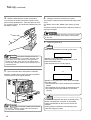
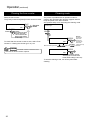
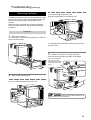
Cleaning the thermal head
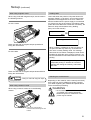
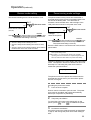
Cleaning the fan filter
When the thermal head gets dirty, defects such as
unwanted lines appearing on the printed card may
occur. It is recommended to clean the thermal head
after printing about 10,000 frames. The thermal head is
a consumable component, that is, it has a limited
service life.
When the fan filter gets dirty, partial omissions may
occur on the printed cards, or the printing result looks
dirty. It is recommended to clean the fan filter after
printing about 10,000 cards.
1.
1.
Open the printer door and remove the ink ribbon
cassette and the retransfer film cassette.
Remove the fan filters located in three positions on
the sides of the printer.
See p.15, 17 in this manual.
2.
Wipe the cleaning head with a cotton bud (sold
separately), dipped in alcohol (sold separately).
Cotton bud (sold separately)
Thermal
head
Wipe the head indicated with
2.
Remove the card tray.
horizontally.
See p.45 in this manual.
3.
Insert the ink ribbon cassette and the retransfer
film cassette, then close the printer door.
3.
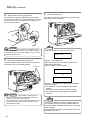
Remove the fan filter located on the base of the
printer (inside the unit).
Bring down the fan filter(side 2) while pressing its side
(side 1). The fan filter can be taken out. Mount the fan
filter by pressing this side.
CAUTION
• The thermal head may break if
touched with an electrostatic charge. Discharge yourself
by touching the printer frame (metallic part) with your
hands before cleaning the thermal head.
• Use a cotton bud soaked with absolute alcohol(ethanol).
Be careful not to scratch the thermal head with hard
materials like metal during cleaning.
1
2
37