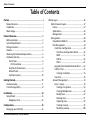
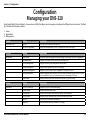
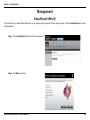
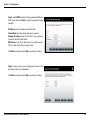
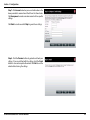
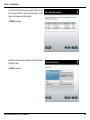
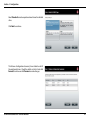
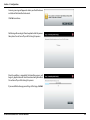
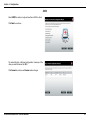
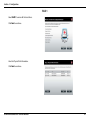
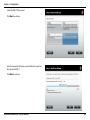
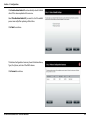
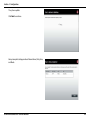
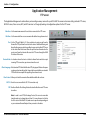
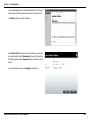
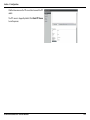
1
Version 1.10 | 09/17/2014 User Manual ShareCenter 2-Bay Network Storage Enclosure DNS-320 Preface D-Link reserves the right to revise this publication and to make changes in the content hereof without obligation to notify any person or organization of such revisions or changes. Manual Revisions Revision Date Description 1.0 August 28, 2012 1.10 September 17, 2014 • Initial release for Revision B1 • add power usage Trademarks D-Link and the D-Link logo are trademarks or registered trademarks of D-Link Corporation or its subsidiaries in the United States or other countries. All other company or product names mentioned herein are trademarks or registered trademarks of their respective companies. Copyright © 2014 by D-Link Systems, Inc. All rights reserved. This publication may not be reproduced, in whole or in part, without prior expressed written permission from D-Link Systems, Inc. Power Usage This device is an Energy Related Product (ErP) designed to be always on. It can be turned off through a power switch to save energy when it is not needed. Switched Off: 0.37 watts D-Link ShareCenter DNS-320 User Manual i Table of Contents Table of Contents Preface.................................................................................. i Manual Revisions............................................................................ i Trademarks....................................................................................... i Power Usage..................................................................................... i Product Overview............................................................... 1 Before you Begin............................................................................ 2 System Requirements.................................................................. 2 Package Contents.......................................................................... 2 Features............................................................................................. 3 Checking the Hardware Requirements................................. 5 Hardware Overview...................................................................... 6 Front Panel............................................................................... 6 LED Description................................................................. 7 Rear Panel (Connections).................................................... 8 Bottom Panel........................................................................... 9 Top Panel (Levers)................................................................10 Getting Started.................................................................11 Hardware Setup...........................................................................11 D-Link Storage Utility.................................................................14 Installation........................................................................16 Setup Wizard.................................................................................16 Mapping a Drive...................................................................32 Configuration....................................................................35 Managing your DNS-320..........................................................35 D-Link ShareCenter DNS-320 User Manual Web UI Login.................................................................................36 Web UI General Layout......................................................37 Home...................................................................................37 Applications......................................................................38 Management....................................................................39 Management.........................................................................40 Setup Wizard (Web UI)..................................................40 Disk Management..........................................................44 Hard Drive Configuration.......................................44 Hard Drive Configuration Wizard..................45 JBOD........................................................................51 RAID 0......................................................................55 RAID 1......................................................................61 Upgrade from Standard Mode to RAID 1.........67 S.M.A.R.T. Test.............................................................73 Creating a Schedule...........................................75 Scan Disk......................................................................76 Account Management..................................................78 Users / Groups............................................................78 Creating a Single User.......................................78 Creating Multiple Users....................................83 Modify Users.........................................................87 Deleting Users......................................................91 Importing Users...................................................92 Creating a Group.................................................95 Modifying a Group........................................... 100 ii Table of Contents Deleting a Group.............................................. 105 Quotas........................................................................ 106 Network Shares....................................................... 111 Add/Modify Network Shares Wizard......... 112 Deleting a Network Share............................. 119 Resetting the Network Shares..................... 121 ISO Shares Setup Wizard................................ 122 Creating an ISO Image................................... 126 ISO image Creation Wizard........................... 127 ISO Name and File Path Settings................ 128 ISO Tree Editing................................................. 131 Verifying the ISO image................................. 132 Admin Password..................................................... 133 Network Management............................................... 134 LAN Setup................................................................. 134 IPv6 Settings...................................................... 137 IPv6 Setup........................................................... 138 Link Speed and LLTD Settings..................... 140 DDNS.......................................................................... 141 Port Forwarding..................................................... 142 Application Management......................................... 146 FTP server................................................................. 146 UPnP AV Server....................................................... 150 iTunes Server........................................................... 153 AFP Service............................................................... 154 NFS Service............................................................... 154 System Management................................................. 155 Language.................................................................. 155 Time and Date......................................................... 156 D-Link ShareCenter DNS-320 User Manual Device........................................................................ 157 System Settings...................................................... 158 Power Management............................................. 159 Notifications............................................................. 161 Email Settings.................................................... 161 SMS Settings...................................................... 162 Adding an SMS Service Provider................ 163 Event Settings................................................... 164 Logs............................................................................. 165 Firmware Upgrade................................................. 166 USB Devices............................................................. 167 UPS Settings....................................................... 167 USB Storage Information............................... 167 Printer Information.......................................... 168 System Status................................................................ 169 System Info............................................................... 169 Home..................................................................................... 171 My Files............................................................................ 172 Upload....................................................................... 173 Download................................................................. 175 My Favorites Application.......................................... 176 Adding Applications............................................. 177 Applications........................................................................ 178 FTP/HTTP Downloads................................................ 178 Remote Backups........................................................... 180 Create Wizard.......................................................... 181 Local Backups.......................................................... 185 Time Machine.......................................................... 186 USB Backups............................................................ 187 iii Table of Contents MTP Backups...................................................... 188 USB Backups...................................................... 188 MTP Backup Process....................................... 189 USB Backup Process........................................ 191 P2P Downloads....................................................... 193 Settings................................................................ 193 Downloads......................................................... 194 My Files...................................................................... 195 Amazon S3................................................................ 196 Creating an AWS Account............................. 197 Knowledge Base.............................................................202 What is RAID?............................................................................. 202 RAID Options...................................................................... 204 UPS Connectivity...................................................................... 206 Deleting a UPS Slave........................................................ 210 USB Print Server........................................................................ 212 Warranty..........................................................................215 D-Link ShareCenter DNS-320 User Manual iv Section 1 - Product Overview Product Overview SAFELY SHARE DIGITAL FILES LOCALLY AND OVER THE INTERNET The D-Link DNS-320 2-Bay Network Storage, when used with internal SATA drives1, enables you to share documents, files, and digital media such as music, photos, and video with everyone on the home or office network. Remotely accessing files through the Internet is also possible with the built-in FTP server. Whether you are allowing access locally or over the Internet, keep data safe by only giving rights to specific users or groups. When configuring the DNS-320, you can create users and groups and assign them to folders with either read or read/write permissions. This is ideal for an office environment with employee-specific sensitive data or for the home where you can ensure your children will only have access to age appropriate material. The DNS-320 will be available to any computer (PC, MAC, or Linux-based) on your network, without the need to install any software on the computer. STREAM DIGITAL MEDIA CONTENT TO UPnP AV COMPATIBLE MEDIA PLAYERS Back up your music, photo, and video collections to the DNS-320 for safekeeping. Then, enjoy the benefits of the built-in UPnP AV media server as you stream digital content to compatible media players2 (such as those found in D-Link’s MediaLounge product line). This feature is highly convenient as it allows you to turn off a computer that would normally be needed for the same function. PROTECTION, PERFORMANCE, AND FLEXIBILITY The availability of four different hard drive modes (Standard, JBOD, RAID 0, RAID1) allows you to choose the configuration best suited to your needs. Standard mode creates two separately accessible hard drives. JBOD combines both drives in linear fashion for maximum space efficiency. RAID 0 combines both drives in a ‘striped’ configuration, which provides the highest performance when using a Gigabit Ethernet connection. RAID 1 causes the drives to mirror each other, providing maximum protection. If one drive fails while configured as RAID 1, the unaffected drive continues to function as a single drive until the failed drive is replaced. The new drive will then be re-mirrored, allowing the DNS-320 to return to its full protection. 1 Hard Drive(s) not included. 2 D-Link cannot guarantee full compatibility or proper playback with all codecs. Playback capability depends on the codec support of the UPnP™ AV media player. D-Link ShareCenter DNS-320 User Manual 1 Section 1 - Product Overview Before you Begin • Check box contents • Check system requirements • Ensure that you have the hardware you need for your ShareCenter device System Requirements For best results, the following minimum requirements are recommended on any system used to configure and use the ShareCenter: • Computer with: 1Ghz processor / 512MB RAM / 200MB available space / CD-ROM drive • Internet Explorer® version 7, Mozilla® Firefox® 3, Google® Chrome 3, or Apple® Safari® 4 and above • Windows® XP (with Service Pack 2), Windows Vista®, Windows® 7 • Mac OS® X 10.5.6 or greater • 3.5” SATA Hard Drive(s) Package Contents • D-Link ShareCenter® DNS-320 • CD-ROM with Manual and Software • Quick Installation Guide • 12V/3A Output Power Adapter • CAT5E Ethernet Cable D-Link ShareCenter DNS-320 User Manual 2 Section 1 - Product Overview Features The ShareCenter® DNS-320 is an easy to install data storage platform used for remote access through a local network or from the Internet. This ShareCenter® supports up to 2 SATA hard drives and includes the product features listed below: Equipped one 10/100/1000 Mbps auto-MDIX Gigabit Ethernet • Unicode Support for both Samba and FTP server LAN port, 1000BASE-T support Half duplex and Full duplex mode • File sharing: Windows/ Mac/ Linux Embedded two SATA II 3.5” HDD interface, support 3TB HDD FTP server 2-bay Serial ATA with RAID 0/1 and JBoD supported • FTP over explicit SSL/ TLS mode (FTPES) Equipped Ultra Cooler (Plastic housing + FAN speed control) • FTP bandwidth and connection control Support Green Ethernet • FTP support FXP Support Smart FAN • IP Blocking Support Real time clock (RTC) Download Management Network Options • HTTP/FTP schedule download • DHCP Client or Static IP • Peer to peer (P2P) downloader Disk Management • NTP Client • RAID: Standard, JBOD, 0,1 • Windows 7/ Vista x32/64 PnP-X/ LLTD • Raid 1 Auto/manual Rebuild • Dynamic DNS • RAID migration: Normal to RAID 1 • Bonjour • Disk Status Monitoring (S.M.A.R.T.) • UPnP Port Forwarding • HDD S.M.A.R.T test • IPv6* Network File Services • Scandisk • Supports Windows XP/ Vista/ 7, Mac OSX 10.5+, Linux clients • Support Advanced Format HDD Power Management • CIFS/SMB for Windows and Mac OS X • Power Saving (Disk idle spin-down) • NFSv3 for Linux and UNIX • Schedule power on/off • AFP3.3 for Mac OS X • Auto Power Recovery • HTTP and HTTP/S for web browsers File System • Smart Fan Control Folder Management • EXT4 for internal HDD • Share Folder Level Permission • FAT32, NTFS for USB external Storage File System Management • Public Folder D-Link ShareCenter DNS-320 User Manual 3 Section 1 - Product Overview • Supports ISO Mount Remote File Sharing • Web File Server (My Files) - Allows user(s) to access files on the NAS using a web browser. • FTP Server • WebDAV User/Group Management • User/group assignment for Network sharing and FTP server • Quota for user and group • Users can assign to multiple Groups • Batch User Creation/ Import Users Backup Management • Schedule Backup from PC to NAS (D-Link ShareCenter Sync) • Apple Time Machine support • Local Backup • USB Backups (External storage and digital camera) • Remote network backup (Rsync, Remote Snapshot) • Cloud Backup (Amazon S3) • USB Copy Button System Management • Support D-Link Storage Utility • OS support: Windows XP, Vista, 7, and Mac OS X • Two access modes supported: Open mode and Account mode, • Support Configuration file save/load • System status • Email/ SMS notifications • Network Recycle bin • System/FTP Log (Syslog Client) • Resource Monitor USB port support: D-Link ShareCenter DNS-320 User Manual • External Storage device • Print server • UPS monitoring • MTP/PTP Media Streaming • UPnP AV server: • Supports PS3/Xbox 360 • Supports UPnP AV file > 4 GB • Complies with DLNA HNv1.5 • D-Link new Media Player (including Boxee) compatible • iTunes Server Supports Multilingual GUI Web Browsers Supported • Internet Explorer 7+ • Mozilla Firefox 3+ • Apple Safari 4+ • Google Chrome3+ • Opera 10+ 4 Section 1 - Product Overview Checking the Hardware Requirements To use your DNS-320, you will need at least one hard drive. If you plan to use RAID 1, which protects your data against one hard drive failure, you will need two hard drives. This section will help you: • Select the hard drives • Determine hard disk space you will need • Ensure your data is protected • Understand the basic requirements for a router or switch Selecting Hard Drives: You can use hard drives from any manufacturer and with any capacity with your DNS-320. The D-Link ShareCenter supports standard 3.5” internal SATA drives. If you are unsure, ask your administrator or hard drive retailer/manufacturer to verify that your hard drives meet this standard *Warning - Any pre-existing data on the drives will be erased during installation. Determining How Much Hard Drive Space you Need: In order to protect your data from hard drive failure, your DNS-320 requires more space than what you will use for your data, sometimes more than double the amount of space required. Using a Router or Switch: If you are connecting your ShareCenter to a router or switch, your router or switch needs to support Gigabit Ethernet (1000Mbit/s) for maximum performance. The ShareCenter will auto-negotiate the highest connection speed available to your router or switch. If you are using Port Bonding, use a managed switch. Using an Uninterrupted Power Supply (UPS): We highly recommend that you use your ShareCenter in conjunction with an uninterrupted power supply (UPS), which will protect against sudden loss in power and power surges. D-Link ShareCenter DNS-320 User Manual 5 Section 1 - Product Overview Hardware Overview Front Panel Top Panel Front Panel Left HDD/ Right HDD USB Button Power Button COMPONENT LED Indicators DESCRIPTION Top Panel This panel unlatches simply by pressing the lever at the back. Unhook and lift up to insert or remove your hard drive(s). Front Panel The casing of the entire NAS Power Button USB Button Left HDD/ Right HDD LED Indicators Press once to power on the ShareCenter. Press and hold the button to power it down. Press once to activate USB or press and hold to release USB activity. Indicates the position of the drive (Left or Right) Illuminates blue or red depending on activity (see the next page for details) D-Link ShareCenter DNS-320 User Manual 6 Section 1 - Product Overview LED Description Power On/Off: Blue Light - the device is on Blinking Blue - the device is booting or restarting No Light - the device is off USB On/Off: Blue Light - the USB Storage is connected Blinking Blue - transferring data, a USB device is being installed or unmounted Orange Light - USB storage failed to mount No Light - No USB Storage or the device is off HDD On/Off: Orange Light(s) - the hard drives are faulty No Light(s) - the hard drives are inactive HDD On/Off: Blue Light(s) - the hard drives are working Blinking Blue Light(s) - the HDD(s) is writing/reading D-Link ShareCenter DNS-320 User Manual 7 Section 1 - Product Overview Rear Panel (Connections) Top Panel Latch Security Lock Cooling Fan Power Receptacle USB Port Gigabit Ethernet Port COMPONENT Cooling Fan Gigabit Ethernet Ports Power Receptacle USB Port Latch Security Lock DESCRIPTION The cooling fan is used to cool the hard drives and features speed control. When the unit is first powered on, the fans rotate at a low speed and later rotate at a high speed when the temperature rises above 49 °C. Use the Gigabit Ethernet port to connect the ShareCenter to the local network. The port is equipped with 2 LEDs. The LED on the right will illuminate solid green for a good connection and will blink during data transmission. If this LED is off, check the connection/cable to the device you are connecting to. The LED on the left will light solid for a Gigabit connection and will remain off when connected to a 10/100 device. Connect the supplied power cord to the receptacle. A single USB 2.0 (Type A) connector. The USB Host port is for Print Servers, USB memory disks, or USB UPS monitoring. Press the latch to release the Top Panel and insert or remove the hard drives Prevent theft by tying a lock to the ShareCenter NAS and a desk D-Link ShareCenter DNS-320 User Manual 8 Section 1 - Product Overview Bottom Panel Product Details Reset Button COMPONENT Product Details Reset Button DESCRIPTION Information about the product - DNS-320. Serial Number, Part Number, Manufacturer Number Press and hold this button for more than 5 seconds to reset the unit to factory defaults. D-Link ShareCenter DNS-320 User Manual 9 Section 1 - Product Overview Top Panel (Levers) Pull the handles to disconnect the hard drive(s) from the SATA sockets. Note: Remove the top cover before releasing the latches. D-Link ShareCenter DNS-320 User Manual 10 Section 2 - Getting Started Getting Started Hardware Setup This User Guide will help you get your ShareCenter set up in just a few steps. To install the ShareCenter on your local network, refer to the steps below, or skip to page 16 to run the setup wizard which will show you how to install and configure your DNS-320. Step 1 - Remove the top panel by firmly pressing the latch at the back. Step 2 - Once the faceplate is unlatched, pull it off the the device to expose the devices’s bays. Note: Make sure to align the drive connector to the SATA connector at the back edge inside the drive bay of the ShareCenter. Gently push the drive in until it connects. When a drive is inserted properly, you will feel it “set” into the connector. Some hard drives that are thin or oddly shaped may need to be inserted carefully into position. If a drive is not properly set in place, the hard drive LED will not illuminate after powering on the device. D-Link ShareCenter DNS-320 User Manual 11 Section 2 - Getting Started Step 3 - Attach the hard drive brackets to the sides of your hard drives with the included screws. Ensure the brackets are aligned so that when the hard drive is inserted, the arrow on the bracket points to the front of the ShareCenter. D-Link ShareCenter DNS-320 User Manual Step 4 - Insert up to two 3.5” SATA hard drives into the drive bays. 12 Section 2 - Getting Started Step 5 - Re-attach the top panel. Ensure the latch is inserted inside the panel. Step 6 - Connect an Ethernet cable to the Ethernet port. This cable should connect the ShareCenter to your local network via a router, switch, or directly to a computer for configuration (cross-over cable required). Step 7 - Connect the power adapter to the power receptacle. D-Link ShareCenter DNS-320 User Manual 13 Section 2 - Getting Started D-Link Storage Utility When first powered on, during the initial boot sequence, the ShareCenter will wait to be assigned an IP address via DHCP. If it does not receive a DHCP assigned IP address, the ShareCenter will be automatically assigned a 169.254.xxx.xxx address. It is recommended that you use the included D-Link Storage Utility software when accessing and configuring the ShareCenter for the first time. If you want to change the IP address before logging in or you are having trouble connecting to the ShareCenter IP address, you can use the Storage Utility software included on the product CD to locate the device on your network and make any necessary changes. Network Storage The D-Link Storage Utility displays any ShareCenter Device: devices it detects on the network here. Refresh: Click Refresh to refresh the device list. Configuration: Click Configuration to access the Web based configuration of the ShareCenter. LAN: Configure the LAN Settings for the ShareCenter here. Apply: Click Apply to save changes to the LAN Settings. Drive Mapping: Volumes available for mapping are displayed here. Available Drive Choose an available drive letter. Click Connect to map Letters: the selected volume. Click Disconnect to disconnect the selected mapped volume. About: Click About to view the software version of the Easy Search Utility. Exit: Click Exit to close the utility. D-Link ShareCenter DNS-320 User Manual 14 Section 2 - Getting Started Select the ShareCenter from the list and click the Configuration button. This will launch the computer’s default web browser and direct it to the IP address listed for the device. Make sure the browser is not configured to use a proxy server. Note: The computer used to access the ShareCenter web-based configuration manager must be on the same subnet as the ShareCenter. If your network is using a DHCP server and the computer receives IP settings from DHCP server, the ShareCenter will automatically be in the same subnet. D-Link ShareCenter DNS-320 User Manual 15 Section 3 - Installation Installation Setup Wizard To run the Setup Wizard, insert the ShareCenter CD into your CD-ROM drive. Step 1 - When the autorun screen appears, click Install Note: Windows Firewall presents you with a warning message to unblock the device. Click Unblock to give your computer access to the NAS. Step 2 - Select the Language of your choice and then click the Start button. D-Link ShareCenter DNS-320 User Manual 16 Section 3 - Installation Install the Hard Drives Step 3 - Follow the instructions to remove the top cover of your ShareCenter. Click Next to continue. Step 4 - Attach the Hard Drives Bracket(s) to the side of the hard drives as indicated. Click Next to continue. D-Link ShareCenter DNS-320 User Manual 17 Section 3 - Installation Step 5 - Slide one, or two hard drive into an available hard drive bay of your ShareCenter. Click Next to continue. D-Link ShareCenter DNS-320 User Manual 18 Section 3 - Installation Connect to your Network Step 6 - With the hard drives installed properly into each bay, close the chassis by re-attaching the top panel into place. Click Next to continue. Step 7 - Connect a CAT5 Ethernet cable to your ShareCenter and connect the other end to a switch or router (Local LAN). Click Next to continue. D-Link ShareCenter DNS-320 User Manual 19 Section 3 - Installation Power and Device Selection Step 8 - Connect the power adapter connector to the power receptacle on the back of the ShareCenter. Then, power on the ShareCenter by pressing the power button located in the front panel. Click Next to continue. Step 9 - With the power on, press the Next button on the device and check and make sure the IP address of your ShareCenter matches what you see on the screen. Note: Allow 1-2 minutes for the DNS-320 to be recognized. Click Next to continue. D-Link ShareCenter DNS-320 User Manual 20 Section 3 - Installation Admin Password Step 10 - Enter the administrator password. If this is the first time you are doing the installation on this NAS, leave the password blank. Click Next to continue. Step 11 - In this step you can create a new password for the Admin username. It is recommended you set a password, however you may also leave the fields blank. Click Next to continue. D-Link ShareCenter DNS-320 User Manual 21 Section 3 - Installation Networking Setup Step 12 - You may either use Static IP or DHCP to configure the IP network settings of the ShareCenter. If you select Static IP, then enter the IP parameters as listed. Click Next to continue. D-Link ShareCenter DNS-320 User Manual 22 Section 3 - Installation Device Information and Dynamic DNS Step 13 - If you want your ShareCenter to be part of a Windows Workgroup network, enter the workgroup name, a name for the device, and a description. The name you entered will be used whenever you map one of the ShareCenter volumes as a Network Drive. Click Next to continue. Step 14 - Click the Yes radio button if you already have a DDNS account to use for the ShareCenter DDNS. Click the No radio button and proceed to step 15 to obtain a new DDNS account. Click Next to continue. D-Link ShareCenter DNS-320 User Manual 23 Section 3 - Installation Dynamic DNS Account Setup Step 15 - Enter the DDNS parameters requested in this window so that your ShareCenter can be accessed by a URL over the Internet. Click Next to continue. Step 16 - Click Yes to go to a Wizard with instructions and links on how to obtain a free DDNS account. Click No skips the DDNS account setup wizard and transfers you back to the ShareCenter Setup Wizard. D-Link ShareCenter DNS-320 User Manual 24 Section 3 - Installation DDNS Account and System Time Step 17 - Follow the steps listed here in order to create a DDNS account and configure your LAN equipment and ShareCenter to work with the new settings. Click Close to continue. Step 18 - Select your time zone and then set the time and date. You can set the time and date manually, from an NTP server, or from your computer. Click Next to continue. D-Link ShareCenter DNS-320 User Manual 25 Section 3 - Installation Email Settings and Volume Information Step 19 - You can configure messages to be sent alerting you to certain operational conditions and drive status conditions to your e-mail account. These alerts can prove helpful with the management and safeguarding of important data. Enter your e-mail information and settings and then click Next to continue. If you do not want to configure your e-mail settings, click Skip to continue. Step 20 - This step is informational and shows any currently configured Volumes previously setup on the ShareCenter®. Click Next to continue. D-Link ShareCenter DNS-320 User Manual 26 Section 3 - Installation RAID Configuration Step 21 - Select one of the volume RAID types. Clicking on each RAID type radio button will display a description. For more information concerning the different RAID Disk Formats please refer to the Knowledge Base section in this manual. Click Next to continue. D-Link ShareCenter DNS-320 User Manual 27 Section 3 - Installation Mapping a Drive and Checking Volume Summary Step 22 - This step allows you to map the volume(s) created as network drive(s) on your computer. Click Next to continue. Step 23 - Review the detailed summary of your volume configuration here before clicking next and starting the drive format. If necessary use the PREV button to go back and reconfigure the RAID configuration of the volume(s). Click Next to continue. D-Link ShareCenter DNS-320 User Manual 28 Section 3 - Installation Formatting Volumes Step 24 - When you click Next, a warning message will appear to inform you that all data on the drive(s) will be lost. Click Yes to proceed or No to exit. Click Next to continue. Step 25 - During the formatting process the wizard displays a percentage complete bar for each hard drive. Click Next to continue. D-Link ShareCenter DNS-320 User Manual 29 Section 3 - Installation Formatting Hard Drives Step 26 - The wizard will notify you when formatting has completed successfully. Click Next to continue. Step 27 - The Format is complete. Click Next to continue. D-Link ShareCenter DNS-320 User Manual 30 Section 3 - Installation Wizard Complete Step 28 - The ShareCenter Setup Wizard is complete. Click Finish to exit the wizard and start using your DNS-320. Your ShareCenter is now installed and ready to use. If your drives are mapped using the wizard, you will be able to access them under your ‘My Computer’ icon. If you did not use the wizard to map the drives, you can manually map or access the created volumes through your computers operating system. Detailed configurations using the Web UI is explained in the configuration section of this manual. D-Link ShareCenter DNS-320 User Manual 31 Section 3 - Installation Mapping a Drive Map a drive to your ShareCenter using Windows® 7 to access it through Windows® Explorer. Step 1 - Click Start, then Computer (the name of your computer). On the right-side panel is a list of your hard drives, removable storage, and network locations. If you do not have any network locations, this may be the first time you set up a network drive. Begin by clicking on ‘Map network drive’. Step 2 - This screen shows some details on selecting a network drive. Click Browse to find your network. D-Link ShareCenter DNS-320 User Manual 32 Section 3 - Installation Step 3 - Windows will automatically detect all devices on your network including your ShareCenter. Step 4 - Click on your ShareCenter to see the volumes you created earlier. Then select the volume that you wish to access and click OK. D-Link ShareCenter DNS-320 User Manual 33 Section 3 - Installation Step 5 - After selecting your volume, click Finish to proceed. Step 6 - The drive will then appear in your Windows® Explorer under Network. This means the drive is active and ready for use. D-Link ShareCenter DNS-320 User Manual 34 Section 4 - Configuration Configuration Managing your DNS-320 ShareCenter Web UI (User Interface) is a browser-based utility that allows you to manage and configure the different tools and services. The Web UI is divided into three main sections: 1. Home 2. Applications 3. Management SECTION OPTION DESCRIPTION Home - My Folder My Files Access files on your NAS via a web browser My Favorites Application Add the favorite applications you use on a regular basis to the Home page SECTION OPTION DESCRIPTION Management Setup Wizard Step by step guide through password & time settings, connectivity, and device configuration Disk Management Configures disk volumes, RAID, and performs disk diagnostics Account Management Configures user and group management, network shares Network Management Configures LAN, Dynamic DNS, and Port Forwarding Application Management Configures FTP, UPnP, iTunes server configurations, AFP, and NFS services System Management Configures language, time and date, device, and system settings. Also allows you to control power, notifications, view logs, do firmware upgrades, and manage USB devices. System Status Displays system and hard drive information along with resource monitoring SECTION OPTION DESCRIPTION Applications FTP/HTTP Downloads Configure FTP and HTTP download settings Remote Backup Configure remote backup services Local Backups Configures local backups, Time Machine© settings, and USB backups P2P Downloads Configure your P2P downloads and control your download schedules My Files Access files on your NAS via a web browser Amazon S3 Create, modify, and delete your Amazon S3© settings D-Link ShareCenter DNS-320 User Manual 35 Section 4 - Configuration Web UI Login To access the Web UI, open a web browser, type in the IP address of your ShareCenter, and log in. You can find the IP address of your NAS by pressing the Next button on the front of the DNS-320. The following screen will appear: Select System Administrator and enter the password created during the Setup Wizard. Click Login. Note: The computer used to access the ShareCenter web-based configuration manager must be on the same subnet as the ShareCenter. If your network is using a DHCP server and the computer receives IP settings from the DHCP, the ShareCenter® will automatically be in the same subnet. D-Link ShareCenter DNS-320 User Manual 36 Section 4 - Configuration Web UI General Layout Home After logging in, the ShareCenter ‘Home’ tab will appear. You will see the Applications and Management tabs alongside of it. D-Link ShareCenter DNS-320 User Manual 37 Section 4 - Configuration Applications The Applications tab contains FTP/HTTP Downloads, Remote Backups, Local Backups, P2P Downloads, My Files, and Amazon S3 icons. Click on each icon to see the submenus. D-Link ShareCenter DNS-320 User Manual 38 Section 4 - Configuration Management The Management tab contains the Setup Wizard, Disk Management, Account Management, Network Management, Application Management, System Management, and Status icons. Click on each icon to see the submenus. D-Link ShareCenter DNS-320 User Manual 39 Section 4 - Configuration Management Setup Wizard (Web UI) The ShareCenter has a Setup Wizard that allows you to quickly configure some of the basic device settings. Click the Setup Wizard icon to start the Setup Wizard. Step 1 - Click the Run Wizard button to start the setup wizard. Step 2 - Click Next to continue. D-Link ShareCenter DNS-320 User Manual 40 Section 4 - Configuration Step 3 - Update the administrator account password here and confirm the password or leave it blank. Click Next to continue. Step 4 - Set the time zone from the drop-down menu to the appropriate geographical zone closest to your location. Click Next to continue or click Skip to ignore these settings. D-Link ShareCenter DNS-320 User Manual 41 Section 4 - Configuration Step 5 - Select DHCP to obtain IP settings automatically from a DHCP server (router) or Static to assign the parameters below manually. IP Address: Enter an IP address for the DNS-320. Subnet Mask: Enter the subnet mask of your network. Gateway IP Address: Enter the IP address of your gateway (usually the local IP of your router). DNS Servers: Enter the IP address(es) of your DNS server(s). DNS1 is usually the IP address of your router. Click Next to continue or click Skip to ignore these settings. Step 6 - Here you can assign a workgroup and name to the ShareCenter with a short description. Click Next to continue or click Skip to ignore these settings. D-Link ShareCenter DNS-320 User Manual 42 Section 4 - Configuration Step 7 - Click Account and enter your e-mail information in the boxes provided to receive Event Alerts from the ShareCenter. Click Anonymous to create a random account with no specific settings. Click Next to continue or click Skip to ignore these settings. Step 8 - Click the Previous button to go back and check your settings. If you are satisfied with the settings, click the Finish button to save and complete the wizard. Click Exit to end the wizard without saving the settings. D-Link ShareCenter DNS-320 User Manual 43 Section 4 - Configuration Disk Management Hard Drive Configuration To setup the Hard Drive RAID configuration of your ShareCenter, click on the Management tab and then the Disk Management icon. Select the Hard Drive Configuration menu item on the left of the window. This menu will allow you to set the RAID type and format your hard drives. Hard Drive Your ShareCenter hard drives can be Configuration: configured here and formatted in various RAID configurations. Current Raid Type: If the drives are already formatted the RAID configuration will be displayed here. Set RAID type and Click on this button to launch a wizard that Reformat: allows you to select the RAID configuration and format the drives. Auto-Rebuild If you have chosen RAID 1 as the configuration Configuration: option, then set the Auto-Rebuild function here using the radio buttons. Enable Auto-Rebuild: Enabling Auto-Rebuild will rebuild a failed RAID 1 drive when a new drive has replaced the degraded one. Disable Auto-Rebuild: If you do not want to automatically rebuild drives after a failure when using the RAID 1 functionality then you can check this option. Note: You can still rebuild a drive using the RAID 1 functionality however you must initiate the rebuild manually. Manual Rebuild Now: If Auto-Rebuild is disabled then you can use the Manual Rebuild option by clicking this button. D-Link ShareCenter DNS-320 User Manual 44 Section 4 - Configuration Hard Drive Configuration Wizard When you click on the Set RAID type and Re-Format button in the Disk Management-Hard Drive Configuration menu a wizard will start, allowing you to format your drives and create the volume RAID format. The following is an example of a standard volume configuration: The Hard Drive Configuration page displays the current RAID configuration under ‘Current RAID Type’. Click Set RAID Type and Re-Format. The Setup Wizard begins. D-Link ShareCenter DNS-320 User Manual 45 Section 4 - Configuration The ‘Physical Disk Information’ page displays all of the hard drives on the DNS-320. It shows the array number, vendor, model, serial number, and drive capacity. Click Next to continue. Select the format you want by clicking on the RAID type box (highlight in blue). Click Next to continue. D-Link ShareCenter DNS-320 User Manual 46 Section 4 - Configuration Select Standard to create separate volumes for each individual drive. Click Next to continue. The ‘Volume Configuration Summary’ shows details on all of the configured drives. Check the details on the list and click Format to continue or click Previous to make changes. D-Link ShareCenter DNS-320 User Manual 47 Section 4 - Configuration A warning message will appear to inform you that all volumes and data will be formatted and erased. Click Yes to continue. Partitioning will now begin. Please be patient while this process takes place. Do not turn off your NAS during this process. Once the partition is completed, the formatting process will begin. A graphical bar will show the volume being formatted. Do not turn off your NAS during this process. If you would like to change your settings at this stage, click Exit. D-Link ShareCenter DNS-320 User Manual 48 Section 4 - Configuration The Wizard starts to partition the second drive if you have installed it. If you would like to change your settings at this stage, click Exit. The system will now update all of the changes made. Please be patient during this process. Do not turn off your NAS during this process. D-Link ShareCenter DNS-320 User Manual 49 Section 4 - Configuration The wizard is now complete. It will show the volume number(s), file system selected, the type of RAID, and the disk formation in the RAID. Click Finish to complete the process and start using your DNS-320. D-Link ShareCenter DNS-320 User Manual 50 Section 4 - Configuration JBOD Select JBOD to create a single volume from all of the drives. Click Next to continue. The wizard displays a Volume Configuration Summary of the drive you want to convert to JBOD. Click Format to continue or Previous make changes. D-Link ShareCenter DNS-320 User Manual 51 Section 4 - Configuration A warning message will appear to inform you that all volumes and data will be formatted and erased. Click Yes to continue. Wait for the Wizard to prepare the drive for configuration D-Link ShareCenter DNS-320 User Manual 52 Section 4 - Configuration The Format process begins The System Updates D-Link ShareCenter DNS-320 User Manual 53 Section 4 - Configuration The wizard is now complete. It will show the volume name, file system, and Mode. Click Finish to complete the process and start using your DNS-320. The wizard returns you to the main screen. Here you can see the current RAID Type. D-Link ShareCenter DNS-320 User Manual 54 Section 4 - Configuration RAID 0 Select RAID 0 (stripes all of the drives). Click Next to continue. View the Physical Disk Information. Click Next to continue. D-Link ShareCenter DNS-320 User Manual 55 Section 4 - Configuration Select the RAID Type. In this example it’s RAID 0 Click Next to continue. Select the size of your RAID 0 configuration. Click Next to continue. D-Link ShareCenter DNS-320 User Manual 56 Section 4 - Configuration The ‘Volume Configuration Summary’ shows details on all of the configured drives. Check the details on the list and click Format to continue or click Previous to make changes. A warning message will appear to inform you that all volumes and data will be formatted and erased. Click Yes to continue. D-Link ShareCenter DNS-320 User Manual 57 Section 4 - Configuration Partitioning will now begin. Please be patient while this process takes place. Do not turn off your NAS during this process. The system formats the First Volume. If you would like to change your settings at this stage, click Exit. D-Link ShareCenter DNS-320 User Manual 58 Section 4 - Configuration The system will now format the second Volume. Please be patient during this process. Do not turn off your NAS during this process. The system will now update all of the changes made. Please be patient during this process. Do not turn off your NAS during this process. D-Link ShareCenter DNS-320 User Manual 59 Section 4 - Configuration The wizard is now complete. It will show the volume number(s), file system selected, the type of RAID, and the disk formation in the RAID. Click Finish to complete the process and start using your DNS-320. The wizard returns you to main Hardware Configuration page. Under Current RAID Type, you can view your changes. D-Link ShareCenter DNS-320 User Manual 60 Section 4 - Configuration RAID 1 Select RAID 1 to mirror all the hard drives. Click Next to continue. View the Physical Disk Information. Click Next to continue. D-Link ShareCenter DNS-320 User Manual 61 Section 4 - Configuration Select the RAID TYPE you want Click Next to continue. Enter the amount of disk space you would like to assign to the first volume for RAID 1. Click Next to continue. D-Link ShareCenter DNS-320 User Manual 62 Section 4 - Configuration Click Enable Auto-Rebuild to automatically rebuild a failed drive if it has been replaced with a new one. Select Disable Auto-Rebuild if you want to start the rebuild process manually after replacing a failed drive. Click Next to continue. The Volume Configuration Summary shows the Volume Name, Type, File System, and size of the RAID volume. Click Format to continue. D-Link ShareCenter DNS-320 User Manual 63 Section 4 - Configuration A warning message will appear, stating that your device will have some latency. Click Yes to continue. Partitioning will now begin. Please be patient while this process takes place. Do not turn off your NAS during this process. The system formats the First Volume. If you would like to change your settings at this stage, click Exit. D-Link ShareCenter DNS-320 User Manual 64 Section 4 - Configuration The system updates. Click Next to continue. Setup is complete. Setup provides a Volume Name, File System, and Mode. D-Link ShareCenter DNS-320 User Manual 65 Section 4 - Configuration Once you have completed the wizard. ShareCenter will return to the main screen. The RAID 1 configuration you just set will be displayed. D-Link ShareCenter DNS-320 User Manual 66 Section 4 - Configuration Upgrade from Standard Mode to RAID 1 Standard Mode doesn’t offer any redundancy and security of data. It is best then to migrate from Standard Mode to RAID 1. To do this follow these instructions: Step 1 - Insert a second hard drive into the DNS-320. Step 2 - Replace the top and restart the DNS-320. D-Link ShareCenter DNS-320 User Manual 67 Section 4 - Configuration Step 3 - Go to Management, Disk Management, Hard Drive Configuration. There are two options available: Set RAID Type and Re-Format or Format the new drive as Standard type. If you select the latter option your Hard Drive Configuration Wizard shows six procedures but if you select the Set RAID Type and Re-Format, the Hard Drive Configuration Wizard only has four procedures. Take a look at the two images below to compare. Click Next to continue. Format the new drive as Standard type. Set RAID Type and Re-Format. D-Link ShareCenter DNS-320 User Manual 68 Section 4 - Configuration Step 4 - Under Physical Disk Information, you will be able to see the drive you just installed. It provides the slot location, vendor, model number, serial number, and disk size. Just below this informational box is a checkbox that offers you the option to Reconfigure the drive to RAID 1. Click the checkbox to proceed. Click Next to continue. Step 5 - Under Auto-Rebuild Settings, select whether you want to enable auto rebuild or disable auto rebuild. Click Next to continue. D-Link ShareCenter DNS-320 User Manual 69 Section 4 - Configuration Step 6 - A warning message will appear prompting you to confirm whether you want to format your hard drive. Click Yes to continue or No to exit. Click Next to continue. Step 7 - The software communicates with the hardware to build a list. D-Link ShareCenter DNS-320 User Manual 70 Section 4 - Configuration Step 6 - The Wizard formats the hard drive. Click Next to continue. Step 7 - The System updates. Click Next to continue. D-Link ShareCenter DNS-320 User Manual 71 Section 4 - Configuration Step 8 - Setup is completed when it shows final information on the slot, vendor, model number, and serial number. Click Finish to continue. Step 9 - The wizard returns to the main Hard Drive Configuration . D-Link ShareCenter DNS-320 User Manual 72 Section 4 - Configuration S.M.A.R.T. Test S.M.A.R.T stands for “Self-Monitoring, Analysis, and Reporting Technology”. This is a system on a hard drive used to monitor and report on the health of the drive. If the HD is grayed out, then it does not support S.M.A.R.T. To run the S.M.A.R.T test, select the hard drive you wish to perform the S.M.A.R.T test on. Select whether to run a Quick or Extended S.M.A.R.T test. Then click Start to run the test. Click the Create Schedule button to run the test at a pre-determined time and date. The Quick Test usually takes less than 10 minutes. This test will check the electrical, mechanical, and read performance of the hard drive. The results are displayed as Passed/Failed on the web UI and can also be sent as an e-mail alert. The Extended Test requires a lot more time to complete. However, it is a more thorough when compared to the Quick Test A warning message will prompt you to stop all services and network activity. Click Yes to continue the Quick S.M.A.R.T. test. The test will run and a percentage completed will display under the Progress Tab. The Start button will change to a Stop button. D-Link ShareCenter DNS-320 User Manual 73 Section 4 - Configuration When the test is complete, the results will be displayed in the Result column. D-Link ShareCenter DNS-320 User Manual 74 Section 4 - Configuration Creating a Schedule To create a schedule, select the disks/volumes to run the test on. Under Schedule, select the period (Daily/Weekly/Monthly) and then select the time from the drop-down menu. Click Create To view the Schedule List, click on the Schedule List arrow. A new table will appear showing details of the new schedule created. To delete a schedule, click on the Trash Can. D-Link ShareCenter DNS-320 User Manual 75 Section 4 - Configuration Scan Disk Scan Disk provides a method to test the disk’s file system on your ShareCenter. Scan Disk scans your disks file system for errors and/or corruption. Click Management, Disk Management, and then Scan Disk. Select the volume from the drop-down list you wish to scan. Click Scan Disk D-Link ShareCenter DNS-320 User Manual 76 Section 4 - Configuration A warning message will prompt you to stop running all services (hard drive and network activity). Click Yes to proceed or No to cancel. The DNS-320 will initialize the volume(s) and begin scanning. Please wait while the software scans the volume(s) or click Exit to cancel the scan. When the scan is complete, the table will either display Success or Failure. Click Finish to exit. D-Link ShareCenter DNS-320 User Manual 77 Section 4 - Configuration Account Management Users / Groups Creating a Single User The Users/Groups menu is used to create and manage user and group accounts. Up to 256 users and 32 groups can be created. By default, all users have read and write access to all folders. However access rules can be created and edited in the Network Shares menu. Click Management > Account Management. Click Users/Groups on the left side and then click Create. The User Setup Wizard will appear. Click Next to continue. D-Link ShareCenter DNS-320 User Manual 78 Section 4 - Configuration Step 1 -Select Create a Single User and then click Next to continue. Step 2 -Enter the user name and password for the new user and then click Next to continue. D-Link ShareCenter DNS-320 User Manual 79 Section 4 - Configuration Step 3 -Add the user to a group by clicking the Group checkbox. Click Next to continue. Step 4 -Select the network share settings. Select Read Only, Read/Write, or Deny Access. Click Next to continue. D-Link ShareCenter DNS-320 User Manual 80 Section 4 - Configuration Assign Privileges/Access Methods to the user. Select either FTP or WebDAV. CIFS and AFP are set as default. • CIFS is short for Common Internet File System. • AFP is short for Apple Filing Protocol. • FTP is short for File Transfer Protocol. • WebDAV is short for Web-based Distribution, Authoring, and Versioning. • Click Next to continue. Select the volumes the user can have WebDAV access to and then select whether to give Read Only or Read/Write rights. Click Next to continue. D-Link ShareCenter DNS-320 User Manual 81 Section 4 - Configuration Step 5 -Enter the amount of disk space you wish to assign the user on each volume. Enter zero to provide unlimited disk space to the user. Click Next to continue. Step 6 -The final step is a summary of all the configurations you made. Click Finish to accept the changes or click Exit to cancel the changes. D-Link ShareCenter DNS-320 User Manual 82 Section 4 - Configuration Creating Multiple Users Step 1 -Select Create Multiple Users and then click Next to continue. Step 2 - Enter the following information: Enter a username. Enter the account prefix (Eg. this could be a department in the company). Enter the amount of users you want to create. Next to the input field is the remaining amount of users you can add to the NAS. Enter a password and confirm it. Click Next to continue. D-Link ShareCenter DNS-320 User Manual 83 Section 4 - Configuration Step 3 -Add the user(s) to a group by clicking the Group checkbox. Click Next to continue. Step 4 -Select the network share settings. Select Read Only, Read/Write, or Deny Access. Click Next to continue. D-Link ShareCenter DNS-320 User Manual 84 Section 4 - Configuration Assign Privileges/Access Methods to the user(s). Select FTP. CIFS and AFP are set as default. • CIFS is short for Common Internet File System. • AFP is short for Apple Filing Protocol. • FTP is short for File Transfer Protocol. Click Next to continue. Step 5 -Enter the amount of disk space you wish to assign the user(s) on each volume. Type 0 to provide unlimited disk space to the user(s). Click Next to continue. D-Link ShareCenter DNS-320 User Manual 85 Section 4 - Configuration Step 6 -The final step is a summary of all the configurations you made. Click Finish to accept the changes or click Exit to cancel the changes. The User Settings window will show a list of the users created. D-Link ShareCenter DNS-320 User Manual 86 Section 4 - Configuration Modify Users Step 1 - Click the user you wish to modify. The user will be highlighted in red. Click Modify to continue. Step 2 - The User Setup Wizard will appear. Click Next to continue. D-Link ShareCenter DNS-320 User Manual 87 Section 4 - Configuration Step 3 - Change the username or password. Click Next to continue. Step 4 - Change the Network Share Settings. Click Next to continue. D-Link ShareCenter DNS-320 User Manual 88 Section 4 - Configuration Step 5 - Assign Privileges/Access Methods for the user. Select either FTP or WebDAV. CIFS and AFP are set as default. • CIFS is short for Common Internet File System. • AFP is short for Apple Filing Protocol. • FTP is short for File Transfer Protocol. • WebDAV is short for Web-based Distribution, Authoring, and Versioning. Click Next to continue. Step 6 - Enter the re-assigned amount of disk space you wish to assign the user on each volume. Type 0 to provide unlimited disk space to the user. Click Next to continue. D-Link ShareCenter DNS-320 User Manual 89 Section 4 - Configuration Step 7 - The final step is a summary of all the configurations you made. Click Finish to accept the changes or Exit to cancel the changes. Step 8 - A message will appear stating the user details have been changed successfully. Click Yes to exit the wizard. D-Link ShareCenter DNS-320 User Manual 90 Section 4 - Configuration Deleting Users Step 1 - Click the user you wish to delete. The user will be highlighted in red. Click Delete to continue. Step 2 - A message will appear prompting you to confirm deleting the user. Click Yes to confirm. The user is now removed from the list. D-Link ShareCenter DNS-320 User Manual 91 Section 4 - Configuration Importing Users Step 1 - Click Account Management > Users/Groups > Import Users. Step 2 - The Import Users Wizard will start. Click Next to continue. D-Link ShareCenter DNS-320 User Manual 92 Section 4 - Configuration Step 3 - Click Download to see a sample file. Check the Overwrite Duplicate Accounts box if this is necessary. Click Browse to select the file you want to import. Click Next to continue Step 4 - Assign the privileges and access methods. Click Next to continue. D-Link ShareCenter DNS-320 User Manual 93 Section 4 - Configuration Step 5 - The Summary will show a list of the imported users. If there are problems with the user list, the wizard will show the errors in red on the table. Click Finish to close the wizard or go back to change the imported file. D-Link ShareCenter DNS-320 User Manual 94 Section 4 - Configuration Creating a Group Step 1 - Click Account Management > Users/Groups. Click the blue arrow next to Group Settings and settings window will appear. Click New to create a new Group. Step 2 - The Group Setup Wizard will now start. Click Next to continue. D-Link ShareCenter DNS-320 User Manual 95 Section 4 - Configuration Step 3 - Enter a Group Name. Click Next to continue Step 4 - Click the checkbox to select the user(s) you wish to add to the group and then click Next to continue. D-Link ShareCenter DNS-320 User Manual 96 Section 4 - Configuration Step 5 - Select the Network Share Settings (read, read/write, deny access) for the corresponding disk volume for the group. Click Next to continue. Step 6 - Select the Privileges/Access Methods you want to assign to the group. The greyed out selections are assigned by default. Click Next to continue. D-Link ShareCenter DNS-320 User Manual 97 Section 4 - Configuration Step 7 - Select the appropriate WebDAV settings and click Next to continue. Step 8 - Enter the amount of space you want to assign to the group for each volume. Enter zero to give unlimited disk space to the group. Click Next to continue. D-Link ShareCenter DNS-320 User Manual 98 Section 4 - Configuration Step 9 - The wizard is now complete. The last step shows a summary of the group you created. Click Previous to change your settings or Finish to end the wizard. Step 10 - Under Group Settings, a table will display the group you just created. D-Link ShareCenter DNS-320 User Manual 99 Section 4 - Configuration Modifying a Group Step 1 - Click Account Management > Users/Groups. Click the blue arrow next to Group Settings and the Group Settings table will appear. Step 2 - Select the group you want to modify. Your selection will turn red. Click Modify to change the settings for the Group. D-Link ShareCenter DNS-320 User Manual 100 Section 4 - Configuration Step 3 - The Group Setup Wizard will now start. Click Next to continue. Step 4 - Make the necessary modifications to the group and then click Next to continue. D-Link ShareCenter DNS-320 User Manual 101 Section 4 - Configuration Step 5 - Select the appropriate Network Share Settings (read, read/write, deny access) for the corresponding disk volume for the group. Click Next to continue. Step 6 - Select the appropriate privileges you want to assign to the group. The greyed out selections are assigned by default and cannot be modified. Click Next to continue. D-Link ShareCenter DNS-320 User Manual 102 Section 4 - Configuration Step 7 - Edit the amount of space you want to assign to the group for each volume. Enter zero to give unlimited disk space to the group. Click Next to continue. Step 8 - When editing the quota, make sure the size is not smaller than the user quota on his/her account. Click Yes to change the quota. D-Link ShareCenter DNS-320 User Manual 103 Section 4 - Configuration Step 9 - The wizard is now complete and will display a summary of the group you edited. Click Previous to change your settings or Finish to end the wizard. Exit will cancel all changes you made. D-Link ShareCenter DNS-320 User Manual 104 Section 4 - Configuration Deleting a Group Step 1 - Select the Group you want to delete and click Delete. Step 2 - A warning message will appear asking you to verify if you want to delete the Group. Click Yes to delete the Group or No to cancel your decision. D-Link ShareCenter DNS-320 User Manual 105 Section 4 - Configuration Quotas The ShareCenter supports storage quotas for both groups and individuals. Assigning a quota to a group or user will limit the amount of storage allocated. By default, users and groups do not have a quota. Click Account Management and then Quotas on the left side. Click Enable to activate Quota Settings. The status will now display ‘Started’ notifying you that the Quota Settings are enabled. To Modify a User’s Quota Settings, click the blue arrow next to User Quota Settings to reveal a table of users. D-Link ShareCenter DNS-320 User Manual 106 Section 4 - Configuration Select the User you want to modify. Your selection will turn red. Click Modify to change the user’s settings. The Quota Settings configuration box will display the user account you want to modify. Enter a new quota amount for each volume. Click Apply to confirm your settings. D-Link ShareCenter DNS-320 User Manual 107 Section 4 - Configuration The modified quota settings will be displayed in the table. For Group Quota Settings, click the blue drop-down arrow next to Group Quota Settings to view the group quota table. D-Link ShareCenter DNS-320 User Manual 108 Section 4 - Configuration Select the group you want to modify. Your selection will turn red. Click Modify. The Group Quota Settings screen will display the group you want to modify. Enter a new quota amount for each volume for the current group and click Apply. D-Link ShareCenter DNS-320 User Manual 109 Section 4 - Configuration The modified quota settings will be displayed in the table. D-Link ShareCenter DNS-320 User Manual 110 Section 4 - Configuration Network Shares The Network Shares page allows the user to configure shared folders and rights to specific users and groups. In order to create network access rules, the default rule must be removed first. This can be done simply by clicking on the Delete button. You can also mount .iso files in the ISO Mount Shares settings. When a user has access to a mounted .iso, he/she will also have access to all the files on it. Network Share/ISO The Network Shares Settings window allows the Mount Shares: user to add, modify, and remove both new and existing Network Share and ISO Mount Share Settings. To add a rule click on the New button. To modify an existing rule click on the Modify button. To remove a rule click on the Delete button. To select a rule, simply click on the rule. Your selection will turn red, indicating it is selected for use. At the bottom of the table, the user can navigate through pages and also refresh the window by click on the Refresh button. Click on the Reset Network Shares button to reset the network access list to the default configuration. D-Link ShareCenter DNS-320 User Manual 111 Section 4 - Configuration Add/Modify Network Shares Wizard The following section will describe how to add a new Network Share on the ShareCenter. To add a Network Share click on the New button. An easy to configure wizard will launch. Step 1 - This window welcomes the user to the setup wizard for creating a new network share. In this wizard the user will be able to: 1) Select share folders. 2) Configure shared folder access rights. 3) Configure network access settings. 4) View a summary of the configuration before completing. Click Next to continue. Step 2 - Select the Share Folder from one of the volumes. Click Next to continue. D-Link ShareCenter DNS-320 User Manual 112 Section 4 - Configuration Step 3 - Select the user accounts or group which are allowed to access this folder(s). Select All Accounts to allow access to this folder to all the accounts. Select Specific User/Group to only allow certain users or groups access to this folder. Click Next to continue. Step 4 - Select the appropriate access rights for the share. Options to select from are Read Only, Read/Write, and Deny Access. This procedure can also be used to block certain users from accessing certain folders. Click Next to continue. D-Link ShareCenter DNS-320 User Manual 113 Section 4 - Configuration Step 5 - If you selected Specific User/Group in Step 3, then this step allows you to set the access rights for each User configured on the ShareCenter. Click Next to continue. Step 6 - If you selected Specific user/Group in Step 3, then this step allows you to set the access rights for each Group configured on the ShareCenter. Click Next to continue. D-Link ShareCenter DNS-320 User Manual 114 Section 4 - Configuration Step 7 - Here you can assign privileges to this share. Opportunistic locks (oplocks) are a characteristic of the LAN Manager networking protocol implemented in the 32-bit Windows family. Oplocks are guarantees made by a server for a shared logical volume to its clients. These guarantees inform the Client that a file’s content will not be allowed to be changed by the server, or if some change is imminent, the client will be notified before the change is allowed to proceed. Oplocks are designed to increase network performance when it comes to network file sharing. However it is recommended to set the share oplocks to No (off) when using file-based database applications. When enabled, the file attribute “Map Archive” will be copied as the file is being stored on the ShareCenter. Click Next to continue. D-Link ShareCenter DNS-320 User Manual 115 Section 4 - Configuration Step 8 - Here you can assign more protocol privileges that a user can use to access this share. Options to choose from are FTP, NFS, and WebDAV. CIFS and AFP are set as default. • CIFS is short for Common Internet File System. • AFP is short for Apple Filing Protocol. • FTP is short for File Transfer Protocol • NFS is short for Network File System. • WebDAV is short for Web-based Distributed Authoring and Versioning. Click Next to continue. D-Link ShareCenter DNS-320 User Manual 116 Section 4 - Configuration Step 9 - Here you can configure the FTP settings for this share. FTP access can be: 1) FTP Anonymous None (No Access). 2) FTP Anonymous Read Only (Limited Access). 3) FTP Anonymous Read/Write (Full Access). Click Next to continue. If you checked NFS as an access method to your network share then this step allows you to set the parameters below: • Host - Allowable host address that can access using NFS (*indicates all hosts) • Root Squash - Disables writing to the Root owned directories and files on the system when the user has root access privileges. • Write - provide write permission to the file system. Click Next to continue. D-Link ShareCenter DNS-320 User Manual 117 Section 4 - Configuration If you checked WebDAV as an access method, then this step will allow you to set the access parameters. Click Next to continue. Step 10 - Here a summary of the created shares will be displayed. Click Finish to save your settings. D-Link ShareCenter DNS-320 User Manual 118 Section 4 - Configuration Deleting a Network Share Select the Network Share you wish to delete. Your selection will turn red. Click Delete to remove the share. A warning message will appear prompting you to verify if you wish to delete the Share. Click Yes to delete or No to Cancel. D-Link ShareCenter DNS-320 User Manual 119 Section 4 - Configuration The deleted Share will be removed from the Network Share List. D-Link ShareCenter DNS-320 User Manual 120 Section 4 - Configuration Resetting the Network Shares Click the Reset Network Shares button. A warning message will prompt you to confirm your selection. Click Yes to confirm or No to cancel. D-Link ShareCenter DNS-320 User Manual 121 Section 4 - Configuration ISO Shares Setup Wizard The following section will describe how to add a new ISO mount on the ShareCenter. To add an ISO Mount, click on the New button. An easy to configure wizard will launch. Click Next to continue. Select the ISO file to mount. Check the box to the left of the .iso file to select it and click Next to continue. D-Link ShareCenter DNS-320 User Manual 122 Section 4 - Configuration Assign access privileges to this ISO Mount share. • Select All Accounts to assign the ISO Mount share read/ deny privileges to all users. • Select Specific User/Group in order to assign read/deny privileges to individual users and groups. Click Next to continue. You can assign Read Only or Deny Access privileges to the ISO Mount share here. Click on the appropriate radio button for the privileges you would like to assign. Click Next to continue. D-Link ShareCenter DNS-320 User Manual 123 Section 4 - Configuration Add a comment that describes the ISO Mount Share. Click Next to continue. Assign more protocol privileges that a user can use to access this share. Options to choose from are FTP, NFS and WebDAV. CIFS and AFP are set as default. • CIFS is short for Common Internet File System. • AFP is short for Apple Filing Protocol. • FTP is short for File Transfer Protocol • NFS is short for Network File System. • WebDAV is short for Web-based Distributed Authoring and Versioning. Click Next to continue. D-Link ShareCenter DNS-320 User Manual 124 Section 4 - Configuration A summary of the share will be displayed. Click on the Finish button to accept the change and complete the wizard. Through the D-Link Storage Utility, the ISO Mount Share can now be mapped to your computer as a normal network share. D-Link ShareCenter DNS-320 User Manual 125 Section 4 - Configuration Creating an ISO Image The following section will describe how to create an ISO image from your NAS, export the data out to your PC. Click Account Management > Network Shares > ISO Mount Share Settings. Click on the Create ISO Image button at the bottom. D-Link ShareCenter DNS-320 User Manual 126 Section 4 - Configuration ISO image Creation Wizard The ISO image wizard helps you create an ISO image on your ShareCenter. Read the instructions for the ISO Image Creation Wizard and then click Next to continue. D-Link ShareCenter DNS-320 User Manual 127 Section 4 - Configuration ISO Name and File Path Settings Select the Image Size. There are three Image Size choices: - CDROM (650MB/74MIN) - This creates an ISO file 650MB in size ready for burning onto a CDROM at a later stage. - DVD5 (4.7GB) - This creates an ISO file 4.7GB in size ready for burning onto a single-layer DVD at a later stage. - DVD9 (8.5GB) - This creates an ISO file 8.5GB in size ready for burning onto a double-layer DVD at a later stage. D-Link ShareCenter DNS-320 User Manual 128 Section 4 - Configuration Select the Image Path. Click the Browse button to select the destination folder on your NAS. Click the Volume to save it there or click New to create a new directory. D-Link ShareCenter DNS-320 User Manual 129 Section 4 - Configuration Enter a name that resembles the ISO file you are writing. Click Next. A warning message appears asking you to confirm your decision. Click Yes to continue or click No to cancel. D-Link ShareCenter DNS-320 User Manual 130 Section 4 - Configuration ISO Tree Editing On the left side of the ISO Tree Editing window you have the option to Overwrite a previous ISO file or Skip it. It also displays the main directory on your NAS. Select the file(s) and click the --> button to add the file(s) to the ISO image. On the right side of the window it displays the total available space of the ISO file and the used space of the ISO. At the bottom of the window it shows the path where the ISO file will be saved. Click Next to continue. The wizard will create the ISO image. Click the Auto Mount checkbox if you want the ISO file to be mounted automatically. Click Finish to close the wizard. D-Link ShareCenter DNS-320 User Manual 131 Section 4 - Configuration Verifying the ISO image Open your Windows Explorer, click the Network icon, double-click your ShareCenter NAS. Double-click the volume you saved the ISO. Your ISO image should be there. D-Link ShareCenter DNS-320 User Manual 132 Section 4 - Configuration Admin Password Changes to the administrator username and password can be made here. The Administrator Settings allows you to change the Username and Password settings. 1. Enter a new Username 2. Type the original Password 3. Enter a New Password 4. Confirm the New Password Click Save Settings to accept the changes or Don’t Save Settings to cancel changes. D-Link ShareCenter DNS-320 User Manual 133 Section 4 - Configuration Network Management LAN Setup Network Management controls and manages all issues referring to LAN settings. Even though your LAN settings were configured in the Setup Wizard, it can still be configured here. The ShareCenter will automatically configure both LAN cards as a single device. This is Ethernet Port Bonding and provides a more direct management of your LAN throughput. It also enables redundancy. If one of the ports fails, the other acts as backup. The network load is balanced across all links. Go to Network Management and then LAN Setup. Click Setup. D-Link ShareCenter DNS-320 User Manual 134 Section 4 - Configuration The LAN setup wizard gives you the option to configure two main settings - IP settings. Click Next to continue. This step allows you to configure your LAN settings. Here you can choose between DHCP Client or Static IP. If you select Static IP, you will need to manually configure your own IP settings. Click Next to continue. D-Link ShareCenter DNS-320 User Manual 135 Section 4 - Configuration A summary of what you just configured will be displayed. Click Finish to exit the wizard. D-Link ShareCenter DNS-320 User Manual 136 Section 4 - Configuration IPv6 Settings Go to Management > Network Management > LAN Setup > IPv6 Settings and click the Setup button. An IPv6 setup window will appear. D-Link ShareCenter DNS-320 User Manual 137 Section 4 - Configuration IPv6 Setup There are four connection modes to select from: Auto, DHCP, Static and Off. Auto - Requests information specifically from an IPv6-enabled router and automatically configure your settings. DHCP - Requests information from a DHCP server. Static - Enter your own IP configuration Off - Do not use IPv6 D-Link ShareCenter DNS-320 User Manual 138 Section 4 - Configuration When configuring IPv6 with Static Mode, enter the IP address provided by your system administrator. The prefix length for an IPv6 subnet will always be 64; no more, no less. Enter the Default Gateway, and DNS settings. Click Apply when complete. The IPv6 Settings table will now display the settings in table format. In order for the changes to take effect, you are prompted to re-login. Click OK and log in. D-Link ShareCenter DNS-320 User Manual 139 Section 4 - Configuration Link Speed and LLTD Settings Link Speed: Select either Auto (Auto-Negotiate), 100Mbps, or 1000Mbps from the drop-down menu. Click the Save Settings button to save the new settings. LLTD: The device supports LLTD (Link Layer Topology Discovery) and is used by the Network Map application that is included in Windows Vista® and Windows® 7. Select to enable or disable LLTD. D-Link ShareCenter DNS-320 User Manual 140 Section 4 - Configuration DDNS The DDNS feature allows the user to host a server (Web, FTP, Game Server, etc…) using a domain name that you have purchased (www. whateveryournameis.com) with your dynamically assigned IP address. Most broadband Internet Service Providers assign dynamic (changing) IP addresses. Using a DDNS service provider, your friends can enter your domain name to connect to your server regardless of your IP address. Go to Network Management and then Dynamic DNS. DDNS: Select Enable or Disable. Server Address: Select a DDNS Server from the combo box on the right hand-side, or type in the server address manually. Host Name: Enter your DDNS host name. Username or Key: Enter your DDNS username or key. Password or Key: Enter your DDNS password or key. Verify: Re-enter your password or key. Status: Displays your DDNS status. When the user clicks on the “Sign up for D-Link’s Free DDNS service at www.DLinkDDNS.com link, the user will be re-directed to the D-Link DDNS page. Here the user can create or modify a D-Link DDNS account to use in this configuration. D-Link ShareCenter DNS-320 User Manual 141 Section 4 - Configuration Port Forwarding The DNS-320 supports UPnP port forwarding which configures port forwarding automatically on your UPnP-enabled router. Note: You will need a UPnP router on your network. Log in and click Network Management > Port Forwarding. Click Test to run a search. The DNS-320 is searching for a UPnP router. Do not turn off your NAS. D-Link ShareCenter DNS-320 User Manual 142 Section 4 - Configuration A message will notify you that the wizard has found a UPnP router on the network. Note that you have to enable UPnP on your router. Click the blue arrow next to port forwarding to reveal the Port Forwarding options. D-Link ShareCenter DNS-320 User Manual 143 Section 4 - Configuration Click Add. The Port Forwarding wizard will start. Click Next to continue. D-Link ShareCenter DNS-320 User Manual 144 Section 4 - Configuration Select Select default service scan to select the port forwarding services from a list or select Custom a port forwarding service to manually configure your own settings. Click Next to continue. If you select default service scan, choose the service(s) to be allowed for remote access from the Internet via your UPnP-enabled router. Note: You can select more than one port. Click Previous to change the Port Forward Rule or Finish to configure the port forwarding on the UPnP router automatically. D-Link ShareCenter DNS-320 User Manual 145 Section 4 - Configuration Application Management FTP server The Application Management section allows you to configure many services for your DNS-320. The server and service settings include: FTP server, UPnP AV server, iTunes server, AFP, and NFS services. Let’s begin by looking at configuration options for the FTP server. Max User: Set the maximum amount of users that can connect to the FTP server. Idle Time: Set the amount of time a user can remain idle before being disconnected. Port: Set the FTP port. Default is 21. If you are behind a router, you will need to forward the FTP port from the router to the device. Additional filtering and firewall settings may need to be modified on your router to allow FTP Access to the device from the Internet. Once the port has been forwarded on the router, users from the Internet will access the FTP server through the WAN IP address of the router. Passive Mode: In situations where the device is behind a firewall and unable to accept incoming TCP connections, passive mode must be used. Client Language: Most standard FTP clients like Windows FTP, only support Western European code page when transferring files. Support has been added for non standard FTP clients that are capable of supporting these character sets. Flow Control: Allow you to limit the amount of bandwidth available for each user. SSL/TLS: Here the user can enable the SSL/TLS connection only. FXP: Enable or Disable File eXhange Protocol to transfer files from one FTP server to another. Note: In order to use FXP (File Exchange Protocol) for server-to-server data transfer, make sure to change the port from 21 to some other port as listed in the Port section of the Web UI. Also, make sure to open the corresponding port on your router and forward that port from your router to the device. D-Link ShareCenter DNS-320 User Manual 146 Section 4 - Configuration The window expands to include a Blocked IP list and a FTP Server Status report. Click the blue arrow to see the drop-down list. Click New to block a specific IP address. Select IPv4 or IPv6 and then enter the IP address of a machine you wish to block. Select Permanent if you wish to block the IP address permanently or Temporary if you wish to set a time frame. If you selected permanent, click Apply and continue. D-Link ShareCenter DNS-320 User Manual 147 Section 4 - Configuration If you selected Temporary, then select a time frame and click Apply to continue. The Blocked IP list will display the IP addresses you blocked. D-Link ShareCenter DNS-320 User Manual 148 Section 4 - Configuration Click the blue arrow next to FTP server status to reveal the FTP details. The FTP server is stopped by default. Click Start FTP Server to run the process. D-Link ShareCenter DNS-320 User Manual 149 Section 4 - Configuration UPnP AV Server The ShareCenter features a UPnP AV Server. This server provides the ability to stream photos, music and videos to UPnP AV compatible network media players. If the server is enabled, the ShareCenter will be automatically detected by UPnP AV compatible media players on your local network. Click the Refresh All button to update all the shared files and folder lists after adding new files/folders. Click Application Management, then UPnP AV Server. Click the Enable radio button to enable the UPnP AV server. Click Add to configure the UPnP AV share. Select the volume you like to share and click Apply. D-Link ShareCenter DNS-320 User Manual 150 Section 4 - Configuration The NAS is building the media library. When the system has finished building the media library, a success message will appear. Click Yes to continue. D-Link ShareCenter DNS-320 User Manual 151 Section 4 - Configuration The selected volume will appear in the table under the UPnP AV server. D-Link ShareCenter DNS-320 User Manual 152 Section 4 - Configuration iTunes Server The DNS-320 features an iTunes Server. This server provides the ability to share music and videos to computers on the local network running iTunes. If the server is enabled, the device will be automatically detected by the iTunes program and the music and videos contained in the specified directory will be available to stream over the network. Click the Refresh All button to update all the shared files and folder lists. iTunes Server: Select to enable or disable the iTunes Server. Folder: Specifies the folder or directory that will be shared by the iTunes server. Select root to share all files on all volumes, or click Browse to select a specific folders. Password: Sets password for the iTunes server. (Optional) MP3 Tag Codepage: Here the user can select the MP3 Tag Codepage used by this device. Currently the Codepage is set to Western European. Auto Refresh: Here the user can select the Automatically Refresh time. After enabling the iTunes server on the ShareCenter, launch iTunes. In your iTunes utility, select the ShareCenter and enter the iTunes server password if required. Select the ShareCenter. When prompted, enter in the iTunes server password. Click OK. D-Link ShareCenter DNS-320 User Manual Media stored on the ShareCenter will then be available for use in iTunes. 153 Section 4 - Configuration AFP Service The ShareCenter supports Apple Filing Service for connectivity with Mac OS® based computers. If you need to use AFP service enable it here otherwise leave it disabled to reduce CPU resource overhead. Click Application Management > AFP Service. Click the Enable radio button to turn AFP service on. Click Save Settings. NFS Service The ShareCenter supports Network File System (NFS) service. To enable this multi-platform file system on your ShareCenter enable it here. Otherwise disable the option to prevent unnecessary CPU overhead. Click Application Management > NFS Service. Click the Enable radio button to turn NFS service on. Click Save Settings. D-Link ShareCenter DNS-320 User Manual 154 Section 4 - Configuration System Management Language The language packs help users customize the DNS-320 to their specific region. Download your language pack from the D-Link website or the CD and follow the instructions below. When you disable the language pack, the GUI will return to English. Click System Management and then Language to install a new language. Click on Browse to search for the specific language pack you want to install. After selecting the language pack, click Apply to install the language pack. If you have not selected a language package, a message will prompt you to locate one. Click Yes to continue. D-Link ShareCenter DNS-320 User Manual 155 Section 4 - Configuration Time and Date The Time and Date configuration option allows you to configure, update, and maintain the correct time and date on the internal system clock. In this section you can set the time zone that you are in, and set the NTP (Network Time Protocol) Server in order to periodically update your system time from the NTP Server. You can also sync the time and date of your computer as the system time. Click System Management, then Time and Date. Select the Set Time from My Computer button if you want to use the time and date of your computer. When a confirmation message appears, click Yes to continue. Select your time zone from the drop-down menu. Click Save Settings. You can also select a NTP server from the drop-down menu to sync the time and date with an online server. Then click Save Settings. D-Link ShareCenter DNS-320 User Manual 156 Section 4 - Configuration Device The device settings page allows you to assign a workgroup, name and description to the device. You can access this device by typing the host name in the URL section of your web browser. For example: http://dlink-d10001. Workgroup: Enter your Workgroup name here. The workgroup name should be the same as the computers on the network. Devices using the same workgroup will have additional file sharing methods available. Name: Enter your device name here. This name is what the device will appear as on the network. By default, the device name is dlink-xxxxxx, where xxxxxx is the last six digits of the MAC address. Description: Assign a device description to the device. D-Link ShareCenter DNS-320 User Manual 157 Section 4 - Configuration System Settings System Settings provides features to control your DNS-320. Users can restart the NAS, restore the system to it’s original state, set idle times, shutdown the system, configure settings, and configure system temperature settings. Restart: Click to reboot the DNS-320. Default: Click to restore the device back to the factory default settings. All previous settings that have been configured will be erased. Shutdown: Click to turn off the DNS-320. Configuration Settings: Click on the Save button to save the current configuration settings to a file on your computer. If at a later time you need to reload this configuration after a system reset, browse to the file and click Load. Idle Time: Enter the time (in minutes) that the administrator and users will be allowed to remain idle while accessing the web UI. System Temperature Threshold: Here you can configure the system temperature threshold value. This value can be set in Fahrenheit or Celsius. The device will automatically shutdown when it reaches the temperature set here. D-Link ShareCenter DNS-320 User Manual 158 Section 4 - Configuration Power Management The device Power Management feature allows you to configure the drives to shut down while power remains constant to the device. The drives will power up again when data is accessed. HDD Hibernation: Click Enable or Disable. Turn Off Hard Drives: Set the amount of idle time before the drives go into hibernation. Power Recover: Click Enable or Disable. The Power Recovery feature will automatically restart your device from a previously unexpected shutdown due to a power failure. D-Link ShareCenter DNS-320 User Manual 159 Section 4 - Configuration You can control the speed of the fan using three different settings and you can power off the device at scheduled times for each day of the week. Fan Control: The speed of the fan can be controlled from this section. If you select Auto mode, the speed of the fan will change (Off/Low/High) depending on the internal temperature of the enclosure. Power Off Scheduling: Click Enable to turn on this function. Enable or disable the power off days using the check box and configure the time for each day that the power off will occur. D-Link ShareCenter DNS-320 User Manual 160 Section 4 - Configuration Notifications Email Settings Login Method: Select either Account or Anonymous. Choosing Anonymous does not require a User Name or Password. Username: Enter the appropriate user name for your e-mail account. Password: Enter the appropriate password for your e-mail account. Port: Enter the SMTP port number used here. SMTP Server: Enter the IP address or domain name of your outgoing mail server. If you are unsure of this value, contact your e-mail provider. Sender E-mail: Enter the “from” e-mail address (e.g. [email protected]). This field does not require a valid e-mail address. However, if your e-mail client is filtering spam, make sure you allow this address to be received. Receiver E-mail: Enter the e-mail address you want to send the alerts to. This address must correspond with the SMTP server configured above. Secure Select STARTTLS or SSL from the drop-down menu if it is Connection: required by your SMTP server, or select NONE. Test E-Mail: Click the Test E-Mail button to send a test alert and confirm your settings are correct. D-Link ShareCenter DNS-320 User Manual 161 Section 4 - Configuration SMS Settings The same alerts of system conditions that can be sent to an email box can also be sent to a mobile phone or by SMS text messages. You need to have an agreement with a SMS service gateway that the device can then be configured to send the alerts to. The service provider then sends the received alerts to the configured mobiles as text messages. Enable SMS Check this box to enable SMS alerts to be sent to Notifications: your mobile phone. SMS Service Provider: Select from the drop-down list your SMS service provider you would like to use (these are added with the Add button) Add button: Click on the Add button and enter the information into the appropriate fields that your provider has given you to use for the configuration. Delete button: Remove the selected Service Provider from the configuration. URL: The specific service provider URL provided and added in the Add procedure. Replace space If required by your service provider enter a character with: character that will be used for the space. Phone Number 1: Automatically populated from the Add button function. Phone Number 2: Enter a second mobile telephone number. Verify that the number input is according to the configuration instructions from your Mobile Service Provider. Test SMS button: Click this button to send a test message to your mobile phone to verify the settings are correct and the API URL is functioning with your provider. D-Link ShareCenter DNS-320 User Manual 162 Section 4 - Configuration Adding an SMS Service Provider Once you have a SMS Service provide you with a HTTP API URL, enter it into the Add SMS Service Provider wizard. Enter the URL in the first window with an appropriate Provider Name. In the next window select the appropriate HTTP API URL parameter types definitions from the drop-down menus next to the parsed fields of the URL. Enter your SMS Provider name here. Enter the HTTP API URL provided to you. Choose the appropriate type parameter in the drop-down menu for the parsed parameters of the URL on the left. D-Link ShareCenter DNS-320 User Manual 163 Section 4 - Configuration Event Settings You can limit which events are sent as alerts to the Email or SMS settings by checking the events here. Event Settings: Select the information you want e-mailed to the above address or sent over SMS messages to the above mobile number. The items checked will be sent when necessary. D-Link ShareCenter DNS-320 User Manual 164 Section 4 - Configuration Logs Within the Logs menu you can setup your ShareCenter to receive Log Events from other ShareCenters or send the ShareCenter’s log events to another ShareCenter or SysLog server. You can also view the NAS system logs and the FTP logs here. Enable Syslog: Click to activate the Syslog server functionality of your device to be able to receive logs from other ShareCenters. Syslog Server IP: Enter the IP address of an external Syslog server that you wish to send the logs of this device to. Clear Log: Click Clear Log to delete all the existing logs. Backup Log: Click Backup Log to save the existing logs to a text file on your computer. D-Link ShareCenter DNS-320 User Manual 165 Section 4 - Configuration Firmware Upgrade The Firmware Upgrade Page makes it simple to check for and upload new firmware releases to the device. This section provides a link to check for new firmware on the D-Link support website. If new firmware is available, download the file to your local computer. Current Firmware Displays the current firmware version on your Version: ShareCenter® device. Firmware Date: Displays the date of when the firmware was created. Firmware Upload: When upgrading the firmware, click Browse to select the new firmware file on your local computer and then click Apply to begin the firmware upgrade process. D-Link ShareCenter DNS-320 User Manual 166 Section 4 - Configuration USB Devices UPS Settings Network UPS is a system management feature that uses a local UPS to protect your NAS from an abnormal shutdown due to a power failure. To enable Network UPS to your NAS (Network Slave Mode): 1. Click to enable the Network UPS. 2. Enter an IP address of the Network UPS Master. 3. Click Save Settings to receive the critical power status from the network UPS master. The UPS Status will display the current status of your UPS. Note: Make sure that the ShareCenter is in the same network as the network UPS master. If a UPS device is connected to the USB port on your NAS, you can select either Stand-Alone or Master mode. If you select Master mode, you will have to enter the IP address(es) of the network UPS slaves to notify them in the event of a power failure. For more details, refer to the UPS Connectivity section. USB Storage Information Click the blue arrow to reveal the USB storage Information. It displays information on the manufacturer, product name, and size (capacity). Click the Unmount button to eject the USB device. D-Link ShareCenter DNS-320 User Manual 167 Section 4 - Configuration Printer Information Click the blue arrow to reveal Printer Information. It displays information on the manufacturer, product type, and connection details. Click Clear Print Queue(s) to remove all active print jobs. D-Link ShareCenter DNS-320 User Manual 168 Section 4 - Configuration System Status System Info The System Status information screen provides information on the DNS-320. System Info provides information on the LAN ports, Device Information, and Volume information. Hard Drive Info displays information on all hard drives including the manufacture details, temperatures, size, and status. Resource Monitor offers more detailed information on the CPU, Memory, Bandwidth, and Processes. Click System Status and then System Info Click the blue arrow from each of the headings to reveal information on each segment. LAN Information, Device Information, and Volume Information. Click System Status and then Hard Drive Info. Click the blue arrow to reveal a table of hard drive information. D-Link ShareCenter DNS-320 User Manual 169 Section 4 - Configuration Click System Status > Resource Monitor, then click the blue arrow to reveal the resource details. It provides information on the CPU, memory, bandwidth, and processes in action. D-Link ShareCenter DNS-320 User Manual 170 Section 4 - Configuration Home The Home tab is the center for all files on your ShareCenter. Home is divided into one main subfolder called My Folder. Under My Folder resides My Files. Let’s take a closer look at this utility independently. D-Link ShareCenter DNS-320 User Manual 171 Section 4 - Configuration My Files Users can access files on their ShareCenter by clicking the My Files icon in the My Folder window under Home. My Files provides access to all your files on the NAS. Click My Files. The My Files window provides a list of all volumes created on the NAS. Click on any Volume you created to see a directory listing of the files. D-Link ShareCenter DNS-320 User Manual 172 Section 4 - Configuration Upload To upload more files to the volume you have selected, click the Upload button. Click the Select Files button to find files on your computer to upload to the NAS. Locate the path of the file you want to upload and click Open. D-Link ShareCenter DNS-320 User Manual 173 Section 4 - Configuration Click Upload to start the uploading process. Then click Exit to close the upload window. The file updates to the NAS and is displayed on the directory table. D-Link ShareCenter DNS-320 User Manual 174 Section 4 - Configuration Download To download files from the NAS to your computer, select the file you want to download and click the Download button. Depending on your browser download settings, the browser automatically downloads the file to your saved location. D-Link ShareCenter DNS-320 User Manual 175 Section 4 - Configuration My Favorites Application The My Favorites Application section allows users to add applications to the Home section so users can easily access these applications. Follow these easy steps to setup Favorite Applications on the Home screen. D-Link ShareCenter DNS-320 User Manual 176 Section 4 - Configuration Adding Applications Click the Add/Remove button to add Applications. Click the checkbox under each application you wish to add to the Home screen. Click Apply to continue. The shortcut is now created on the Home screen. Click the shortcut to access the application. D-Link ShareCenter DNS-320 User Manual 177 Section 4 - Configuration Applications FTP/HTTP Downloads Schedule file and folder backups from an FTP server, web server, or local network share. Always test the URL before applying changes. This will help to ensure a successful download. Category: Use the radio buttons to select the type of server that the source files/folders for the Schedule Downloads are located on. Click the HTTP radio button to specify that the source files are located on a web server or click the FTP radio button to specify that the source files/folders are located on an FTP server. Login Method: Enter the login information for the site that contains the files that you want to schedule for downloading. If no password is required, choose Anonymous. If a password is required, choose Account and enter the user name and password. Username: Enter the user name here. Password: Enter the password here. Type: Select either File or Folder from the drop-down list depending on whether you wish to download a file or a folder. URL: Enter the FTP/HTTP site address for the scheduled download. Click on Test to verify access to the site address and file/folder. If you selected File from the above dropdown list, you must specify the exact file in the URL path, including the file extension. (e.g. http://example.com/test/ testfile.txt). D-Link ShareCenter DNS-320 User Manual 178 Section 4 - Configuration Save To: Enter the specific destination on the internal drives for the downloaded files or folders to be saved to. Click Browse to browse the internal drives. Rename: If you would like to rename a file after it has been downloaded from the specified HTTP/FTP server, enter the name you would like the file to be renamed to in this field. Language: Use the drop-down menu to select the language used in the file or folder that you are trying to download. When: Select the date and time for the download to occur. Recurring: If you wish to schedule a recurring backup, select the desired interval (daily, weekly, or monthly) and the time you want the backup to start. Schedule Download List: Pending and completed download events will be listed here. The current status for each event is displayed here. In addition, there is an option to delete a download event at any time. Current download statistics, such as % completed and download speed, are displayed for each event. A refresh button is also provided to produce updated listings at any time. D-Link ShareCenter DNS-320 User Manual 179 Section 4 - Configuration Remote Backups The Remote Backups section allows you to back up your ShareCenter to another ShareCenter, Linux Server or vice versa from a remote ShareCenter or Linux Server to your ShareCenter. Use the Create button in the remote backups list to start a wizard where you can configure the remote backup. Enable remote backup service: Check this box to enable the remote backup server functionality to allow a remote NAS or Linux server to backup from/to your ShareCenter. Note: If you are not using the Remote Backup functionality of your ShareCenter leave this box unchecked so that your ShareCenter’s performance will not be affected by the additional overhead used by this process. Password: Remote Backups list: Enter a password that the remote client will use to access your NAS for backup. This is the list of remote backup jobs. Create: Click the Create button to build a new remote backup job on your ShareCenter. Modify: Click this button to make changes to your existing Remote Backup jobs in the Remote Backup list. You must select the remote backup job first and then click the Modify button. Delete: To remove a Remote Backup job select the job in the list and then click the Delete button. D-Link ShareCenter DNS-320 User Manual 180 Section 4 - Configuration Create Wizard When you click the Create button above the Remote Backup list a wizard will start, guiding you to configure a new Remote Backup job. Welcome: Service Type: Displays the steps of the wizard. NAS to NAS: backup from the local NAS to a remote NAS or vice versa. NAS to Linux backup from the local NAS to a Linux file system or vice versa. Local to Remote: sets the backup source as the local NAS and the target destination for the backup files as the remote NAS or Linux file system. Remote To Local: sets the backup source as the remote NAS or Linux file system and the target destination for the backup files as the local NAS. D-Link ShareCenter DNS-320 User Manual 181 Section 4 - Configuration Local Settings: Task (Name): the name used to refer to the backup job which will be listed later in the Remote Backup list. Folder Path: select a local network share folder or file as the target or source for the backup job. Remote Settings: Remote IP: The backup process uses Rsync protocol and needs to know the IP address of the destination source or target device for the backup. Input the IP of the remote NAS or Linux file system. Password: Enter the password that is used by the remote backup server on the remote NAS or Linux file system. Enable Encryption: Checking this box will enable SSH encryption of the files that are transferred (backed up) over the network between the local and remote devices. Ignore existing file(s): Checking this box prevents the backup process from writing over any files in the target file system that are not part of the backup files or folders. Therefore any existing files in the target system are preserved. Incremental backup support Num (#): Checking this box provides multiple backup-capability at scheduled times. The first backup in an incremental series captures all the files for backup. Subsequent backups are incremental in that only the files and the folders that have changed in the backup source since the last incremental backup will need to be backed up. Each incremental backup builds a complete snapshot of the backup source however only the initial backup contains all the original files and folders. The subsequent backups in the incremental series contain new files and folders plus the links to the first incremental backup. D-Link ShareCenter DNS-320 User Manual 182 Section 4 - Configuration Remote Settings: Remote Path: Using the Browse button, select the file system (folder) path to the remote target or source system for backup. Schedule Settings: Scheduled Mode: Manual: Check either Yes or No selection below to start the backup (yes) immediately on completion of the wizard or (no) manually start the backup from the Remote Backup list. Once - Select this option to run the Remote Backup once at a specific date and time set here. Scheduled: Select this option to set the backup to occur daily, weekly, monthly per a specific schedule. D-Link ShareCenter DNS-320 User Manual 183 Section 4 - Configuration Finished: Click on the Finish button if you are satisfied with all the settings of the Backup job created. Otherwise click on the Previous button to go back and make changes. Alternatively click on Exit to end the configuration without adding a Remote Backup job. Remote Backups list: Task: The name of the Remote Backup job. Schedule: When the Remote Backup job will execute. Status: Current status which can be • Ready the remote backup job is ready to be executed. • Finished the remote backup job has executed completely and successfully. • Failed the Remote backup job was unsuccessful during execution. Enable/Disable: If the button shows a red circle the remote backup job is enabled. Clicking the red button will disable the remote backup job and the button will change to a green right pointing triangle. Clicking the green triangle will enable the job again. Backup now: Clicking this button will execute the backup job immediately as long as the job is enabled. Recovery: Clicking this button will write the backup files and folders back into the source file system from the backup target system (reverse the file direction). Navigation buttons: Use these buttons to move up and down in the list when there are multiple jobs configured. Refresh Button: Click this button during a backup or recovery process to monitor the progress by updating the progress completed bar. D-Link ShareCenter DNS-320 User Manual 184 Section 4 - Configuration Local Backups Schedule local file and folder backups from the local network share of the device or from the local computer. Always test the URL before applying changes. This will help to ensure a successful download. Category: Use the radio buttons to select the backup method. If your NAS device has two volumes you can click the Internal Backup radio button to backup the data from the first volume to the second volume and vice-versa. The Internal Backup feature also allows you to backup an existing folder on a volume to another folder on the same volume but nested folders in the same volume are not allowed. If you want to backup the data from your PC or another NAS device to your NAS device, click the LAN Backup radio button. Login Method: Enter the login information for the site that contains the files that you want to schedule downloads from. If no password is required choose Anonymous. If a password is required choose Account and provide the user name and password. This option is only available for LAN Backups. Username: Enter the user name here. Password: Enter the password here. Type: Select File or Folder, depending on what you want to download or backup. URL: Enter the path of the site or server you are initiating a transfer from. (e.g. Volume_1/Test or \\192.168.0.32\ Volume_1\Test\test.txt). Save To: Enter a valid destination drive on the ShareCenter, or click Browse to select the destination. D-Link ShareCenter DNS-320 User Manual Rename: Enter the renamed file name here. When: Enter the date and time you want the scheduled backup or download to initiate. Recurring Backup: Designate the interval and time you want the backup or download to run unattended. Incremental Backup: By default all local backups and file/folder downloads are in Overwrite mode, meaning that identical files in the destination folder will be overwritten by the source files. Checking Incremental Backup will have the ShareCenter compare identical file names at the source and destination. Files will only be overwritten if the source file is more recent. 185 Section 4 - Configuration Time Machine This section allows the user to configure the ShareCenter so that it becomes a backup destination in the Mac OS® X Time Machine. In order to use this function, the AFP service is required. The AFP service will start automatically as soon as this function is enabled. Enable Time Machine: Click this to enable the Time Machine function to work with a Mac OS® X Time Machine. The Time Machine Settings list will appear when this checkbox is checked. Time Machine Settings list: A list of destination folders on the Network Shares associated with the Time Machine backup. New: Adds a NAS folder as a Time Machine destination. Delete: Deletes a NAS folder setup as a Time Machine destination. Remove all Network Shares: Delete all the NAS folders in the list configured as Time Machine Destinations. D-Link ShareCenter DNS-320 User Manual 186 Section 4 - Configuration USB Backups This section allows the user to configure the ShareCenter so that it becomes a backup destination for a USB device that is connected to your DNS-320. MTP Backups (Media Transfer Protocol) basically backup digital media content from a MTP compatible USB device such as digital cameras, MP3 players, and smartphones to your ShareCenter. USB Backups allows you to backup data from a USB storage device to the ShareCenter or from the ShareCenter to a USB storage device. D-Link ShareCenter DNS-320 User Manual 187 Section 4 - Configuration MTP Backups MTP Backups: Click Enable to allow your ShareCenter to copy digital media content from a MTP USB device. Destination: Click Browse to select a folder on your ShareCenter for the backup data to be saved to. Status: Displays the current MTP backup status. Click on the Save Settings button to save the MTP Backups settings. USB Backups USB Backups: Click Enable to allow your ShareCenter to copy data from/to a USB storage device. Category: Select either USB to NAS (backup from the USB storage device to the ShareCenter) or NAS to USB (backup from the ShareCenter to the USB storage device). Source: Click Browse to select a folder as the source folder for the backups. Destination: Click Browse to select a folder as the destination folder for the backups. Type: Select Copy to create a new folder in the destination folder. Select Synchronize to overwrite all the files in the existing USB folder named USBDisk1_1. Status: Displays the current USB backup status. Click on the Save Settings button to save the USB Backups settings. D-Link ShareCenter DNS-320 User Manual 188 Section 4 - Configuration MTP Backup Process 1. Connect a MTP USB device to the USB port on the back panel of the device. The DNS-320 will enter backup mode if MTP Backups has been enabled in the MTP backup settings. 2.Press the USB button to start the backup process. The blue USB LED flashes briefly to display that the backup is in the process. The ShareCenter will create a new folder in the destination folder that you selected in the MTP backups settings and will copy all the media files from the MTP USB device to this folder. At this time the USB LED remains blue until the device is disconnected. D-Link ShareCenter DNS-320 User Manual 189 Section 4 - Configuration 3.Go to System Management, USB Devices. Under USB Storage Information, you will see detailed information on the device you plugged into the DNS-320. You can connect an Android device but enable USB debugging. 4.When the backup is complete, the flashing blue LED will become solid blue. Click and hold the USB button at the front and the DNS320 unmounts the device. D-Link ShareCenter DNS-320 User Manual 190 Section 4 - Configuration USB Backup Process 1.Connect a USB storage device to the USB port on the back panel of the device. The LED will blink then become solid once it is ready for backup, if USB Backups has been enabled in the USB backup settings. 2. Press the USB button to start the backup process. The LED starts to blink that the backup is in the process. The ShareCenter will copy or sync all the files from the source folder to the destination folder. Please Note: No warning message will appear to indicate that all data on the destination folder will be deleted automatically. D-Link ShareCenter DNS-320 User Manual 191 Section 4 - Configuration 3.When the backup is complete, the flashing blue LED will become solid blue. To unmount the USB storage device, you can click and hold the USB button at the front of the DNS-320 or you can go to the USB Devices menu of the System Management icon in the Management Tab of the Web GUI of the device. Click the blue arrow to reveal the USB Storage information. Click the Unmount button to eject the USB device. D-Link ShareCenter DNS-320 User Manual 192 Section 4 - Configuration P2P Downloads Settings In this menu you can configure the P2P download management settings. P2P: Select Enable or Disable. Download Schedule: In the block provided the user can configure the running schedule for P2P downloads. Simply select the Start and Stop block for the appropriate Time and Date. Auto Download: Here the user can enable or disable the automatic download option. Port Settings: The user can choose whether to allow the device to automatically choose an incoming connections port or configure the incoming connections port manually. Seeding: Select one of the three seeding options. Torrent Save Path: Displays the volume where the Torrent will be saved. Encryption: Here the user can choose to enable or disable the encryption. Bandwidth Control: You can manually configure the maximum download rate and maximum upload rate. Enter the value -1 to set the respective field to unlimited. D-Link ShareCenter DNS-320 User Manual 193 Section 4 - Configuration Downloads Here the user can add torrents and view P2P download lists. Add Torrent from URL: In the field provided you can copy and paste a link to a torrent file hosted on the internet. The P2P download manager will add the torrent file to the download manager and begin downloading your files. Add Torrent from File: Browse for a torrent file you have downloaded onto your PC. P2P Downloads list: This window will display all the running tasks. Remove Completed: The user can click on the Remove Completed button to remove finished downloads. Sometimes identifying finished jobs, when multiple downloads exist, can be difficult. This option makes it is easier for the user to remove finished downloads from the list with a single click. Detail: The Details button allows the user to view the files that are being downloaded for each torrent. Top,Up, Down,Bottom: The Top, Up, Down and Bottom buttons allow you to move the selected P2P download in the task list. The downloads at the top of the list have a higher priority than the one listed below them. Delete: The Delete button allows the user to remove a selected download. This will remove not only the torrent file, but also the partially downloaded files too. D-Link ShareCenter DNS-320 User Manual Start / Stop: The Start and Stop buttons allow users to start and stop selected P2P downloads in the task list. Navigation: At the bottom of the P2P Task window there are a couple of navigation controls. When multiple tasks exist, the user can select how many tasks will be displayed by using the drop-down menu. The user can also navigate to other pages when more than one page exist. Refresh: The Refresh button allows the user to refresh the P2P task list so it displays the most updated statistics. 194 Section 4 - Configuration My Files Whenever you cannot mount the network shares of your NAS, use My Files to access the files using a browser over the internet. If the network, that your ShareCenter is connected to is using NAT then you will need to forward HTTP port 80 across your router for access over the internet. Up: Left click the Up button to go up (or back) one directory in the folder structure of the selected network share. Upload: Select a destination folder in a network share by navigating in the folder view on the left. Then click the Upload button to open a dialogue window where you can browse to select a file on your computer for uploading to the destination folder. Download: Select a file to download to your computer by navigating in the folder view on the left. When you find the file click on it in the folder. Your selection will be highlighted in red. Next click on the Download button and save or open the file as needed. Refresh: Left click the Refresh button to update the folder and file view of My Files. Download: Downloads the file to your computer. Copy: Copies the file to the clipboard and opens a wizard to allow you to select the folder to paste the file into. Once you have chosen the folder clicking OK to paste the file into the folder. Move: Moves the file to a new folder on the disk. Delete: Removes the selected file from disk. Rename: Allows you to configure a new file name for the selected file. Properties: Displays the file properties such as ownership, access rights, and modify time. D-Link ShareCenter DNS-320 User Manual 195 Section 4 - Configuration Amazon S3 Amazon S3 (Simple Storage Service) is an online storage web service offered by AWS (Amazon Web Services). It provides a simple web services interface that can be used to store and retrieve any amount of data at any time from anywhere on the web. With Amazon S3 support, it is possible to upload the data from your DNS-320 to Amazon S3 or download the data from Amazon S3 to your DNS-320. D-Link ShareCenter DNS-320 User Manual 196 Section 4 - Configuration Creating an AWS Account Open your web browser and type the following link for the Amazon Web Services: http://www.aws.amazon.com/s3. Then, click on the link at the top named “Create an Amazon Web Services Account”. Follow the instructions to create your AWS account. Click the “Sign Up for Amazon S3” button and follow the instructions to select the amount of desired storage and create your Amazon S3 account. You will be issued the following keys as credentials to give you access to the account: 1. Access Key ID 2. Secret Access Key Save these keys in a secure location as your ShareCenter will need them to create the backup and recovery jobs to and from the Amazon S3 Cloud Storage. D-Link ShareCenter DNS-320 User Manual 197 Section 4 - Configuration Create Button When you click the Create button, the wizard will appear and you will be able to create either a ShareCenter backup or a restore job to the Amazon S3 Cloud Storage. You can schedule the job to run once, scheduled, or manually. You will need the following configuration data to create a backup/restore job: Step 1: Job Name Settings Enter a 16 character name to identify the name of the backup or the restore job. D-Link ShareCenter DNS-320 User Manual 198 Section 4 - Configuration Step 2: Remote Settings Access Key ID: Enter your Amazon S3 assigned Access Key ID which allows your ShareCenter to access your Amazon S3 Cloud Storage. Secret Access Key: Enter your Secret Access Key to access your Amazon S3 Cloud Storage. Remote Path: Input a new or already existing Amazon bucket name. Region: Select your Region from the drop-down menu. Step 3: Server Type Type: Select Upload or Download from the drop-down menu. Backup Type: Use the drop-down menu and select Overwrite Existing Files, Full Backup or Incremental Backup. D-Link ShareCenter DNS-320 User Manual 199 Section 4 - Configuration Step 4: Local Settings Use the Browser button to locate the path to the ShareCenter file location to be either backed up or restored to/from the AmazonS3 Cloud. Step 5: Schedule Settings Select the Schedule Mode for the job to be executed. You may select Manual (now or later from the job list), Once (at a predetermined time and day), or Scheduled (a predetermined time on a daily basis). D-Link ShareCenter DNS-320 User Manual 200 Section 4 - Configuration Modify Button Once a job is created, the Modify button is used to change any of the settings described in the Create Button section. Click on a created job in the Amazon S3 table so that its text turns red. Then click the Modify button to edit the job settings in a wizard that appears. Note: The Job Name cannot be modified. Delete Button The Delete button is used to delete any backed up or restored job listed in the Amazon S3 table. Click on a created job in the Amazon S3 table so that its text turns red. Then click the Delete button to remove the job from your ShareCenter configuration. Enable/Disable Column This field of the jobs controls whether the job will execute or not. If the button shows a green triangle, clicking it enables the job to function. If the button shows the red square, clicking it disables the job from executing. D-Link ShareCenter DNS-320 User Manual 201 Section 5 - Knowledge Base Knowledge Base What is RAID? RAID, short for Redundant Array of Independent Disks, is a combination of two or more disks with the aim of providing fault tolerance and performance improvement. There are several different levels of RAID, with each one providing a different method of sharing or distributing data amongst the drives. The DNS-320 supports Standard, JBOD, RAID 0, and RAID 1. Standard Standard provides a single volume for each drive. Although performance is improved, the lack of any RAID or mirroring means that if one drive fails, all data on the volume will be lost. D-Link ShareCenter DNS-320 User Manual JBOD JBOD allows you to create a large virtual disk drive by concatenating two or more smaller drives together. It offers no redundancy and limited data protection.. 202 Section 5 - Knowledge Base RAID 0 RAID 0 provides data striping, which spreads out blocks of data over all the drives, but does not provide data redundancy. Although performance is improved, the lack of fault tolerance means that if one drive fails, all data in the array will be lost. D-Link ShareCenter DNS-320 User Manual RAID 1 RAID 1 provides mirroring over multiple disks, with the same read/write speed of a single disk. A RAID 1 array can only be as large as it’s smallest member disk. Because the data is stored on multiple disks, RAID 1 provides fault tolerance and protection, in addition to performance advantages. 203 Section 5 - Knowledge Base RAID Options Here is a list of the RAID options available on the ShareCenter DNS-320 Standard RAID - creates a single volume for one drive or more drives. JBOD - allows you to create a large virtual disk drive by concatenating two or more smaller drives together. The individual hard drives that makes up a JBOD RAID can be different sizes and manufacturers. The total size of the JBOD RAID is the combined total of all the individual drives in the set. RAID 0 - allows you to assign two or more disks as a striped set. Once you create the striped set, you will see it as a single disk drive. But when you write data to the RAID 0 striped set, the data will be distributed across all of the drives that make up the set. Because each disk has less to do, it takes less time to write the data. The same is true when reading data; instead of a single disk having to seek out and then send a large block of data, multiple disks each stream their part of the data stream. As a result, RAID 0 striped sets can provide a dynamic increase in disk performance. D-Link ShareCenter DNS-320 User Manual 204 Section 5 - Knowledge Base RAID 1 - allows you to assign two disks as a mirrored set. Once you create the mirrored set, you will see it as a single disk drive. But when you write data to the mirrored set, it will duplicate the data across all members of the set. This ensures that your data is protected against loss if any hard drive in the RAID 1 set fails. In fact, as long as any single member of the set remains functional, you will continue to operate normally, with complete access to your data. D-Link ShareCenter DNS-320 User Manual 205 Section 5 - Knowledge Base UPS Connectivity The DNS-320 supports USB UPS, giving users the ability to share the UPS on their local network and protect from an abnormal shutdown due to a power failure. Connect a UPS to the USB port on the back of the ShareCenter®. Standalone and Network Master Mode: Log into the DNS-320. D-Link ShareCenter DNS-320 User Manual 206 Section 5 - Knowledge Base Click Management. Click System Management and then USB Devices. Click the blue arrow next to UPS Settings. There are two modes - Standalone and Master. Select Standalone to use the UPS only on the DNS-320 or select Master to share the UPS with the network UPS slaves. The UPS Status screen shows the mode, manufacturer, product type, battery charge meter, and status. D-Link ShareCenter DNS-320 User Manual 207 Section 5 - Knowledge Base Under Mode, select Master from the drop-down list and then click Add. Enter the IP address of the other UPS slave on the network. Click the + button to add more IP addresses. Make sure the DNS-320 and the UPS slaves are on the same physical network. D-Link ShareCenter DNS-320 User Manual 208 Section 5 - Knowledge Base Once you have entered an IP address, the system will check its database for IP address records. The UPS Settings table will display the IP address(es) you added. Your DNS-320 is now setup as the network master to notify the network slaves about critical power status. D-Link ShareCenter DNS-320 User Manual 209 Section 5 - Knowledge Base Deleting a UPS Slave Under Management > System Management > USB Devices > UPS Setting, select the IP address. Your selection will turn red. Click Delete. The DNS-320 will process your request. D-Link ShareCenter DNS-320 User Manual 210 Section 5 - Knowledge Base The IP address will no longer be listed in the table. D-Link ShareCenter DNS-320 User Manual 211 Section 5 - Knowledge Base USB Print Server The device features a built-in USB print server, giving users the ability to share a printer on their local network. Connect a USB printer to the USB port on the back of the device. It is important to ensure that any of the printer manufacturer’s drivers are already installed or available on any computer you want to print from. Note: The print function is supported in Microsoft Windows OS only. The device does not support the copy and scan functions of Multi-Function Printers either. To add a printer, connect your printer via USB cable to the USB port of your device: The printer should appear in the USB Devices menu of the System Management icon. D-Link ShareCenter DNS-320 User Manual 212 Section 5 - Knowledge Base Connect to your device with Samba and then double-click the lp icon. The Windows® Add Printer Wizard will launch: Select the printer driver from the installed Manufacturer list or use the Have Disk button to browse for the printer driver file. Click OK to continue. D-Link ShareCenter DNS-320 User Manual 213 Section 5 - Knowledge Base Once you have selected the proper driver as shown in the browse list then click OK to install the printer. The printer is now installed and the printer queue will appear. D-Link ShareCenter DNS-320 User Manual 214 Appendix B - Warranty Warranty Subject to the terms and conditions set forth herein, D-Link Systems, Inc. (“D-Link”) provides this Limited Warranty: • Only to the person or entity that originally purchased the product from D-Link or its authorized reseller or distributor. • Only for products purchased and delivered within the fifty states of the United States, the District of Columbia, U.S. Possessions or Protectorates, U.S. Military Installations, or addresses with an APO or FPO. Limited Warranty: D-Link warrants that the hardware portion of the D-Link product described below (“Hardware”) will be free from material defects in workmanship and materials under normal use from the date of original retail purchase of the product, for the period set forth below (“Warranty Period”), except as otherwise stated herein. • Hardware (excluding power supplies): Three (3) years • Free Technical Support - Basic Installation: Ninety (90) days The customer’s sole and exclusive remedy and the entire liability of D-Link and its suppliers under this Limited Warranty will be, at D-Link’s option, to repair or replace the defective Hardware during the Warranty Period at no charge to the original owner or to refund the actual purchase price paid. Any repair or replacement will be rendered by D-Link at an Authorized D-Link Service Office. The replacement hardware need not be new or have an identical make, model or part. D-Link may, at its option, replace the defective Hardware or any part thereof with any reconditioned product that D-Link reasonably determines is substantially equivalent (or superior) in all material respects to the defective Hardware. Repaired or replacement hardware will be warranted for the remainder of the original Warranty Period or ninety (90) days, whichever is longer, and is subject to the same limitations and exclusions. If a material defect is incapable of correction, or if D-Link determines that it is not practical to repair or replace the defective Hardware, the actual price paid by the original purchaser for the defective Hardware will be refunded by D-Link upon return to D-Link of the defective Hardware. All Hardware or part thereof that is replaced by D-Link, or for which the purchase price is refunded, shall become the property of D-Link upon replacement or refund. D-Link ShareCenter DNS-320 User Manual 215 Appendix B - Warranty Limited Software Warranty: D-Link warrants that the software portion of the product (“Software”) will substantially conform to D-Link’s then current functional specifications for the Software, as set forth in the applicable documentation, from the date of original retail purchase of the Software for a period of ninety (90) days (“Software Warranty Period”), provided that the Software is properly installed on approved hardware and operated as contemplated in its documentation. D-Link further warrants that, during the Software Warranty Period, the magnetic media on which D-Link delivers the Software will be free of physical defects. The customer’s sole and exclusive remedy and the entire liability of D-Link and its suppliers under this Limited Warranty will be, at D-Link’s option, to replace the non-conforming Software (or defective media) with software that substantially conforms to D-Link’s functional specifications for the Software or to refund the portion of the actual purchase price paid that is attributable to the Software. Except as otherwise agreed by D-Link in writing, the replacement Software is provided only to the original licensee, and is subject to the terms and conditions of the license granted by D-Link for the Software. Replacement Software will be warranted for the remainder of the original Warranty Period and is subject to the same limitations and exclusions. If a material non-conformance is incapable of correction, or if D-Link determines in its sole discretion that it is not practical to replace the non-conforming Software, the price paid by the original licensee for the non-conforming Software will be refunded by D-Link; provided that the non-conforming Software (and all copies thereof ) is first returned to D-Link. The license granted respecting any Software for which a refund is given automatically terminates. Non-Applicability of Warranty: The Limited Warranty provided hereunder for Hardware and Software portions of D-Link’s products will not be applied to and does not cover any refurbished product and any product purchased through the inventory clearance or liquidation sale or other sales in which D-Link, the sellers, or the liquidators expressly disclaim their warranty obligation pertaining to the product and in that case, the product is being sold “As-Is” without any warranty whatsoever including, without limitation, the Limited Warranty as described herein, notwithstanding anything stated herein to the contrary. Submitting A Claim: The customer shall return the product to the original purchase point based on its return policy. In case the return policy period has expired and the product is within warranty, the customer shall submit a claim to D-Link as outlined below: • The customer must submit with the product as part of the claim a written description of the Hardware defect or Software nonconformance in sufficient detail to allow D-Link to confirm the same, along with proof of purchase of the product (such as a copy of the dated purchase invoice for the product) if the product is not registered. • The customer must obtain a Case ID Number from D-Link Technical Support at 1-877-453-5465, who will attempt to assist the customer in resolving any suspected defects with the product. If the product is considered defective, the customer must obtain a Return Material Authorization (“RMA”) number by completing the RMA form and entering the assigned Case ID Number at https://rma.dlink.com/. D-Link ShareCenter DNS-320 User Manual 216 Appendix B - Warranty • After an RMA number is issued, the defective product must be packaged securely in the original or other suitable shipping package o ensure that it will not be damaged in transit, and the RMA number must be prominently marked on the outside of the package. Do not include any manuals or accessories in the shipping package. D-Link will only replace the defective portion of the product and will not ship back any accessories. • The customer is responsible for all in-bound shipping charges to D-Link. No Cash on Delivery (“COD”) is allowed. Products sent COD will either be rejected by D-Link or become the property of D-Link. Products shall be fully insured by the customer and shipped to D-Link Systems, Inc. • USA residents send to 17595 Mt. Herrmann, Fountain Valley, CA 92708. D-Link will not be held responsible for any packages that are lost in transit to D-Link. The repaired or replaced packages will be shipped to the customer via UPS Ground or any common carrier selected by D-Link. Return shipping charges shall be prepaid by D-Link if you use an address in the United States, otherwise we will ship the product to you freight collect. Expedited shipping is available upon request and provided shipping charges are prepaid by the customer. D-Link may reject or return any product that is not packaged and shipped in strict compliance with the foregoing requirements, or for which an RMA number is not visible from the outside of the package. The product owner agrees to pay D-Link’s reasonable handling and return shipping charges for any product that is not packaged and shipped in accordance with the foregoing requirements, or that is determined by D-Link not to be defective or non-conforming. • Canadian residents send to D-Link Networks, Inc., 2525 Meadowvale Boulevard Mississauga, Ontario, L5N 5S2 Canada. D-Link will not be held responsible for any packages that are lost in transit to D-Link. The repaired or replaced packages will be shipped to the customer via Purolator Canada or any common carrier selected by D-Link. Return shipping charges shall be prepaid by D-Link if you use an address in Canada, otherwise we will ship the product to you freight collect. Expedited shipping is available upon request and provided shipping charges are prepaid by the customer. D-Link may reject or return any product that is not packaged and shipped in strict compliance with the foregoing requirements, or for which an RMA number is not visible from the outside of the package. The product owner agrees to pay D-Link’s reasonable handling and return shipping charges for any product that is not packaged and shipped in accordance with the foregoing requirements, or that is determined by D-Link not to be defective or non-conforming. RMA phone number: 1-800-361-5265 Hours of Operation: Monday-Friday, 9:00AM – 9:00PM EST Disclaimer of Other Warranties: EXCEPT FOR THE LIMITED WARRANTY SPECIFIED HEREIN, THE PRODUCT IS PROVIDED “AS-IS” WITHOUT ANY WARRANTY OF ANY KIND WHATSOEVER INCLUDING, WITHOUT LIMITATION, ANY WARRANTY OF MERCHANTABILITY, FITNESS FOR A PARTICULAR PURPOSE AND NON-INFRINGEMENT. IF ANY IMPLIED WARRANTY CANNOT BE DISCLAIMED IN ANY TERRITORY WHERE A PRODUCT IS SOLD, THE DURATION OF SUCH IMPLIED WARRANTY SHALL BE LIMITED TO THE DURATION OF THE APPLICABLE WARRANTY PERIOD SET FORTH ABOVE. EXCEPT AS EXPRESSLY COVERED UNDER THE LIMITED WARRANTY PROVIDED HEREIN, THE ENTIRE RISK AS TO THE QUALITY, SELECTION AND PERFORMANCE OF THE PRODUCT IS WITH THE PURCHASER OF THE PRODUCT. D-Link ShareCenter DNS-320 User Manual 217 Appendix B - Warranty Limitation of Liability: TO THE MAXIMUM EXTENT PERMITTED BY LAW, D-LINK IS NOT LIABLE UNDER ANY CONTRACT, NEGLIGENCE, STRICT LIABILITY OR OTHER LEGAL OR EQUITABLE THEORY FOR ANY LOSS OF USE OF THE PRODUCT, INCONVENIENCE OR DAMAGES OF ANY CHARACTER, WHETHER DIRECT, SPECIAL, INCIDENTAL OR CONSEQUENTIAL (INCLUDING, BUT NOT LIMITED TO, DAMAGES FOR LOSS OF GOODWILL, LOSS OF REVENUE OR PROFIT, WORK STOPPAGE, COMPUTER FAILURE OR MALFUNCTION, FAILURE OF OTHER EQUIPMENT OR COMPUTER PROGRAMS TO WHICH D-LINK’S PRODUCT IS CONNECTED WITH, LOSS OF INFORMATION OR DATA CONTAINED IN, STORED ON, OR INTEGRATED WITH ANY PRODUCT RETURNED TO D-LINK FOR WARRANTY SERVICE) RESULTING FROM THE USE OF THE PRODUCT, RELATING TO WARRANTY SERVICE, OR ARISING OUT OF ANY BREACH OF THIS LIMITED WARRANTY, EVEN IF D-LINK HAS BEEN ADVISED OF THE POSSIBILITY OF SUCH DAMAGES. THE SOLE REMEDY FOR A BREACH OF THE FOREGOING LIMITED WARRANTY IS REPAIR, REPLACEMENT OR REFUND OF THE DEFECTIVE OR NONCONFORMING PRODUCT. THE MAXIMUM LIABILITY OF D-LINK UNDER THIS WARRANTY IS LIMITED TO THE PURCHASE PRICE OF THE PRODUCT COVERED BY THE WARRANTY. THE FOREGOING EXPRESS WRITTEN WARRANTIES AND REMEDIES ARE EXCLUSIVE AND ARE IN LIEU OF ANY OTHER WARRANTIES OR REMEDIES, EXPRESS, IMPLIED OR STATUTORY. Governing Law: This Limited Warranty shall be governed by the laws of the State of California. Some states do not allow exclusion or limitation of incidental or consequential damages, or limitations on how long an implied warranty lasts, so the foregoing limitations and exclusions may not apply. This Limited Warranty provides specific legal rights and you may also have other rights which vary from state to state. D-Link ShareCenter DNS-320 User Manual 218 Appendix B - Warranty FCC Statement: This equipment has been tested and found to comply with the limits for a Class B device, pursuant to Part 15 of the FCC Rules. These limits are designed to provide reasonable protection against harmful interference in a residential installation. This equipment generates, uses and can radiate radio frequency energy and, if not installed and used in accordance with the instructions, may cause harmful interference to radio communications. However, there is no guarantee that interference will not occur in a particular installation. If this equipment does cause harmful interference to radio or television reception, which can be determined by turning the equipment off and on, the user is encouraged to try to correct the interference by one of the following measures: - Reorient or relocate the receiving antenna. - Increase the separation between the equipment and receiver. - Connect the equipment into an outlet on a circuit different from that to which the receiver is connected. - Consult the dealer or an experienced radio/TV technician for help. FCC Caution: Any changes or modifications not expressly approved by the party responsible for compliance could void the user’s authority to operate this equipment. This device complies with Part 15 of the FCC Rules. Operation is subject to the following two conditions: (1) This device may not cause harmful interference, and (2) this device must accept any interference received, including interference that may cause undesired operation. For detailed warranty information applicable to products purchased outside the United States, please contact the corresponding local D-Link office. D-Link ShareCenter DNS-320 User Manual 219