1
4. Setting up the device
4.3. Extended parameterization
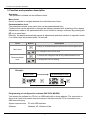
By pressing the [▲] & [▼] buttons during standard parameterization for one second, the
display switches to the extended parameterization mode. Operation is the same as in standard
parameterization.
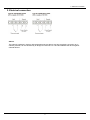
Menu level
Parameterization level
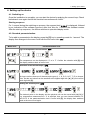
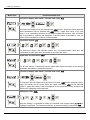
4.3.1. MIN/MAX value inquiry - Assignment of key functions, Tast:
Here, you can enter for the operating mode either a MIN/MAX value inquiry or a
threshold value correction on the arrow keys.
If the MIN/MAX memory is activated with EHER, the measured MIN/MAX values will be
saved during operation and can be called up via the arrow keys [▲] [▼]. The values
are lost if the device is restarted.
If the threshold value correction LI.1 is selected, the limit values can be changed during
operation without hindering the operating procedure.
If No is parameterized, the arrow keys [▼] [▲] have no function in operating mode.
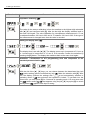
4.3.2. Flashing of display, FLAS:
Here, flashing of the display can be added as an extra alarm function, either to the first
limit value (select: LI-1), the second limit value (select: LI-2) or to both limit values
(select: LI-12). With No (works setting), no flashing is assigned at all.
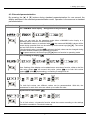
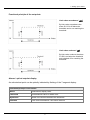
4.3.3. Limit values / Limits, LI-1:
For both limit values, two different values can be parameterized. With this, the
parameters for each limit value are called up one after the other.
Hysteresis for limit values, HY-1:
For all limit values, a hysteresis function exists that reacts according to the settings
(threshold exceedance / threshold undercut).
7