1
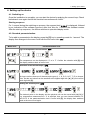
4. Setting up the device
Menu level
Parameterization level
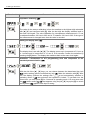
Impedance matching, dot:
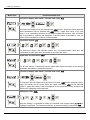
The value for the sensor calibration is from the smallest to the highest digit selectable
with [▲] [▼] and confirmed with [P]. After the last digit the display switches back to
the menu level again. The value calibration for a temperature measurement in °C can
be adjusted between -20.0 and +20.0 and in °F between -36.0 and +36.0. If the type of
the measurement is changed later, then the value is rounded.
Setting the display time, SEC:
then
The display time is set with [▲] [▼]. The display moves up in increments of 0.1 sec up
to 1 second and in increments of 1.0 sec to 10.0 seconds. Confirm the selection by
pressing the [P] button. The display then switches back to the menu level again.
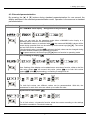
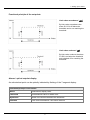
Activation / deactivation of the programming lock and completion of the
standard parameterization, run:
With the aid of the [▲] [▼] keys, you can choose between the deactivated key lock
Uloc (works setting) and the activated key lock Loc. Make the selection with [P]. After
this, the display confirms the settings with "- - - -", and automatically switches to
operating mode. If Loc was selected, the keyboard is locked. To get back into the
menu level, you must press [P] for 3 seconds in operating mode. You must now enter
the CODE (works setting 1 2 3 4) that appears using the [▲] [▼] keys plus [P] to unlock
the keyboard. FAIL appears if the input is wrong.
6