1
Guided Tour
3. Surfing the Internet
Before surfing the Internet, you need to make sure you have a working Internet connection. In case
you are not connected yet, consult Section 6.2, “Connect to the Internet” [p. 47]
.
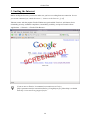
Xubuntu comes with the popular Firefox Webbrowser preinstalled. Firefox is well-known for its
outstanding security, standards compliance, extensibility, usability, and speed. Launch it from
Applications → Network → Firefox Web Browser .
If you are new to Firefox, I recommend An introduction to Firefox
[http://opensourcearticles.com/articles/firefox_15/english/part_01]. More help is available
from http://www.mozilla.org/support/firefox/.
20