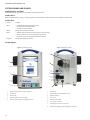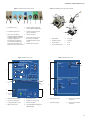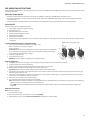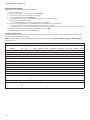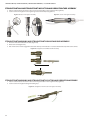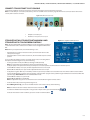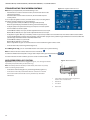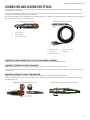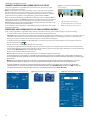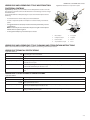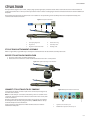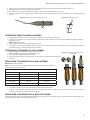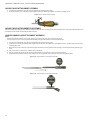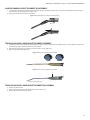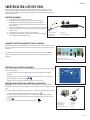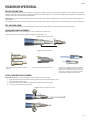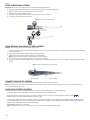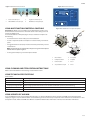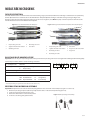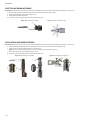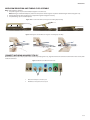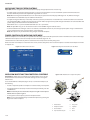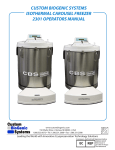
1
Integrated Power Console (IPC®) System MODEL: EC300 User’s Guide CUSTOMER SERVICE For further information regarding the use of this product or to report any problems, please contact Medtronic using the appropriate information provided on the blue and white contact information card packaged with each device; or contact your local distributor. Medtronic Powered Surgical Solutions 4620 North Beach Street Fort Worth, Texas 76137 USA www.medtronic.com US Help Line 1-800-468-9710 International Service International Customers should contact their local Medtronic Neurologic Technologies representative. The information contained in this document is accurate at time of publication. Medtronic reserves the right to make changes to the product described in this manual without notice and without incorporating those changes to products already sold. Released documents are available to view or print at manuals.medtronic.com. The following are trademarks or registered trademarks of Medtronic, Inc. in the United States and other countries: CD HORIZON®, Endo-Scrub®, Hydrodebrider®, Indigo™, Intelliflow®, IPC®, Legend®, Legend EHS®, Legend EHS Stylus©, Magnum®, Midas Rex®, Mednext®, NIM®, NIM-Eclipse®, Powerease™, Skeeter®, SOLERA®, StraightShot®, Stylus Touch®, Triton®, TSRH® 3Dx™ , Visao® and XPS®. All other trademarks, service marks, registered trademarks, or registered service marks are the property of their respective owners in the United States and other countries. TABLE OF CONTENTS SYMBOLS...................................................................................................................................................... 1-1 GLOSSARY.................................................................................................................................................... 1-2 INDICATIONS FOR USE................................................................................................................................ 1-2 DEVICE DESCRIPTION................................................................................................................................. 1-2 CONTRAINDICATIONS................................................................................................................................. 1-2 WARNINGS.................................................................................................................................................... 1-2 PRECAUTIONS.............................................................................................................................................. 1-4 SYSTEM REQUIREMENTS AND SPECIFICATIONS................................................................................................................................. 1-5 SYSTEM SOUNDS AND FIGURES................................................................................................................ 1-6 PRE-OPERATING INSTRUCTIONS............................................................................................................... 1-9 When the System Arrives......................................................................................................................................................................... 1-9 Set up the IPC.............................................................................................................................................................................................. 1-9 Install the Pump Cartridges or Irrigation Tubing............................................................................................................................ 1-9 Prepare the IPC for Use............................................................................................................................................................................. 1-9 Calibrate Touchscreen.............................................................................................................................................................................. 1-9 Change System Settings........................................................................................................................................................................1-10 Set up and Prime Pumps.......................................................................................................................................................................1-11 Confirm System Operation...................................................................................................................................................................1-11 IPC COMPONENTS.....................................................................................................................................1-12 Auxillary Power Console........................................................................................................................................................................1-12 Multifunction Footpedal........................................................................................................................................................................1-12 Y-Splitter......................................................................................................................................................................................................1-12 IntelliFlow Irrigation Remote Control...............................................................................................................................................1-12 GUIDANCE AND MANUFACTURER’S DECLARATION - ELECTROMAGNETIC IMMUNITY....................1-13 LIMITED WARRANTY..................................................................................................................................1-15 FOR ITEMS CONTAMINATED WITH TSE AGENTS....................................................................................1-15 TRITON ELECTRIC HIGH-TORQUE HANDPIECE......................................................................................... 2-1 SUCTION IRRIGATOR................................................................................................................................... 3-1 ENDO-SCRUB 2............................................................................................................................................. 4-1 SPINE SHAVER (SC1) HANDPIECE.............................................................................................................. 5-1 STRAIGHTSHOT M5, STRAIGHTSHOT M4, STRAIGHTSHOT MAGNUM II AND STRAIGHTSHOT III..... 6-1 LEGEND EHS AND LEGEND EHS STYLUS................................................................................................... 7-1 STYLUS TOUCH............................................................................................................................................. 8-1 LEGEND EHS, LEGEND EHS STYLUS AND STYLUS TOUCH ATTACHMENTS........................................... 9-1 SKEETER ULTRA-LITE OTO-TOOL.............................................................................................................10-1 VISAO HIGH-SPEED DRILL........................................................................................................................11-1 INDIGO HIGH-SPEED OTOLOGIC DRILL...................................................................................................12-1 MIDAS REX MICROSAWS...........................................................................................................................13-1 POWEREASE DRIVER.................................................................................................................................14-1 TROUBLESHOOTING AND ERROR CODES.................................................................................................A-1 CLEANING AND STERILIZATION.................................................................................................................B-1 Post-Operative Instructions.................................................................................................................................................................... B-1 Triton Electric High-Torque Handpiece.............................................................................................................................................. M000030A322 Endo-Scrub 2........................................................................................................................................................................................................... 68E4005 Midas Rex Spine Shaver, StraightShot M5, StraightShot M4, StraightShot Magnum II or StraightShot III............................ 68E3282 Legend EHS and Legend EHS Stylus................................................................................................................................................... M000030A234 Stylus Touch............................................................................................................................................................................................................. 68E4132 Legend Attachments................................................................................................................................................................................ M000030A235 Skeeter Oto-flex Burs............................................................................................................................................................................................ 68E3968 Skeeter Handpiece................................................................................................................................................................................................. 68E3969 Visao............................................................................................................................................................................................................................ 68E3281 Indigo High-Speed Otologic Drill..................................................................................................................................................................... 68E4187 Indigo High-Speed Otologic Drill Attachments.......................................................................................................................................... 68E4188 Microsaws..................................................................................................................................................................................................... M000030A231 POWEREASE Driver................................................................................................................................................................................................ 68E4189 INTEGRATED POWER CONSOLE (IPC) SYMBOLS The following symbols can appear on this device and related packaging. On Off Button Package Contents Follow Instructions For Use Conforms to ANSI/AAMI ES 60601-1, IEC/EN 60601-1. Certified to CSA C22.2 No.601.1 105345 EMC Compliance Mark Do Not Oil Do Not Immerse Oscillate Caution: Federal law (USA) restricts this device to sale by or on the order of a physician. EUR · USA · JPN · AUS ACC Fuse IPX1 Protected Against Vertical Water Drops Use By Date IPX7 Protected Against The Effects Of Temporary Immersion In Water F Forward Type BF Applied Part R Reverse Accessory EC REP Authorized Representative in the European Communicty Precaution: Pinch Hazard. Keep Fingers Clear Of Rollers PHT Contains DEHP (di-2-ethyl hexyl phthalate) DEHP STERILE >120 VAC AC Power Start/Stop Foot Pedal Connector Protective Earth Output RF Transmitter (Interference May Occur) Fine Irrigant Adjustment Equaipotential Ground Connector Is Approximately Equal To Consult Instructions for Use Left Foot Control Unit Button / Mode Button Use With Non-Sterile BUR Stim Bur Connector Right Foot Control Unit Button / Control Button RoHS - Environmental friendly use period - China (SJ/ T11364-2006) Quantity NIM NIM Console Connector Top Foot Control Unit Button / Handpiece Button Do Not Dispose Of This Product In The Unsorted Municipal Waste Stream. Dispose Of This Product Accordingto Local Regulations. See Recycling. Medtronic.Com For Instructions On Proper Disposal Of This Product. EHS Electrical High Speed Handpiece Connector Locked World Wide Standard for Medical Tubing Diameter Unlocked If the single use symbols is on the device label then this device is designed for single patient use only. Do not reuse, reprocess, or resterilize this product. Reuse, reprocessing, or resterilization may compromise the structural integrity of the device and/or create a risk of contamination of the device, which could result in patient injury, illness, or death. Applied Party Duty Cycle Date of Manufacture Handpiece Catalog Number Manufacturer Skeeter Not Greater Than 120vac Caution ON <120s OFF >180s REF Fr Accessory Adapter Attachment Bone Mill Brush LOT SN Lot Number STERILE R Serial Number <XX° C XX° C XX° C >X° C Sterilized by Radiation 1 Pump Head 1 Control Unit Temperature Limitation 2 Pump Head 2 Instrument Case Dissecting Tool Lubricant/Diffuser Motor !USA USA Only Ergonomically engineered REFURBISHED Refurbished Multi-Use Disposable Attachment Regulator 1-1 INTEGRATED POWER CONSOLE (IPC) GLOSSARY The following words and acronyms may be used in this guide. FCU Foot Control Unit IPC Integrated Power Console I.V. Intravenous NIM Nerve Integrity Monitor - One or all of the Nerve Integrity Monitor units: NIM-Response 2.0, NIM-Neuro 2.0, NIM-Response 3.0 and NIM-Neuro 3.0 NIM-ECLIPSE Nerve Integrity Monitor for spinal surgeries XPS Xomed Power System FWD Forward - Rotation is clockwise OSC Oscillate REV Reverse - Rotation is counter-clockwise INDICATIONS FOR USE The IPC is indicated for the incision / cutting, removal, drilling, and sawing of soft and hard tissue and bone, and biomaterials in Neurosurgical (Cranial, Craniofacial) Orthopedic, Arthroscopic, Spinal, Sternotomy, and General surgical procedures. DEVICE DESCRIPTION The IPC System is a powered microdebrider, drill and saw system that will remove soft tissue, hard tissue and bone during surgical procedures. The system consists of a power control console, footpedal, connection cables and assorted handpieces to drive various burs, blades, drills, rasps, cannulae and saws. It includes integrated irrigation pumps for irrigation of blades, burts and for motor coolant. In addition to the handpieces and pumps there is a connection for continuous stimulation of the Visao straight burs that enables nerve integrity monitoring during surgical procedures. The Nerve Integrity Monitor (NIM) is a separate device that stimulates and monitors the nerve. This system has connections that allow the NIM to be connected with the Visao handpiece and Stimulating Bur Guard, enabling the NIM to stimulate and monitor the nerve at the surgical site. The system can be used to clear the end of a rigid rod endocscope in order to maintain good visualization of endoscopic procedures without having to remove the scope from the surgical site. This device is intended for use by physicians trained in the procedures described. CONTRAINDICATIONS The IPC system is contraindicated for arthroscopic microdiscectomy in individuals with the following: • Severe/progressive neurological deficits • Cauda equine syndrome • Active infection. Arthroscopic microdiscectomy is not indicated for individuals with sequestered disc fragments, discogenic pain, internal disc destruction, or lumbago. WARNINGS System Warnings W1 W2 W3 W4 W5 W6 W7 W8 W9 W10 W11 W12 W13 W14 W15 1-2 It is important that the IPC system operator be familiar with the system User’s Guide, its precautions, procedures and safety issues. Do not use the IPC POWEREASE system in the presence of flammable anesthetics. Avoid potential ignition or explosion of gases. When not operating handpiece, eliminate accidental foot control activation. Control energy to and through the handpiece to prevent unintended tissue, bone, or nerve resection. Disconnect power to the IPC system before cleaning the unit to avoid electrical macro shock. Do not attach unapproved components to the IPC system to avoid electrical macro shock. To avoid the risk of electrical shock, achieve electrical grounding reliability with proper connections. Connect the IPC system to hospital grade receptacles only. This medical device complies with EN60601-1-2 safety standard for electromagnetic compatibility, requirements and test. However, if this equipment is operated in the presence of high levels of electromagnetic interference (EMI) or highly sensitive equipment, interference may be encountered and the user should take whatever steps are necessary to eliminate or reduce the source of the interference. Diminished performance may lengthen operating time for anesthetized patient. Medical Electrical Equipment needs special Precautions regarding EMC and needs to be installed and put into service according to the EMC information provided in this Guide. Portable and mobile RF communications equipment can affect Medical Electrical Equipment. Do not operate the IPC POWEREASE system in the presence of Magnetic Resonance Imaging devices. Use of accessories and cables other than those specified and sold by Medtronic may result in increased emissions and decreased immunity of this unit. The IPC system should not be used adjacent to or stacked with other equipment. If adjacent or stacked use is necessary, the IPC system should be observed to verify normal operation in the configuration in which it will be used. Do not attempt to run the IPC POWEREASE system handpiece immediately after autoclaving. Allow an adequate “cool down” period (Typically 1 hour). Consult the Legend Bone Mill product insert before use with the Integrated Power Console system. For metal transection, observe the following safety precautions: W15a Eye wear protection is essential. W15b Irrigate well to cool the cutting surfaces. W15c Protect the wound site from metal debris. W15d Use a clamp or grasping device to control loose fragments during transection of any metal component. INTEGRATED POWER CONSOLE (IPC) W16 Do not operate the IPC POWEREASE system without eye protection. W17 All service must be performed by Medtronic qualified personnel only. W18 Repair and/or modification to the IPC system by anyone other than qualified service personnel may significantly compromise the unit’s ability to perform effectively and/or void the equipment warranty. Component Warnings W19 Do not use any parts other than Medtronic system components as damage or substandard performance could result. W20 Always inspect the components before and after use for any damage. If damage is observed, do not use damaged part until it is repaired or replaced. Damaged parts may deposit metal shavings on surgical site. W21 When precise location of blade tip is required, engage the rotation lock on the handpiece, then calibrate and verify the blade tip on Image Guided Surgery (IGS) system. Always lock M4 handpiece when driving non-rotatable blades to maintain their IGS calibration. W22 Employ visualization, including use of imaging techniques (e.g., fluoroscopy, image guided surgery) when using rotating powered accessories. Discontinue powered application in the event of lack of visualization of surgical site. W23 Midas Rex Variable Exposure attachments. Surgeons should familiarize themselves with the performance of dissecting tools before use, and should explore the effect of various levels of tool exposure on dissection stability. If the tool exhibits excessive chatter, vibration, or movement, decrease the tool exposure. W24 Motors and attachments may fail due to extended use and allow a component to detach and fall from the motor or attachment, causing patient injury. W25 Electrical contacts must be dry prior to use. W26 Heavy side loads and/or long operating periods may cause the device to overheat. W27 Do not use an overheated device, as it may cause thermal injury to the patient or operator. W28 Use adequate irrigation. The use of a tool without irrigation may cause an inordinate amount of heat buildup resulting in a thermal injury to tissue. Depending on the amount of irrigation used, the drill bits and saw blades can achieve temperatures in excess of 50°C. W29 Do not attempt to change a dissecting tool, saw blade, or attachment while the motor is running, or when the motor or attachment is in an overheated state. W30 Do not immerse the system components, except as noted. W31 Do not place motor, attachment and tool on the patient or in an unsecured location during surgery. W32 A system that is not functioning properly should not be used until all necessary repairs have been made and the unit is tested to ensure that it is functioning in accordance with Medtronic specifications. W33 Match the nomenclature and color code on the tool packaging to the same nomenclature and color code on the Attachment. W34 Make sure that the attachment is still in the locked position after each adjustment of the tool exposure, as attempting to increase the tool exposure too far, may result in the attachment accidentally being unlocked. W35 Midas Rex Legend EHS Motor and Midas Rex Legend EHS Stylus Motor should only be operated when the attachment is in the locked position. W36 Smoke and/or excessive heat may be generated if attachment is not in the fully locked position. This may result in thermal injury to the surgeon or staff. W37 The Indigo and Legend EHS motors will not run properly unless the attachment is in the locked position. W38 DO NOT change accessory with handpiece running to prevent laceration of user and cross-contamination through compromised glove. W39 Remove Legend Footed Attachments cautiously and slowly as per instructions to avoid injury to the operator. W40 DO NOT modify accessories used with the handpiece. Performance could be diminished with modified accessories. W41 The safe use of the Endo-Scrub 2 System in procedures where surgical lasers are also employed has not been clinically demonstrated. W42 In order to ensure compliance with requirements of IEC 60601-1, use a Medtronic approved power cable. W43 To avoid the risk of electric shock, this equipment must only be connected to a supply main with protective earth. W44 Keep NIM Muting Probe cable away from IPC system cables. W45 Verify reusable device was sterilized prior to use. If not sterilized, do not use. Disposable Warnings W46 Tools are available for resection of soft tissue and bone for surgical procedures. Use of tools depends on the intended application and patient needs. Sharpcutting powered tools induce bleeding and removal of significant tissue and bone. W47 Use methods at the operative site to control bleeding that do not compromise patient safety during at-risk surgery. W48 Always keep the cutting area of the tool/saw blade away from fingers and loose clothing. Prevent laceration of user and cross-contamination through compromised glove. W49 Operate the tool only after the appropriate anatomical landmarks and the intended surgical site have been confirmed. W50 Use care in application of the moving cutting end to only appropriate anatomical landmarks and the intended surgical site when using powered accessories. W51 Insertion of metal objects in accessory tip may cause the accessory to break leaving fragments in the wound. The fragments may be difficult to remove, causing irritation, inflammation and foreign-body response at surgical site. W52 Bending or prying may break the accessory, causing harm to patient or staff. W53 Do not use excessive force to pry or push bone with the attachment, tool or blade during dissection. W54 A tool’s size and geometry may create excessive vibration at certain speeds. Increase or decrease speed on console. Change to a new tool to prevent unintended tissue removal from patient. W55 Test for wobble at desired speed prior to use. Discontinue use of accessory if tip begins to wobble and replace accessory to prevent unintended tissue removal from patient. W56 Eccentricity of the tool can cause tool vibration and may result in excess tissue and bone destruction and hearing damage. W57 Excessive noise from the tool when drilling close to the cochlea or ossicular chain may cause hearing damage. W58 CONSULT the cranial perforator device labeling for the recommended speed specifications. W59 Tools with “L” identification are longer tools intended for light bone dissection. The increased tool head/stem configuration may affect dissection stability. W60 Tool flutes and blade teeth are sharp and may perforate surgical gloves. Tools/blades may be grasped with a hemostat to aid in installation and removal. W61 DO NOT attempt to resharpen used tools. Worn tools should be replaced with new ones frequently to ensure effective cutting and control. W62 Carefully inspect tool both prior to and following each use for signs of excessive wear, fragmentation, eccentricities or other defects. Replace any suspicious tools with a new one prior to use. W63 Excessive pressure applied to bur may cause bur fracture. Should a tool fracture in use, extreme care must be exercised to ensure that all fragments of the tool are retrieved and removed from the patient. Unremoved tool fragments may cause tissue damage to the patient. W64 Do not use metal-cutting tools on bone. W65 Use only rotary tools specifically designed for use with this drill system. W66 When using non-rotatable tools, ensure rotation lock is engaged to prevent inadvertent rotation. W67 The use of powered reciprocating instruments may result in vibration / related injury. W68 Powered blades should be operated in the oscillate mode only. Operating in the forward mode may cause damage to the blade. W69 Do not attempt to sterilize disposable devices. The disposables are packed sterile and are not intended for repeat use. To prevent contamination, use only once. 1-3 INTEGRATED POWER CONSOLE (IPC) W70 W71 W72 W73 W74 W75 W76 W77 W78 W79 W80 W81 W82 W83 W84 W85 Any tubing or other tip protectors used during shipping must be removed prior to cleaning and sterilization. Do not use accessory if package is opened or damaged. Broken seal offers no protection against cross-contamination. Properly dispose of single-use devices removed from sterile packages. Devices lose sterility upon removal from packaging. Do not use dull, damaged or bent tools. Use of dull tools can reduce handpiece effectiveness and cause the handpiece temperature to increase. T&A Blades: Gently remove the inner tube from the outer tube. The inner tube may elongate upon removal from the outer tube. If this occurs, the inner tube may not lock properly into the handpiece or the blade may not work properly. T&A Blades: Rotate the inner tube when removing and inserting it in the outer tubes to prevent damage to the internal seal. If the seal is damaged, the blade will leak at the handpiece. Always ensure that the drill is securely engaged into the handpiece prior to operating the system. Always examine operation of each tool in a handpiece before use. Powered burs and drills should be operated in the forward mode only. This system requires insulated connectors for the StraightShot M4 Microdebrider, StraightShot Magnum II Microdebrider, StraightShot III Microdebrider, Midas Rex SC1, Visao, or Skeeter handpieces and the Multi Function Foot Control Unit. Sterilize and dry reusable device before storing the system. Decrease likelihood of cross-contamination with timely sterilization. After each procedure, properly clean all reusable system components. Auxiliary Power Outlet with protective cover is for use with the Hydrodebrider or Bone Mill consoles only. Place Stylus Touch in safe mode while not in use. Do not place Stylus Touch handpiece in the proximity of magnetic field, such as magnetic drape and MRI equipment, to avoid inadvertent handpiece activation. Do not apply excessive side loading. Excessive side loading could cause angled attachments to unlock accidentally from motor. PRECAUTIONS P1 P2 P3 P4 P5 P6 P7 P8 P9 P10 P11 P12 P13 P14 P15 P16 P17 P18 P19 P20 P21 P22 P23 P24 P25 1-4 PRIME/FLUSH Priming is a feature designed to purge air out of the tubing set(s) during setup. The first time a Prime or Flush button is pressed it will turn on pump 1 and/or 2 long enough to purge air out of the tubing set(s). Turning power Off and On resets the PRIME feature. Once pressed all Prime buttons will change to Flush buttons. To prevent damage to curved tools, disconnect suction tube prior to changing tool during procedure. When using an angled attachment, hold the handpiece assembly by the attachment so that the attachment does not inadvertently loosen from the handpiece. For Legend tools only: If a tool package is opened, but the tool is not used or contaminated, the tool can be re-sterilized. Remove tool from original packaging and place into an approved autoclave package. Steam sterilize as follows: High-Vacuum Steam 132°C for 5 minutes Gravity Displacement 132°C for 15 minutes The re-sterilized tool must be used promptly following re-sterilization. If rust or corrosion is encountered after re-sterilization, do not use the re-sterilized tool. DO NOT run the 16-MF attachment with operating speed above 62,000 rpm. This may cause over heating and damage to internal gears of attachment. DO NOT use twist drill or Contra-Angle tool at an operating speed over 62,000 rpm. Do not attempt to disconnect the cable from the Midas Rex Legend EHS Stylus Motor. Do not kink cables. Inspect cables and pins for cracks, tears or corrosion. Do not use anti-fog on scope or sheath, as weeping or leaking may result. Disconnect cable from Midas Rex Legend EHS motor prior to sterilization. The use of a washer-disinfector for cleaning may cause a pre-mature degradation in performance. Remove devices from instrument case before placing into washer disinfector and allow devices to drain. Orient devices in the washer-disinfector by following manufacturer recommendations. DO NOT use low-temperature hydrogen peroxide gas plasma sterilization due to the lumen internal diameter and length restrictions. DO NOT use low-temperature liquid peracetic acid sterilization due to immersion procedure. DO NOT steam or EO sterilize the Legend Attachment Cleaning Nozzle. Remove and discard accessories following local regulations for proper disposal of contaminated materials. Disposable devices are for single-use only. Clean the motor and cable while still connected together. This will help to reduce ingress of debris. Use ONLY recommended cleaning agents. Do not use excessive force to insert the endoscope into the Endo-Scrub 2 sheath. This will damage the endoscope as well as the Endo-Scrub 2 sheath. If the endoscope tip can be seen extending beyond the tip of the Endo-Scrub 2 sheath, then the sheath has been damaged. Damaged product must be immediately discarded. When using a Y-Splitter, only one Multifunction Footpedal shall be active at a time. Only one Y-Splitter shall be used at a time. Ensure the blade or bur is fully engaged in the microdebrider. For blades, verify the tip is fully engaged with the outer cannula prior to use. INTEGRATED POWER CONSOLE (IPC) SYSTEM REQUIREMENTS AND SPECIFICATIONS Console Specifications Functional Standards for Electrical Systems ANSI/AAMI ES60601-1 Medical electrical equipment - Part 1: General requirements for basic safety and essential performance 2005 IEC 60601-1 Medical electrical equipment - Part 1: General requirements for basic safety and essential performance 2005 EN 60601-1 Medical electrical equipment - Part 1: General requirements for basic safety and essential performance (IEC 60601-1:2005) 2006 IEC 60601-1-4 Medical electrical equipment - Part 1: General Requirements for Safety, Part 4: Programmable Electrical Medical Systems 2000 EN 60601-1-2 Medical electrical equipment - Part 1-2: General Requirements for Safety - Collateral Standard: Electromagnetic Compatibility - Requirements and Tests 2001/ A1: 2006 CSA-C22.2 No. 601.1 Medical Electrical Equipment - Part 1: General Requirements for Safety 2005 Physical Dimensions Size 277 mm W x 353 mm H x 267 mm D Weight 7.3 kg Operational Environment Temperature +10°C to +33°C Humidity 30% to 75% RH Barometric Pressure 700 - 1060 hPa Transport and Storage Environment Temperature -40°C to +70°C Humidity 10% to 95% RH Barometric Pressure 500 to 1060 hPa Display / Touchscreen Type High contrast, digital, graphic color, visible in complete darkness Resolution Display 21 cm diagonal, resolution 480 X 640 pixels Audio Output Baseline Audio Sound Level 60 dBA minimum SPL (1 m) Electrical Input Voltage 100 V-240 V ± 10% Frequency 50/60 Hz Power Consumption 500 VA Auxiliary AC output 200 VA Max. Internal Fuse 5 x 20 mm T. L. 5 A, 250 V Medtronic Xomed P/N 11270066 Duty Cycle for Applied Part Maximum On Time 120 Seconds Minimum Off Time 180 Seconds Power Cord Product Numbers North America: USA, Barbados, Belize, Bolivia, Canada, Columbia, Ecuador, Venezuela Standard P/N EA600 or 1895820 6 meter P/N EA650 or 189721 China P/N EA604 Argentina P/N EA608 Australia, New Zealand P/N EA605 United Kingdom, Ireland, Hong Kong, Malaysia, Singapore P/N EA606 or 1895821 India, South Africa P/N EA607 Israel P/N EA609 Japan P/N EA603 or 1895823 Continental Europe: Austria, Belgium, Finland, France, Germany, Greece, Korea, Luxembourg, Netherlands, Norway, Portugal, Spain, Sweden P/N EA602 or 1895822 Switzerland P/N EA601 Denmark P/N EA610 Italy, Chile P/N EA611 1-5 INTEGRATED POWER CONSOLE (IPC) SYSTEM SOUNDS AND FIGURES Audible Alarms and Tones The following alarms and tones can sound while using the IPC Console. Audible Alarm When the system detects an error, a message appears on the touchscreen and the system emits a sequence of three tones. Audible Tones IPC Tone Cause(s) 1 Tone • Confirmation of change button pressed. • Change from forward to oscillate. • Change of active handpiece. 2 Tones Change from oscillate to forward. 3 Tones • Audible Alarm. Error detected. See screen for error message. • Active handpiece is in reverse and foot pedal pressed. • First time accessory changes from forward to reverse. Long Tone Change from handpiece to drill. System Figures Figure 1-1. IPC Console Front Figure 1-2. IPC Console Back 1 1 2 2 3 4 3 5 6 4 5 7 1-6 8 1 Pump 1: Coolant, lense cleaning or irrigation 1 Pole clamp 2 Touchscreen 2 Compact flash card port (Medtronic Use) 3 Power on/off 3 Manual start/stop 4 Pump 2: Irrigation or lense cleaning 4 Fuse access 5 Console connector panel for peripheral devices 5 Auxillary power outlet 6 Endo-Scrub 2 connector 7 Hospital grade power cord connector 8 Equipotential. Apply potential equalization conductor. INTEGRATED POWER CONSOLE (IPC) Figure 1-4. Multifunction Footpedal & Y-Splitter Figure 1-3. IPC Console Connector Panel 2 6 1 3 1 2 3 4 5 6 7 4 1 Legend EHS motor 4 Stimulus input from patient interface (NIM or NIM-Eclipse) 2 Legend EHS Stylus motor 5 Stimulus output to stim bur guard or Powerease 3 Spine shaver handpiece, StraightShot M5 microdebrider, StraightShot M4 microdebrider, StraightShot Magnum II microdebrider, StraightShot III microdebrider, Stylus Touch motor, Visao drill, Indigo drill, Midas Rex microsaws, Triton drill 6 Skeeter handpiece 7 Endo-Scrub 2 finger switch, Endo-Scrub 2 footpedal, Intelliflow irrigation remote control 8 4 Multifunction footpedal Acceleration 2 100 % Foot pedal 2 Handpiece button 6 Y-Splitter 3 Control button 7 Port 1 4 Slip-resistant foot pad 8 Port 2 Pump 1 Prime None REV Finger Foot + Endo-Scrub® 2 1 2 3 Both Prime Pump 2 8 (Handpiece Name) 3 7 Prime None None 4 Endo-Scrub® 2 M4 M4 Irrigation Irrigation EndoScrub 2 4 Pumps 5 5 FWD Control 0 Mode button + Pump 2 cc/min 1 Figure 1-6. IPC Pumps Screen Mode + 60000 RPM 2 1 5 Handpiece Name Speed 8 3 Figure 1-5. IPC Touchscreen 1 7 5 8 Flow ? Help 3 On Setting 6 + Prime 1 Displays active handpiece 5 Opens Help screen 2 Accessory control panel 6 Irrigation accessory panel 3 Footpedal variable control 7 Inactive handpiece 4 Opens Pumps screen 8 Set active handpiece settings as default settings 1 Close Pumps screen 3 Pump 1 panel available accessories 2 Prime/Flush pump 4 Pump 2 panel available accessories 1-7 INTEGRATED POWER CONSOLE (IPC) Figure 1-7. Operating Room Setup Figure 1-8. IPC System Configuration 3 2 5 4 1 6 10 1 2 11 3 9 7 8 1 Mode anesthesia equipment 6 Microscope 2 IPC system 7 Surgeon 3 Nursing supplies/Surgical instruments 8 Electro-Surgical unit 4 Scrub nurse 9 Anesthesiologist 5 NIM Monitor 10 Patient 4 10 9 5 Figure 1-9. IntelliFlow Remote Control 6 8 1 2 7 3 Irrigation and coolant bags 7 Minimum base diameter is 53 cm. 2 Irrigation pole 8 Irrigation pole basket IPC console 9 Power cord 1 Pause/On-Off 3 2 Increase/Decrease Fine Adjustment 4 Console connector panel 10 Pump 2 Increase/Decrease Coarse Adjustment OR Select stainless steel tubing size (French size) for suction irrigator. 5 Accessory cables 11 Pump 1 6 Maximum height from floor is 89 cm. 3 1-8 1 INTEGRATED POWER CONSOLE (IPC) PRE-OPERATING INSTRUCTIONS The following are general IPC pre-operating instructions. “Accessories or Additional Devices Operating Instructions” contains individual accessory operating instructions. When the System Arrives • Verify the contents of the box match the packing slip. If incomplete or damaged, notify Medtronic Customer Service. • If container is damaged, or cushioning material shows stress, notify carrier and Medtronic Customer Service. Keep shipping materials for carrier inspection. • Save the cartons and packing material. If the instrument is to be shipped the shipping package will provide proper protection. Set up the IPC Refer the related topics for detailed instruction. 1. 2. 3. 4. 5. 6. 7. Install pump cartridges or irrigation tubing. Prepare IPC for use. Calibrate touchscreen, if necessary. Change system settings, if necessary. Set up and prime pumps. Confirm system operation. Press the manual start/stop button on the back of the console (Figure 1-2) and verify you can start/stop the handpiece, irrigiation and/or coolant flow. Figure 1-10. Install Pump Cartridge Install the Pump Cartridges or Irrigation Tubing 1. Locate the correct pump and lift up the lock (Figure 1-10). Pump 1: Coolant, lens cleaning or irrgation Pump 2: Irrigation Important: The number on the pump must match the number on the cartridge (either 1/1 or 2/2). If the cartridge does not have a pump designator number, use the Pump Setup Screen to install the pump cartridge. 2. Insert the pump cartridge. 3. Snap the pump lock shut. Warning: Ensure the pump cartridge does not crimp the tubing. 1 2 3 Prepare IPC for Use 1. 2. 3. 4. 5. 6. 7. 8. Verify Operation Room set up (Figure 1-7). The surgeon may have preferences to the location and visibility. Verify the wheels are locked on the IPC cart. Inspect all components for damage and determine if the system is ready for use. Mount the IPC and irrigation/coolant bags on the IV pole (Figure 1-8). Important: Mount irrigant and coolant bags above the IPC to ensure adequate flow. Plug the IPC into the power source. Position the IPC so that it does not obstruct the power source for the purpose of disconnecting the Main voltage by the power cord. Locate the correct footpedal or accessory connection port on the connector panel (Figure 1-3), align the mark on the connector to the mark on the console, and then insert the connector. Connect suction, cooling and/or irrigation tubing. Turn on the IPC and verify the system passes the self-test. Note: If the IPC does not detect a handpiece or footpedal the Connect Handpiece/Connect Footswitch screen appears. Do the following: • Verify the cable is connected to the correct connection port. • Press [OK] in the Connect Handpiece/Connect Footswitch message window to continue use of the IPC without the handpiece or footpedal. Calibrate Touchscreen Note: This step is optional. 1. Turn on the IPC console. 2. When the system starts, on the Splash screen, press [Settings]. 3. On the Settings screen, press Touch Screen Calibration and follow the screen prompts. 1-9 INTEGRATED POWER CONSOLE (IPC) Change System Settings Note: During surgery, system settings can be overwritten. 1. 2. 3. 4. Turn on the IPC console. While the system starts, on the Splash screen, press [Settings]. To change the language, press the appropriate language. To change the default settings, press [Default]. • On the Default screen, press the forward or backward arrow to change the accessory. • Make changes to the default settings. • To confirm system settings and return to the Splash screen, press [OK]. 5. For accessories with audible tones, press the REV Audible Tones button to control the following: • The system delivers one set of reverse beeps when the reverse mode is activated. • The system delivers one set of reverse beeps the first time the drill is used in reverse mode after the reverse mode has been activated. 6. To confirm system settings and continue to the IPC touchscreen, press [OK]. 7. To restore settings to factory default, press [Restore]. Handpiece Default Settings The system configuration is dependent on the handpiece(s) connected to the console. The following table defines the default configurations, default settings (X) and default options (O). Note: During use, update the default settings for the active handpiece by pressing the set active handpiece settings as default settings button (Figure 1-5). Table 1. IPC Touchscreen Default Configurations Speed Handpiece rpm Visao 80000 Indigo 52000 Midas Rex SC1 cpm Mode or Mode Select Switch % Forward Oscillate X X 3400 Reverse Acceleration Deceleration Size Flow Irrigation O 30 O 30 O X 60 StraightShot M5 5000 O X 05 StraightShot M4 5000 O X 05 StraightShot III, Magnum II 5000 O X Legend EHS Stylus 60000 X O Legend EHS 70000 X O Stylus Touch 60000 X Skeeter 16000 X 30 45% 45% O 80% 100% O v 0 0 0 0 Endo-Scrub 2 3 Suction Irrigator 8 Triton 100 Powerease 200 250 1-10 X 100 120 50% X 100 Midas Rex Microsaws Control 0 X X X Finger INTEGRATED POWER CONSOLE (IPC) Set up and Prime Pumps • The IPC turns on pump 1 and/or 2 long enough to purge air out of the tubing set(s) the first time the prime button is pressed. • The IPC resets the prime feature when you turn IPC power Off and On. • After you prime the pump, the prime button and functionality become flush functionality. 1. Connect tubing from an IPC cartridge to irrigation or coolant tubing on an accessory. 2. On the irrigation tubing, turn the clamp to OPEN. 3. If an accessory uses the clear drip chamber (Visao), fill the clear drip chamber with coolant. To fill, squeeze and release the chamber until full. 4. On the IPC touchscreen (Figure 1-5), press the pumps button. Note: The IPC pumps screen is also available from the Connect Handpiece/Connect Footswitch screen which the system displays during IPC preparation for use if a handpiece or footswitch is not detected by the system. 5. On the IPC pumps screen (Figure 1-6), select the accessory for each pump. 6. For each pump, press the prime button and verify the following: • Pump(s) run until air is completely purged from tubing. • Small amount of lubricate flows at the tip of the irrigation device. • Pump(s) turns off. 7. Press the close button. Pump Default Configurations The pump configuration is dependent on the handpiece(s) connected to the console. The following table defines the pump default settings (X) and default options (O). Table 2. IPC Pumps Screen Default Configurations Pump 1 Handpiece Cooling Visao Pump 2 Irrigation X Irrigation Endo-Scrub 2 Pump 1 X Pump 2 O X O O Midas Rex SC1 O X O O StraightShot M5 O X* X O StraightShot M4 O X* X O StraightShot III, Magum II O X* X O Legend EHS Stylus X O* O Legend EHS X O Stylus Touch X O Endo-Scrub 2 X O Suction Irrigator O O Midas Rex Microsaws O X Powerease Pump 1 O Indigo Skeeter Suction Irrigator Pump 2 O O O O O O O O O O O O O O O O O O X O O O O O O O O O O O * When the IPC detects both the Straightshot M4 or StraightShot M5 and the Legend EHS Stylus Touch handpiece, by default, the system sets pump 2 as a “shared” irrigation pump. You must manually connect the irrigation tubing to the active handpiece. Confirm System Operation 1. Confirm the irrigation pedal starts handpiece and irrigation flow. Verify the speed changes from white to yellow in the Speed box on the touchscreen. 2. Confirm the footpedal buttons operate. Refer to “Operate Multifunction Footpedal” for details. 3. On the touchscreen, verify you can do all of the following: • Adjust Speed: In the Speed box, press the plus and minus buttons. + • Change Modes: In a Mode box, press any mode button. • Adjust Flow Rate: In the Irrigation box, press the plus and minus buttons. + 1-11 INTEGRATED POWER CONSOLE (IPC) IPC COMPONENTS Auxillary Power to Console Warning: The auxillary power outlet is available for use with the Hydrodebrider and Bone Mill IPC consoles only (see W 82). The auxillary power outlet is for use at grid voltage ≤120 VAC only. Multifunction Footpedal You can use the multifunction footpedal (Figure 1-4) to start/stop the handpiece, control handpiece speed, handpiece selection and mode of operation. Refer to the Multifunction Footpedal Controls topic for each handpiece for specific use and control. Y-Splitter Y-Splitter (Figure 1-4) allows using a maximum of two multifunction footpedals connected to a single IPC (see P23 & P24). In this configuration, the Y-Splitter shall be connected to the IPC, and the Multifunction Footpedal(s) shall be connected to the Y-Splitter. When connecting a single footpedal to the Y-Splitter, you may connect to either Port 1 or 2. IntelliFlow Irrigation Remote Control Use the IntelliFlow irrigation remote control (Figure 1-9) to start/stop and change irrigation flow while in the sterile field. If you are using handpiece irrigation: • To pause irrigation flow, press the Pause/On-Off button. • To adjust flow rate, press the Fine Adjustment or Coarse Adjustment Increase/Decrease button. If you are using the Suction Irrigator: • To pause or turn on/off the Suction Irrigator, press the Pause/On-Off button. • To adjust flow rate, press the Fine Adjustment Increase/Decrease button. • To select the stainless steel tubing size (French size), press the Stainless Steel Tubing Size button. 1-12 INTEGRATED POWER CONSOLE (IPC) GUIDANCE AND MANUFACTURER’S DECLARATION – ELECTROMAGNETIC IMMUNITY Part I Guidance and manufacturer’s declaration – electromagnetic immunity – Part I The IPC is intended for use in the electromagnetic environment specified below. The customer or the user of the IPC should assure that it is used in such an environment. IEC/EN60601-1-2 Immunity test Compliance level Electromagnetic environment - guidance test level Floors should be wood, concrete, or ceramic tile. If floors are covered Electrostatic discharge (ESD) ±6 kV contact ±6 kV contact IEC 61000-4-2 ±8 kV air ±8 kV air with synthetic material, the relative humidity should be at least 30 %. Electrical fast transient/burst ±2 kV for power supply lines ±2 kV for power supply lines Mains power quality should be that of a typical commercial or hospiIEC 61000-4-4 ±1 kV for input/output lines ±1 kV for input/output lines tal environment. Surge ±1 kV differential mode ±1 kV differential mode Mains power quality should be that of a typical commercial or hospiIEC 61000-4-5 ±2 kV common mode ±2 kV common mode tal environment. <5 % UT (>95 % dip in UT) <5 % UT (>95 % dip in UT) for 0.5 cycle for 0.5 cycle Voltage dips, short interrup40 % UT (60 % dip in UT) for 40 % UT (60 % dip in UT) for Mains power quality should be that of a typical commercial or hospitions and voltage variations on 5 cycles tal environment. If the user of the IPC requires continuous operation 5 cycles 70 %UT (30 % dip in UT) for 70 % UT (30 % dip in UT) for during power mains interruptions, it is recommended that the IPC be power supply input lines 25 cycles 25 cycles IEC 61000-4-11 powered from an uninterruptible power supply or a battery. <5 % UT (>95 % dip in UT) <5 % UT (>95 % dip in UT) for 5 sec for 5 sec Power frequency (50/60 Hz) Power frequency magnetic fields should be at levels characteristic of magnetic field 3 A/m 3 A/m a typical location in a typical commercial or hospital environment. IEC 61000-4-8 Note: UT is the a.c. mains voltage prior to application of the test level. Guidance and manufacturer’s declaration – electromagnetic emissions The IPC is intended for use in the electromagnetic environment specified below. The customer or the user of the IPC should assure that it is used in such an environment. Emissions test Compliance Electromagnetic environment - guidance RF emissions CISPR 11 Group 1 The IPC uses RF energy only for its internal function. Therefore, its RF emissions are very low and are not likely to cause any interference in nearby electronic equipment RF emissions CISPR 11 Class A Harmonic emissions IEC 61000-3-2 Class A Voltage fluctuations IEC 61000-3-3 Complies The IPC is suitable for use in all establishments, other than domestic and those directly connected to the public low-voltage power supply network that supplies buildings for domestic purpose. Recommended separation distances between portable and mobile RF communications equipment and the IPC The IPC is intended for use in the electromagnetic environment in which radiated RF disturbances are controlled. The customer or the user of the IPC can help prevent electromagnetic interference by maintaining a minimum distance between portable and mobile RF communications equipment (transmitters) and the IPC as recommended below, according to the maximum output power of the communications equipment. Rated maximum power of transmitter W Separation distance according to frequency of transmitter meters 150 kHz to 80 MHz d = 1.2√P 80 MHz to 800 MHz d = 1.2√P 800 MHz to 2.5 GHz d = 2.3√P 0.01 0.12 0.12 0.23 0.10 0.38 0.38 0.73 1.00 1.20 1.20 2.30 10.00 3.80 3.80 7.30 100.00 12.00 12.00 23.0 For transmitters rated at a maximum output power not listed above, the recommended separation distance d in meters (m) can be estimated using the equation applicable to the frequency of the transmitter, where P is the maximum output power rating of the transmitter in watts (W) according to the transmitter manufacturer. NOTE 1At 80 MHz and 800 MHz, the separation distance for the higher frequency range applies. NOTE 2These guidelines may not apply in all situations. Electromagnetic propagation is affected by absorption and reflection from structures, objects and people. 1-13 INTEGRATED POWER CONSOLE (IPC) Part II The IPC is intended for use in the electromagnetic environment specified below. The customer or the user of the IPC should assure that it is used in such an environment. Immunity test IEC/EN60601-1-2 test level Compliance level Electromagnetic environment - guidance Portable and mobile RF communications equipment should be used no closer to any part of the IPC , including cables, than the recommended separation distance calculated from the equation applicable to the frequency of the transmitter. Recommended separation distance Conducted RF 3 Vrms IEC 61000-4-6 150 kHz to 80 MHz Radiated RF 3 V / m IEC 61000-4-3 80 MHz to 2.5 GHz 3 Vrms d = 1.2 √P 3 V / m d = 1.2 √P 80 MHz to 800 MHz d = 2.3 √P 800 MHz to 2.5 GHz Where P is the maximum output power rating of the transmitter in watts (W) according to the transmitter manufacturer and d is the recommended separation distance in meters (m). Field strengths from fixed RF transmitters, as determined by an electromagnetic site survey,a should be less than the compliance level in each frequency range.b Interference may occur in the vicinity of equipment marked with the following symbol: NOTE 1At 80 MHz and 800 MHz, the higher frequency range applies. NOTE 2These guidelines may not apply in all situations. Electromagnetic propagation is affected by absorption and reflection from structures, objects and people. NOTE 3 When operating the IPC with Stylus Touch, the compliance level is 3 V/m except from 88 MHz to 91 MHz where it is 1 V/m. The formula for separation distance for the IPC with Stylus Touch will be d = 3.5 √P in that frequency range. a Field strengths from fixed transmitters, such as base stations for radio (cellular/cordless) telephones and land mobile radios, amateur radio, AM and FM radio broadcast and TV broadcast cannot be predicted theoretically with accuracy. To assess the electromagnetic environment due to fixed RF transmitters, an electromagnetic site survey should be considered. If the measured field strength in the location in which the IPC is used exceeds the applicable RF compliance level above, the IPC should be observed to verify normal operation. If abnormal performance is observed, additional measures may be necessary, such as re-orienting or relocating the IPC . b Over the frequency range 150 kHz to 80 MHz, field strengths should be less than 3 V/m. 1-14 INTEGRATED POWER CONSOLE (IPC) LIMITED WARRANTY A. This Limited Warranty provides the following assurance for the customer who purchases a Medtronic IPC System. This Limited Warranty is extended only to the buyer purchasing the IPC System directly from Medtronic or from its affiliate or its authorized distributor or representative. The IPC System includes the console, motor or handpiece, foot control, motor cables, instrumentation cases and trays (hereafter referred to as System Components), straight and angled motor attachments (hereinafter referred to as “Attachments”), bur guards and telescoping tubes (hereinafter referred to as Semi-reusable Components) and dissecting tools, irrigation and coolant tubing, and Intelliflow remote control (hereinafter referred to as Single Use Components) and jointly referred to as the IPC System, unless specifically noted. i. Should a System Component fail to function to Medtronic’s published specifications during the term of this Limited Warranty (one year from the date of sale of a new System Component or 90 days from the date of sale of a refurbished or used System Component), Medtronic will either repair or replace the Motor Component or any portion thereof. ii. Should an Attachment fail to function to Medtronic’s published specifications during the term of this Limited Warranty (90 days from the date of sale of a new Attachment), Medtronic will either repair or replace the Attachment or any portion thereof. iii. Should a Semi-reusable Component fail to function to Medtronic’s published specifications during the term of this Limited Warranty (30 days from the date of sale of a new Semi-reusable Component), Medtronic will replace the Semi-reusable Component or any portion thereof. iv. Should a Single Use Component fail to function to Medtronic’s published specifications prior to its “use by” date Medtronic will replace the Single Use Component. B. To qualify for this Limited Warranty, the following conditions must be met: i. The Product must be used on or before its “Use By” or “Use Before” date, if applicable. ii. The Product must be used in accordance with its labeling and may not be altered or subjected to misuse, abuse, accident or improper handling. iii. Medtronic must be notified in writing within thirty (30) days following discovery of a defect. iv. The Product must be returned to Medtronic within thirty (30) days of Medtronic receiving notice as provided for in (3) above. v. Upon examination of the Product by Medtronic, Medtronic shall have determined that: (i) the Product was not repaired or altered by anyone other than Medtronic or its authorized representative, (ii) the Product was not operated under conditions other than normal use, and (iii) the prescribed periodic maintenance and services, if applicable, have been performed on the Product. C. This Limited Warranty is limited to its express terms. THIS LIMITED WARRANTY IS IN LIEU OF ALL OTHER WARRANTIES, EXPRESSED OR IMPLIED WHETHER STATUTORY OR OTHERWISE, INCLUDING ANY IMPLIED WARRANTY OF MERCHANTABILITY OR FITNESS FOR A PARTICULAR PURPOSE. In no event shall Medtronic be liable for any consequential, incidental, prospective or other similar damage resulting from a defect, failure, or malfunction of the IPC System, whether a claim for such damage is based upon the warranty, contract, negligence or otherwise. D. The exclusions and limitations set out above are not intended to, and should not be construed so as to, contravene mandatory provisions of applicable law. Users may benefit from statutory warranty rights under legislation governing the sale of consumer goods. If any part or term of this Limited Warranty is held by any court of competent jurisdiction to be illegal, unenforceable, or in conflict with applicable law, the validity of the remaining portion of the Limited Warranty shall not be affected, and all rights and obligations shall be construed and enforced as if this Limited Warranty did not contain the particular part or term held to be invalid. FOR ITEMS CONTAMINATED WITH TSE AGENTS Medtronic ENT/NT Transmissible Spongiform Encephalopathy (TSE) Return Policy Medtronic will not authorize or accept the return of products that directly contact patients or is contaminated with a patient’s body fluids suspected or confirmed with a Transmissible Spongiform Encephalopathy / Creutzfeldt-Jakob Disease (TSE/CJD) diagnosis. The following are recommended guidelines and may vary according to specific policy and procedures among hospitals. Hospital personnel should contact their infection control personnel for current procedures and policy for reusable equipment processing when suspected of contamination with Creutzfeldt-Jakob Disease (CJD) or other Transmissible Spongiform Encephalopathy (TSE) agent. Medtronic dissecting tools, burs, or blades used on a patient suspected of a TSE/CJD diagnosis should be incinerated. Reusable equipment that has been used on patients with suspected Creutzfeldt-Jakob Disease (CJD) or other Transmissible Spongiform Encephalopathy (TSE) should be quarantined and not reused until diagnosis is confirmed or excluded. Reusable equipment should be quarantined after having been cleaned, decontaminated, sterilized and packed in a rigid sealed container until final diagnosis. If TSE/CJD is excluded as a diagnosis, the quarantined reusable equipment may be returned for use after appropriate cleaning, decontamination and sterilization. Medtronic recommends that all Medtronic products used directly on a patient confirmed with a TSE diagnosis be incinerated. Contact your Sales Representative to purchase replacement products or secure loaner equipment. For additional information contact your Customer Service Representative. 1-15 TRITON ELECTRIC HIGH-TORQUE HANDPIECE TRITON ELECTRIC HIGH-TORQUE HANDPIECE DEVICE DESCRIPTION The Triton Electric High-Torque Handpiece is capable of removing hard and soft tissue, drilling pilot holes, and driving screws, wires, and pins during spinal, cranial, and small-bone surgical procedures performed in an operating-room environment by surgeons trained in its use. The following instructions for the Triton Electric High-Torque Handpiece are in addition to “Set up the IPC” general assembly instructions. Complete IPC setup, then continue to the instructions below. BEFORE USE Clean and sterilize the device, prior to first use. Refer to the reprocessing instructions contained in this manual for additional information. TRITON SAGITTAL SAW ASSEMBLY Warning: Triton saw attachments should only be used with Medtronic Triton saw blades. Refer to the Triton Quick Reference Saw Blade Guide (LIT200017) for additional information on Triton saw blades. 1. Insert the Sagittal Saw Attachment into the handpiece in a position to allow easy insertion of the Sagittal Saw Key (Figure 2-1). Note: You can install the attachment in 12 different positions to facilitate proper surgical access. 2. Insert the Sagittal Saw Key into the attachment and turn counterclockwise until there is slight resistance. 3. Insert the blade into the space between the two jaws, ensuring that the blade is fully seated. 4. Turn the Sagittal Saw Key clockwise to lock the blade. Run briefly, then retighten blade. Caution: Do not over-tighten. Figure 2-1. Sagittal Saw Assembly TRITON SAGITTAL SAW DISASSEMBLY To remove the Triton saw blade, insert the Sagittal Saw Key into the Attachment and turn counterclockwise. TRITON RECIPROCATING SAW ASSEMBLY Warning: Triton saw attachments should only be used with Medtronic Triton saw blades. Refer to the Triton Quick Reference Saw Blade Guide (LIT200017) for additional information on Triton saw blades. Figure 2-2. Reciprocatting Saw Assembly 1. Loosen the collet nut then insert the blade until it is fully seated (Figure 2-2). Note: You can install the attachment in different positions to facilitate proper surgical access. 2. Finger-tighten the collet nut. Run briefly, then retighten collet nut. TRITON RECIPROCATING SAW DISASSEMBLY To remove the Triton Reciprocating Saw blade, unscrew the collet nut. TRITON AO/SYNTHES CHUCK AND TRINKLE CHUCK ASSEMBLY 1. To install a drill bit, pull back on the attachment collar (Figure 2-3). 2. Insert the drill bit and release the attachment collar. Figure 2-3. AO/Synthes Chuck and Trinkle Chuck Assembly TRITON AO/SYNTHES CHUCK AND TRINKLE CHUCK DISASSEMBLY 1. To remove a drill bit, pull back on the attachment collar. 2. Remove the drill bit and release the attachment collar. 2-1 TRITON ELECTRIC HIGH-TORQUE HANDPIECE TRITON JACOBS CHUCK ASSEMBLY 1. To install a drill bit, turn the key to open the chuck or spin the collar if using a keyless chuck attachment (Figure 2-4). 2. Insert the drill bit. Figure 2-4. Jacobs Chuck Assembly TRITON JACOBS CHUCK DISASSEMBLY 1. To remove a drill bit, turn the key to open the chuck or spin the collar if using a keyless chuck attachment. 2. Remove the drill bit. TRITON HUDSON AND ZIMMER CHUCK ASSEMBLY To install an instrument, pull back on the attachment collar, then insert the male end of the instrument into the chuck. Figure 2-5. Hudson and Zimmer Chuck Assembly TRITON HUDSON AND ZIMMER CHUCK DISASSEMBLY To remove an instrument, pull back on the attachment collar, then remove the instrument from the chuck. TRITON WIRE AND PIN COLLET ASSEMBLY The Wire Collet accepts wires up to 1.6mm (.062”) in diameter. The Pin Collet accepts pins up to 3.2mm (.125”) in diameter. 1. Insert the Wire or Pin Collet (Figure 2-6) while the handpiece is in the SAFE position (Figure 2-7). 2. Screw the Cannulated Extension in the back of the handpiece to protect the operator from the point of the wire or pin, as necessary. 3. Insert the wire or pin into the front or back of the handpiece. 4. Put the instrument in the RUN position by positioning the trigger control vertically. 5. Turn the Mode select switch at the base of the handle to the FORWARD position. 6. Squeeze the Wire/Pin Advance lever and hold it down. 7. Press the trigger control to drive the wire/pin. The pressure-sensitive trigger allows variable speed operation. 8. To obtain additional wire/pin length, release the wire/pin. 9. Advance the lever and trigger control. 10.Pull back on the instrument. 11.Squeeze the Wire/Pin Advance lever and trigger control to drive the wire. TRITON WIRE AND PIN COLLET DISASSEMBLY To remove threaded wire/pin, put the Mode select switch in REVERSE, squeeze the Wire/Pin Advance lever and press the trigger control. Figure 2-6. Wire and Pin Collet Assembly 2-2 TRITON ELECTRIC HIGH-TORQUE HANDPIECE TRITON ELECTRIC HIGH-TORQUE HANDPIECE OPERATION You can preload attachments before insertion into the handpiece. Caution: Insert all attachments into the handpiece with the handpiece in the SAFE position (Figure 2-7). Note: The handpiece has an Extension Handle that screws into the back of the handpiece. The handle extension provides balance and twohanded control for various drilling and cutting applications. 1. With the handpiece in the SAFE position (Figure 2-7), insert a preloaded attachment by pressing the quick-release button on top of the handpiece. Snap the attachment into the handpiece with a slight twisting motion until it is seated. 2. Place the handpiece in the RUN position, with the trigger control vertical. The Mode select switch at the base of the handle should be in the FORWARD position. 3. After use, return the trigger control to the SAFE position prior to removing the attachment. 4. Remove the attachment by pressing the quick-release button on top of the handpiece. Safe Position The handpiece will not operate in the SAFE position. To operate the handpiece, activate and press the trigger control. Figure 2-7. Triton Handpiece Safe and Run positions L L L SAFE: Turn trigger control to either side to lock handpiece in SAFE mode. M M L RUN: Trigger control in the vertical position will allow activation of the handpiece. CONNECT TRITON ELECTRIC HIGH-TORQUE HANDPIECE TO IPC Locate the Triton Electric High-Torque Handpiece connection port on the connector panel (Figure 2-8) and insert the connector. Note: To insert multi-pin connectors (indicated by a silver or red mark on the connector), align the mark on the connector to the mark on the console, then insert the connector. Figure 2-8. Triton IPC Connection Ports 1 2 1 Triton handpiece connection port 2 Multifunction footpedal connection port TRITON ELECTRIC HIGH-TORQUE HANDPIECE TOUCHSCREEN CONTROLS To adjust Triton Electric High-Torque Handpiece variable speed, on the IPC touchscreen, in the FWD Speed or REV Speed control box (Figure 2-9), press the plus button to increase variable speed or the minus button to decrease variable speed. Figure 2-9. Triton Touchscreen TRITON FWD Speed + 100 % REV Speed + 100 % 2-3 TRITON ELECTRIC HIGH-TORQUE HANDPIECE TRITON ELECTRIC HIGH-TORQUE HANDPIECE MODE SELECT SWITCH Figure 2-10. Multifunction Footpedal & Y-Splitter Use the mode select switch to change the handpiece from forward to reverse when the handpiece is the active handpiece. When the handpiece is the inactive handpiece, use the mode select switch to activate the handpiece. 2 6 1 TRITON ELECTRIC HIGH-TORQUE HANDPIECE MULTIFUNCTION FOOTPEDAL CONTROLS Important: By default, press each button on the footpedal for at least 100 mS for the selection to become active. Use the IPC touchscreen Settings screen to change the default value. To use the multifunction footpedal (Figure 12-10) to control the handpiece do the following: 3 7 5 4 8 2 1 3 • To toggle between the start/stop mode and variable speed mode, press the control button. 5 4 • To change the handpiece, press the handpiece button. Triton Electric High-Torque Handpiece Reverse Footpedal Control When you connect the optional foot pedal to the IPC console, the pedal can be used as an alternative method of activating Reverse mode (without manipulating the Mode select switch at the bottom of the handpiece). When the pedal is connected, the Reverse Pedal control box appears on the screen (Figure 2-11). Note: By default, pedal functionality is turned OFF. 1. To use the pedal, press ON in the Reverse Pedal control box on the IPC touch screen. 2. With the pedal turned on, step on the foot pedal to put the handpiece into Reverse mode (regardless of what position the Mode select switch is in). NOTE: The trigger control must be pressed to activate the handpiece, even when you are stepping on the foot pedal. 3. Remove your foot from the pedal to return the handpiece to the mode currently defined by the Mode select switch on the handpiece. 1 Mode button 5 Foot pedal 2 Handpiece button 6 Y-Splitter 3 Control button 7 Port 1 4 Slip-resistant food pad 8 Port 2 Figure 2-11. Reverse Pedal Control Box TRITON ELECTRIC HIGH-TORQUE HANDPIECE CLEANING AND STERILIZATION INSTRUCTIONS Refer to document M000030A322 in the Cleaning and Sterilization section. TRITON ELECTRIC HIGH-TORQUE HANDPIECE TECHNICAL SPECIFICATIONS Triton Electric High-Torque Handpiece ED500 Size 3.5 in L x 5.4 in H x 1.1 in W Weight 2.1 lbs Speed 180-1800 rpm (actual speed depends on attachment used) Duty Cycle for Applied Part Cycle Time: 20 seconds on maximum / 20 seconds off minimum Maximum number of cycles before resting handpiece: 6 Maximum number of cycles before resting attachment: 3 Minumum rest period: 25 minutes 2-4 Reverse Pedal REV REV ON OFF SUCTION IRRIGATOR SUCTION IRRIGATOR The following instructions for the Suction Irrigator are in addition to “Set up the IPC” general assembly instructions. Complete IPC setup, then continue to the instructions below. SUCTION IRRIGATOR ASSEMBLY 1. Connect the suction tubing from a suction source to the suction fitting on the Suction Irrigator (Figure 3-1). 2. On the IPC touchscreen (Figure 1-5), press the pumps button. 3. On the IPC pumps screen (Figure 1-6), select a pump for the Suction Irrigator. Note: When using a handpiece that connects to a pump, the IPC automatically incorporates the Suction Irrigator at the pump not in use by the handpiece. 4. Connect the irrigation tubing from the IPC cartridge (Figure 1-8) to the irrigation fitting on the Suction Irrigator (Figure 3-1). 5. On the irrigation tubing, turn the clamp to OPEN. SUCTION IRRIGATOR ADAPTER KIT 1. Connect an adapter to the high-speed irrigation tubing (blue adapter) or the IPC tubing (white adapter). 2. Connect an adapter to the irrigation connector tube (Figure 3-2). 3. Connect an irrigation connector tube to the irrigation fitting on the Suction Irrigator. Figure 3-1. Suction Irrigator Figure 3-2. Suction Irrigator Adapter Kit (1) (3) (2) (4) (5) 1 Suction tube 4 Irrigation fitting 2 Irrigation tube 5 Suction fitting 3 Tube size 3-1 SUCTION IRRIGATOR SUCTION IRRIGATOR IN STANDALONE MODE The Suction Irrigator tool can operate as a standalone device by changing the IPC system defaults. 1. On the Defaults menu (Figure 3-3), in the Stand Alone section, select Suction Irrigator and then press [OK]. 2. On the Handpiece Connection screen (Figure 3-4), in the Suction Irrigator box, press [OK]. Figure 3-3. IPC General System Default Menu Figure 3-4.Handpiece Connection Screen SUCTION IRRIGATOR TOUCHSCREEN CONTROLS To set or adjust Suction Irrigator controls, on the IPC touchscreen, in the Suction Irrigator control box (Figure 3-5), do the following: • To set the tubing size, in the Size control box, press the plus and minus buttons. + Note: The system defaults to size 8. • To enable or disable the irrigation flow, in the Flow control box, select the On/Off box. • To adjust the flow rate, in the Flow control box, press the plus and minus buttons. Figure 3-5. Suction Irrigator Touchscreen Suction Irrigator Size 8 Fr 3-2 Flow + On IIIIIIIII + ENDO-SCRUB 2 ENDO-SCRUB 2 The following instructions for the Endo-Scrub 2 are in addition to “Set up the IPC” general assembly instructions. Complete IPC setup, then continue to the instructions below. Refer to the Endo-Scrub 2 System Instructions for Use, Endo-Scrub Sheaths Instructions for Use and EndoScrub 2 Finger Switch Instructions for Use for additional information. The IPC System incorporates Endo-Scrub 2 functionality by using irrigation pump number one (1) and controlling operation with the touch screen and an external footswitch or finger switch. DO NOT use the Endo-Scrub 2 for infusion, for disinfection or sterilization of an endoscope, or for suction removal of blood and debris. Use the Endo-Scrub 2 sheath only with an endoscope listed on the sheath product label, as malfunction or poor performance could result. Figure 4-1. Endo-Scrub 2 Fingerswitch (1) (2) Figure 4-2. Endo-Scrub 2 Footpedal (5) (3) (4) 1 Fingerswitch 4 Light connection 2 Endo-Scrub 2 sheath 5 Fingerswitch cable 3 Irrigation connection ENDO-SCRUB 2 ASSEMBLY 1. Wet the endoscope. 2. Slowly, slide the approved endoscope into the Endo-Scrub 2 sheath (Figure 4-3). 3. Connect the irrigation tubing and a light source (Figure 4-4). Figure 4-3. Endo-Scrub 2 Assembly Figure 4-4. Endo-Scrub 2 Assembly ENDO-SCRUB 2 FINGERSWITCH ASSEMBLY If using the Endo-Scrub 2 fingerswitch, complete the following: 1. Slide the fingerswitch onto the Endo-Scrub 2 sheath (Figure 4-1). Align the cutout section of the ring with the luer connector of the tubing set. The fingerswitch is properly installed when the cutout section of the ring is firmly seated against the luer connector. 2. Activate the pump by pressing the actuator button located on the fingerswitch. ENDO-SCRUB 2 ACTIVATION Note: The procedure below also applies if using the multifunction footpedal. 1. To activate the Endo-Scrub wash cycle, press and release the fingerswitch. 2. To initiate a continuous flow of irrigant, press and hold the fingerswitch. CONNECT ENDO-SCRUB 2 TO IPC CONSOLE 1. 2. 3. 4. Figure 4-5. IPC Endo-Scrub 2 Connection Port Locate the Endo-Scrub 2 connector cover on the back of the IPC console (Figure 1-2). Insert a small screwdriver in the notch on the cable connector cover and pull. Connect the control switch cable to the cable connector. Connect the Endo-Scrub 2 fingerswtich (Figure 4-1) or the footpedal (Figure 4-2) to the console (Figure 4-5). (1) 1 Fingerswitch or footpedal connection port 4-1 ENDO-SCRUB 2 ENDO-SCRUB 2 TOUCHSCREEN CONTROLS To set or adjust Endo-Scrub 2 controls, on the IPC touchscreen, in the Flow section of the Endo-Scrub control box (Figure 4-6), do the following: Figure 4-6. Endo-Scrub 2 Touchscreen • To enable the Endo-Scrub 2 , press the On/Off check-box. • To adjust the flow rate, press the plus button to increase flow rate or the minus button to decrease flow rate. + • To prime the pump, press the prime button. ENDO-SCRUB 2 IN STANDALONE MODE The Endo-Scrub 2 can operate as a standalone device by changing the IPC system defaults 1. On the Defaults menu (Figure 4-7), in the Stand Alone section, select Endo-Scrub and then press [OK]. 2. On the Handpiece Connection screen (Figure 4-8), in the Endo-Scrub box, press [OK]. Figure 4-7. IPC General System Default Menu Figure 4-8.Handpiece Connection Screen ENDO-SCRUB 2 CLEANING AND STERILIZATION INSTRUCTIONS Refer to document 68E4005 in the Cleaning and Sterilization section. Endo-Scrub 2 Foot Pedal Cleaning Important: If debris is found under the foot pedal boot, return for warranty service. DO NOT emerse or sterilize the foot pedal unit. DO NOT use alcohol, other solvents or abrasive cleaners. 1. Wipe down the Endo-Scrub 2 foot pedal with a cloth dampened with a neutral enzymatic detergent, pH 6.0-8.0 or phenol based disinfectant. 2. Dry the unit with a clean, non-abrasive cloth. 4-2 SPINE SHAVER (SC1) HANDPIECE SPINE SHAVER (SC1) HANDPIECE DEVICE DESCRIPTION The following instructions for the Spine Shaver (SC1) Handpiece are in addition to “Set up the IPC” general assembly instructions. Complete IPC setup, then continue to the instructions below. Refer to the Midas Rex User’s Guide for additional information. The IPC incorporates the Midas Rex Spine Shaver (SC1) at pump 2. Control operation of the Midas Rex Spine Shaver (SC1) with the IPC touchscreen and the multifunction footpedal. Figure 5-1. Spine Shaver (SC1) Handpiece 1 5 2 3 4 1 Finger Wheel 4 Finger Wheel Lock 2 Irrigation Tubing Groove 5 Locking Collar 3 Suction Barb SPINE SHAVER (SC1) BLADE OR BUR ASSEMBLY 1. Insert the tool aligning the tabs with the notches (Figure 5-2). Orientate the irrigation barb to the left or right side. Note: The StraightShot M4 uses a four-tab alignment system. • For rotating straight blades, orient the irrigation barb at the 3 o’clock position for right-handed surgeons and 9 o’clock for left-handed surgeons. • For rotating curved blades, orient the irrigation barb at 3 o’clock. 2. Press the locking collar (Figure 5-3). 3. Release the locking collar. Note: If collar does not return to full out position adjust the finger wheel with small back-and-forth motions until collar pops out. 4. Pull on the blade or bur to ensure engagement and visually check to make sure the distal tip of the inner blade is in contact with the distal tip of the outer cannula (Figure 5-4). Figure 5-2. Spine Shaver (SC1) Assembly Figure 5-3. Spine Shaver (SC1) Assembly Figure 5-4. Spine Shaver (SC1) Assembly 5-1 SPINE SHAVER (SC1) HANDPIECE SPINE SHAVER (SC1) SUCTION AND IRRIGATION TUBE ASSEMBLY 1. Attach a suction tube to the suction source (Figure 5-5) and an irrigation tube on the irrigation barb (Figure 5-5). 2. Secure suction and irrigation in the irrigation groove on the handpiece (Figure 5-6). Figure 5-5. Spine Shaver (SC1) Suction Irrigation Assembly Figure 5-6. Spine Shaver (SC1) Suction Irrigation Assembly CONNECT SPINE SHAVER (SC1) TO IPC CONSOLE Locate the Spine Shaver (SC1) connection port on the connector panel (Figure 5-7) and insert the connector. Note: To insert multi-pin connectors (indicated by a silver or red mark on the connector), align the mark on the connector to the mark on the console, then insert the connector. Figure 5-7. Spine Shaver (SC1) IPC Connection Ports 1 1 Spine Shaver (SC1) handpiece connection port 2 Multifunction footpedal connection port 2 SPINE SHAVER (SC1) TOUCHSCREEN CONTROLS To set or adjust Spine Shaver (SC1) controls, on the IPC touchscreen, in the control box (Figure 5-8), do the following: • To change rotation mode, in the Mode control box select OSC (oscillating) or FWD (forward). • To adjust speed, in the Speed control box, press the plus button to increase speed and the minus button to decrease speed. + Forward Mode: Default, 12000 rpm; variable adjustment from 50 to 12000 rpm. Oscillate Mode: Default, 3400 cpm; variable adjustment from 50 to 5000 rpm. • To adjust the irrigation flow rate, in the Pump control box, press the plus button to increase flow rate or the minus button to decrease flow rate. If intermittent flow is available, pressing the plus or minus button progresses the system through intermittent and continuous flow. The system displays Intermittent when in intermittent flow mode. Forward Mode: Default, 30cc per minute. Oscillate Mode: Default, 60cc per minute. Note: To adjust flow rate, you can use the touchscreen or the IntelliFlow Irrigation remote control. • In oscillating mode only, you can use the Blade Position control box to do any of the following: To rotate the inner blade 1800, press the delta button. 180º To rotate the inner blade in small increments, press the clockwise or counter-clockwise buttons. Note: The motion indicator indicates rotation direction of the blade. • To rotate the outer blade, use the finger wheel (Figure 5-1). 5-2 Figure 5-8. Spine Shaver (SC1) Touchscreen Speed SC1 Handpiece + 3400 CPM Blade Position 180° Pump 2 60 cc/min + Prime Mode OSC FWD SPINE SHAVER (SC1) HANDPIECE MICRODEBRIDER BLADE CONTROL Figure 5-9. Blade Dissection Important: If airway blade becomes clogged during use, 1-5cc of irrigant could be aspirated by the patient before you detect the clog. 1 Note: Periodically submerse blade tip in sterile water, with suction on, to keep blades clear during the procedure. • To rotate the outer blade (Figure 5-9), use the finger wheel (Figure 5-1). • To rotate the inner blade, use the Blade Position control box on the IPC touchscreen. 3 2 SPINE SHAVER (SC1) MULTIFUNCTION FOOTPEDAL CONTROLS 4 1 Suction flow in through inner blade Irrigation flow between inner and outer blades 2 Outer blade 3 Inner blade 4 Outer sleeve Figure 5-10. Multifunction Footpedal & Y-Splitter Important: By default, press each button on the footpedal for at least 100 mS for the selection to become active. Use the IPC touch screen Settings screen to change the default value. 2 6 1 Use the multifunction footpedal (Figure 5-10) to control the following: • To select forward or oscillating mode, press the mode button. • To start or adjust the speed of a handpiece in variable mode, press the foot pedal. • To rotate the inner blade (1800) press the control button. • To change the handpiece, press the handpiece button. 3 7 5 4 8 2 1 3 5 4 1 Mode button 5 Foot pedal 2 Handpiece button 6 Y-Splitter 3 Control button 7 Port 1 4 Slip-resistant food pad 8 Port 2 SPINE SHAVER (SC1) CLEANING AND STERILIZATION INSTRUCTIONS Refer to document 68E3282 in the Cleaning and Sterilization section. SPINE SHAVER (SC1) TECHNICAL SPECIFICATIONS Spine Shaver (SC1) ED100 Size 14.3 cm legnth x 1.8 cm width (1898200T) Weight 228g 1898200T 240g 1897200, 1897201 254g 1897200T Speed 50-5000 rpm oscillate 50-12000 rpm forward Duty Cycle for Applied Part Maximum on time = 60 seconds. Minimum off time = 30 seconds. 5-3 STRAIGHTSHOT M5, STRAIGHTSHOT M4, STRAIGHTSHOT MAGNUM II, and STRAIGHTSHOT III STRAIGHTSHOT M5, STRAIGHTSHOT M4, STRAIGHTSHOT MAGNUM II, AND STRAIGHTSHOT III DEVICE DESCRIPTION Note: The StraightShot III is not for sale in the United States. The following instructions for the the StraightShot M5, StraightShot M4, StraightShot Magnum II, and the StraightShot III are in addition to “Set up the IPC” general assembly instructions. Complete IPC setup, then continue to the instructions below. The IPC incorporates the microdebrider at pump 2. Control operation of the microdebrider with the IPC touchscreen and the multifunction footpedal. When the IPC detects both the StraightShot M4 or StraightShot M5 and the Legend EHS Stylus handpieces, the system defaults Pump 2 to the Shared configuration. You must manually move the irrigation tubing from the inactive to the active handpiece. Use the pumps screen to override the Shared default by selecting the StraightShot M4 or the Legend EHS Stylus for Pump 1. Refer to “Set up and Prime Pumps” for more information. Figure 6-1. StraightShot M5 Handpiece 1 2 Figure 6-2. StraightShot Magnum II and III Handpiece 3 2 1 5 4 1 Finger wheel 4 Finger wheel lock 2 Irrigation tubing groove 5 Locking collar 3 Suction barb 1 Suction barb 2 Locking collar STRAIGHTSHOT M4 AND STRAIGHTSHOT M5 BLADE OR BUR ASSEMBLY 1. Insert the tool aligning the tabs with the notches (Figure 6-3). Orientate the irrigation barb to the left or right side. Note: The StraightShot M4 and the StraightShot M5 use a four-tab alignment system. • For rotating straight blades, orient the irrigation barb at the 3 o’clock position for right-handed surgeons and 9 o’clock for left-handed surgeons. • For rotating curved blades, orient the irrigation barb at 3 o’clock. • For rotatable blades, adjust the finger wheel with small back-and-forth motions until the blade is engaged. 2. Press the locking collar (Figure 6-4). 3. Release the locking collar. Note: If the collar does not return to full out position adjust the finger wheel with small back-and-forth motions until collar pops out. 4. Pull on the blade or the bur to ensure engagement and visually check to make sure the distal tip of the inner blade is in contact with the distal tip of the outer cannula (Figure 6-5). Figure 6-3. Blade or Bur Assembly Figure 6-4. Blade or Bur Assembly Figure 6-5. Blade or Bur Assembly 6-1 STRAIGHTSHOT M5, STRAIGHTSHOT M4, STRAIGHTSHOT MAGNUM II, and STRAIGHTSHOT III STRAIGHTSHOT M4 AND STRAIGHTSHOT M5 SUCTION AND IRRIGATION TUBE ASSEMBLY 1. Attach a suction tube to the suction source and an irrigation tube on the irrigation barb (Figure 6-6). 2. Secure suction and irrigation in the irrigation groove on the handpiece (Figure 6-7). Figure 6-6. Suction and Irrigation Assembly Figure 6-7. Suction and Irrigation Assembly STRAIGHTSHOT MAGNUM II AND STRAIGHTSHOT III BLADE AND BUR ASSEMBLY 1. Press the collet and insert blade in collet (Figure 6-8). 2. Release the collet (Figure 6-8). 3. Pull on the tool to ensure engagement and check distal tip of inner blade is in contact with the distal tip of the outer cannula. Figure 6-8. StraightShot II and III Blade and Bur Assembly STRAIGHTSHOT MAGNUM II AND STRAIGHTSHOT III SUCTION AND IRRIGATION ASSEMBLY 1. Attach a suction tube to the suction source and an irrigation tube on the irrigation barb (Figure 6-9). 2. Secure suction and irrigation tubing with tubing clips. Figure 6-9. StraightShot II and III Suction and Irrigation Assembly 6-2 STRAIGHTSHOT M5, STRAIGHTSHOT M4, STRAIGHTSHOT MAGNUM II, and STRAIGHTSHOT III CONNECT STRAIGHTSHOT TO IPC CONSOLE Locate the StraightShot connection port on the connector panel (Figure 6-10) and insert the connector. Note: To insert multi-pin connectors (indicated by a silver or red mark on the connector), align the mark on the connector to the mark on the console, then insert the connector. Figure 6-10. IPC Connection Ports 1 1 Handpiece connection port 2 Multifunction footpedal connection port STRAIGHTSHOT M4, STRAIGHTSHOT MAGNUM II AND STRAIGHTSHOT III TOUCHSCREEN CONTROLS 2 Figure 6-11. StraightShot M4 Touchscreen Note: The StraightShot M4, StraightShot Magnum II and StraightShot III handpiece screens feature the same controls as those shown on the StraightShot M4 Control Box. Note: When you stop the blade, one of the following occurs: • If the IPC button is visible on the touchscreen, the inner blade returns to the same position it began. • If the XPS button is visible on the touchscreen, the inner blade stops the current position. To set or adjust StraightShot controls, on the IPC touchscreen, in the StraightShot Handpiece control box (Figure 6-11), do the following: • To change rotation mode, select OSC (oscillating) or FWD (forward). Note: The system displays the default oscillating or forward mode speed. • To adjust speed, in the Speed control box, press the plus to increase speed or the minus button to decrease speed. Forward Mode: Default, 12000 rpm; variable adjustment from 50 to 12000 rpm. Oscillate Mode: Default, 5000 rpm; variable adjustment from 50 to 5000 rpm. • To adjust the irrigation flow rate, in the Pump control box, press the plus button to increase flow rate or the minus button to decrease flow rate. If intermittent flow is available, pressing the plus or minus button progresses the system through intermittent and continuous flow. The system displays Intermittent when in intermittent flow mode. Forward Mode: Default, 30cc per minute. Oscillate Mode: Default, 5cc per minute. Note: To adjust flow rate, you can use the touchscreen or the IntelliFlow Irrigation remote control. • To rotate outer blade, use the finger wheel (Figure 6-1). • In oscillating mode only, you can use the Blade Position control box to do any of the following: Note: The motion indicator indicates rotation direction of the blade. To enable the multifunction footpedal to change rotation displacement, press the delta button. 60º 180º To rotate inner blade in small increments, press the counter-clockwise buttons. 6-3 STRAIGHTSHOT M5, STRAIGHTSHOT M4, STRAIGHTSHOT MAGNUM II, and STRAIGHTSHOT III STRAIGHTSHOT M5 TOUCHSCREEN CONTROLS Figure 6-12. StraightShot M5 Touchscreen Note: When you stop the blade, one of the following occurs: • If the IPC button is visible on the touchscreen, the inner blade returns to the same position it began. • If the XPS button is visible on the touchscreen, the inner blade stops the current position. To set or adjust StraightShot controls, on the IPC touchscreen, in the StraightShot Handpiece control box (Figure 6-11), do the following: • To change rotation mode, select OSC (oscillating) or FWD (forward). Note: The system displays the default oscillating or forward mode speed. • To adjust speed, in the Speed control box, press the plus to increase speed or the minus button to decrease speed. Forward Mode: Default, 12000 rpm; variable adjustment from 50 to 30000 rpm. Oscillate Mode: Default, 5000 rpm; variable adjustment from 50 to 7500 rpm. • To adjust the irrigation flow rate, in the Pump control box, press the plus button to increase flow rate or the minus button to decrease flow rate. If intermittent flow is available, pressing the plus or minus button progresses the system through intermittent and continuous flow. The system displays Intermittent when in intermittent flow mode. Forward Mode: Default, 30cc per minute. Oscillate Mode: Default, 5cc per minute. Note: To adjust flow rate, you can use the touchscreen or the IntelliFlow Irrigation remote control. • To rotate outer blade, use the finger wheel (Figure 6-1). In oscillating mode only, you can use the Blade Position control box to do any of the following: Note: The motion indicator indicates rotation direction of the blade. To enable the multifunction footpedal to change rotation displacement, press the delta button. 60º 180º To rotate inner blade in small increments, press the counter-clockwise buttons. MICRODEBRIDER BLADE CONTROL Figure 6-13. Blade Dissection Important: If airway blade becomes clogged during use, 1-5cc of irrigant could be aspirated by the patient before you detect the clog. 1 Note: Periodically submerse blade tip in sterile water, with suction on, to keep blades clear during the procedure. • To rotate the outer blade (Figure 5-8), use the finger wheel (Figure 6-13). • To rotate the inner blade, use the Blade Position control box on the IPC touchscreen. Refer to the related accessory Controls topic for further information. 6-4 2 3 4 1 Suction flow in through inner blade irrigation flow between inner and outer blades 2 Outer blade 3 Inner blade 4 Outer sleeve STRAIGHTSHOT M5, STRAIGHTSHOT M4, STRAIGHTSHOT MAGNUM II, and STRAIGHTSHOT III MULTIFUNCTION FOOTPEDAL CONTROLS Important: By default, press each button on the footpedal for at least 100 mS for the selection to become active. Use the IPC touch screen Settings screen to change the default value. To use the multifunction footpedal (Figure 6-14) to control the handpiece do the following: • To select forward or oscillate mode, press the mode button. • To start or adjust the speed of a handpiece in variable mode, press the foot pedal. • To rotate the inner blade (600 or 1800), press the control button. Figure 6-14. Multifunction Footpedal & Y-Splitter 2 6 1 3 7 5 • To change the handpiece, press the handpiece button. 4 8 2 1 3 5 4 1 Mode button 5 Foot pedal 2 Handpiece button 6 Y-Splitter 3 Control button 7 Port 1 4 Slip-resistant food pad 8 Port 2 CLEANING AND STERILIZATION INSTRUCTIONS Refer to document 68E3282 in the Cleaning and Sterilization section. STRAIGHTSHOT M4 TECHNICAL SPECIFICATIONS StraightShot M4 1898200T Size 14.3 cm length x 1.8 cm width (1898200T) Weight 228g 1898200T Speed 50-5000 rpm oscillate 50-12000 rpm forward Duty Cycle for Applied Part The StraightShot M4 handpiece under full load is rated for intermittent operation per the following: Maximum On Time: 60 seconds Minimum Off Time: 30 seconds STRAIGHTSHOT M5 TECHNICAL SPECIFICATIONS StraightShot M5 1899200 Size 12.5cm length x 2.0 cm width Weight 203g 1899200 Speed 50-7500 rpm oscillate 50-30000 rpm forward Duty Cycle for Applied Part The StraightShot M5 handpiece under full load is rated for intermittent operation per the following: Maximum On Time: 60 seconds Minimum Off Time: 30 seconds 6-5 STRAIGHTSHOT M5, STRAIGHTSHOT M4, STRAIGHTSHOT MAGNUM II, and STRAIGHTSHOT III STRAIGHTSHOT MAGNUM II AND STRAIGHTSHOT III TECHNICAL SPECIFICATIONS StraightShot Magnum II 1897200 StraightShot III 1897201 Size 17 cm length x 1.6 cm width (1897200/1897201) Weight 240g 1897200, 1897201 254g 1897200T Speed 50-5000 rpm oscillate 50-12000 rpm forward Duty Cycle for Applied Part Under full load is rated for intermittent operation per the following: Maximum On Time: 60 seconds Minimum Off Time: 30 seconds 6-6 LEGEND EHS and LEGEND EHS STYLUS LEGEND EHS AND LEGEND EHS STYLUS The Legend EHS motor (Figure 7-1) is a high speed, high torque, reversible electric motor used to dissect bone and biomaterial at selectable speeds from 200 to 75000 rpm. The Legend EHS Stylus motor (Figure 7-2) is a smaller, compact, high speed, high torque, reversible electric motor used to dissect bone and biomaterials at selectable speeds from 200 to 75000 rpm. The following instructions for the Legend EHS and Legend EHS Stylus are in addition to “Set up the IPC” general assembly instructions. Complete IPC setup, then continue to the instructions below. Figure 7-1. Legend EHS Motor Figure 7-2. Legend EHS Stylus Motor 3 1 2 1 2 1 Rotating collet 2 Stationary collet 3 4-pin cable connection 3 4 5 1 Stationary collet 4 4-pin cable connection 2 Rotating collet 5 Locking sleeve 3 Ground connector LEGEND EHS AND LEGEND EHS STYLUS ATTACHMENT ASSEMBLY Refer to “Legend EHS, Legend EHS Stylus and Stylus Touch Attachments” for attachment assembly instructions. CONNECT LEGEND EHS CABLE TO MOTOR Note: The Legend EHS Stylus motor cable is integrated in the handpiece and cannot be removed from the motor. To connect the Legend EHS cable to the Legend EHS motor, align the mark on the cable to the red mark on the motor (Figure 7-3) and connect the two pieces. REMOVE LEGEND EHS CABLE FROM MOTOR Note: The Legend EHS Stylus motor cable is integrated in the handpiece and cannot be removed from the motor. To remove the Legend EHS cable from the Legend EHS motor, (1) push the cable towards the motor, then (2) pull out the cable by the locking ring ONLY (Figure 7-4). Figure 7-3. Legend EHS Motor Cable Connection Figure 7-4. Disconnect Legend EHS Cable from Motor 2 1 7-1 LEGEND EHS and LEGEND EHS STYLUS CONNECT LEGEND EHS OR LEGEND EHS STYLUS TO IPC Locate the Legend EHS or Legend EHS Stylus connection port on the connector panel (Figure 7-5) and insert the connector. Note: To insert multi-pin connectors (indicated by a silver or red mark on the connector), align the mark on the connector to the mark on the console, then insert the connector. The IPC incorporates the Legend EHS or Legend EHS Stylus irrigation at pump 1. When the system detects the Legend EHS or Legend EHS Stylus, pump 2 defaults to None. When the IPC detects both the Legend EHS Stylus handpieces and the StraightShot M4, the system defaults Pump 2 to the Shared configuration. You must manually move the irrigation tubing from the inactive to the active handpiece. Use the pumps screen to override the Shared default by selecting the StraightShot M4 or the Legend EHS Stylus for Pump 1. Refer to “Set up and Prime Pumps” for more information. Control operation of the Legend EHS or Legend EHS Stylus with the IPC touchscreen and the multifunction footpedal. Figure 7-5. Legend EHS and Legend EHS Stylus Connection Ports 1 2 1 Legend EHS motor connection port 2 Legend EHS Stylus motor connection port 3 Multifunction footpedal connection port 3 LEGEND EHS AND LEGEND EHS STYLUS TOUCHSCREEN CONTROLS To set or adjust Legend EHS or Legend EHS Stylus controls, on the IPC touchscreen, in the control box (Figure 7-6), do the following: • To change rotation mode, in the Mode control box, select FWD (forward) or REV (reverse). Important: System configuration may be different from the default. If the REV (reverse) button appears raised (Figure 7-7) and does not have a selectable radio button, you cannot select the reverse mode. If the REV button appears concave (Figure 7-7) and has a selectable radio button, you can select the reverse mode via the touchscreen or the multifunction footpedal. • To adjust speed in forward (FWD) or reverse (REV) mode, in the Speed control box, press the plus button to increase speed or the minus button to decrease speed. + Default, 70000 rpm; variable adjustment from 200 to 75000 rpm. • To adjust the irrigation flow rate, in the Pump control box, press the plus button to increase flow rate or the minus button to decrease flow rate. If intermittent flow is available, pressing the plus or minus button progresses the system through intermittent and continuous flow. The system displays Intermittent when in intermittent flow mode. Default, 0cc per minute in forward or reverse mode. Note: To adjust flow rate, you can use the touchscreen or the IntelliFlow Irrigation remote control. • To adjust acceleration and deceleration, on the Defaults menu (Figure 7-8), press the corresponding plus or minus button. Acceleration is the rate at which the motor speeds up to reach the target speed. Deceleration is the rate at which the motor slows down to reach the target speed or stop. Note: While in the default menu, the motor will not be active to demonstrate the selected acceleration and deceleration. In order to determine the desired values, adjust the acceleration and deceleration during motor operation and note the preferred values. • To enable adjustment of acceleration or deceleration during handpiece operation and to display the acceleration and deceleration adjustment options on the motor operational screen; On the Defaults menu, select Show On Screen and then press [OK]. To hide the acceleration and deceleration during handpiece operation, on the Defaults menu, deselect Show On Screen. Figure 7-6. Legend EHS Stylus Touchscreen Figure 7-7. Legend EHS or Legend EHS Stylus Mode Mode 7-2 Mode FWD FWD REV REV Figure 7-8. Stylus Default Setting Menu LEGEND EHS and LEGEND EHS STYLUS LEGEND EHS AND LEGEND EHS STYLUS MULTIFUNCTION FOOTPEDAL CONTROLS Figure 7-9. Multifunction Footpedal & Y-Splitter Important: By default, press each button on the footpedal for at least 100 mS for the selection to become active. Use the IPC touch screen Settings screen to change the default value. To use the multifunction footpedal (Figure 7-9) to control the handpiece do the following: 2 6 1 • To select forward or reverse mode, press the mode button. • To start or adjust the speed of a handpiece in variable mode, press the foot pedal. 3 7 5 4 • To toggle between the start/stop mode and variable speed mode, press the control button. Note: Functionality of the control button may be changed in the handpiece Defaults menu to pause irrigation. 8 2 1 3 5 4 • To change the handpiece, press the handpiece button. 1 Mode button 5 Foot pedal 2 Handpiece button 6 Y-Splitter 3 Control button 7 Port 1 4 Slip-resistant food pad 8 Port 2 LEGEND EHS AND LEGEND EHS STYLUS CLEANING AND STERILIZATION INSTRUCTIONS Refer to documents M000030A234 and M000030A235 in the Cleaning and Sterilization section. LEGEND EHS TECHNICAL SPECIFICATIONS Legend EHS EM100-A Size 9.02 cm length x 2.03 cm diameter Weight 180g Speed 75000 rpm forward/reverse Duty Cycle for Applied Part For use in operating room temperatures up to 400C (1040F), the Legend EHS Motor is rated for a cutting time of 3 minutes at 70000 rpm. For normal operating room temperatures (typically 200C/680F), the Legend EHS Motor is rated for cutting time of 10 minutes followed by 25 minutes or rest. The Legend EHS Motor is rated for intermittent use of 20 seconds ON / 20 seconds OFF, indefinitely at 70000 rpm. LEGEND EHS STYLUS TECHNICAL SPECIFICATIONS Legend EHS EM200 Size 7.77 cm length x 1.65 cm diameter Weight 90g Speed 75000 rpm forward/reverse Duty Cycle for Applied Part For use in operating room temperatures up to 400C (1040F), the Legend EHS Stylus Motor is rated for 3 minutes at 60000 rpm followed by 25 minutes or rest. For normal operating room temperatures (typically 200C/680F), the Legend EHS Stylus Motor is rated for cutting indefinitely at 60000 rpm. 7-3 STYLUS TOUCH STYLUS TOUCH The Stylus Touch (Figure 8-1) is a small, compact, high-speed, high-torque, reversible electric motor used to dissect bone and biomaterials at variable speeds from 200 to 75000 rpm. The Stylus Touch motor includes a rotating finger lever that emulates the functions of the multifunction footpedal. The following instructions for the Stylus Touch are in addition to “Set up the IPC” general assembly instructions. Complete IPC setup, then continue to the instructions below. Figure 8-1. Stylus Touch Motor 1 2 3 4 6 5 1 Telescoping finger rest 4 Control lever ring 2 Finger lever 5 Stationary collet 3 Finger lever safe mode switch 6 Rotating collet STYLUS TOUCH ATTACHMENT ASSEMBLY Refer to “Legend EHS, Legend EHS Stylus and Stylus Touch Attachments” for attachment assembly instructions. ROTATE STYLUS TOUCH FINGER LEVER 1. Press the control lever ring forward (Figure 8-2). 2. Rotate the lever clockwise or counter clockwise until the lever locks in a new position. Figure 8-2. Stylus Touch Finger Lever Rotation 1 2 CONNECT STYLUS TOUCH TO IPC CONSOLE Figure 8-3. Stylus Touch Connection Ports Locate the Stylus Touch connection port on the connector panel (Figure 8-3) and insert the connector. Note: To insert multi-pin connectors (indicated by a silver or red mark on the connector), align the mark on the connector to the mark on the console, then insert the connector. The IPC incorporates the Stylus Touch at pump 1. If you do not use irrigation for the Stylus Touch, manually change the Pump 1 to None. Refer to “Set up and Prime Pumps” for more information. Control operation of the Stylus Touch with the IPC touchscreen and the multifunction footpedal. 1 1 Stylus Touch connection port 2 Multifunctio footpedal connection port 2 8-1 STYLUS TOUCH STYLUS TOUCH TOUCHSCREEN CONTROLS To set or adjust Stylus Touch controls, on the IPC touchscreen, in the control box (Figure 8-4), do the following: • To change rotation mode, in the Mode control box, select FWD (forward) or REV (reverse). • To adjust speed, in the Speed control box, press the plus button to increase speed or the minus button to decrease speed. + Default, 60000 rpm; variable adjustment from 200 to 75000 rpm. Note: When the handpiece is in safe mode, the Speed control box displays SAFE (Figure 8-6). Refer to the Stylus Touch Safe Mode topic for additional information. • To adjust the irrigation flow rate, in the Pump control box, press the plus button to increase flow rate or the minus button to decrease flow rate. If intermittent flow is available, pressing the plus or minus button progresses the system through intermittent and continuous flow. The system displays Intermittent when in intermittent mode. Default, 0cc per minute. Note: To adjust flow rate, you can use the touchscreen or the IntelliFlow Irrigation remote control. • To adjust acceleration and deceleration, on the Defaults menu (Figure 8-5), press the cooresponding plus or minus button. Acceleration is the rate at which the motor speeds up to reach the target speed. Deceleration is the rate the at which motor slows down to reach the target speed or stop. Note: While in the default menu, the motor will not be active to demonstrate the selected acceleration and deceleration. In order to determine the desired values, adjust the acceleration and deceleration during motor operation and note the preferred values. • To enable the adjustment of acceleration or deceleration during handpiece operation and to display the acceleration and deceleration adjustment options on the motor operational screen; On the Defaults menu, select Show On Screen and then press [OK]. To hide the acceleration and deceleration during handpiece operation, on the Defaults menu, deselect Show On Screen. STYLUS TOUCH SAFE MODE When the handpiece is in safe mode, it is inoperable until the safety is turned off. The Speed control box on the Stylus Touch touchscreen displays SAFE when the handpiece is the active handpiece and in safe mode (Figure 8-6). Switch the device to safe mode any time it is attached to the console, but not currently being used. To set the Stylus Touch to Safe Mode, on the Stylus Touch handpiece, switch the Safe Mode finger lever (Figure 8-1) to on. When more than one handpiece is attached to the console, use the safety switch of an inactive handpiece to activate that handpiece and make it ready for use. Figure 8-4. Stylus Touch Touchscreen Figure 8-5. Stylus Touch Default Setting Menu Figure 8-6. Stylus Touch Safe Mode Speed SAFE + RPM 8-2 STYLUS TOUCH STYLUS TOUCH MULTIFUNCTION FOOTPEDAL CONTROLS Figure 8-7. Multifunction Footpedal & Y-Splitter Important: By default, press each button on the footpedal for at least 100 mS for the selection to become active. Use the IPC touch screen Settings screen to change the default value. To use the multifunction footpedal (Figure 8-7) to control the handpiece do the following: 2 6 1 • To select forward or reverse mode, press the mode button. • To start or adjust the speed of a handpiece in variable mode, press the foot pedal. 3 7 5 4 • To toggle between the start/stop mode and variable speed mode, press the control button. Note: Functionality of the control button may be changed in the handpiece Defaults menu to pause irrigation. 8 2 1 3 5 • To change the handpiece, press the handpiece button. 4 1 Mode button 5 Foot pedal 2 Handpiece button 6 Y-Splitter 3 Control button 7 Port 1 4 Slip-resistant food pad 8 Port 2 STYLUS TOUCH CLEANING AND STERILIZATION INSTRUCTIONS Refer to documents 68E4132 and M000030A235 in the Cleaning and Sterilization section. STYLUS TOUCH TECHNICAL SPECIFICATIONS Stylus Touch EM210 Size 15.26 cm length x 1.65 cm diameter Weight 130g Speed 75000 rpm forward/reverse Duty Cycle for Applied Part For use in operating room temperatures up to 40°C, the Legend EHS Stylus Touch Motor is rated for 3 minutes at 60000 rpm followed by 25 minutes or rest. For normal operating room temperatures (typically 20°C), the Legend EHS Stylus Touch Motor is rated for cutting indefinitely at 60000 rpm. 8-3 LEGEND EHS, LEGEND EHS STYLUS, and STYLUS TOUCH ATTACHMENTS LEGEND EHS, LEGEND EHS STYLUS AND STYLUS TOUCH ATTACHMENTS The following instructions for the Legend EHS, Legend EHS Stylus and Stylus Touch attachments are in addition to “Set up the IPC” and motorspecific general instructions. Complete IPC setup, motor specific instructions and then continue to the instructions below. DISSECTING TOOLS NOMENCLATURE Note: Match the nomenclature and color code on the dissecting tool packaging to the same nomenclature and color code on the attachment. Part numbers for dissecting tools follow a standard naming convention (Figure 9-1). A basic part number consists of five characters, representing the associated attachment length, the tool-head shape, and the tool-head diameter. Part numbers can also include a variety of prefixes to identify specific attachment types, as well as a variety of suffixes to provide additional information about the dissecting tool. Tools that use a design taken from the Mednext line are designated by an additional “-MN” suffix. Figure 9-1. Dissecting tool nomenclature naming convention 9 MH30 1 2 3 4 5 6 1 Optional prefix 4 Tool head diameter (x.x millimeters) 2 Attachment length 5 Optional suffix 3 Tool head shape 6 Optional “-MN” suffix Tool Number Prefixes F For use with footed attachments. MC For use with metal-cutting attachments. T For use with telescoping attachments. Tool Number Suffixes Tool Head Shapes Note: More than one suffix can be combined in a single part number. AC Acorn MH Match Head L Long S Spiral BA Ball OV Oval D Diamond SH Short CY Cylinder RT Reverse Taper X Extra HM Hole Maker TA Tapered F Fine DC Diamond Coarse HS Hole Saw TD Twist Drill C Carbide DX Diamond Extra Coarse ALIGN MOTOR COLLET Note: An attachment will not seat on the Legend EHS, Legend EHS Stylus or Stylus Touch motor if the arrows on the collet flats are not aligned. 1. Verify alignment of arrows on motor collet flats. Prior to installation of an attachment and dissecting tool on the Legend EHS, Legend EHS Stylus or Stylus Touch motor, ensure that arrows on the motor collet flats are in proper alignment. (Figure 9-2). 2. If the arrows are not aligned (Figure 9-3), use the motor wrench (Figure 9-4) to turn the rotational collet until its arrow is aligned with the arrow on the stationary collet. Note: DO NOT use any other components except for the motor wrench to align arrows on motor collet. Figure 9-2. Correct alignment Figure 9-3. Incorrect alignment Figure 9-4. Motor wrench 9-1 LEGEND EHS, LEGEND EHS STYLUS, and STYLUS TOUCH ATTACHMENTS STRAIGHT ATTACHMENT ASSEMBLY Warnings: Refer to warnings W36 and W54. Caution: Match the nomenclature and color code on the tool packaging to the same nomenclature and color code on the attachment. Notes: • An attachment will not seat on the motor if the arrows on the collet flats are not in alignment. • The Legend EHS motors will not run properly unless the attachment is in the locked position. • Smoke and/or excessive heat may be generated if attachment is not in the fully locked position. This may result in thermal injury to the surgeon or staff. 1. Slide a straight attachment over the motor collet aligning triangular arrows on the attachment and the motor case (Figure 9-5). An audible click, heard and perceptible by touch, confirms that the tool is fully seated. Figure 9-5. Straight Attachment Assembly 2. Insert the tool into the attachment with a slight rotational motion (Figure 9-6). An audible click, heard and perceptible by touch, confirms that the tool is fully seated. Figure 9-6. Straight Attachment Assembly 3. Rotate the attachment in the direction indicated by arrow until the attachment alignment mark is directly in line with the locked symbol (Figure 9-7).You will hear two clicks as the attachment is rotated. Figure 9-7. Straight Attachment Assembly 4. Gently pull on the tool to ensure that it is locked into the handpiece. Note: Tool should rotate freely, if not, unlock the attachment, re-seat the tool, and re-lock the attachment. STRAIGHT ATTACHMENT DISASSEMBLY 1. Hold the motor in palm of hand. Rotate the attachment to the unlocked position. 2. Remove the dissecting tool from the attachment and discard the tool. 3. Use thumb and index finger to lift the attachment off of the motor. ANGLED ATTACHMENT ASSEMBLY Caution: When using an angled attachment, hold the handpiece assembly by the attachment so that the attachment does not inadvertently loosen from the handpiece. Notes: • A dissecting tool may be installed and locked in the attachment before the angled attachment is installed onto the motor. • Angled and straight attachments with the same length, marking and color band share the same dissecting tools. • The Legend EHS Motors will not run properly unless the attachment is in the locked position. • Smoke and/or excessive heat may be generated if attachment is not in the fully locked position. This may result in thermal injury to the surgeon or staff. 1. With the tool lock in the unlocked position, insert a tool into the angled attachment with a slight rotational motion (Figure 9-8). An audible click, heard and perceptible by touch, confirms that the tool is fully seated. Figure 9-8. Angled Attachment Assembly 9-2 LEGEND EHS, LEGEND EHS STYLUS, and STYLUS TOUCH ATTACHMENTS 2. Rotate the tool lock in the direction indicated by arrow until the tool lock alignment mark is directly in line with the locked symbol (Figure 9-9). Figure 9-9. Angled Attachment Assembly 3. Gently pull on the tool to ensure that it is locked into the handpiece. Note: Tool should rotates freely, if not, unlock the attachment, re-seat the tool, and re-lock the attachment. 4. Slide the angled attachment over the motor collet aligning triangular arrows on the attachment and the motor case. An audible click, heard and perceptible by touch, confirms that the tool is fully seated. 5. Rotate the attachment in the direction indicated by the arrow until attachment alignment mark is directly in line with the locked symbol. You will hear two clicks as the attachment is rotated. 6. Verify that both the attachment to motor alignment mark and the tool lock alignment mark are directly in line with the locked symbol (Figure 9-10). Figure 9-10. Angled Attachment Assembly ANGLED ATTACHMENT DISASSEMBLY 1. Rotate the Tool Lock to the unlocked position to remove the tool from the attachment. 2. Rotate the attachment to the unlocked position and lift attachment off of the motor. FIXED FOOTED ATTACHMENT ASSEMBLY Warning: Refer to Warning W37. 1. Insert a dissecting tool into the motor collet with a slight rotational motion (Figure 9-11). An audible click, heard and perceptible by touch, confirms that the tool is fully seated. Figure 9-11. Footed Attachment Assembly 2. Slide the footed attachment over the dissecting tool onto the motor aligning triangular arrows on the attachment and the motor case (Figure 9-12). Figure 9-12. Footed Attachment Assembly 3. Pull the footed attachment towards the motor and rotate the attachment to the locked position on the motor case (Figure 9-13). Figure 9-13. Footed Attachment Assembly 9-3 LEGEND EHS, LEGEND EHS STYLUS, and STYLUS TOUCH ATTACHMENTS FIXED FOOTED ATTACHMENT DISASSEMBLY 1. To remove the footed attachment, hold the motor in the palm of your hand. Push the sleeve on the footed attachment distally while rotating the attachment to the unlocked position on the motor case. Release the sleeve (Figure 9-14). Figure 9-14. Footed Attachment Disassembly 2. To avoid injury from the dissecting tool, use thumb and index finger to cautiously and slowly lift the attachment off of the motor and away from the dissecting tool (Figure 9-15). Figure 9-15. Footed Attachment Disassembly 3. Pull the dissecting tool out of the motor collet and discard the tool (Figure 9-16). Figure 9-16. Footed Attachment Disassembly ROTATING FOOTED ATTACHMENT ASSEMBLY Warnings: Refer to Warnings, W20 and W52. Notes: • Rotating and fixed footed attachments with the same length, marking and color band share the same dissecting tools. • The footed end of the attachment has 360˚ of unrestricted rotation. Attach the Rotating Footed attachment using the Fixed Footed Attachment Assembly Instructions. ROTATING FOOTED ATTACHMENT DISASSEMBLY Remove the Rotating Footed attachment using the Fixed Footed Attachment Disassembly Instructions. CONTRA-ANGLE ATTACHMENT AC-16 ASSEMBLY 1. On the IPC Touchscreen, adjust the speed setting to 62,000 rpm using the speed control buttons. 2. Slide the Contra-Angle Attachment over the motor collet aligning triangular arrows on the attachment and the motor case. An audible click, heard and perceptible by touch, confirms that the tool is fully seated. 3. Rotate the attachment to the locked position on the motor case (Figure 9-17). Figure 9-17. Contra-Angle Attachment Assembly 9-4 LEGEND EHS, LEGEND EHS STYLUS, and STYLUS TOUCH ATTACHMENTS 4. Rotate the attachment head’s lever laterally to the open position and insert a dissecting tool (Figure 9-18). 5. Close lever (Figure 9-19). Figure 9-18. Contra-Angle Attachment Assembly Figure 9-19. Contra-Angle Attachment Assembly 6. Gently pull on the dissecting tool shaft to ensure proper installation. CONTRA-ANGLE ATTACHMENT AC-16 DISASSEMBLY 1. Rotate the lever on the attachment head laterally to remove the dissecting tool. 2. Discard the dissecting tool. 3. Rotate the 16-MF attachment to the unlocked position and lift the attachment off of the motor. METAL CUTTING ATTACHMENT ASSEMBLY Warning: Refer to Warning W15. Important: The Metal Cutting attachment uses the tungsten carbide or diamond wheel dissecting tools. All metal cutting dissecting tools have an “MC” attachment prefix in their nomenclature, e.g., MC254, MC30. Metal cutting dissecting tools cannot be installed into any other Attachment. Figure 9-20. Metal Cutting Attachment Assembly 1. Slide the Metal Cutting attachment over the motor collet aligning triangular markers on the attachment and the motor case. An audible click, heard and perceptible by touch, confirms that the tool is fully seated. 2. Rotate the attachment to the locked position on the motor case. 3. With the tool lock unscrewed several turns and holding the attachment UPRIGHT, insert a dissecting tool into attachment (Figure 9-20). 4. Rotate the dissecting tool until it drops into position and is fully seated. You will feel a tactile click indicating that the tool is fully seated (Figure 9-20). METAL CUTTING ATTACHMENT DISASSEMBLY 1. Unscrew the tool lock with several turns, then withdraw the dissecting tool. 2. Rotate the attachment to the locked position on the motor case and lift attachment off of the motor. VARIABLE EXPOSURE ATTACHMENT ASSEMBLY Warnings: Refer to Warnings W23, W34, W53 and W57. The Variable Exposure attachments can be distinguished from standard attachments by the dual color bands on the attachment. Match the color band on the attachment to the color code on the dissecting tool packaging. Figure 9-21. Variable Exposure Attachment Assembly 1. Assemble the attachment using the Straight Attachment Assembly Instructions. 2. After assembly, use the TUBE adjustment ring to adjust the exposure of the dissecting tool (Figure 9-21). With the tool pointing away from you, turn the ring to the right to increase the length of the tube, thereby decreasing the exposure of the tool. Turn the ring to the left to decrease the length of the tube, thereby increasing the exposure of the tool. VARIABLE EXPOSURE ATTACHMENT DISASSEMBLY Remove the Variable Exposure Attachment using the Straight Attachment Disassembly Instructions. 9-5 LEGEND EHS, LEGEND EHS STYLUS, and STYLUS TOUCH ATTACHMENTS TELESCOPING STRAIGHT ATTACHMENT AT10 ASSEMBLY 1. Assemble the attachment using the Straight Attachment Assembly Instructions. 2. Insert the base end of the selected telescoping tube into the attachment. 3. To lock tube in place, turn the TUBE Locking Ring clockwise until finger tight (Figure 9-22). Note: DO NO T over tighten. Figure 9-22. Telescoping Straight Attachment Assembly 1 1 Tube locking ring 2 Tool locking ring 3 2 3 Base 4. Be sure that the TOOL Locking Ring is in the unlocked position. Insert the dissecting tool into the telescoping tube (Figure 9-23). Tactile feedback is felt when the dissecting tool is fully seated. Figure 9-23. Telescoping Straight Attachment Assembly 5. Turn the TOOL Locking Ring to the locked position (Figure 9-24). Figure 9-24. Telescoping Straight Attachment Assembly 6. Verify that the tool is in place by gently pulling on the tool. 7. If the tube position needs to be changed, rotate the TUBE Locking Ring towards the unlocked position, re-position the tube, then rotate the TUBE Locking Ring towards locked. 8. Gently pull on the dissecting tool, then the tube, to ensure proper installation. TELESCOPING CURVED ATTACHMENT AT10 ASSEMBLY 1. Assemble the attachment using the Straight Attachment Assembly Instructions. 2. Insert the base end of the curved bur into the attachment until the hub is fully seated. To lock in place, turn the TUBE Locking Ring until finger tight (Figure 9-25). Note: DO NOT over tighten. Figure 9-25. Telescoping Curved Attachment Assembly 3. Verify that the hub is in place by gently pulling on the tool. 4. Seat the tool in the tool Locking Ring by applying a slight amount of inward pressure on the bur (Figure 9-26). An audible click, heard and perceptible by touch, confirms that the tool is fully seated. Figure 9-26. Telescoping Curved Attachment Assembly 9-6 LEGEND EHS, LEGEND EHS STYLUS, and STYLUS TOUCH ATTACHMENTS 5. 6. 7. 8. Rotate the Tool Locking Ring until the tool lock alignment mark is directly in line with the locked symbol (Figure 9-27). Verify that the bur is in place by gently pulling on the bur. Prior to initial use, soak the cooling sleeve by dipping it into a cup of saline or DI water (Figure 9-28). During use, maintain copious irrigation of the cooling sleeve and bur by dribbling saline or DI water along the entire length of the cooling sleeve. Figure 9-27. Telescoping Curved Attachment Assembly Figure 9-28. Curved Bur Cooling TELESCOPING TUBE ATTACHMENT ASSEMBLY 1. Assemble the attachment to the motor using the Straight Attachment Assembly Instructions. 2. Insert the base end of the tool into the attachment until the hub is fully seated. To lock in place, turn the TUBE Locking Ring until finger tight (Figure 9-27). Note: DO NOT over tighten. 3. Verify that the hub is in place by gently pulling on the tool. 4. Seat the tool in the tool Locking Ring by applying a slight amount of inward pressure on the bur (Figure 9-27). An audible click, heard and perceptible by touch, confirms that the tool is fully seated. TELESCOPING ATTACHMENT AT10 DISASSEMBLY 1. 2. 3. 4. Rotate the TUBE Locking Ring towards the unlocked position. Rotate the TOOL Locking Ring to the unlocked position. Pull the telescoping tube out of the attachment. Rotate the attachment to the unlocked position on the motor case and lift the attachment off the motor. Figure 9-29. Perforator Attachment Hudson Shank Assembly PERFORATOR ATTACHMENT AD01 & AD03 ASSEMBLY Warning: Refer to Warning W56. Note: A cranial perforator device may be installed in the attachment before the perforator attachment is installed on the motor. Maximum Speed Console Setting AD01 Output Speed (MAX) AD03 Output Speed (MAX) 60000 rpm 645 rpm 830 rpm 70000 rpm 745 rpm 965 rpm 72000 rpm 770 rpm 995 rpm 74000 rpm 790 rpm 1020 rpm 75000 rpm 805 rpm 1035 rpm 1. Assemble the attachment using the Straight Attachment Assembly Instructions. 2. To install a cranial perforator device with a Hudson shank, pull back proximally on the collar of the Perforator Attachment. Insert a device and release the collar to its original position (Figure 9-29). PERFORATOR ATTACHMENT AD01 & AD03 DISASSEMBLY Pull back proximally on the collar of the Perforator Attachment to remove the cranial perforator device. Rotate the Perforator Attachment to the unlocked position and lift the attachment off of the motor. 9-7 LEGEND EHS, LEGEND EHS STYLUS, and STYLUS TOUCH ATTACHMENTS JACOBS CHUCK ATTACHMENT ASSEMBLY 1. Assemble the attachment using the Straight Attachment Assembly Instructions. 2. To install a drill bit, turn Jacobs key to open ridged collar. Insert drill bit and tighten collar with key (Figure 9-30). Figure 9-30. Jacobs Chuck Tool Assembly B A A B JACOBS CHUCK ATTACHMENT DISASSEMBLY Use the Jacobs key to open the collar. Remove and discard the drill bit in an appropriate container. Rotate the Jacobs Chuck Attachment to the unlocked position and lift the attachment off of the motor. ANGLED DOUBLE LOCK ATTACHMENT ASSEMBLY Notes: • Angled attachments with the same length, marking, and color band share the same dissecting tools. • You can insert and lock a tool in the attachment before the angled attachment is installed on the motor. 1. Assemble the attachment using the Straight Attachment Assembly Instructions. 2. Insert the tool into the attachment with a slight rotational motion. An audible click, perceptible by touch, confirms that the tool is fully seated (Figure 9-31). 3. Rotate the tool lock in direction indicated by arrow until the tool lock alignment mark is directly in line with the locked symbol (Figure 9-32). 4. Pull on the tool to ensure that it is locked into the handpiece. 5. The tool should rotate freely. If not, unlock the attachment, re-seat the tool, and re-lock the attachment. 6. Verify that both the attachment to motor and the tool-lock alignment mark is directly in line with the locked symbol. Figure 9-31. Angled Double Lock Attachment Assembly Figure 9-32. Angled Double Lock Attachment Assembly 9-8 LEGEND EHS, LEGEND EHS STYLUS, and STYLUS TOUCH ATTACHMENTS ANGLED DOUBLE LOCK ATTACHMENT DISASSEMBLY 1. To remove the attachment, hold the motor in the palm of your hand, and push the sleeve on the attachment distally while turning the attachment to the unlocked position (Figure 9-33). 2. Release the sleeve and remove the attachment. Figure 9-33. Angled Double Lock Attachment Disassembly TRANS-NASAL SKULL BASE BUR ATTACHMENT ASSEMBLY 1. Slide the attachment over the motor collet aligning triangular arrows on the attachment and the motor case. An audible click, heard and perceptible by touch, confirms that the tool is fully seated. 2. Rotate the attachment to the locked position on the motor case (Figure 9-34). 3. Attach irrigation tubing (Figure 9-35). Figure 9-34. Trans-Nasal Skull Base Bur Assembly Figure 9-35. Trans-Nasal Skull Base Bur Assembly 1 1 Irrigation tubing connection TRANS-NASAL SKULL BASE BUR ATTACHMENT DISASSEMBLY 1. Remove irrigation tubing. 2. Rotate the attachment to the unlocked position on the motor case. 3. Remove the attachment from the motor. 9-9 LEGEND EHS, LEGEND EHS STYLUS, and STYLUS TOUCH ATTACHMENTS IRRIGATION ASSEMBLY NOTE: Clip may not fasten to small bore attachment after having been used on large bore attachment. 1. Adjust the plastic clip on the stainless-steel irrigation tube (Figure 9-36). 2. Bend the irrigation tube to the desired angle. 3. Snap the clip onto the handpiece near the tool. Figure 9-36. Irrigatoin Assembly LEGEND EHS, LEGEND EHS STYLUS AND STYLUS TOUCH CLEANING AND STERILIZATION INSTRUCTIONS Refer to documents M000030A234, 68E4132 and M000030A235 in the Cleaning and Sterilization section. Variable Exposure Attachment Cleaning When cleaning, clean the attachment completely. First without adjusting the tube length, then with the tube fully extended, and finally with the tube fully retracted. 9-10 SKEETER SKEETER ULTRA-LITE OTO-TOOL The following instructions for the Skeeter Ultra-Lite Oto-Tool are in addition to “Set up the IPC” general assembly instructions. Complete the IPC setup, then continue to the instructions below. Refer to the Skeeter Ultra-Lite Oto-Tool System Instructions for Use for additional information. SKEETER ASSEMBLY 1. Press the bur release button (Figure 10-1). 2. Load the desired bur for the procedure into the handpiece by inserting the bur shaft through the distal end of the handpiece with a slight twisting motion while simultaneously pressing the bur release button. 3. The bur is locked into place when a “click” is noted. Locking of the bur should be checked prior to use by firmly pulling on the bur after the “click” is noted. 4. Tug the bur to ensure it fits securely in the handpiece. 5. To remove the bur from the handpiece, press the bur release button on the handpiece and pull the bur out. Figure 10-1. Skeeter Handpiece Assembly 4 1 2 3 5 1 Bur at Distal End 2 Bur Color Code 3 PTFE Bearing 4 Bur Shaft 5 Bur Release Button CONNECT SKEETER HANDPIECE TO IPC CONSOLE On the IPC Console, locate the Skeeter accessory connection port on the connector panel (Figure 10-2), align the mark on the connector to the mark on the console, then insert the connector. Figure 10-2. IPC Skeeter Connection Port The Skeeter does not use irrigation. By default, the system sets both pumps to None. Control the operation of the Skeeter with the IPC touchscreen and the multifunction footpedal. (1) (2) 1 Skeeter Connection Port 2 Multifunction Footpedal Connection Port SKEETER TOUCHSCREEN CONTROLS Figure 10-3. Skeeter Touchscreen To set or adjust Skeeter controls, on the IPC touchscreen, in the Skeeter control box (Figure 10-3), do the following: Speed • To change rotation mode, in the Mode control box, select FWD (forward) or REV (reverse). Skeeter Mode 16000 + FWD RPM REV • To adjust speed, in the Speed control box, press the plus button to increase speed or the minus button to decrease speed. + Default, 16000 rpm; variable adjustment from 1000 to 16000 rpm. SKEETER MULTIFUNCTION FOOTPEDAL CONTROLS Important: By default, press each button on the footpedal for at least 100 mS for the selection to become active. Use the IPC touch screen Settings screen to change the default value. Figure 10-4. Multifunction Footpedal & Y- Splitter 2 To use the multifunction footpedal (Figure 10-4) to control the handpiece do the following: • To select forward or reverse mode, press the mode button. • To start or adjust the speed of a handpiece in variable mode, press the foot pedal. • To toggle between the start/stop mode and variable speed mode, press the control button. 6 1 3 7 5 4 8 2 1 3 5 4 • To change the handpiece, press the handpiece button. 1 Mode Button 2 Handpiece Button 3 Control Button 4 Slip-resistant foot pad 5 Foot Pedal 6 Y- Splitter 7 Port 1 8 Port 2 10-1 SKEETER SKEETER CLEANING AND STERILIZATION INSTRUCTIONS Refer to documents 68E3968 and 68E3969 in the Cleaning and Sterilization section. SKEETER TECHNICAL SPECIFICATIONS Skeeter 3055601 Size 17cm length x 1.6cm diameter Weight 57g Speed 1000-16000 rpm forward/reverse Duty Cycle for Applied Part Continuous run Storage Temperature -400C to +700C Humidity 10% to 100% RH Barometric Pressure 500 to 1060 hPa 10-2 VISAO VISAO HIGH-SPEED DRILL DEVICE DESCRIPTION The IPC incorporates the Visao coolant at pump 1 and irrigation at pump 2. The Visao coolant pump cartridge uses both a pump tube and a drip chamber return tube. If you will not use irrigation, select None for pump 2. Refer to “Set up and Prime Pumps”. Control operation of the Visao with the IPC touchscreen and the multifunction footpedal. Important: During use, maintain free flow irrigation to the cooling sleeve and bur by dribbling saline or DI water along the entire length of the cooling sleeve. The following instructions are specific for the use of the Visao with the IPC. They are in addition to “Set up the IPC” general accessory instructions. SET UP VISAO PUMP Fill the clear-drip chamber with coolant before you prime the coolant system. Refer to “Set up and Prime Pumps” for instruction. VISAO BUR GUARD ASSEMBLY Important: On the Visao, a bur guard (Figure 11-2) is required for use with all burs. Slide bur guard over the front end of the Visao until fully seated (Figure 11-1). Figure 11-1: Bur Guard Assembly Figure 11-2. Visao Bur Guards Visao Reusable Bur Guards with and without irrigation. Visao Single Use Bur Guard with irrigation. Visao Single Use STIM Bur Guard with and without irrigation. The STIM Bur Guard also provides nerve stimulation to standard burs in static and dynamic modes when used with both the Medtronic Nerve Integrity Monitor (NIM) and the IPC System. VISAO STRAIGHT BUR ASSEMBLY Important: On the Visao, a bur guard (Figure 11-2) is required for use with all burs. 1. 2. 3. 4. Align the alignment point on the Visao locking collar with the unlock symbol (Figure 11-3). Insert the tool until fully seated. Move the locking collar so that the alignment point aligns with the lock symbol. To ensure a secure fit, gently pull the tool. Figure 11-3. Visao Straight Tool Assembly 11-1 VISAO VISAO CURVED BUR ASSEMBLY Important: On the Visao, a bur guard (Figure 11-2) is required for use with all burs. 1. 2. 3. 4. 5. Align the alignment point on the Visao locking collar with the unlock symbol (Figure 11-4). Align the notch on the tool with the notch on the Visao collar. Gently press on the tool until full seated. Align the alignment point on the Visao locking collar with the lock symbol. To ensure a secure fit, gently pull the tool. Figure 11-4. Visao Curved Bur Assembly VISAO IRRIGANT AND COOLING TUBE ASSEMBLY Caution: Do not confuse the coolant tube with irrigation tube. 1. Connect one coolant tube to each coolant port (Figure 11-5). The coolant can flow in the left or right port if you connect the return tubing to the opposite port. 2. Connect the free end of the irrigation tube to the irrigation barb. 3. Confirm the coolant pedal starts the handpiece and coolant flow. Note: The coolant pump runs for 1 minute after you release the pedal 4. Prior to initial use, soak the cooling sleeve in a cup of saline or DI water. 5. During use, maintain copious irrigation of the cooling sleeve and bur by dribbling saline or DI water along the entire length of the cooling sleeve. Figure 11-5. Visao Irrigant and Cooling Assembly 1 2 1 Coolant tubing 2 Irrigation tubing CONNECT VISAO TO IPC CONSOLE Locate the Visao connection port on the connector panel (Figure 11-6) and insert the connector. Note: To insert multi-pin connectors (indicated by a silver or red mark on the connector), align the mark on the connector to the mark on the console, then insert the connector. VISAO TOUCHSCREEN CONTROLS To set or adjust Visao controls, on the IPC touchscreen, in the Visao control box (Figure 11-7), do the following: • To change rotation mode, in the Mode control box, select FWD (forward) or REV (reverse). • To adjust speed, in the Speed control box, press the plus button to increase speed or the minus button to decrease speed. + Default, 80000 rpm; variable adjustment from 200 to 80000 rpm. • To adjust the irrigation flow rate, in the Pump control box, press the plus button to increase flow rate or the minus button to decrease flow rate. If intermittent flow is available, pressing the plus or minus button progresses the system through intermittent and continuous flow. The system displays Intermittent when in intermittent mode. Forward Mode: Default, 30cc per minute. Note: To adjust flow rate, you can use the touchscreen or the IntelliFlow Irrigation remote control. 11-2 VISAO Figure 11-6. IPC Visao Connection Port Figure 11-7. Visao Touchscreen Speed Visao Mode 80000 + FWD RPM 1 2 3 REV 4 1 Visao connection port 3 Irrigation connection port 2 NIM STIM Bur connection port 4 Multifunction footpedal port Pump 2 0 cc/min VISAO MULTIFUNCTION FOOTPEDAL CONTROLS + Prime Figure 11-8. Multifunction Footpedal & Y-Splitter Important: By default, press each button on the footpedal for at least 100 mS for the selection to become active. Use the IPC touch screen Settings screen to change the default value. To use the multifunction footpedal (Figure 11-8) to control the handpiece do the following: 2 6 1 • To select forward or reverse mode, press the mode button. • To start or adjust the speed of a handpiece in variable mode, press the foot pedal. 3 7 5 • To toggle between the start/stop mode and variable speed mode, press the control button. Note: Functionality of the control button may be changed in the handpiece Defaults menu to pause irrigation. 4 8 2 1 3 • To change the handpiece, press the handpiece button. 5 4 1 Mode button 5 Foot pedal 2 Handpiece button 6 Y-Splitter 3 Control button 7 Port 1 4 Slip-resistant food pad 8 Port 2 VISAO CLEANING AND STERILIZATION INSTRUCTIONS Refer to document 68E3281 in the Cleaning and Sterilization section. VISAO TECHNICAL SPECIFICATIONS Visao 3334800 Size 16.0 cm length x 2.0 cm diameter Weight 148g Speed 200-80000 rpm forward/reverse. Visao High-Speed Drill, water cooled Duty Cycle for Applied Part The Visao High-Speed Drill under full load is rated for intermittent operation per the following: Maximum On Time: 60 seconds Maximum Off Time: 30 seconds VISAO USE WITH IPC AND NIM To use the NIM with the IPC use the Stim Bur Guard (Figure 11-2). The Stim Bur Guard connects the IPC to the NIM via the Stim bur stimulus output port (Figure 11-6). The Stim Bur Guard carries stimulating current to the tool’s tip and provides nerve stimulation to standard burs in static and dynamic modes. Refer to the NIM User’s Manual and Stim Bur Guard Product Information and Instructions for further information. 11-3 INDIGO INDIGO HIGH-SPEED OTOLOGIC DRILL DEVICE DESCRIPTION The Indigo drill is a small, compact high-speed, high-torque, reversible electric drill that can be used to dissect bone and biomaterial at variable speeds from 200 to 60000 rpm. The cable cannot be removed from the drill. The following instructions for the Indigo drill are in addition to “Set up the IPC” general assembly instructions. Complete IPC setup, then continue to the instructions below. Figure 12-1. Indigo Alignment 1 Correct Alignment Indigo™ High-Speed Otologic Drill 2 3 5 4 6 Incorrect Alignment Indigo™ High-Speed Otologic Drill 1 Correct Alignment 4 Indigo Motor 2 Stationary Collet 5 Cable 3 Rotating Collet 6 Incorrect Alignment INDIGO DRILL STRAIGHT ATTACHMENT ASSEMBLY Important: The Indigo High-speed Otologic drill is designed to work only with Medtronic Xomed burs and Indigo attachments. The use of other burs and attachments may result in sub-standard performance and will void the manufacturer’s warranty. Do not use with Midas Rex attachments or burs. 1. Verify the alignment marks on the motor collet are in alignment (Figure 12-1). Note: If the marks are misaligned, turn the collet until the marks are aligned. 2. Slide the attachment over the motor collet (Figure 12-2) so that the alignment mark on the attachment aligns with the alignment mark (unlocked symbol) on the motor collet. 3. Insert the bur with a slight twisting motion until you feel it seat into position. 4. Turn the attachment so the alignment mark aligns with the locked symbol on the motor collet. You will hear two clicks while rotating the attachment. 5. To ensure a secure fit, gently pull the tool. Important: The Indigo motor will not run correctly unless the attachment is in the locked position. Warning: Smoke may be generated if attachment is not in the locked position (W 36). Figure 12-2. Indigo Straight Attachment Assembly Indigo™ High-Speed Otologic Drill Indigo™ High-Speed Otologic Drill High-Speed Otologic Drill 12-1 INDIGO INDIGO DRILL ANGLED ATTACHMENT ASSEMBLY Important: The Indigo High-speed Otologic drill is designed to work only with Medtronic Xomed burs and Indigo attachments. The use of other burs and attachments may result in sub-standard performance and will void the manufacturer’s warranty. Do not use with Midas Rex attachments or burs. 1. Verify the alignment marks on the motor collet are in alignment (Figure 12-1). Note: If the marks are misaligned, turn the collet until the marks are aligned. 2. Slide the attachment over the motor collet (Figure 12-3) so that the alignment mark on the attachment aligns with the alignment mark (unlocked symbol) on the motor collet. 3. Turn the attachment so the alignment mark aligns with the locked symbol on the motor collet. You will hear two clicks while rotating the attachment. 4. Verify the alignment marks on the tool lock ring align with the unlocked symbol on the attachment. 5. Insert the bur with a slight twisting motion until you feel it seat into position. 6. Turn the lock ring so the alignment mark aligns with the locked symbol on the attachment. You will hear two clicks while rotating the attachment. 7. To ensure a secure fit, gently pull the tool. Important: The Indigo motor will not run correctly unless the attachment and lock ring is in the locked position. Warning: Smoke may be generated if attachment is not in the locked position (W 36). Figure 12-3. Indigo Angled Attachment Assembly Indigo™ High-Speed Otologic Drill Indigo™ High-Speed Otologic Drill High-Speed Otologic Drill 1 1 Tool Lock Ring INDIGO DRILL IRRIGATION AND TUBING CLIP ASSEMBLY 1. Snap or slide the irrigation clip on to the attachment (Figure 12-4). Note: The irrigation clip is designed with two nodules that fit in the grooves on the attachment. 2. Bend the irrigation tube to a desirable angle and adjust the clip closer to or farther from the bur, as necessary. 3. Snap the tubing clip on the handpiece or angled attachment. 12-4. Irrigation and Tubing Clip Assembly 1 2 3 12-2 INDIGO CONNECT INDIGO DRILL TO IPC Locate the Indigo drill connection port on the connector panel (Figure 12-5) and insert the connector. Note: To insert multi-pin connectors (indicated by a silver or red mark on the connector), align the mark on the connector to the mark on the console, then insert the connector. The IPC incorporates Indigo on-drill irrigation at pump 2. If you do not use drill irrigation, select None for pump 2. If you will use a suction irrigator, you must manually select it for pump 1 or pump 2. Control operation of the Indigo drill with the IPC touchscreen and the multifunction footpedal. Figure 12-5. IPC Indigo Connection Ports 1 1 Indigo connection port 2 Multifunction Footpedal port 2 INDIGO DRILL TOUCHSCREEN CONTROLS To set or adjust Indigo drill controls, on the IPC touchscreen, in the control box (Figure 12-6), do the following: • To change rotation mode, in the Mode control box, select FWD (forward) or REV (reverse). Important: System configuration may be different from the default. If the REV (reverse) button appears raised and does not have a selectable radio button (Figure 12-7), you cannot select the reverse mode. If the REV button appears concave (Figure 12-7) and has a selectable radio button, you can select the reverse mode via the touchscreen or the multifunction footpedal. • To adjust speed, in the Speed control box, press the plus button to increase speed or the minus button to decrease speed. + Default, 52000 rpm; variable adjustment from 200 to 60000 rpm in increments of 200, 500 and then 1000 until 60000. Note: The speed you set remains constant when you switch between modes. Warning: A tool’s size and geometry may create excessive vibration at certain speeds. Increase or decrease speed on console. Change to a new tool to prevent unintended tissue removal from patient (W 54). • To adjust the irrigation flow rate, in the Pump control box, press the plus button to increase flow rate or the minus button to decrease flow rate. If intermittent flow is available, pressing the plus or minus button progresses the system through intermittent and continous flow of irrigation at 5, 10, 15 and 20 cc per minute. The system displays Intermittent when in intermittent mode. Default, 30cc per minute. Note: To adjust flow rate, you can use the touchscreen or the IntelliFlow Irrigation remote control. Figure 12-6. Indigo Touchscreen Indigo Speed Mode + 60000 RPM FWD REV Pump 2 + 30 cc/min Prime Figure 12-7. Indigo Mode Mode Mode FWD FWD REV REV 12-3 INDIGO INDIGO DRILL MULTIFUNCTION FOOTPEDAL CONTROLS Figure 12-8. Multifunction Footpedal & Y-Splitter Important: By default, press each button on the footpedal for at least 100 mS for the selection to become active. Use the IPC touchscreen Settings screen to change the default value. To use the multifunction footpedal (Figure 12-8) to control the handpiece do the following: 2 6 1 • To select forward or reverse mode, press the mode button. • To start or adjust the speed of a handpiece in variable mode, press the foot pedal. • To toggle between the start/stop mode and variable speed mode, press the control button. Note: Functionality of the control button may be changed in the handpiece Defaults menu to pause irrigation. 3 7 5 4 8 2 1 3 • To change the handpiece, press the handpiece button. 5 4 1 Mode button 5 Foot pedal 2 Handpiece button 6 Y-Splitter 3 Control button 7 Port 1 4 Slip-resistant food pad 8 Port 2 INDIGO DRILL CLEANING AND STERILIZATION INSTRUCTIONS Refer to documents 68E4187 and 68E4188 in the Cleaning and Sterilization section. INDIGO DRILL TECHNICAL SPECIFICATIONS Indigo Drill 1845000 Size 11.9 cm length x 1.53 cm diameter Weight 102 g Speed 60000 rpm forward/reverse Duty Cycle for Applied Part For continuous use in operating room temperatures up to 40°C, the Indigo motor is rated for 3 minutes at 60000 rpm, followed by 25 minutes of rest. For normal operating room temperatures (typically 20°C), the Indigo motor is rated for continuous cutting indefinitely at 60000 rpm. 12-4 MICROSAWS MIDAS REX MICROSAWS DEVICE DESCRIPTION Use Midas Rex Microsaws to remove hard tissue and bone during surgical procedures. Both the foot and finger-controlled saws are powered by the IPC. Operate the foot-controlled saws via the multifunction footpedal. Operate the finger-controlled saws by pressing the finger lever. The IPC incorporates microsaws irrigation at pump 2. If you do not use irrigation, select None for pump 2. Control operation of the microsaws with the IPC touchscreen and the multifunction footpedal. Figure 13-1. Foot-Controlled Microsaw Handpieces Figure 13-2. Finger-Controlled Microsaw (Microsaw Touch) Handpieces 7 1 6 1 5 2 2 3 5 4 1 Reciprocating saw collet 4 Oscillating saw collet 2 Sagittal saw blade release button 5 Color band 3 Oscillating saw head 3 4 1 Reciprocating saw collet 5 Color band 2 Sagittal saw blade release button 6 Finger lever safe mode switch 3 Oscillating saw head 7 Finger lever 4 Oscillating saw collet BLADE AND RASP NOMENCLATURE Important: You can only use reciprocating blades and rasps with the reciprocating saw. You can use sagittal and oscillating blades interchangeably. Saw blade part numbers follow a standard naming convention. 1 Cut Depth Limit XX.X mm* 2 Saw Type S Sagittal / Oscillating R Reciprocating 120S97-03F 1 3 Cut Width / Length X.X mm 4 Blade Thickness X.X mm 5 Other Identifiers F Fine Teeth PT Pointed Blade ARC Rounded Blade ST Straight Rasp BAY CC Crosscut Rasp Bayoneted Blade 2 3 4 5 * Blade depth markings are approximate and should be used for reference only. RECIPROCATING MICROSAW ASSEMBLY Important: Verify that the color code on the blade package matches the color band on the handpiece (Figures 13-1 and 13-2). 1. 2. 3. 4. On the reciprocating handpiece (red band), verify that the collet is in the unlocked position (Figure 13-3). Insert the reciprocating blade into the collet. Rotate the collet knob 900 to the locked position. Figure 13-3. Reciprocating Saw Assembly To ensure a secure fit, gently pull the blade. 1 2 13-1 MICROSAWS SAGITTAL MICROSAW ASSEMBLY Important: Verify that the color code on the blade package matches the color band on the handpiece (Figures 13-1 and 13-2). 1. 2. 3. 4. On the sagittal handpiece (yellow band), press the blade release button (Figure 13-4). Insert the blade at the desired angle (Figure 13-5). Release the blade release button. To ensure a secure fit, gently move the blade from side to side. Figure 13-4. Sagittal Saw Assembly Figure 13-5. Blade Installation Angles 1 2 OSCILLATING MICROSAW ASSEMBLY Important: Verify that the color code on the blade package matches the color band on the handpiece (Figures 13-1 and 13-2). 1. On the oscillating handpiece (blue band), verify that the collet is in the unlocked position (Figure 13-6). 2. Insert the blade into the collet. The blade “clicks” into place. Note: You can insert the blade every 450 in a 3600 circle in up to 8 locations (Figure 13-7). 3. Rotate the collet to the locked position (Figure 13-6). 4. To ensure a secure fit, gently move the blade from side to side. Figure 13-6. Oscillating Saw Assembly Figure 13-7. Oscillating Pin Alignment 3 2 4 1 13-2 MICROSAWS MICROSAW IRRIGATION AND TUBING CLIPS ASSEMBLY Note: Saw irrigation is optional. 1. Snap the irrigation clip on to the handpiece (Figures 13-8 and 13-9). Note: On finger-controlled handpieces, attach the rear portion of the irrigation clip to the rotatable finger lever base (Figure 13-9). 2. Disengage the front of the irrigation clip to adjust the irrigation length, if necessary. 3. Snap the tubing clip on to the handpiece. Figure 13-8. Foot-Controlled Microsaw Irrigation and Tubing Clip Assembly Figure 13-9. Finger-Controlled Microsaw Irrigation and Tubing Clip Assembly CONNECT MICROSAW HANDPIECE TO IPC On the IPC Console, locate a 12-pin port on the connector panel (Figure 13-10), align the mark on the connector to the mark on the console, then insert the connector. Figure 13-10. Microsaws IPC Connection Ports 1 1 Microsaws handpiece connection port 2 Multifunction footpedal connection port 2 13-3 MICROSAWS MICROSAWS TOUCHSCREEN CONTROLS Important: The IPC recognizes the connected saw, then displays the appropriate name and color ring. • To adjust speed, in the Speed control box (Figure 13-11), press the plus button to increase maximum speed and the minus button to decrease maximum speed. Variable adjustment ranges from 0% to 100%. Note: When the Finger-Controlled Microsaw is in safe mode, the Speed control box displays SAFE (Figure 13-12). Refer to the FingerControlled Microsaw Safe Mode topic for additional information. • To adjust the irrigation flow rate, in the Pump control box, press the plus button to increase flow rate or the minus button to decrease flow rate. If intermittent flow is available, pressing the plus or minus button progresses the system through intermittent and continuous flow. The system displays Intermittent when in intermittent mode. Default flow rate is 0 cc per minute. Maximum flow rate is 50 cc per minute. Note: To adjust flow rate, you can use the touchscreen or the Intelliflow Irrigation remote control. • To switch between foot and finger control or to use both, in the Control control box, select the appropriate option. Finger-controlled saws can be operated via the lever on the handpiece, or the footpedal. Note: This option is only available when using a finger-controlled handpiece. FINGER-CONTROLLED MICROSAW SAFE MODE When the handpiece is in safe mode, it is inoperable until the safety is turned off. The Speed control box on the Microsaws touchscreen displays SAFE when the handpiece is the active handpiece and in safe mode. (Figure 13-12) Switch the device to safe mode any time it is attached to the console, but not currently being used. When more than one handpiece is attached to the console, use the safety switch of an inactive handpiece to activate that handpiece and make it ready for use. Figure 13-11. Microsaws Touchscreen Figure 13-12. Finger-Controlled Microsaw Safe Mode Speed SAFE + RPM MICROSAW MULTIFUNCTION FOOTPEDAL CONTROLS Figure 13-13. Multifunction Footpedal & Y-Splitter Important: By default, press each button on the footpedal for at least 100 mS for the selection to become active. Use the IPC Settings screen to change the default value. 2 To use the multifunction footpedal (Figure 13-13) to control the handpiece, do the following: 6 1 • To start or adjust the speed of a handpiece in variable mode, press the pedal. • To toggle between the start/stop mode and variable-speed mode, press the control button. Note: Functionality of the control button may be changed in the handpiece Defaults menu to pause irrigation. 3 4 • To change the active handpiece, press the handpiece button. Note: You can switch between finger-controlled handpieces by pressing the finger lever on the handpiece. 13-4 7 5 8 2 1 3 5 4 1 Mode button 5 Foot pedal 2 Handpiece button 6 Y-Splitter 3 Control button 7 Port 1 4 Slip-resistant food pad 8 Port 2 MICROSAWS MICROSAWS CLEANING AND STERILIZATION INSTRUCTIONS Refer to document M000030A231 in the Cleaning and Sterilization section. MICROSAWS TECHNICAL SPECIFICATIONS Size Reciprocating (ES200): 2.3 cm W x 20.3 cm L Sagittal (ES300): 2.3cm W x 17.3 cm L Oscillating (ES100): 2.3 cm W x 19.8 cm L Finger-Controlled Reciprocating (ES210): 2.3 cm W x 3.2 cm H x 20.3 cm L Finger-Controlled Sagittal (ES310): 2.3 cm W x 3.2 cm H x 17.8 cm L Finger-Controlled Oscillating (ES110): 2.3 cm W x 3.2 cm H x 21.0 cm L Weight Reciprocating (ES200): 300 g Sagittal (ES300): 250 g Oscillating (ES100): 300 g Finger-Controlled Reciprocating (ES210): 320 g Finger-Controlled Sagittal (ES310): 300 g Finger-Controlled Oscillating (ES110): 320 g Speed All Reciprocatting: 1400-14000 cpm All Sagittal: 2000-20000 cpm All Oscillating: 1600-16000 cpm Duty Cycle ≤ 20°C Ambient (one cut period = 20 seconds on / 20 seconds off ) Reciprocating: ≤ 15 cut periods1 Sagittal: ≤ 6 cut periods2 Oscillating: ≤ 4 cut periods3 > 20°C Ambient (one cut period = 20 seconds on / 40 seconds off ) Reciprocating: ≤ 5 cut periods4 Sagittal: ≤ 6 cut periods5 Oscillating: ≤ 3 cut periods6 Time for cool down after maximum number of cut periods listed above: 25 minutes. 15 periods with Light Force (0.8 Lbf ), 5 periods with Medium Force (2.1 Lbf ), 5 periods with Heavy Force (3.9 Lbf ) 22 periods with Light Force (0.8 Lbf ), 2 periods with Medium Force (1.5 Lbf ), 2 periods with Heavy Force (3.0 Lbf ) 31 period with Light Force (0.7 Lbf ), 2 periods with Medium Force (1.5 Lbf ), 1 period with Heavy Force (2.6 Lbf ) 41 period with Light Force (0.8 Lbf ), 2 periods with Medium Force (2.1 Lbf ), 2 periods with Heavy Force (3.9 Lbf ) 52 periods with Light Force (0.8 Lbf ), 2 periods with Medium Force (1.5 Lbf ), 2 periods with Heavy Force (3.0 Lbf ) 61 period with Light Force (0.7 Lbf ), 1 period with Medium Force (1.5 Lbf ), 1 period with Heavy Force (2.6 Lbf ) 13-5 POWEREASE POWEREASE DRIVER Figure 14-1. POWEREASE Driver (1) (8) DEVICE DESCRIPTION The IPC POWEREASE System is specifically designed for drilling, tapping, and driving screws during spine surgery. The IPC POWEREASE system consists of a POWEREASE Driver (Figure 14-1) that is powered by the IPC, along with the following POWEREASE driver compatible working end instruments: • • • • • • Taps Drill Bits Drivers Rod Cutter Post Cutter Set Screw Break-off Instrument (SSBO) (2) (3) (7) (7) (4) (5) (6) The POWEREASE System and accessories are compatible with the following implant systems: • CD HORIZON SOLERA Spinal System • TSRH 3Dx Spinal System 1 Quick Disconnect Unlocked 2 Quick Disconnect Locked 3 Mechanized Working Collar Locking Pins (2) 4 Variable Speed Trigger ASSEMBLE THE IPC Important: The manual start/stop button on the IPC console (Figure 1-2) does not function with the POWEREASE driver. Note: The POWEREASE driver does not use the IPC pump system. The pumps are available for use with other accessories requiring irrigation or cooling. 1. Verify the wheels are locked on the IPC cart. 2. Inspect all components for damage and determine if the system is ready for use. 3. Mount the IPC and irrigation/collant bags on the IV pole. Important: Mount the irrigant and coolant bags above the IPC to ensure adequate flow. 4. Plug the IPC into the power source. Position the IPC so that it does not obstruct the power source for the purpose of disconnecting the Main voltage by the power cord. 5. Locate the POWEREASE connection port on the IPC connector panel (Figure 14-2) and insert the connector from the POWEREASE driver. 6. If using the NIM-Eclipse with the IPC POWEREASE, assemble the IPC POWEREASE and the NIM-Eclipse system. 7. Turn on the IPC and do the following: • Verify the system passes the self-test. • Verify the POWEREASE screen appears on the IPC monitor. 8. Confirm the IPC POWEREASE System Operation. 5 6 7 8 Finger Sensor Trigger NIM-Eclipse Cable Connector Mode Select Switch Flat Side Indicators Figure 14-2. IPC POWEREASE Connection Ports (1) 1 POWEREASE Connection 2 Stimulus Input from NIMEclipse (2) (3) 3 Stimulus Output to POWEREASE IPC POWEREASE MODE SELECT SWITCH Use the mode select switch to change the handpiece from forward, reverse or oscillate when the handpiece is the active handpiece. When the handpiece is the inactive handpiece, use the mode select switch to activate the handpiece. Figure 14-3. POWEREASE Mode Select Switch IPC POWEREASE SYSTEM OPERATION 1. On the POWEREASE driver, rotate the mode select switch (Figure 14-3) to F (forward). 2. On the IPC touchscreen, verify the following: • The FWD Speed box is active and the default speed appears in white. • The Trigger Status is Ready For Use. Note: If the trigger status is Locked, release and press the trigger to disengage the lock. Contact Customer Service if the trigger status does not change to Ready For Use. 3. On the POWEREASE driver, touch the trigger (Figure 14-4) and verify the speed in the FWD Speed box on the IPC touchscreen turns green. 4. On the POWEREASE driver, press the trigger and verify the following: • The speed increases as you increase pressure on the trigger. • The speed in the FWD Speed box on the IPC touchscreen turns yellow. 5. Remove finger from the POWEREASE driver trigger and verify the following: • The driver rotation stops. • The speed in the FWD Speed box on the IPC touchscreen turns white. 6. Repeat steps 1 through 5 for the reverse (R) and oscillate Figure 14-4. IPC POWEREASE Touchscreen modes. 14-1 POWEREASE POWEREASE TOUCHSCREEN CONTROLS To adjust the maximum speed of the driver using the IPC POWEREASE touchscreen (Figure 14-4), in the relevent speed control box, press the plus button to increase maximum speed or minus button to decrease maximum speed. • Variable speed control: FWD Speed: variable adjustment from 10 to 250 rpm in increments of 10 rpm. REV Speed: variable adjustment from 10 to 250 rpm in increments of 10 rpm. OSC Speed: variable adjustment from 10 to 200 rpm in increments of 10 rpm. Figure 14-4. IPC POWEREASE Touchscreen • IPC POWEREASE touchscreen color codes: White: active speed at idle, finger off trigger. Green: active speed at idle, finger on trigger. Yellow: active speed in use. Gray: inactive • Trigger Status: Ready For Use: Device is ready for use. Locked: In the case of a trigger control anomaly, the trigger is locked until the anomaly has cleared and use of the POWEREASE may resume. To disengage the lock, release and press the trigger. Contact customer service if the device does not return to Ready For Use. CLASSIC WORKING END ASSEMBLY AND OPERATION NOTE: Please see the POWEREASE System Working Ends User’s Manual and IFU for a complete listing of compatible working ends and further details regarding their proper use. Contact customer service or your sales representative for the most up-to-date version of the package insert or manual. 1. On the POWEREASE driver, pull back on and hold the quick disconnect to unlock the collet (Figure 14-1, 1). Note: The quick disconnect must be held in the unlocked position when inserting or removing tools. 2. Insert the classic working end drive shaft (Figure 14-5, 1) into the collet until fully seated. Fully seated is on or near the drive shaft shoulder (Figure 14-6). Note: If using a two sided shaft, align the flat sides on the drive shaft with the marks on the collet (Figure 14-1, 8). 3. Release the quick disconnect to place the working end in the locked position (Figure 14-1, 2). 4. To set the mode on the POWEREASE driver, rotate the mode select switch (Figure 14-3) Figure 14-5. Classic Working End (1) (2) 1 Four sided drive shaft 2 Flat Side (3) (4) 3 Drive shaft shoulder 4Shaft Figure 14-6. Classic Working End Seating to F (forward), R (reverse) or (oscillate) • Place mode select switch in forward to drill, tap or insert screw. • Place mode select switch in reverse to back out drill, back out tap or back out screw. • Place mode select switch in oscillate to lock the tool in its current position. Refer to POWEREASE Driver Electronic Ratcheting for additional information. 5. To adjust the speed of the driver, increase pressure to increase speed or decrease pressure to decrease speed. NOTE: The IPC touchscreen displays the maximum speed for the selected mode. 6. Reverse procedure to remove the classic working end accessory. POWEREASE Driver Electronic Ratcheting Ratcheting is intended to permit manual motion in one direction only. • FWD Mode: With the trigger released, the handpiece functions as a ratchet allowing the handpiece to be turned in a clockwise direction while ratcheting in a counter clockwise direction. • REV Mode: With the trigger released, the handpiece functions as a ratchet allowing the handpiece to be turned in a counter clockwise direction while ratcheting in a clockwise direction. • OSC Mode: With trigger released, the handpiece locks the tool in its current position, and the surgeon can manually rotate the handpiece in a clockwise or counter-clockwise direction. POWEREASE Ratchet Test 1. Load a drill, tap or screwdriver in the collet. Refer to Classic Working End Assembly and Operation for details. 2. On the POWEREASE driver, set the mode select switch to F (forward, Figure 14-3). 3. Hold the POWEREASE driver shaft firmly and verify the following: Important: DO NOT hold by the tool. DO NOT touch the trigger sensor. • The driver ratchets when rotated counter clockwise. • The driver does not ratchet when rotated clockwise. 4. Set the mode select switch to R (reverse) and verify the following: • The driver ratchets when rotated clockwise. • The driver does not ratchet when rotated counter clockwise. 5. Set the mode select switch to oscillate 14-2 and verify the driver does not ratchet when rotated clockwise or counter clockwise. POWEREASE MECHANIZED WORKING END ASSEMBLY AND OPERATION NOTE: Please see the POWEREASE System Working Ends User’s Manual and IFU for a complete listing of compatible working ends and further details regarding their proper use. Contact customer service or your sales representative for the most up-to-date version of the package insert or manual. Figure 14-7. Mechanical Working End Seating 1. On the POWEREASE driver, pull back on and hold the quick disconnect (Figure 14-1, 1) to unlock the collet. Note: The quick disconnect must be held in the unlocked position when inserting or removing tools. 2. Align the slots on the working end collar with the mechanized working collar locking pins (Figure 14-7). 3. To set the mode on the POWEREASE driver, rotate the mode select switch (Figure 14-3) to F (forward), R (reverse) or (oscillate). • Place the mode select switch in forward to cut/shear implantable rods, cut vertical posts, break set screws. • Place the mode select switch in reverse to open the tool. • Oscillate is intended as a rotational lock for classic working ends and has no function with mechanized working ends. However, if the trigger is pulled, the tool shaft will oscillate 60° clockwise and counter-clockwise. 4. To adjust the speed of the driver, increase pressure to increase speed or decrease pressure to decrease speed. NOTE: The IPC touchscreen displays the maximum speed for the selected mode. 5. Reverse this procedure to remove the classic working end accessory. POWEREASE CLEANING AND STERILIZATION INSTRUCTIONS Refer to document 68E4189 in the Cleaning and Sterilization section. POWEREASE DRIVER TECHNICAL SPECIFICATIONS POWEREASE Driver 230000 Size 175mm x 160mm x 42mm Weight 900g (1200g including cable) Speed 0 to 250 rpm (variable) Torque 7Nm Cable Length (Driver) 4.5m Cable Length (IPC to Patient Interface Box) 4.5m Cable Length (Driver to IPC) 4.5m Duty Cycle for Applied Part For continuous operating room temperatures up to 33°C, the POWEREASE driver rates for continuous operation. For normal operating room temperatures (below 25°C), the POWEREASE driver rates for continuous operation. IPC POWEREASE WITH THE NIM-ECLIPSE SYSTEM Important: Do not use the IPC POWEREASE - NIM-Eclipse System with multiple portable socket-outlet or extension cord. The POWEREASE System is equipped with two cables that connect the IPC to the NIM-Eclipse. Wires within the POWEREASE make contact with the uncoated tool and carry stimulating current to the tool’s tip for nerve monitoring. Contact to your local NIM-Eclipse representative for more information. Important: Only taps, screws and drills are available for nerve stimulation. Please see the POWEREASE System Working Ends User’s Manual and IFU for further details reguarding the working ends available for use with nerve stimulation. When the IPC POWEREASE driver is used in combination with the NIM-Eclipse, the combination creates a medical electrical system. The system components are as follows: • • • • IPC POWEREASE with accessories NIM-Eclipse NIM cable set 14-3 POWEREASE Assemble IPC POWEREASE and NIM-Eclipse System Important: Refer to the NIM-Eclipse Users Guide for set up and use of the NIM-Eclipse system, including the laptop computer. Warnings: • Only the POWEREASE handpiece with its accessories are intended to be used within the patient environment. The NIM-Eclipse cannot be used in the patient vicinity (1.5 meter radius from patient). • Do not touch the patient and the enclosure parts of the NIM-Eclipse simultaneously. • Dispose of the single-use NIM cables after each procedure. • Any peripheral devices connected to the system must meet IEC60601-1 requirements. Consult with your biomedical engineering department to determine if the external devices meet this requirement. 1. Assemble the IPC and confirm IPC POWEREASE system operation. 2. Assemble the NIM-Eclipse according to the instructions in the NIM-Eclipse Users Guide. Verify the laptop computer power cord is plugged into the NIM-Eclipse 945ECLC Controller. 3. On the NIM-Eclipse stimulator extender, connect one end of the black NIM cable to the Stimulus Output connection port (Figure 14-8). 4. On the IPC connector panel, connect the other end of the black NIM cable to the Stimulus Input connection port (Figure 14-8). Important: Route the wire so that it does not interfere with operating room personnel. 5. Connect one end of the blue NIM cable to the Stimulus Output IPC connector panel (Figure 14-8). 6. Connect the other end of the blue NIM cable to the NIM Stim Input on the POWEREASE driver. Important: Route the wire so that it does not interfere with operating room personnel. Figure 14-8. POWEREASE, IPC, NIM-Eclipse Connection INTEGRATED POWER C O N S O L E POWEREASE™ IPC BUR EHS NIM Cable 2 (blue) NIM NIM Cable (black) Main Powerease Cable Mouse Notebook Power Supply Preamplifier Module USB Interface Cable Stimulator Extender NIM-ECLIPSE® System 68L2120 A Controller NIM-ECLIPSE® System 68L2125 A NIM-Eclipse 14-4 INTEGRATED POWER CONSOLE (IPC) TROUBLESHOOTING AND ERROR CODES TROUBLESHOOTING For any troubleshooting items not corrected by the actions below, contact Customer Service. General System Troubleshooting Issue Possible Cause Action Pump(s) does not run. Failed internal components. Contact Customer Service Little or no irrigation flow. Tubing Set improperly seated in pump. Reposition tubing in pump, verify pump lid is fully closed with the fluid flow from left to right. Tubing is pinched or kinked. Check tubing at side of pump, see Irrigation/Coolant Pumps. Check remaining tubing for pinched or kinked areas, if necessary replace tubing. Tubing clamps are restricting flow. Set tubing clamps in “open” position. Irrigation flow rate setting low. Adjust irrigation flow rate. Irrigator obstructed. Replace irrigator. Tubing set improperly placed in pump. Reposition tubing in pump, verify pump lid is fully closed with the fluid flow from left to right. Tubing is pinched or kinked. Check tubing is not pinched or kinked on side of pump (see section on “Irrigation/Coolant Pumps”). Moisture in cable conflicts with handpiece recognition. Run a dry cycle when sterilizing. Power cord not properly connected. Connect power cord. No power. Check power available (i.e. power strip is on, circuit breaker is closed etc.). Power Inlet Fuses blown. Replace fuses with 5.00 A, 250V, time delayed fuses (P/N 11270066 Fuse Kit 1898125 ). Failed internal components. Contact Customer Service. Power switch light is on but Touchscreen does not come on. Failed internal components. Contact Customer Service. Console does not power down. Power switch failure. Unplug power cord, Contact Customer Service. Touchscreen does not respond. Screen gasket displaced or failed internal components. Contact Customer Service. Touchscreen does not work properly. Touchscreen not calibrated. Calibrate Touchscreen. Console displays wrong handpiece / motor type. Console misidentified the handpiece / motor. Disconnect and reconnect the motor cable. Turn console off then on. Pump stall error. Handpiece connected but console reads “Connect Handpiece.” Handpiece connected but console displays incorrect handpiece. Console does not power up. Change motor, motor cable, or console to isolate the problem. Foot control unit buttons or pedal does not respond. Moisture in cable conflicts with handpiece recognition. Run a dry cycle when sterilizing. Faulty Y-Splitter. Disconnect Y-Splitter and connect FCU to IPC directly. Incorrect use. Press and hold buttons for at least 1 second, wait for console confirmation beep. Top button does not respond. One (1) handpiece connected (top button has no function with 1 handpiece connected). Connector not fully inserted. Disconnect and reconnect the FCU cable connector. Try different FCU or console to isolate the problem. Handpiece fails to rotate. Internal component failure. Contact Customer Service. Failed footswitch. Disconnect footswitch, use manual start/stop rocker switch on rear of console. Failed handpiece motor or motor driver. Contact Customer Service. A-1 INTEGRATED POWER CONSOLE (IPC) TROUBLESHOOTING AND ERROR CODES Issue Handpiece is too hot to touch/hold. Possible Cause Action Cables are not property connected. Ensure handpiece cable is properly connected. Cables are damanged. Check cables for cracks, splits, or bent connector pins. Blade, bur, and/or attachment transferring heat to handpiece. Remove and reinstall or change blade, bur, and/ or attachment. Ensure the part is properly seated before resuming use. Inadequate irrigation and/or coolant. Ensure adequate irrigation and/or coolant is present. XOMED Blades or Burs Issue Possible Cause Action Appears to be damaged or defective. Damaged or defective. Remove and replace. Tool vibrates excessively, abnormal noise movement. Tool is not firmly seated. Microdebriders, pull back locking collet and re-seat the tool. No suction. Blade opening is obstructed. Visao, unlock collar, check/re-seat notch, lock collar. Use stylet to clear blade. Remove blade from surgical site and submerse the blade tip in sterile water with suction connected to the handpiece to evacuate the obstruction. Tool is leaking irrigant. Tool wobbles in handpiece. Tubing obstructed. Remove and inspect suction tubing, and if obstructed, remove obstruction, reconnect tubing. Tool not seated correctly in collet. Check for proper tool insertion by pulling back locking collet, and re-seating tool. Low or no suction. See Possible Cause, No Suction. Tool wobbles in handpiece. Reduce handpiece operating speeds. Use tools that are rated for the console speed selected. If necessary, use bur guard with burs medium, long and X-long. Operate handpiece at 50% of full speed for medium, long and X-long burs. Select a new tool. Tool vibrates excessively, abnormal noise movement. Tool is not firmly seated. Microdebriders, pull back locking collet and reseat the tool. If applicable for model, thumbwheel may be rotated slightly to check. Visao, unlock collar, check/reseat notch, lock collar. Legend EHS, Legend EHS Stylus and Indigo Motors Issue Possible Cause Action Motor is too hot to touch/hold. Inadequate cool down period following sterilization. Motor must be allowed to cool down following steam sterilization. Attachment transferring heat to the motor. Switch attachments to determine whether the heat is being generated by the motor or the attachment. Heavy side loading during dissection. Discontinue use and rest the motor by using it intermittently or wrap the motor with a moist sterile towel. Inadequate irrigation. Ensure adequate irrigation to surgical site during bone dissection. Aging of attachment. Contact Customer Service. Tool is difficult to remove from attachment. Use of reprocessed tools. Use of an unauthorized refurbisher. Improper cleaning. Clean the attachment thoroughly according to the instructions in this manual. Change tool. Attachment will not seat properly on the motor. A-2 Motor collet flats are not aligned. Use the Legend motor wrench to rotate the flat closest to the motor case until its marker is aligned with the marker on the flat farthest away from the motor case. INTEGRATED POWER CONSOLE (IPC) TROUBLESHOOTING AND ERROR CODES Issue Possible Cause Action Motor does not run. Cables not properly connected. Ensure motor and foot control cables are properly connected. Speed setting is too low. Ensure that a speed greater than 10000 rpm (EHS) or 3000 rpm (Stylus) is selected. Attachment not properly installed and locked onto the motor. Remove and reinstall the attachment and dissecting tool to ensure proper installation. Internal failure of motor and/or console. Change motor or console to isolate the problem. Foot control not properly functioning. Check for obstruction under the foot pedal. Cables damaged. Check cables for cracks, splits, or bent connector pins. Bearings are worn. Change the attachment to isolate the location of the problem. Poor electrical connection. Check all connections from electrical source to console. Motor with attachment rotates, but an abnormal noise is heard. Ensure motor and foot control cables are properly connected. Internal failure of motor, console, or cable. Change motor, console, or cable to isolate the failing component. Attachment not properly installed. Remove and reinstall the attachment and dissecting tool. Issue Possible Cause Action Motor does not run. Finger switch not reaching maximum speed. Check that the control lever ring is properly seated in one of the four possible positions. Finger switch not responding. Safety switch in safe mode. Place switch in run mode. Finger control damaged. Contact Customer Service. Stylus Touch Motors Legend EHS, Legend EHS Stylus and Stylus Touch Attachments and Telescoping Tubes Issue Possible Cause Action Attachment or Telescoping Tube has uncomfortable temperature to touch/hold. Heat from worn attachment/tube bearings. DO NOT use. Try another attachment/tube. Telescoping Tubes are multi-use disposable. If problem is resolved with a new Telescoping Tube, discard the over-heated tube. Attachment/tube unclean due to improper cleaning procedures. Check that appropriate cleaning procedures are being followed. Heavy side loading during dissection. Discontinue use and rest the attachment by using intermittently, try another identical attachment or wrap the attachment interface with a moist sterile towel. Attachment/telescoping tube is bent, loose, damaged or missing a component. Attachment mishandled, failed due to extended use or excessive force applied during use. DO NOT use. Dispose of telescoping tube. Telescoping Tubes are multi-use disposable. Contact Customer Service. Color band on Attachment/Telescoping Tube fades or discolors. Incorrect cleaning or sterilization method. Use nomenclature markings on the attachment to match with a corresponding dissecting tool or Contact Customer Service. Use of chlorine based or corrosive agents. Aging. Telescoping Tubes are multi-use disposable. Attachment has excess lubrication. Over lubrication during cleaning process Visually inspect and wipe excess lubrication. Footed attachment has a component missing from leg/foot area or foot is bent. Attachment damaged by dissecting tool drilling out part or all of leg/foot area. DO NOT use. Contact Customer Service. Bend caused by incorrect use. A-3 INTEGRATED POWER CONSOLE (IPC) TROUBLESHOOTING AND ERROR CODES Issue Possible Cause Action 16-MF contra-angle attachment is overheating. The contra-angle attachment operates by a set of internal gears to engage the drive shaft. It is normal for some heat to be generated approximately 2 cm from the distal end of the attachment and at the right of the angle head. If heat continues or is excessive, Contact Customer Service. Smoke is generated by the attachment or motor. Attachment is not in the locked position. Make sure the attachment is in the locked position. Legend EHS, Legend EHS Stylus and Stylus Touch Tools Issue Possible Cause Action Tool wobbles. A non-Legend tool is being used. Replace with a Legend tool. Worn attachment or tube bearings. Try another attachment or tube to isolate the location of the problem. If the attachment is failing, Contact Customer Service. If the tube is failing, dispose of it and use a new tube. Tool vibrates excessively. Attachment/tube and tool are not compatible. Match color code on the tool packaging to the color code on the attachment/tube. Motor is damaged. Contact Customer Service. Tool’s size and geometry may contribute to wobbling at certain speeds. Adjust the speed by changing the pressure setting or foot/finger control. Do not use if wobbling persists. Change tool. Tool’s size and geometry may create excessive vibration at certain speeds. Adjust the speed. Change tools. Tool dull. Extended use. Change to a new tool. Reprocessed tool was used. Tool will not seat properly in the motor or attachment collet. Incorrect geometry. Contact Customer Service. Debris in collet of attachment or motor. Clean the attachment or motor thoroughly according to the instructions in this manual. If cleaning does not correct the problem, Contact Customer Service. A non-Legend tool is being used. A-4 Replace with a Legend tool. INTEGRATED POWER CONSOLE (IPC) TROUBLESHOOTING AND ERROR CODES ERROR CODES Code # Title Cause Description 1 MCB does not report that it booted within 5 seconds of AI telling it to start and subsequent reattempts fail. System Error. Power off. Wait 10 seconds. Power on. If error persists, call Customer Service. 2 NOT USED. NOT USED. NOT USED 3 UI-MCB Com Failure - Max resends exceeded. System Error. 4 UI-MCB Com Failure - Get answer failed. Power off. Wait 10 seconds. Power on. If error persists, call Customer Service. 5 UI-MCB Com Failure - No status message received. 6 UI-MCB Com Failure - Serilization ID error. 7 UI-MCB Com Failure - Timeout exception. 8 UI-MCB Com Failure - Variable not recognized. 9 Pump 1 stalled (no transitions on opto sensor). Pump #1 stalled. Check tubing connection. 10 Pump 2 stalled (no transitions on opto sensor). Pump #2 stalled. Check tubing connection. 11 Unrecognized/damaged handpiece plugged in on port 1 (first 12 pin). Handpiece. 12 Unrecognized/damaged handpiece plugged in on port 2 (second 12 pin). Unplug handpiece and plug back in. If error persists, replace handpiece. 13 Unrecognized/damaged handpiece plugged in on port 3 (4 pin). 14 Unrecognized/damaged handpiece plugged in on port 4 (Skeeter). 15 Handpiece stalled. Handpiece stalled. Check accessory. 16 MCB motor overcurrent detected. Motor overcurrent. Unplug handpiece and plug back in. If error persists, replace handpiece. 17 Unrecognized/damaged multifunction footpedal plugged in. Footpedal Connection error. When using footpedal only, unplug footpedal and plug back in. If error persists, replace footpedal or switch to manual control. When using Y-Splitter, disconnect footpedal and Y-Splitter, then connect footpedal directly to IPC. If after reconnecting footpedal, the error goes away, replace Y-Splitter with another unit. If error persists, replace footpedal and reconnect both Y-Splitter and footpedal or switch to manual control. 18 Damaged handpiece or finger lever base out of position. Finger Control error. Stylus Touch - A finger control error has been detected. Check that the control lever ring is properly seated in one of the four possible positions. If error persists contact Medtronic support. Press OK to use alternate control method. Triton/Powerease - Please check mode select switch to ensure a mode has been selected by rotating mechanism until it rests in a detent. If error persists contact Medtronic support. 19 UI self test failure - culture (language) registry entry. Self Test Failed. 20 UI self test failure - sector configuration registry entry. Power off. Wait 10 seconds. Power on. If error persists, call Customer Service. 21 UI self test failure - corrupt usage data file or unable to create usage data file. 22 NOT USED. NOT USED. NOT USED. 23 MCB non-specific self test failure. Self Test Failed. 24 MCB self test failure - port 1. Power off. Wait 10 seconds. Power on. If error persists, call Customer Service. 25 MCB self test failure - port 2. 26 MCB self test failure - port 3. 27 MCB self test failure - port 4. 28 MCB self test failure - bridge transitor 1 shorted. 29 MCB self test failure - bridge transitor 2 shorted. 30 MCB self test failure - bridge transitor 3 shorted. 31 MCB self test failure - bridge transitor 4 shorted. 32 MCB self test failure - bridge transitor 5 shorted. 33 MCB self test failure - bridge transitor 6 shorted. 34 MCB self test failure - A/D converter. 35 MCB self test failure - motor error. 36 MCB self test failure - 3.3 volt supply. 37 MCB self test failure - 12 volt supply. 38 MCB self test failure - 48 volt supply. 39 MCB self test failure - FCU port. A-5 CLEANING AND STERILIZATION CLEANING AND STERILIZATION Reprocessing Instructions are subject to change without notice. Refer to manuals.medtronic.com for current reprocessing instructions. POST-OPERATIVE INSTRUCTIONS Disconnect Accessory Cable from Console To disconnect non-sillicone multi-pin cables from the console, push the cable towards the console and then pull out by the lock ring. Note: Silicone insulated multi-pin and single pin cable connectors do not have a lock ring (1). Remove these types of cable connectors straight from the connector panel. Warning: After disconnecting insulated connectors (see W79) from the console, connectors that have debris under the insulator must be cleaned according to Cleaning and Sterilization instructions. If debris is still present after cleaning and sterilization, return for warranty servicing. 1 Clean the Multifunction Footpedal Important: If debris is present under the footpedal’s boot, return for warranty service. DO NOT immerse or sterilize the footpedal. DO NOT use alcohol, other solvents or abrasive cleaners. 1. On the slip resistant foot pad ONLY, spray a neutral enzymatic detergent, pH 6.0-8.0, or a phenol based disinfectant, mixed according to manufacturer’s instructions. 2. Leave the solution on the foot pad for approximately 10 minutes. 3. Dampen a cloth with a neutral enzymatic detergent, pH 6.0-8.0, or a phenol based disinfectant, mixed according to manufacturer’s instructions. 4. Wipe the footpedal with the damp cloth until visually clean. 5. Dry the unit with a clean, non-abrasive cloth. Clean the Y-Splitter 1. DO NOT immerse or sterilize the Y-Splitter. 2. DO NOT use alcohol, other solvents or abrasive cleaners. 3. Dampen a cloth with a neutral enzymatic detergent, pH 6.0 – 8.0, or a phenol based disinfectant, mixed according to manufacturer’s instructions. 4. Wipe the Y-Splitter with a damp cloth until visually clean. 5. Dry the unit with a clean, non abrasive cloth. B-1 Reprocessing Instructions Triton Electric High-Torque Handpiece Reprocessing Instructions (Per ISO17664) Cleaning and Sterilization instructions are subject to change without notice. Up to date instructions are available online at manuals.medtronic.com. M000030A322 B Warnings and Precautions • • • • • Limitations Verify functionality prior to re-use, by connecting the handpiece to the IPC and pressing the trigger. Verify that the drive shaft rotates. Point of Use Disconnect device from the IPC. Remove and discard disposables. Containment and Transportation It is recommended that devices are reprocessed as soon as is practical following use. Preparation for Decontaimination Disconnect device from the IPC. Remove and discard disposables. Cleaning: Automated (Do NOT use ultrasonic washer) Handpiece and Attachments • Prior to placing devices in the automated washer, manually rinse under tap water, until no visible soil is noticed. • Move any movable parts back and forth to allow water to reach hard-to-rinse areas. • Transfer the devices into the washer for processing. Place the devices in the washer to facilitate drainage. • Verify that devices are visually clean after automated cleaning. Do not soak/submerge devices. Do not use ultrasound to clean Triton High-Torque Handpiece. Do not use chlorine based or corrosive cleaning agents such as bleach, lye, acetone, sodium hydroxide, formic acid, or solutions containing glutaraldehyde. Allow an adequate cooling period after steam sterilization. The use of a washer-disinfector for cleaning may cause a pre-mature degradation in peformanace. Recommended Washer Cycle Cleaning: Manual Phase Recirculation Time Water Temperature Detergent Type and Concentration Pre-Wash 2 minutes Cold tap water not applicable Wash 5 minutes 660C Neutral enzymatic detergent, pH 6.0-8.0 Rinse 1 minute Hot tap waterC not applicable Handpiece and Attachments 1. Rinse the entire device, including cable, thoroughly under running water. 2. Wipe all external surfaces of the device and cable with a cloth dampened with a neutral enzymatic detergent pH 6.0-8.0 (henceforth referred to as “cleaning solution”). 3. Scrub the device thoroughly with a soft bristled brush that has been dampened with the cleaning solution, paying close attention to rough surfaces, crevices, and difficult to reach areas. Move any moveable parts, to allow the solution to reach all areas. 4. Clean central cannulation shaft of the handpiece with a cleaning brush (P/N 120-028-1 or equivalent) dampened with the cleaning solution. 5. Insert the cleaning brush into the cannulation from the front and make at least 6 passes with the brush. If residual soil is seen on the cleaning brush in between strokes, rinse it off in the cleaning solution. 6. Repeat the step above from the back side of the handpiece. 7. Flush approximately 30 mL of cleaning solution from a syringe into the central cannulation shaft. 8. Flush approximately 30 mL of cleaning solution from a syringe into the trigger and Forward / Reverse switch, while moving moveable parts. 9. Repeat the flushing in steps 7 and 8, using water instead of cleaning solution. 10.Rinse the entire device under running water. Move any moveable parts, to allow the water to reach all areas. Also, allow water to thoroughly clean the central cannulation shaft. Rinse until there is no visible evidence of soil or debris. 11.Dry the entire device with a towel. Sagittal and Reciprocating Saw Attachments 1. Rinse the entire device thoroughly under running water. 2. Wipe all external surfaces of the device with a cloth dampened with a neutral enzymatic detergent pH 6.0-8.0 (henceforth referred to as “cleaning solution”). 3. Scrub the device thoroughly with a soft bristled brush that has been dampened with the cleaning solution, paying close attention to rough surfaces, crevices, and difficult to reach. Ensure to brush the blade opening, the gaps/details between and around the blade jaws. 4. Dip the distal end of the saw body (up to approximately 1.25” from the distal end) into cleaning solution and agitate it for 10-15 seconds. 5. Flush approximately 30 mL of cleaning solution from a syringe into the blade opening and the gaps and details between and around two jaws. Repeat the flushing using water, instead of cleaning solution. 6. Repeat the previous step one more time. 7. Rinse the device under running water. Allow water to thoroughly rinse the gaps and details between and around blade jaws. Rinse until there is no visible evidence of soil or debris. 8. Dry the device with a towel. Disinfection Follow hospital procedures. Packaging For sterilization, place devices in instrument tray. Devices may be unwrapped, or wrapped with up to two layers of 1-ply polypropylene wrap Sterilization (Temperatures are minimum required, times are minimum required) Steam Sterilization Cycle Gravity Pre-Vac Pre-Vac (FR/WHO) Pre-Vac (UK) Temperature 1320C 1320C 1340C 1340C Time 25 minutes 4 minutes 18 minutes 3 minutes Drying 30 minutes 20 minutes 30 minutes 22 minutes STERRAD Do not use low temperature hydrogen peroxide gas plasma sterilization due to lumen internal diameter and length restrictions. STERIS Not applicable. 100% EtO Sterilization Parameters Preconditioning 51-59°C, 70 ±5% relative humidity, 30 min. Sterilization Temperature 51-59°C Relative Humidity 70 +/- 5% Ethylene oxide concentration 725 +/- 25 mg/L Gas exposure time (full-cycle) 4 hours Aeration 51-59°C, 18 hours Maintenance, Inspection and Testing • • Storage Store in a clean, dry area. Additional Information None Inspect devices for any damage before and after each use. If damage is observed, do not use the device until it is repaired. Verify functionality prior to re-use. Note: The Pre-Vac (FR/WHO) and Pre-Vac (UK) sterilization cycles are not considered by the United States Food and Drug Administration (US FDA) to be standard sterilization cycles. Users should only use sterilizers and accessories (such as sterilization wraps, sterilization pouches, chemical indicators, biological indicators, and sterilization containers) that have been cleared by the US FDA for the selected sterilization cycle specifications (time and temperature). Note: The instructions provided above have been validated by the manufacturer as being CAPABLE of preparing the product for re-use. It remains the responsibility of the processor to ensure that the reprocessing is actually performed using equipment, materials and personnel in the reprocessing facility to achieve the desired result. This normally requires validation and routine monitoring of the process. Note: All validations performed per current AAMI TIR12, Designing, testing, and labeling reusable medical devices for reprocessing in health care facilities: A guide for medical device manufacturers. Medtronic recommends incineration of devices that have directly contacted patients suspected or confirmed with Transmissible Spongiform Encephalopathy (TSE)/ CJD diagnosis. NHS Estates HTM 2010 Parts 4 & 6: Appendix 2, Items contaminated with TSE Agents and WHO Infection Control Guidelines for Transmissible Spongiform Encephalopathies refers to a TSE decontamination cycle using a steam autoclave at a temperature of 134-137°C for a single cycle of 18 minutes or repeated for a total of six 3-minute cycles. Reprocessing Instructions Endo-Scrub 2 Fingerswitch Reprocessing Instructions (Per ISO17664) Cleaning and Sterilization instructions are subject to change without notice. Up to date instructions are available online at manuals. medtronic.com. 68E4005 B Warnings and Precautions Disconnect the finger switch from the Endo-Scrub 2 pump before cleaning. Limitations After cleaning and sterilization, verify functionality prior to re-use. Point of Use • This product is provided non-sterile and must be cleaned and sterilized before the first use and any reuse. • After use, remove the finger switch from the sheath and dissconect the plug from the pump. • Thoroughly rinse with water following use. Containment and Transportation It is recommended that devices are reprocessed as soon as is practical following use. Preparation for Decontaimination Promptly and thoroughly rinse with deionized water after each use. Cleaning: Automated (Do NOT use ultrasonic washer) Not validated Cleaning: Manual • Dip the finger switch housing in a diluted mixture of mild (pH 7.0 - 8.5) enzymatic detergent. (Follow detergent manufacturer’s instructions for proper dilution.) • Thoroughly clean the housing with a soft instrument brush to remove any blood and tissue. • Rinse the housing thoroughly with tap water and wipe dry. • Note: If wiping the cord dry, be sure to hold the cord and not the housing to avoid stressing or breaking the electrical connections located inside the housing. Disinfection Do not cold soak in glutaraldehyde, chlorine, or ammonium solutions, or dry heat sterilize, as damage to the instrument finish may occur. Packaging • A standard, sterilization wrap may be used. In the US, an FDA approved surgical wrap must be used. Ensure that the pack is large enough to contain the instrument without stressing the seals. • In sets: Instruments may be loaded into dedicated instruments trays or general purpose sterilization trays. Ensure that cutting edges are protected. Wrap trays using appropriate method. Sterilization (Temperatures are minimum required, times are minimum required) • Check the cleanliness and operation of the instrument. Clean again if debris is present and remove from use any damaged instrument. Close instruments with catches and racks on the first notch. Arrange the instruments in sterilization containers with perforations on the top and bottom, and on supports such as those used in microsurgery. Follow the appropriate cycle listed in the table below. • The sterilization parameters given below should be used for devices that are fully disassembled when disassembly is possible. Use basic aseptic technique during post-sterilization assembly to maintain the sterility of the instruments. • All steam cycles have been validated in the wrapped configuration and can be sterilized wrapped or unwrapped. These devices have only been validated for steam sterilization methods. Steam Sterilization Cycle Gravity Pre-Vac Pre-Vac (FR/WHO) Pre-vac (UK) Temperature 1320C 1320C 1320C 1340C Time 10 minutes 10 minutes 4 minutes 3 minutes Drying 15-30 minutes, or until visibly dry. STERRAD Not validated. 100% EtO Sterilization Parameters Not validated. Maintenance, Inspection and Testing • Inspect finger switch for any damage before and after each use. If damage is observed do not use the finger switch until it is repaired or replaced. • After cleaning and sterilization, verify functionality prior to re-use. Storage Store in a clean, dry area. Additional Information None Note: The instructions provided above have been validated by the manufacturer as being CAPABLE of preparing the product for re-use. It remains the responsibility of the processor to ensure that the reprocessing is actually performed using equipment, materials and personnel in the reprocessing facility to achieve the desired result. This normally requires validation and routine monitoring of the process. Note: All validations performed per current AAMI TIR12, Designing, testing, and labeling reusable medical devices for reprocessing in health care facilities: A guide for medical device manufacturers. Medtronic recommends incineration of devices that have directly contacted patients suspected or confirmed with Transmissible Spongiform Encephalopathy (TSE)/ CJD diagnosis. NHS Estates HTM 2010 Parts 4 & 6: Appendix 2, Items contaminated with TSE Agents and WHO Infection Control Guidelines for Transmissible Spongiform Encephalopathies refers to a TSE decontamination cycle using a steam autoclave at a temperature of 134-137°C for a single cycle of 18 minutes or repeated for a total of six 3-minute cycles. Reprocessing Instructions Microdebriders Spine Shaver, StraightShot M5, StraightShot M4, StraightShot Magnum II or StraightShot III Reprocessing Instructions (Per ISO17664) Cleaning and Sterilization instructions are subject to change without notice. Up to date instructions are available online at manuals.medtronic.com. 68E3282 D Warnings and Precautions • • • • • Limitations After cleaning and sterilization, verify functionality prior to re-use. Point of Use • This product is provided non-sterile and must be cleaned and sterilized before the first use and any reuse. • To remove occasional residual buildup on handpiece cable connector, use a soft brush and isopropyl alcohol. Containment and Transportation It is recommended that instruments are reprocessed as soon as is practical following use. Preparation for Decontaimination Remove the bur from the handpiece, otherwise disassembly is not required. Cleaning: Automated (Do NOT use ultrasonic washer) • Remove instruments and equipment from any instrument trays. • Use alkaline (pH ≤10.5) or neutral pH detergent. • Do not immerse the handpiece. Auto Wash Pre-Cleaning Instructions - Neutral Detergent • Manually rinse the handpiece, cable, and tubing management clips with running tap water to remove all visible soil from the device. Using a soft bristled brush and a neutral detergent solution, gently and thoroughly clean the entire open lumen of the device. Actuate the collet while rinsing and turn the thumbwheel. Hold the handpiece with collet end down when rinsing and run stream of water through the suction port. • Place devices in the washer with the collet facing downward to facilitate drainage. Disconnect the power before cleaning. Do not fully immerse, or ultrasonically clean, this instrument. Do not cold soak sterilize this instrument in glutaraldehyde. This will void the warranty. Do not use organic solvents to clean the bur chuck. For drill handpiece cleaning, cover handpiece cable connector end with Handpiece Cable Cap, Small, catalog no. 3318510 or Handpiece Cleaning Cap, Universal, catalog no. 3318520. (Note: Use 3318520 for Straightshot M4, Visao, and Xcalibur Hi-Speed with angled cable. Use 3318510 for other handpieces.) • After completion of the cleaning steps, remove Handpiece Cable Cap or other protective components installed prior to cleaning. Auto wash Cycle - Neutral Enzymatic Detergent Phase Minimum Time Temperature Detergent Pre-wash 1 02:00 cold tap water N/A Enzyme wash 05:00 < 50°C neutral pH enzymatic detergent, manufacturer’s recommended concentration Rinse 1 01:00 hot tap water N/A Thermal rinse 01:00 82°C minimum N/A Dry the devices with a clean soft cloth. Visually exame for cleanliness. Auto Wash Pre-Cleaning Instructions - Alkaline Detergent • Manually rinse the handpiece, cable, and tubing management clips with running tap water to remove all visible soil from the device. Using a soft bristled brush and a neutral detergent solution, gently and thoroughly brush the entire open lumen of the device. Actuate the collet while rinsing and turn the thumbwheel. Hold the handpiece with collet end down when rinsing and run stream of water through the suction port. • Place devices in the washer with the collet facing downward to facilitate drainage. Auto wash Cycle - Alkaline Detergent Phase Minimum Time Temperature Detergent Pre-wash 1 02:00 cold tap water N/A Wash 1 05:00 66°C (set point) alkaline detergent pH ≤ 10.5 Rinse 1 01:00 hot tap water N/A Thermal rinse 01:00 82°C minimum N/A Dry the devices with a clean soft cloth. Visually exame for cleanliness. Cleaning: Manual • • • • • • • • • • • Remove instruments and equipment from instrument tray. Do not immerse the handpiece. Wipe the handpiece and cable with neutral detergent applied to a clean, non-abrasive cloth. Manually rinse the handpiece, cable, and tubing management clips with running tap water to remove all visible soil from the device. Hold the handpiece with collet end down when rinsing and run stream of water through the suction port. Use an enzymatic detergent solution to loosen and remove collected tissues from the unit. Using an enzymatic detergent solution and a soft cloth dampened with the detergent, wipe the motor and cable. Gently clean the handpiece, cable, and tubing management clips with a soft bristle brush wetted with the enzymatic detergent. Using a soft bristled brush, gently and thoroughly clean the entire open lumen of the device. Actuate the collet while cleaning and turn the thumbwheel. Use the brush to thoroughly clean the tubing management clips. Manually rinse the handpiece, cable, and tubing management clips with running tap water to remove all visible soil from the device. Hold the handpiece with collet end down when rinsing the lumen thoroughly.* * Additional Cleaning Instructions for XPS Straightshot M5/M4/Spine Shaver Microdebrider: • During the normal cleaning cycle, run a gentle stream of warm water into the collet (front end), and into the lock lever of the Straightshot M4/Spine Shaver handpiece. • While warm water is running into the collet, rotate the mechanism for several revolutions (rotate the wheel); and while water is running into the lock lever, actuate the lock lever several times (locking and unlocking). • Shake excess water from the handpiece. • PRECAUTION: Ensure the use of a very gentle stream of warm clean water during this additional cleaning step. Dry the handpiece and cable with a lint-free towel. Make sure to dry off the electrical connection on the cable ends. Apply a small amount of silicone spray into the front-end collet and outside of the handpiece. Sterilize the handpiece immediately after cleaning. Disinfection Do not cold soak in gluteraldehyde. Packaging • A standard, sterilization wrap may be used. In the US, an FDA approved surgical wrap must be used. Ensure that the pack is large enough to contain the instrument without stressing the seals. • In sets: Instruments may be loaded into dedicated instrument trays. Wrap trays using appropriate method. Reprocessing Instructions Microdebriders Spine Shaver, StraightShot M5, StraightShot M4, StraightShot Magnum II or StraightShot III Sterilization (Temperatures are minimum required, times are minimum required) Reprocessing Instructions (Per ISO17664) Cleaning and Sterilization instructions are subject to change without notice. Up to date instructions are available online at manuals.medtronic.com. 68E3282 D The sterilization parameters given below should be used for devices that are fully disassembled when disassembly is possible. Use basic aseptic technique during post-sterilization assembly to maintain the sterility of the instrument(s). All steam sterilization cycles have been validated in the wrapped configuration and instruments can be sterilized wrapped or unwrapped. Steam Sterilization Cycle Gravity Pre-Vac Pre-Vac (FR/WHO) Pre-vac (UK) Temperature 1210C 1320C 1340C 1340C Time 40 minutes 4 minutes 18 minutes 3 minutes Drying 25 minutes, or until visibly dry 100% EtO Sterilization Parameters (set points) Preconditioning 54°C, 60% relative humidity, 60 minutes Sterilization Temperature 540C Relative Humidity 60% Ethylene oxide concentration 725 mg/L Gas exposure time (full-cycle) 120 minutes Aeration 540C, 8 hours Maintenance, Inspection and Testing • Inspect components for any damage before and after each use. If damage is observed do not use the instrument until it is repaired. • After cleaning and sterilization, verify functionality prior to re-use. Storage It is extremely important that the handpiece be rapidly and completely vacuum dried before storage to prevent corrosion and residue deposits in the bearing and motor. Additional Information Increase temperatures higher than those stated when necessary to satisfy governmental or health care facility requirements so long as the temperature does not exceed 149° C. Heating above 149° C may damage the handpiece and will void the warranty. Note: The instructions provided above have been validated by the manufacturer as being CAPABLE of preparing the product for re-use. It remains the responsibility of the processor to ensure that the reprocessing is actually performed using equipment, materials and personnel in the reprocessing facility to achieve the desired result. This normally requires validation and routine monitoring of the process. Note: All validations performed per current AAMI TIR12, Designing, testing, and labeling reusable medical devices for reprocessing in health care facilities: A guide for medical device manufacturers. Medtronic recommends incineration of devices that have directly contacted patients suspected or confirmed with Transmissible Spongiform Encephalopathy (TSE)/ CJD diagnosis. NHS Estates HTM 2010 Parts 4 & 6: Appendix 2, Items contaminated with TSE Agents and WHO Infection Control Guidelines for Transmissible Spongiform Encephalopathies refers to a TSE decontamination cycle using a steam autoclave at a temperature of 134-137°C for a single cycle of 18 minutes or repeated for a total of six 3-minute cycles. Reprocessing Instructions Legend EHS and Legend EHS Stylus Reprocessing Instructions (Per ISO17664) Cleaning and Sterilization instructions are subject to change without notice. Up to date instructions are available online at manuals.medtronic.com. M000030A234 A Warnings and Precautions • Do not soak/submerge devices. • Do not use ultrasound to clean devices. • Do not use chlorine based or corrosive cleaning agents such as bleach, lye, acetone, sodium hypochlorite/bleach, sodium hydroxide, formic acid, or solutions containing glutaraldehyde. • The use of a washer-disinfector for cleaning may cause a degradation in performance. • Allow an adequate cooling period after steam sterilization. Limitations Verify functionality prior to re-use. Point of Use Follow hospital procedures. Containment and Transportation It is recommended that devices are reprocessed as soon as is practical following use. Preparation for Decontaimination Follow hospital procedures. Cleaning: Automated (Do NOT use ultrasonic washer) • Review the washer-disinfector warning above, before using this cleaning method. • Remove devices from instrument trays before placing into washer baskets. • Orient devices following recommendations of the washer/disinfector manufacturers. Recommended Washer Cycle Phase Recirculation Time Water Temperature Detergent Type and Concentration Pre-Wash 5 minutes 350C not applicable Wash 30 minutes 930C not applicable Neutralize 2 minutes Final Rinse 10 minutes 650C not applicable Cleaning: Manual • • • • • Disinfection Follow hospital procedures. Packaging For sterilization, place devices in instrument tray. Devices may be unwrapped, or wrapped with up to two layers of 1-ply polypropylene wrap Sterilization (Temperatures are minimum required, times are minimum required) Steam Sterilization Wipe all external surfaces of the motor and cable with a cloth dampened with a neutral enzymatic detergent, pH 6.0-8.0. Brush motor case and collet with a nylon brush dampened with a neutral enzymatic detergent. Rinse motor thoroughly under running water, collet end pointed down. Dry collet and motor with towel. Verify that devices are visually clean after manual cleaning. Rinse thoroughly with tap water. Cycle Gravity Pre-Vac Pre-Vac Temperature 1320C 1320C 1340C Time 25 minutes 4 minutes 3 minutes Drying 15 minutes 15 minutes 10 minutes STERRAD Do not use low temperature hydrogen peroxide gas plasma sterilization due to lumen internal diameter and length restrictions. STERIS Do not use liquid peracetic acid sterilization due to immersion procedure. 100% EtO Sterilization Parameters Preconditioning 51-59°C, 70 ±5% relative humidity, 30 min. Sterilization Temperature 51-59°C Relative Humidity 70 +/- 5% Ethylene oxide concentration 725 +/- 25 mg/L Gas exposure time (full-cycle) 4 hours Aeration 51-59°C, 18 hours Maintenance, Inspection and Testing • Inspect devices for any damage before and after each use. If damage is observed, do not use the device until it is repaired. • Verify functionality prior to re-use. Storage Store with other sterile devices. Additional Information None Note: The instructions provided above have been validated by the manufacturer as being CAPABLE of preparing the product for re-use. It remains the responsibility of the processor to ensure that the reprocessing is actually performed using equipment, materials and personnel in the reprocessing facility to achieve the desired result. This normally requires validation and routine monitoring of the process. Note: All validations performed per current AAMI TIR12, Designing, testing, and labeling reusable medical devices for reprocessing in health care facilities: A guide for medical device manufacturers. Medtronic recommends incineration of devices that have directly contacted patients suspected or confirmed with Transmissible Spongiform Encephalopathy (TSE)/ CJD diagnosis. NHS Estates HTM 2010 Parts 4 & 6: Appendix 2, Items contaminated with TSE Agents and WHO Infection Control Guidelines for Transmissible Spongiform Encephalopathies refers to a TSE decontamination cycle using a steam autoclave at a temperature of 134-137°C for a single cycle of 18 minutes or repeated for a total of six 3-minute cycles. Reprocessing Instructions Stylus Touch Reprocessing Instructions (Per ISO17664) Cleaning and Sterilization instructions are subject to change without notice. Up to date instructions are available online at manuals.medtronic.com. 68E4132 B Warnings and Precautions • Do not soak/submerge devices. • Do not use ultrasound to clean devices. • Do not use chlorine based or corrosive cleaning agents such as bleach, lye, acetone, sodium hypochlorite/bleach, sodium hydroxide, formic acid, or solutions containing glutaraldehyde. • The use of a washer-disinfector for cleaning may cause a degradation in performance. • Allow an adequate cooling period after steam sterilization. Limitations Verify functionality prior to re-use. Point of Use This product is provided non-sterile and must be cleaned and sterilized before the first use and any reuse. Containment and Transportation It is recommended that devices are reprocessed as soon as is practical following use. Preparation for Decontaimination Follow hospital procedures. Review the washer-disinfector warning above, before using this cleaning method. Remove devices from instrument trays before placing into washer baskets. Cleaning: Orient devices following recommendations of the washer/disinfector manufacturers. Verify that devices are visually clean after automated cleaning. Automated (Do NOT use ultrasonic Recommended Washer Cycle Phase Recirculation Time Water Temperature Detergent Type and Concentration washer) Pre-Wash 2 minutes Cold tap water not applicable Wash 5 minutes 660C (set point) Neutral enzymatic detergent, pH 6.0-8.0 Rinse 1 minute Hot tap water not applicable Cleaning: Manual • • • • • Disinfection Follow hospital procedures. Packaging For sterilization, place devices in instrument tray. Devices may be unwrapped, or wrapped with up to two layers of 1-ply polypropylene wrap. Sterilization (Temperatures are minimum required, times are minimum required) Wipe all external surfaces with a cloth dampened with a neutral enzymatic detergent, pH 6.0-8.0. Brush motor case and collet with a nylon brush dampened with a neutral enzymatic detergent. Rinse motor thoroughly under running water, collet end pointed down. Dry with towel. Verify that devices are visually clean after manual cleaning. Steam Sterilization Cycle Pre-Vac Temperature Gravity Pre-Vac Pre-Vac Flash (Pre-Vac Unwrapped) 1320C 1320C 1340C 1340C 1320C Time 4 minutes 25 minutes 3 minutes 18 minutes 4 minutes Drying 15 minutes 15 minutes 10 minutes 20 minutes not applicable STERRAD Not validated 100% EtO Sterilization Parameters Preconditioning 55ºC, 70% relative humdity, Vacuum Set Point: 1.3 psia, Time: 30 minutes Sterilization Temperature 55ºC +/- 4ºC Relative Humidity 70 +/- 5% Ethylene oxide concentration 725 +/- 25 mg/L Gas exposure time (full-cycle) 4 hours Aeration 550C +/-40C, 12 hours Maintenance, Inspection and Testing • Inspect devices for any damage before and after each use. If damage is observed, do not use the device until it is repaired. • After cleaning and sterilization, verify functionality prior to re-use. Storage Store with other sterile devices. Additional Information None Note: The instructions provided above have been validated by the manufacturer as being CAPABLE of preparing the product for re-use. It remains the responsibility of the processor to ensure that the reprocessing is actually performed using equipment, materials and personnel in the reprocessing facility to achieve the desired result. This normally requires validation and routine monitoring of the process. Note: All validations performed per current AAMI TIR12, Designing, testing, and labeling reusable medical devices for reprocessing in health care facilities: A guide for medical device manufacturers. Medtronic recommends incineration of devices that have directly contacted patients suspected or confirmed with Transmissible Spongiform Encephalopathy (TSE)/ CJD diagnosis. NHS Estates HTM 2010 Parts 4 & 6: Appendix 2, Items contaminated with TSE Agents and WHO Infection Control Guidelines for Transmissible Spongiform Encephalopathies refers to a TSE decontamination cycle using a steam autoclave at a temperature of 134-137°C for a single cycle of 18 minutes or repeated for a total of six 3-minute cycles. Reprocessing Instructions Legend Attachments/Tubes Reprocessing Instructions (Per ISO17664) Cleaning and Sterilization instructions are subject to change without notice. Up to date instructions are available online at manuals.medtronic.com. M000030A235 B Warnings and Precautions • Do not soak/submerge devices. • Do not use ultrasound to clean devices. • Do not use chlorine based or corrosive cleaning agents such as bleach, lye, acetone, sodium hypochlorite/bleach, sodium hydroxide, formic acid, or solutions containing glutaraldehyde. • The use of a washer-disinfector for cleaning may cause a pre-mature degradation in performance. • Allow an adequate cooling period after steam sterilization. • Use ONLY nylon cleaning brushes. Non-nylon cleaning brushes leave residue that may prevent the tool from being secured properly in the handpiece. Limitations Verify functionality prior to re-use. Point of Use Follow hospital procedures. Containment and Transportation It is recommended that devices are reprocessed as soon as is practical following use. Preparation for Decontaimination Follow hospital procedures. Cleaning: Automated (Do NOT use ultrasonic washer) • • • • Review the washer-disinfector warning above, before using this cleaning method. Manually rinse attachments/tubes under tap water, until no visible soil is noticed, before placing them into the automatic washer. Remove devices from instrument trays before placing into washer baskets. Orient devices following recommendations of the washer/disinfector manufacturers. Recommended Washer Cycle Phase Recirculation Time Water Temperature Pre-Wash 2 minutes Cold tap water Detergent Type and Concentration not applicable Wash 5 minutes 660C (set point) Neutral enzymatic detergent, pH 6.0-8.0 Rinse 1 minute Hot tap water not applicable Cleaning: Manual 1. 2. 3. 4. Disinfection Follow hospital procedures. Packaging For sterilization, place devices in instrument tray. Devices may be unwrapped, or wrapped with up to two layers of 1-ply polypropylene wrap. Sterilization (Temperatures are minimum required, times are minimum required) Steam Sterilization Wipe all attachments and telescoping tubes with a cloth, dampened with a surgical instrument cleaning solution. Immerse the head of Contra-Angle attachments in surgical instrument cleaning solution and run the motor for 1 minute. Other attachments and tubes may be mechanically agitated in cleaning solution, but not soaked or immersed. A nylon brush dampened with a surgical instrument cleaning solution may be used to clean the external surfaces and internal connecting surfaces of the attachments and tubes. 5. Straight attachments, footed attachments and telescoping straight tubes have special cleaning brushes sized to the attachment’s or telescoping tube’s internal diameter. Push the brush wet with surgical instrument cleaning solution through the attachment or telescoping tube from rear to front to loosen and remove debris trapped inside. 6. Move any moveable parts back and forth to allow solution to thoroughly clean attachment, e.g., sleeve on footed attachment, perforator attachment. 7. Rinse thoroughly with tap water. 8. Thoroughly dry attachments. An air gun may be used to blow moisture out from rear to front of attachment. Note: Medtronic no longer recommends using the Legend attachment cleaning nozzle (PA120), as this may cause some attachments to overheat. 9. Using an aerosol spray lubricant (such as Pana Spray), perform the following steps to lubricate attachments: • Holding the can approximately 10-15 cm (3-6 in.) away from the attachment, spray all components that move, rotate, or slide with three quick squirts. • Articulate movable components to ensure proper lubrication. • Remove excess lubricant with a clean cloth. Cycle Gravity Pre-Vac Pre-Vac (FR/WHO) Pre-vac (UK) Temperature 1320C 1320C 1340C 1340C Time 25 minutes 4 minutes 18 minutes 3 minutes Drying 15 minutes 15 minutes 20 minutes 10 minutes STERRAD Do not use low temperature hydrogen peroxide gas plasma sterilization due to lumen internal diameter and length restrictions. STERIS Do not use liquid peracetic acid sterilization due to immersion procedure. 100% EtO Sterilization Parameters Maintenance, Inspection and Testing Preconditioning 51-59°C, 70 ±5% relative humidity, 30 min Sterilization Temperature 51-59°C Relative Humidity 70 ±5% Ethylene oxide concentration 725 +/- 25 mg/L Gas exposure time (full-cycle) 4 hours Aeration 51-59°C, 18 hours • Inspect devices for any damage before and after each use. If damage is observed, do not use the device until it is repaired. • Verify functionality prior to re-use. Storage Store with other sterile devices. Additional Information None Note: The instructions provided above have been validated by the manufacturer as being CAPABLE of preparing the product for re-use. It remains the responsibility of the processor to ensure that the reprocessing is actually performed using equipment, materials and personnel in the reprocessing facility to achieve the desired result. This normally requires validation and routine monitoring of the process. Note: All validations performed per current AAMI TIR12, Designing, testing, and labeling reusable medical devices for reprocessing in health care facilities: A guide for medical device manufacturers. Medtronic recommends incineration of devices that have directly contacted patients suspected or confirmed with Transmissible Spongiform Encephalopathy (TSE)/ CJD diagnosis. NHS Estates HTM 2010 Parts 4 & 6: Appendix 2, Items contaminated with TSE Agents and WHO Infection Control Guidelines for Transmissible Spongiform Encephalopathies refers to a TSE decontamination cycle using a steam autoclave at a temperature of 134-137°C for a single cycle of 18 minutes or repeated for a total of six 3-minute cycles. Reprocessing Instructions for Reusable Instruments Reprocessing Instructions (Per ISO17664) Cleaning and Sterilization instructions are subject to change without notice. Up to date instructions are available online at manuals.medtronic.com. 68E3968 D Skeeter® Oto-Flex Burs Warnings and Precautions • Remove bur from handpiece before reprocessing of bur and/or handpiece. • Before sterilization, carefully inspect the bur tips. • Burs exhibiting the following conditions should be replaced: • nicks on cutting surfaces • noticeable wear on PTFE bearings • severe bends or crimps on bur shaft • Cold soak in glutaraldehyde, chlorine, or ammonium solutions, or dry heat sterilization is not recommended as damage to the bur may occur. • Store burs in a clean, dry area. Limitations Discard any burs that shows signs of damage or wear. Point of Use • Remove burs from the handpiece before cleaning and sterilizing. • Promptly and thoroughly rinse instruments with deionized water after each use. Containment and Transportation It is recommended that instruments are reprocessed as soon as is practical following use. Preparation for Decontaimination Promptly and thoroughly rinse instruments with deionized water after each use. Cleaning: Automated • Remove burs from any instrument trays before placing into washer baskets. • Orient burs following recommendations of washer/disinfector manufacturers. • Use alkaline or neutral pH detergent recommended by washer/disinfector or detergent manufacturers. • Following cleaning, apply a light coating of silicone spray or Pana Spray in the following manner: grasp the PTFE bearing and rotate the bur to assure application of the spray inside the bearing. Phase Recirculation Time Water Temperature Detergent Type Pre-wash 1 3 minutes cold tap water not applicable Enzyme Wash 5 minutes hot tap water neutral pH enzymatic detergent Wash 1 5 minutes 66 C set point neutral pH detergent Rinse 1 3 minutes hot tap water not applicable o Cleaning: Manual • Soak in lukewarm (less than 43°C), mild (pH 7.0 - 8.5), enzymatic detergent and deionized water for a minimum of 2 minutes. • Then clean ultrasonically in lukewarm solution of mild detergent (less than 43°C; pH 7.0 - 8.5) and deionized water for at least 10 minutes. • Rinse thoroughly with deionized water and wipe dry. • Following cleaning, apply a light coating of silicone spray or Pana Spray in the following manner: grasp the PTFE bearing and rotate the bur to assure application of the spray inside the bearing. Note: When using an ultrasonic cleaner or a spray washing machine, follow the manufacturer’s recommendations, particularly with regard to articulated instruments and positioning of instruments. Disinfection Do not cold soak in gluteraldehyde. Packaging • A standard sterilization wrap may be used. In the US, an FDA approved surgical wrap is required. Ensure that the pack is large enough to contain the instrument without stressing the seals • In sets: Instruments may be loaded into dedicated Medtronic Xomed instrument trays. Ensure that cutting edges are protected. Wrap trays using appropriate method. Sterilization (Temperatures are minimum required; times are minimum required) • The sterilization parameters given below should be used for devices that are fully disassembled when disassembly is possible. Use basic aseptic technique during post-sterilization assembly to maintain the sterility of the instrument(s). • All steam cycles have been validated in the wrapped configuration and can be sterilized wrapped or unwrapped. Cycle Gravity Gravity Pre-Vac Pre-Vac (FR/WHO) Pre-vac (UK) Temperature 121°C 132°C 132°C 134°C 134°C Time 30 minutes 10 minutes 4 minutes 18 minutes 3 minutes Drying 15 minutes, or until visibly dry 100% EtO Sterilization Parameters Conditioning in Chamber Sterilization Temperature 54 +/- 2°C Temperature 54 +/- 2°C Relative Humidity 60 +/- 5% Relative Humidity 60 +/- 5% Vacuum Set Point 1.3 psia Ethylene Oxide Concentration 600 +/- 25 mg/L Preconditioning Time 30 minutes Gas Exposure Time (full cycle) 120 minutes Aeration 8 hours heated aeration at 48-52°C or 24 hours aeration at ambient temperature Maintenance, Inspection and Testing Discard any burs that shows signs of damage or wear. Storage Store burs in a clean, dry area. Additional Information None Note: The instructions provided above have been validated by the manufacturer as being CAPABLE of preparing the product for re-use. It remains the responsibility of the processor to ensure that the reprocessing is performed using validated equipment to achieve the desired result. This normally requires validation and routine monitoring of the process. Some devices have specific assembly instructions. In this case, refer to the assembly insert provided with the device for additional instructions. All validations performed per current AAMI TIR12, “Designing, testing, and labeling reusable medical devices for reprocessing in health care facilities: A guide for medical device manufacturers.” Medtronic recommends incineration of devices that have directly contacted patients suspected or confirmed with Transmissible Spongiform Encephalopathy (TSE)/ CJD diagnosis. NHS Estates HTM 2010 Parts 4 & 6: Appendix 2, Items contaminated with TSE Agents and WHO Infection Control Guidelines for Transmissible Spongiform Encephalopathies refers to a TSE decontamination cycle using a steam autoclave at a temperature of 134-137°C for a single cycle of 18 minutes or repeated for a total of six 3-minute cycles. Note: In France, soaking the device in one mole of Soda (NaOH) per liter of solution is the recommendation of French Instruction DGS/RI3/2011/449 in order to prevent Creutzfeld-Jakob Disease transmission. Reprocessing Instructions Skeeter Handpiece Reprocessing Instructions (Per ISO17664) Cleaning and Sterilization instructions are subject to change without notice. Up to date instructions are available online at manuals.medtronic.com. 68E3969 E Warnings and Precautions • • • • • Limitations After cleaning and sterilization, verify functionality prior to re-use. Point of Use • This product is provided non-sterile and must be cleaned and sterilized before the first use and any reuse. • To remove occasional residual buildup on handpiece cable connector, use a soft brush and isopropyl alcohol. Containment and Transportation It is recommended that instruments are reprocessed as soon as is practical following use. Preparation for Decontaimination Disassembly not required, other than removal of the bur. Cleaning: Automated (Do NOT use ultrasonic washer) • • • • Cleaning: Manual • Carefully clean with an enzymatic detergent. Do not fully immerse. • The cannulated needle nose should be cleaned by immersing in the detergent solution up to the level of the Bur Release button. Do not use any cleaning instruments in the cannulated shaft of the handpiece. • Rinse by immersing the distal end of the handpiece (up to the Bur Release button) in distilled water, using a gentle swirling motion to flush away residual cleaning solution. Avoid water accumulation in the motor housing by shaking excess water out with a downward motion. • Silicone spray or Pana Spray should be sprayed into the cannulated shaft of the handpiece prior to sterilization. Apply silicone spray or Pana Spray until surplus lubricant is noted on the outside of the Bur Release Button. Wipe away excess lubricant from the handpiece. Following this procedure will insure that the bur release mechanism is well lubricated for proper functioning. • Sterilize the handpieces immediately after cleaning. Disinfection Do not cold soak in gluteraldehyde. Packaging • A standard, sterilization wrap may be used. In the US, an FDA approved surgical wrap must be used. Ensure that the pack is large enough to contain the instrument without stressing the seals. • In sets: Instruments may be loaded into dedicated instrument trays or general purpose sterilization trays. Wrap trays using appropriate method. Sterilization (Temperatures are minimum required, times are minimum required) • The sterilization parameters given below should be used for devices that are fully disassembled when disassembly is possible. Use basic aseptic technique during post-sterilization assembly to maintain the sterility of the instrument(s). • All steam sterilization cycles have been validated in the wrapped configuration and instruments can be sterilized wrapped or unwrapped. Disconnect the power before cleaning. Do not fully immerse, or ultrasonically clean, this instrument. Do not use any cleaning instruments in the cannulated shaft of the handpiece. Do not cold soak sterilize this instrument in glutaraldehyde. This will void the warranty. Do not use organic solvents to clean the bur chuck. Remove instruments and equipment from any sterilization trays before placing into washer baskets. Orient devices following recommendations of washer/disinfector manufacturers. Use alkaline or neutral pH detergent recommended by washer/disinfector or detergent manufacturers. These products have been validated for effective cleaning using an automatic washer/disinfector cycle consisting of a minimum 44 minutes total time, including a pre-wash, main wash & rinse, and thermal rinse. The thermal rinse shall be at least 10 minutes long at a minimum temperature of 60°C. Steam Sterilization Cycle Gravity Gravity Pre-vac Pre-vac (FR/WHO) Pre-vac (UK) Temperature 1210C 1320C 1320C 1340C 1340C Time 30 minutes 10 minutes 4 minutes 18 minutes 3 minutes Drying 8 minutes, or until visibly dry. STERRAD 100S Compatible 100% EtO Sterilization Parameters Preconditioning Sterilization Temperature 54 +/- 20C Relative Humidity 60 +/- 5% Ethylene oxide concentration 600 +/- 25 mg/L Gas exposure time (full-cycle) 120 minutes Aeration 48-520C, 8 hours Maintenance, Inspection and Testing • Inspect components for any damage before and after each use. If damage is observed do not use the instrument until it is repaired. • After cleaning and sterilization, verify functionality prior to re-use. Storage It is extremely important that the handpiece be rapidly and completely dried before storage to prevent corrosion and residue deposits in the bearing and motor. Additional Information None Note: The instructions provided above have been validated by the manufacturer as being CAPABLE of preparing the product for re-use. It remains the responsibility of the processor to ensure that the reprocessing is actually performed using equipment, materials and personnel in the reprocessing facility to achieve the desired result. This normally requires validation and routine monitoring of the process. Note: All validations performed per current AAMI TIR12, Designing, testing, and labeling reusable medical devices for reprocessing in health care facilities: A guide for medical device manufacturers. Medtronic recommends incineration of devices that have directly contacted patients suspected or confirmed with Transmissible Spongiform Encephalopathy (TSE)/ CJD diagnosis. NHS Estates HTM 2010 Parts 4 & 6: Appendix 2, Items contaminated with TSE Agents and WHO Infection Control Guidelines for Transmissible Spongiform Encephalopathies refers to a TSE decontamination cycle using a steam autoclave at a temperature of 134-137°C for a single cycle of 18 minutes or repeated for a total of six 3-minute cycles. Reprocessing Instructions Visao Reprocessing Instructions (Per ISO17664) Cleaning and Sterilization instructions are subject to change without notice. Up to date instructions are available online at manuals.medtronic.com. 68E3281 D Warnings and Precautions • • • • • Limitations After cleaning and sterilization, verify functionality prior to re-use. Point of Use • This product is provided non-sterile and must be cleaned and sterilized before the first use and any reuse. • To remove occasional residual buildup on handpiece cable connector, use a soft brush and isopropyl alcohol. Containment and Transportation It is recommended that instruments are reprocessed as soon as is practical following use. Preparation for Decontaimination Remove the bur from the handpiece, otherwise disassembly is not required. Cleaning: Automated • Remove instruments and equipment from any sterilization trays before placing into washer baskets. Orient devices following recommendations of washer/ disinfector manufacturers. • Use alkaline or neutral pH detergent recommended by washer/disinfector or detergent manufacturers. • These products have been validated for effective cleaning using an automatic washer/disinfector cycle consisting of a minimum 44 minutes total time, including a pre-wash, main wash & rinse, and thermal rinse. The thermal rinse shall be at least 10 minutes long at a minimum temperature of 60°C. Cleaning: Manual • After surgery, clean the irrigation sleeves and bur guards with an enzymatic detergent solution. Wipe the handpiece and cable with disinfectant applied to a clean, non-abrasive cloth. • A chuck brush cleaner (REF 3112500) or an appropriately sized small (plastic bristle) bore brush may be inserted into the distal end of the Visao handpiece, irrigation sleeves and bur guards to assist in removing fluids, tissue, or bone fragments, making sure to clean all passages. Use an enzymatic detergent solution to loosen and remove collected tissues from the unit. • Rinse out the distal end of the handpiece. Shake excess water from the handpiece. • Ensure all water is drained from the cooling housing. If saline was used for cooling during surgery, use distilled water to rinse the housing prior to draining. • Using distilled water, rinse saline from the irrigation nozzles. Drain the nozzle of all water. • Sterilize the handpiece immediately after cleaning. Disinfection Do not cold soak in gluteraldehyde. Packaging • A standard, sterilization wrap may be used. In the US, an FDA approved surgical wrap must be used. Ensure that the pack is large enough to contain the instrument without stressing the seals. • In sets: Instruments may be loaded into dedicated instrument trays or general purpose sterilization trays. Wrap trays using appropriate method. Sterilization (Temperatures are minimum required, times are minimum required) The sterilization parameters given below should be used for devices that are fully disassembled when disassembly is possible. Use basic aseptic technique during post-sterilization assembly to maintain the sterility of the instrument(s). All steam sterilization cycles have been validated in the wrapped configuration and instruments can be sterilized wrapped or unwrapped. Disconnect the power before cleaning. Do not fully immerse, or ultrasonically clean, this instrument. Do not cold soak sterilize this instrument in glutaraldehyde. This will void the warranty. Do not use organic solvents to clean the bur chuck. For drill handpiece cleaning, cover handpiece cable connector end with Handpiece Cable Cap, Small, catalog no. 3318510 or Handpiece Cleaning Cap, Universal, catalog no. 3318520. (Note: Use 3318520 for Straightshot M4, Visao, and Xcalibur Hi-Speed with angled cable. Use 3318510 for other handpieces.) • After completion of the cleaning steps, remove Handpiece Cable Cap or other protective components installed prior to cleaning. Steam Sterilization Cycle Gravity Pre-Vac Pre-Vac (FR/WHO) Pre-vac (UK) Temperature 1210C 1320C 1340C 1340C Time 40 minutes 4 minutes 18 minutes 3 minutes Drying 8 minutes, or until visibly dry STERRAD 100S Compatible (Handpiece Only) 100% EtO Sterilization Parameters Preconditioning Sterilization Temperature 54-550C Relative Humidity 60 +/- 5% Ethylene oxide concentration 600 +/- 25 mg/L Gas exposure time (full-cycle) 120 minutes Aeration 48-520C, 8 hours Maintenance, Inspection and Testing • Inspect components for any damage before and after each use. If damage is observed do not use the instrument until it is repaired. • After cleaning and sterilization, verify functionality prior to re-use. Storage It is extremely important that the handpiece be rapidly and completely vacuum dried before storage to prevent corrosion and residue deposits in the bearing and motor. Additional Information Increase temperatures higher than those stated when necessary to satisfy governmental or health care facility requirements so long as the temperature does not exceed 149° C. Heating above 149° C may damage the handpiece and will void the warranty. Note: The instructions provided above have been validated by the manufacturer as being CAPABLE of preparing the product for re-use. It remains the responsibility of the processor to ensure that the reprocessing is actually performed using equipment, materials and personnel in the reprocessing facility to achieve the desired result. This normally requires validation and routine monitoring of the process. Note: All validations performed per current AAMI TIR12, Designing, testing, and labeling reusable medical devices for reprocessing in health care facilities: A guide for medical device manufacturers. Medtronic recommends incineration of devices that have directly contacted patients suspected or confirmed with Transmissible Spongiform Encephalopathy (TSE)/ CJD diagnosis. NHS Estates HTM 2010 Parts 4 & 6: Appendix 2, Items contaminated with TSE Agents and WHO Infection Control Guidelines for Transmissible Spongiform Encephalopathies refers to a TSE decontamination cycle using a steam autoclave at a temperature of 134-137°C for a single cycle of 18 minutes or repeated for a total of six 3-minute cycles. Reprocessing Instructions Indigo High-Speed Otologic Drill Reprocessing Instructions (Per ISO17664) Cleaning and Sterilization instructions are subject to change without notice. Up to date instructions are available online at manuals.medtronic.com. 68E4187 B Warnings and Precautions • Do not soak/submerge devices. • Do not use ultrasound to clean devices. • Do not use chlorine based or corrosive cleaning agents such as bleach, lye, acetone, sodium hypochlorite/bleach, sodium hydroxide, formic acid, or solutions containing glutaraldehyde. • The use of a washer-disinfector for cleaning may cause a pre-mature degradation in performance. • Allow an adequate cooling period after steam sterilization. Limitations Verify functionality prior to re-use. Point of Use This product is provided non-sterile and must be cleaned and sterilized before the first use and any reuse. Containment and Transportation It is recommended that devices are reprocessed as soon as is practical following use. Preparation for Decontaimination Follow hospital procedures. Cleaning: Detergent Use a cleaning agent that is suitable for use on aluminum surfaces. A neutral enzymatic to mild alkaline agent (pH 6.0 to 10.5) is preferred. If a washer-disinfector is used, see the instructions supplied with the washer-disinfector machine to select the recommended cleaning agent. Cleaning: Automated (Do NOT use ultrasonic washer) • • • • Remove devices from instrument trays before placing into washer baskets. Prior to cleaning, cover the drill cable connector end with Handpiece Cleaning Cap, catalog no. 3318520. Orient devices following recommendations of the washer/disinfector manufacturers. After comploetion of the cleaning steps, remove Handpiece Cleaning Cap or other protective components prior to sterilization. Recommended Washer Cycle Phase Recirculation Time Water Temperature Detergent Type and Concentration Pre-Wash 2 minutes Cold tap water not applicable Wash 5 minutes 660 (set point) Neutral enzymatic to mild alkaline detergent, pH 6.0-10.5 Rinse 1 minute Hot tap water not applicable Cleaning: Manual • • • • • • • Disinfection Follow hospital procedures. Packaging Place devices in instrument tray, and double wrap instrument case with 1-ply polypropylene wrap. In the US, an FDA approved surgical wrap must be used. Sterilization (Temperatures are minimum required, times are minimum required) Prior to cleaning, cover the drill cable connector end with Handpiece Cleaning Cap, catalog no. 3318520. Wipe all external surface of the motor and cable with a cloth dampened with the detergent prepared with lukewarm tap water. Brush motor case and collet with a nylon brush dampened with a neutral enzymatic detergent. Rinse motor thoroughly under running water, collet end pointed down. Dry collet and motor with lint free towel After comploetion of the cleaning steps, remove Handpiece Cleaning Cap or other protective components prior to sterilization. Verify that devices are visually clean after manual cleaning Steam Sterilization Cycle Gravity Pre-Vac Pre-Vac (FR/WHO) Pre-vac (UK) Temperature 1320C 1320C 1340C 1340C Time 25 minutes 4 minutes 18 minutes 3 minutes Drying 20 minutes STERRAD Not validated 100% EtO Sterilization Parameters Preconditioning 550C, 70% relative humidity, 30 minutes Sterilization Temperature 550C Relative Humidity 70% Ethylene oxide concentration 725 mg/L Gas exposure time (full-cycle) 240 minutes Aeration 53-570C, 18 hours Maintenance, Inspection and Testing • Inspect components for any damage before and after each use. If damage is observed do not use the instrument until it is repaired. • After cleaning and sterilization, verify functionality prior to re-use. Storage Store with other sterile devices. Additional Information None Note: The instructions provided above have been validated by the manufacturer as being CAPABLE of preparing the product for re-use. It remains the responsibility of the processor to ensure that the reprocessing is actually performed using equipment, materials and personnel in the reprocessing facility to achieve the desired result. This normally requires validation and routine monitoring of the process. Note: All validations performed per current AAMI TIR12, Designing, testing, and labeling reusable medical devices for reprocessing in health care facilities: A guide for medical device manufacturers. Medtronic recommends incineration of devices that have directly contacted patients suspected or confirmed with Transmissible Spongiform Encephalopathy (TSE)/ CJD diagnosis. NHS Estates HTM 2010 Parts 4 & 6: Appendix 2, Items contaminated with TSE Agents and WHO Infection Control Guidelines for Transmissible Spongiform Encephalopathies refers to a TSE decontamination cycle using a steam autoclave at a temperature of 134-137°C for a single cycle of 18 minutes or repeated for a total of six 3-minute cycles. Reprocessing Instructions Indigo High-Speed Otologic Drill Attachments Reprocessing Instructions (Per ISO17664) Cleaning and Sterilization instructions are subject to change without notice. Up to date instructions are available online at manuals.medtronic.com. 68E4188 B Warnings and Precautions • Do not soak/submerge devices. • Do not use ultrasound to clean devices. • Do not use chlorine based or corrosive cleaning agents such as bleach, lye, acetone, sodium hypochlorite/bleach, sodium hydroxide, formic acid, or solutions containing glutaraldehyde. • The use of a washer-disinfector for cleaning may cause a pre-mature degradation in performance. • Allow an adequate cooling period after steam sterilization. Limitations Verify functionality prior to re-use. Point of Use This product is provided non-sterile and must be cleaned and sterilized before the first use and any reuse. Containment and Transportation It is recommended that devices are reprocessed as soon as is practical following use. Preparation for Decontaimination Follow hospital procedures. Cleaning: Detergent A neutral enzymatic to mild alkaline agent (pH 6.0 to 10.5) is preferred. If a washer-disinfector is used, see the instructions supplied with the washer-disinfector machine to select the recommended cleaning agent. Cleaning: Automated (Do NOT use ultrasonic washer) • All attachments must be thoroughly rinsed manually with tap water, ensuring all hard to reach areas are rinsed, prior to transfer to automatic washer for processing. • Remove devices from instrument trays before placing into washer baskets. • Orient devices following recommendations of the washer/disinfector manufacturers. Recommended Washer Cycle Cleaning: Manual • • • • • • • • • • • Phase Recirculation Time Water Temperature Pre-Wash 2 minutes Cold tap water Detergent Type and Concentration not applicable Wash 5 minutes 660 (set point) Neutral enzymatic to mild alkaline detergent, pH 6.0-10.5 Rinse 1 minute Hot tap water not applicable Use the detergent, prepared with lukewarm tap water for the cleaning process. Thoroughly wipe the straight and angled attachments with a cloth dampened with the detergent. Wipe entire attachment until all gross soil has been removed. Using a brush wetted with the detergent, brush the attachments to clean the external surfaces and internal connecting surfaces. For the angled attachment: Wet an appropriately sized cleaning brush (Ø 2.4mm) with the detergent. Insert the brush into the bore at the front of the attachment. Brush the bore to loosen debris trapped inside. Rinse the bore to remove debris. For the straight attachment: Wet an appropriately sized cleaning brush (Ø 2.4mm) with the detergent. Push the brush through the straight attachment from the rear to front to loosen and remove debris trapped inside. Rinse bore to remove debris. Place one half of the straight or angled attachment into the detergent. Do not immerse the entire attachment. Gently agitate the attachments in the detergent and actuate any moveable parts. Place the other half of the attachment into the detergent and repeat. Do not immerse the entire attachment. Rinse the attachment thoroughly with tap water. Flush both ends to remove detergent. Thoroughly dry the attachments. An air gun may be used on the straight attachment to blow moisture out from the rear to front. Using an aerosol spray lubricant (such as Pana Spray), perform the following steps to lubricate attachments: • Holding the can approximately 10-15 cm (3-6 in) away from the attachment, spray all components that move, rotate, or slide with three quick squirts. • Articulate movable components to ensure proper lubrication. • Remove excess lubricant with a clean cloth. Follow hospital procedures. Packaging Place devices in instrument tray, and double wrap instrument case with 1-ply polypropylene wrap. In the US, an FDA approved surgical wrap must be used. Sterilization (Temperatures are minimum required, times are minimum required) Steam Sterilization Cycle Gravity Pre-Vac Pre-Vac (FR/WHO) Pre-vac (UK) Temperature 1320C 1320C 1340C 1340C Time 25 minutes 4 minutes 18 minutes 3 minutes Drying 20 minutes STERRAD Not validated 100% EtO Sterilization Parameters Preconditioning 550C, 70% relative humidity, 30 minutes Sterilization Temperature 550C Relative Humidity 70% Ethylene oxide concentration 725 mg/L Gas exposure time (full-cycle) 240 minutes Aeration 53-570C, 18 hours Maintenance, Inspection and Testing • Inspect components for any damage before and after each use. If damage is observed do not use the instrument until it is repaired. • After cleaning and sterilization, verify functionality prior to re-use. Storage Store with other sterile devices. Additional Information None Note: The instructions provided above have been validated by the manufacturer as being CAPABLE of preparing the product for re-use. It remains the responsibility of the processor to ensure that the reprocessing is actually performed using equipment, materials and personnel in the reprocessing facility to achieve the desired result. This normally requires validation and routine monitoring of the process. Note: All validations performed per current AAMI TIR12, Designing, testing, and labeling reusable medical devices for reprocessing in health care facilities: A guide for medical device manufacturers. Medtronic recommends incineration of devices that have directly contacted patients suspected or confirmed with Transmissible Spongiform Encephalopathy (TSE)/ CJD diagnosis. NHS Estates HTM 2010 Parts 4 & 6: Appendix 2, Items contaminated with TSE Agents and WHO Infection Control Guidelines for Transmissible Spongiform Encephalopathies refers to a TSE decontamination cycle using a steam autoclave at a temperature of 134-137°C for a single cycle of 18 minutes or repeated for a total of six 3-minute cycles. Reprocessing Instructions Microsaws Reprocessing Instructions (Per ISO17664) Cleaning and Sterilization instructions are subject to change without notice. Up to date instructions are available online at manuals.medtronic.com. M000030A231 B Warnings and Precautions • Do not soak/submerge devices. • Do not use ultrasound to clean Midas Rex Microsaw devices. • Do not use chlorine-based or corrosive cleaning agents such as bleach, lye, acetone, sodium hypochlorite/bleach, sodium hydroxide, formic acid, or solutions containing glutaraldehyde. • Allow an adequate cooling period after steam sterilization. • The use of a washer-disinfector for cleaning may cause a premature degradation in performance. Limitations Verify functionality prior to reuse. Point of Use Follow hospital procedures. Containment and Transportation It is recommended that devices are reprocessed as soon as is practical following use. Preparation for Decontaimination • Disconnect handpiece from console. • Remove irrigation tubing/clips, saw blade, and cable management clamps. Cleaning: Automated (Do NOT use ultrasonic washer) • • • • Prior to placing the saws in the automated washer, manually rinse the saw body with the distal end pointed down under tap water, until no visible soil is noticed. Move any movable parts back and forth to allow water to reach hard-to-rinse areas. Transfer the devices into the washer for processing, making sure that the oscillating saw collet is open . Place the devices in the washer to facilitate drainage. Verify that devices are visually clean after automated cleaning. Recommended Washer Cycle Phase Recirculation Time Water Temperature Pre-Wash 2 minutes Cold tap water Detergent Type and Concentration not applicable Wash 5 minutes 660 (set point) Neutral enzymatic detergent, pH 6.0-8.0 Rinse 1 minute Hot tap water not applicable Cleaning: Manual • Rinse the device thoroughly under running water, with the collet end pointed down. • Wipe the saw body and cable with a cloth dampened with a neutral enzymatic detergent, pH 6.0-8.0 (henceforth referred to as “cleaning solution”). • With the blade collet end pointed down, brush saw body, blade-release button, and extended lever tip (if applicable) with a nylon brush that has been dipped in cleaning solution. • Sagittal Only: 1. Dip the distal end of the saw in cleaning solution and agitate for 10-15 seconds. 2. Press and hold the blade-release button, then repeat step 1. 3. With the blade-release button pressed, flush approximately 15 mL of cleaning solution from a syringe into the blade opening. 4. Flush all ports with 15 mL of cleaning solution. 5. Repeat steps 1-4 using water instead of cleaning solution. • Reciprocating Only: 1. With the distal end facing up, squeeze 30 mL of cleaning soultion from a syringe into the distal end of the device so that the solution thoroughly reaches the inside of the collet. 2. While the device is in the vertical position, rotate the collet knob back and forth three times. 3. Dump the solution from the device. 4. Repeat steps 1-3 a second time with cleaning solution. 5. Repeat steps 1-3 a third time with water. • Rinse the device under running water, ensuring that water enters all ports/openings. Move any moveable parts to allow the solution to reach all areas. Rinse until there is no visible evidence of soil or debris. • Dry the entire device with a lint-free towel. • Reciprocating and Oscillating Only: If desired, complete the following steps using Pana Spray to lubricate the saw collet: 1. Holding the can approximately 10-15 cm (4-6 in) away from the saw collet, spray into the hole of the shaft (reciprocating saw) or onto the proximal/bottom portion of the collet near the locked/unlocked indicators (oscillating saw) with three quick squirts. 2. Articulate the collet to ensure proper lubrication. 3. Remove excess lubricant with a clean cloth. Disinfection Follow hospital procedures. Packaging For sterilization, place devices in instrument tray. Devices may be unwrapped, or wrapped with up to two layers of 1-ply polypropylene wrap. Sterilization (Temperatures are minimum required, times are minimum required) Steam Sterilization Cycle Gravity Pre-Vac Pre-Vac (FR/WHO) Pre-vac (UK) Temperature 1320C 1320C 1340C 1340C Time 25 minutes 4 minutes 18 minutes 3 minutes Drying 35 minutes 20 minutes 30 minutes 22 minutes STERRAD Do not use low temperature hydrogen peroxide gas plasma sterilization due to lumen internal diameter and length restrictions. STERIS Do not use liquid peracetic acid sterilization due to immersion procedure. 100% EtO Sterilization Parameters Preconditioning 51-590C, 70% relative humidity, 30 minutes Sterilization Temperature 51-590C Relative Humidity 70 +/- 5% Ethylene oxide concentration 725 +/- 25mg/L Gas exposure time (full-cycle) 4 hours Aeration 51-590C, 18 hours Maintenance, Inspection and Testing • Inspect components for any damage before and after each use. If damage is observed, do not use the instrument until it is repaired. • After cleaning and sterilization, verify functionality prior to reuse. Storage Store with other sterile devices. Additional Information None Note: The instructions provided above have been validated by the manufacturer as being CAPABLE of preparing the product for reuse. It remains the responsibility of the processor to ensure that the reprocessing is actually performed using equipment, materials and personnel in the reprocessing facility to achieve the desired result. This normally requires validation and routine monitoring of the process. Note: All validations performed per current AAMI TIR12, Designing, testing, and labeling reusable medical devices for reprocessing in health care facilities: A guide for medical device manufacturers. Medtronic recommends incineration of devices that have directly contacted patients suspected or confirmed with Transmissible Spongiform Encephalopathy (TSE)/ CJD diagnosis. NHS Estates HTM 2010 Parts 4 & 6: Appendix 2, Items contaminated with TSE Agents and WHO Infection Control Guidelines for Transmissible Spongiform Encephalopathies refers to a TSE decontamination cycle using a steam autoclave at a temperature of 134-137°C for a single cycle of 18 minutes or repeated for a total of six 3-minute cycles. Reprocessing Instructions POWEREASE Driver Reprocessing Instructions (Per ISO17664) Cleaning and Sterilization instructions are subject to change without notice. Up to date instructions are available online at manuals.medtronic.com. 68E4189 A Warnings and Precautions • Do not soak/submerge devices. • Do not use ultrasound to clean devices. • Do not use chlorine based or corrosive cleaning agents such as bleach, lye, acetone, sodium hypochlorite/bleach, sodium hydroxide, formic acid, or solutions containing glutaraldehyde. • The use of a washer-disinfector for cleaning may cause a pre-mature degradation in performance. • Allow an adequate cooling period after steam sterilization. Limitations Verify functionality prior to re-use. Point of Use No particular requirements. Containment and Transportation It is recommended that devices are reprocessed as soon as is practical following use. Preparation for Decontaimination Disconnect handpiece from console. Cleaning: Manual • Rinse tap water through the open lumen of the handpiece, collet pointed down, until all evidence of soil and debris is removed. Actuate and rinse collet. • Wipe external surface of the motor and cable with a cloth dampened with neutral enzymatic detergent, pH 6.0-8.0. • Thoroughly clean the motor case, collet, and trigger area with a nylon brush dampened with neutral enzymatic detergent, pH 6.0-8.0. Actuate the collet and trigger while brushing. • Use a lumen brush to brush the entire length of the lumen. • Rinse entire device, with collet pointed down, under running tap water. • Immerse the collet portion of the device into neutral enzymatic detergent, pH 6.0-8.0 for a minimum of 2 minutes. Actuate and thoroughly brush the collet while immersed. A syringe should be used to flush hard to reach areas. • Rinse entire device, with collet pointed down, under running tap water. A syringe should be used to rinse hard to reach areas. • Dry with lint free cloth. • Verify that device is visually clean. Cleaning: Automated (Do NOT use ultrasonic washer) The POWEREASE must undergo the manual cleaning process prior to processing in a washer/disinfector. 1. Rinse tap water through the open lumen of the handpiece, collet pointed down until all evidence of soil and debris is removed. Actuate and rinse collet. 2. Wipe external surface of the motor and cable with a cloth dampened with neutral enzymatic detergent. 3. Brush motor case, collet, and trigger area with a nylon brush dampened with neutral enzymatic detergent. Actuate the collet and trigger while brushing. 4. Use a lumen brush to brush the entire length of the lumen. 5. Rinse entire device, with the collet pointed down, under running tap water 6. Immerse the collet portion of the device into neutral enzymatic detergent for a minimum of 2 minutes. Actuate and brush the collet while immersed. A syringe should be used to flush hard to reach areas. 7. Rinse entire device, with the collet pointed down, under running tap water. A syringe should be used to rinse hard to reach areas. 8. Place POWEREASE into a suitable washer/disinfector basket and process through a washer/disinfector cycle. Recommended Washer Cycle Phase Recirculation Time Water Temperature Detergent Type and Concentration Pre-Wash 2 minutes Cold tap water not applicable Wash 5 minutes 660C (set point) Neutral enzymatic detergent, pH 6.0-8.0 Rinse 1 minute Hot tap water not applicable Disinfection Follow hospital procedures. Packaging Steam sterilization may be performed wrapped or unwrapped. If wrapped, in the US, an FDA approved surgical wrap must be used. Sterilization (Temperatures are minimum required, times are minimum required) Steam Sterilization Cycle Temperature Time Gravity Pre-Vac Pre-Vac (FR/WHO) Pre-Vac (UK) 1320C 1320C 1340C 1340C 25 minutes 4 minutes 3 minutes 18 minutes Drying 40 minutes STERRAD Not validated STERIS Not validated 100% EtO Sterilization Parameters Not validated Maintenance, Inspection and Testing • Inspect devices for any damage before and after each use. If damage is observed, do not use the device until it is repaired. • After cleaning and sterilization, verify functionality prior to re-use. Storage Store with other sterile devices. Additional Information None Note: The instructions provided above have been validated by the manufacturer as being CAPABLE of preparing the product for re-use. It remains the responsibility of the processor to ensure that the reprocessing is actually performed using equipment, materials and personnel in the reprocessing facility to achieve the desired result. This normally requires validation and routine monitoring of the process. Note: All validations performed per current AAMI TIR12, Designing, testing, and labeling reusable medical devices for reprocessing in health care facilities: A guide for medical device manufacturers. Medtronic recommends incineration of devices that have directly contacted patients suspected or confirmed with Transmissible Spongiform Encephalopathy (TSE)/ CJD diagnosis. NHS Estates HTM 2010 Parts 4 & 6: Appendix 2, Items contaminated with TSE Agents and WHO Infection Control Guidelines for Transmissible Spongiform Encephalopathies refers to a TSE decontamination cycle using a steam autoclave at a temperature of 134-137°C for a single cycle of 18 minutes or repeated for a total of six 3-minute cycles. 68E4072 L 2014-08 © 2014 Medtronic, Inc. medtronic.com manuals.medtronic.com Medtronic Xomed, Inc. 6743 Southpoint Drive North Jacksonville, Florida USA 32216 800.874.5797 EC REP Medtronic B.V. Earl Bakkenstraat 10 6422 PJ Heerlen The Netherlands 011.31.45.566.8000